


完成前一偏文章后,我们在com下创建一个adtools文件夹,再创建一个类名为BannerAd的BannerAd.java文件。
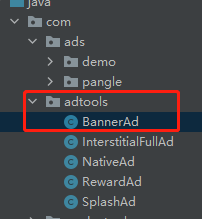
Android模块:
1、写入Banner广告的单例和Unity接收消息的GameObject名字。
    private static volatile BannerAd instance;
    public static BannerAd Instance() {
        if (instance == null) {
            synchronized (BannerAd.class) {
                if (instance == null) {
                    instance = new BannerAd();
                }
            }
        }
        return instance;
    }

    //Unity接收消息的名字
    public static String AdGameObjectName = "CSJSDK_BannerAd";
2、加载广告和加载完成的回调。
广告加载出来后,如果展示,是需要放在一个View中的。
 public GMBannerAd mttBannerAd;//加载出来的广告放在这

 public ViewGroup bannerViewLayout;//创建出来的View存在这

public void LoadBannerAd(Activity context,String adUnitId)
    {
        Log.e("LoadBanner",adUnitId);
        mttBannerAd = new GMBannerAd(context, adUnitId);
        GMAdSlotBanner slotBanner = new GMAdSlotBanner.Builder()
                .setBannerSize(GMAdSize.BANNER_CUSTOME)
                .setImageAdSize(UIUtils.getScreenWidth(WXEntryActivity.app), 50)
                //.setImageAdSize(adSlot.getImgAcceptedWidth(), adSlot.getImgAcceptedHeight())// GMAdSize.BANNER_CUSTOME可以调用setImageAdSize设置大小
                .setRefreshTime(10)
                .setAllowShowCloseBtn(true)//如果广告本身允许展示关闭按钮,这里设置为true就是展示。注:目前只有mintegral支持。
                .build();
        mttBannerAd.setAdBannerListener(new GMBannerAdListener() {
            @Override
            public void onAdOpened() {

            }

            @Override
            public void onAdLeftApplication() {

            }

            @Override
            public void onAdClosed() {
                //OnAdDismiss
               //手动点击Banner的关闭按钮
            }

            @Override
            public void onAdClicked() {

            }

            @Override
            public void onAdShow() {
                WXEntryActivity.mUnityPlayer.UnitySendMessage(AdGameObjectName, "onAdShowCallBack","");
            }

            @Override
            public void onAdShowFail(@NonNull AdError adError) {

            }
        });
        Log.e("LoadBanner","onAdFailedToLoad");
        mttBannerAd.loadAd(slotBanner, new GMBannerAdLoadCallback() {
            @Override
            public void onAdFailedToLoad(@NonNull AdError adError) {
                Log.e("LoadBanner","onAdFailedToLoad___" + adError.code + "__" + adError.message);
            }

            @Override
            public void onAdLoaded() {
                Log.e("LoadBanner","onAdLoaded");
                context.runOnUiThread(new Runnable() {
                    public void run() {
                        try
                        {
                            removeViewFromRootView(context,bannerViewLayout);
                            bannerViewLayout  = getFrameLayoutForBanner(context);
                            Log.e("LoadBanner","bannerViewLayout");
                            View view = mttBannerAd.getBannerView();
                            Log.e("LoadBanner","getBannerView");
                            if(view != null)
                            {
                                Log.e("LoadBanner","xxxxxxxxxxxxxxxxxxxxxxxxxxxxxxx1");
                                view.setBackgroundColor(Color.WHITE);

                            }

                            Log.e("LoadBanner","setBackgroundColor");
                            bannerViewLayout.addView(view);
                            Log.e("LoadBanner","bannerViewLayout.addView");
                        }
                        catch(Exception ex)
                        {
                            Log.e("LoadBanner","xxxxxxxxxxxxxxxxxxxxxxxxxxxxxxx2");
                        }

                    }
                });

            }
        });


    }
3、未完待续
此内容由惯性聚合(RSS阅读器)自动聚合整理,仅供阅读参考。 原文来自 — 版权归原作者所有。