


惯性聚合 高效追踪和阅读你感兴趣的博客、新闻、科技资讯
阅读原文 在惯性聚合中打开

推荐订阅源

让小产品的独立变现更简单 - ezindie.com
月光博客
月光博客
freeCodeCamp Programming Tutorials: Python, JavaScript, Git & More
T
Tailwind CSS Blog
大猫的无限游戏
大猫的无限游戏
The Cloudflare Blog
博客园_首页
Jina AI
Jina AI
WordPress大学
WordPress大学
小众软件
小众软件
阮一峰的网络日志
阮一峰的网络日志
Apple Machine Learning Research
博客园 - 三生石上(FineUI控件)
酷 壳 – CoolShell
酷 壳 – CoolShell
博客园 - 叶小钗
美团技术团队
IT之家
IT之家
爱范儿
爱范儿
有赞技术团队
有赞技术团队
OSCHINA 社区最新新闻
OSCHINA 社区最新新闻
量子位
博客园 - 聂微东
人人都是产品经理
人人都是产品经理
博客园 - 【当耐特】

Video Conferencing Blog

Istanbul New Airport transforms customer service with video kiosks — Video Conferencing Blog TrueConf at LEAP 2026 in Saudi Arabia — Video Conferencing Blog The Agency for Services and Payments created a safe collaborative space for 3,000 employees in France — Video Conferencing Blog Major updates of TrueConf Secure Collaboration Solutions at InfoComm India 2026 — Video Conferencing Blog TrueConf MCU 2.2.1: Changes and Improvements — Video Conferencing Blog TrueConf 4.1.1 for iOS and iPadOS: Changes and Improvements — Video Conferencing Blog TrueConf brings secure collaboration with AI to LEAP 2026 — Video Conferencing Blog Telemedicine video communication framework for eye test service in Israel — Video Conferencing Blog TrueConf AI Server recognizes speakers by voice in any meeting recording — Video Conferencing Blog TrueConf powers collaboration of energy infrastructure in Bangladesh — Video Conferencing Blog Corporate messenger in a private network — the only way to protect your chats — Video Conferencing Blog Sovereign Collaboration Platform: Requirements and Architecture TrueConf 8.5.5: Changes and Improvements — Video Conferencing Blog Sovereign Video Conferencing: Architecture, Control and Platforms Optimizing TrueConf Room for Multi-Monitor Conference Setups — Video Conferencing Blog TrueConf 4.1 for iOS: Messenger Improvements — Video Conferencing Blog Secure Communication Platform for Enterprises: 2026 Guide TrueConf 3.2 for Android TV: Tone Dialling, User-Friendly Conference Management, and Updated UI — Video Conferencing Blog Webinar: New Features of API and Chat Bots — Video Conferencing Blog What will happen to Microsoft Teams on Windows 7, 8, and 10? — Video Conferencing Blog How to use TrueConf chatbots with the Hermes AI agent — Video Conferencing Blog TrueConf Calendar Connector 2.4: Support for Rooms and “Do Not Disturb” Status for Offline Meetings — Video Conferencing Blog How to use TrueСonf bots with the OpenClaw AI agent — Video Conferencing Blog How to create a "Let's Encrypt" certificate on Windows TrueConf AI Server 1.1: Detecting Speakers by Voice, Uploading Recordings, and Transcription Search — Video Conferencing Blog TrueConf Server: Security Updates for June 2026 — Video Conferencing Blog Enterprise Video Conferencing: Top 10 Platforms, Features and Deployment Options TrueConf 4.0 for iOS: Voice Messages and Additional Statuses — Video Conferencing Blog Self-Hosted Video Conferencing in Enterprise Environments Business Document Sharing: Secure Files Collaboration + 5 Best Tools
Password Management in TrueConf — Video Conferencin...
Theodor Lazarev · 2026-05-07 · via Video Conferencing Blog

When using TrueConf solutions, you will often need to access your personal profile and account as a user, or the server software admin panel as an administrator. This article explains how to set or change passwords, as well as the reasons why the password configuration option may be unavailable.

User Passwords

Changing a TrueConf Server User Password

If you need to change your password, follow these steps:

No further confirmation will be required. Your password has been changed!

Why Password Change May Be Unavailable

The password change function may not always be available—for example, if your administrator has configured integration with Active Directory (or another directory service). If you have forgotten your old password or wish to change it, you will need to contact your system administrator. Their contact details can usually be found on your video conferencing server’s guest page.

Personal Data Security – Can the Administrator See Your Password?

An important question regarding user data security is whether passwords could be leaked.

Regardless of the credential storage mode (Registry or LDAP), passwords on the TrueConf Server side always remain inaccessible to the server administrator. Therefore, if you forget your password, it cannot be retrieved—only reset, allowing you to set a new one. Additionally, when using local passwords, an administrator may set a temporary password for your initial account login, which you will be required to change upon first authentication. When accounts are synchronized from LDAP/AD, passwords are managed entirely by the directory service.

TrueConf Server Administrator Passwords

In addition to user passwords, there are also passwords for administrators to access the server panel.

The administrator password is the same as that used for user accounts belonging to the designated administrator group. For more details, please refer to our documentation.

On Linux operating systems, you can change your password using the passwd command. Let’s consider two possible scenarios:

  • If you are logged into the OS under the account for which you want to change the password, simply run:
  • passwd

  • If you are logged into the OS under one account but want to change the password for another:
  • sudo passwd [user]

After entering the command, you will be prompted to enter your current password and then set a new one.

Note: When changing passwords on CentOS, there are specific considerations related to extended file access control lists (ACLs). After changing a user account password in the OS, the following command must be executed (as an administrator):

sudo setfacl -m u:trueconf:r /etc/shadow

Administrator and Operator Passwords in TrueConf MCU

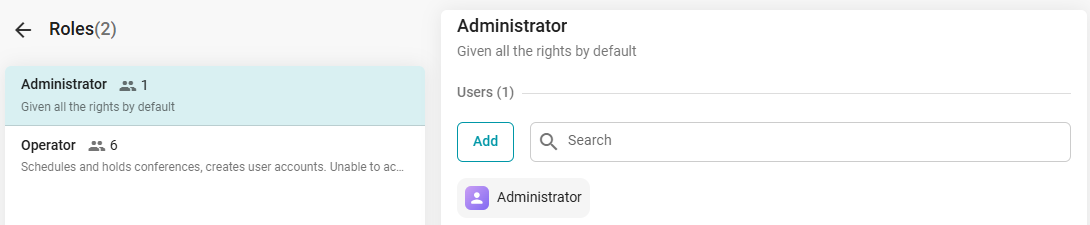
TrueConf MCU has two roles for accessing its management panel: Administrator and Operator. To learn about the permissions associated with these roles, please refer to our documentation.

By default, immediately after deploying TrueConf MCU, the administrator credentials are as follows:

  • Username: admin
  • Password: admin

You can change your own login credentials, as well as those for users with the Operator role, after completing the registration procedure. This can be done in the Contact Card menu under the Account section:
Password Management in TrueConf 5