




We recommend migrating to the remote MCP server at mcp.sanity.io.
Read the launch post for the remote MCP server
The remote server offers OAuth authentication, managed infrastructure, and automatic updates. No npm install, no API token management required, no version maintenance.
To migrate, run: npx sanity@latest mcp configure
The local server will continue to work but won't receive new features.
Have you ever wished you could just ask your favorite AI Agent to find, update, or create content for you? The Model Context Protocol (MCP) makes this possible, and we've built a server that brings this capability to your Sanity projects. The Sanity MCP server connects your structured content directly to AI agents like Claude and Cursor, letting you manage content through natural language conversations.
Need to update product descriptions across multiple pages? Want to organize content for a seasonal campaign? Simply describe what you need, and let the AI handle the technical details. No more switching contexts or remembering query syntax.
Here's what you can do with the Sanity MCP server:
Let's get practical and see how you can start using the MCP server today.
The remote MCP server is hosted on Sanity's infrastructure and is the easiest way to get started.
The server follows Anthropic's official MCP specification and should work with any MCP clients. Follow the documentation for your client for how to add MCP servers. Typically, you add a section like the following to the relevant configuration file:
See the MCP server documentation for more installation instructions in Cursor, Claude Code and more.
If you're itching to see the MCP server in action (and who wouldn't be?), let's get you up and running in minutes. The setup is straightforward—just follow these steps, and you'll be able to converse with your content in no time.
Go to the GitHub repository for more information.
First, make sure you've deployed your schema manifest. This is crucial because the MCP server needs to understand your content structure to work on it:
You'll also need your Sanity credentials handy (you can find these in your project settings):
Now for the fun part. Add the Sanity MCP server to your AI tool's configuration file:
Where exactly this configuration goes depends on which AI tool you're using:
Using nvm, mise, or another Node version manager? Here's a quick fix for the most common setup issue. It's a one-time configuration that creates the necessary system links:
Windows users can run this in PowerShell (as Administrator):
With everything set up, you're ready for your first AI-powered content conversation! Try these starter prompts:
The first time you run a command, your AI agent will most likely ask for permission to use the Sanity tools. After that, you're off to the races!
In the week we had of internal testing at Sanity, we found that you can use the MCP server in tandem with AI in two fundamental approaches.
This mode brings your content into the conversation, making it part of your thinking process. It's like having a research assistant who:
The power here lies in how naturally you can explore your content. Instead of constructing complex queries, you simply ask questions in plain language: "What product pages haven't been updated in the last six months?" or "Which blog posts mention our enterprise features?"
In this conversation with Claude, I asked, "What are common ways of defining 'Sanity Studio' in our Sanity documentation?" Here is what it did:
These could be useful insights for our documentation team, ensuring we stay consistent and helpful in defining our products. But knowing is only half the battle, which takes us to the really powerful stuff.
This mode puts your content ideas into action. It's like having a skilled content operations specialist who can:
The transformation happens when you go from "I need to update all product descriptions to include our new pricing model" to simply saying exactly that—and having it done. Let's say we needed to rename "Sanity Create" to "Sanity Canvas". Here is a video of Claude at work finding documents that mention Sanity Create and staging the name change into a Content Release (cut and sped up for demo purposes):
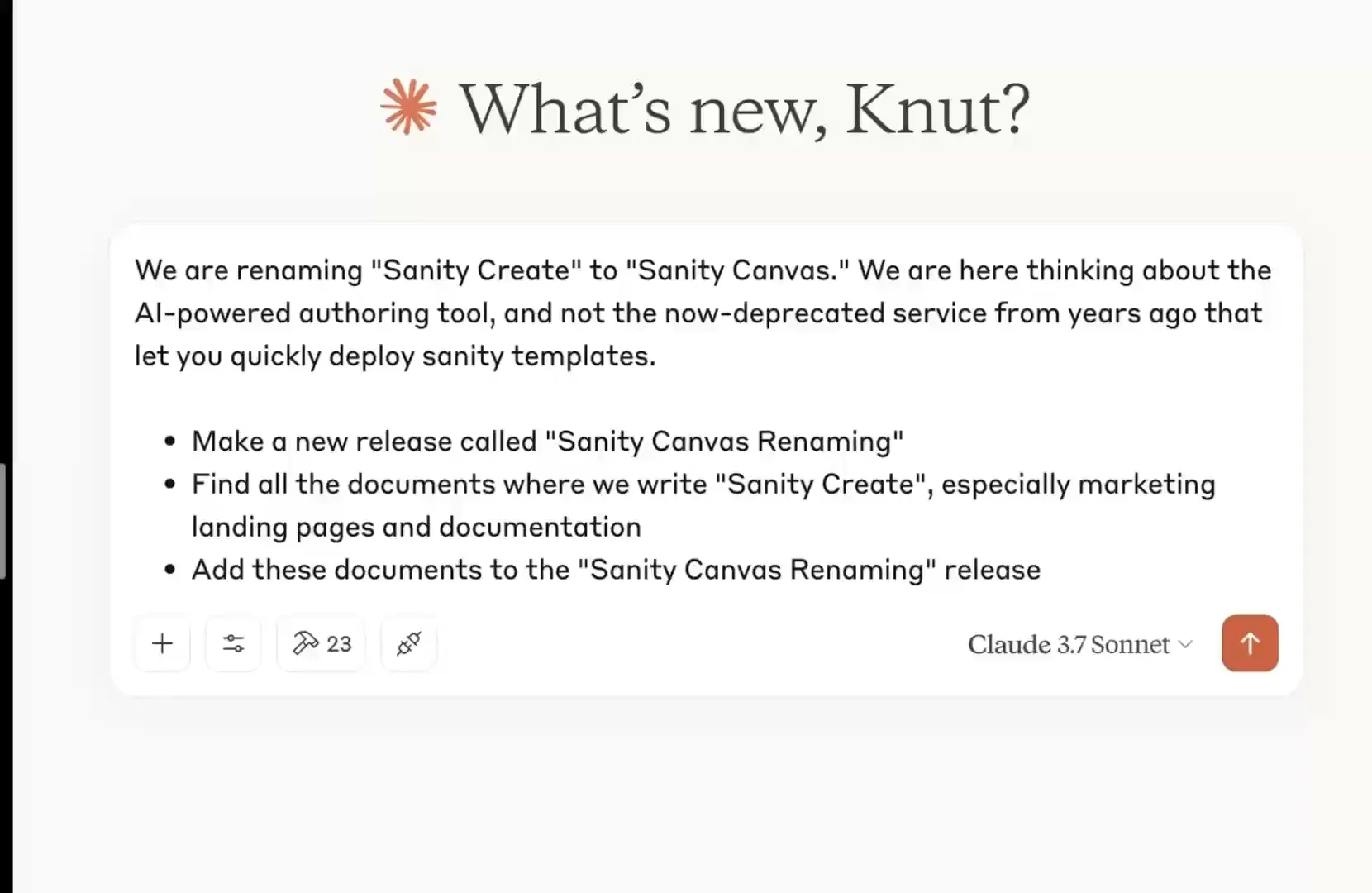
That's pretty useful!
It doesn't always get everything right, but it did save us a lot of time. Now a human editor can go through the changes to quality control that everything is correct before running the release.
What makes the MCP server so handy isn't just these individual capabilities but how seamlessly you can flow between understanding your content and taking action on it—all through natural conversation rather than technical interfaces.
The Model Context Protocol (MCP) provides a standardized interface for AI models interacting with external systems through APIs. Anthropic proposed and maintains it, and MCP has gained traction as the default way to make services available as AI tools. For example, OpenAI is on board with official support, and the Google team has committed to maintaining the official Go SDK. Reassuring!
So far, it has worked with most applications by installing and configuring the MCP server, which then shows up as "tools" that your AI Agent or chat can use. Conceptually, it is a bit like building a GraphQL API, where you translate the schema to resolvers that connect to the data and operations you want to expose.
Usually, the AI will intuit when and what tools to use depending on what you ask it to do. Claude will explicitly ask for permission to run tools within a conversation, while Cursor can run them automatically, depending on your configuration.

For now, the most common way to install and run MCP servers is to install them locally on your computer and authenticate with API tokens stored in the JSON configuration. The MCP specification maintainers and the developer community are still actively figuring out how to best implement MCP servers, especially when hosting them remotely and dealing with authentication and security. We are actively following these discussions.
So, what can you use the Sanity MCP server for? Pretty much anything you can do with your content in Sanity! We are launching the server with several tools and capabilities.
General tools:
Document management:
Release management:
Dataset management:
Content querying:
AI-Powered search:
Schema tools:
It's tempting to come up with lofty promises about how this revolutionizes content operations and will 10x the productivity of your teams. Using these tools, you get a sense of the potential, but you will also discover that it's also a skill to manage AI in a way that makes it do the right things and not over-eagerly get off the trail. Working with the MPC server is an excellent way to build those skills.
And speaking of skill building, you might also be interested in some of our recent AI materials:
And don't forget to check out our upcoming Spring release; there will be more AI news there, too! 🍰
此内容由惯性聚合(RSS阅读器)自动聚合整理,仅供阅读参考。 原文来自 — 版权归原作者所有。