



惯性聚合 高效追踪和阅读你感兴趣的博客、新闻、科技资讯
阅读原文 在惯性聚合中打开

推荐订阅源

GbyAI
GbyAI
The Last Watchdog
The Last Watchdog
TaoSecurity Blog
TaoSecurity Blog
PCI Perspectives
PCI Perspectives
L
LINUX DO - 最新话题
H
Heimdal Security Blog
S
Security Archives - TechRepublic
www.infosecurity-magazine.com
T
Troy Hunt's Blog
SecWiki News
SecWiki News
S
Secure Thoughts
The Cloudflare Blog
Last Week in AI
Last Week in AI
Google DeepMind News
Attack and Defense Labs
奇客Solidot–传递最新科技情报
奇客Solidot–传递最新科技情报
量子位
K
KPMG report finds enterprise disconnect between AI and its ROI | CIO
V
Visual Studio Blog
N
News and Events Feed by Topic
E
Exploit-DB.com RSS Feed
博客园 - Franky
博客园 - 司徒正美
OSCHINA 社区最新新闻
OSCHINA 社区最新新闻
酷 壳 – CoolShell
酷 壳 – CoolShell
Know Your Adversary
Know Your Adversary
M
MIT News - Artificial intelligence
V
V2EX
Webroot Blog
Webroot Blog
Hacker News - Newest:
Hacker News - Newest: "LLM"
Cyberwarzone
Cyberwarzone
博客园 - 【当耐特】
月光博客
月光博客
Y
Y Combinator Blog
B
Blog RSS Feed
Recent Announcements
S
Schneier on Security
H
Hacker News: Front Page
Stack Overflow Blog
Stack Overflow Blog
NISL@THU
NISL@THU
小众软件
小众软件
雷峰网
雷峰网
P
Privacy International News Feed
腾讯CDC
大猫的无限游戏
大猫的无限游戏
博客园 - 叶小钗
C
Cyber Attacks, Cyber Crime and Cyber Security
V
Vulnerabilities – Threatpost
H
Hackread – Cybersecurity News, Data Breaches, AI and More
N
News and Events Feed by Topic

Resend RSS Feed

6 Tips for Accessible Emails Welcoming Manoel do Amaral, our new Brand Designer Welcoming Michael Vaz, our new Customer Success Engineer Six Steps to Improve Your Sender Reputation Welcoming Tatira Andrade, our new Executive Assistant Welcoming Pedro Ivo Hudson, our new Design Engineer Welcoming Diel Duarte, our new Open source Engineer Welcoming Areia Spinner, our new Recruiter Resend Forward: A Conference about Craft React Email 6.0 Custom Tracking Domains AI Email Editor Introducing Automations Welcoming Ahmed Tolba, our new SRE Engineer Welcoming Aneil Singh, our new Founding Account Executive Welcoming Lucas Motta, our new Software Engineer Welcoming Trey Knowles, our new Founding Account Executive Welcoming Anxhela Carciu, our new SRE Engineer Introducing DMARC Analyzer Welcoming Evan Thibodeau, our new Customer Success Engineer Welcoming Derich Pacheco, our new Software Engineer Welcoming Alec Ventura, our new Data Engineer Welcoming Felipe Freitag, our new Software Engineer Welcoming Mateusz Wos, our new Software Engineer Incident report for February 15, 2026 Email automation for OpenClaw How to Create a DevTools Agent Skill Introducing Email Skills Why You Should Embrace the Promotions Tab Slater Smith, our new Customer Success Engineer Do You Need a Warmup Service? Welcoming Zá Scalon, our new Brand Designer How Replit Built Effortless Email Sending Features 1,000,000 users Top 10 new features in 2025 Welcoming Danilo Campos, our new Design Engineer How Dub Uses Webhooks to Power Features Incident report for November 18, 2025 Resend Forward 5: Wrap Up One More (AI) Thing React Email 5.0 Unsubscribe Topics New Contacts Experience Introducing Templates Inbound Emails $3M to Make Email Safer Hacktoberfest 2025 Four Ways to Hurt Your Sender Reputation Resend MCP Hackathon Welcoming Christina Martinez, our new Developer Experience Engineer How to read a DMARC report Welcoming Erin Levine, our new Chief of Staff How to Validate Form Inputs Engineering an AI App Welcoming Lucas da Costa, our new Software Engineer Welcoming Lucas Vieira, our new Software Engineer Resend acquires Briefer How Raycast Modernized their Email Sending How to Get Email Consent DMARC Policy Modes Welcoming Gabriel Miranda, our new Software Engineer Rebranding Resend The 7 Best Email Verification APIs for Developers How DMARC Applies to Subdomains Welcoming Pedro Gomes, our new Software Engineer Do You Need a Dedicated IP? The 6 best notification infrastructure services The Fixer Why Your Emails are Going to Spam Engineering Idempotency Keys Microsoft’s bulk sending requirements for 2025 Welcoming Rehan van der Merwe, our new Devops Engineer 400,000 users and beyond Welcoming Cassio Zen, our new Software Engineer Resend acquires Mergent How to warm up a new domain Welcoming Carolina Josephik, our new Software Engineer Launch Week: Behind the Scenes Welcoming Isabella Aquino, our new Software Engineer Resend Forward 4: Wrap Up React Email 4.0 Multiplayer Editor Broadcast API Multiple Teams new.email Public Launch Welcoming Anna Ward, our new Postmaster How Gumroad Migrated 100M Emails to Resend Welcoming João Melo, our new Software Engineer Welcoming Jp Valery, our new Customer Success Engineer What is AX (Agent Experience) and how to improve it Welcoming Pauline Chin, our new Customer Success Engineer Introducing new.email How we use Friction Logs to improve the product Top 10 Email Deliverability Tips Welcoming Giovana Yahiro, our new Designer Engineer What BIMI's Changes Mean for Email Top 10 new features in 2024 Design Engineering an X Component Welcoming Alexandre Cisneiros, our new Software Engineer Resend raises $18M Series A
React Email 3.0
Gabriel Miranda · 2024-08-23 · via Resend RSS Feed

We're excited to announce React Email 3.0, featuring:

  • Brand new component library
  • 11x performance improvement
  • Support for React 19 RC
  • Deprecation of renderAsync
  • Supabase Email Hook

Update today and check the upgrade instructions below.

npm i react-email@latest @react-email/components@latest

React Email now has 270,627 weekly downloads on npm, that is a 136% increase since the last major released 7 months ago.

We also have 13,503 stars on GitHub and would like to thank all the 132 contributors who made this possible.

Brand new component library

As developers, we are big fans of projects like Tailwind UI and shadcn/ui. These projects make it dead simple to create elegant UIs by simply copying and pasting components.

We want to provide that same experience with React Email, so we made 54 components for you to create beautiful emails.

Here's how to get started:

1. Navigate to Components

When you go to react.email/components, you will see all the available categories, including e-commerce, marketing, and more.

2. Find a component you like

Once you find a component you like, you can see the preview on desktop and mobile.

3. Copy and paste the code

When you inspect the code, you will see two options: Inline CSS or Tailwind CSS.

Pick your preferred option, and copy the code directly into your project.

We can't wait to see what you'll build with these components.

Shoutout to @luxonauta for the amazing work on the new website pages, and @leandrodragani, who's the creator of React Email Templates, and inspired this project.

11x performance improvement

Great developer experiences mean fast startup times. That's true for any framework, library, or tool.

That's why we decided to focus on improving the performance of React Email 3.0 even more.

We ran a performance benchmark for the old version of React Email (2.1.6) against the new one (3.0.0), and the results were massive.
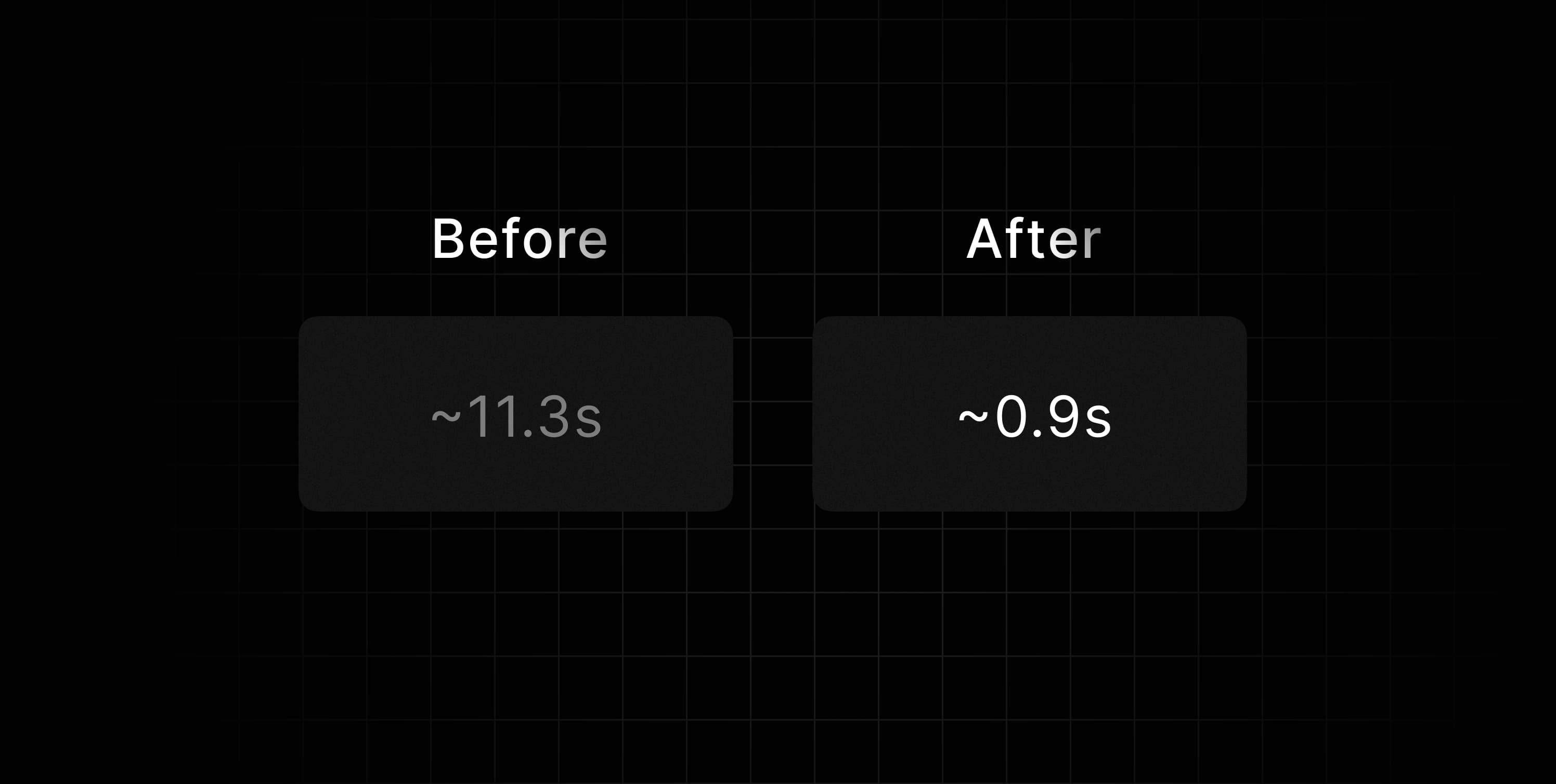
p99 for React Email 2.1.6 vs 3.0.0

The tests evaluated the startup time, plus the time to render the first email preview, and were executed on a Linux machine with 3.7 GHz 12-core AMD Ryzen 9 5900x CPU, 16 GB 3600 MHz DDR4 memory (see benchmark details).

Here's the breakdown of the performance improvements:

P99 (99th percentile)

  • Old version: 11331ms
  • New version: 975ms

We are committed to providing a fast and efficient local development experience, and we hope these improvements will help you build better emails faster.

Support for React 19 RC

Even though React 19 is still a Release Candidate, we have made some changes to ensure compatibility in the future.

With this, you won't have to worry about overriding things when trying React 19 with React Email, and you will be able to make it work just as it would with older versions.

To make that happen, we had to implement a few internal changes so that the render function works 100% with React 19.

Deprecation of renderAsync

The future of React includes async rendering - there is no avoiding it. Suspense and Server Components will be the norm, and we want to ensure React Email is ready for that.

The new version of React will deprecate renderToStaticMarkup, which would break our old render function.

That is why we decided to deprecate our old renderAsync in favor of a new render function, which will be async by default.

If you are using renderAsync now, you need to replace it with the new render. If you are using the old render, you have to treat the new Promise that it returns.

This is going to pave the way for future headache-free upgrades for all users.

Supabase Email Hook

Supabase users have been asking for a better way to customize their authentication emails.

Before, you had to create a React Email template, then export the HTML result, and copy it to the Supabase UI. Needless to say, this manual process was hard to maintain.

Now, Supabase released a new feature called Email Hooks that allows you to use a custom email provider to send emails directly from edge functions.

This enables you to use React Email templates directly in Supabase:

Thor from Supabase recorded a video showing how it works:

Upgrade instructions

  1. Update your react-email package to 3.0.0.
  1. Update your @react-email/components package to 0.0.23.

You can also check if you have any missing dependencies for your emails to be bundled.

Conclusion

If you want to know all the details about this release, check the React Email Changelog.

If you have any problems upgrading, feel free to share on GitHub or X.