惯性聚合 高效追踪和阅读你感兴趣的博客、新闻、科技资讯
阅读原文 在惯性聚合中打开

推荐订阅源

G
Google Developers Blog
OSCHINA 社区最新新闻
OSCHINA 社区最新新闻
Martin Fowler
Martin Fowler
Cyber Security Advisories - MS-ISAC
IT之家
IT之家
云风的 BLOG
云风的 BLOG
奇客Solidot–传递最新科技情报
奇客Solidot–传递最新科技情报
Google DeepMind News
Microsoft Azure Blog
Engineering at Meta
Engineering at Meta
P
Proofpoint News Feed
博客园_首页
J
Java Code Geeks
C
Check Point Blog
I
InfoQ
Apple Machine Learning Research
大猫的无限游戏
大猫的无限游戏
D
Docker
U
Unit 42
T
The Blog of Author Tim Ferriss
F
Fortinet All Blogs
GbyAI
GbyAI
N
Netflix TechBlog - Medium
T
Tailwind CSS Blog

Resend RSS Feed

6 Tips for Accessible Emails Welcoming Manoel do Amaral, our new Brand Designer Welcoming Michael Vaz, our new Customer Success Engineer Six Steps to Improve Your Sender Reputation Welcoming Tatira Andrade, our new Executive Assistant Welcoming Pedro Ivo Hudson, our new Design Engineer Welcoming Diel Duarte, our new Open source Engineer Welcoming Areia Spinner, our new Recruiter Resend Forward: A Conference about Craft React Email 6.0 Custom Tracking Domains AI Email Editor Introducing Automations Welcoming Ahmed Tolba, our new SRE Engineer Welcoming Aneil Singh, our new Founding Account Executive Welcoming Lucas Motta, our new Software Engineer Welcoming Trey Knowles, our new Founding Account Executive Welcoming Anxhela Carciu, our new SRE Engineer Introducing DMARC Analyzer Welcoming Evan Thibodeau, our new Customer Success Engineer Welcoming Derich Pacheco, our new Software Engineer Welcoming Alec Ventura, our new Data Engineer Welcoming Felipe Freitag, our new Software Engineer Welcoming Mateusz Wos, our new Software Engineer Incident report for February 15, 2026 Email automation for OpenClaw How to Create a DevTools Agent Skill Introducing Email Skills Why You Should Embrace the Promotions Tab Slater Smith, our new Customer Success Engineer
Inbound Emails
Lucas da Costa, Lucas Vieira, Giovana Yahiro, Felipe Volpone, Pe · 2025-11-03 · via Resend RSS Feed

Resend started by modernizing the way you send emails.

Today, we're making it easy for you to receive emails as well.

Inbound unlocks entirely new use cases like:

  • Replying to in-app emails
  • Processing forwarded attachments
  • Receiving support emails from users

How does it work?

First, determine the email address you want to use. You can either:

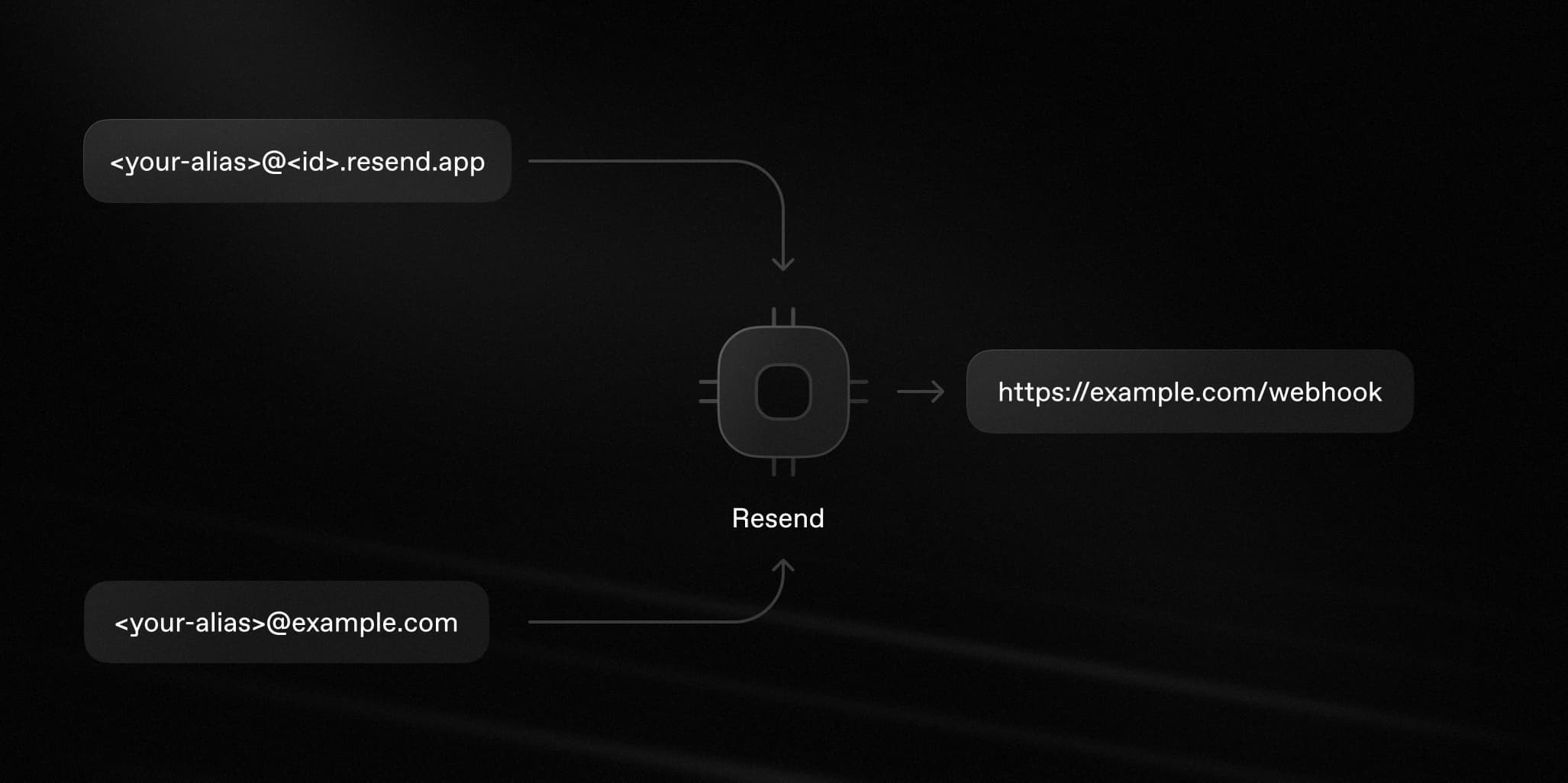
  • Use your team's default inbound domain (e.g. <your-alias>@<id>.resend.app)
  • Set up a custom domain (e.g. example.com)
Diagram of how inbound emails work

Resend processes all incoming emails to the provided address and then:

  1. Parses the email content as JSON
  2. Stores the attachment file(s)
  3. Sends a JSON payload to an endpoint of your choice

Getting started

Here's how to start receiving emails using Resend.

1. Get your email address

To help you get started quickly, Resend provides a .resend.app address, which is automatically created for you.

To find your Resend domain:

  • Go to the Receiving Emails page.
  • Click the more options button and select Inbound address.

Send emails to your inbound address and Resend will process them and send a JSON payload to your webhook.

2. Configure webhook

In your application, create a new route that can accept POST requests.

Next, create a new webhook to receive events.

Enter your endpoint URL and select the email.received event.

3. Receive email events

Once you receive the email event, you can process the email and attachments metadata.

View received emails

All inbound emails are visible on the emails page. Resend will store your emails even if you don't configure a webhook, or if your webhook endpoint is down.

Emails can be filtered by their to, from, and subject fields. Click on an email to see its full details, including the HTML, Plain Text, and any attachments.

Process forwarded attachments

Inbound email flows often involve processing attachments.

Users can forward airplane tickets, receipts, and expenses to you. Then, you can extract key information from attachments and use that data.

To do this, call the Attachments API when you receive the webhook event. That API will return a list of attachments with their metadata and a download_url that you can use to download the actual content.

Get started today

We're excited to see the new features Inbound will empower you to build.

Visit the Inbound API docs to get started.