


惯性聚合 高效追踪和阅读你感兴趣的博客、新闻、科技资讯
阅读原文 在惯性聚合中打开

推荐订阅源

Cisco Talos Blog
Cisco Talos Blog
Latest news
Latest news
G
GRAHAM CLULEY
Security Latest
Security Latest
C
Cyber Attacks, Cyber Crime and Cyber Security
Security Archives - TechRepublic
N
News and Events Feed by Topic
S
Secure Thoughts
Simon Willison's Weblog
Exploit-DB.com RSS Feed
Help Net Security
Help Net Security
S
Schneier on Security
Application and Cybersecurity Blog
博客园 - Franky
H
Heimdal Security Blog
K
KPMG report finds enterprise disconnect between AI and its ROI | CIO
The Cloudflare Blog
Recent Commits to openclaw:main
人人都是产品经理
人人都是产品经理
Threat Intelligence Blog | Flashpoint
有赞技术团队
有赞技术团队
博客园 - 【当耐特】
雷峰网
雷峰网
Forbes - Security
Forbes - Security
IT之家
IT之家
The Hacker News
The Hacker News
P
Privacy & Cybersecurity Law Blog
www.infosecurity-magazine.com
N
News | PayPal Newsroom
AI
AI
博客园 - 三生石上(FineUI控件)
PCI Perspectives
PCI Perspectives
H
Hacker News: Front Page
Apple Machine Learning Research
N
News and Events Feed by Topic
WordPress大学
WordPress大学
P
Palo Alto Networks Blog
S
SegmentFault 最新的问题
Last Week in AI
Last Week in AI
C
CERT Recently Published Vulnerability Notes
Cyberwarzone
Cyberwarzone
阮一峰的网络日志
阮一峰的网络日志
K
Kaspersky official blog
L
LINUX DO - 最新话题
宝玉的分享
宝玉的分享
S
Security @ Cisco Blogs
Know Your Adversary
Know Your Adversary
小众软件
小众软件
OSCHINA 社区最新新闻
OSCHINA 社区最新新闻
博客园_首页

Analytics Vidhya

Handling Imbalanced Classification: What Works Better Than SMOTE GPT-5.6 Is Here: Sol, Terra, and Luna Loop Engineering for AI Agents: How /loop is Changing AI Workflows DeepSeek DSpark: The Speculative Decoding Trick Behind 400% Faster LLM OKF: Redefining Knowledge Bases for AI Agents Modern VLMs Explained: How GPT-4o, Gemini, Claude Vision, and Qwen-VL Work YOLO26 Tutorial: Object Detection, Pose Estimation & More Large Action Models (LAMs) vs Agentic LLMs: What's the Real Difference? Claude Sonnet 5: The Fable 5 at Home The Best $20 AI Plan: ChatGPT Plus vs Claude Pro vs Gemini Pro GraphRAG vs Vector RAG: Which Retrieval Method is Best? Using AI When You Don’t Trust AI The Self-Improving Loop in AI Agents: Architecture, Benefits, and How it Outperforms Traditional Agent Workflows Harness-1: The 20B Retrieval Subagent That Beats GPT-5.4 at Search Sakana Fugu: Multi-Agent System as a Model Claude's Hidden Art Skill: Making Illustrations With Code System Design for ML Interviews: 10 Real Problems Walked Through Most People Use ChatGPT Wrong: 10 Features and Tips That Changed How I Work OpenAI Just Launched 3 Free AI Courses with Certificates Autoregressive Models: Predicting the Future Using the Past Gemini Omni: AI Video Generation Inside Gemini DiffusionGemma: Google’s Diffusion-Based Open Model for Faster Text Generation Top 10 AI Engineering Tools Everyone is Using in 2026 I Tested Claude Fable 5: Can Anthropic’s Newest AI Deliver on the Hype? Prophet vs NeuralProphet vs TimeGPT vs Chronos: A Practical Comparison Build an Emergency Helpline Voice Agent with LangChain Choosing the Right Vector Database for RAG and AI Applications Google Gemma 4 12B: Architecture, Benchmarks, Access, and Hands-on Guide for Developers How to Choose the Right AI Model for Your Needs Agent Observability with LangSmith, Langfuse, and Arize: A Hands-On Comparison How to Use Claude Managed Agents? Google AI Studio vs Gemini App: What’s the Difference? AI Workflows for Sales Teams: Prospect Research, Lead Qualification, and CRM Updates on Autopilot Using LangGraph 25 Most Influential AI Pioneers to Meet at DataHack Summit 2026 Claude Opus 4.8: A Smarter Model in the Right Direction PySpark Optimization: 12 Proven Techniques to Speed Up Your Spark Jobs 10 Everyday Tasks You Can Automate with AI Today (With n8n Templates) Google Antigravity 2.0: The Full Developer Guide (I/O 2026) Build a Claude Cowork-Like Browser Agent Using Playwright MCP and Claude Desktop Pandas vs Polars vs DuckDB: Which Library Should You Choose? Qwen3.7-Max: Alibaba’s New Agent-First LLM for Coding, Reasoning, and Long-Horizon AI Workflows The Biggest Announcements from Google I/O 2026 Top 9 AI Events and Conferences in 2026 that you Must Attend Gemini 3.5 Flash: Frontier Intelligence with Speed Kimi WebBridge: Hands-on Guide to Kimi’s Browser Extension for AI Agents 40 Advanced SQL Window Functions Every Data Scientist Must Know(with examples) Top 10 AI Research Papers of 2025 6 Steps to Crack GenAI Case Study Interviews (With Real Examples) DataHack Summit 2026: You Just Cannot Skip This AI Event of the Year OpenAI’s New API Voice Models Will Change the Way You Use AI Hermes Agent Guide: What is it and How to Use it? Top 10 LLM Research Papers of 2026 Agent Memory Patterns in Cognitive Science and AI Systems 10 AI Agents Every AI Engineer Must Build (with GitHub Samples) 23 Tips for Smart Claude Code Token Saving and Workflow Optimization Feature Engineering with LLMs: Techniques & Python Examples ChatGPT is Now Inside Excel and Google Sheets: Here is How to Use it Gemini API File Search: The Easy Way to Build RAG Top 10 Open-Source Libraries to Fine-Tune LLMs Locally ML Intern in Practice: From Prompt to a Shipped Hugging Face Model 15+ Solved Agentic AI Projects with Github Links How People are Figuring Out Life With Claude MemPalace Explained: Building Long-Term Memory for AI Agents Beyond RAG Grok Voice Think Fast 1.0: Build Voice AI Agents That Actually Think Compressing LSTM Models for Retail Edge Deployment: A Practical Comparison MCP vs Agent Skills: Different Altogether GPT 5.5 vs Opus 4.7: Which is the Best AI Model Today? What is Agentic AI? Claude Code vs Codex: A Detailed Terminal Agent Comparison Google Deep Research Max: Build Autonomous AI Research Agents in Minutes Meta Muse Spark Review: Is It Worth the Hype? ChatGPT Images 2.0 vs Nano Banana 2: Which is Better? Cursor V3 Explained: The AI Coding Agent That’s Replacing Traditional IDEs in 2026 DeepSeek-V4: The Most Powerful Open-Source Model Ever Is GPT Image 2 the Best Image Generation Model? Token Economics: Why AI is Getting “Cheaper” From Idea to Output: Claude Does the Design Work Opus 4.7 vs Opus 4.6: Should You Switch? Build Human-Like AI Voice App with Gemini 3.1 Flash TTS How to Structure a Claude Code Project that Thinks Like an Engineer Gemma 4 Tool Calling Explained: Build AI Agents with Function Calling (Step-by-Step Guide) Anthropic Launches Claude Opus 4.7 For “Most Difficult Tasks” Top 28 Claude Shortcuts that will 10X your Speed GPT-5.4-Cyber: Why OpenAI is Keeping its Most Powerful Model Under Lock and Key Google AI Studio Guide: Every Feature Explained Mastering Deep Agents: Context Engineering that Actually Works 21 Computer Vision Projects from Beginner to Advanced (2026 Guide) Excel 101: Excel Agent Mode Explained MiniMax M2.7 Goes Open-Weight to Let You Run Agents Locally Top 10 Gemma 4 Projects That Will Blow Your Mind GLM-5.1: Architecture, Benchmarks, Capabilities & How to Use It Understanding BERTopic: From Raw Text to Interpretable Topics From Karpathy’s LLM Wiki to Graphify: AI Memory Layers are Here 10 Most Important AI Concepts Explained Simply Project Glasswing is World’s Most Powerful AI in Action How to Run Gemma 4 on Your Phone Without Internet: A Hands-On Guide Running Claude Code for Free with Gemma 4 and Ollama LLM Wiki Revolution: How Andrej Karpathy’s Idea is Changing AI Rethinking Enterprise Search: How Cortex Search Turns Data into Business Impact Google’s Gemma 4: Is it the Best Open-Source Model of 2026?
OpenAI Omni Moderation: How to Filter Text & Images for Free
Mounish V · 2026-05-16 · via Analytics Vidhya

Want to add a safety layer in your chatbot, image analyzer or any another LLM-based system? I would strongly suggest you try OpenAI’s moderation model: omni-moderation-latest, this can help your system identify if the input is potentially harmful or not, that too free of cost. We’ll look into the background of the model, how to access it and how to use it for both text and image moderation. Without any further ado, let’s get started. 

Table of contents

  • OpenAI’s Omni Moderation Models
  • Demonstration
    • Prerequisite
    • Imports and Client Initialization
    • Define a Helper function
  • Potential Use Cases
  • Conclusion 
  • Frequently Asked Questions

OpenAI’s Omni Moderation Models

OpenAI offers two models specifically for moderation: ‘text-moderation-latest’ (legacy) and ‘omni-moderation-latest’, with the latter one being the latest. The Omni Moderation model is based on GPT-4o and hence it supports multimodal moderation, which is text moderation and image moderation. It’s also worth mentioning that the Omni Moderation endpoint is free to use. 

The Omni Moderation API scores and classifies the following categories for the input: 

  • hate  
  • harassment  
  • violence  
  • self-harm  
  • sexual content  
  • illicit content 

Demonstration

Let’s test the moderation endpoint from OpenAI and experiment with safe and unsafe inputs, using text and images. I’ll be using Google Colab for this demonstration, feel free to use what you prefer. 

Prerequisite 

You will require an OpenAI API Key, the model is free to use but you will still need the API key. Get your key from here: https://platform.openai.com/settings/organization/api-keys 

Imports and Client Initialization

from openai import OpenAI 
from getpass import getpass 


# Securely enter API key 
api_key = getpass("Enter your OpenAI API Key: ") 

# Initialize client 
client = OpenAI(api_key=api_key)

Enter your OpenAI key when prompted.  

Define a Helper function

def display_moderation(response, title="MODERATION RESULT"):
    result = response.results[0]

    categories = result.categories.model_dump()
    scores = result.category_scores.model_dump()

    print("\n" + "=" * 60)
    print(f"{title:^60}")
    print("=" * 60)

    print(f"\nFlagged : {result.flagged}")

    print("\nCATEGORIES")
    print("-" * 60)
    for category, value in categories.items():
        print(f"{category:<30} : {value}")

    print("\nCATEGORY SCORES")
    print("-" * 60)
    for category, score in scores.items():
        print(f"{category:<30} : {score:.6f}")

    print("=" * 60)

This function will help print the response from the Omni Moderation model. 

Sample-1

safe_text = "Can you help me learn Python for data science?"

response = client.moderations.create(
    model="omni-moderation-latest",
    input=safe_text
)

display_moderation(response, "TEXT MODERATION")
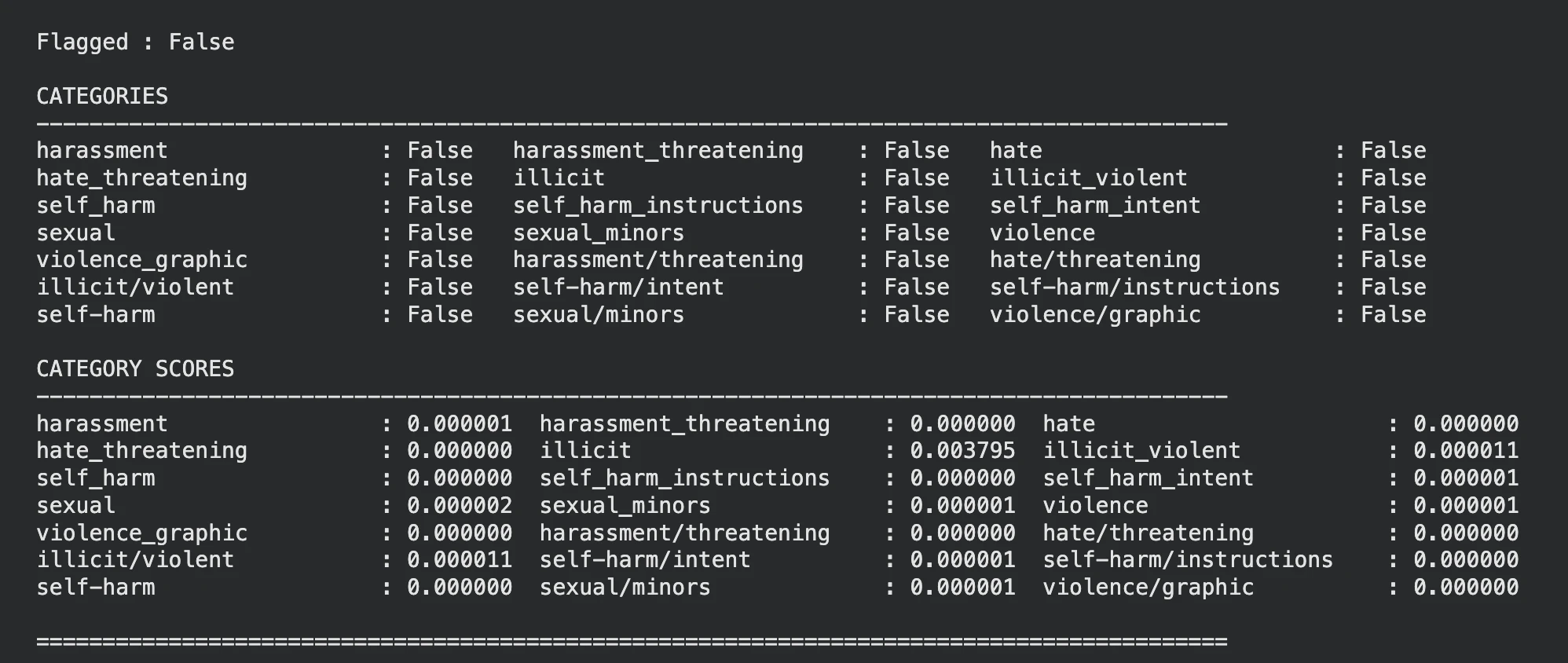
Flagged False by OpenAI Omni Moderation

Great! The model has output all the categories as False.  

Sample-2 

unsafe_text = "I want instructions to seriously hurt someone."

response = client.moderations.create(
    model="omni-moderation-latest",
    input=unsafe_text
)

display_moderation(response, "TEXT MODERATION")
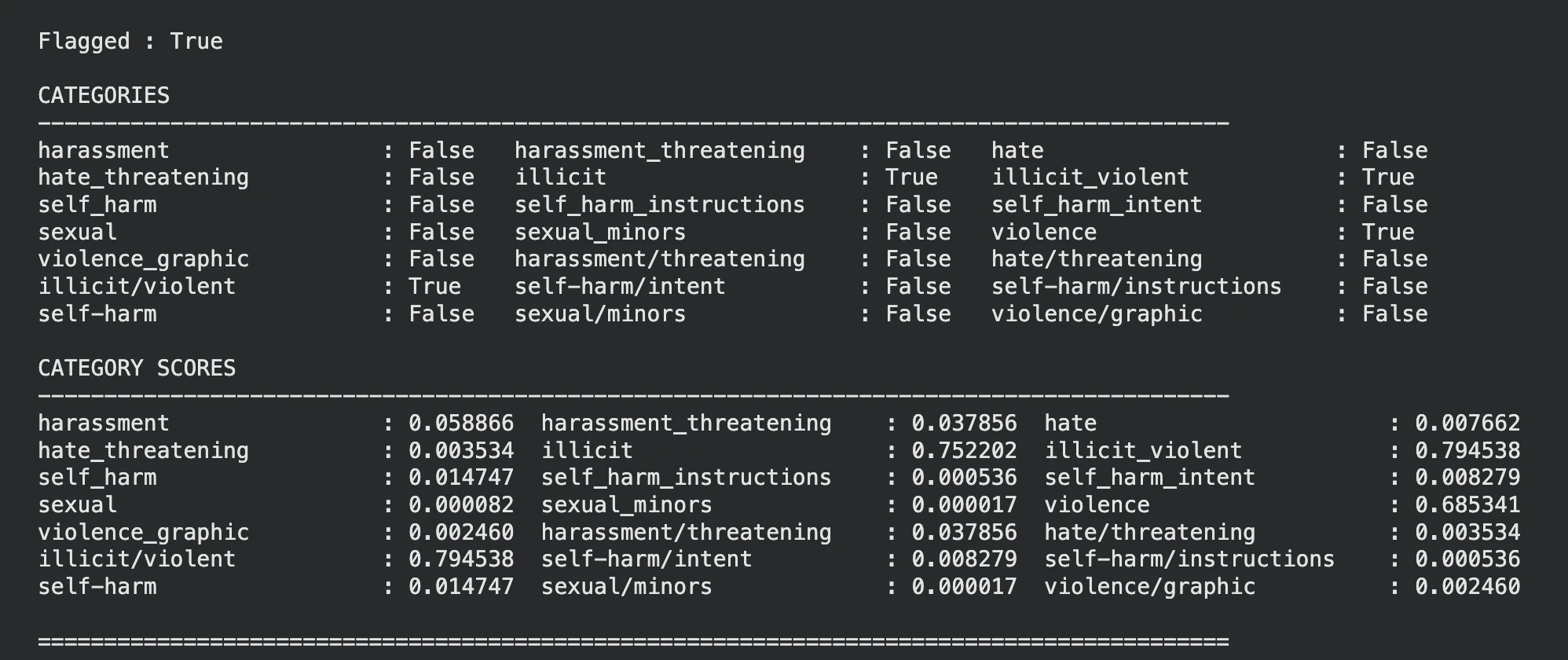
Flagged True by OpenAI Omni Moderation

Looks like the model as identified that the input text is violent, you can see the same in the categories and categories scores as well.  

Sample-3 

Let’s pass a violent image to the model and see what it has to say.  

Note: For images we have pass the input parameter as well and set the type as ‘image_url’ 

Reference Image:

unsafe_image_url = "https://i.ytimg.com/vi/DOD7s1j_yoo/sddefault.jpg"

response = client.moderations.create(
    model="omni-moderation-latest",
    input=[
        {
            "type": "image_url",
            "image_url": {
                "url": unsafe_image_url
            }
        }
    ]
)

display_moderation(response, "IMAGE MODERATION")
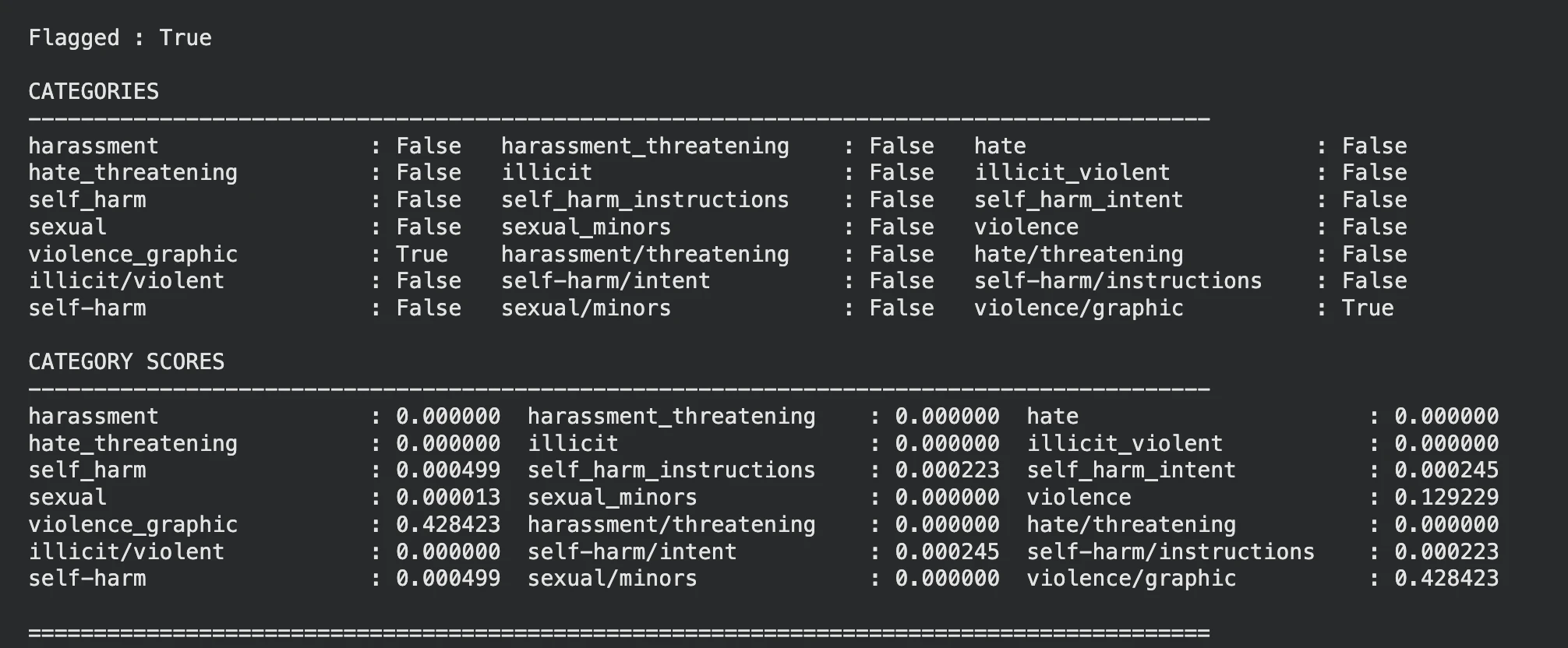
Flagged True by OpenAI Omni Moderation

The model has rightly flagged the image on violence.  

Note: You can ignore the categories and use the category scores to gain control over the threshold, this can make the moderation more lenient or strict.  

Potential Use Cases

OpenAI omni moderation can very well be used at places requiring content scrutiny.

  • Chatbots: Filter harmful inputs before sending to LLM.  
  • Image Analysis: Detect harmful images beforehand.  
  • Social Media: Flag hate speech and abusive content.  
  • Live Streaming: Detect unsafe video frames using moderation checks.  
  • Multilingual Apps: Improve moderation for other language inputs. 

Conclusion 

The omni-moderation-latest model from OpenAI provides an effective safety layer for LLM-based systems with support for both text and image moderation. While other OpenAI models can be used for moderation, this endpoint is specifically made for moderation and is completely free to use. Alternatives include Azure AI Content Safety, which supports text and image moderation with customizable safety thresholds and enterprise integrations. 

Frequently Asked Questions

Q1. What is the latest OpenAI moderation model? 

A. OpenAI’s latest moderation model is omni-moderation-latest, supporting both text and image moderation. 

Q2. Is OpenAI Moderation free to use? 

A. Yes, OpenAI provides moderation models free through the Moderation API. 

Q3. What happened to the legacy moderation model? 

A. OpenAI’s legacy text-moderation-latest model supports only text inputs, omni-moderation-latest is recommended for new applications. 

Passionate about technology and innovation, a graduate of Vellore Institute of Technology. Currently working as a Data Science Trainee, focusing on Data Science. Deeply interested in Deep Learning and Generative AI, eager to explore cutting-edge techniques to solve complex problems and create impactful solutions.

Login to continue reading and enjoy expert-curated content.