






According to Stack Overflow and Atlassian, developers lose between 6 and 10 hours every week searching for information or clarifying unclear documentation. For a 50-developer team, that adds up to $675,000–$1.1 million in wasted productivity every year. This is not just a tooling issue. It is a retrieval problem.
Enterprises have plenty of data but lack fast, reliable ways to find the right information. Traditional search fails as systems grow complex, slowing onboarding, decisions, and support. In this article, we explore how modern enterprise search solves these gaps.
Most enterprise search systems were built for a different era. They assume relatively static content, predictable bugs and queries, and manual tuning to stay relevant. In modern data environment none of those assumptions hold significance.
Teams work across rapidly changing datasets. Queries are ambiguous and conversational. Context matters as much as Keywords. Yet many search tools still rely on brittle rules and exact matches, forcing users guess the right phrasing rather than expressing real intent.
The result is familiar. People search repeatedly, refine queries manually or abandon search altogether. In AI-powered applications, the problem becomes more serious. Poor retrieval does not just slow users down. It often feeds incomplete or irrelevant context into language models, increasing the risk of low-quality or misleading outputs.
The next generation of enterprise search is built on hybrid retrieval. Instead of choosing between keyword search and semantic search, modern systems combine both of them.
Keyword search excels at precision. Vector search captures meaning and intent. Together, they enable search experiences that are fast, flexible and resilient across a wide range of queries.
Cortex Search is designed orienting this hybrid approach from the start. It provides low latency, high-quality fuzzy search directly over Snowflake data, without requiring teams to manage embeddings and tune relevance parameters or maintain custom infrastructure. The retrieval layer adapts to the data, not the other way around.
Rather than treating search as an add on feature, Coretx Search makes it a foundational capability that scales with enterprise data complexity.
Cortex Search supports two primary use cases that are increasingly central to modern data strategies.
First is Retrieval Augmented Generation. Cortex Search acts as the retrieval engine that supplies large language models with accurate, up-to-date enterprise context. This grounding layer is what allows AI chat applications to deliver responses that are specific, relevant and aligned with proprietary data rather than generic patterns.
Second is Enterprise Search. Cortex Search can power high-quality search experiences embedded directly into applications, tools and workflows. Users ask questions in natural language and receive results ranked by both semantic relevance and keyword precision.
Under the hood, cortex search indexes text data, applies hybrid retrieval and uses semantic reranking to surface the most relevant results. Refreshes are automated and incremental, so search results stay aligned with the current state of the data without manual intervention.
This matters because retrieval quality directly shapes user trust. When search works consistently, people rely on it. When it does not, they stop using it and fall back to slower, more expensive paths.
At a high level, Cortex Search abstracts away the hardest parts of building a modern retrieval system.
What we’ll Build: A customer support AI assistant that answers user questions by retrieving grounded context from historical support tickets and transcripts: then passing that context to a Snowflake Cortex LLM to generate accurate, specific answers.
| Requirement | Details |
| Snowflake Account | Free trial at trial.snowflake.com — Enterprise tier or above |
| Snowflake Role | SYSADMIN or a role with CREATE DATABASE, CREATE WAREHOUSE, CREATE CORTEX SEARCH SERVICE privileges |
| Python | 3.9+ |
| Packages | snowflake-snowpark-python, snowflake-core |
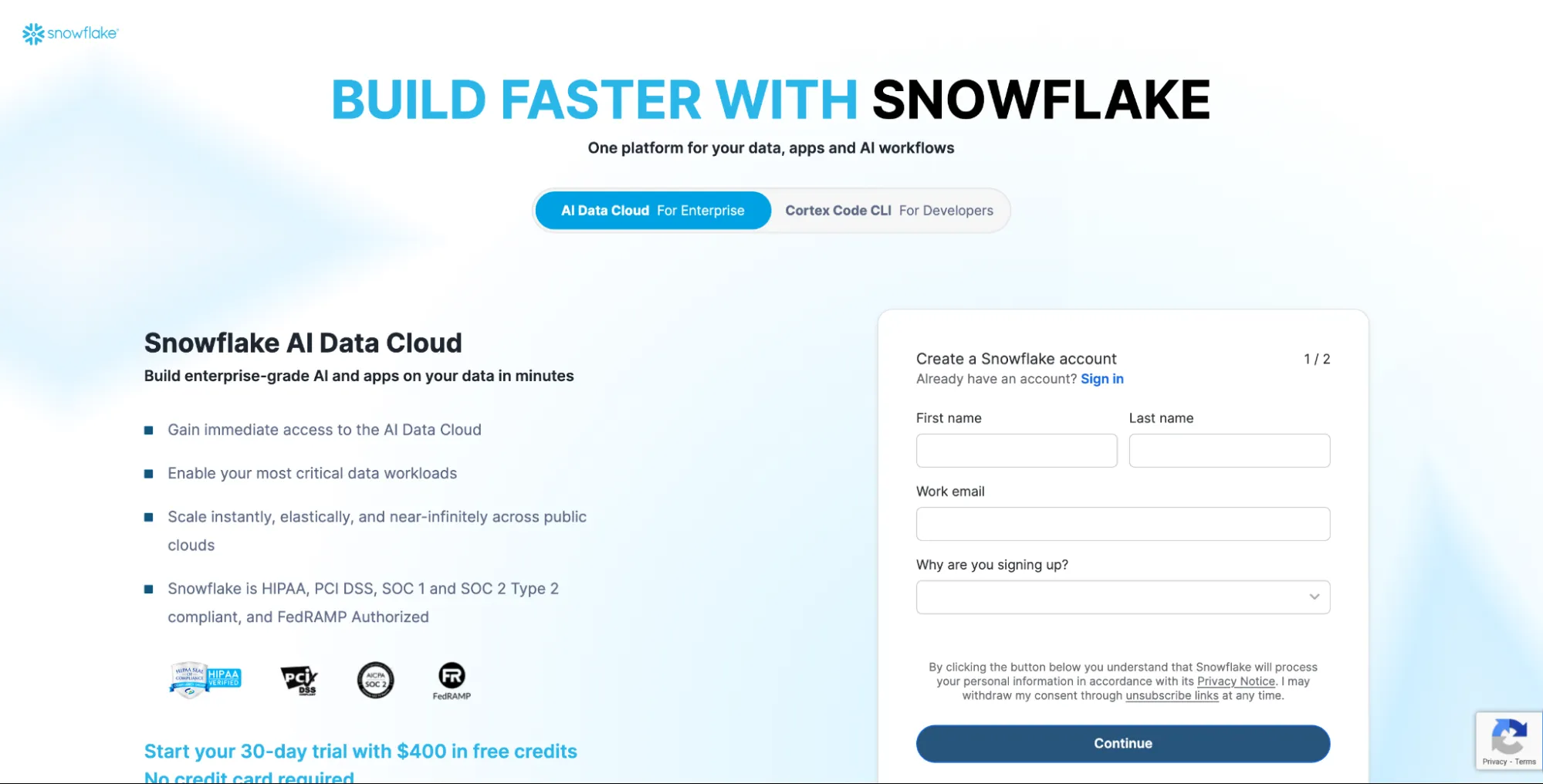
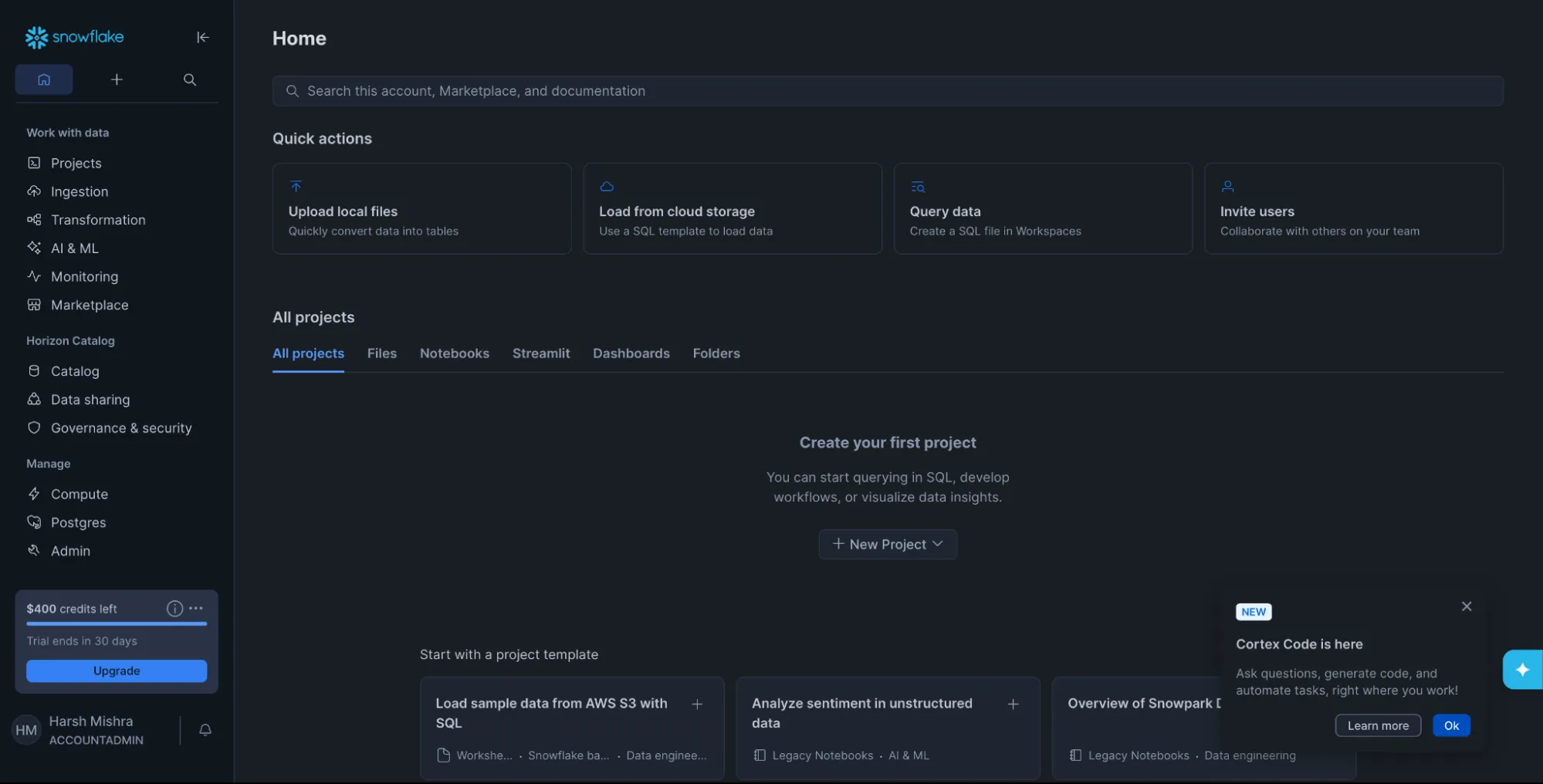
Step 1 — Set Up Snowflake Environment
Run the following in a Snowflake Worksheet to create the database, schema
First create a new sql file.
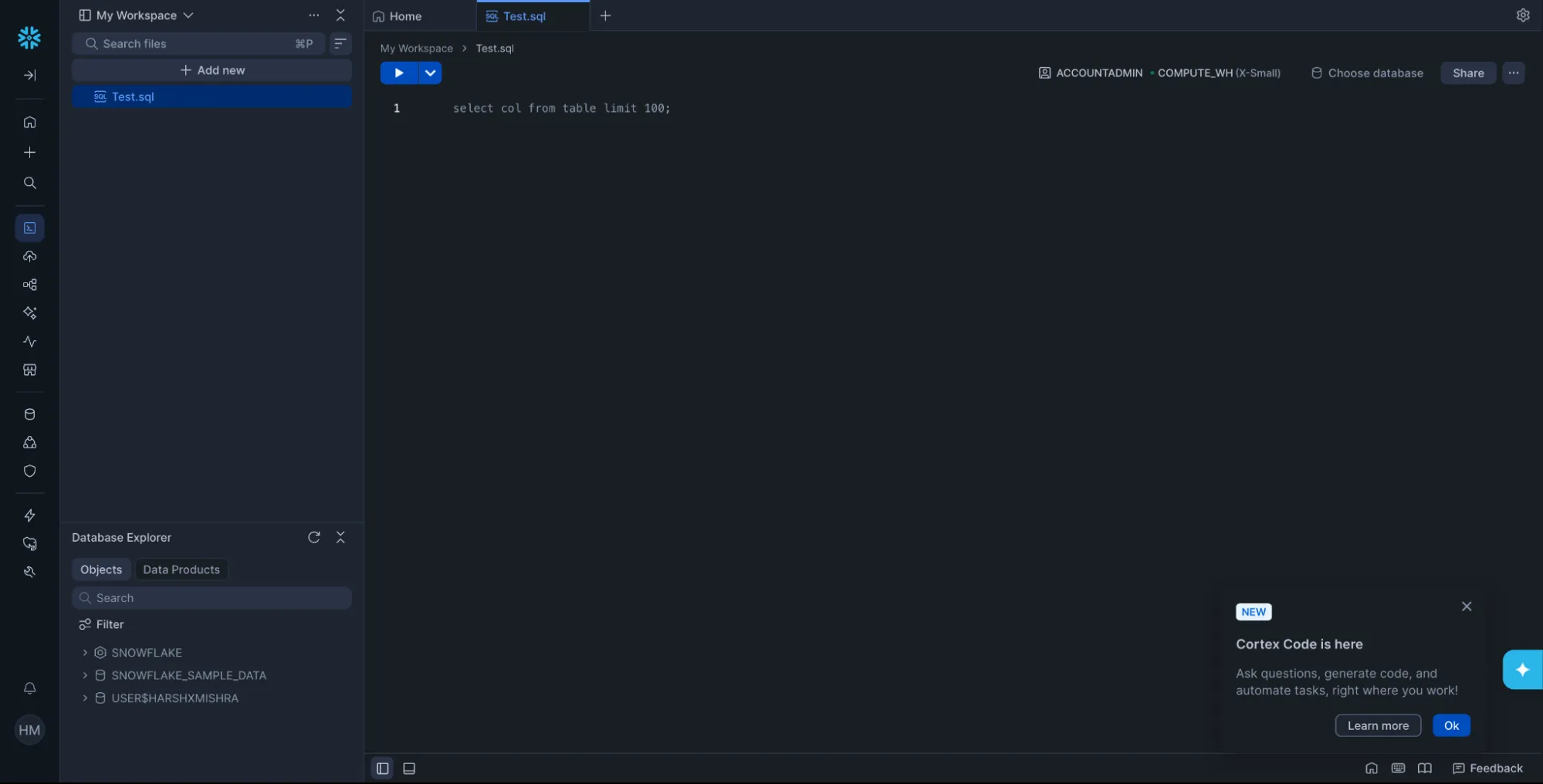
CREATE DATABASE IF NOT EXISTS SUPPORT_DB;

CREATE WAREHOUSE IF NOT EXISTS COMPUTE_WH
WAREHOUSE_SIZE = 'X-SMALL'
AUTO_SUSPEND = 60
AUTO_RESUME = TRUE;

USE DATABASE SUPPORT_DB;
USE WAREHOUSE COMPUTE_WH;
Step 2 — Create and Populate the Source Table
This table simulates historical support tickets. In production, this could be a live table synced from your CRM, ticketing system, or data pipeline.
CREATE TABLE IF NOT EXISTS SUPPORT_DB.PUBLIC.support_tickets (
    ticket_id VARCHAR(20),
    issue_category VARCHAR(100),
    user_query TEXT,
    resolution TEXT,
    created_at TIMESTAMP_NTZ DEFAULT CURRENT_TIMESTAMP()
);

INSERT INTO SUPPORT_DB.PUBLIC.support_tickets (ticket_id, issue_category, user_query, resolution) VALUES
('TKT-001', 'Connectivity',
'My internet keeps dropping every few minutes. The router lights look normal.',
'Agent checked line diagnostics. Found intermittent signal degradation on the coax line. Dispatched technician to replace splitter. Issue resolved after hardware swap.'),

('TKT-002', 'Connectivity',
'Internet is very slow during evenings but fine in the morning.',
'Network congestion detected in customer segment during peak hours (6–10 PM). Upgraded customer to a less congested node. Speeds normalized within 24 hours.'),

('TKT-003', 'Billing',
'I was charged twice for the same month. Need a refund.',
'Duplicate billing confirmed due to payment gateway retry error. Refund of $49.99 issued. Customer notified via email. Root cause patched in billing system.'),

('TKT-004', 'Device Setup',
'My new router is not showing up in the Wi-Fi list on my laptop.',
'Router was broadcasting on 5GHz only. Customer laptop had outdated Wi-Fi driver that did not support 5GHz. Guided customer to update driver. Both 2.4GHz and 5GHz bands now visible.'),

('TKT-005', 'Connectivity',
'Frequent packet loss during video calls. Wired connection also affected.',
'Packet loss traced to faulty ethernet port on modem. Replaced modem under warranty. Customer confirmed stable connection post-replacement.'),

('TKT-006', 'Account',
'Cannot log into the customer portal. Password reset emails are not arriving.',
'Email delivery blocked by SPF record misconfiguration on customer domain. Advised customer to provide support domain. Reset email delivered successfully.'),

('TKT-007', 'Connectivity',
'Internet unstable only when microwave is running in the kitchen.',
'2.4GHz Wi-Fi interference caused by microwave proximity to router. Recommended switching router channel from 6 to 11 and enabling 5GHz band. Issue eliminated.'),

('TKT-008', 'Speed',
'Advertised speed is 500Mbps but I only get around 120Mbps on speedtest.',
'Speed test confirmed 480Mbps at node. Customer router limited to 100Mbps due to Fast Ethernet port. Recommended router upgrade. Post-upgrade speed confirmed at 470Mbps.');
Step 3 — Create the Cortex Search Service
This single SQL command handles embedding generation, indexing, and hybrid retrieval setup automatically. The ON clause specifies which column to index for full-text and semantic search. ATTRIBUTES defines filterable metadata columns.
CREATE OR REPLACE CORTEX SEARCH SERVICE SUPPORT_DB.PUBLIC.support_search_svc
ON resolution
ATTRIBUTES issue_category, ticket_id
WAREHOUSE = COMPUTE_WH
TARGET_LAG = '1 minute'
AS (
    SELECT
        ticket_id,
        issue_category,
        user_query,
        resolution
    FROM SUPPORT_DB.PUBLIC.support_tickets
);
What happens here: Snowflake automatically generates vector embeddings for the resolution column, builds both a keyword index and a vector index, and exposes a unified hybrid retrieval endpoint. No embedding model management, no separate vector database.
You can verify the service is active:
SHOW CORTEX SEARCH SERVICES IN SCHEMA SUPPORT_DB.PUBLIC;Output:

Step 4 — Query the Search Service from Python
Connect to Snowflake and use the snowflake-core SDK to query the service:
First Install required packages:
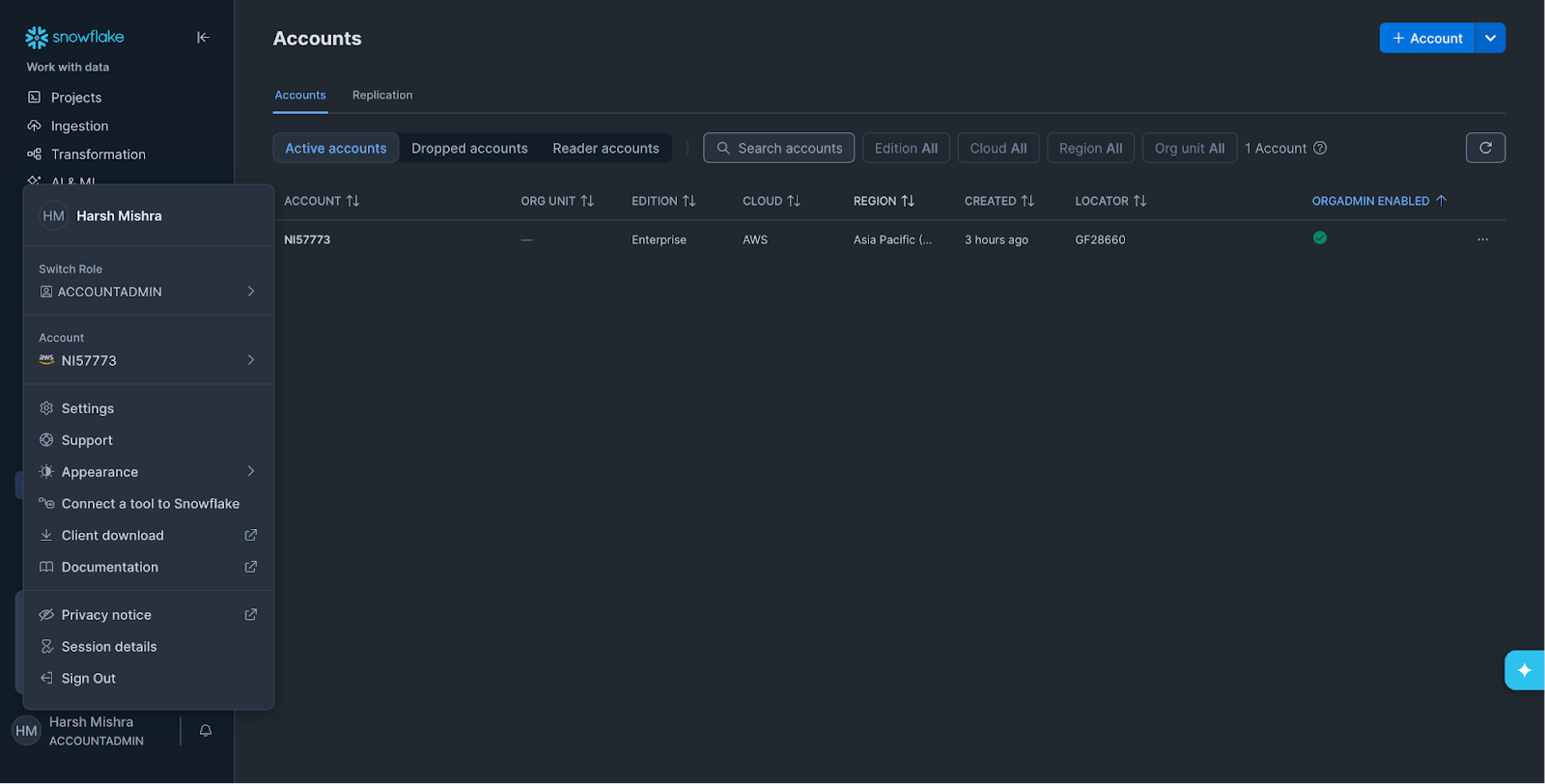
pip install snowflake-snowpark-python snowflake-coreNow to find your account details go to your account and click on “Connect a tool to Snowflake”
from snowflake.snowpark import Session
from snowflake.core import Root

# --- Connection config ---
connection_params = {
    "account": "YOUR_ACCOUNT_IDENTIFIER",  # e.g. abc12345.us-east-1
    "user": "YOUR_USERNAME",
    "password": "YOUR_PASSWORD",
    "role": "SYSADMIN",
    "warehouse": "COMPUTE_WH",
    "database": "SUPPORT_DB",
    "schema": "PUBLIC",
}

# --- Create Snowpark session ---
session = Session.builder.configs(connection_params).create()
root = Root(session)

# --- Reference the Cortex Search service ---
search_svc = (
    root.databases["SUPPORT_DB"]
    .schemas["PUBLIC"]
    .cortex_search_services["SUPPORT_SEARCH_SVC"]
)

def retrieve_context(query: str, category_filter: str = None, top_k: int = 3):
    """Run hybrid search against the Cortex Search service."""
    filter_expr = {"@eq": {"issue_category": category_filter}} if category_filter else None

    response = search_svc.search(
        query=query,
        columns=["ticket_id", "issue_category", "user_query", "resolution"],
        filter=filter_expr,
        limit=top_k,
    )
    return response.results

# --- Test retrieval ---
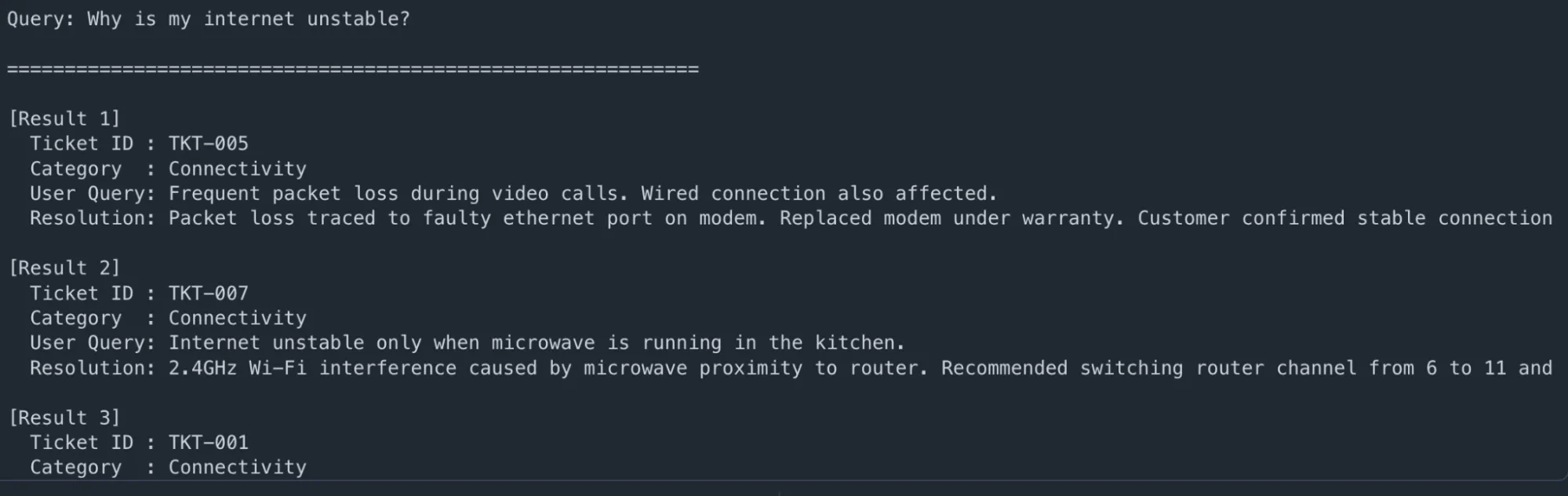
user_question = "Why is my internet unstable?"
results = retrieve_context(user_question, top_k=3)

print(f"\n🔍 Query: {user_question}\n")
print("=" * 60)

for i, r in enumerate(results, 1):
    print(f"\n[Result {i}]")
    print(f"  Ticket ID : {r['ticket_id']}")
    print(f"  Category  : {r['issue_category']}")
    print(f"  User Query: {r['user_query']}")
    print(f"  Resolution: {r['resolution'][:200]}...")
Output:
Step 5 — Build the Full RAG Pipeline
Now pass the retrieved context into Snowflake Cortex LLM (mistral-large or llama3.1-70b) to generate a grounded answer:
import json

def build_rag_prompt(user_question: str, retrieved_results: list) -> str:
    """Format retrieved context into an LLM-ready prompt."""
    context_blocks = []
    for r in retrieved_results:
        context_blocks.append(
            f"- Ticket {r['ticket_id']} ({r['issue_category']}): "
            f"Customer reported '{r['user_query']}'. "
            f"Resolution: {r['resolution']}"
        )
    context_str = "\n".join(context_blocks)

    return f"""You are a helpful customer support assistant. Use ONLY the context below
to answer the customer's question. Be specific and concise.

CONTEXT FROM HISTORICAL TICKETS:
{context_str}

CUSTOMER QUESTION: {user_question}
ANSWER:"""

def ask_rag_assistant(user_question: str, model: str = "mistral-large2"):
    """Full RAG pipeline: retrieve → augment → generate."""
    print(f"\n📡 Retrieving context for: '{user_question}'")
    results = retrieve_context(user_question, top_k=3)
    print(f"   ✅ Retrieved {len(results)} relevant tickets")

    prompt = build_rag_prompt(user_question, results)

    safe_prompt = prompt.replace("'", "\\'")
    sql = f"""
        SELECT SNOWFLAKE.CORTEX.COMPLETE(
            '{model}',
            '{safe_prompt}'
        ) AS answer
    """

    result = session.sql(sql).collect()
    answer = result[0]["ANSWER"]
    return answer, results

# --- Run the assistant ---
questions = [
    "Why is my internet unstable?",
    "I'm being charged incorrectly, what should I do?",
    "My router is not visible on my devices",
]

for q in questions:
    answer, ctx = ask_rag_assistant(q)
    print(f"\n{'='*60}")
    print(f"❓ Customer: {q}")
    print(f"\n🤖 AI Assistant:\n{answer.strip()}")
    print(f"\n📎 Grounded in tickets: {[r['ticket_id'] for r in ctx]}")
Output:
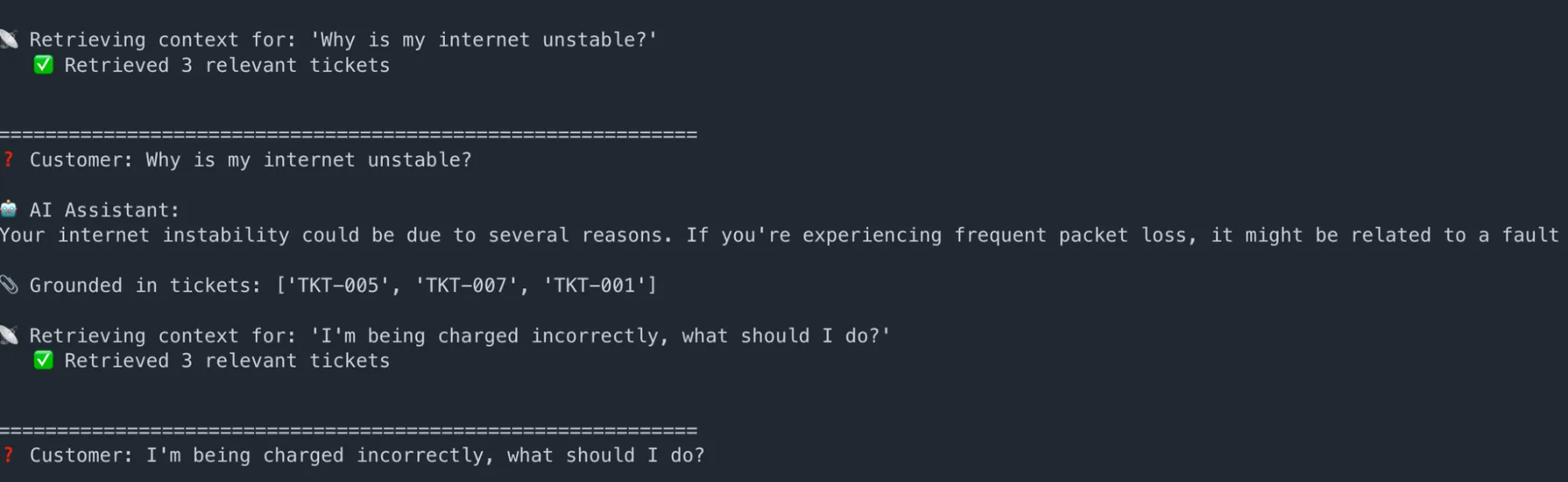
Key takeaway: The AI never generates generic answers. Every response is traceable to specific historical tickets, dramatically reducing hallucination risk and making outputs auditable.
A natural language support ticket search interface — embedded directly into an application — that lets agents and customers search historical tickets using plain English. No new infrastructure is needed: this example reuses the exact same support_tickets table and support_search_svc Cortex Search service created in the RAG section above.
This shows how the same Cortex Search service can power two entirely different surfaces: an AI assistant on one hand, and a browsable search UI on the other.
Step 1 — Confirm the Existing Service is Active
Verify the service created in the previous section is still running:
USE DATABASE SUPPORT_DB;

USE SCHEMA PUBLIC;

SHOW CORTEX SEARCH SERVICES IN SCHEMA RAG_SCHEMA;
Output:
Step 2 — Build the Enterprise Search Client
This module connects to the same Snowpark session and support_search_svc service, and exposes a search function with category filtering and ranked result display — the kind of interface you’d embed into a support portal, an internal knowledge tool, or an agent dashboard.
# enterprise_search.py

from snowflake.snowpark import Session
from snowflake.core import Root

# --- Connection config ---
connection_params = {
    "account": "YOUR_ACCOUNT_IDENTIFIER",  # e.g. abc12345.us-east-1
    "user": "YOUR_USERNAME",
    "password": "YOUR_PASSWORD",
    "role": "SYSADMIN",
    "warehouse": "COMPUTE_WH",
    "database": "SUPPORT_DB",
    "schema": "PUBLIC",
}

session = Session.builder.configs(connection_params).create()
root = Root(session)

# --- Same service as the RAG example — no new service needed ---
search_svc = (
    root.databases["SUPPORT_DB"]
    .schemas["RAG_SCHEMA"]
    .cortex_search_services["SUPPORT_SEARCH_SVC"]
)

def search_tickets(query: str, category: str = None, top_k: int = 5) -> list:
    """Natural language ticket search with optional category filter."""
    filter_expr = {"@eq": {"issue_category": category}} if category else None

    response = search_svc.search(
        query=query,
        columns=["ticket_id", "issue_category", "user_query", "resolution"],
        filter=filter_expr,
        limit=top_k,
    )
    return response.results

def display_tickets(query: str, results: list, filter_label: str = None):
    """Render search results as a formatted ticket list."""
    label = f" [{filter_label}]" if filter_label else ""

    print(f"\n🔎 Search{label}: \"{query}\"")
    print(f"   {len(results)} ticket(s) found\n")
    print("-" * 72)

    for i, r in enumerate(results, 1):
        print(f"  #{i}  {r['ticket_id']}  |  Category: {r['issue_category']}")
        print(f"       Customer: {r['user_query']}")
        print(f"       Resolution: {r['resolution'][:160]}...\n")
Step 3 — Run Natural Language Ticket Searches
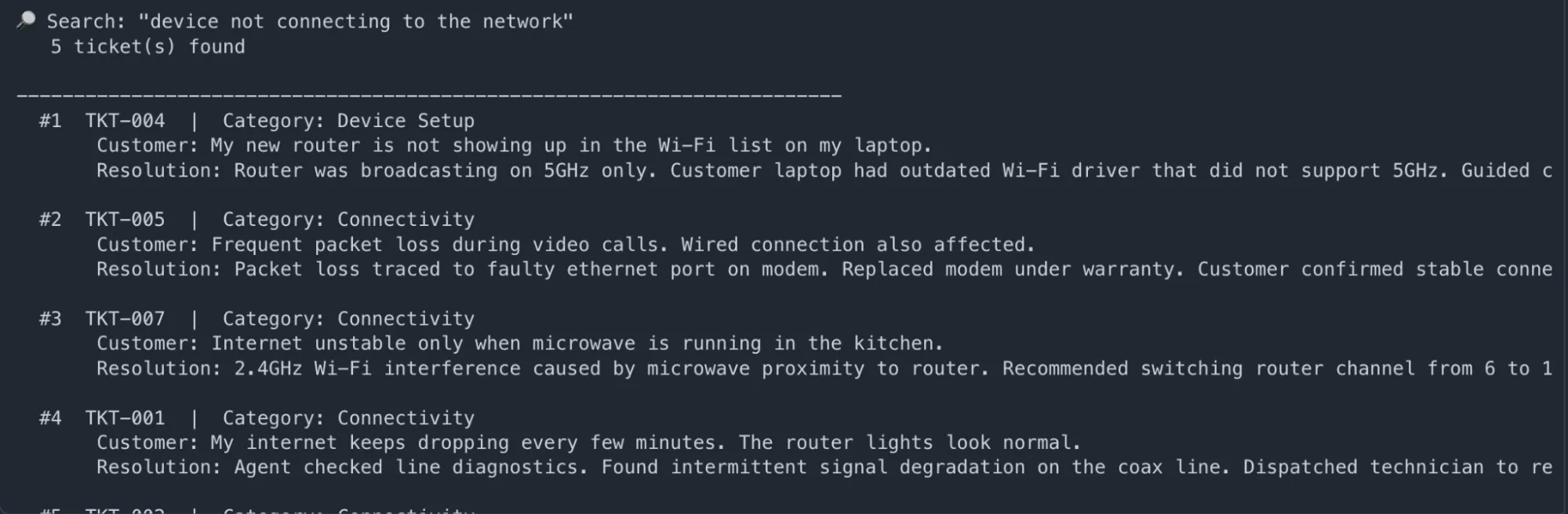
# --- Search 1: Semantic query — no exact match needed ---
results = search_tickets("device not connecting to the network")
display_tickets("device not connecting to the network", results)
Output:
# --- Search 2: Category-filtered search (Billing only) ---
results = search_tickets(
    query="incorrect payment or refund request",
    category="Billing"
)

display_tickets(
    "incorrect payment or refund request",
    results,
    filter_label="Billing"
)
2nd Output:

# --- Search 3: Account & access issues ---
results = search_tickets("can't log in or access my account", category="Account")
display_tickets("can't log in or access my account", results, filter_label="Account")
Output:

Step 4 — Expose as a Flask Search API (Optional)
Wrap the search function in a REST endpoint to embed it into any support portal, internal tool, or chatbot backend:
# app.py

from flask import Flask, request, jsonify
from enterprise_search import search_tickets

app = Flask(__name__)

@app.route("/tickets/search", methods=["GET"])

def ticket_search():
    query    = request.args.get("q", "")
    category = request.args.get("category")        # optional filter
    top_k    = int(request.args.get("limit", 5))

    if not query:
        return jsonify({"error": "Query parameter 'q' is required"}), 400

    results = search_tickets(query, category=category, top_k=top_k)

    return jsonify({
        "query":    query,
        "category": category,
        "count":    len(results),
        "results":  results,
    })

if __name__ == "__main__":
    app.run(port=5001, debug=True)
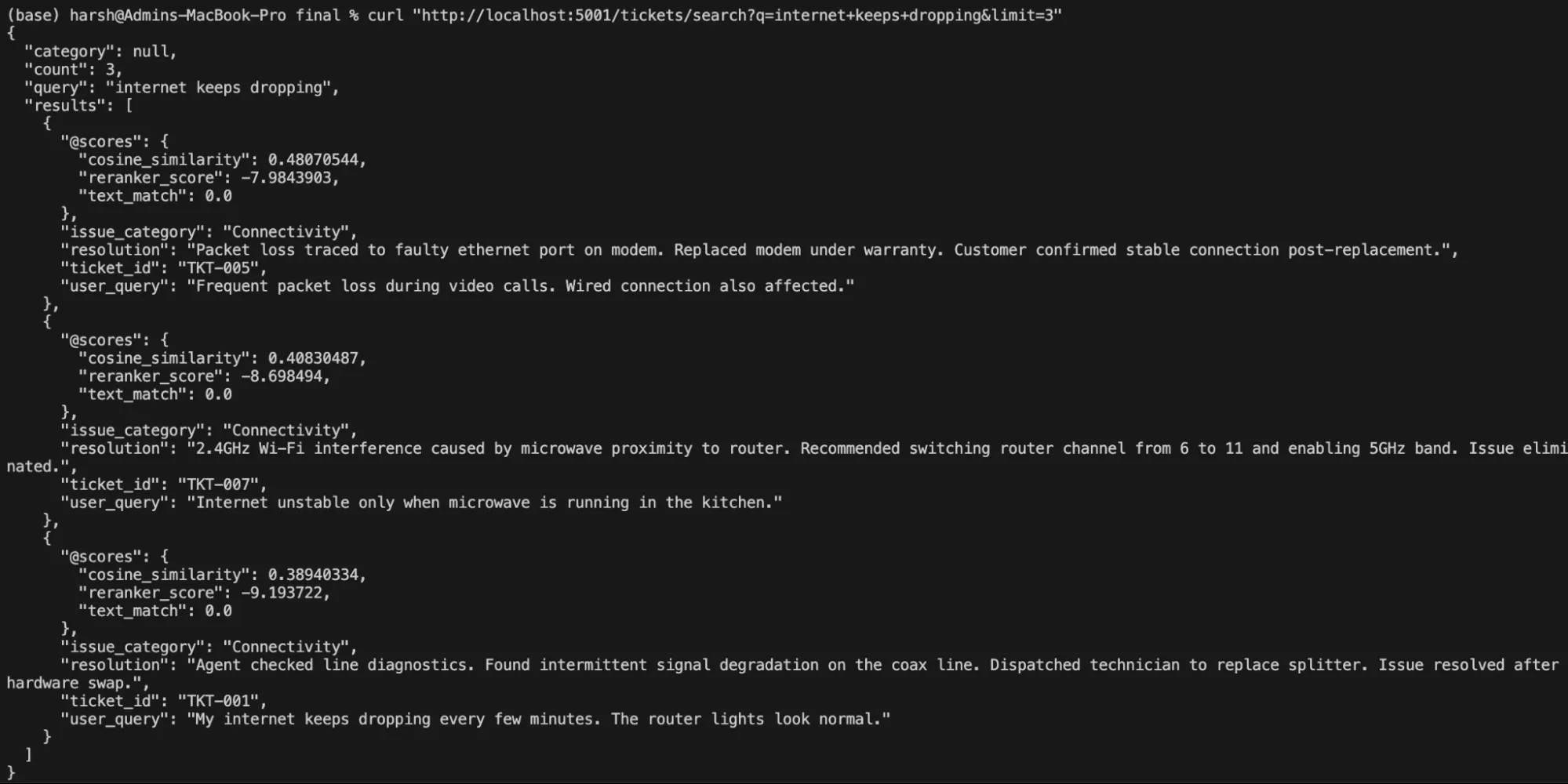
Test with curl:
# Free-text natural language search
curl "http://localhost:5001/tickets/search?q=internet+keeps+dropping&limit=3"
Output:
# Filtered by category

curl "http://localhost:5001/tickets/search?q=charged+incorrectly&category=Billing"
Output:
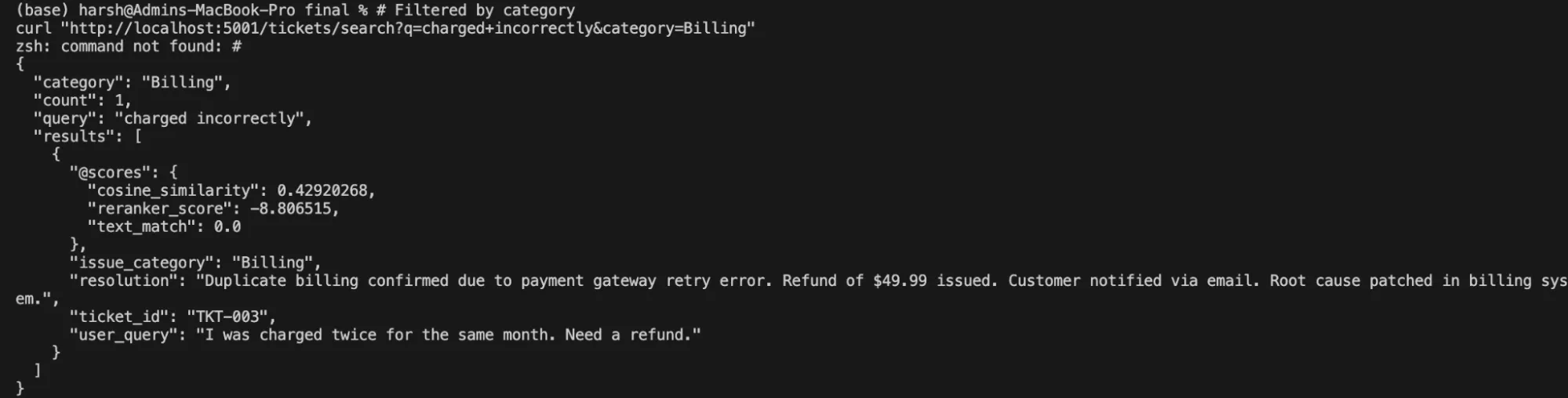
Key takeaway: The same Cortex Search service that grounds the RAG assistant also powers a fully functional enterprise search UI — no duplication of infrastructure, no second index to maintain. One service definition delivers both experiences, and both stay automatically in sync as tickets are added or updated.
Poor data search methods quietly erode enterprise performance. Time is lost to repeated queries and rework. On the other hand, support teams get involved in resolving questions that should have been self-served in the first place. New hires and customers take longer to reach productivity. AI initiatives stall when outputs cannot be trusted.
By contrast, strong retrieval changes how organizations operate.
Teams move faster because answers are easier to find. AI applications perform better because they are grounded in relevant, current data. Feature adoption improves because users can discover and understand capabilities without friction. Support costs decline as search absorbs routine questions.
Cortex Search turns retrieval from a background utility into a strategic lever. It helps enterprises unlock the value already present in their data by making it accessible, searchable and usable at scale.
Q1. Why does traditional enterprise search fail in modern systems?
A. It relies on keyword matching and static indexes, which fail to capture intent and keep up with dynamic, distributed data environments.
Q2. What makes hybrid retrieval more effective than traditional search?
A. It combines keyword precision with semantic understanding, enabling faster, more relevant results even for ambiguous or conversational queries.
Q3. How does Cortex Search improve AI and enterprise applications?
A. It provides accurate, real-time retrieval that grounds AI responses and powers search experiences without complex infrastructure or manual tuning.

Dentsu’s global capability center, Dentsu Global Services (DGS), is shaping the future as an innovation engine. DGS has 5,600+ experts that specialize in digital platforms, performance marketing, product engineering, data science, automation and AI, with media transformation at the core. DGS delivers AI-first, scalable solutions through dentsu’s network seamlessly integrating people, technology, and craft. They blend human creativity and advanced technology, building a diverse, future-focused organization that adapts quickly to client needs while ensuring reliability, collaboration and excellence in every engagement.
DGS brings together world-class talent, breakthrough technology and bold ideas to deliver impact at scale—for dentsu’s clients, its people and the world. It’s a future-focused, industry-leading workplace where talent meets opportunity. At DGS, employees can accelerate their career, collaborate with global teams and contribute to work that shapes the future. Find out more: Dentsu Global Services
此内容由惯性聚合(RSS阅读器)自动聚合整理,仅供阅读参考。 原文来自 — 版权归原作者所有。