

惯性聚合 高效追踪和阅读你感兴趣的博客、新闻、科技资讯
阅读原文 在惯性聚合中打开

推荐订阅源

C
Cybersecurity and Infrastructure Security Agency CISA
WordPress大学
WordPress大学
人人都是产品经理
人人都是产品经理
小众软件
小众软件
博客园 - 【当耐特】
爱范儿
爱范儿
美团技术团队
Jina AI
Jina AI
Hugging Face - Blog
Hugging Face - Blog
博客园 - 聂微东
月光博客
月光博客
宝玉的分享
宝玉的分享
V
V2EX
Blog — PlanetScale
Blog — PlanetScale
Spread Privacy
Spread Privacy
博客园 - 叶小钗
量子位
Security Archives - TechRepublic
Google DeepMind News
L
LINUX DO - 热门话题
Hacker News - Newest:
Hacker News - Newest: "LLM"
P
Privacy International News Feed
Y
Y Combinator Blog
P
Proofpoint News Feed
NISL@THU
NISL@THU
The Last Watchdog
The Last Watchdog
S
Secure Thoughts
G
Google Developers Blog
Hacker News: Ask HN
Hacker News: Ask HN
Help Net Security
Help Net Security
I
InfoQ
Cisco Talos Blog
Cisco Talos Blog
Google Online Security Blog
钛媒体:引领未来商业与生活新知
钛媒体:引领未来商业与生活新知
Recent Announcements
Simon Willison's Weblog
Vercel News
Vercel News
Recent Commits to openclaw:main
T
Threat Research - Cisco Blogs
GbyAI
GbyAI
奇客Solidot–传递最新科技情报
奇客Solidot–传递最新科技情报
C
CXSECURITY Database RSS Feed - CXSecurity.com
V
Vulnerabilities – Threatpost
B
Blog
Stack Overflow Blog
Stack Overflow Blog
Microsoft Azure Blog
N
News | PayPal Newsroom
J
Java Code Geeks
Latest news
Latest news
H
Hackread – Cybersecurity News, Data Breaches, AI and More

Analytics Vidhya

Handling Imbalanced Classification: What Works Better Than SMOTE GPT-5.6 Is Here: Sol, Terra, and Luna Loop Engineering for AI Agents: How /loop is Changing AI Workflows DeepSeek DSpark: The Speculative Decoding Trick Behind 400% Faster LLM OKF: Redefining Knowledge Bases for AI Agents Modern VLMs Explained: How GPT-4o, Gemini, Claude Vision, and Qwen-VL Work YOLO26 Tutorial: Object Detection, Pose Estimation & More Large Action Models (LAMs) vs Agentic LLMs: What's the Real Difference? Claude Sonnet 5: The Fable 5 at Home The Best $20 AI Plan: ChatGPT Plus vs Claude Pro vs Gemini Pro GraphRAG vs Vector RAG: Which Retrieval Method is Best? Using AI When You Don’t Trust AI The Self-Improving Loop in AI Agents: Architecture, Benefits, and How it Outperforms Traditional Agent Workflows Harness-1: The 20B Retrieval Subagent That Beats GPT-5.4 at Search Sakana Fugu: Multi-Agent System as a Model Claude's Hidden Art Skill: Making Illustrations With Code System Design for ML Interviews: 10 Real Problems Walked Through Most People Use ChatGPT Wrong: 10 Features and Tips That Changed How I Work OpenAI Just Launched 3 Free AI Courses with Certificates Autoregressive Models: Predicting the Future Using the Past Gemini Omni: AI Video Generation Inside Gemini DiffusionGemma: Google’s Diffusion-Based Open Model for Faster Text Generation Top 10 AI Engineering Tools Everyone is Using in 2026 I Tested Claude Fable 5: Can Anthropic’s Newest AI Deliver on the Hype? Prophet vs NeuralProphet vs TimeGPT vs Chronos: A Practical Comparison Build an Emergency Helpline Voice Agent with LangChain Choosing the Right Vector Database for RAG and AI Applications Google Gemma 4 12B: Architecture, Benchmarks, Access, and Hands-on Guide for Developers How to Choose the Right AI Model for Your Needs Agent Observability with LangSmith, Langfuse, and Arize: A Hands-On Comparison How to Use Claude Managed Agents? Google AI Studio vs Gemini App: What’s the Difference? AI Workflows for Sales Teams: Prospect Research, Lead Qualification, and CRM Updates on Autopilot Using LangGraph 25 Most Influential AI Pioneers to Meet at DataHack Summit 2026 Claude Opus 4.8: A Smarter Model in the Right Direction PySpark Optimization: 12 Proven Techniques to Speed Up Your Spark Jobs 10 Everyday Tasks You Can Automate with AI Today (With n8n Templates) Google Antigravity 2.0: The Full Developer Guide (I/O 2026) Build a Claude Cowork-Like Browser Agent Using Playwright MCP and Claude Desktop Pandas vs Polars vs DuckDB: Which Library Should You Choose? Qwen3.7-Max: Alibaba’s New Agent-First LLM for Coding, Reasoning, and Long-Horizon AI Workflows The Biggest Announcements from Google I/O 2026 Top 9 AI Events and Conferences in 2026 that you Must Attend Gemini 3.5 Flash: Frontier Intelligence with Speed Kimi WebBridge: Hands-on Guide to Kimi’s Browser Extension for AI Agents 40 Advanced SQL Window Functions Every Data Scientist Must Know(with examples) Top 10 AI Research Papers of 2025 6 Steps to Crack GenAI Case Study Interviews (With Real Examples) OpenAI Omni Moderation: How to Filter Text & Images for Free DataHack Summit 2026: You Just Cannot Skip This AI Event of the Year OpenAI’s New API Voice Models Will Change the Way You Use AI Hermes Agent Guide: What is it and How to Use it? Top 10 LLM Research Papers of 2026 Agent Memory Patterns in Cognitive Science and AI Systems 10 AI Agents Every AI Engineer Must Build (with GitHub Samples) 23 Tips for Smart Claude Code Token Saving and Workflow Optimization Feature Engineering with LLMs: Techniques & Python Examples ChatGPT is Now Inside Excel and Google Sheets: Here is How to Use it Gemini API File Search: The Easy Way to Build RAG Top 10 Open-Source Libraries to Fine-Tune LLMs Locally ML Intern in Practice: From Prompt to a Shipped Hugging Face Model 15+ Solved Agentic AI Projects with Github Links How People are Figuring Out Life With Claude MemPalace Explained: Building Long-Term Memory for AI Agents Beyond RAG Grok Voice Think Fast 1.0: Build Voice AI Agents That Actually Think Compressing LSTM Models for Retail Edge Deployment: A Practical Comparison MCP vs Agent Skills: Different Altogether GPT 5.5 vs Opus 4.7: Which is the Best AI Model Today? What is Agentic AI? Claude Code vs Codex: A Detailed Terminal Agent Comparison Google Deep Research Max: Build Autonomous AI Research Agents in Minutes Meta Muse Spark Review: Is It Worth the Hype? ChatGPT Images 2.0 vs Nano Banana 2: Which is Better? Cursor V3 Explained: The AI Coding Agent That’s Replacing Traditional IDEs in 2026 DeepSeek-V4: The Most Powerful Open-Source Model Ever Is GPT Image 2 the Best Image Generation Model? Token Economics: Why AI is Getting “Cheaper” From Idea to Output: Claude Does the Design Work Opus 4.7 vs Opus 4.6: Should You Switch? Build Human-Like AI Voice App with Gemini 3.1 Flash TTS How to Structure a Claude Code Project that Thinks Like an Engineer Gemma 4 Tool Calling Explained: Build AI Agents with Function Calling (Step-by-Step Guide) Anthropic Launches Claude Opus 4.7 For “Most Difficult Tasks” Top 28 Claude Shortcuts that will 10X your Speed GPT-5.4-Cyber: Why OpenAI is Keeping its Most Powerful Model Under Lock and Key Google AI Studio Guide: Every Feature Explained Mastering Deep Agents: Context Engineering that Actually Works 21 Computer Vision Projects from Beginner to Advanced (2026 Guide) Excel 101: Excel Agent Mode Explained MiniMax M2.7 Goes Open-Weight to Let You Run Agents Locally Top 10 Gemma 4 Projects That Will Blow Your Mind GLM-5.1: Architecture, Benchmarks, Capabilities & How to Use It Understanding BERTopic: From Raw Text to Interpretable Topics From Karpathy’s LLM Wiki to Graphify: AI Memory Layers are Here 10 Most Important AI Concepts Explained Simply Project Glasswing is World’s Most Powerful AI in Action How to Run Gemma 4 on Your Phone Without Internet: A Hands-On Guide Running Claude Code for Free with Gemma 4 and Ollama Rethinking Enterprise Search: How Cortex Search Turns Data into Business Impact Google’s Gemma 4: Is it the Best Open-Source Model of 2026?
LLM Wiki Revolution: How Andrej Karpathy’s Idea is Changing AI
2026-04-07 · via Analytics Vidhya

Think about revisiting items you’ve saved to Pocket, Notion or your bookmarks. Most people don’t have the time to re-read all of these things after they’ve saved them to these various apps, unless they have a need. We are excellent at collecting tons of information. However, we are just not very good at making any of those places interact with each other or add a cumulative layer that connects them together. 

In April of 2026, Andrej Karpathy (former AI Director of Tesla and co-founder of OpenAI) suggested a solution to this issue: use a large language model (LLM) to build your wiki in real-time.
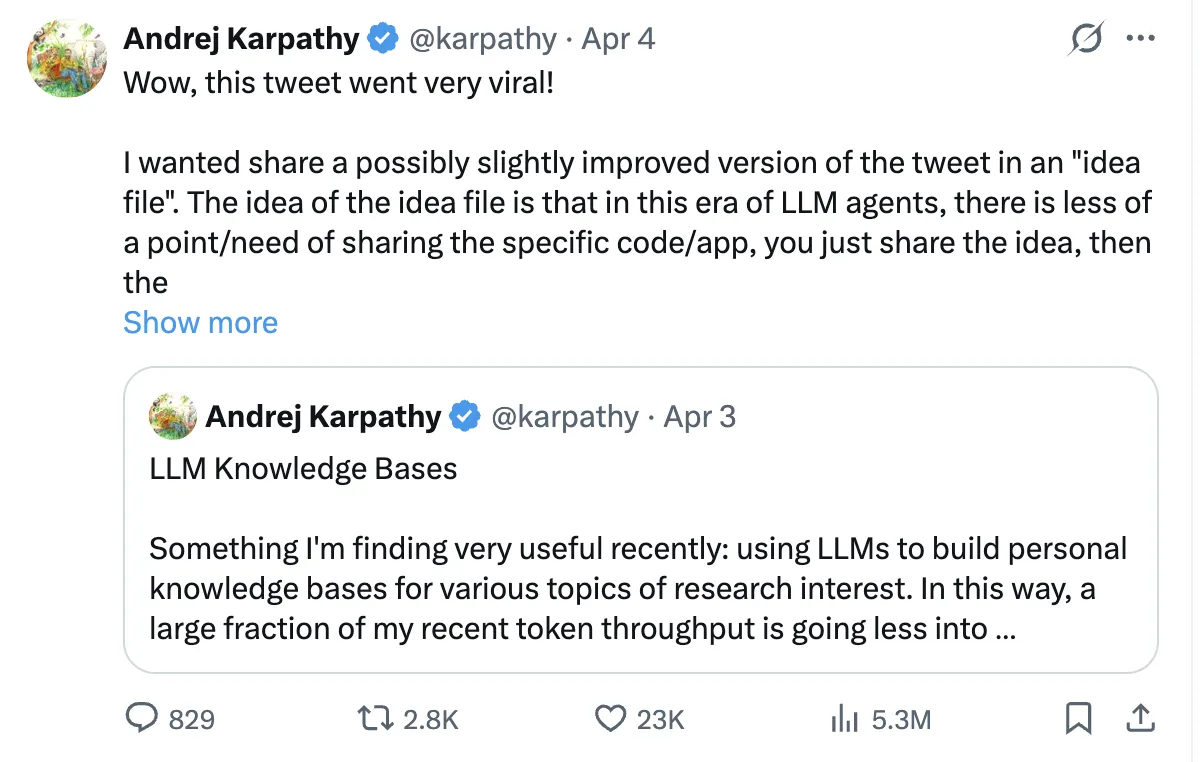
LLM Wiki Revolution

This idea became viral and was ultimately followed with a GitHub gist describing how to do this using an LLM. This guide will provide all of the support (with example code) for building your own living, evolving personal wiki. 

The RAG Problem: Rediscovering Knowledge from Scratch, Every Single Time

A large number of modern AI knowledge tools use Retrieval-Augmented Generation (RAG). In simple terms, you upload documents, ask a question, and the system retrieves relevant text to help the AI generate an answer. Tools like NotebookLM, ChatGPT (file uploads), and most enterprise AI systems follow this approach.

On the surface, this makes sense. But as Andrej Karpathy points out, there’s a key flaw: the model doesn’t accumulate knowledge. Each query starts from scratch.

If a question requires synthesizing five documents, RAG pulls and combines them for that one response. Ask the same question again tomorrow, and it repeats the entire process. It also struggles to connect information across time, like linking an article from March with one from October.

In short, RAG produces answers, but it doesn’t build lasting knowledge.

Wiki Solution: Compile Knowledge Once, Query Forever

Karpathy’s approach will change the way we look at models. Rather than processing raw documents after our queries, we will now process those documents at the time of ingestion. The results of this processing will be a permanent, structured wiki-like product (which will allow you to store and retrieve documents with a high degree of control over their location). 

When you add a new document source to the LLM, the LLM does not merely create an index of that source for later retrieval. Instead, the LLM reads, understands, and integrates that source into the knowledge base, updating all relevant existing pages (where necessary). It notes down any contradictions between the new and existing claims or knowledge, creating any necessary new concept pages, and reinforcing the complex relationships across the entire wiki. 

According to Karpathy, “With LLMs, knowledge is created and maintained continuously and consistently rather than being able to use individual queries to create knowledge.” Here is a simple comparison that illustrates this difference further. 

Dimension Traditional RAG LLM Wiki
When knowledge is processed At query time (for every question) At ingest time (once per source)
Cross-references Discovered ad hoc or missed entirely Pre-built and continuously maintained
Contradictions between sources Often overlooked Detected and flagged during ingestion
Knowledge accumulation None — resets with each query Builds over time with every new source
Output format Temporary chat responses Persistent, editable Markdown files
Data ownership Stored within provider systems Fully controlled on your local machine

How It Actually Works: A Step-by-Step Guide

Let’s review how an individual would develop one of these wikis. 

Step 1: Obtain your resources

You need to accumulate everything – articles that you have saved, books enjoyed, notes you have created, transcripts from discussions, and even your very own historical conversations. All these materials are your raw materials, just as ore must undergo refining before use. 

One of the best practices from this community is to not treat all documents in the same fashion. For example, a 50-page research white paper requires extraction on a section-by-section basis while a tweet or social media thread only requires a primary insight and corresponding context. Likewise, a meeting transcript requires extraction of decisions that were made, action items that are to be carried out and key quotations. By first classifying the type of document will help extract the right type of information to the correct amount of detail. 
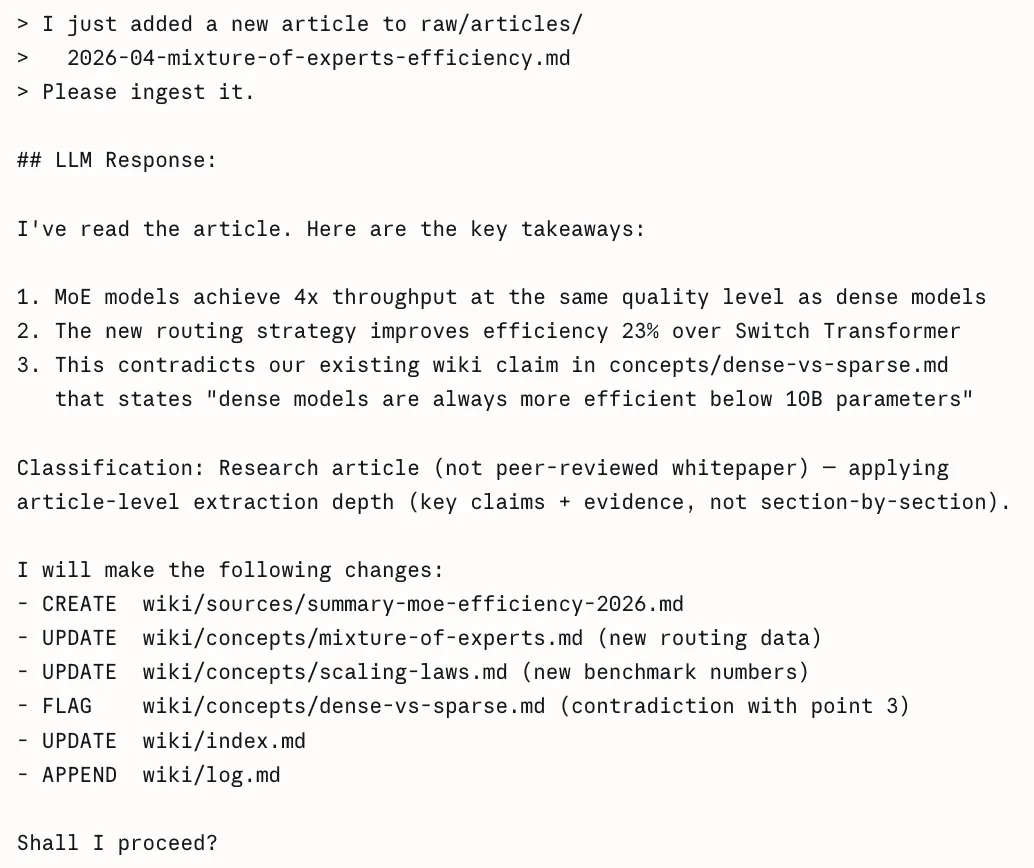
Classify prior to extracting (ingest)

Step 3: The AI writes wiki pages (Query)

You will feed your source materials into your AI’s LLM via a structured query. It will allow the LLM to produce one or more wiki pages that conform to the established template of having: a frontmatter block (YAML), a TLDR sentence, the body of the content, and the counterarguments/data gaps. 
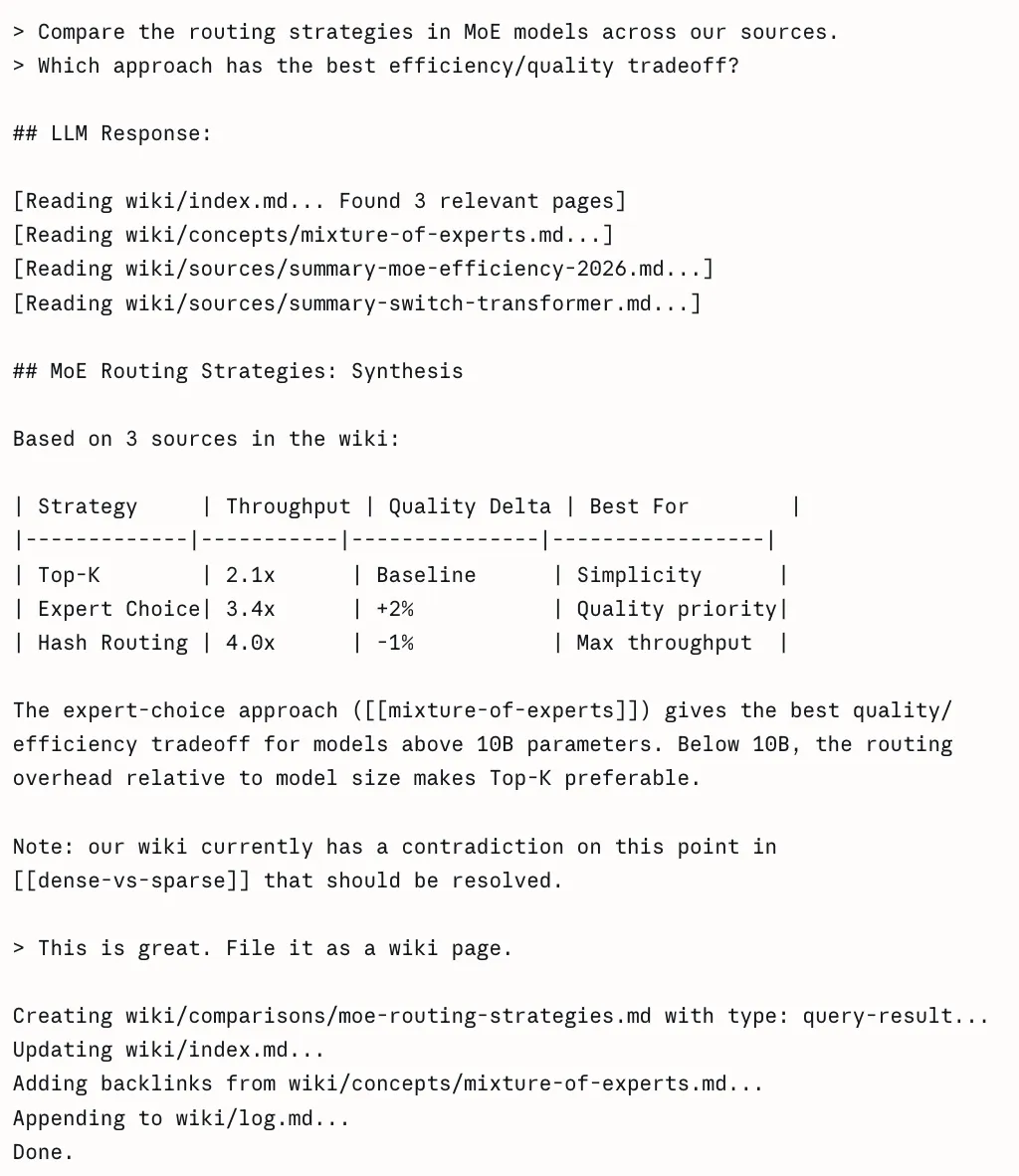
AI writes wiki pages

Step 4: Create an index

A central index.md will serve as a table of contents, and link directly to each page of the wiki. This is how an AI agent can efficiently traverse the entire knowledge base; it starts at the index, reads through the tldr’s, then drills down into only those pages that are relevant to its specific question. 
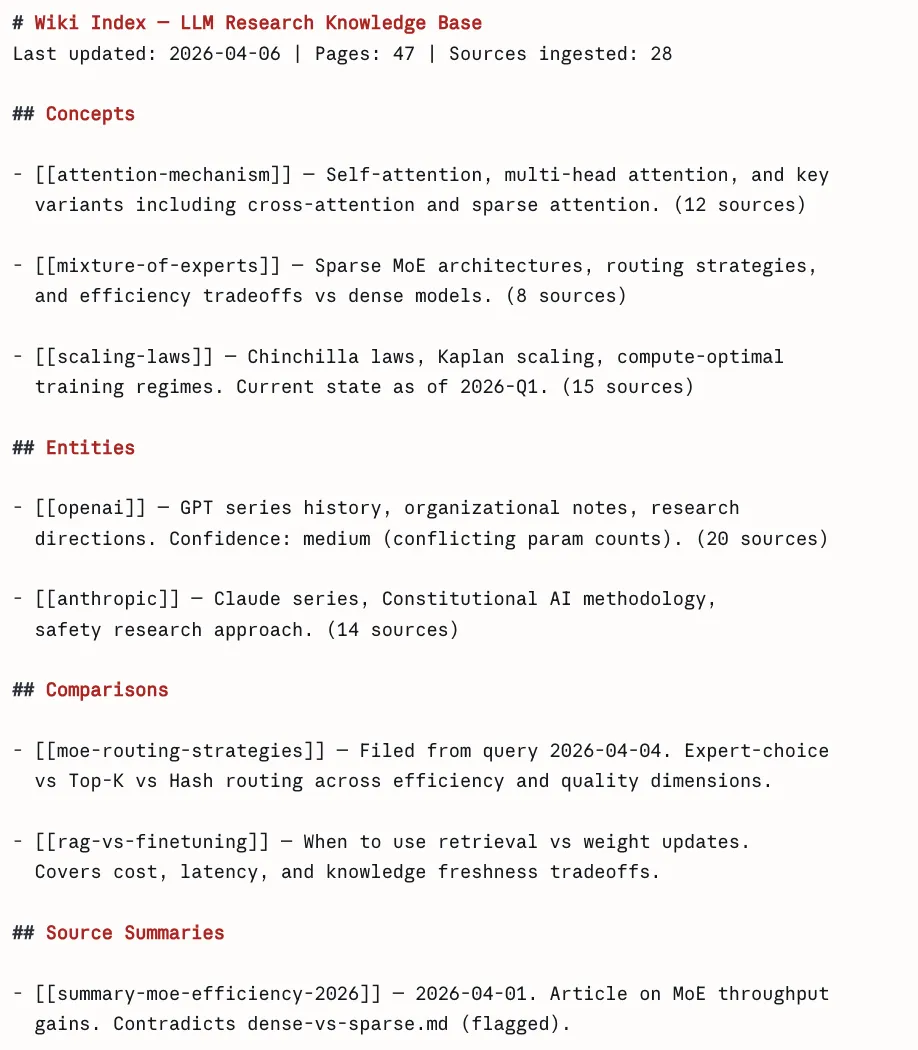
Creating an Wiki Index

Step 5: Record your questions

This is one of the most under-appreciated features of the system. When you ask the LLM a well-formed question and receive a response that provides valuable insight. For example, a comparison between two frameworks, or an explanation of how two concepts are related, you save that response as a new wiki page tagged with the label query-result. As time goes on, your best thinking has been collected rather than lost in chat logs.
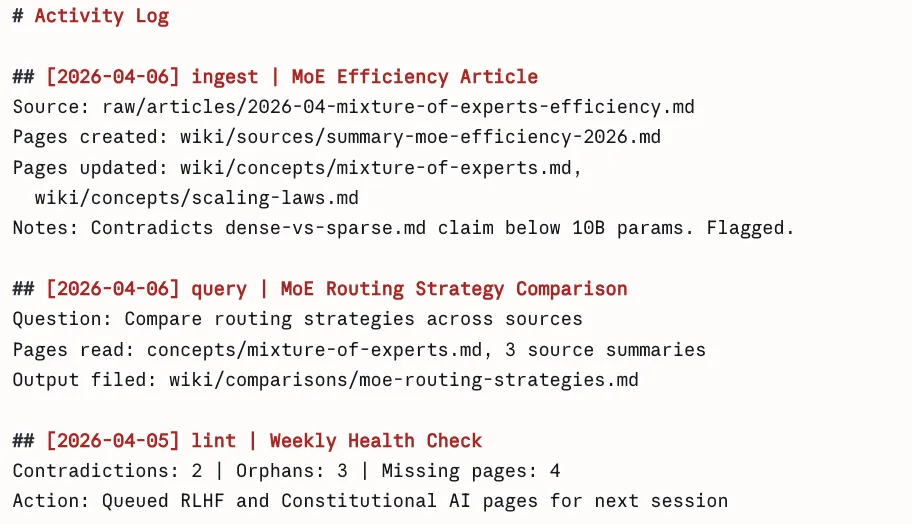
Activity Log

Step 6: Conduct lint passes

At appropriate intervals, you ask the LLM to audit the entire wiki for contradictions or inconsistencies between pages, and to indicate those statements which have been rendered obsolete by a more recent source. Additionally, the LLM will provide input on identifying orphan pages (i.e., pages that have no links pointing to them), and for providing a list of concepts that are referenced within the existing content but are not yet represented by their own respective pages.
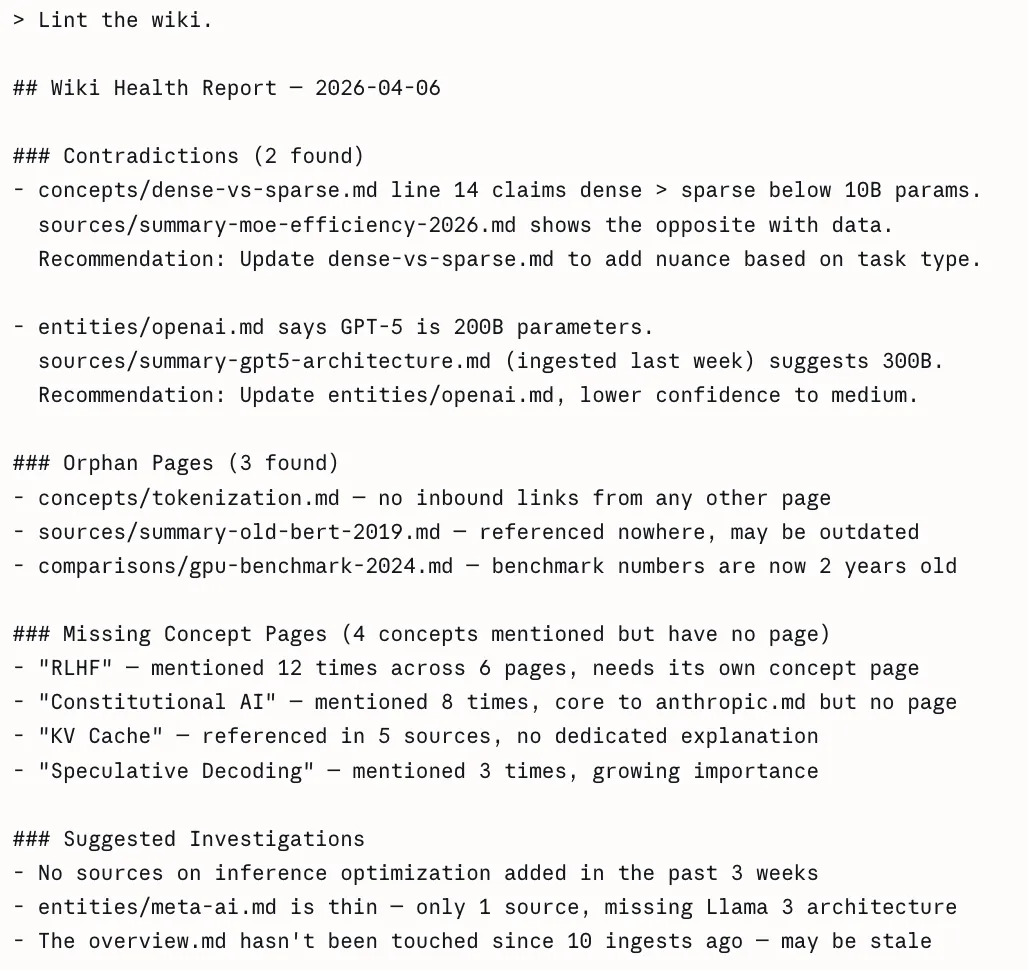
Lint the Wiki

The Complete Tool Stack

Karpathy talks about lots of specific tools in his Gist. Below you will find what each tool does and how they fit into his overall workflow. 

1. Obsidian – Your Wiki IDE

Obsidian is a free markdown knowledge management application which uses a local directory as a vault. For Karpathy, this is the viewing interface used for the wiki because it has three distinct features that matter for his system: 

  1.  The Graph View provides a graph of all wiki pages represented as nodes, and in addition, every wiki link ( [[wiki-links]] ) will be represented as edges connecting all nodes together. Hub pages will be connected to many nodes, and so will be represented as larger than average nodes. Orphan pages will be represented as isolated nodes. This allows for immediate visual representation of the density of knowledge and gaps within a person’s knowledge. No other document view or file browser can provide this representation visually. 
  2. The Dataview Plugin allows users to turn their wiki into a database that can be queried. All pages must have yaml frontmatter, so the integration specification is satisfied and therefore allows the user to run SQL-like queries against all pages in the wiki. 
# In any Obsidian note, Dataview renders this dynamically:

# List all concept pages ordered by number of sources
TABLE length(sources) AS "Source Count", confidence, updated
FROM "wiki/concepts"
SORT length(sources) DESC


# Find low-confidence pages that need review
TABLE title, sources
FROM "wiki"
WHERE confidence = "low"
SORT file.mtime ASC


# Find pages not updated in the last 2 weeks
LIST
FROM "wiki"
WHERE updated < date(today) - dur(14 days)
SORT updated ASC
  1. The Web Clipper browser extension (available for Chrome, Firefox, Safari, Edge, Arc, and Brave) converts web articles to clean Markdown with YAML frontmatter in one click, saving directly to your raw folder. You download all images to your computer by pressing the hotkey Ctrl+Shift+D after you finish clipping because the LLM requires access to the images. 

2. Qmd: Search at Scale

The LLM can use the index.md file to access the wiki content without problems at small scale. The index becomes unreadable in one context window when you have more than 100 pages because it reaches excessive size. 

The local search engine qmd enables Markdown file searches through three search methods which Tobi Lutke (CEO of Shopify) developed. The system operates entirely on your device because it uses node-llama-cpp with GGUF models which require no API connections and protect your data from leaving your computer. 

# Install qmd globally
npm install -g @tobilu/qmd 

# Register your wiki as a searchable collection
qmd collection add ./wiki --name my-research 

# Basic keyword search (BM25)
qmd search "mixture of experts routing efficiency" 

# Semantic search, finds related concepts even with different words
qmd vsearch "how do sparse models handle load balancing" 

# Hybrid search with LLM re-ranking, highest quality results
qmd query "what are the tradeoffs between top-k and expert-choice routing" 

# JSON output for piping into agent workflows
qmd query "scaling laws" --json | jq '.results[].title' 

# Expose qmd as an MCP server so Claude Code can use it as a native tool
qmd mcp

The MCP server mode enables Claude Code to use qmd directly as a built-in tool which results in smoother workflow integration throughout your data ingestion and query processing tasks. 

3. Git: Version Control for Knowledge

Because your entire wiki is a folder of plain Markdown files, you get version history branching and collaboration for free with Git. This is quite powerful: 

# Initialize the repo when you start
cd my-research && git init 

# Commit after every ingest session
git add .
git commit -m "ingest: MoE efficiency article — flags dense-vs-sparse contradiction" 

# See exactly what changed in any ingest
git diff HEAD~1 

# Roll back a bad compilation pass
git revert abc1234 

# See how your knowledge evolved over time
git log --oneline wiki/concepts/mixture-of-experts.md 

# Share with a team via GitHub (the wiki becomes collaborative)
git remote add origin https://github.com/yourname/research-wiki
git push -u origin main

Getting Started: Your First LLM Wiki in Three Steps

If you’re excited about this concept there is an easy way to begin: 

  1. Select one area of interest you are currently exploring and give the AI 5-10 of your best sources. Do not attempt to put everything you’ve done digitally into one place on the first day but instead learn how the system works and how to use it on a small scale. 
  2. Create the basic framework soon. Create a wiki/directory for your wiki and have an index.md file there. Write down what your frontmatter is (title, type, source, created, updated, tags), and be consistent in naming your files e.g., concept-name.md or firstname-lastname.md. If this is not done it will be difficult to rectify later. 
  3. Spend a lot of time creating your initial prompt. This is the most critical step. Create rules for Classifying, writing TLDRs, writing the frontmatter as well as guides for when to create Pages and when to edit the pages. Make sure to keep updating the prompt as you use it. 

Use Claude with Claude Code, or any AI with file access, to build and maintain the wiki. Start at your index file when querying. Let the agent navigate. 

The Practical Challenges (And How to Handle Them)

Let’s be realistic, Constructing an LLM powered wiki is no easy task as it comes with several obstacles as well:  

  1. Building an LLM-powered wiki is difficult: It involves multiple challenges across setup, structure, and long-term maintenance.
  2. Prompt engineering is the first challenge: You need clear instructions for structuring pages, deciding when to create vs update them, and resolving conflicting information, which requires iteration and refinement.
  3. Scalability is a hidden factor: Simple setups break down beyond a few hundred pages, so you need tagging, folders, and search systems planned in advance.
  4. Consistency over time matters: Without regular maintenance, your wiki will accumulate outdated information, contradictions, and orphaned pages.
  5. Agent proficiency is a key skill: Effectively guiding AI through prompts and structure takes practice, and those who invest in learning this get significantly better outcomes.

Conclusion 

The most important advice for building your first LLM wiki is the same advice Karpathy gives in his gist: don’t overthink the setup. The schema template from this guide can be easily copied after which you can create the directory structure by executing the bash commands.  

The system achieves its magical effect through multiple architectural improvements which develop from the first day onwards. The wiki becomes more valuable with each new source material you include. The data belongs to you. The files exist in formats which can be used by any system. You can use any AI you want to query it. The LLM takes care of all maintenance tasks instead of you needing to handle them which creates a different experience from other productivity tools. 

Your knowledge, finally, working as hard for you as you worked to acquire it

Frequently Asked Questions

Q1. What problem does RAG have with knowledge retention?

A. It doesn’t accumulate knowledge; every query starts from scratch without building on past insights.

Q2. How does an LLM wiki differ from traditional RAG?

A. It processes knowledge during ingestion, creating a persistent, structured system that evolves over time.

Q3. Why is classifying documents before ingestion important?

A. It ensures the system extracts the right level of detail for each document type, improving accuracy and usefulness.

Data Science Trainee at Analytics Vidhya
I am currently working as a Data Science Trainee at Analytics Vidhya, where I focus on building data-driven solutions and applying AI/ML techniques to solve real-world business problems. My work allows me to explore advanced analytics, machine learning, and AI applications that empower organizations to make smarter, evidence-based decisions.
With a strong foundation in computer science, software development, and data analytics, I am passionate about leveraging AI to create impactful, scalable solutions that bridge the gap between technology and business.
📩 You can also reach out to me at [email protected]