











Deep Agents can plan, use tools, manage state, and handle long multi-step tasks. But their real performance depends on context engineering. Poor instructions, messy memory, or too much raw input quickly degrade results, while clean, structured context makes agents more reliable, cheaper, and easier to scale.
This is why the system is organized into five layers: input context, runtime context, compression, isolation, and long-term memory. In this article, you’ll see how each layer works, when to use it, and how to implement it using the create_deep_agent(...) Python interface.
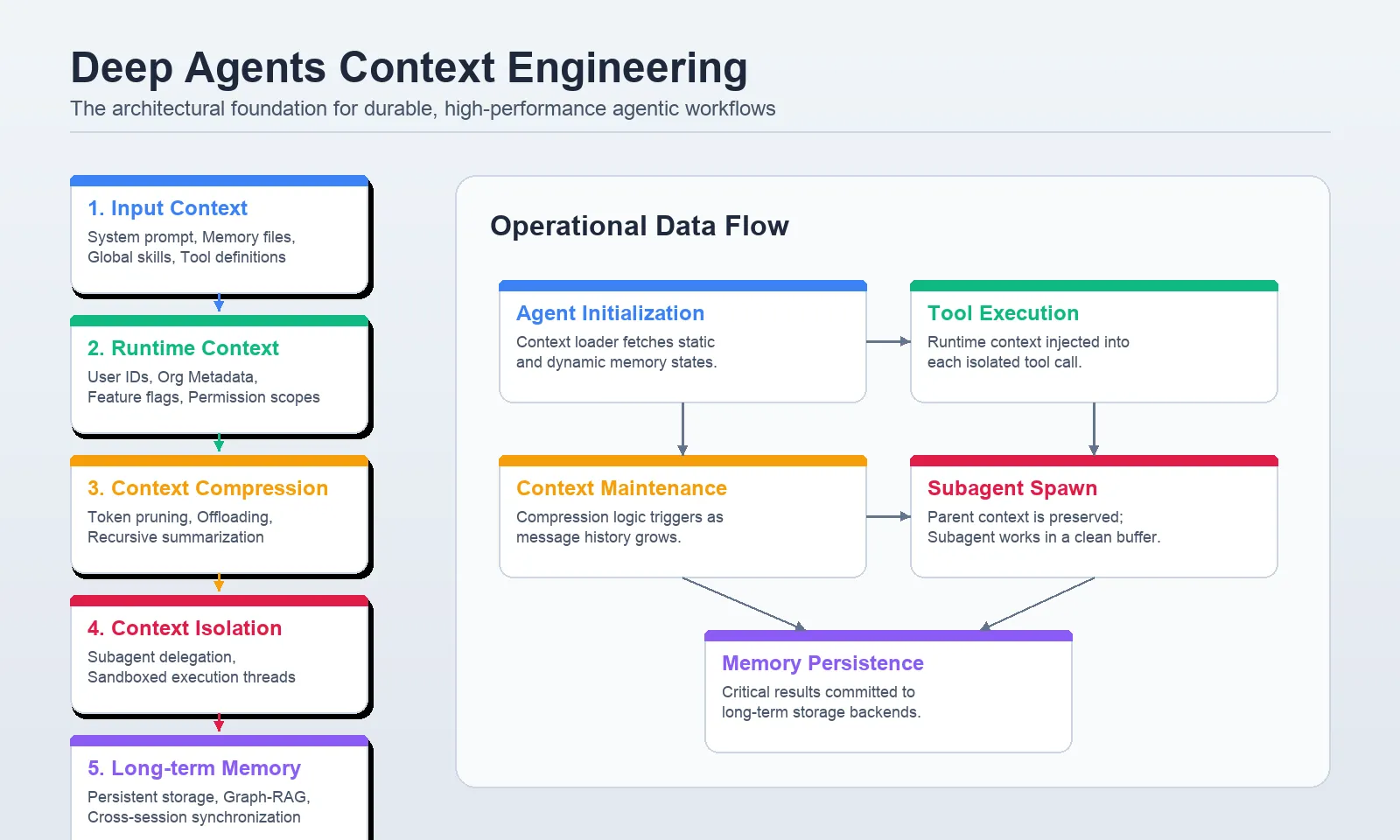
Context in Deep Agents is not that of the chat history alone. Some context is loaded into the system prompt at startup. Part is handed over at the time of invocation. Part of it is automatically compressed when the working set of the agent becomes too big. A part is confined within subagents. Others is carried over between conversations using the virtual filesystem and store-backed memory. The documentation is clear that they are separate mechanisms with separate scopes and that is what makes deep agents usable in production.
The five layers are:
Let’s construct every one right.
You will require Python 3.10 or later, the deepagents package and a supported model provider. In case you want to use live web search or hosted tools, configure the provider API keys in your environment. The official quickstart supports provider setups to Anthropic, OpenAI, Google, OpenRouter, Fireworks, Baseten and Ollama.
!pip install -U deepagents langchain langgraph Input context refers to all that the agent perceives at initiation as part of its constructed system prompt. That contains your custom system prompt, memory files like AGENTS.md, skills loaded based on SKILL.md, and tool prompts based on built-in or custom tools in the Deep Agents docs. The docs also reveal that the complete assembled system prompt contains inbuilt planning advice, filesystem tool advice, subagent advice, and optional middleware prompts. That is, what you custom prompt is is just one component of what the model gets.
That design matters. It does not imply that you will hand concatenate your agent prompt, memory file, skills file and tool help into a single large string. Deep Agents already understands how to construct such a structure. It is your task to place the appropriate content in the appropriate channel.
Request the system prompt on the role of the agent, tone, boundaries and top-level priorities. The documentation indicates that system prompt is immutable and in case you want it to be different depending on the user or request, you should use dynamic prompt middleware rather than editing prompt strings directly.
Memory files like AGENTS.md are always loaded when configured. The docs suggest that memory should be used to store stable conventions, user preferences or critical instructions which should be used throughout all conversations. Since memory is always injected, it must remain short and high-signal.
Skills are reusable workflows which are only partially applicable. Deep Agents loads the skill frontmatter on startup, and only loads the full skill body when it determines the skill applies. The pattern of progressive disclosure is among the simplest methods of minimizing token waste without compromising ability.
The metadata of the tool is included in the prompt that the model is reasoning about. The docs suggest giving names to tools in clear language, write descriptions indicating when to use them, and document arguments in a manner that can be understood by the agent and so, they can select the tools appropriately.
The First lab develops a simple yet realistic project manager agent. It has a fixed place, a fixed memory file of conventions and an ability to do weekly reporting.
Project structure
project/
├── AGENTS.md
├── skills/
│   └── weekly-report/
│       └── SKILL.md
└── agent_setup.py
AGENTS.md
## Role
You are a project manager agent for Acme Corp.## Conventions
- Always reference tasks by task ID, such as TASK-42
- Summarize status in three words or fewer
- Never expose internal cost data to external stakeholders
skills/weekly-report/SKILL.md
---
name: weekly-report

description: Use this skill when the user asks for a weekly update or status report.
---

# Weekly report workflow
1. Pull all tasks updated in the last 7 days.
2. Group them by status: Done, In Progress, Blocked.
3. Format the result as a markdown table with owner and task ID.
4. Add a short executive summary at the top.
agent_setup.py
from pathlib import Path
from IPython.core.display import Markdown
from deepagents import create_deep_agent
from deepagents.backends import FilesystemBackend
from langchain.tools import tool

ROOT = Path.cwd().resolve().parent

@tool
def get_blocked_tasks() -> str:
    """Return blocked tasks for the current project."""
    return """
TASK-17 | Blocked | Priya | Waiting on API approval
TASK-23 | Blocked | Omar  | Vendor dependency
TASK-31 | Blocked | Mina  | Test environment unstable
""".strip()

agent = create_deep_agent(
    model="openai:gpt-4.1",
    system_prompt="You are Acme Corp's project manager agent.",
    tools=[get_blocked_tasks],
    memory=["./AGENTS.md"],
    skills=["./skills/"],
    backend=FilesystemBackend(root_dir=str(ROOT), virtual_mode=True),
)

result = agent.invoke(
    {
        "messages": [
            {"role": "user", "content": "What tasks are currently blocked?"}
        ]
    }
)

Markdown(result["messages"][-1].content[0]["text"])
Output:
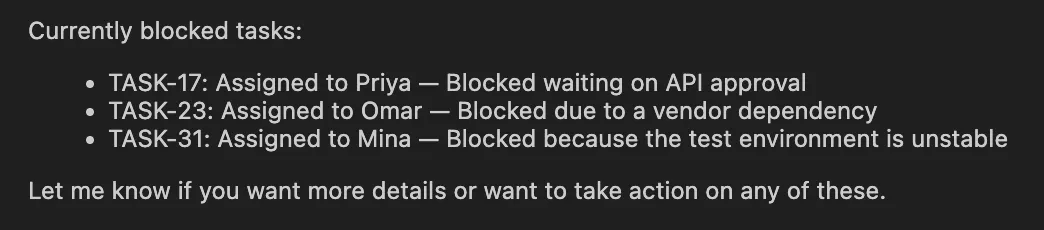
This variant coincides with the recorded Deep Agents pattern. Memory is proclaimed with memory=… and skills with skills=… and a backend provides access to those files by the agent. The agent will never get optimistic about the contents of AGENTS.md, but fully load SKILL.md on occasions when it finds it necessary to do so, i.e. when the weekly-report workflow is in play.
The moral of the story is easy. Fix lasting laws in mind. Locate reusable and non-constant workflows in skills. Maintain a system that is behaviorally and identity oriented. A single separation already aids a good deal of timely bloat.
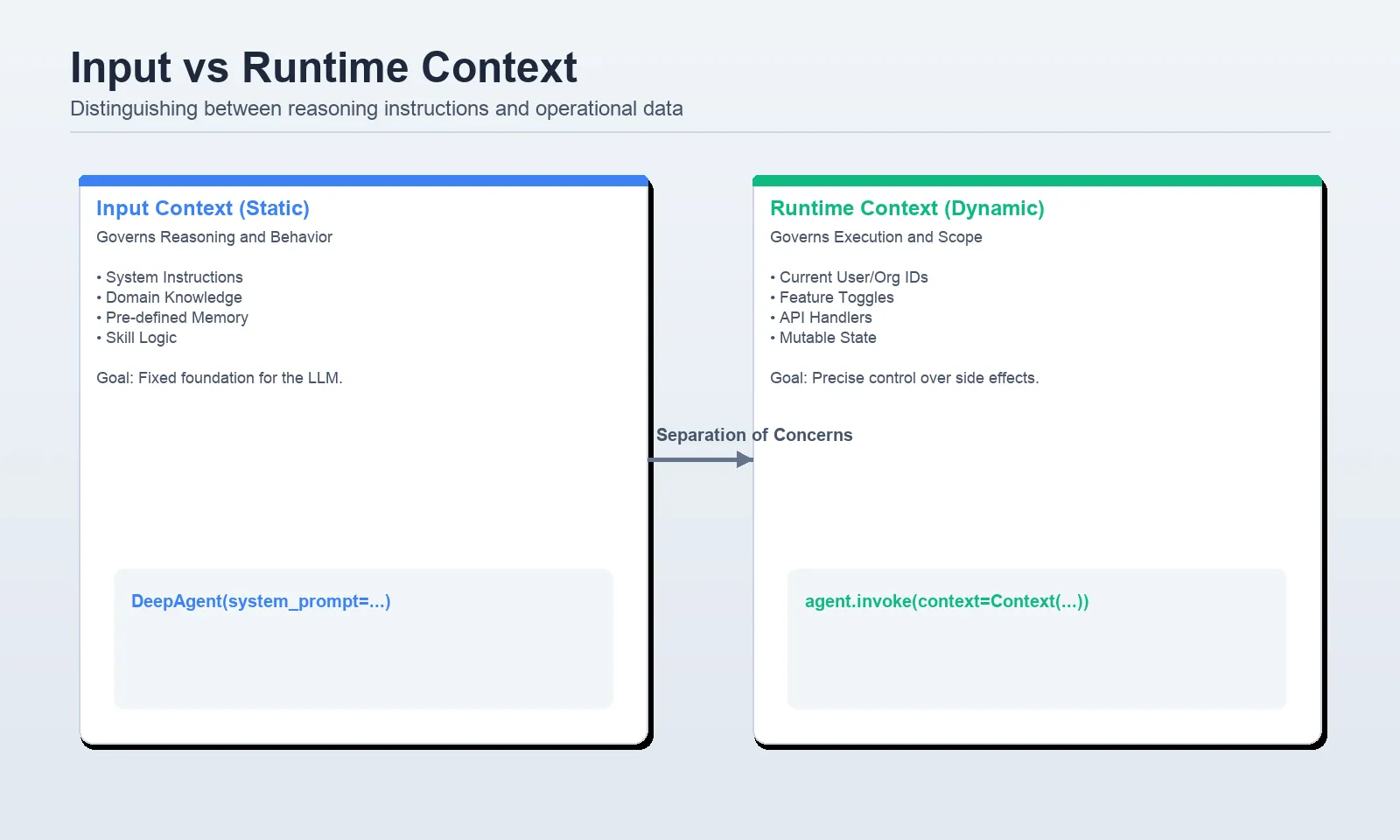
The data that you pass during invocation time is the runtime context. Another important fact that is made very clear by the docs is that the runtime context is not automatically presented to the model. Only is it seen whether tools or middleware explicitly read it and surface it. It is the right place, then, to keep user IDs, roles, feature flags, database handles, API keys, or anything that is operational but not to be found in a prompt.
The pattern that is currently suggested is to specify a context_schema, and invoke the agent with context=…, and to access those values within tools with ToolRuntime. The docs of the LangChain tools also mention that runtime is the appropriate injection point of execution information, context, access to a store, and other relevant metadata.
from openai import api_key
from dataclasses import dataclass
import os
from IPython.core.display import Markdown
from deepagents import create_deep_agent
from langchain.tools import tool, ToolRuntime

@dataclass
class Context:
    user_id: str
    org_id: str
    db_connection_string: str
    weekly_report_enabled: bool

@tool
def get_my_tasks(runtime: ToolRuntime[Context]) -> str:
    """Return tasks assigned to the current user."""
    user_id = runtime.context.user_id
    org_id = runtime.context.org_id
    # Replace this stub with a real query in production.
    return (
        f"Tasks for user={user_id} in org={org_id}\n"
        "- TASK-12 | In Progress | Finish onboarding flow\n"
        "- TASK-19 | Blocked | Await legal review\n"
    )

agent = create_deep_agent(
    model="openai:gpt-4.1",
    tools=[get_my_tasks],
    context_schema=Context,
)

result = agent.invoke(
    {
        "messages": [
            {"role": "user", "content": "What tasks are assigned to me?"}
        ]
    },
    context=Context(
        user_id="usr_8821",
        org_id="acme-corp",
        db_connection_string="postgresql://localhost/acme",
        weekly_report_enabled=True,
    ),
)

Markdown(result["messages"][-1].content[0]["text"])
Output:
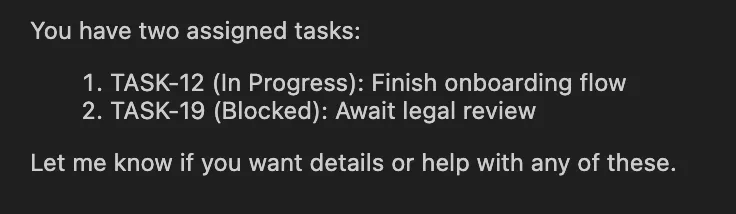
This is the clean cut that you desire in production. The model can invoke get my tasks but the real userid and orgid remain in the runtime context rather than being pushed onto the system prompt or chat history. It is much safer and easier to reason about, during debugging of permissions and data flow.
One rule is as follows: When the model ought to reason about a fact directly, put it in prompt-space. To leave it in runtime context in case your tools require it to be in operational state.
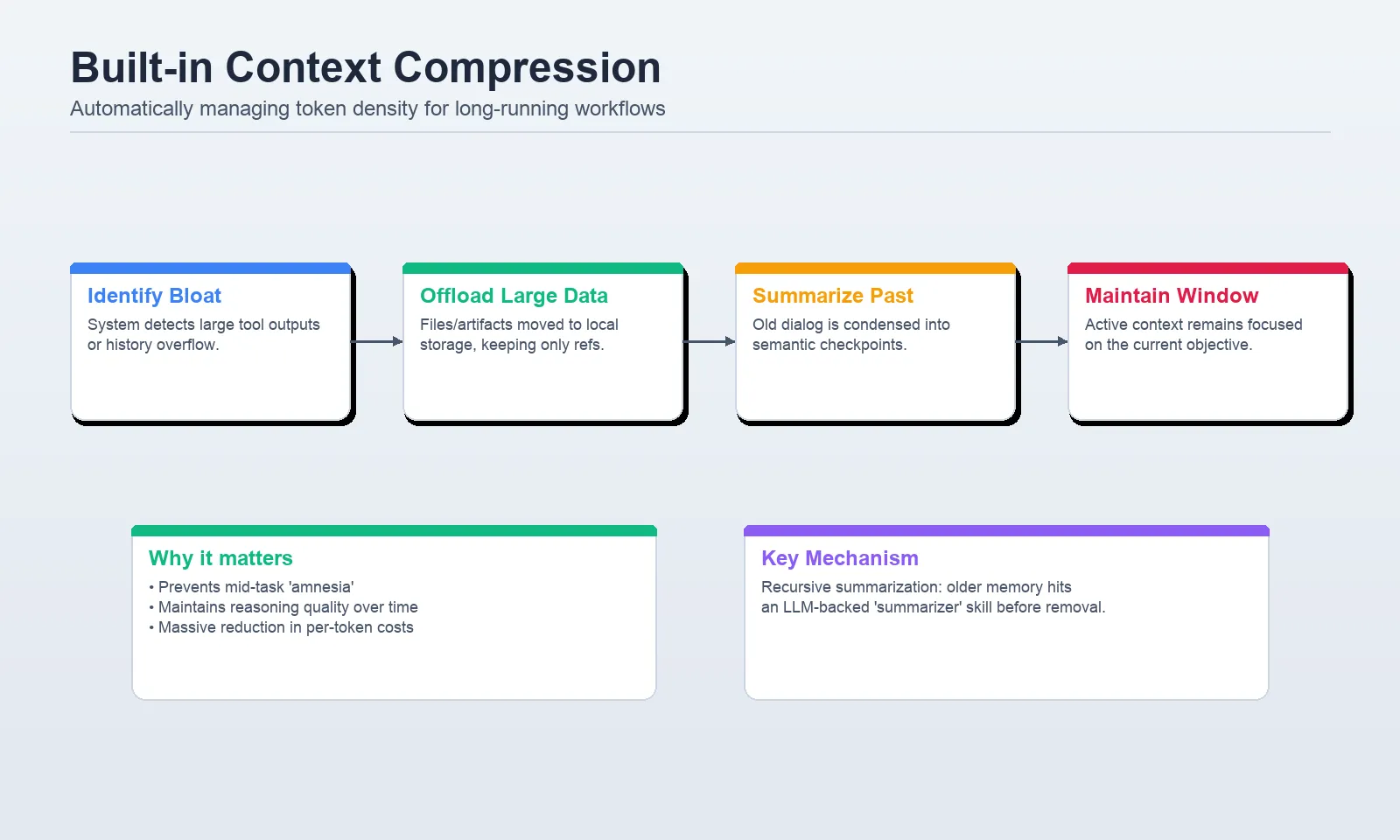
Tasks that are long-running generate two issues quickly: huge tool outputs and lengthy histories. Deep Agents supports them both with inbuilt context compression. The two native mechanisms, offloading and summarization, are described in the docs. Unloads stores with large tool inputs and replicates them with references in the filesystem. Summarization is used to reduce the size of older messages as the agent nears the context constraint of the model.
According to the context engineering docs, content offloading occurs when the tool call inputs or outputs surpass a token threshold, with default threshold being 20,000 tokens. Huge historical tools data are substituted with references to the files that have been persisted so that the agent can access it later when required.
In case the active context becomes excessively large, Deep Agents summarizes older parts of the conversation to continue with the task without surpassing the window of the model. It also has an optional summarization tool middleware, which allows the agent to summarize on more interesting boundaries, e.g., between task phases, rather than just at the automatic threshold.
from deepagents import create_deep_agent
from IPython.core.display import Markdown

def generate_large_report(topic: str) -> str:
    """Generate a very detailed report on vector database tradeoffs."""
    # Simulate a large tool result
    return ("Detailed report about " + topic + "\n") * 5000

agent = create_deep_agent(
    model="openai:gpt-4.1-mini",
    tools=[generate_large_report],
)

result = agent.invoke(
    {
        "messages": [
            {
                "role": "user",
                "content": "Generate a very detailed report on vector database tradeoffs.",
            }
        ]
    }
)

Markdown(result["messages"][-1].content[0]["text"])
Output:
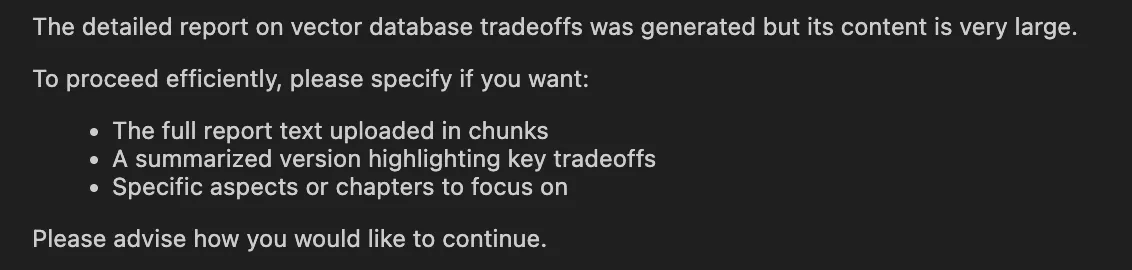
In a setup like this, Deep Agents handles the heavy lifting. If the tool output becomes large enough, the framework can offload it to the filesystem and keep only the relevant reference in active context. That means you should start with the built-in behavior before inventing your own middleware.
If you want proactive summarization between stages, use the documented middleware:
from deepagents import create_deep_agent
from deepagents.backends import StateBackend
from deepagents.middleware.summarization import create_summarization_tool_middleware

agent = create_deep_agent(
    model="openai:gpt-4.1",
    middleware=[
        create_summarization_tool_middleware("openai:gpt-4.1", StateBackend),
    ],
)
That adds an optional summarization tool so the agent can compress context at logical checkpoints instead of waiting until the window is nearly full.
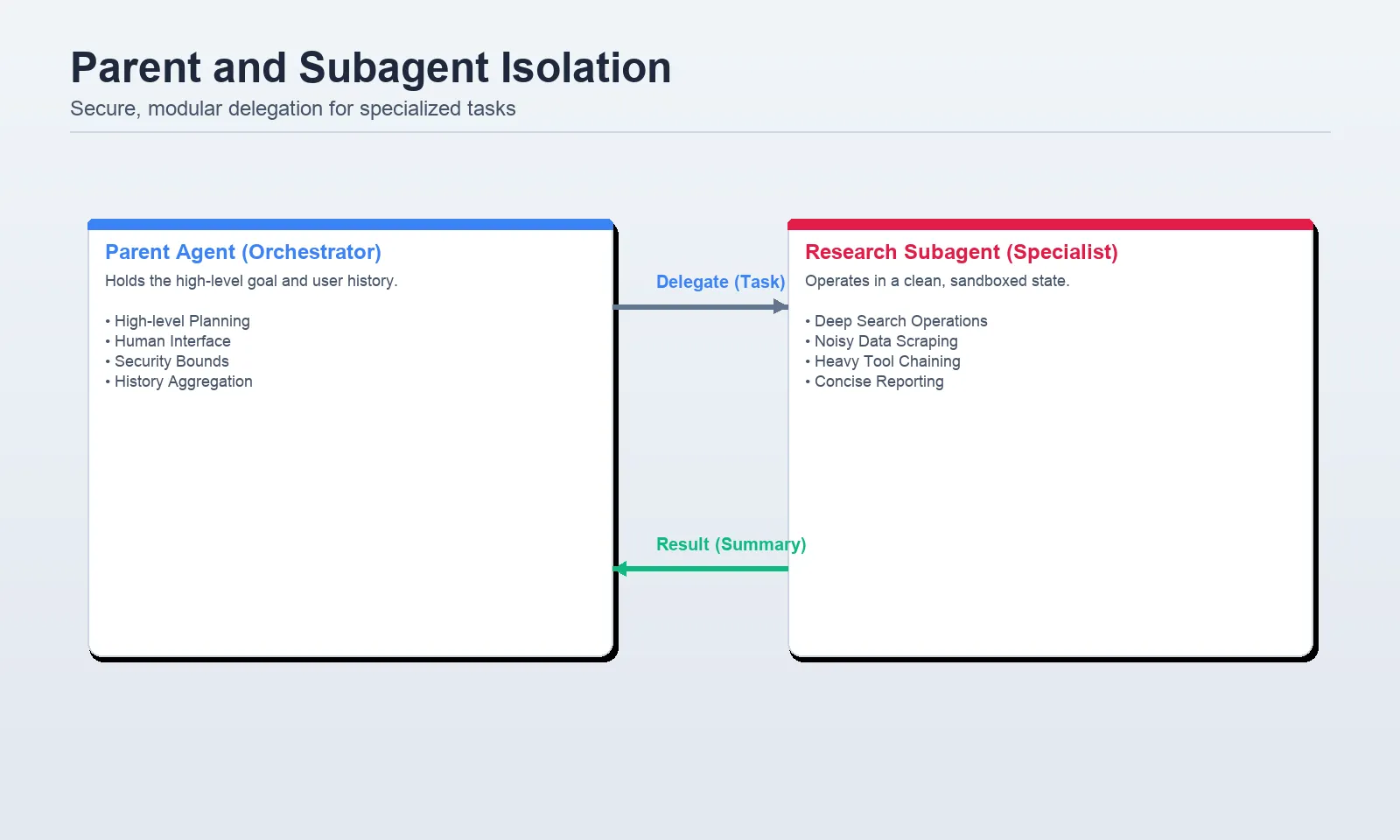
Subagents are available to maintain the primary agent clean. The docs suggest them in multi-step work that would otherwise litter the parent context, in specific areas, and in work that might require a different toolset or model. They clearly suggest that they are not to be used in one-step tasks or tasks where the parents intermediate reasoning will still be within the scope.
The Deep Agents pattern is currently to declare subagents with the subagents= parameter. In the majority of applications, they can be represented as a dictionary with a name, description, system prompt, tools and optional model override as each subagent.
from deepagents import create_deep_agent
from IPython.core.display import Markdown

def internet_search(query: str, max_results: int = 5) -> str:
    """Run a web search for the given query."""
    return f"Search results for: {query} (top {max_results})"

research_subagent = {
    "name": "research-agent",
    "description": "Use for deep research and evidence gathering.",
    "system_prompt": (
        "You are a research specialist. "
        "Research thoroughly, but return only a concise summary. "
        "Do not return raw search results, long excerpts, or tool logs."
    ),
    "tools": [internet_search],
    "model": "openai:gpt-4.1",
}

agent = create_deep_agent(
    model="openai:gpt-4.1",
    system_prompt="You coordinate work and delegate deep research when needed.",
    subagents=[research_subagent],
)

result = agent.invoke(
    {
        "messages": [
            {
                "role": "user",
                "content": "Research best practices for retrieval evaluation and summarize them.",
            }
        ]
    }
)

Markdown(result["messages"][-1].content[0]["text"])
Output:
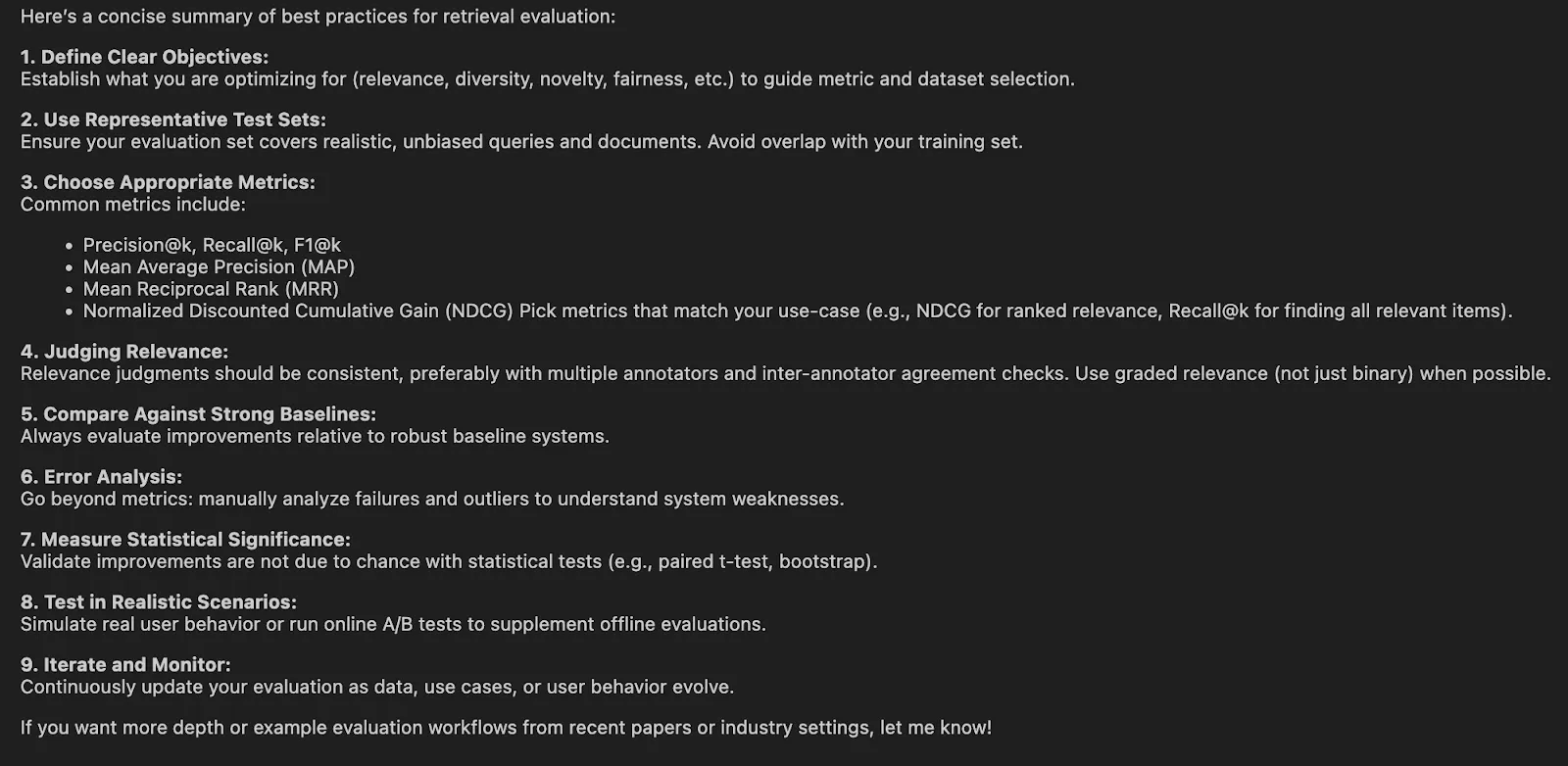
Delegation is not the key to good subagent design. It is containment. The subagent is not supposed to give the raw data, but a concise answer. Otherwise, you lose all the overhead of isolation without having any context savings.
The other noteworthy fact mentioned in the documents is that runtime context is propagated to subagents. When the parent has an existing user, org or role in the runtime context, the subagent inherits it as well. That is why subagents are a lot more convenient to work with in real systems since you do not need to re-enter the same data in every place manually.
Long-term memory is where Deep Agents becomes much more than a fancy prompt wrapper. The docs describe memory as persistent storage across threads through the virtual filesystem, usually routed with StoreBackend and often combined with CompositeBackend so different filesystem paths can have different storage behavior.
This is what most examples err at wrongly. It should have a route to a backend such as StoreBackend and not to a raw store object. The store itself is exchanged to form create deep_agent(...). The paths of the memory files are defined in memory=[…], which can be then loaded automatically into the system prompt.
The memory docs further clarify that there are other dimensions to memory other than storage. You must consider length, type of information, coverage, and updating plan. Practically, the most critical choice is scope: Is it going to be per-user, per-agent, or an organization-wide memory?
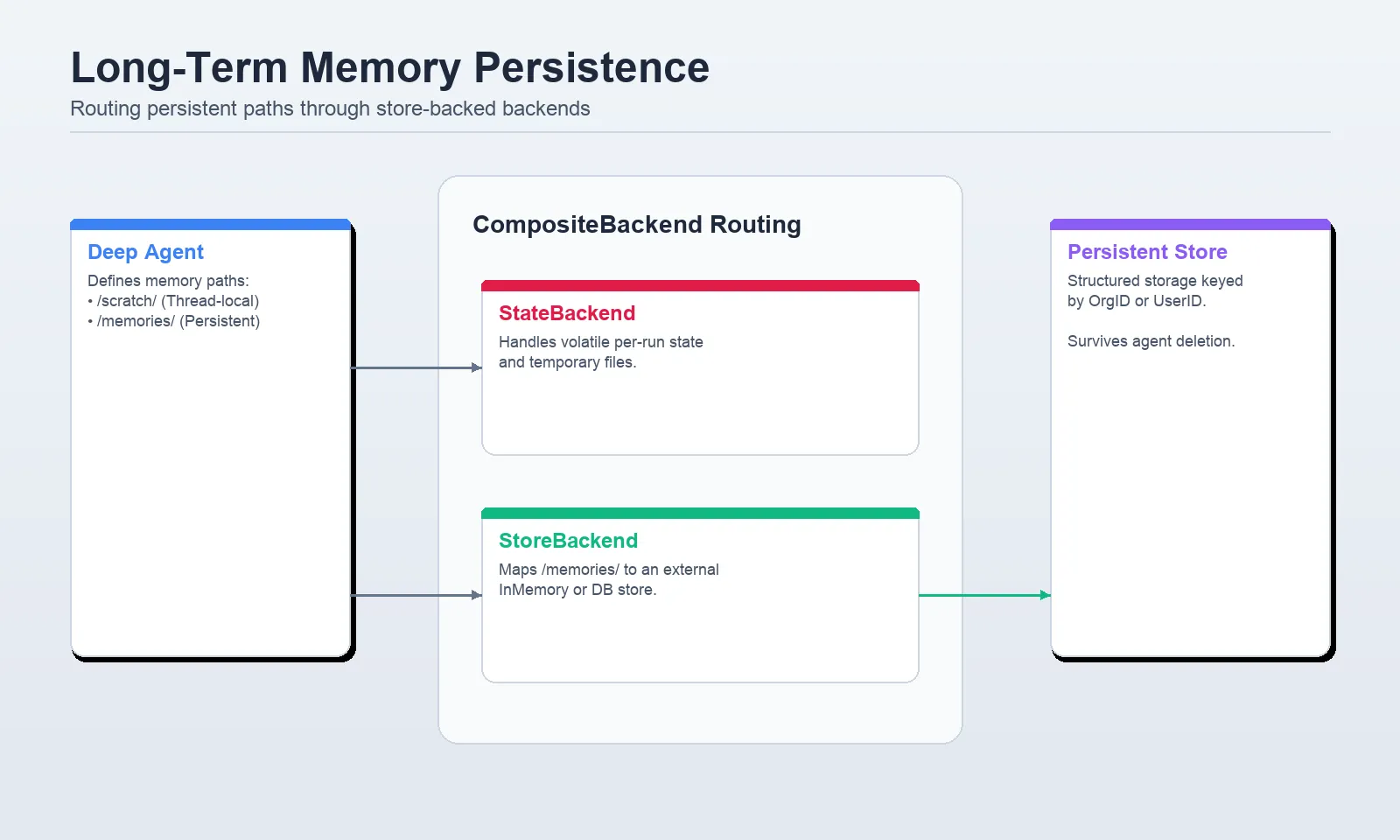
CompositeBackend to send scratch data to StateBackend and /memories/ paths to StoreBackend. from dataclasses import dataclass
from IPython.core.display import Markdown
from deepagents import create_deep_agent
from deepagents.backends import CompositeBackend, StateBackend, StoreBackend
from deepagents.backends.utils import create_file_data
from langgraph.store.memory import InMemoryStore
from langchain_core.utils.uuid import uuid7
@dataclass
class Context:
user_id: str
store = InMemoryStore()
# Seed memory for one user
store.put(
("user-alice",),
"/memories/preferences.md",
create_file_data("""## Preferences
- Keep responses concise
- Prefer Python examples
"""),
)
agent = create_deep_agent(
model="openai:gpt-4.1-mini",
memory=["/memories/preferences.md"],
context_schema=Context,
backend=lambda rt: CompositeBackend(
default=StateBackend(rt),
routes={
"/memories/": StoreBackend(
rt,
namespace=lambda ctx: (ctx.runtime.context.user_id,),
),
},
),
store=store,
system_prompt=(
"You are a helpful assistant. "
"Use memory files to personalize your answers when relevant."
),
)
result = agent.invoke(
{
"messages": [
{"role": "user", "content": "How do I read a CSV file in Python?"}
]
},
config={"configurable": {"thread_id": str(uuid7())}},
context=Context(user_id="user-alice"),
)
Markdown(result["messages"][-1].content[0]["text"])Output:
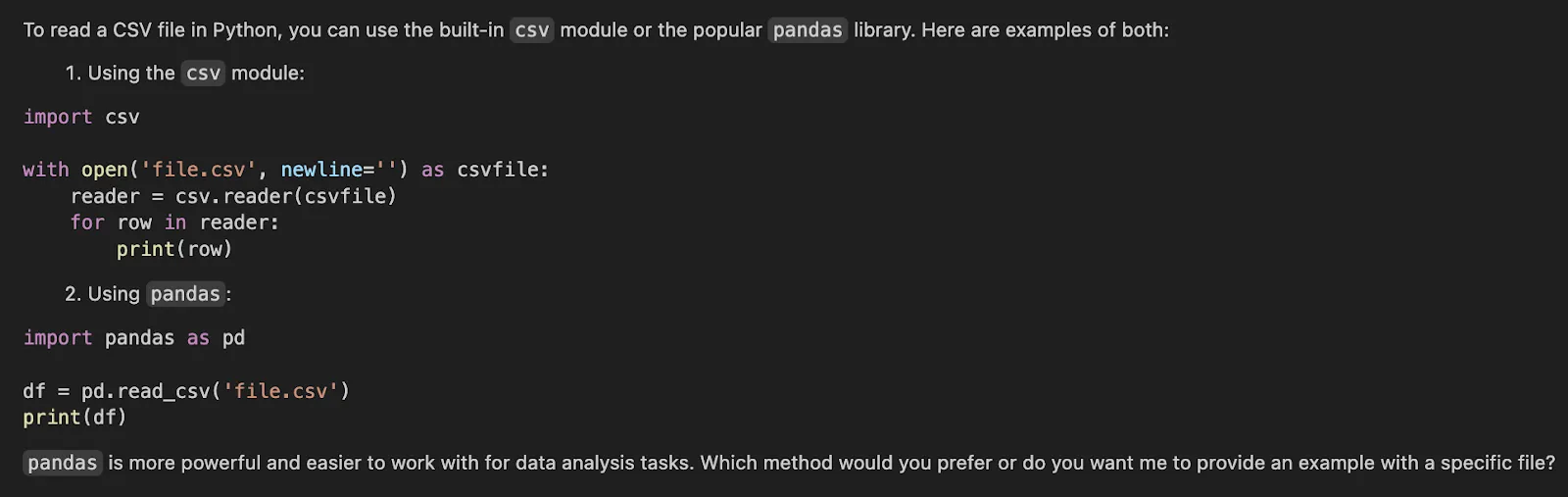
There are three significant things that this setup does. It loads a memory file to the agent. It sends /memories/ to persistent store-backed storage. And it is namespace isolated per user by using user_id as the namespace. This is the correct default with most multi-user systems since it does not allow memory to leak between users.
When you require organizational memory that you share, you should use a different namespace and frequently a different path like /policies or /org-memory. When you require agent level shared procedural memory, then use agent specific namespace. However, user scope is the most secure starting point, in terms of user preferences and customized behavior.
The existing documentation implicitly cautions against some of the typical pitfalls, and they cannot hurt to be explicit.
Deep Agents are not effective since they possess lengthy prompts. They are strong since they allow you to decouple context by role and lifecycle. Cross-thread memory, per-run state, startup instructions, compressed history, and delegated work are a few other things. Deep Agents framework provides you with a clean abstraction of each. When you directly use those abstractions rather than debugging around them, your agents are simpler to debug, cheaper to execute, and more reliable to use in real workloads.
That is the actual art of context engineering. It does not matter about providing more context. It is giving the agent just the context that it requires, just where it is required.
Q1. What is context engineering in Deep Agents?
A. It is the procedure of giving AI agents the correct information. This is provided in the appropriate format and at the opportune moment. It directs their actions and makes them accomplish any task.
Q2. Why is context important for Deep Agents?
A. Context plays an important role since it helps agents to stay focused. It assists them in not being irrelevant. It also makes sure that they get requisite data. This results into effective and dependable performance of tasks.
Q3. What are the benefits of subagents in managing context?
A. Subagents are context isolating. They tackle intricate output-intensive jobs within their very distinct setting. This ensures that the memory of the main agent is clean and objective towards its main goals.
Harsh Mishra is an AI/ML Engineer who spends more time talking to Large Language Models than actual humans. Passionate about GenAI, NLP, and making machines smarter (so they don’t replace him just yet). When not optimizing models, he’s probably optimizing his coffee intake. 🚀☕
此内容由惯性聚合(RSS阅读器)自动聚合整理,仅供阅读参考。 原文来自 — 版权归原作者所有。