



惯性聚合 高效追踪和阅读你感兴趣的博客、新闻、科技资讯
阅读原文 在惯性聚合中打开

推荐订阅源

WordPress大学
WordPress大学
T
Threatpost
IT之家
IT之家
腾讯CDC
博客园 - 【当耐特】
博客园 - 聂微东
月光博客
月光博客
小众软件
小众软件
博客园 - 三生石上(FineUI控件)
让小产品的独立变现更简单 - ezindie.com
酷 壳 – CoolShell
酷 壳 – CoolShell
奇客Solidot–传递最新科技情报
奇客Solidot–传递最新科技情报
博客园 - Franky
博客园 - 叶小钗
S
Security @ Cisco Blogs
雷峰网
雷峰网
N
News and Events Feed by Topic
Attack and Defense Labs
Forbes - Security
Forbes - Security
Application and Cybersecurity Blog
S
SegmentFault 最新的问题
NISL@THU
NISL@THU
Exploit-DB.com RSS Feed
L
Lohrmann on Cybersecurity
Project Zero
Project Zero
www.infosecurity-magazine.com
宝玉的分享
宝玉的分享
阮一峰的网络日志
阮一峰的网络日志
The Last Watchdog
The Last Watchdog
Apple Machine Learning Research
W
WeLiveSecurity
C
Cisco Blogs
T
Tenable Blog
Schneier on Security
爱范儿
爱范儿
美团技术团队
V2EX - 技术
V2EX - 技术
V
V2EX
Google Online Security Blog
Last Week in AI
Last Week in AI
Security Archives - TechRepublic
The Hacker News
The Hacker News
Recent Commits to openclaw:main
S
Schneier on Security
T
The Exploit Database - CXSecurity.com
博客园_首页
H
Hacker News: Front Page
量子位
N
News | PayPal Newsroom
大猫的无限游戏
大猫的无限游戏

Analytics Vidhya

Handling Imbalanced Classification: What Works Better Than SMOTE GPT-5.6 Is Here: Sol, Terra, and Luna Loop Engineering for AI Agents: How /loop is Changing AI Workflows DeepSeek DSpark: The Speculative Decoding Trick Behind 400% Faster LLM OKF: Redefining Knowledge Bases for AI Agents Modern VLMs Explained: How GPT-4o, Gemini, Claude Vision, and Qwen-VL Work YOLO26 Tutorial: Object Detection, Pose Estimation & More Large Action Models (LAMs) vs Agentic LLMs: What's the Real Difference? Claude Sonnet 5: The Fable 5 at Home The Best $20 AI Plan: ChatGPT Plus vs Claude Pro vs Gemini Pro GraphRAG vs Vector RAG: Which Retrieval Method is Best? Using AI When You Don’t Trust AI The Self-Improving Loop in AI Agents: Architecture, Benefits, and How it Outperforms Traditional Agent Workflows Harness-1: The 20B Retrieval Subagent That Beats GPT-5.4 at Search Sakana Fugu: Multi-Agent System as a Model Claude's Hidden Art Skill: Making Illustrations With Code System Design for ML Interviews: 10 Real Problems Walked Through Most People Use ChatGPT Wrong: 10 Features and Tips That Changed How I Work OpenAI Just Launched 3 Free AI Courses with Certificates Autoregressive Models: Predicting the Future Using the Past Gemini Omni: AI Video Generation Inside Gemini DiffusionGemma: Google’s Diffusion-Based Open Model for Faster Text Generation Top 10 AI Engineering Tools Everyone is Using in 2026 I Tested Claude Fable 5: Can Anthropic’s Newest AI Deliver on the Hype? Prophet vs NeuralProphet vs TimeGPT vs Chronos: A Practical Comparison Build an Emergency Helpline Voice Agent with LangChain Choosing the Right Vector Database for RAG and AI Applications Google Gemma 4 12B: Architecture, Benchmarks, Access, and Hands-on Guide for Developers How to Choose the Right AI Model for Your Needs Agent Observability with LangSmith, Langfuse, and Arize: A Hands-On Comparison How to Use Claude Managed Agents? Google AI Studio vs Gemini App: What’s the Difference? AI Workflows for Sales Teams: Prospect Research, Lead Qualification, and CRM Updates on Autopilot Using LangGraph 25 Most Influential AI Pioneers to Meet at DataHack Summit 2026 Claude Opus 4.8: A Smarter Model in the Right Direction PySpark Optimization: 12 Proven Techniques to Speed Up Your Spark Jobs 10 Everyday Tasks You Can Automate with AI Today (With n8n Templates) Google Antigravity 2.0: The Full Developer Guide (I/O 2026) Build a Claude Cowork-Like Browser Agent Using Playwright MCP and Claude Desktop Pandas vs Polars vs DuckDB: Which Library Should You Choose? Qwen3.7-Max: Alibaba’s New Agent-First LLM for Coding, Reasoning, and Long-Horizon AI Workflows The Biggest Announcements from Google I/O 2026 Top 9 AI Events and Conferences in 2026 that you Must Attend Gemini 3.5 Flash: Frontier Intelligence with Speed Kimi WebBridge: Hands-on Guide to Kimi’s Browser Extension for AI Agents 40 Advanced SQL Window Functions Every Data Scientist Must Know(with examples) Top 10 AI Research Papers of 2025 6 Steps to Crack GenAI Case Study Interviews (With Real Examples) OpenAI Omni Moderation: How to Filter Text & Images for Free DataHack Summit 2026: You Just Cannot Skip This AI Event of the Year OpenAI’s New API Voice Models Will Change the Way You Use AI Hermes Agent Guide: What is it and How to Use it? Top 10 LLM Research Papers of 2026 Agent Memory Patterns in Cognitive Science and AI Systems 10 AI Agents Every AI Engineer Must Build (with GitHub Samples) 23 Tips for Smart Claude Code Token Saving and Workflow Optimization Feature Engineering with LLMs: Techniques & Python Examples ChatGPT is Now Inside Excel and Google Sheets: Here is How to Use it Gemini API File Search: The Easy Way to Build RAG Top 10 Open-Source Libraries to Fine-Tune LLMs Locally ML Intern in Practice: From Prompt to a Shipped Hugging Face Model 15+ Solved Agentic AI Projects with Github Links How People are Figuring Out Life With Claude MemPalace Explained: Building Long-Term Memory for AI Agents Beyond RAG Grok Voice Think Fast 1.0: Build Voice AI Agents That Actually Think Compressing LSTM Models for Retail Edge Deployment: A Practical Comparison MCP vs Agent Skills: Different Altogether GPT 5.5 vs Opus 4.7: Which is the Best AI Model Today? What is Agentic AI? Claude Code vs Codex: A Detailed Terminal Agent Comparison Google Deep Research Max: Build Autonomous AI Research Agents in Minutes Meta Muse Spark Review: Is It Worth the Hype? ChatGPT Images 2.0 vs Nano Banana 2: Which is Better? Cursor V3 Explained: The AI Coding Agent That’s Replacing Traditional IDEs in 2026 DeepSeek-V4: The Most Powerful Open-Source Model Ever Is GPT Image 2 the Best Image Generation Model? Token Economics: Why AI is Getting “Cheaper” Opus 4.7 vs Opus 4.6: Should You Switch? Build Human-Like AI Voice App with Gemini 3.1 Flash TTS How to Structure a Claude Code Project that Thinks Like an Engineer Gemma 4 Tool Calling Explained: Build AI Agents with Function Calling (Step-by-Step Guide) Anthropic Launches Claude Opus 4.7 For “Most Difficult Tasks” Top 28 Claude Shortcuts that will 10X your Speed GPT-5.4-Cyber: Why OpenAI is Keeping its Most Powerful Model Under Lock and Key Google AI Studio Guide: Every Feature Explained Mastering Deep Agents: Context Engineering that Actually Works 21 Computer Vision Projects from Beginner to Advanced (2026 Guide) Excel 101: Excel Agent Mode Explained MiniMax M2.7 Goes Open-Weight to Let You Run Agents Locally Top 10 Gemma 4 Projects That Will Blow Your Mind GLM-5.1: Architecture, Benchmarks, Capabilities & How to Use It Understanding BERTopic: From Raw Text to Interpretable Topics From Karpathy’s LLM Wiki to Graphify: AI Memory Layers are Here 10 Most Important AI Concepts Explained Simply Project Glasswing is World’s Most Powerful AI in Action How to Run Gemma 4 on Your Phone Without Internet: A Hands-On Guide Running Claude Code for Free with Gemma 4 and Ollama LLM Wiki Revolution: How Andrej Karpathy’s Idea is Changing AI Rethinking Enterprise Search: How Cortex Search Turns Data into Business Impact Google’s Gemma 4: Is it the Best Open-Source Model of 2026?
From Idea to Output: Claude Does the Design Work
Riya Bansal · 2026-04-22 · via Analytics Vidhya

Design has traditionally required multiple roles working in sequence: a strategist to define the problem, a designer to shape the solution, and a developer to build it. This means coordinating timelines, aligning opinions, and going through rounds of iteration before anything tangible is created.

Claude Design removes much of this friction by turning ideas directly into working outputs. What once took weeks can now happen in minutes. In this article, we break down how Claude design works and walk through real examples from idea to a final prototype.

What is Claude Design?

Claude Design lets Anthropic’s system produce real visual and functional outputs, not just descriptions. Most AI tools act like consultants, offering suggestions. Claude actually builds. It can generate animated presentation exports, send UI designs to Canva, and even create full React apps with authentication and payments.

The key difference is how it thinks: Claude approaches design like a senior designer, evaluating multiple factors in a single pass. Its capabilities are structured across three core layers:

  • Visual design: The system creates design elements which include layout components and color systems and typeface design and space distribution and component design elements.  
  • Content design: The system creates a narrative structure which includes copywriting and information hierarchy design.  
  • Functional design: The system uses operational code to create interactive prototypes which connect to back-end systems.  

Most tools exist only on one operational layer. Claude operates concurrently through all three operational layers. 
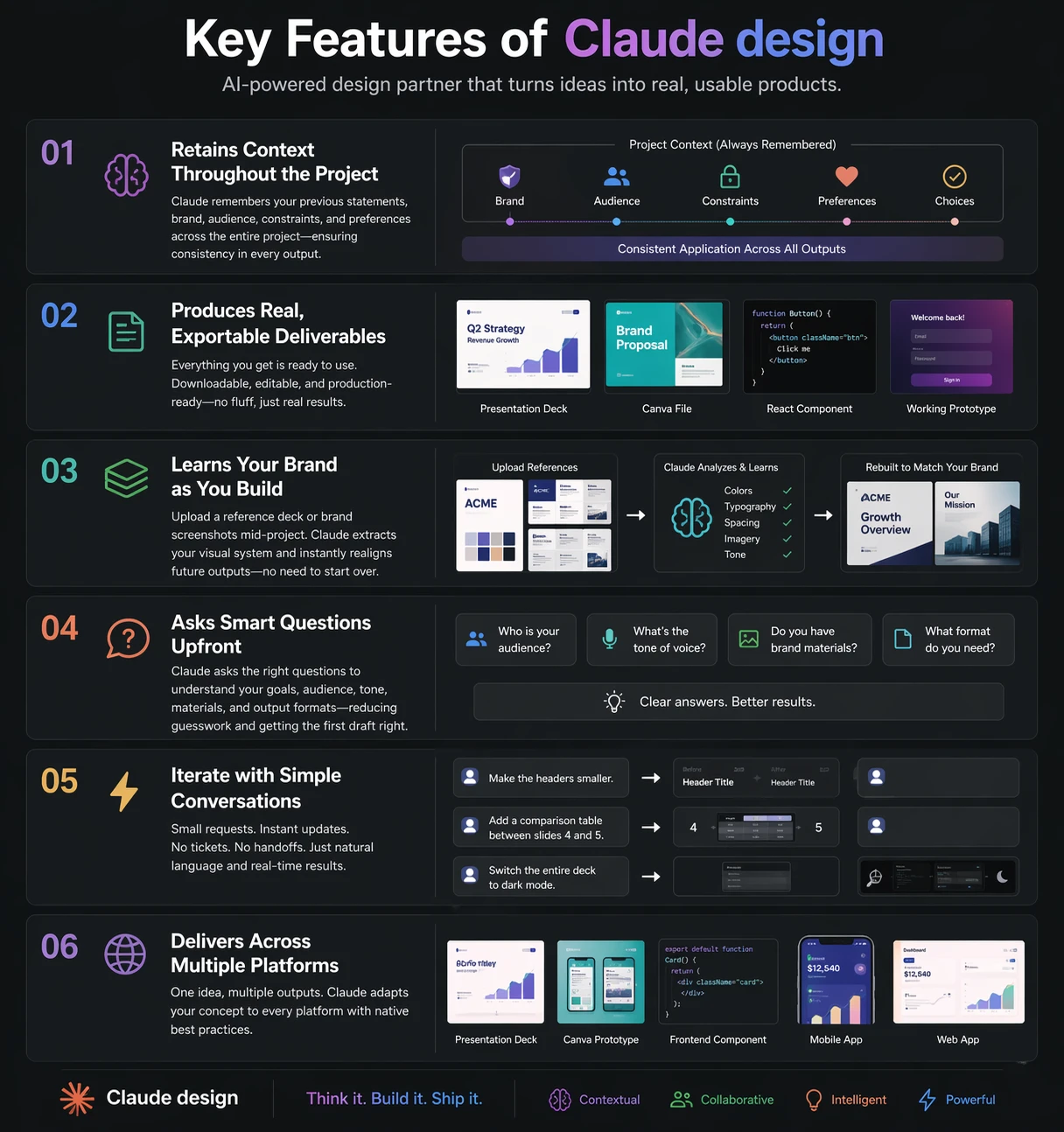
Key Features of Claude Design

How It Works?

The procedure is straightforward, and the next steps will help you understand how things work.  

  1. Start by explaining the idea in plain language. Even a short sentence works, though a bit more context helps. Claude can take minimal input and still produce something useful.
  2. It will then ask a few quick clarifying questions around audience, tone, format, and constraints. This takes a couple of minutes but saves hours of back-and-forth later.
  3. Next, Claude creates a rough plan before building anything. It thinks through structure first, so the output isn’t random or scattered.
  4. From there, it generates the full output in one go. That could mean writing content, designing layouts, or even building a working prototype.
  5. You can iterate as much as needed. Just give feedback in plain language and it will adjust across the entire output, including brand changes.
  6. Finally, the work is exported in whatever format you need, whether that’s a presentation, code, design file, or something more interactive.

Getting Started with Claude design

A user can access the claude design via following steps: 
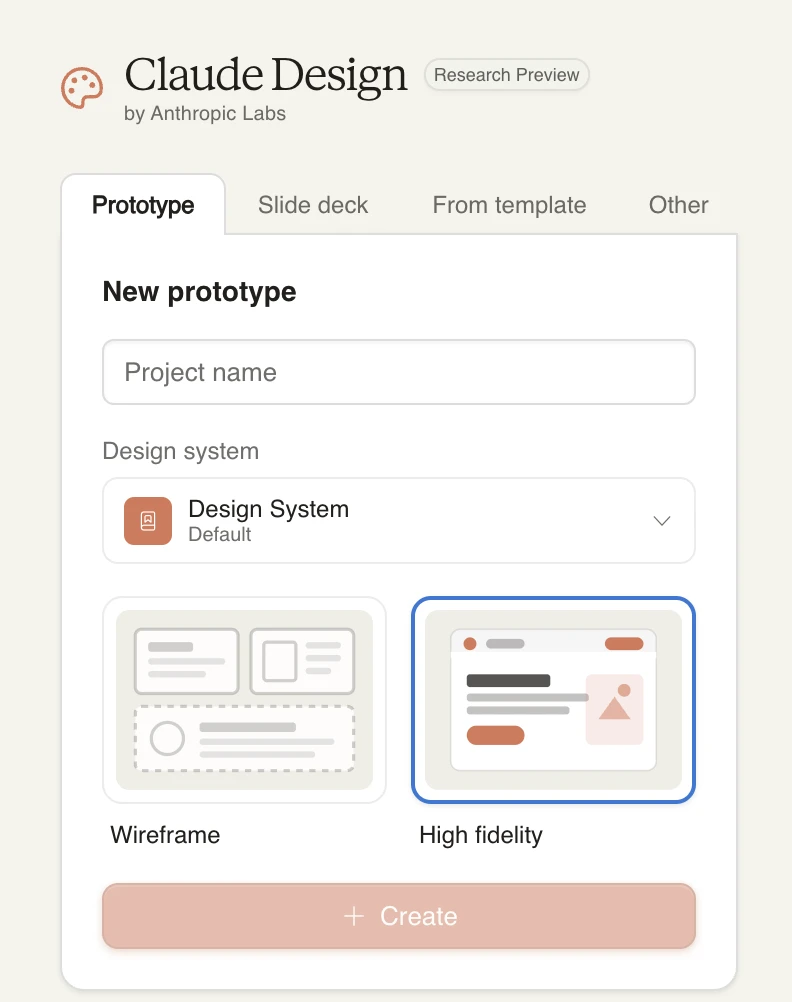
  1. Visit https://claude.ai/design to access the platform, the models are same as in claude chat, with a different interface.
  2. After that, you can choose whether you want to create a Prototype, slide deck, Animated design using existing Template design. 
  3. Once selected, give your Project a name and choose a default design and then you can get started with your prompt. 
Claude Design

Hands-On 1: “Explain Our Product” → Branded Animated Deck

This isn’t a rigid step-by-step process. It’s a continuous flow, from defining the goal, shaping the output, prompting Claude, to the final result.

The sections below break down the key pieces so you know what to look for.

1. Define the objective
You’re building a Cowork course that explains how Plugins work within an enterprise workflow automation setup.

2. Identify the gap
Existing docs are too complex, and teams don’t clearly understand what Plugins are or how they differ from MCP Connectors and Skills.

3. Design the output
A 25-minute Teaching Deck that explains concepts, usage, marketplace access, permissions, and security.

4. Generate with Claude
Prompt Claude to create a ~15-slide deck in dark mode, developer style, with speaker notes.

5. Refine the structure
Ensure the deck includes key sections like primitives, marketplace guides, installation flow, lifecycle, and sandbox security.

6. Polish consistency
Check layout, spacing, monospace font, and overall clarity across slides.

7. Apply branding
Align the deck with existing brand styles (colors, fonts, logos) using prior examples.

Watch the full workflow

The video below walks through this entire process in one continuous flow: from prompt to refined deck.

Final output

The following video shows the completed prototype and what the final result looks like.

Hands-On 2: App Idea → Layout Prototype → Live in Canva

This isn’t a strict sequence of steps. It’s a guided build—moving from idea → structure → design → refinement, with Claude helping at each stage.

The breakdown below gives you a clear mental model before you watch it in action.

1. Define the idea
An app for Gen Z users to journal emotions and mental health using mood tracking, voice input, and AI-generated weekly summaries.

2. Identify the audience
Young adults (around 22) who want to manage their mental health but haven’t found existing therapy apps helpful.

3. Set the goal
Create a complete, editable prototype that can be exported and refined in tools like Canva.

4. Generate the initial prototype
Prompt Claude to create core screens: onboarding, home, journal entry, mood check-in, and weekly summary.

5. Map the user experience
Define how users think and feel across each stage—first-time onboarding vs returning usage.

6. Build core screens
Develop ~6 key screens with clear layout, spacing, and structure.

7. Add functional details
Include elements like mood tracking (mood ring), voice journaling, and written reflections.

8. Document design decisions
Create a log explaining layout choices, typography, color, and overall usability.

9. Prepare for export
Structure screens so they can be easily exported as editable frames into Canva.

Watch the full workflow

The video below shows this entire process in one continuous build: from idea to working prototype.

Final Output

The following video shows the completed prototype and what the final result looks like.

Pros and Cons of Claude Design

With all that this tools offers, here’s a table summarizing its strengths and weaknesses:

Advantages Disadvantages
Speed of design – Go from idea to prototype in hours instead of days of back-and-forth. Needs human judgment – First drafts can miss context; final review by a designer is still necessary.
Cross-discipline thinking – Handles visual, content, and functional design together instead of in silos. Limited creative intuition – Strong on structure, weaker on unique brand feel or creative instincts.
No expert required to start – Anyone can create a solid first version that designers can refine later. Iteration still needed – Complex interactions and edge cases often require multiple refinement cycles.
Brand consistency at scale – Learns brand assets once and applies them across the entire project. Code not production-ready – Generated code may need optimization before real-world deployment.
Reduced friction in edits – Changes happen instantly through simple instructions instead of long feedback loops. Context limitations at scale – Can lose track of earlier decisions in large, complex projects.
Handles complexity without handoffs – Can build full-stack flows and multi-screen systems in one go. No user validation – Doesn’t assess whether the product actually meets real user needs.

Conclusion

Designers, developers, and strategists aren’t replaced by Claude Design. It removes the slow parts: starting from scratch, building initial wireframes, and waiting days for mockups. The routine bottlenecks disappear, letting teams move from idea to tangible output much faster.

What remains is the work that actually matters: deciding if a product solves a real problem, if a brand feels authentic, and if the experience lands emotionally. Claude helps you test and show ideas early, so instead of pitching concepts, you walk into meetings with working prototypes.

Frequently Asked Questions

Q1. What is Claude Design and how does it work?

A. Claude Design creates full design outputs (UI, content, and code) by reasoning through projects end-to-end instead of just giving suggestions.

Q2. Can Claude Design replace designers and developers?

A. No. Claude speeds up design and prototyping, but human judgment is still needed for creativity, validation, and final production decisions.

Q3. What can you build using Claude Design?

A. You can create presentations, UI prototypes, React apps, and Canva designs from a simple idea with iterative feedback.

Data Science Trainee at Analytics Vidhya
I am currently working as a Data Science Trainee at Analytics Vidhya, where I focus on building data-driven solutions and applying AI/ML techniques to solve real-world business problems. My work allows me to explore advanced analytics, machine learning, and AI applications that empower organizations to make smarter, evidence-based decisions.
With a strong foundation in computer science, software development, and data analytics, I am passionate about leveraging AI to create impactful, scalable solutions that bridge the gap between technology and business.
📩 You can also reach out to me at [email protected]