


惯性聚合 高效追踪和阅读你感兴趣的博客、新闻、科技资讯
阅读原文 在惯性聚合中打开

推荐订阅源

The Hacker News
The Hacker News
F
Full Disclosure
Cloudbric
Cloudbric
Blog — PlanetScale
Blog — PlanetScale
W
WeLiveSecurity
N
News and Events Feed by Topic
T
Troy Hunt's Blog
V2EX - 技术
V2EX - 技术
CTFtime.org: upcoming CTF events
B
Blog
GbyAI
GbyAI
C
Check Point Blog
B
Blog RSS Feed
Application and Cybersecurity Blog
Recorded Future
Recorded Future
The Last Watchdog
The Last Watchdog
N
News and Events Feed by Topic
T
The Blog of Author Tim Ferriss
O
OpenAI News
V
V2EX
人人都是产品经理
人人都是产品经理
cs.AI updates on arXiv.org
IT之家
IT之家
WordPress大学
WordPress大学
www.infosecurity-magazine.com
S
Security @ Cisco Blogs
C
Cisco Blogs
Security Latest
Security Latest
S
Security Affairs
V
Visual Studio Blog
C
Cybersecurity and Infrastructure Security Agency CISA
Hacker News - Newest:
Hacker News - Newest: "LLM"
博客园 - 司徒正美
freeCodeCamp Programming Tutorials: Python, JavaScript, Git & More
Microsoft Azure Blog
Last Week in AI
Last Week in AI
AWS News Blog
AWS News Blog
雷峰网
雷峰网
Apple Machine Learning Research
PCI Perspectives
PCI Perspectives
博客园_首页
U
Unit 42
Google DeepMind News
Hugging Face - Blog
Hugging Face - Blog
Project Zero
Project Zero
Cisco Talos Blog
Cisco Talos Blog
The Register - Security
N
Netflix TechBlog - Medium
L
LINUX DO - 热门话题
H
Hacker News: Front Page

Analytics Vidhya

Handling Imbalanced Classification: What Works Better Than SMOTE GPT-5.6 Is Here: Sol, Terra, and Luna Loop Engineering for AI Agents: How /loop is Changing AI Workflows DeepSeek DSpark: The Speculative Decoding Trick Behind 400% Faster LLM OKF: Redefining Knowledge Bases for AI Agents Modern VLMs Explained: How GPT-4o, Gemini, Claude Vision, and Qwen-VL Work YOLO26 Tutorial: Object Detection, Pose Estimation & More Large Action Models (LAMs) vs Agentic LLMs: What's the Real Difference? Claude Sonnet 5: The Fable 5 at Home The Best $20 AI Plan: ChatGPT Plus vs Claude Pro vs Gemini Pro GraphRAG vs Vector RAG: Which Retrieval Method is Best? Using AI When You Don’t Trust AI The Self-Improving Loop in AI Agents: Architecture, Benefits, and How it Outperforms Traditional Agent Workflows Harness-1: The 20B Retrieval Subagent That Beats GPT-5.4 at Search Sakana Fugu: Multi-Agent System as a Model Claude's Hidden Art Skill: Making Illustrations With Code System Design for ML Interviews: 10 Real Problems Walked Through Most People Use ChatGPT Wrong: 10 Features and Tips That Changed How I Work OpenAI Just Launched 3 Free AI Courses with Certificates Autoregressive Models: Predicting the Future Using the Past Gemini Omni: AI Video Generation Inside Gemini DiffusionGemma: Google’s Diffusion-Based Open Model for Faster Text Generation Top 10 AI Engineering Tools Everyone is Using in 2026 I Tested Claude Fable 5: Can Anthropic’s Newest AI Deliver on the Hype? Prophet vs NeuralProphet vs TimeGPT vs Chronos: A Practical Comparison Build an Emergency Helpline Voice Agent with LangChain Choosing the Right Vector Database for RAG and AI Applications Google Gemma 4 12B: Architecture, Benchmarks, Access, and Hands-on Guide for Developers How to Choose the Right AI Model for Your Needs Agent Observability with LangSmith, Langfuse, and Arize: A Hands-On Comparison How to Use Claude Managed Agents? Google AI Studio vs Gemini App: What’s the Difference? AI Workflows for Sales Teams: Prospect Research, Lead Qualification, and CRM Updates on Autopilot Using LangGraph 25 Most Influential AI Pioneers to Meet at DataHack Summit 2026 Claude Opus 4.8: A Smarter Model in the Right Direction PySpark Optimization: 12 Proven Techniques to Speed Up Your Spark Jobs 10 Everyday Tasks You Can Automate with AI Today (With n8n Templates) Google Antigravity 2.0: The Full Developer Guide (I/O 2026) Build a Claude Cowork-Like Browser Agent Using Playwright MCP and Claude Desktop Pandas vs Polars vs DuckDB: Which Library Should You Choose? Qwen3.7-Max: Alibaba’s New Agent-First LLM for Coding, Reasoning, and Long-Horizon AI Workflows The Biggest Announcements from Google I/O 2026 Top 9 AI Events and Conferences in 2026 that you Must Attend Gemini 3.5 Flash: Frontier Intelligence with Speed Kimi WebBridge: Hands-on Guide to Kimi’s Browser Extension for AI Agents 40 Advanced SQL Window Functions Every Data Scientist Must Know(with examples) Top 10 AI Research Papers of 2025 6 Steps to Crack GenAI Case Study Interviews (With Real Examples) OpenAI Omni Moderation: How to Filter Text & Images for Free DataHack Summit 2026: You Just Cannot Skip This AI Event of the Year OpenAI’s New API Voice Models Will Change the Way You Use AI Hermes Agent Guide: What is it and How to Use it? Top 10 LLM Research Papers of 2026 Agent Memory Patterns in Cognitive Science and AI Systems 10 AI Agents Every AI Engineer Must Build (with GitHub Samples) 23 Tips for Smart Claude Code Token Saving and Workflow Optimization Feature Engineering with LLMs: Techniques & Python Examples ChatGPT is Now Inside Excel and Google Sheets: Here is How to Use it Gemini API File Search: The Easy Way to Build RAG Top 10 Open-Source Libraries to Fine-Tune LLMs Locally ML Intern in Practice: From Prompt to a Shipped Hugging Face Model 15+ Solved Agentic AI Projects with Github Links How People are Figuring Out Life With Claude MemPalace Explained: Building Long-Term Memory for AI Agents Beyond RAG Grok Voice Think Fast 1.0: Build Voice AI Agents That Actually Think Compressing LSTM Models for Retail Edge Deployment: A Practical Comparison MCP vs Agent Skills: Different Altogether GPT 5.5 vs Opus 4.7: Which is the Best AI Model Today? What is Agentic AI? Claude Code vs Codex: A Detailed Terminal Agent Comparison Meta Muse Spark Review: Is It Worth the Hype? ChatGPT Images 2.0 vs Nano Banana 2: Which is Better? Cursor V3 Explained: The AI Coding Agent That’s Replacing Traditional IDEs in 2026 DeepSeek-V4: The Most Powerful Open-Source Model Ever Is GPT Image 2 the Best Image Generation Model? Token Economics: Why AI is Getting “Cheaper” From Idea to Output: Claude Does the Design Work Opus 4.7 vs Opus 4.6: Should You Switch? Build Human-Like AI Voice App with Gemini 3.1 Flash TTS How to Structure a Claude Code Project that Thinks Like an Engineer Gemma 4 Tool Calling Explained: Build AI Agents with Function Calling (Step-by-Step Guide) Anthropic Launches Claude Opus 4.7 For “Most Difficult Tasks” Top 28 Claude Shortcuts that will 10X your Speed GPT-5.4-Cyber: Why OpenAI is Keeping its Most Powerful Model Under Lock and Key Google AI Studio Guide: Every Feature Explained Mastering Deep Agents: Context Engineering that Actually Works 21 Computer Vision Projects from Beginner to Advanced (2026 Guide) Excel 101: Excel Agent Mode Explained MiniMax M2.7 Goes Open-Weight to Let You Run Agents Locally Top 10 Gemma 4 Projects That Will Blow Your Mind GLM-5.1: Architecture, Benchmarks, Capabilities & How to Use It Understanding BERTopic: From Raw Text to Interpretable Topics From Karpathy’s LLM Wiki to Graphify: AI Memory Layers are Here 10 Most Important AI Concepts Explained Simply Project Glasswing is World’s Most Powerful AI in Action How to Run Gemma 4 on Your Phone Without Internet: A Hands-On Guide Running Claude Code for Free with Gemma 4 and Ollama LLM Wiki Revolution: How Andrej Karpathy’s Idea is Changing AI Rethinking Enterprise Search: How Cortex Search Turns Data into Business Impact Google’s Gemma 4: Is it the Best Open-Source Model of 2026?
Google Deep Research Max: Build Autonomous AI Research Agents in Minutes
Riya Bansal · 2026-04-27 · via Analytics Vidhya

Google just changed how developers do research. On April 21, 2026, they launched Deep Research Max. It runs on Gemini 3.1 Pro and is not just another chatbot upgrade. This is an autonomous AI research agent. It plans, searches, reads, reasons, and writes, all from a single API call. By the end, you get a fully cited report back.

If you build AI apps, this guide is for you. You’ll understand how it works, set it up, and run your first research task today.

What is Deep Research Max?

Deep Research Max operates as a research analyst that functions through an application programming interface. When you present a difficult inquiry, the system creates a research strategy that it uses to conduct online research and analyze your documents before producing a referenced document.
Google Deep Research Agent

Google introduced Deep Research in December 2025 with basic summarization and limited capabilities, lacking visuals, external integrations, and access to private data. The April 2026 version marks a major upgrade.

Deep Research Max runs on Gemini 3.1 Pro, scoring 77.1% on ARC-AGI-2, over twice Gemini 3 Pro’s performance, and adds autonomous research to its reasoning abilities.

What is the difference between Deep Research and Deep Research Max?

Google shipped two agents with Deep Research, not one. Your workflow needs an assessment because it requires the selection of the appropriate agent.

  • The standard Deep Research agent (deep-research-preview-04-2026) is built for speed. The model achieves faster results by searching fewer queries and processing fewer tokens. The system operates when users sit at the remote viewing location. Interactive dashboards, chat interfaces, and quick lookups demonstrate its usage.
  • Deep Research Max (deep-research-max-preview-04-2026) is built for depth. The system operates continuously through test-time computation until it produces an exhaustive report. Use it for background jobs. The system handles work that requires evaluation during the night and analysis of competitive market conditions and literature research.

Here is the comparison that matters:

Feature Deep Research Deep Research Max
Optimized for Speed and low latency Maximum depth and comprehensiveness
Best use case Interactive UIs, dashboards Overnight batch jobs, due diligence
Search queries/task ~80 ~160
Input tokens/task ~250K ~900K
Cost per task $1 – $3 $3 – $5
Typical completion 5 – 10 min 10 – 20 min

Key Features of Deep Research Max

  • MCP Offered Specialized Solutions: To link proprietary data from FactSet, S&P, PitchBook, or company-sourced material. It can enhance or replace externally sourced internet information with native charts and infographics produced.
  • Collaborative Planning: Now you can have better control of how your research plan will be executed through research plan review & approval prior to execution.
  • Extended Tooling: Using multiple tools together, such as search tools, MCP, file storage, code, URL, etc., enhances research and promotes compliance.
  • Multi-Modal Grounding: Analyse formats such as PDF(s), CSV(s), image, audio, and video side by side with web information.
  • Real Time Streaming: Display all current progress, intermediate products, and resultant products simultaneously on a real-time basis.

How does Deep Research Max work?

Deep Research Max does not operate from the traditional generate_content endpoint. Instead, it is intended to run solely via the Interactions API, which is a relatively new, stateful API designed for executing long-running background work.

When you submit a prompt, the following things occur:

  1. You submit your research question to the API with the background=True option, and immediately receive an interaction ID. Your application can then proceed with whatever work it was doing prior to that.
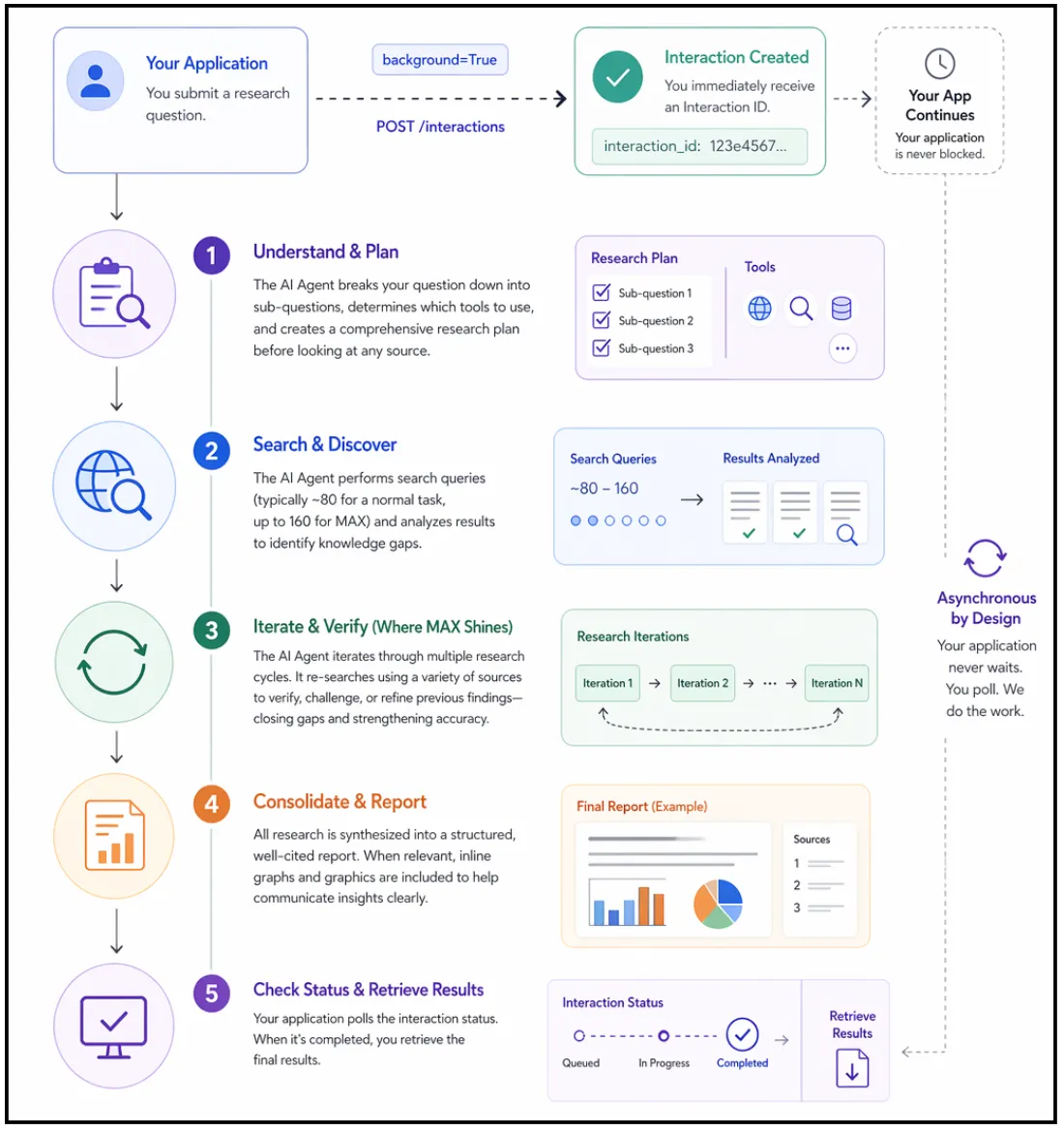
  2. The AI Agent will take your question and break it down into sub-questions, determine which tools will be employed, and create a complete research plan before looking at any source.
  3. The AI Agent will perform the search queries (typically around 80 for a normal task, up to 160 for MAX). It will analyze the results of the queries thoroughly to identify knowledge gaps.
  4. This is where MAX shines; the AI Agent will iterate through the research multiple times. It does not perform research once and stop. It will continue to research again, using a variety of sources to conduct each research phase and verify or contradict the previous research findings.
  5. Finally, the AI Agent will consolidate all research into a structured report that is cited. If the data warrants, there will also be inline graphs & graphics as part of the report.
  6. At that point, you will poll the status of the interaction. When an interaction indicates that it has completed, you will get your results. The entire process is asynchronous, meaning your application will not block.
Google Deep Research Max

Getting Started with Deep Research Max

You need three items to start your research code work: a Gemini API key, the Python SDK, and an environment variable. This process requires approximately five minutes to complete.

1. The first step requires you to acquire your Gemini API key.

2. The second step requires you to install the Python SDK. Once you have Python installed you can install the official Google GenAI client library by executing this command:

pip install google-genai 

The system installation process requires users to wait until the installation operation finishes.

3. The third step requires you to establish your environment variable. Your SDK will automatically fetch your API key from an environment variable. Set it in your terminal session like this:

export GEMINI_API_KEY="your-api-key-here"

You must replace your-api-key-here with the actual key you copied from Google AI Studio. Users should use the set command in Windows instead of export.

4. The fourth step requires you to check all system components for proper operation. Create a new file called verify.py in your project folder. Add this code:

from google import genai 

client = genai.Client() 

print("Client initialized successfully.") 
print("You are ready to use Deep Research.")

5. Run the command through your terminal:

python verify.py

Your environment is fully prepared when you succeed with both success messages.

Output

6. There might be a case of API key authentication failure, which occurs because your API key authentication setup is wrong. You need to confirm that your API key authentication setup is correct. Deep Research is not available on the free tier.

Task 1: Your First Research Task

Here, you will create your first autonomous research task. This task teaches you the three core patterns associated with submitting a prompt, polling for status, and retrieving the final result.

Step 1: Create the script

You will create a new file named “first_research.py” that asks your agent to conduct research about Artificial Intelligence Regulation in Europe; however, feel free to change the topic of your research.

import time
from google import genai

client = genai.Client()

interaction = client.interactions.create(
    input="Research the current state of AI regulation in the European Union.",
    agent="deep-research-preview-04-2026",
    background=True
)
print(f"Research started. Interaction ID: {interaction.id}") 

Please take note of the two important values. agent represents the AI agent that the API will use to perform research. We are going with the standard Deep Research agent, as it will pull data faster. The background=True parameter must be supplied because if it is not available, then the request will fail. Research always takes place asynchronously via Deep Research.

Step 2: Build the polling loop

The API will quickly return your interaction ID. Your job is to check back periodically until the research has been completed. Add your polling code below your creation code.

while True:
    interaction = client.interactions.get(interaction.id)
    if interaction.status == "completed":
        print("\n--- Research Complete ---\n")
        print(interaction.outputs[-1].text)
        break
    elif interaction.status == "failed":
        print(f"Research failed: {interaction.error}")
        break
    print("Still researching...", flush=True)
    time.sleep(10)

It checks its status every 10 seconds and prints the entire report after completion. If something fails, it will print “Error”.

Step 3: Run Script

python first_research.py

You should see the phrase “Still researching…” multiple times in your Terminal window. Most jobs finish between 5 and 15 minutes, so when all jobs are finished, you will receive a fully assembled research report that is fully cited.

Step 4: Review the Output

Spend time looking through the report and note how the Agent organised the research based on logical sections. After each claim, you will see a citation to the source used by the agent to complete that section of the report. You just accomplished what would have taken tens of hours for a human to read and write.

Task 2: Generating Native Visualizations

Using Deep Research Max, you can produce visualizations (charts) directly from your data, without the need to use third-party libraries, using the agent to obtain visual reports automatically.

Step 1: Generate all charts in the report:

import time
from google import genai

client = genai.Client()

prompt = """
Research the top 10 programming languages by job demand in 2026.
Include in your report:
- A bar chart comparing job postings across languages
- A trend line showing growth over the past 3 years
- A comparison table with salary ranges
Generate all charts natively inline.
"""

interaction = client.interactions.create(
    input=prompt,
    agent="deep-research-max-preview-04-2026",
    background=True
)

print(f"Visual research started. ID: {interaction.id}")

Create visual_research.py with a prompt to request charts – the prompt should contain the phrase “generate all charts natively inline” to request that the agent create an HTML or Nano banana visualization that is embedded directly in the report.

Step 2: Poll for results and save as an HTML file

while True:
    interaction = client.interactions.get(interaction.id)

    if interaction.status == "completed":
        with open("visual_report.html", "w") as f:
            f.write(interaction.outputs[-1].text)

        print("Saved to visual_report.html")
        break

    elif interaction.status == "failed":
        print(f"Failed: {interaction.error}")
        break

    time.sleep(10)

Step 3: Open visual_report.html in a web browser

The agent created the charts directly on the page: no Matplotlib, no Plotly, no JavaScript charting libraries, the agent created all of these as part of the report output.

This is extremely beneficial for automated report pipelines. The report can be shared immediately without any additional post-processing.

Production Best Practices

When transitioning from lab scripts to production code, a few changes are necessary:

  • Instead of polling your main server using a while-loop, use a job queue architecture. Accept the request through Cloud Run, then store the interaction ID in a database and check the results using Cloud Scheduler or a cron job. This way, you keep your server responsive when experiencing high traffic.
  • Persist interaction IDs and event IDs. Lost connections are common with 20-minute research tasks. Always persist the interaction_id and last_event_id from streaming. By reconnecting with client.interactions.get() using the persisted ids, you will be able to resume where you left off.
  • Write specific prompts to control costs. General prompts lead to a broad search, which will require more tokens and time than using a specific and well-defined prompt.
  • Cache whenever possible. A Deep Research Max report can cost anywhere from $3-$5, so if there are a lot of similar questions amongst users, cache those results. You would be spending very little in terms of operating costs to serve from the cache.
  • Always verify citations. The agent provides its citations, but it is a reading of the open web. For critical business decisions, it is advisable to spot-check the most important claims with original sources; therefore, “trust but verify.”

Is Deep Research Max worth using?

Deep Research Max is not like the standard AI chatbots that we are accustomed to. With Deep Research Max, you provide the machine with a task, leave it alone, then check back later for a complete report (as you would do with an individual). No longer do you need to provide multiple prompts to the AI to receive the correct answer.

Having everything in one place is also beneficial. Deep Research Max can look things up for you; use your data (if available) and create charts without any additional effort on your part. I would encourage you to have Deep Research Max do something small for you, so you will see how well it works before increasing the amount of work you use it for.

Frequently Asked Questions

Q1. What is Deep Research Max?

A. It is an autonomous AI agent that plans, searches, analyzes, and generates fully cited reports. 

Q2. When should you use Deep Research Max instead of standard Deep Research?

A. Use it for deeper, longer, and more comprehensive research tasks. 

Q3. Can Deep Research Max generate charts automatically?

A. Yes, it creates native inline charts and visual reports without external libraries.

Data Science Trainee at Analytics Vidhya
I am currently working as a Data Science Trainee at Analytics Vidhya, where I focus on building data-driven solutions and applying AI/ML techniques to solve real-world business problems. My work allows me to explore advanced analytics, machine learning, and AI applications that empower organizations to make smarter, evidence-based decisions.
With a strong foundation in computer science, software development, and data analytics, I am passionate about leveraging AI to create impactful, scalable solutions that bridge the gap between technology and business.
📩 You can also reach out to me at [email protected]