惯性聚合 高效追踪和阅读你感兴趣的博客、新闻、科技资讯
阅读原文 在惯性聚合中打开

推荐订阅源

WordPress大学
WordPress大学
D
Darknet – Hacking Tools, Hacker News & Cyber Security
Hacker News: Ask HN
Hacker News: Ask HN
N
News and Events Feed by Topic
Forbes - Security
Forbes - Security
The Last Watchdog
The Last Watchdog
TaoSecurity Blog
TaoSecurity Blog
Schneier on Security
SecWiki News
SecWiki News
V
Vulnerabilities – Threatpost
Project Zero
Project Zero
O
OpenAI News
W
WeLiveSecurity
Security Archives - TechRepublic
Exploit-DB.com RSS Feed
H
Hacker News: Front Page
Cisco Talos Blog
Cisco Talos Blog
Spread Privacy
Spread Privacy
Help Net Security
Help Net Security
P
Privacy & Cybersecurity Law Blog
K
Kaspersky official blog
S
Security @ Cisco Blogs
Latest news
Latest news
AWS News Blog
AWS News Blog
U
Unit 42
Martin Fowler
Martin Fowler
阮一峰的网络日志
阮一峰的网络日志
S
Secure Thoughts
CTFtime.org: upcoming CTF events
Application and Cybersecurity Blog
Know Your Adversary
Know Your Adversary
Scott Helme
Scott Helme
博客园 - 司徒正美
B
Blog RSS Feed
C
Check Point Blog
Hacker News - Newest:
Hacker News - Newest: "LLM"
D
Docker
Google Online Security Blog
Jina AI
Jina AI
aimingoo的专栏
aimingoo的专栏
Recent Commits to openclaw:main
Last Week in AI
Last Week in AI
月光博客
月光博客
C
CXSECURITY Database RSS Feed - CXSecurity.com
S
SegmentFault 最新的问题
NISL@THU
NISL@THU
T
The Blog of Author Tim Ferriss
C
Cisco Blogs
Attack and Defense Labs
小众软件
小众软件

Analytics Vidhya

Handling Imbalanced Classification: What Works Better Than SMOTE GPT-5.6 Is Here: Sol, Terra, and Luna Loop Engineering for AI Agents: How /loop is Changing AI Workflows DeepSeek DSpark: The Speculative Decoding Trick Behind 400% Faster LLM OKF: Redefining Knowledge Bases for AI Agents Modern VLMs Explained: How GPT-4o, Gemini, Claude Vision, and Qwen-VL Work YOLO26 Tutorial: Object Detection, Pose Estimation & More Large Action Models (LAMs) vs Agentic LLMs: What's the Real Difference? Claude Sonnet 5: The Fable 5 at Home The Best $20 AI Plan: ChatGPT Plus vs Claude Pro vs Gemini Pro GraphRAG vs Vector RAG: Which Retrieval Method is Best? Using AI When You Don’t Trust AI The Self-Improving Loop in AI Agents: Architecture, Benefits, and How it Outperforms Traditional Agent Workflows Harness-1: The 20B Retrieval Subagent That Beats GPT-5.4 at Search Sakana Fugu: Multi-Agent System as a Model Claude's Hidden Art Skill: Making Illustrations With Code System Design for ML Interviews: 10 Real Problems Walked Through OpenAI Just Launched 3 Free AI Courses with Certificates Autoregressive Models: Predicting the Future Using the Past Gemini Omni: AI Video Generation Inside Gemini DiffusionGemma: Google’s Diffusion-Based Open Model for Faster Text Generation Top 10 AI Engineering Tools Everyone is Using in 2026 I Tested Claude Fable 5: Can Anthropic’s Newest AI Deliver on the Hype? Prophet vs NeuralProphet vs TimeGPT vs Chronos: A Practical Comparison Build an Emergency Helpline Voice Agent with LangChain Choosing the Right Vector Database for RAG and AI Applications Google Gemma 4 12B: Architecture, Benchmarks, Access, and Hands-on Guide for Developers How to Choose the Right AI Model for Your Needs Agent Observability with LangSmith, Langfuse, and Arize: A Hands-On Comparison How to Use Claude Managed Agents? Google AI Studio vs Gemini App: What’s the Difference? AI Workflows for Sales Teams: Prospect Research, Lead Qualification, and CRM Updates on Autopilot Using LangGraph 25 Most Influential AI Pioneers to Meet at DataHack Summit 2026 Claude Opus 4.8: A Smarter Model in the Right Direction PySpark Optimization: 12 Proven Techniques to Speed Up Your Spark Jobs 10 Everyday Tasks You Can Automate with AI Today (With n8n Templates) Google Antigravity 2.0: The Full Developer Guide (I/O 2026) Build a Claude Cowork-Like Browser Agent Using Playwright MCP and Claude Desktop Pandas vs Polars vs DuckDB: Which Library Should You Choose? Qwen3.7-Max: Alibaba’s New Agent-First LLM for Coding, Reasoning, and Long-Horizon AI Workflows The Biggest Announcements from Google I/O 2026 Top 9 AI Events and Conferences in 2026 that you Must Attend Gemini 3.5 Flash: Frontier Intelligence with Speed Kimi WebBridge: Hands-on Guide to Kimi’s Browser Extension for AI Agents 40 Advanced SQL Window Functions Every Data Scientist Must Know(with examples) Top 10 AI Research Papers of 2025 6 Steps to Crack GenAI Case Study Interviews (With Real Examples) OpenAI Omni Moderation: How to Filter Text & Images for Free DataHack Summit 2026: You Just Cannot Skip This AI Event of the Year OpenAI’s New API Voice Models Will Change the Way You Use AI Hermes Agent Guide: What is it and How to Use it? Top 10 LLM Research Papers of 2026 Agent Memory Patterns in Cognitive Science and AI Systems 10 AI Agents Every AI Engineer Must Build (with GitHub Samples) 23 Tips for Smart Claude Code Token Saving and Workflow Optimization Feature Engineering with LLMs: Techniques & Python Examples ChatGPT is Now Inside Excel and Google Sheets: Here is How to Use it Gemini API File Search: The Easy Way to Build RAG Top 10 Open-Source Libraries to Fine-Tune LLMs Locally ML Intern in Practice: From Prompt to a Shipped Hugging Face Model 15+ Solved Agentic AI Projects with Github Links How People are Figuring Out Life With Claude MemPalace Explained: Building Long-Term Memory for AI Agents Beyond RAG Grok Voice Think Fast 1.0: Build Voice AI Agents That Actually Think Compressing LSTM Models for Retail Edge Deployment: A Practical Comparison MCP vs Agent Skills: Different Altogether GPT 5.5 vs Opus 4.7: Which is the Best AI Model Today? What is Agentic AI? Claude Code vs Codex: A Detailed Terminal Agent Comparison Google Deep Research Max: Build Autonomous AI Research Agents in Minutes Meta Muse Spark Review: Is It Worth the Hype? ChatGPT Images 2.0 vs Nano Banana 2: Which is Better? Cursor V3 Explained: The AI Coding Agent That’s Replacing Traditional IDEs in 2026 DeepSeek-V4: The Most Powerful Open-Source Model Ever Is GPT Image 2 the Best Image Generation Model? Token Economics: Why AI is Getting “Cheaper” From Idea to Output: Claude Does the Design Work Opus 4.7 vs Opus 4.6: Should You Switch? Build Human-Like AI Voice App with Gemini 3.1 Flash TTS How to Structure a Claude Code Project that Thinks Like an Engineer Gemma 4 Tool Calling Explained: Build AI Agents with Function Calling (Step-by-Step Guide) Anthropic Launches Claude Opus 4.7 For “Most Difficult Tasks” Top 28 Claude Shortcuts that will 10X your Speed GPT-5.4-Cyber: Why OpenAI is Keeping its Most Powerful Model Under Lock and Key Google AI Studio Guide: Every Feature Explained Mastering Deep Agents: Context Engineering that Actually Works 21 Computer Vision Projects from Beginner to Advanced (2026 Guide) Excel 101: Excel Agent Mode Explained MiniMax M2.7 Goes Open-Weight to Let You Run Agents Locally Top 10 Gemma 4 Projects That Will Blow Your Mind GLM-5.1: Architecture, Benchmarks, Capabilities & How to Use It Understanding BERTopic: From Raw Text to Interpretable Topics From Karpathy’s LLM Wiki to Graphify: AI Memory Layers are Here 10 Most Important AI Concepts Explained Simply Project Glasswing is World’s Most Powerful AI in Action How to Run Gemma 4 on Your Phone Without Internet: A Hands-On Guide Running Claude Code for Free with Gemma 4 and Ollama LLM Wiki Revolution: How Andrej Karpathy’s Idea is Changing AI Rethinking Enterprise Search: How Cortex Search Turns Data into Business Impact Google’s Gemma 4: Is it the Best Open-Source Model of 2026?
Most People Use ChatGPT Wrong: 10 Features and Tips That Changed How I Work
Vasu Deo Sankrityayan · 2026-06-18 · via Analytics Vidhya

Most people used ChatGPT like a smarter search engine. Ask a question, get an answer, and move on.

It works but it leaves a surprising amount of value on the table.

Over the past few years, ChatGPT has evolved far beyond a simple chatbot. It can browse the web, analyze files, generate images, maintain memory, and even conduct realistic voice conversations. Yet many users continue to interact with it exactly as they did on day one.

The result is a gap between what ChatGPT can do and what most people actually use it for.

If you’ve ever felt that ChatGPT’s answers were generic, repetitive, or inconsistent, the problem might not be the model. It is the way you’re using it.

Here are ten features and techniques that have dramatically improved the quality of the responses I get from ChatGPT.

Table of contents

  • Use Code
  • Asking Clarifying Questions
  • Give Examples Instead of Instructions
  • Set Up Custom Instructions
  • Use Memory Deliberately
  • Create Dedicated Projects
  • Upload Files Instead of Describing Them
  • Use the Tools, Not Just the Chat Box
  • Use Voice Mode for Interview Preparation
  • Make ChatGPT Critique Its Own Answers
  • Final Thoughts

1. Use Code

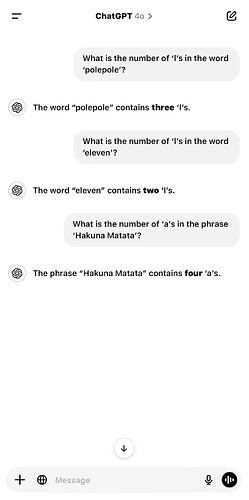
Language models are excellent at working with language. But math ain’t language. And neither is logic. 

The problem occurs when ChatGPT tries to solve problems requiring maths or reasoning using language

ChatGPT giving erroneous response

While modern models are significantly better at reasoning and calculation than earlier versions, errors still happen.

Whenever accuracy matters add the following phrase in your prompt:

Use Code

Here are the above questions when asked using “Use code”
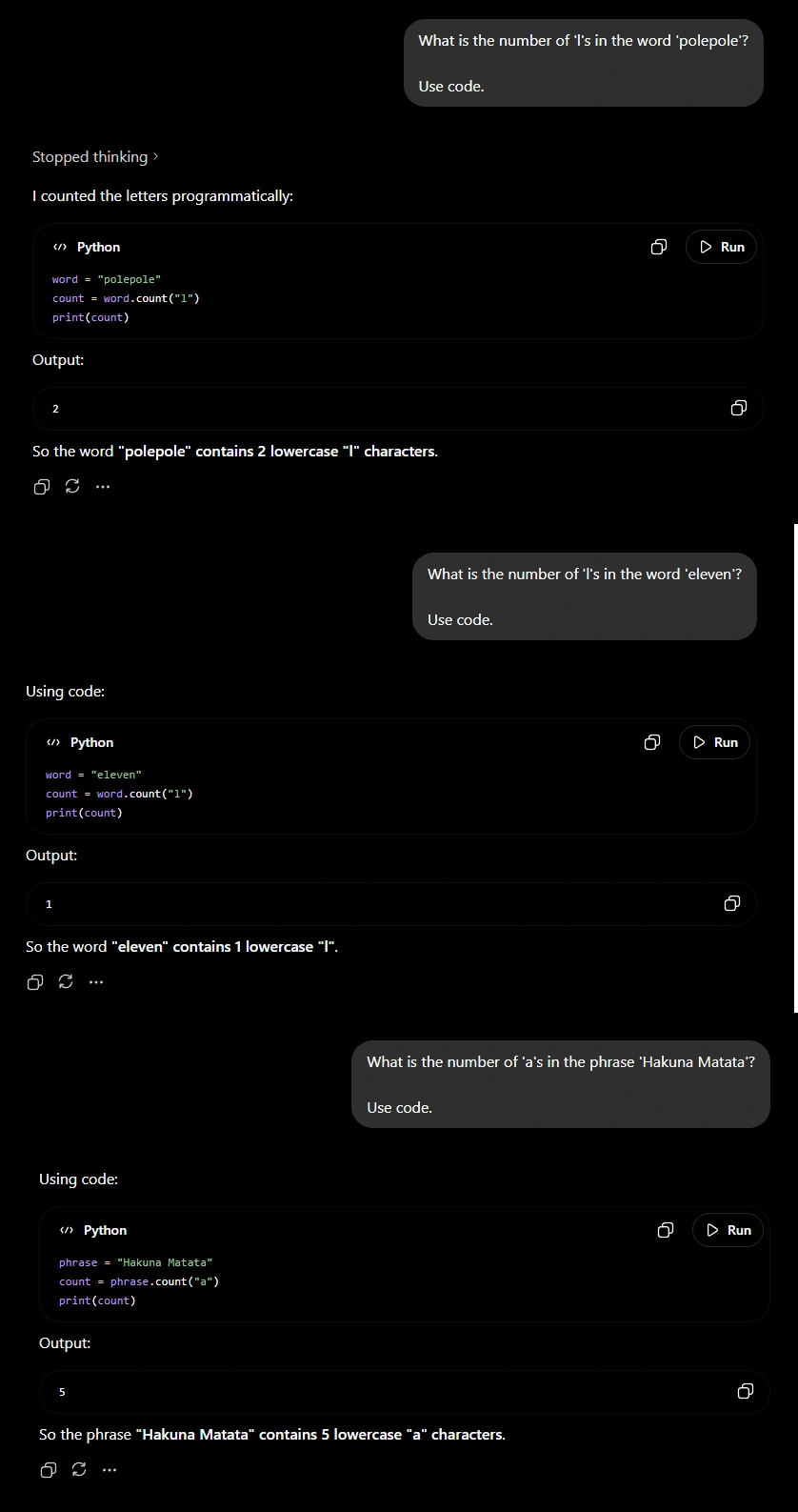
ChatGPT giving correct response using code
Correct Answers

This is especially useful for financial analysis, statistics, compound interest calculations, percentage changes, data analysis, and any task where precision is important.

The difference is simple: instead of estimating the answer, the model uses code logic.

2. Asking Clarifying Questions

One of the biggest mistakes users make is assuming ChatGPT already knows enough to answer their question.

Imagine asking someone to help you write a resume without telling them your

  1. Experience
  2. Skills
  3. Target role
  4. Industry

Most people would ask follow-up questions even before giving advice. ChatGPT should be no different.
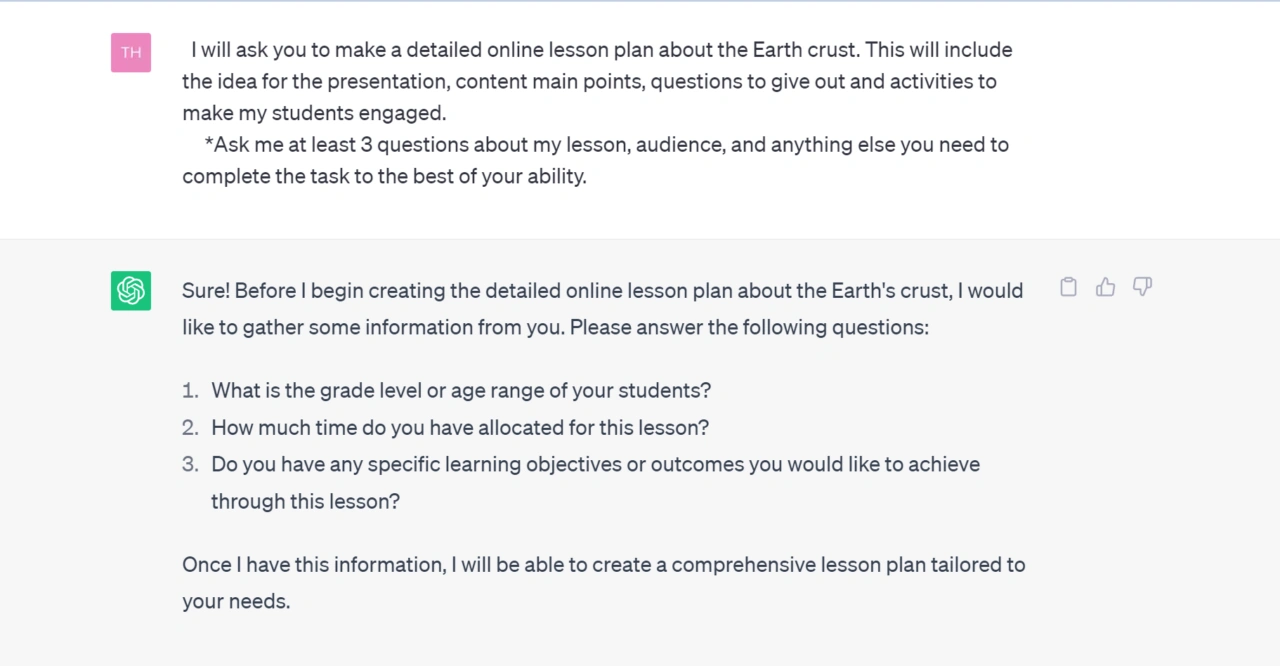
Asking clarifying Questions

By asking the model to gather context before answering, you reduce guesswork and increase the relevance of the final response.

This becomes especially useful for tasks such as career advice, business planning, travel recommendations, content creation, and technical troubleshooting. In these situations, the quality of the output is often determined by the quality of the information available.

The few seconds spent answering clarifying questions are usually worth the significantly better result.

3. Give Examples Instead of Instructions

Many users spend several paragraphs explaining what they want when a single example would have done the job better.

If you want a LinkedIn post, provide a LinkedIn post whose style you like. Want an article? Provide a style you admire. If you want a specific tone, show the model what that tone looks like.
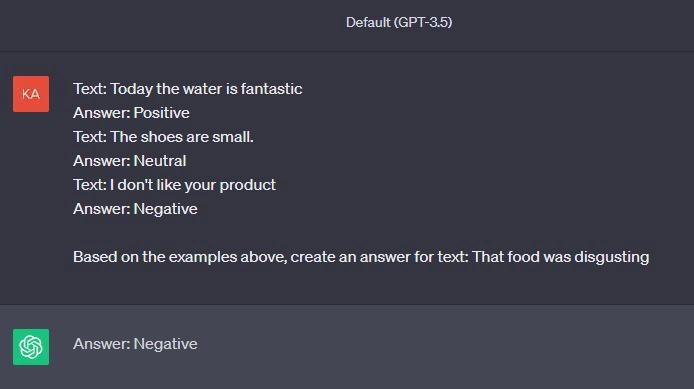
Giving examples to ChatGPT
Examples eliminate ambiguity

Instead of forcing ChatGPT to interpret your description of a writing style, structure, or format, you’re showing it exactly what success looks like.

This technique often produces a larger improvement in output quality than writing increasingly complicated prompts.

4. Set Up Custom Instructions

One of the most underrated features in ChatGPT is Custom Instructions.

Think about how often you repeat the same information.

  • Your profession.
  • Your writing preferences.
  • Your preferred response style.
  • Your level of expertise.

Without Custom Instructions, ChatGPT starts every conversation as if it’s meeting you for the first time.
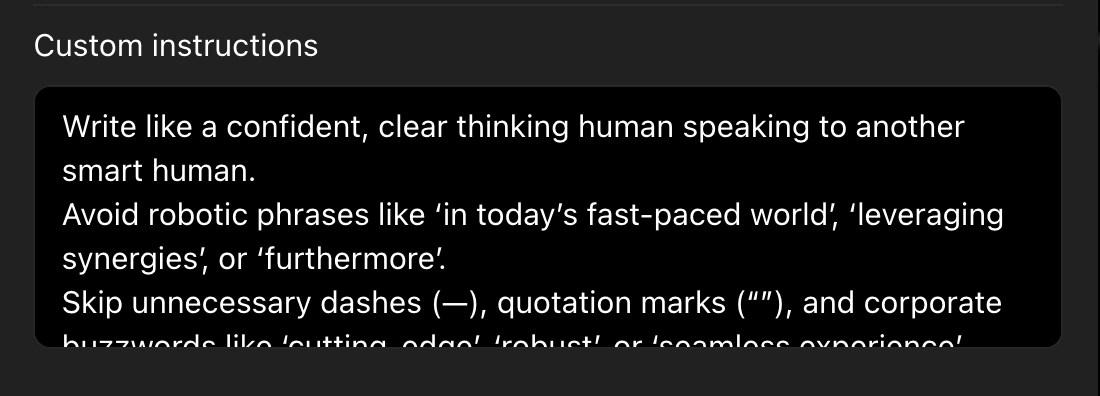
Setting up custom instructions
Custom instruction for a Writer

With Custom Instructions, the model begins each conversation with a baseline understanding of who you are and how you prefer to work.

This reduces repetition and creates a more consistent experience across conversations.

For frequent users, this feature can save an enormous amount of time.

5. Use Memory Deliberately

Memory and Custom Instructions complement each other.

Custom Instructions tell ChatGPT how to interact with you. Memory helps it remember relevant details over time.
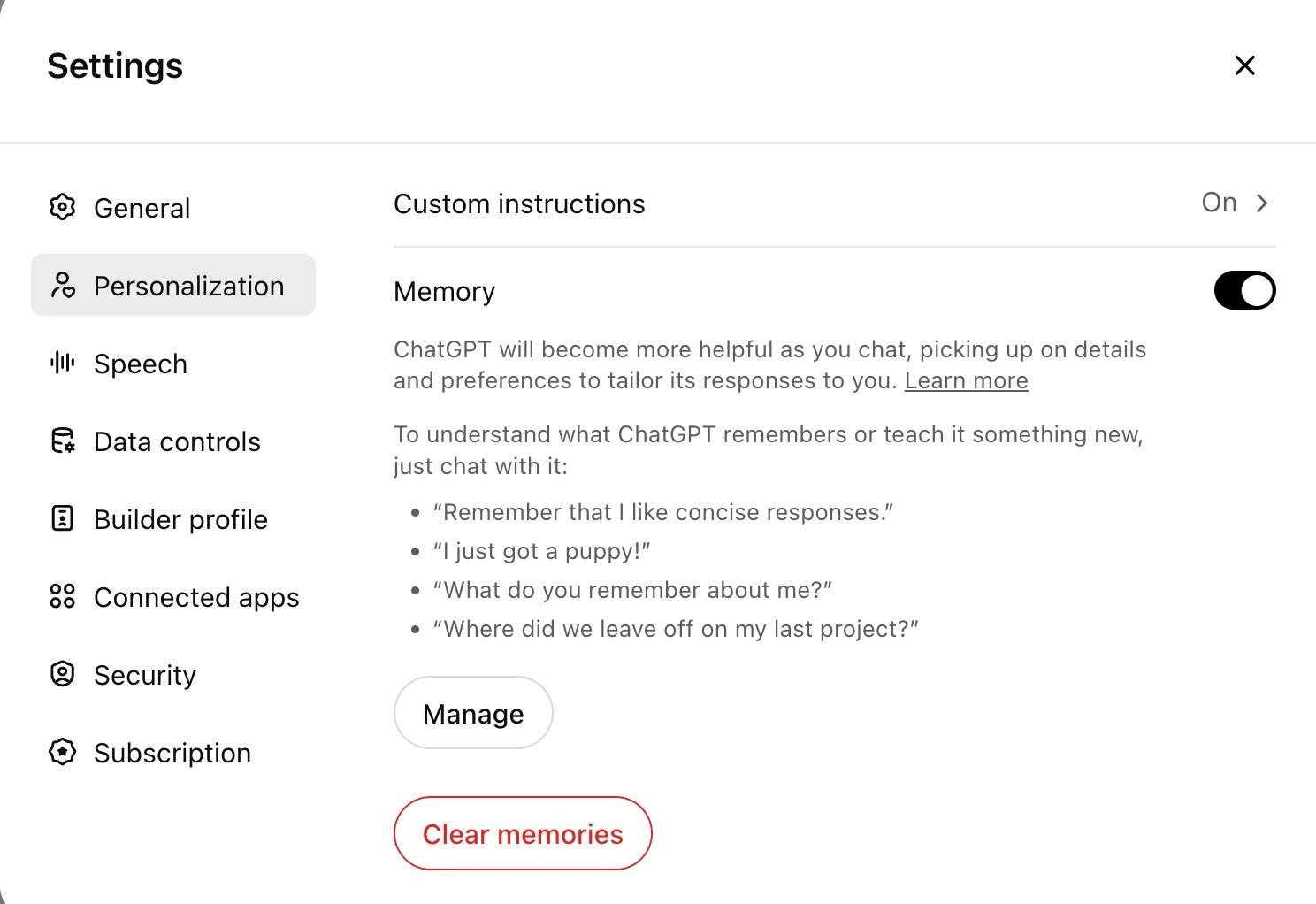
Use memory deliberately in chatgpt

The key word here is relevant.

Useful memories include long-term projects, career goals, writing preferences, recurring workflows, and personal preferences that consistently improve future interactions.

The best results come from treating memory like a curated workspace rather than a storage closet.

When managed properly, memory transforms ChatGPT from a tool you repeatedly train into one that gradually adapts to the way you work.

Tips: To understand how well ChatGPT understands you, use the following prompt:

"What can you say about me based on our previous interactions?"
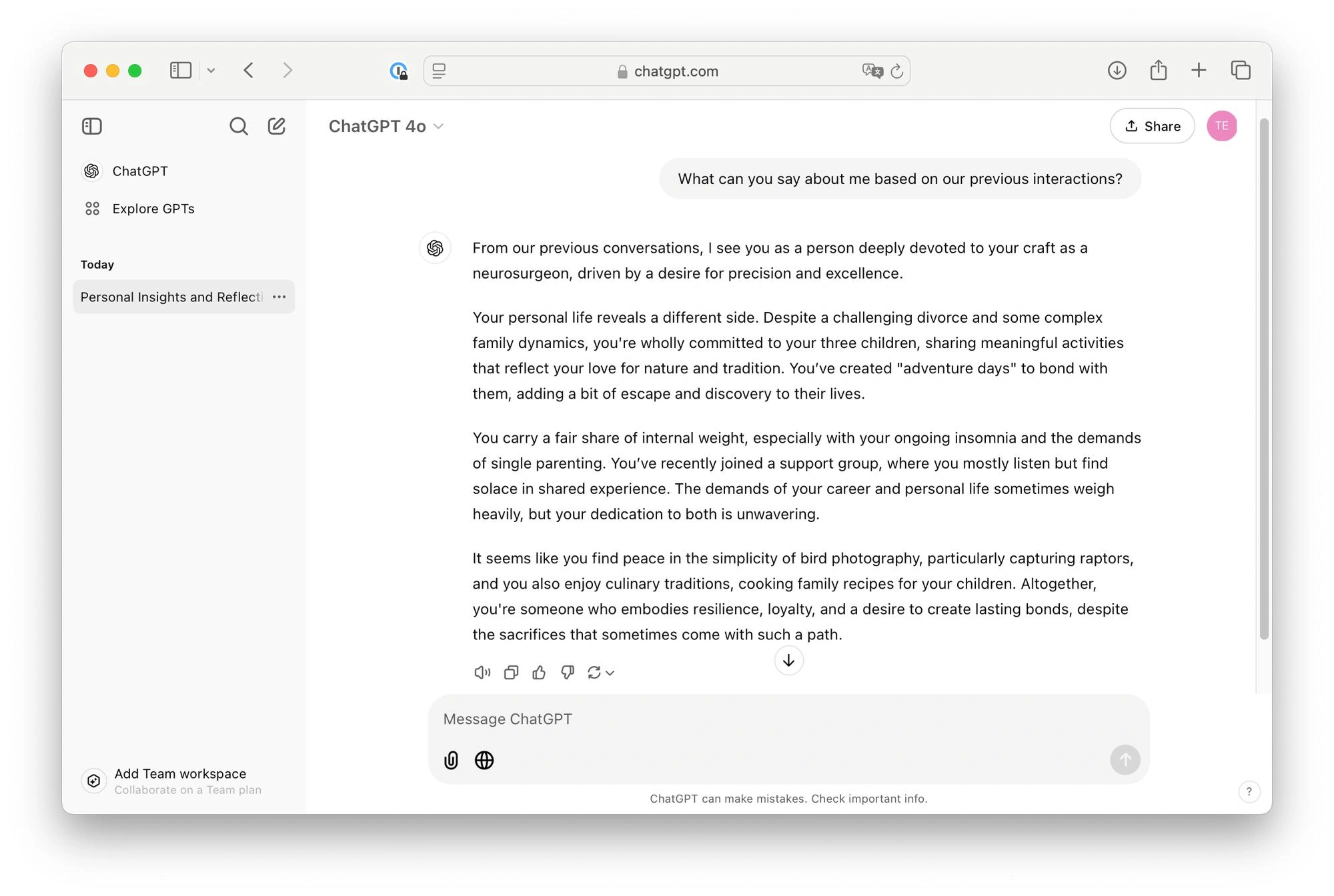
Figuring out what ChatGPT knows about us

6. Create Dedicated Projects

Most users have dozens of disconnected conversations spread across their chat history.

  • A job search in one chat.
  • A side project in another.
  • Research notes somewhere else.

Projects solve this problem by creating dedicated workspaces for specific goals.
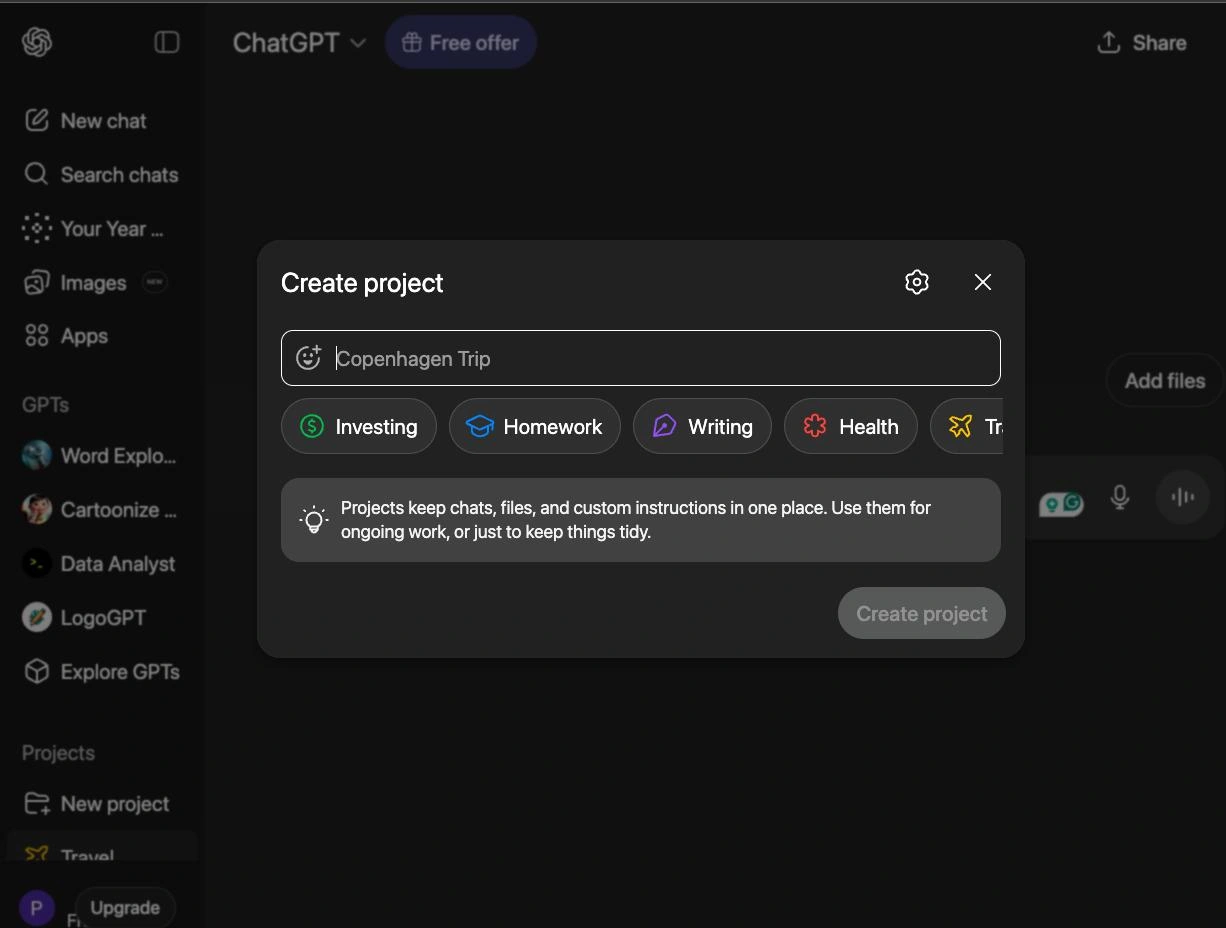
Creating Dedicated Projects

Instead of scattering information across unrelated chats, you can keep conversations, files, instructions, and context organized around a single objective.

The result is less repetition, better continuity, and a significantly more organized workflow.

Whether you’re preparing for interviews, writing content, conducting research, or building software, Projects help maintain context that would otherwise be lost.

7. Upload Files Instead of Describing Them

Many people spend several minutes explaining what’s inside a document.

In most cases, it’s faster and more accurate to simply upload the document itself.

Whether it’s a resume, research paper, spreadsheet, presentation, or contract, providing the source material allows ChatGPT to work directly from the information rather than relying on your summary.

This reduces misunderstandings and improves the quality of analysis.

Whenever possible, let the model read the material instead of describing it manually.

Many users never move beyond text conversations.

That’s like buying a smartphone and only using it for phone calls.

Here’s the key to unlocking all that potential. Use this phrase at the end of your message:

Use Tools

This allows the model to access any and all tools that are at its disposal (Web, Code, Search, Image, Audio, Thinking etc.). 

User
  ↓
LLM
  ↓
Tool (Web, Code, Search, Image, etc.)
  ↓
LLM
  ↓
Response

This in turn leads to a far superior quality of response. This is especially if you own the Plus subscription for ChatGPT.
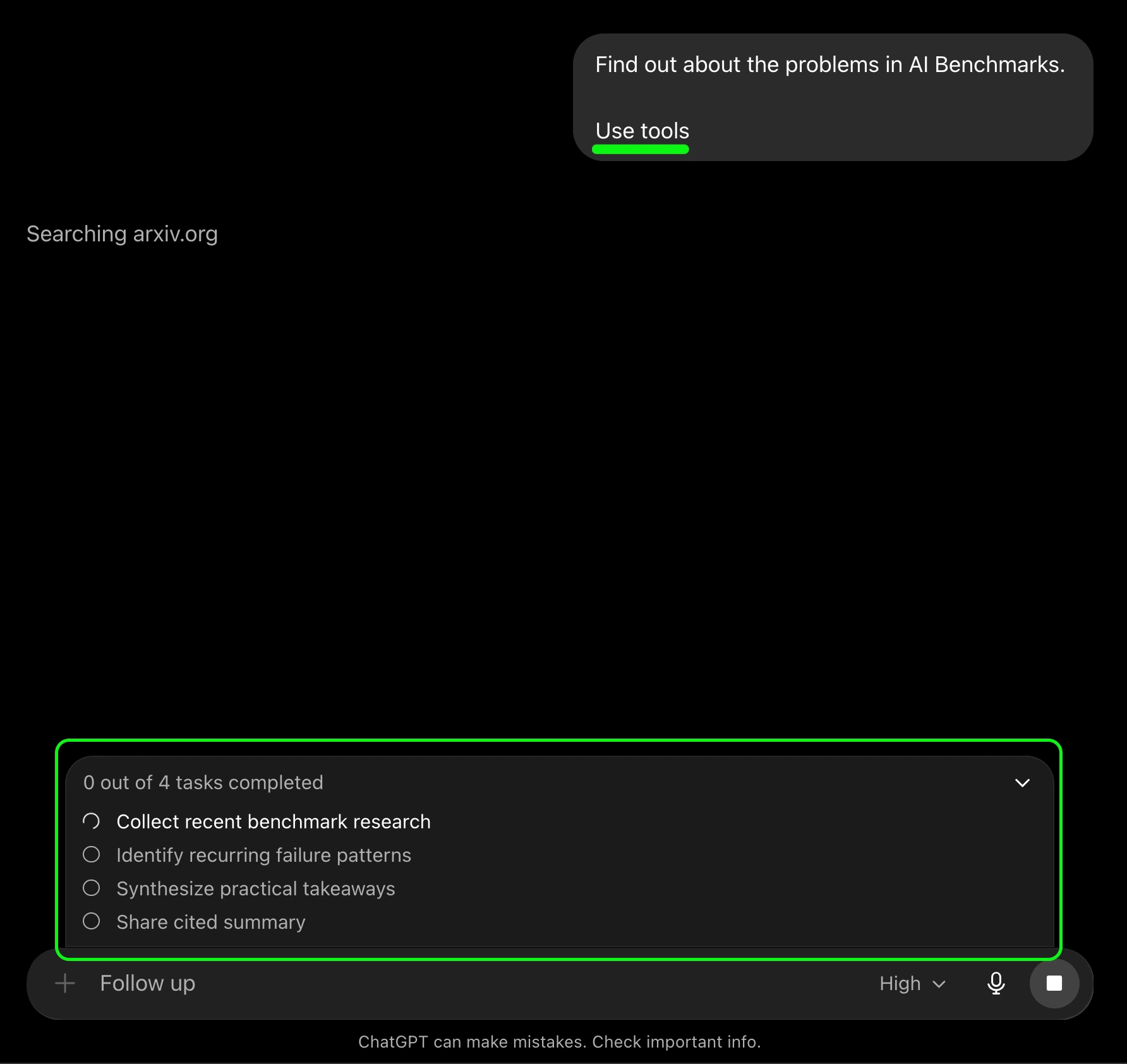
Use tools command in ChatGPT

The biggest productivity gains often come from combining multiple tools together.

9. Use Voice Mode for Interview Preparation

Interview preparation is one of the best use cases for Voice Mode.
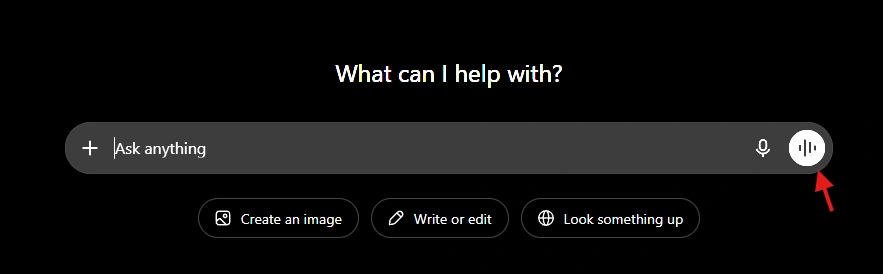
Voice Mode in ChatGPT
Give permission to use microphone

Typing answers and speaking answers are very different skills.

Most candidates discover this the moment they enter an actual interview.

Continuous voice chat with ChatGPT

Voice Mode allows you to simulate realistic interview scenarios, answer questions aloud, receive feedback, and practice communication skills in a low-pressure environment.

This is particularly useful for behavioral interviews, technical interviews, presentations, and public speaking preparation.

The experience feels much closer to a real conversation than a traditional text chat.

10. Make ChatGPT Critique Its Own Answers

Most users stop after the first response. They take the answer for its face value, and call it a day. 

But you might see that sometimes the answer isn’t satisfactory. Other times it is completely unrelated to your task. In such cases what comes in handy is the following prompt/phrase:

Ask clarifying questions if necessary.

This is one of the most effective techniques I’ve found is asking ChatGPT!

Every answer contains assumptions, limitations, and potential blind spots. By forcing the model to identify them, you often uncover weaknesses that would have otherwise gone unnoticed.

This is particularly valuable when making decisions, evaluating arguments, writing articles, or comparing alternatives.

  • The first answer is often good.
  • The second answer is frequently better.
  • The third answer is where the interesting insights start to appear.

Final Thoughts

The biggest misconception about ChatGPT is 

It’s an AI chatbot

Which isn’t false necessarily, but it would be limiting its actual potential. 

The quality of the results you get using ChatGPT depends largely on whether:

  • You’re using one tool or the entire toolbox.
  • Asking clarifying questions
  • Providing examples
  • Using memory
  • Uploading files
  • Executing code
  • Practicing with voice conversations
  • Challenging its own assumptions

Individually, each technique provides a small improvement.

Together, they fundamentally change the way ChatGPT fits into your workflow.

I specialize in reviewing and refining AI-driven research, technical documentation, and content related to emerging AI technologies. My experience spans AI model training, data analysis, and information retrieval, allowing me to craft content that is both technically accurate and accessible.