








Your AI agent works great in testing. Then you ship it, and something kinda breaks. A tool called loops forever, like it never learns. A retrieval step returns garbage and costs spike. You have no idea why, at all.
That’s the agent observability problem. And if you’re building with LLMs, you need to solve it before production, not after. This post kinda breaks down three of the most-used observability tools: LangSmith, Langfuse and Arize. We’ll set each one up, trace the same agent and compare what you actually get.
Traditional application monitoring tracks requests, errors, and latency, but that is not enough for Agents.
An Agent may call multiple tools in sequence, with each LLM step having its own prompt, token usage, latency, and potential failure point. A single failed retrieval or tool call can lead to an incorrect final response.
Agent observability captures the full execution graph: every step, decision, LLM input and output, tool call, arguments, results, token usage, latency, and evaluation score. Without this visibility, debugging agent behavior becomes guesswork.
We will utilize a very simple LangChain agent to compare them. The agent receives a question from the user, retrieves relevant context, and responds using one or more tools to provide an answer.
First, you need to create the test agent and for that install all the required libraries.
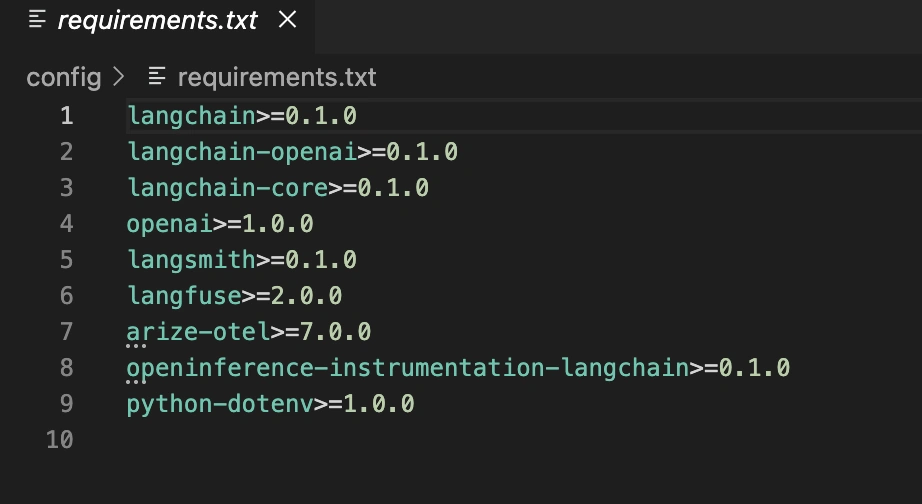
Let’s look at the base agent with two methods (search_docs and get_order_status). This will act as our foundational base for comparison with the three observability tools.
"""
Base agent used across all three observability demos.

Swap the OPENAI_API_KEY env var or call build_agent() from any demo file.
"""

import os

from dotenv import load_dotenv
from langchain.agents import AgentExecutor, create_openai_tools_agent
from langchain.tools import tool
from langchain_core.prompts import ChatPromptTemplate, MessagesPlaceholder
from langchain_openai import ChatOpenAI

load_dotenv()


@tool
def search_docs(query: str) -> str:
    """Search internal docs for relevant information."""
    # Simulated retrieval — swap with your actual vector store
    docs = {
        "refund": (
            "Refunds are processed within 5-7 business days. "
            "Items must be returned within 30 days."
        ),
        "shipping": (
            "Standard shipping takes 3-5 business days. "
            "Express is 1-2 days."
        ),
        "account": (
            "You can reset your password via the login page. "
            "Contact support for account issues."
        ),
    }

    for keyword, content in docs.items():
        if keyword in query.lower():
            return content

    return f"Found general docs related to: {query}"


@tool
def get_order_status(order_id: str) -> str:
    """Look up the status of an order by ID."""
    # Simulated order lookup
    statuses = {
        "ORD-001": "Shipped — expected delivery 2026-05-30",
        "ORD-002": "Processing — not yet shipped",
        "ORD-003": "Delivered on 2026-05-25",
    }

    return statuses.get(
        order_id,
        f"Order {order_id} not found in the system.",
    )


def build_agent() -> AgentExecutor:
    llm = ChatOpenAI(
        model="gpt-4o",
        temperature=0,
        api_key=os.environ["OPENAI_API_KEY"],
    )

    tools = [search_docs, get_order_status]

    prompt = ChatPromptTemplate.from_messages(
        [
            (
                "system",
                "You are a helpful customer support assistant. "
                "Use tools when needed.",
            ),
            ("user", "{input}"),
            MessagesPlaceholder(variable_name="agent_scratchpad"),
        ]
    )

    agent = create_openai_tools_agent(llm, tools, prompt)

    return AgentExecutor(
        agent=agent,
        tools=tools,
        verbose=False,
    )


TEST_QUESTIONS = [
    "What are the refund policies?",
    "What is the status of order ORD-002?",
    "How long does shipping take?",
]


if __name__ == "__main__":
    executor = build_agent()

    for question in TEST_QUESTIONS:
        print(f"\nQ: {question}")

        result = executor.invoke({"input": question})

        print(f"A: {result['output']}")
This creates a candidate agent that can also be used with each of the tools. The first tool we will explore will be the one provided by LangSmith.
The LangChain team has developed LangSmith. If you are using LangChain, then integration will be quick and easy.
"""
LangSmith observability demo.

Setup:

pip install langsmith

Set LANGCHAIN_API_KEY in your .env file.

How it works:

LangSmith hooks into LangChain's callback system via env vars, so no code
changes are needed beyond the two os.environ lines below.
"""

import os

from dotenv import load_dotenv

from agent_base import TEST_QUESTIONS, build_agent

load_dotenv()

# Enable LangSmith tracing. These two vars are all you need.
os.environ["LANGCHAIN_TRACING_V2"] = "true"
os.environ["LANGCHAIN_PROJECT"] = "agent-observability-demo"

# LANGCHAIN_API_KEY must be set in your .env or environment.


def run_with_metadata(
    executor,
    question: str,
    user_id: str = "demo-user",
):
    """Run the agent and attach per-run metadata via config."""
    return executor.invoke(
        {"input": question},
        config={
            "metadata": {
                "user_id": user_id,
                "source": "langsmith_demo",
            },
            # Optional: tag runs for filtering in the dashboard.
            "tags": ["observability-blog", "demo"],
        },
    )


def main():
    print("=== LangSmith Demo ===")
    print("Traces will appear at: https://smith.langchain.com")
    print(f"Project: {os.environ['LANGCHAIN_PROJECT']}\n")

    executor = build_agent()

    for question in TEST_QUESTIONS:
        print(f"Q: {question}")

        result = run_with_metadata(executor, question)

        print(f"A: {result['output']}\n")

    print("Done. Open LangSmith to inspect the full trace tree for each run.")


if __name__ == "__main__":
    main()
LangSmith automatically connects to LangChain’s callback system without the need for decorators or wrappers to see each run appear in your project dashboard.
LangSmith’s trace view shows the full agent execution tree, from the initial call to tool use, LLM responses, and final output. Each node includes inputs, outputs, and latency.
You can tag runs, add metadata, filter by outcome, save runs as datasets, and run evaluations. This is useful when improving prompts or retrieval logic.
The prompt playground is another strong feature. You can open any trace, edit the prompt inline, and rerun it to debug poor LLM performance.
LangSmith’s limitations appear at scale. The free tier has caps, and integration takes more effort if you are not using LangChain, though OpenTelemetry is supported.
Langfuse is the open-source alternative here. You can either host it on your server, or use their cloud service. It also integrates with all frameworks like LangChain, LlamaIndex, raw OpenAI APIs, etc.
# Read this Doc-string for installing the dependencies and their setup
"""
Langfuse observability demo.

Setup:

pip install langfuse

Set LANGFUSE_PUBLIC_KEY, LANGFUSE_SECRET_KEY in your .env file.

LANGFUSE_HOST defaults to https://cloud.langfuse.com; override for self-hosted.

Key differences from LangSmith:

- Callback handler is passed per-invoke for more explicit control.
- Native session grouping for multi-turn conversations.
- You can score any trace after the fact via the Langfuse client.
"""

import os

from dotenv import load_dotenv
from langfuse import Langfuse
from langfuse.callback import CallbackHandler

from agent_base import TEST_QUESTIONS, build_agent

load_dotenv()


def build_handler(
    session_id: str,
    user_id: str = "demo-user",
) -> CallbackHandler:
    return CallbackHandler(
        public_key=os.environ["LANGFUSE_PUBLIC_KEY"],
        secret_key=os.environ["LANGFUSE_SECRET_KEY"],
        host=os.getenv("LANGFUSE_HOST", "https://cloud.langfuse.com"),
        session_id=session_id,
        user_id=user_id,
        metadata={"source": "langfuse_demo"},
        tags=["observability-blog", "demo"],
    )


def score_trace(
    trace_id: str,
    score: float,
    comment: str = "",
):
    """Add a correctness score to a trace after reviewing the output."""
    lf = Langfuse(
        public_key=os.environ["LANGFUSE_PUBLIC_KEY"],
        secret_key=os.environ["LANGFUSE_SECRET_KEY"],
        host=os.getenv("LANGFUSE_HOST", "https://cloud.langfuse.com"),
    )

    lf.score(
        trace_id=trace_id,
        name="correctness",
        value=score,
        comment=comment,
    )

    lf.flush()

    print(f"Scored trace {trace_id}: {score}")


def run_single_session(
    executor,
    session_id: str,
):
    """Run all test questions in a single session so they're linked in the UI."""
    handler = build_handler(session_id=session_id)
    trace_ids = []

    for question in TEST_QUESTIONS:
        print(f"Q: {question}")

        result = executor.invoke(
            {"input": question},
            config={"callbacks": [handler]},
        )

        print(f"A: {result['output']}\n")

        # handler.get_trace_id() returns the trace ID for the last run.
        trace_ids.append(handler.get_trace_id())

    # Flush ensures traces are sent before the process exits.
    # This is critical in batch jobs.
    handler.flush()

    return trace_ids


def main():
    print("=== Langfuse Demo ===")
    print(f"Dashboard: {os.getenv('LANGFUSE_HOST', 'https://cloud.langfuse.com')}\n")

    executor = build_agent()
    session_id = "demo-session-001"

    trace_ids = run_single_session(executor, session_id)

    # Example: programmatically score the first trace.
    if trace_ids and trace_ids[0]:
        print("\nScoring first trace as an example:")
        score_trace(trace_ids[0], score=0.9, comment="Answer was accurate")

    print(f"\nDone. Find all runs under session '{session_id}' in your Langfuse dashboard.")


if __name__ == "__main__":
    main()
You can pass callback handlers every run, which is a little bit more explicit than LangSmith is, but provides greater flexibility since you can assign user IDs, session IDs, and custom metadata when you invoke it.
Langfuse has a really good evaluation workflow as well; you can add scores after the trace has been completed.
from langfuse import Langfuse

lf = Langfuse()

# Score a specific trace by ID.
lf.score(
    trace_id="trace-abc123",
    name="correctness",
    value=0.9,
    comment="Answer was accurate but slightly verbose",
)
This works in conjunction with human reviews of the responses your team scores, allowing you to get aggregated evaluation metrics over time.
Users can organize their sessions by connecting them, so agents can easily follow conversations across multiple turns. All the traces in an individual user session are connected in the application, which allows you to follow an entire conversation in one place.
Initially developed as a platform for monitoring conventional machine learning models, Arize is now capable of observing both language models and agents. The fact that it was originally created to help teams deploy models into production at scale has remained intact.
In addition to using the OpenInference standard as its measurement scheme, Arize integrates with OpenTelemetry for instrumentation. Configuring Arize is more complicated than it is for most providers.
# Read this Doc-string for installing the dependencies and their setup
"""
Arize observability demo.

Setup:

pip install arize-otel openinference-instrumentation-langchain

Set ARIZE_SPACE_ID and ARIZE_API_KEY in your .env file.

Key differences from the others:

- Uses OpenTelemetry under the hood, so it integrates with existing OTel stacks.
- Instrumentation is global like LangSmith, not per-invoke like Langfuse.
- Best-in-class production monitoring: drift detection, cohort analysis, alerting.
- Phoenix, arize-phoenix, is the free local sibling for development use.
"""

import os

from arize.otel import register
from dotenv import load_dotenv
from openinference.instrumentation.langchain import LangChainInstrumentor

from agent_base import TEST_QUESTIONS, build_agent

load_dotenv()


def setup_arize_tracing():
    """Register Arize as the OTel tracer provider and instrument LangChain globally."""
    tracer_provider = register(
        space_id=os.environ["ARIZE_SPACE_ID"],
        api_key=os.environ["ARIZE_API_KEY"],
        project_name="agent-observability-demo",
    )

    LangChainInstrumentor().instrument(tracer_provider=tracer_provider)

    return tracer_provider


def run_with_attributes(
    executor,
    question: str,
    user_segment: str = "standard",
):
    """Run the agent and attach span attributes for cohort analysis in Arize."""
    from opentelemetry import trace

    tracer = trace.get_tracer(__name__)

    with tracer.start_as_current_span("agent_run") as span:
        span.set_attribute("user.segment", user_segment)
        span.set_attribute("query.text", question)
        span.set_attribute("demo.source", "arize_demo")

        result = executor.invoke({"input": question})

        span.set_attribute("response.text", result["output"])

        return result


def main():
    print("=== Arize Demo ===")
    print("Traces will appear at: https://app.arize.com")
    print("Project: agent-observability-demo\n")

    setup_arize_tracing()

    executor = build_agent()

    # Simulate two user segments to demonstrate cohort analysis in Arize.
    segments = ["premium", "standard", "standard"]

    for question, segment in zip(TEST_QUESTIONS, segments):
        print(f"Q: {question} [segment={segment}]")

        result = run_with_attributes(
            executor,
            question,
            user_segment=segment,
        )

        print(f"A: {result['output']}\n")

    print("Done. In Arize, use the cohort filter to compare premium vs standard responses.")
    print("Set up monitors on the Arize dashboard to alert on response quality drift.")


if __name__ == "__main__":
    main()
The instrumentation is global like that of LangSmith, but it becomes a component of OpenTelemetry’s overall measurement framework. Therefore, Arize can utilize the existing observability stack of your organization regardless of the actual framework you use (i.e., Jaeger, Grafana, etc.).
To be completely open, there is no single right tool for all use cases; it all depends on where you are in the development cycle and what your team needs.
| Feature | LangSmith | Langfuse | Arize |
| Setup complexity | Minimal (2 env vars) | Low (callback handler) | Most boilerplate |
| Framework support | LangChain-native; others via OTel | Any framework | Any framework via OTel |
| Self-hosting | Limited | First-class (Docker Compose) | Phoenix only (local dev) |
| Trace visualization | Excellent tree view | Good, session-linked | Good, OTel-standard |
| Evaluation / scoring | Dataset + playground | Session-level human scores | Rubric-based evals |
| Production monitoring | Basic | Basic | Drift, alerting, cohorts |
| Multi-turn / sessions | Thread-level | Native session grouping | Trace-level only |
| Open source | Proprietary | Fully open source | Phoenix is OSS; platform isn’t |
| Free tier | Limited traces/month | Generous (self-host = unlimited) | Limited |
| Best for | LangChain dev & iteration | Data ownership + any framework | Production-scale monitoring |
Agent observability is one of those things you only regret skipping after something goes wrong in production. Tracing an agent run after the fact, without any instrumentation is like debugging a distributed system with print statements.
All three tools covered here are production ready. They each have a free path in. And they each take under 30 minutes to integrate with a LangChain agent. There’s no good reason to ship an unobservable agent anymore.
Pick the tool that fits your current stage. Add scoring early, even informally. And when your agent starts doing something weird at 2am, you’ll be glad you did.
Data Science Trainee at Analytics Vidhya
I am currently working as a Data Science Trainee at Analytics Vidhya, where I focus on building data-driven solutions and applying AI/ML techniques to solve real-world business problems. My work allows me to explore advanced analytics, machine learning, and AI applications that empower organizations to make smarter, evidence-based decisions.
With a strong foundation in computer science, software development, and data analytics, I am passionate about leveraging AI to create impactful, scalable solutions that bridge the gap between technology and business.
📩 You can also reach out to me at [email protected]
此内容由惯性聚合(RSS阅读器)自动聚合整理,仅供阅读参考。 原文来自 — 版权归原作者所有。