惯性聚合 高效追踪和阅读你感兴趣的博客、新闻、科技资讯
阅读原文 在惯性聚合中打开

推荐订阅源

B
Blog
C
Check Point Blog
The GitHub Blog
The GitHub Blog
Y
Y Combinator Blog
SecWiki News
SecWiki News
有赞技术团队
有赞技术团队
Latest news
Latest news
D
DataBreaches.Net
Blog — PlanetScale
Blog — PlanetScale
Project Zero
Project Zero
H
Help Net Security
Cyber Security Advisories - MS-ISAC
G
GRAHAM CLULEY
Engineering at Meta
Engineering at Meta
T
Threat Research - Cisco Blogs
腾讯CDC
P
Proofpoint News Feed
L
LINUX DO - 热门话题
C
Cisco Blogs
P
Palo Alto Networks Blog
Vercel News
Vercel News
P
Privacy International News Feed
爱范儿
爱范儿
Scott Helme
Scott Helme
L
Lohrmann on Cybersecurity
MyScale Blog
MyScale Blog
K
Kaspersky official blog
B
Blog RSS Feed
美团技术团队
Microsoft Security Blog
O
OpenAI News
博客园 - 叶小钗
量子位
T
Tenable Blog
C
Cybersecurity and Infrastructure Security Agency CISA
J
Java Code Geeks
Application and Cybersecurity Blog
Hacker News: Ask HN
Hacker News: Ask HN
OSCHINA 社区最新新闻
OSCHINA 社区最新新闻
L
LINUX DO - 最新话题
F
Fortinet All Blogs
N
News | PayPal Newsroom
The Hacker News
The Hacker News
C
CXSECURITY Database RSS Feed - CXSecurity.com
cs.CV updates on arXiv.org
博客园 - 【当耐特】
N
News and Events Feed by Topic
V
Visual Studio Blog
Google DeepMind News
Last Week in AI
Last Week in AI

Analytics Vidhya

Handling Imbalanced Classification: What Works Better Than SMOTE GPT-5.6 Is Here: Sol, Terra, and Luna Loop Engineering for AI Agents: How /loop is Changing AI Workflows DeepSeek DSpark: The Speculative Decoding Trick Behind 400% Faster LLM OKF: Redefining Knowledge Bases for AI Agents Modern VLMs Explained: How GPT-4o, Gemini, Claude Vision, and Qwen-VL Work YOLO26 Tutorial: Object Detection, Pose Estimation & More Large Action Models (LAMs) vs Agentic LLMs: What's the Real Difference? Claude Sonnet 5: The Fable 5 at Home The Best $20 AI Plan: ChatGPT Plus vs Claude Pro vs Gemini Pro GraphRAG vs Vector RAG: Which Retrieval Method is Best? Using AI When You Don’t Trust AI The Self-Improving Loop in AI Agents: Architecture, Benefits, and How it Outperforms Traditional Agent Workflows Harness-1: The 20B Retrieval Subagent That Beats GPT-5.4 at Search Sakana Fugu: Multi-Agent System as a Model System Design for ML Interviews: 10 Real Problems Walked Through Most People Use ChatGPT Wrong: 10 Features and Tips That Changed How I Work OpenAI Just Launched 3 Free AI Courses with Certificates Autoregressive Models: Predicting the Future Using the Past Gemini Omni: AI Video Generation Inside Gemini DiffusionGemma: Google’s Diffusion-Based Open Model for Faster Text Generation Top 10 AI Engineering Tools Everyone is Using in 2026 I Tested Claude Fable 5: Can Anthropic’s Newest AI Deliver on the Hype? Prophet vs NeuralProphet vs TimeGPT vs Chronos: A Practical Comparison Build an Emergency Helpline Voice Agent with LangChain Choosing the Right Vector Database for RAG and AI Applications Google Gemma 4 12B: Architecture, Benchmarks, Access, and Hands-on Guide for Developers How to Choose the Right AI Model for Your Needs Agent Observability with LangSmith, Langfuse, and Arize: A Hands-On Comparison How to Use Claude Managed Agents? Google AI Studio vs Gemini App: What’s the Difference? AI Workflows for Sales Teams: Prospect Research, Lead Qualification, and CRM Updates on Autopilot Using LangGraph 25 Most Influential AI Pioneers to Meet at DataHack Summit 2026 Claude Opus 4.8: A Smarter Model in the Right Direction PySpark Optimization: 12 Proven Techniques to Speed Up Your Spark Jobs 10 Everyday Tasks You Can Automate with AI Today (With n8n Templates) Google Antigravity 2.0: The Full Developer Guide (I/O 2026) Build a Claude Cowork-Like Browser Agent Using Playwright MCP and Claude Desktop Pandas vs Polars vs DuckDB: Which Library Should You Choose? Qwen3.7-Max: Alibaba’s New Agent-First LLM for Coding, Reasoning, and Long-Horizon AI Workflows The Biggest Announcements from Google I/O 2026 Top 9 AI Events and Conferences in 2026 that you Must Attend Gemini 3.5 Flash: Frontier Intelligence with Speed Kimi WebBridge: Hands-on Guide to Kimi’s Browser Extension for AI Agents 40 Advanced SQL Window Functions Every Data Scientist Must Know(with examples) Top 10 AI Research Papers of 2025 6 Steps to Crack GenAI Case Study Interviews (With Real Examples) OpenAI Omni Moderation: How to Filter Text & Images for Free DataHack Summit 2026: You Just Cannot Skip This AI Event of the Year OpenAI’s New API Voice Models Will Change the Way You Use AI Hermes Agent Guide: What is it and How to Use it? Top 10 LLM Research Papers of 2026 Agent Memory Patterns in Cognitive Science and AI Systems 10 AI Agents Every AI Engineer Must Build (with GitHub Samples) 23 Tips for Smart Claude Code Token Saving and Workflow Optimization Feature Engineering with LLMs: Techniques & Python Examples ChatGPT is Now Inside Excel and Google Sheets: Here is How to Use it Gemini API File Search: The Easy Way to Build RAG Top 10 Open-Source Libraries to Fine-Tune LLMs Locally ML Intern in Practice: From Prompt to a Shipped Hugging Face Model 15+ Solved Agentic AI Projects with Github Links How People are Figuring Out Life With Claude MemPalace Explained: Building Long-Term Memory for AI Agents Beyond RAG Grok Voice Think Fast 1.0: Build Voice AI Agents That Actually Think Compressing LSTM Models for Retail Edge Deployment: A Practical Comparison MCP vs Agent Skills: Different Altogether GPT 5.5 vs Opus 4.7: Which is the Best AI Model Today? What is Agentic AI? Claude Code vs Codex: A Detailed Terminal Agent Comparison Google Deep Research Max: Build Autonomous AI Research Agents in Minutes Meta Muse Spark Review: Is It Worth the Hype? ChatGPT Images 2.0 vs Nano Banana 2: Which is Better? Cursor V3 Explained: The AI Coding Agent That’s Replacing Traditional IDEs in 2026 DeepSeek-V4: The Most Powerful Open-Source Model Ever Is GPT Image 2 the Best Image Generation Model? Token Economics: Why AI is Getting “Cheaper” From Idea to Output: Claude Does the Design Work Opus 4.7 vs Opus 4.6: Should You Switch? Build Human-Like AI Voice App with Gemini 3.1 Flash TTS How to Structure a Claude Code Project that Thinks Like an Engineer Gemma 4 Tool Calling Explained: Build AI Agents with Function Calling (Step-by-Step Guide) Anthropic Launches Claude Opus 4.7 For “Most Difficult Tasks” Top 28 Claude Shortcuts that will 10X your Speed GPT-5.4-Cyber: Why OpenAI is Keeping its Most Powerful Model Under Lock and Key Google AI Studio Guide: Every Feature Explained Mastering Deep Agents: Context Engineering that Actually Works 21 Computer Vision Projects from Beginner to Advanced (2026 Guide) Excel 101: Excel Agent Mode Explained MiniMax M2.7 Goes Open-Weight to Let You Run Agents Locally Top 10 Gemma 4 Projects That Will Blow Your Mind GLM-5.1: Architecture, Benchmarks, Capabilities & How to Use It Understanding BERTopic: From Raw Text to Interpretable Topics From Karpathy’s LLM Wiki to Graphify: AI Memory Layers are Here 10 Most Important AI Concepts Explained Simply Project Glasswing is World’s Most Powerful AI in Action How to Run Gemma 4 on Your Phone Without Internet: A Hands-On Guide Running Claude Code for Free with Gemma 4 and Ollama LLM Wiki Revolution: How Andrej Karpathy’s Idea is Changing AI Rethinking Enterprise Search: How Cortex Search Turns Data into Business Impact Google’s Gemma 4: Is it the Best Open-Source Model of 2026?
Claude's Hidden Art Skill: Making Illustrations With Code
Vasu Deo Sankrityayan · 2026-06-22 · via Analytics Vidhya

Everyone says Claude can’t make pictures. That’s partly true.

Here is the kind of art it makes on its own, with no plugins and no connectors:

Animations using Claude
The sun’s rays turn and the clouds drift

Drawn by Claude in SVG, no image model anywhere near it. Not pixels but code: shapes and coordinates that stay sharp at any size and redraw themselves when you ask.

What follows is the full tour, with the exact prompts that made each piece, so you can see the range of Claude’s visual capabilities and try it yourself.

Table of contents

  • How it works, in one minute
  • The range (hands-on)
    • Single-weight line art
    • Isometric, three-face shading
    • An icon set in one consistent style
    • A small data panel
    • A flat character illustration
  • The trick no image generator has
  • How to get good results
  • Where it shines, where it doesn’t
  • The takeaway
  • Frequently Asked Questions

You have probably heard that Claude can’t make images. It is the one knock on it that never quite goes away. Open a chat, ask for a picture, and you will not get a photo back the way you would from Midjourney or the image tools baked into ChatGPT and Gemini.

That part is true, but is also half the story. There is a whole that Claude makes entirely on its own, with no connectors, no credits, and no signing up for some third-party tool. It draws. Not with pixels, but with code. And it carries one advantage that no image generator can match, which we will get to near the end.

Below is what that looks like, with the exact prompts that produced each piece. Everything you are about to see was drawn by Claude.

How it works, in one minute

When Claude makes a visual, it writes SVG. Instead of painting a grid of colored dots, SVG describes a picture as shapes and coordinates: a circle here, a line there, this color, that angle. It is a recipe for a drawing rather than a photograph of one.
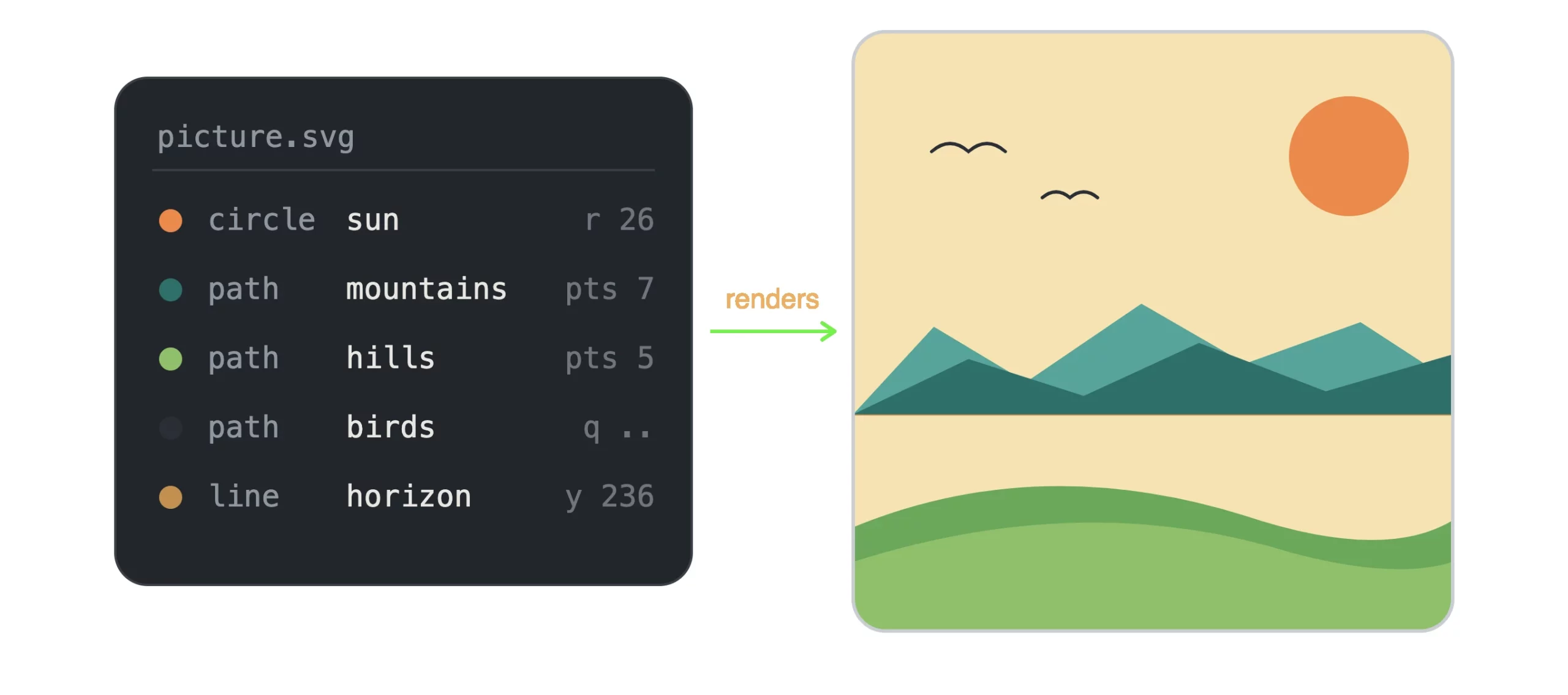
Editing images using Claude
change the words, change the picture

Two useful things fall out of that. First, the art stays razor sharp at any size, because the shapes are recomputed instead of stretched. Second, and this is the part that matters most, you can change the picture by changing the words, which is the trick we will come back to.

The trade is honest: this is flat, graphic, vector-style work. Think logos, icons, diagrams, and editorial illustration, not photorealistic skin or painterly texture. Within that lane, though, the range is wider than most people expect.

The range (hands-on)

Here are five pieces, each made from a single plain-English request. The prompt sits under each one so you can try it yourself.

1. Single-weight line art

Simple weight line graph made using Claude

> Draw a potted plant as minimalist single-weight line art. Black strokes only, no fill, rounded ends.

Pure outline, even line weight. The kind of thing that sits nicely at the top of a blog post or as a quiet section break.
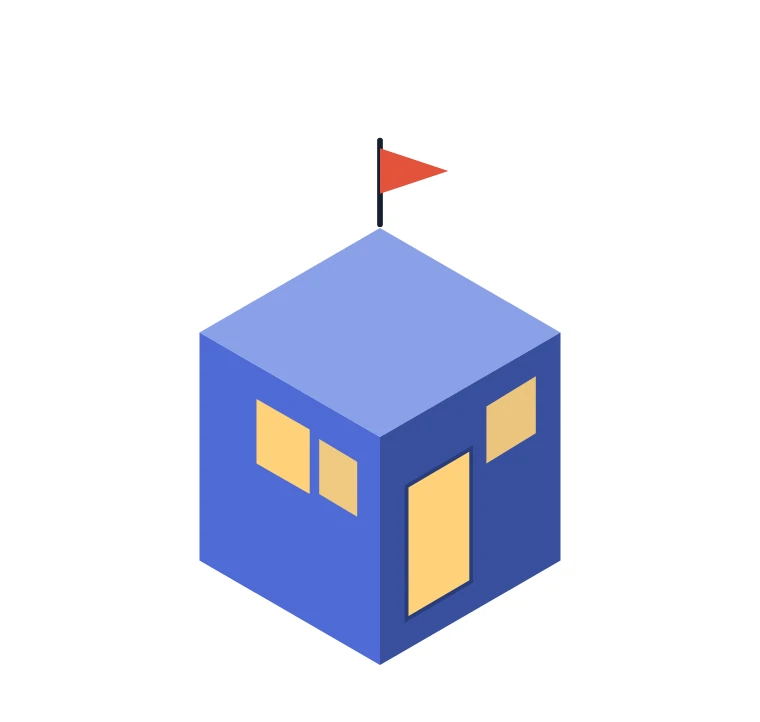
2. Isometric, three-face shading

Isometric Face Shading using Claude

Make an isometric little house. Three shaded faces, warm windows, a small flag on top.

Isometric work is all angles and consistent shading, which is exactly the sort of math code is good at. Useful for product explainers and how-it-works graphics.
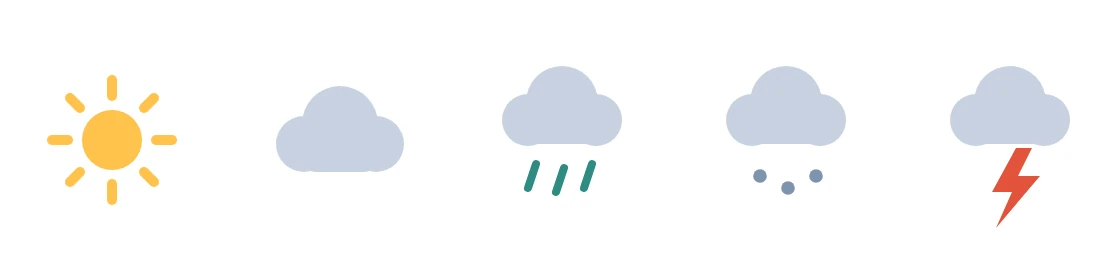
3. An icon set in one consistent style

Creating consistent icons using Claude

Give me a flat weather icon set: sun, cloud, rain, snow, lightning. Keep one consistent style.

The win here is consistency. Ask for a set and you get shapes that share the same weight and spacing, which is the hard part to keep steady by hand.
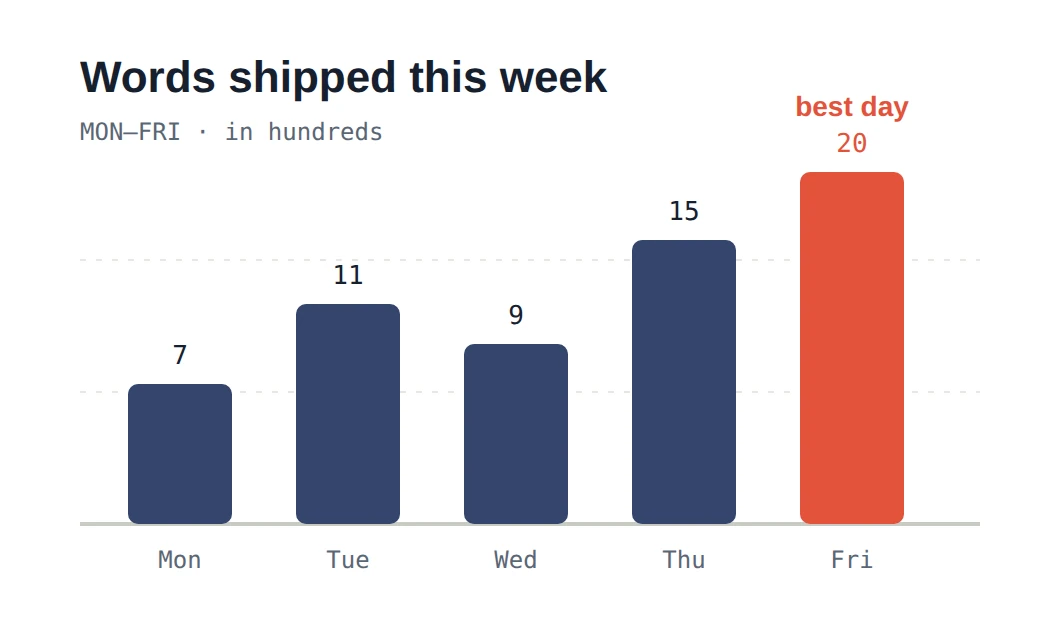
4. A small data panel

Creating data panels using Claude

Turn this into a clean bar chart: Mon 7, Tue 11, Wed 9, Thu 15, Fri 20. Highlight the best day.

Hand Claude numbers and it will lay out a chart with labels, a baseline, and a highlighted bar. Good for reports and slides where you want one tidy figure rather than a spreadsheet.

5. A flat character illustration

Character illustration using Claude

Draw a cute sitting fox in flat illustration style, warm palette, simple shapes.

Characters land too, as long as you keep them flat and graphic. This is where “vector” starts to feel like proper illustration rather than clip art.

The trick no image generator has

Here is the part worth the price of admission. With a normal image generator, a small change means rolling the dice again and hoping the next render keeps everything you liked. With Claude’s drawings, you just say what to change, and it edits the picture you already have.

Watch a plain mug pick up a few requests, one sentence at a time.

Starting image on the left. After 3 edits on the right.

·  make it coral instead

·  add steam rising off the top

·  give it polka dots and a little saucer

Three sentences, three edits, and the mug never lost its shape between steps. Try doing that cleanly with a text-to-image model.

This is the real reason to care. Claude does not just hand you a picture, it hands you a picture you can keep steering. The conversation is with the editor.

How to get good results

The difference between a flat “meh” and something you would publish usually comes down to how you ask. A few habits that help:

  • Name the style: Say the words out loud: “flat vector,” “single-line art,” “isometric,” “editorial spot illustration.” Claude leans into a named look far better than a vague one.
  • Set the mood: Give it a palette and a feeling. “Warm dusk colors, calm” beats “make it nice” every time.
  • Ask for SVG: Request it as an SVG so you get the sharp, editable version rather than a one-off.
  • Edit small: Change one thing per message. Small instructions keep the rest of the drawing intact.
  • Ask for a set: Need icons or a series? Ask for them together so the style stays consistent across all of them.

Where it shines, where it doesn’t

Reach for it Skip it for
  • Logos, icons, and icon sets
  • Diagrams and how-it-works graphics
  • Charts and small data panels
  • Blog headers and spot illustrations
  • Anything flat, graphic, or geometric
  • Anything you will keep editing
  • Photorealism and real-looking people
  • Painterly or textured artwork
  • Busy, organic, detailed scenes
  • A photo of my product on a table
  • Anything that needs lifelike light

Being clear about the ceiling is the whole point. Promise someone a painterly portrait and they will be let down. Show them a clean icon set, a chart, or the fox above, and they tend to be surprised it came out of a chat window at all.

The takeaway

Claude will not paint you a photo. But it will draw you something good, for free, the moment you ask, and then let you redirect it with a sentence. For a huge slice of everyday visual work, the headers, the icons, the diagrams, the little illustrations that make a page feel made rather than dumped, that is more than enough.

The fastest way to believe it is to open a chat and ask for one thing. Try “draw me a flat vector mountain scene at sunset as an SVG,” then tell it to warm up the sky. Watching the picture change on command is the moment it clicks.

Note: Every illustration in this article was drawn by Claude as SVG and rendered to image as-is. No image generator or connector was used to make them.

Frequently Asked Questions

Q1. Can Claude create images without an image generator?

A. Yes. Claude draws in SVG code—shapes and coordinates instead of pixels: producing logos, icons, diagrams, and flat illustrations with no plugins, connectors, or credits required.

Q2. What kind of art can Claude make in SVG?

A. Flat, graphic, vector-style work: single-line art, isometric drawings, icon sets, charts, and flat character illustrations. Not photorealism, painterly texture, or busy organic scenes.

Q3. Why is SVG art better than regular images?

A. SVG describes pictures as shapes, so art stays razor sharp at any size. Best of all, you edit it by changing words, not regenerating.

Q4. How is Claude better than other image generators?

A. You can keep steering the same picture. Instead of rerolling and hoping, just say what to change and Claude edits the existing drawing directly.

Q5. How do I get the best results from Claude’s SVG drawings?

A. Name the style, set a palette and mood, request SVG, edit one thing per message, and ask for sets together to keep style consistent.

I specialize in reviewing and refining AI-driven research, technical documentation, and content related to emerging AI technologies. My experience spans AI model training, data analysis, and information retrieval, allowing me to craft content that is both technically accurate and accessible.