








Google’s Nano Banana Pro finally has a worthy competitor, and if the results are anything to go by, it looks like this one may give it a run for its money. Putting its hat in the ring is none other than OpenAI, with its all-new ChatGPT Images 2.0. Now we all know the kind of quality that name brings to an AI product. The new image generation model is no different and now tries for the best spot on the list. Whether it is capable enough or not, we shall judge in this showdown between the two best image generation AI models: Nano Banana 2 vs ChatGPT Images 2.0. The goal – to find the best AI image generator for your everyday workflow
We shall test both models across different use cases to understand their capabilities in a typical work scenario. By the end, this comparison should be able to tell us the best model to use for each use-case, as well as the best overall AI model for image generation. But before we begin with the practical comparison, here is a bit of theory to help you know each of the models in detail.
Surmising from their product pages, both models understandably come with different strengths. This is largely because their originators – Google and OpenAI – have focused on vastly different set of features. Here, let’s have a look at what both models promise, at least on paper.
This one has been the fan favourite ever since its release earlier this year. Nano Banana 2 feels like a model built for practical image work at speed. Its biggest strength is not just generating an image from scratch, but editing and refining visuals quickly across different formats and use cases. Google’s positioning makes that quite clear. In its product page, the model is shown changing camera angles, adjusting mood and focus, applying reference styles, resizing assets for different placements, and handling text inside images with ease.
Because of this, Nano Banana 2 feels less like a pure art model and more like a production-ready creative engine.
You can learn all about the Nano Banana 2 here.
Now here comes the competitor. ChatGPT Images 2.0 is a model built for people who want more than just a pretty picture. Its core strength seems to be turning ideas into polished visual communication. That means not just generating an image, but handling layouts, multilingual text, educational graphics, posters, comics, branding concepts, and other design-heavy outputs. Moreover, it is able to do so with far more structure than a normal text-to-image model. OpenAI is also clearly positioning it as part of a broader reasoning workflow, where the model can think through the task, transform inputs, generate variations, and check its own output.
In simple words, ChatGPT Images 2.0 appears to be strongest when the job is not merely “make an image,” but “make an image that communicates something clearly and intelligently.”
You can learn all about the new ChatGPT Images 2.0 here.
Here is a table to summarise this on-paper comparison:
| Model | Core Strength | Known For | Best Use Cases | Main Edge |
|---|---|---|---|---|
| Nano Banana 2 | Fast image editing and iteration | Editing images quickly, adapting visuals, and working with references | Ad creatives, quick edits, resizing, variations, and production work | Better for speed and practical creative workflows |
| ChatGPT Images 2.0 | Intelligent visual creation | Turning ideas into polished visuals with structure and clarity | Infographics, posters, educational visuals, and design-heavy content | Better for visual communication and reasoning-led outputs |
And now that we know what each of the models is capable of, let us put them to the test in real-world scenarios.
Here are some instances from everyday office workflows that we will use to judge the two models for Nano Banana 2 vs ChatGPT Images 2.0.
Prompt:
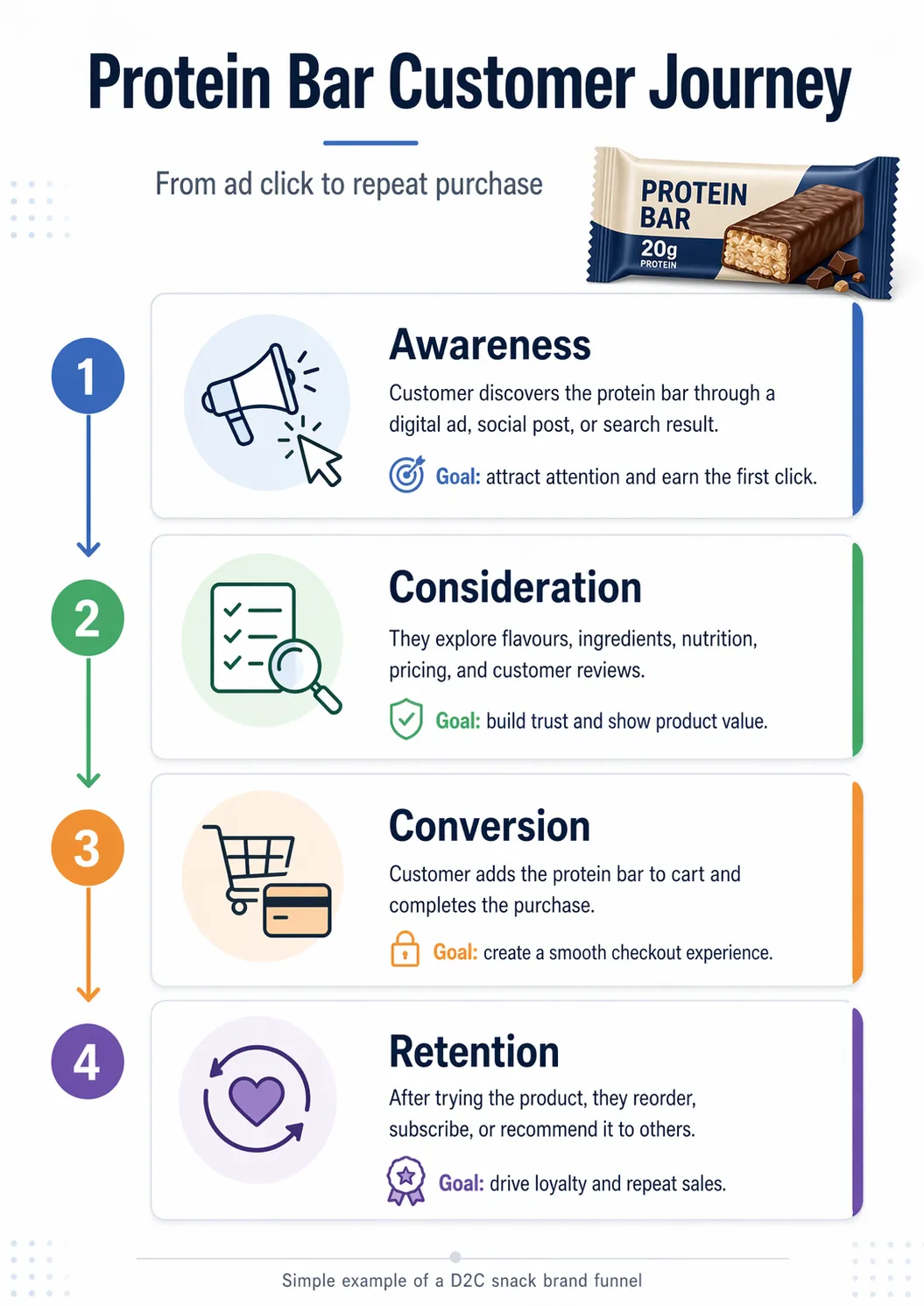
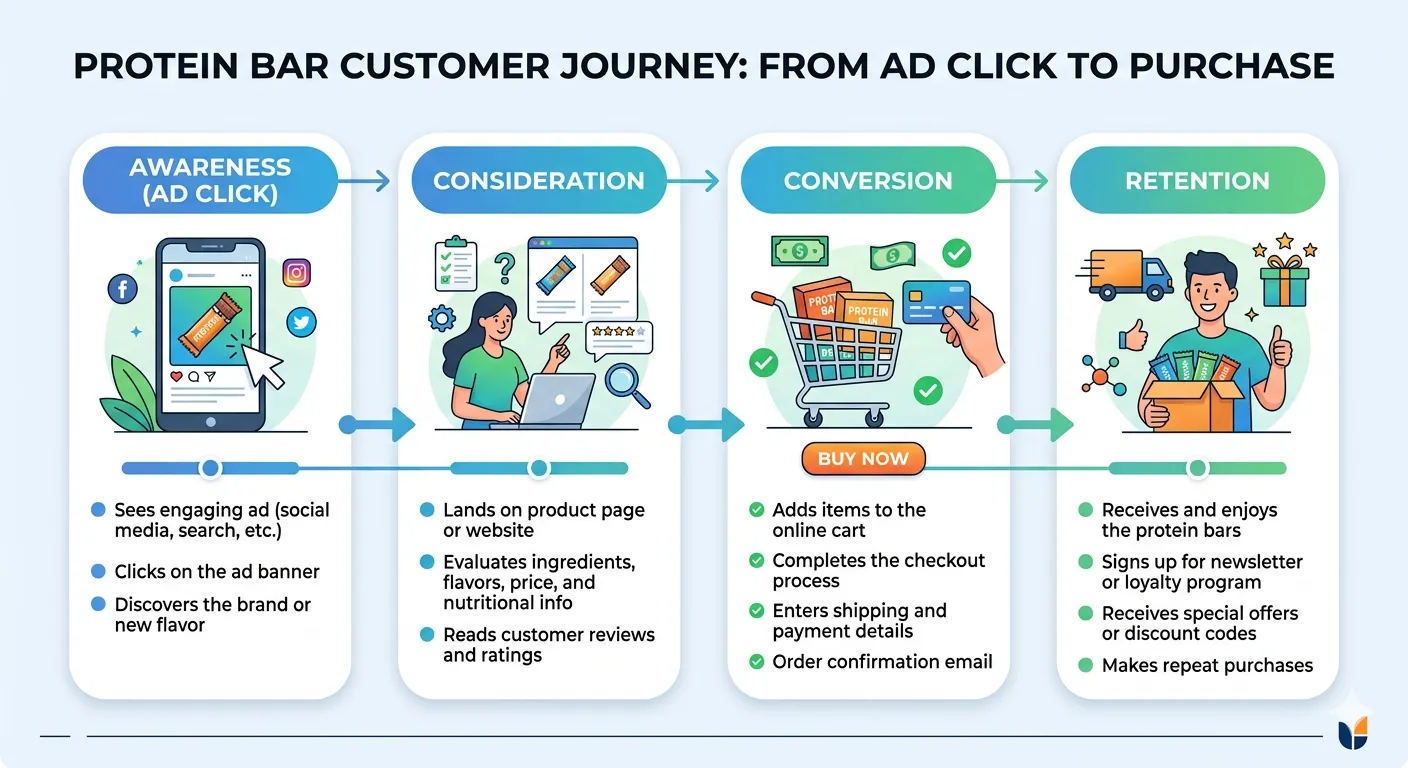
Create a clean infographic for a protein bar, explaining the customer journey from ad click to final purchase. Include the stages: Awareness, Consideration, Conversion, and Retention. Use a professional business style, simple icons, clear headings, and short supporting text for each stage.
ChatGPT Images 2.0 Output:
Nano Banana 2 Output:
Observation:
ChatGPT Images 2.0 clearly takes the lead here. Its output looks way too professional, as if ready to be presented in front of an audience. From the colour scheme to the layout, the information within, and the clean elements, including an image of the protein bar itself, make it look just like a professional designer has made this image.
Nano Banana 2, on the other hand, gives out all the information accurately within the image that is overall quite on-point. Yet, it feels much like a cumulation of vector art that has been created using an image generator by sharing information with it in a prompt. It works, but you won’t want to present it to your boss or colleagues.
Result:
ChatGPT Images 2.0 – 1
Nano Banana 2 – 0
Prompt:
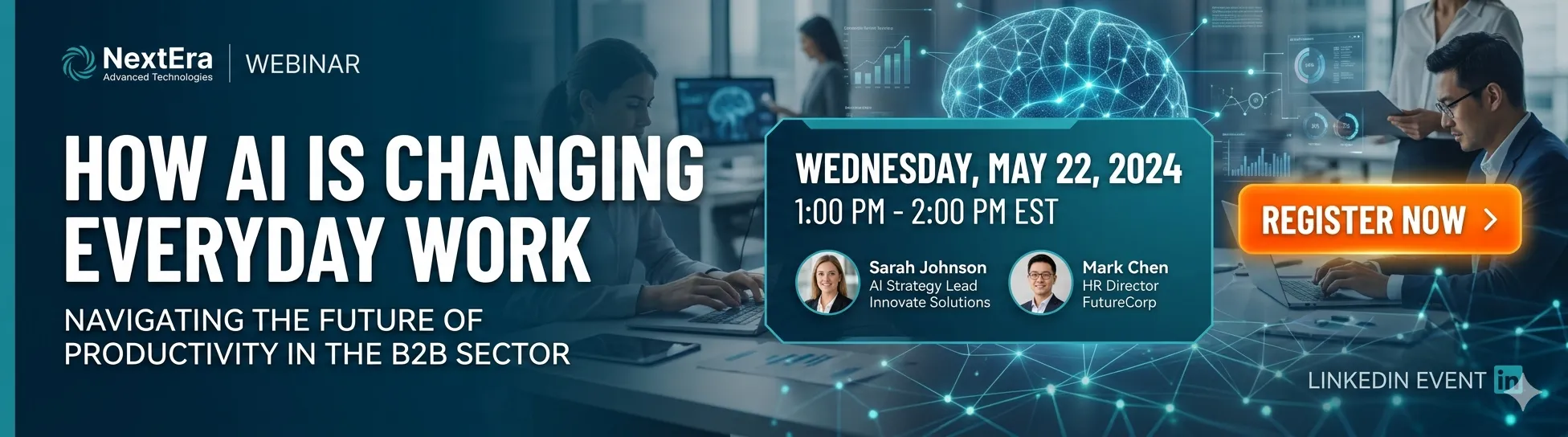
Create a LinkedIn promotional banner for a webinar on “How AI Is Changing Everyday Work.” Keep it modern and professional. Include the title, date, time, and a “Register Now” call-to-action. Make it suitable for a B2B audience.
ChatGPT Images 2.0 Output:

Nano Banana 2 Output:
Observation:
Both models seem to have done a pretty good job here, as both outputs look highly professional and visually appealing, with the right type of vibe that was needed for a professional banner.
Nano Banana 2 noticeably went a step further to include more information within the banner, including the name of the company, speakers, and even a date (which was wrong, though). On the other hand, ChatGPT Images 2.0 did a better job with the colour scheme and the minimalistic theme.
Result:
To keep it fair, both models gain 1 point each here.
Prompt:
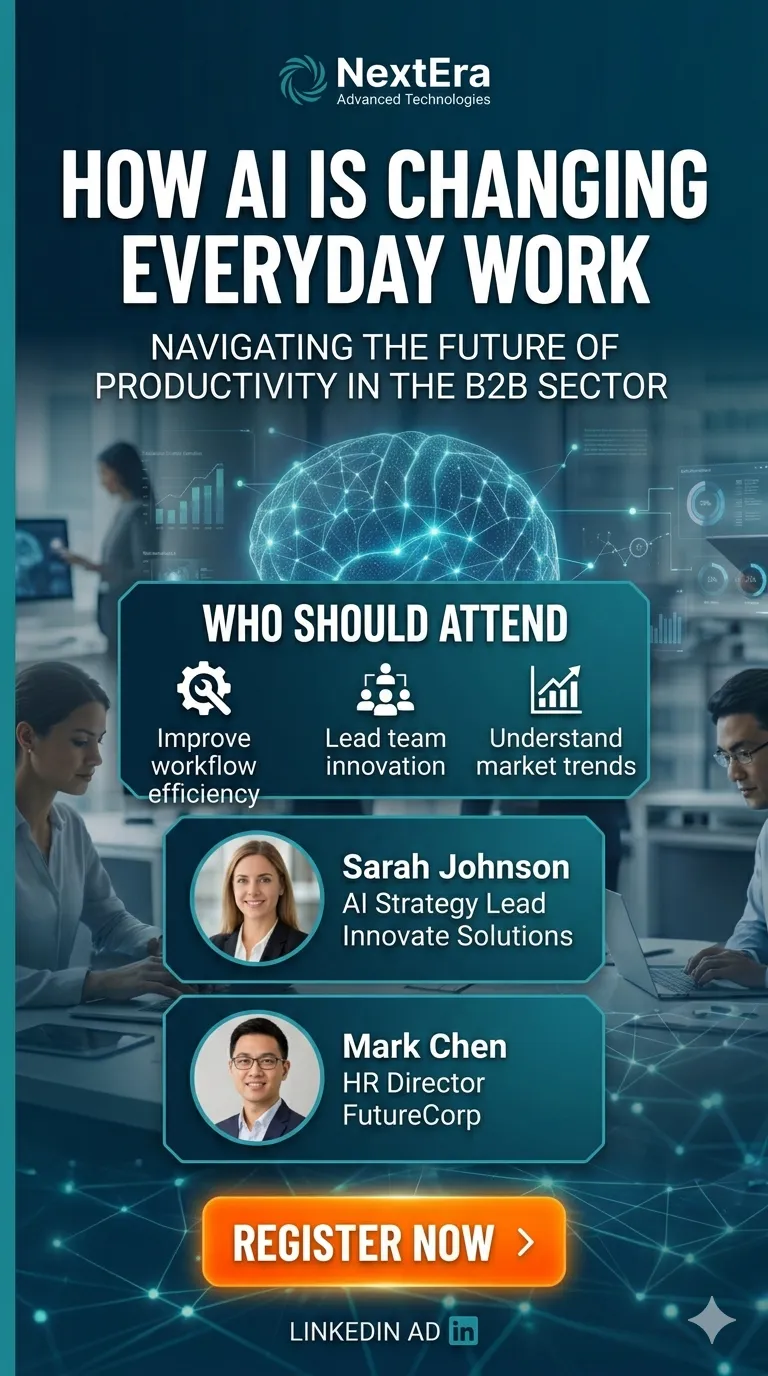
Adapt the same banner into an Instagram Reel-size image dimensions for a vertical ad. Remove date and time. Include “Who should Attend” with 3 very short bullet points.
ChatGPT Images 2.0 Output:

Nano Banana 2 Output:
Observation:
I believe ChatGPT Images 2.0 is the clear winner here, mainly because of 2 factors. First, its ad image is way better than the one by Nano Banana 2 LinkedIn Banner. It is more minimalistic and visually appealing, with just the right amount of text and visual elements fitted inside the dimensions. The ad image by Nano Banana 2 looks much more cluttered in comparison.
Another reason is the text placement within textholders within the images. While both models followed the directions accurately to remove time and date and include a new section, the text in Nano Banana 2’s image is slightly spilling over its container within the new section. The image by ChatGPT Images 2.0, on the other hand, is simply perfect in this regard.
Result:
ChatGPT Images 2.0 – 1
Nano Banana 2 – 0
Prompt:
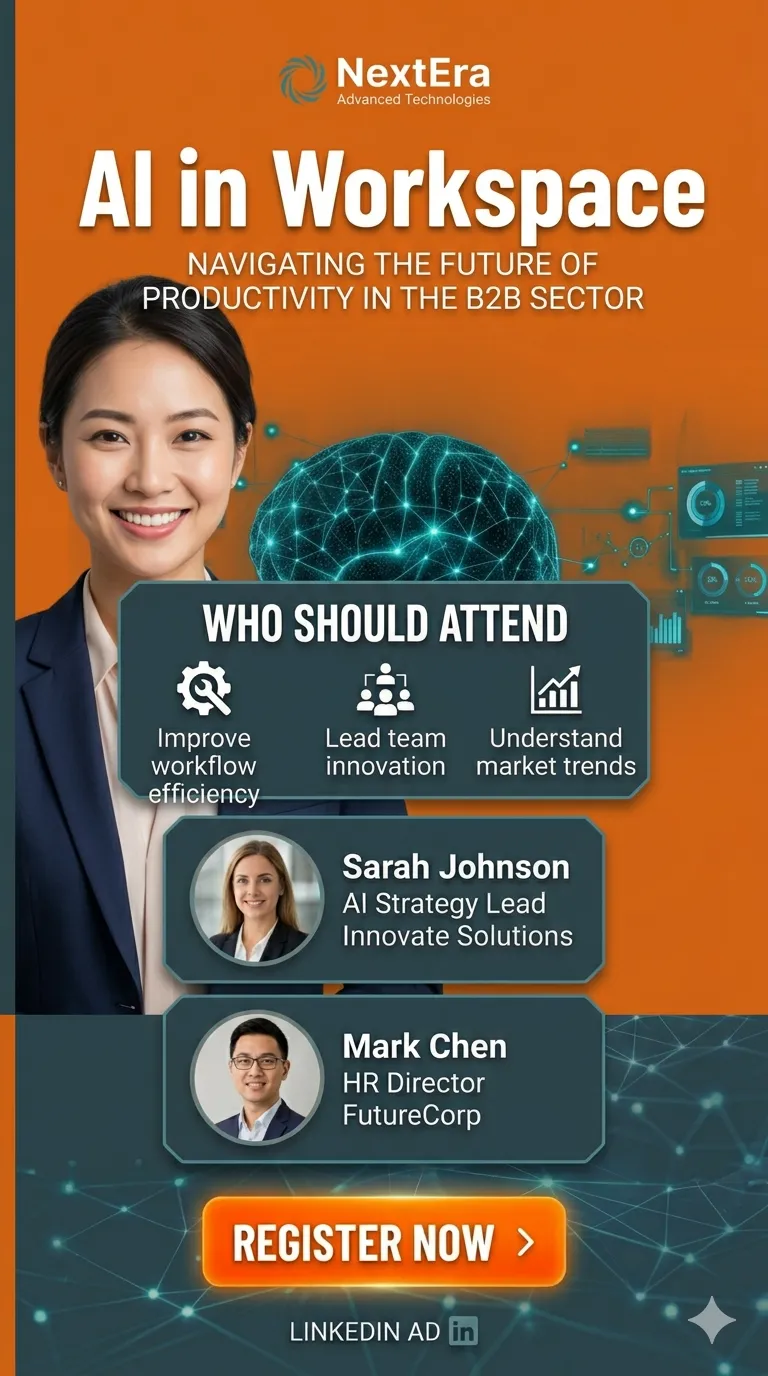
In this image, change the title to – “AI in Workspace”. Change the colour scheme to Orange and a matching colour.
Also, change the background image to that of an Asian woman in professional attire, smiling. Make sure no elements in the front overlap her face. Keep the rest of the image as it is.
ChatGPT Images 2.0 Output:

Nano Banana 2 Output:
Observation:
Ok, so Nano Banana 2 did a good job here, following all the instructions within the prompt accurately and making changes accordingly. The Orange theme looks good, and the background image has been changed as asked for. The text below the title slightly overlaps the woman’s hair despite specific instructions, but that’s ignorable.
It is ChatGPT Images 2.0’s output that really blew my mind. It wasn’t just accurate with all the changes, it made the new look like a highly professional design that was supposed to be as it is to begin with. Everything about the ad banner in its output looks massively professional and appealing. This point definitely goes to ChatGPT Images 2.0.
Result:
ChatGPT Images 2.0 – 1
Nano Banana 2 – 0
Prompt:
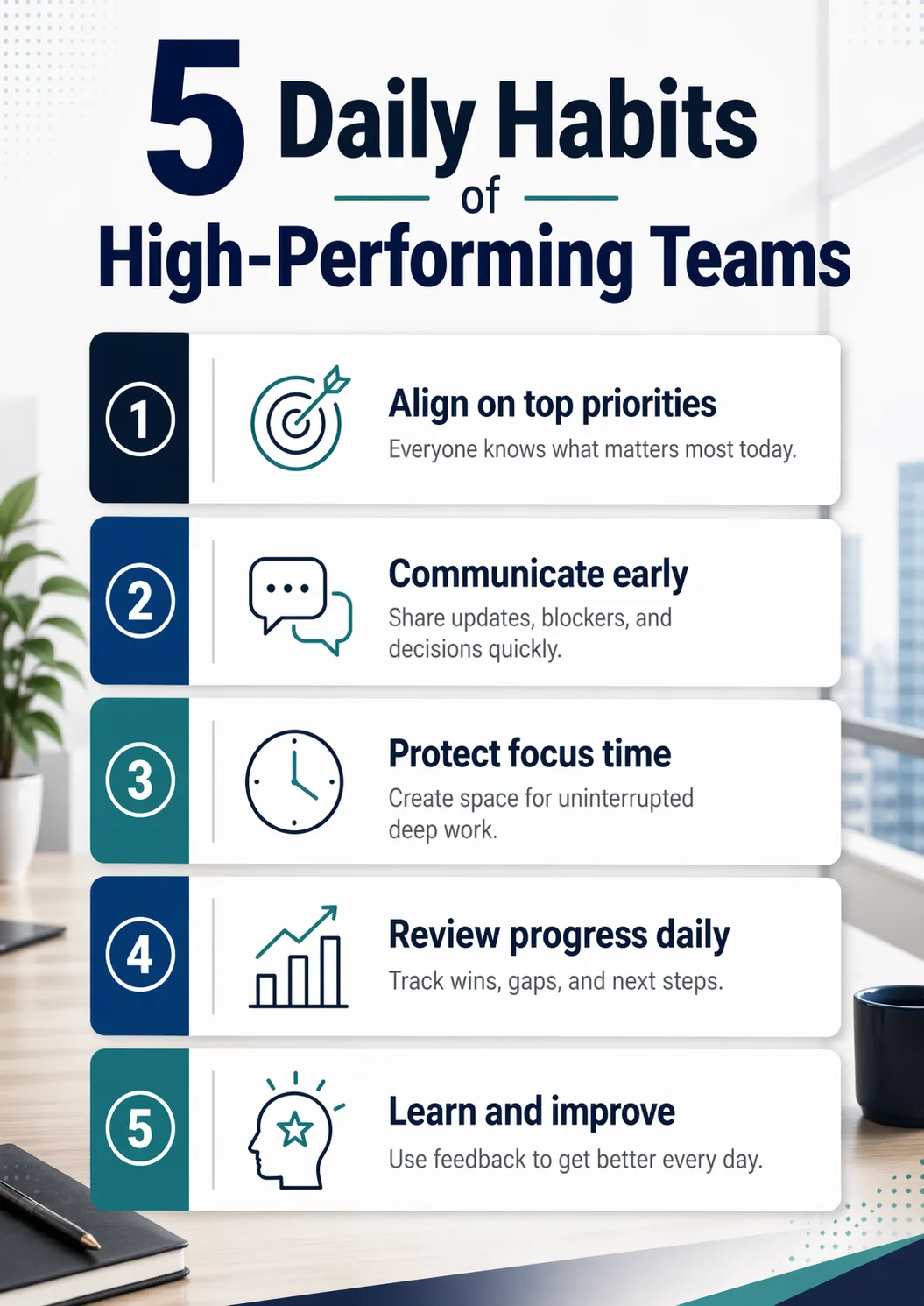
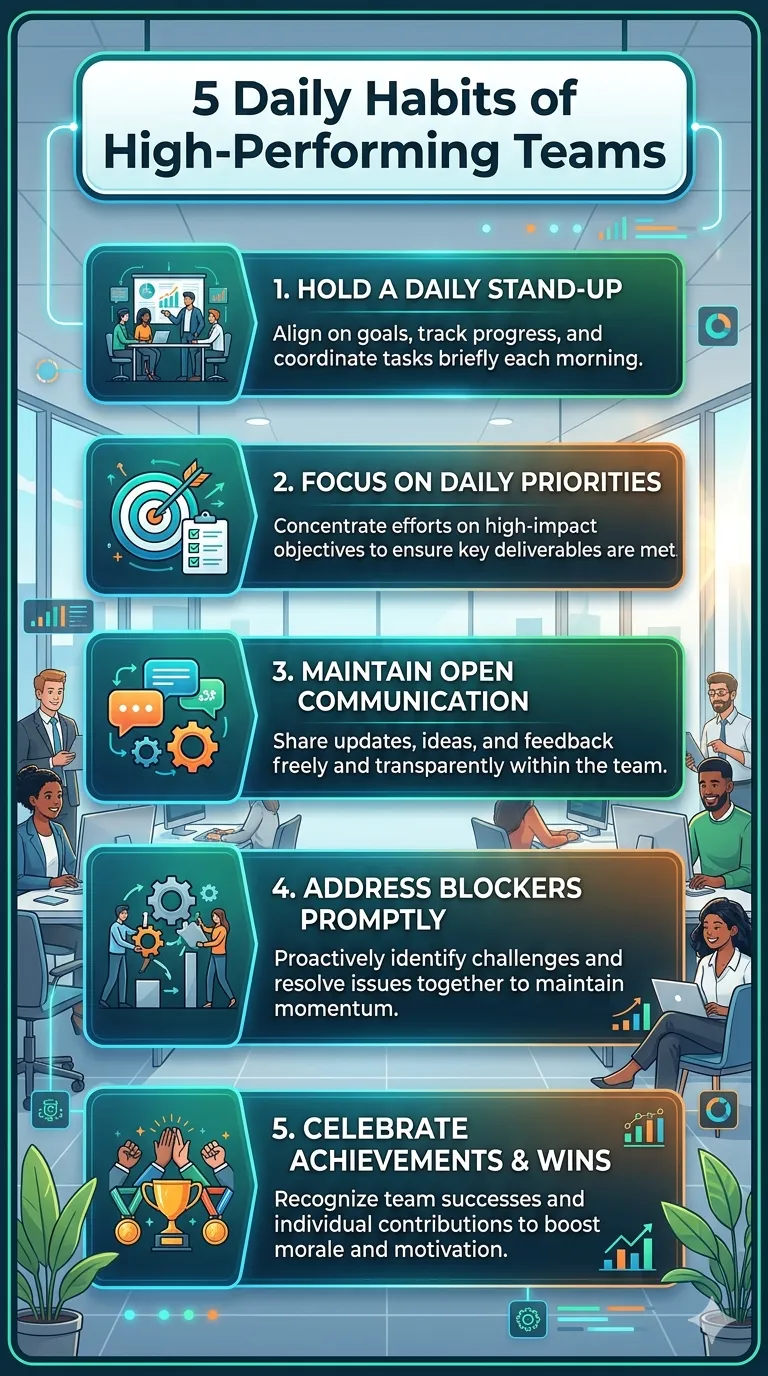
Create a poster titled “5 Daily Habits of High-Performing Teams.” Include five short points with clear typography, visual hierarchy, and a polished office-friendly design. Make sure all text is accurate, readable, and neatly placed.
ChatGPT Images 2.0 Output:
Gemini Nano Banana 2 Output:
Observation:
To be honest, I prefer the minimalist and clean style of the output by ChatGPT Images 2.0 here. It plays with font sizes while keeping the font type uniform, uses contrasting colours to portray information in a crystal-clear manner, and even uses all the visual elements right, no overdo. Give it a read, and you will know that the 5 points within are also very applicable in this case.
However, the result by Nana Banana 2 is also at par in its own way. Though the visual representation is way different, it depicts the perfect information in a presentable manner, with visually appealing graphics. I am sure some of you will like that output better.
Result:
Hence, both models get 1 point each here.
Prompt:
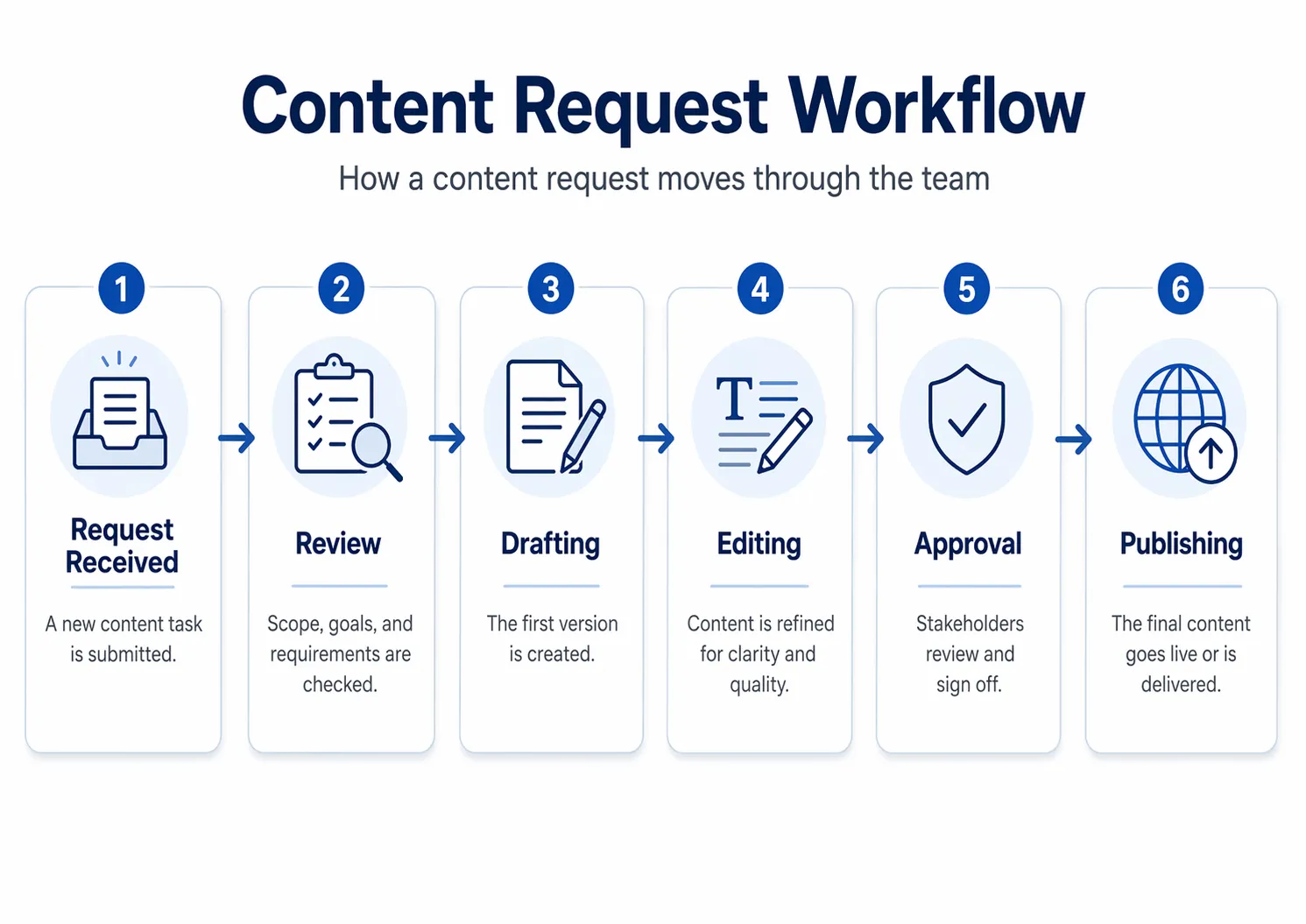
Create a clean process diagram showing how a content request moves through a team. Include these steps: Request Received, Review, Drafting, Editing, Approval, and Publishing. Make it professional, easy to follow, and suitable for an internal team document.
ChatGPT Images 2.0 Output:
Nano Banana 2 Output:
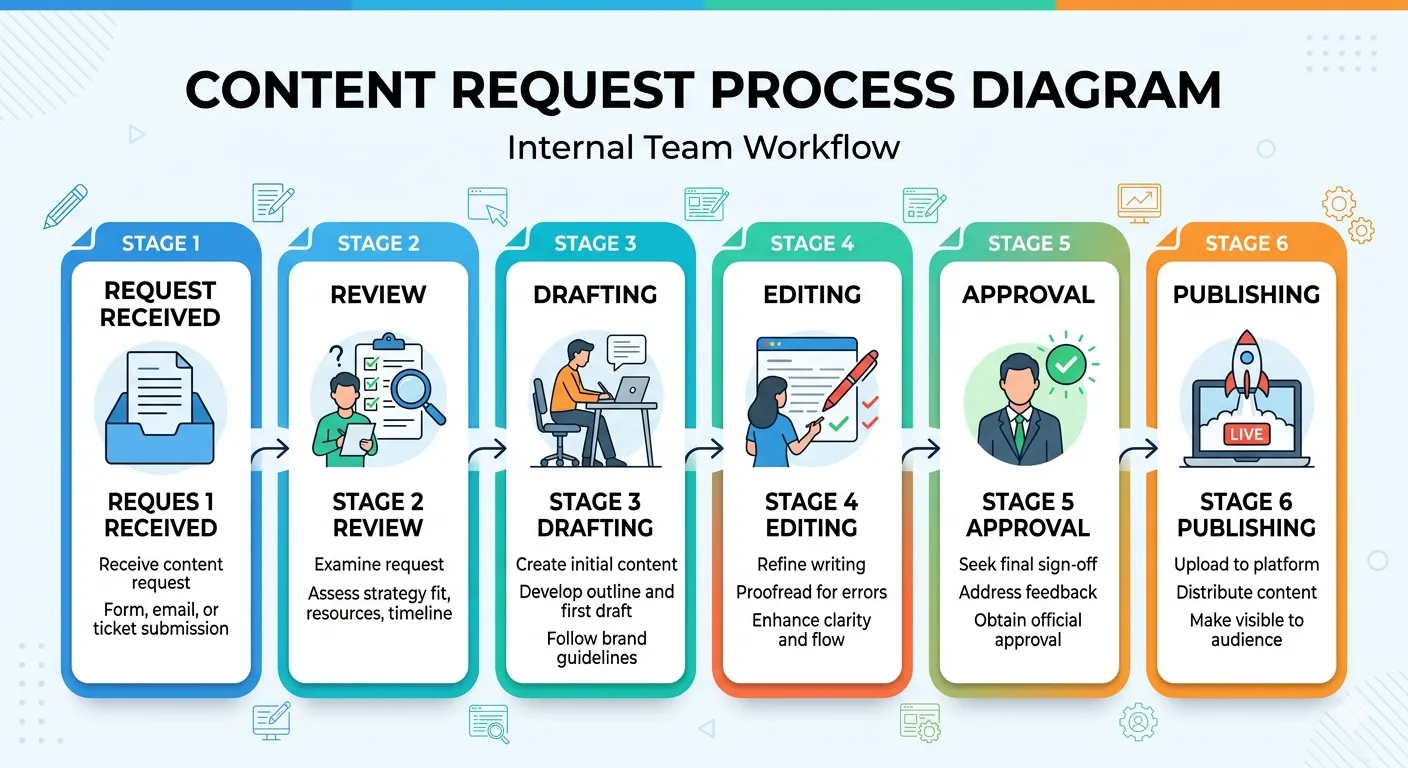
Observation:
In this particular case, the output by Nano Banana 2 is overly graphic, while that by its counterpart is too simplistic. Considering we needed the diagram “clean” and for an internal team document, I think the output by ChatGPT Images 2.0 is more desirable here for all purposes.
Yet, it should be noted that both models came up with quite on-point images as per the prompt and that Nano Banana 2 went a step further to make it visually appealing by adding various graphical elements across the image. Whether it was needed here or not is up for debate.
Result:
Both models get 1 point each here.
Prompt:
Create a 3-page comic book script with 15+ scenes following two employees who join the same company as Data Analysts. The story must visually contrast their paths over three years: one employee is shown constantly upskilling, mastering AI tools, and upgrading their technical knowledge, while the other is depicted frequently partying and neglecting professional growth. The finale should show the first employee successfully promoted to a GenAI Scientist, while the second remains a Data Analyst, reflecting on their choices with deep regret for not learning AI and new skills.
ChatGPT Images 2.0 Output:
Nano Banana 2 Output:
Observation:
ChatGPT Images 2.0 delivered a full 3-page comic spread with 18 panels, keeping both characters visually consistent from start to finish. It also handled the details well, from believable course dashboards and RAG pipeline visuals to evaluation metrics, while adding contextual background cues and building a surprisingly effective emotional journey.
Nano Banana 2, by contrast, produced a polished PDF script instead of an actual comic, so it missed the core requirement of the task. And that is what makes ChatGPT’s result stand out even more. Carrying two separate characters through 18 visual panels, while preserving continuity and telling a clear, engaging story, is not a small achievement. It feels like a serious leap for image generation models.
Result:
ChatGPT Images 2.0 – 1
Nano Banana 2 – 0
Prompt:
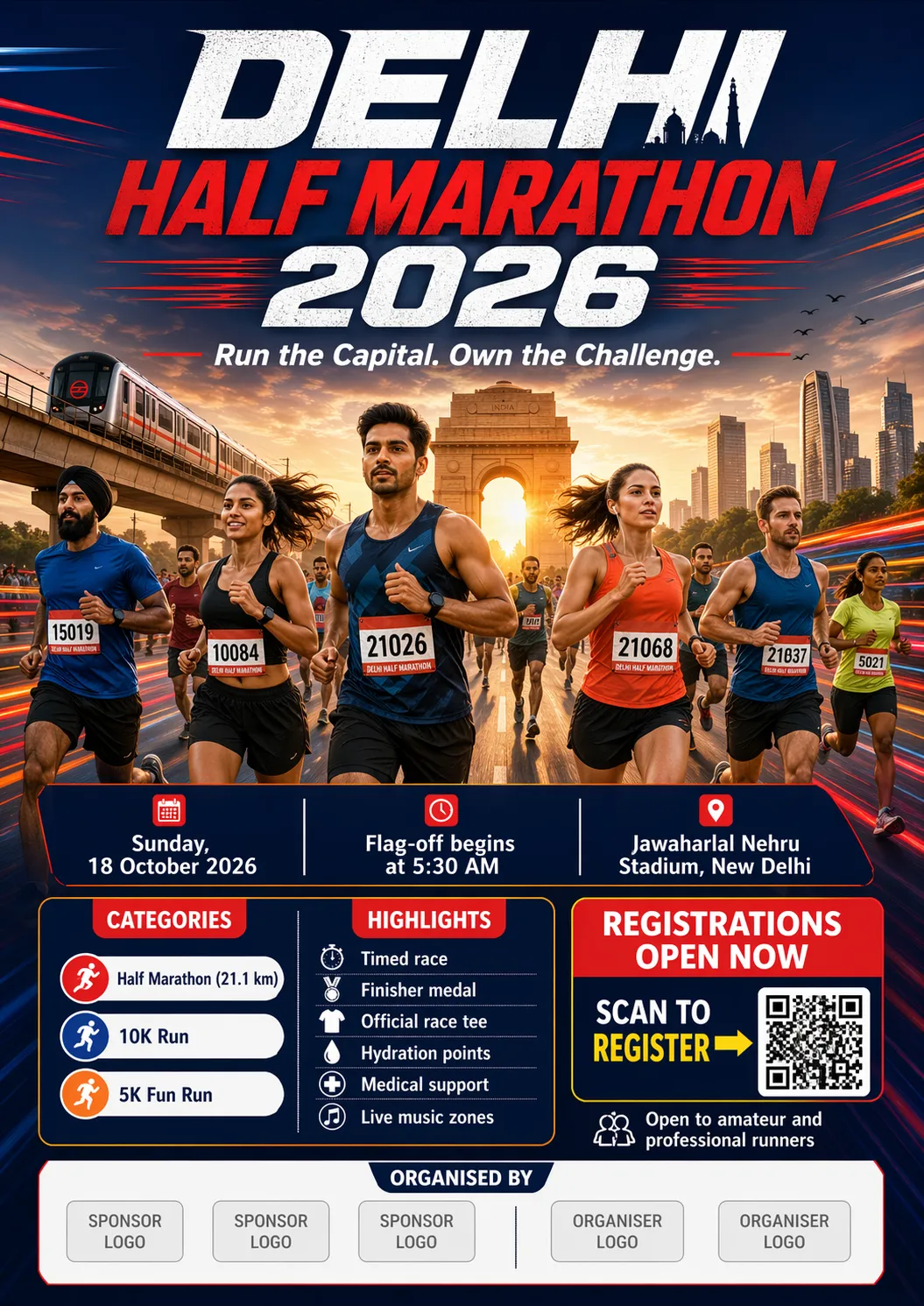
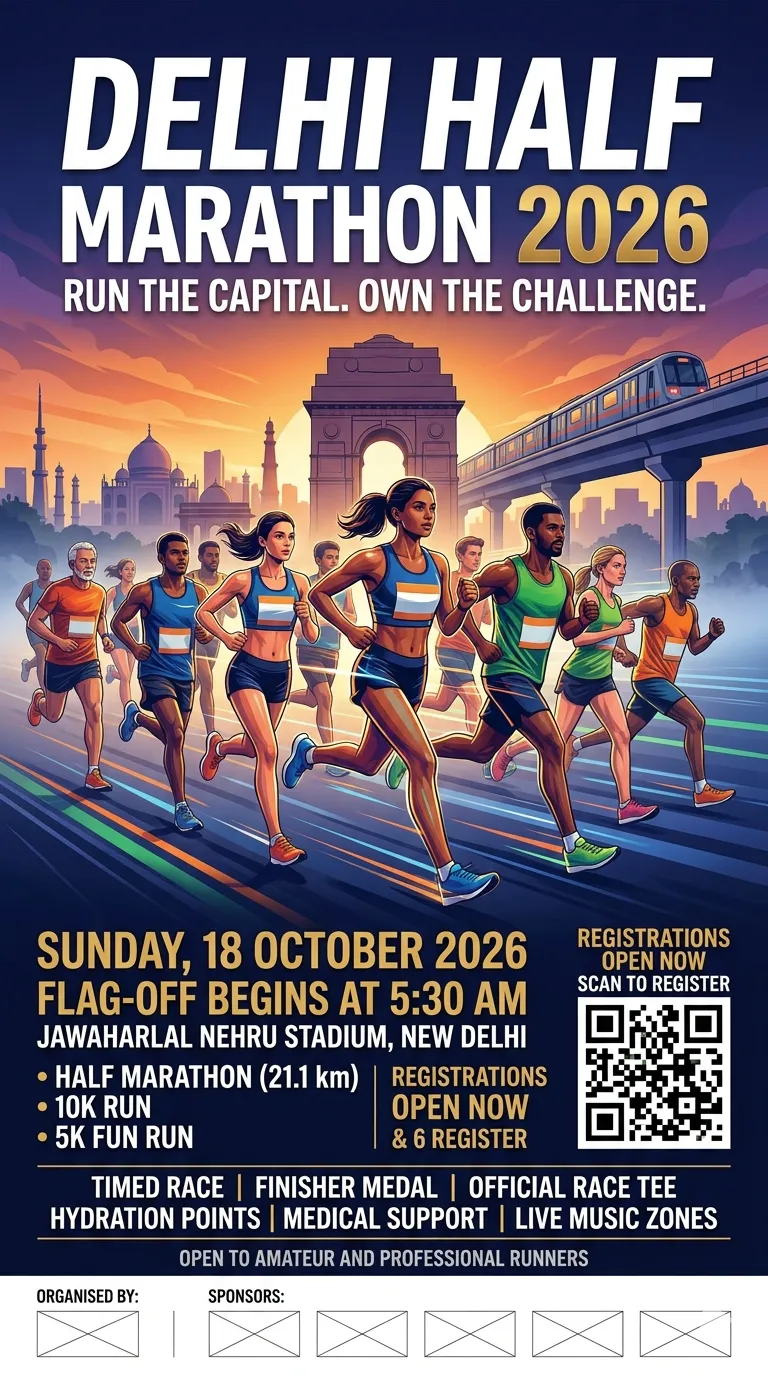
Design a large-format promotional poster for the Delhi Half Marathon 2026, meant for public display across metro stations, corporate parks, gyms, universities, and residential societies. The poster should feel energetic, premium, and city-scale, capturing the excitement of one of India’s biggest running events.
Include the following details clearly in the design:
Event Title: Delhi Half Marathon 2026
Tagline: Run the Capital. Own the Challenge.
Date: Sunday, 18 October 2026
Time: Flag-off begins at 5:30 AM
Venue: Jawaharlal Nehru Stadium, New Delhi
Categories: Half Marathon (21.1 km), 10K Run, 5K Fun Run
Registration Line: Registrations Open Now
CTA: Scan to Register
Highlights: Timed race, finisher medal, official race tee, hydration points, medical support, live music zones
Eligibility Note: Open to amateur and professional runners
Organised By: Add space for sponsor and organiser logos at the bottom
Visually, show a diverse group of runners in motion with Delhi landmarks subtly integrated in the background, such as India Gate, metro lines, or the city skyline. Use dynamic motion lines, early morning race energy, and a bold athletic colour palette. Make the typography strong and easy to read from a distance. The overall look should feel premium, aspirational, and suitable for a major national sporting event.
ChatGPT Images 2.0 Output:
Nano Banana 2 Output:
Observations:
Let’s step away from this comparison and take a moment to appreciate how far AI models have come in terms of image generation. Both Google and OpenAI should take a bow here. Absolutely amazing outputs on such detailed prompts could have only been imagined earlier.
Both models did perfectly well in encapsulating all the information in a visually appealing poster format. From the details to the race to the empty space for sponsor and organiser logos at the bottom, each detail was meticulously crafted into these posters. Full marks to both models here!
Result:
ChatGPT Images 2.0 – 1
Nano Banana 2 – 1
Prompt:
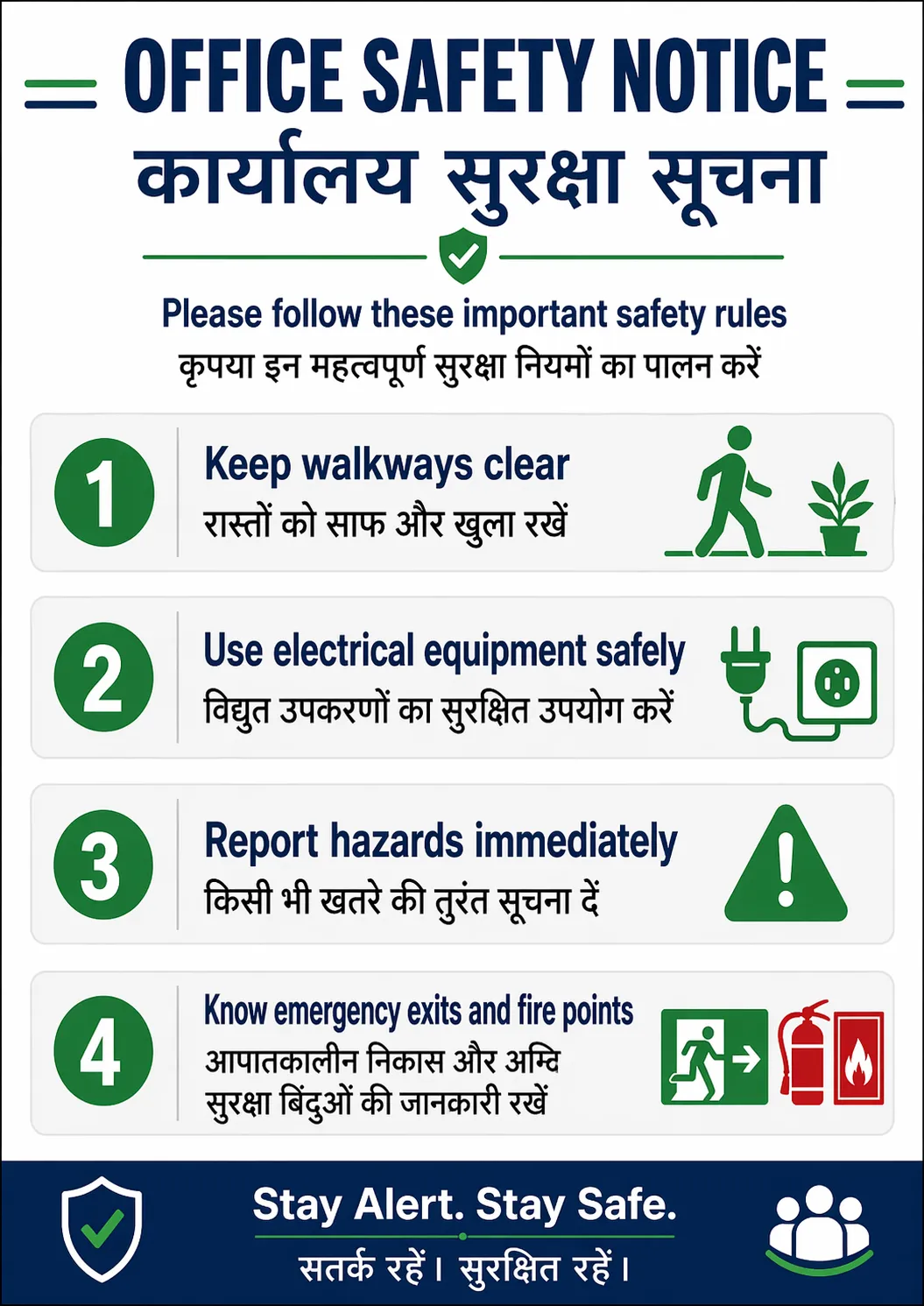
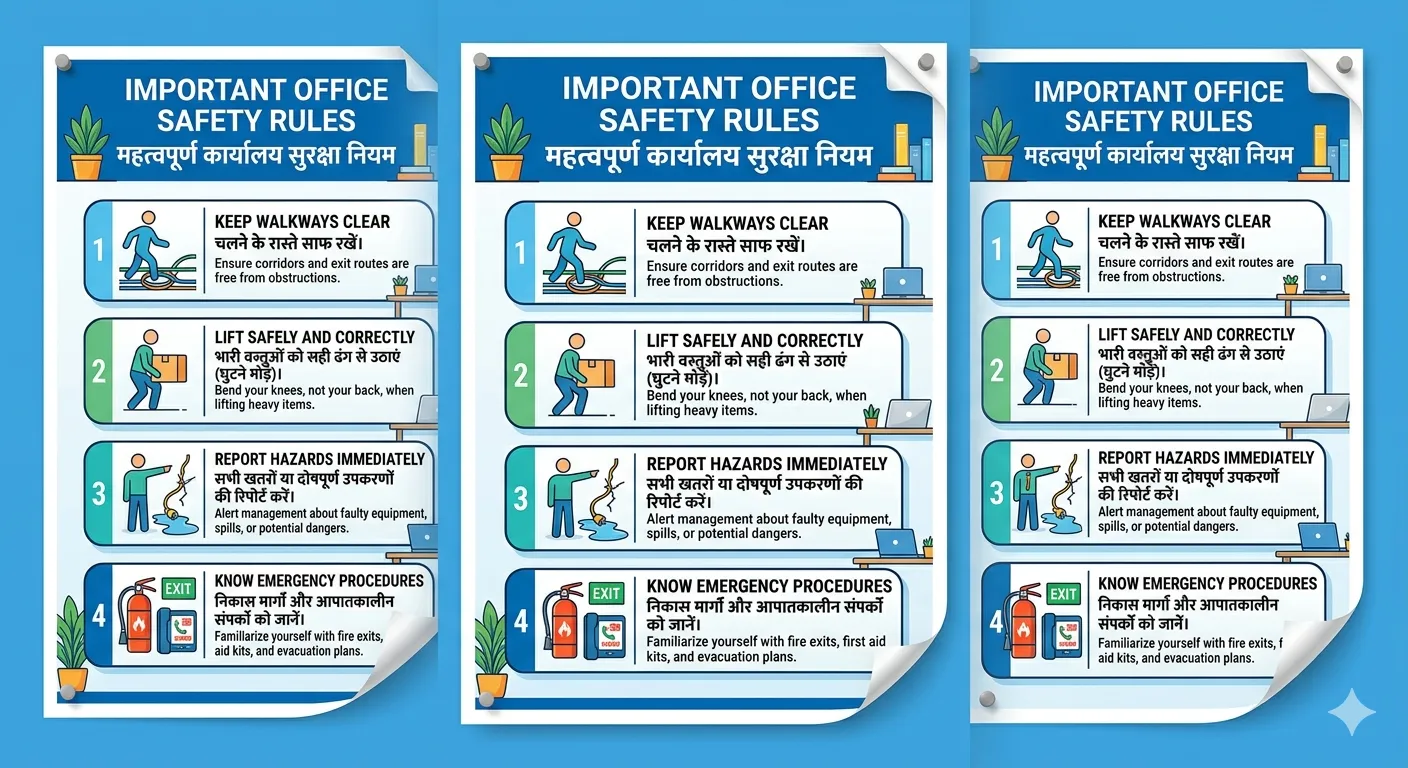
Create a workplace notice about office safety rules in both English and Hindi. Include 4 short safety instructions, clear headings, and a neat layout that is easy to read at a glance.
ChatGPT Images 2.0 Output:
Nano Banana 2 Output:
Observation:
Not sure why, but Nano Banana 2 goofed up here, delivering an output that repeats the poster thrice within the image. Furthermore, it specifies the rules within English and Hindi, but forgets to write the description of each in Hindi. So any Hindi speaker within the office will not be able to read the details within any of the safety rules.
ChatGPT Images 2.0, on the other hand, did a marvellous job coming up with a bilingual poster for the safety rules of the office. The poster looks perfectly readable in both languages, displays all the information clearly, and looks professional enough to be used directly within an office without any edit.
Results:
ChatGPT Images 2.0 – 1
Nano Banana 2 – 0
Prompt:
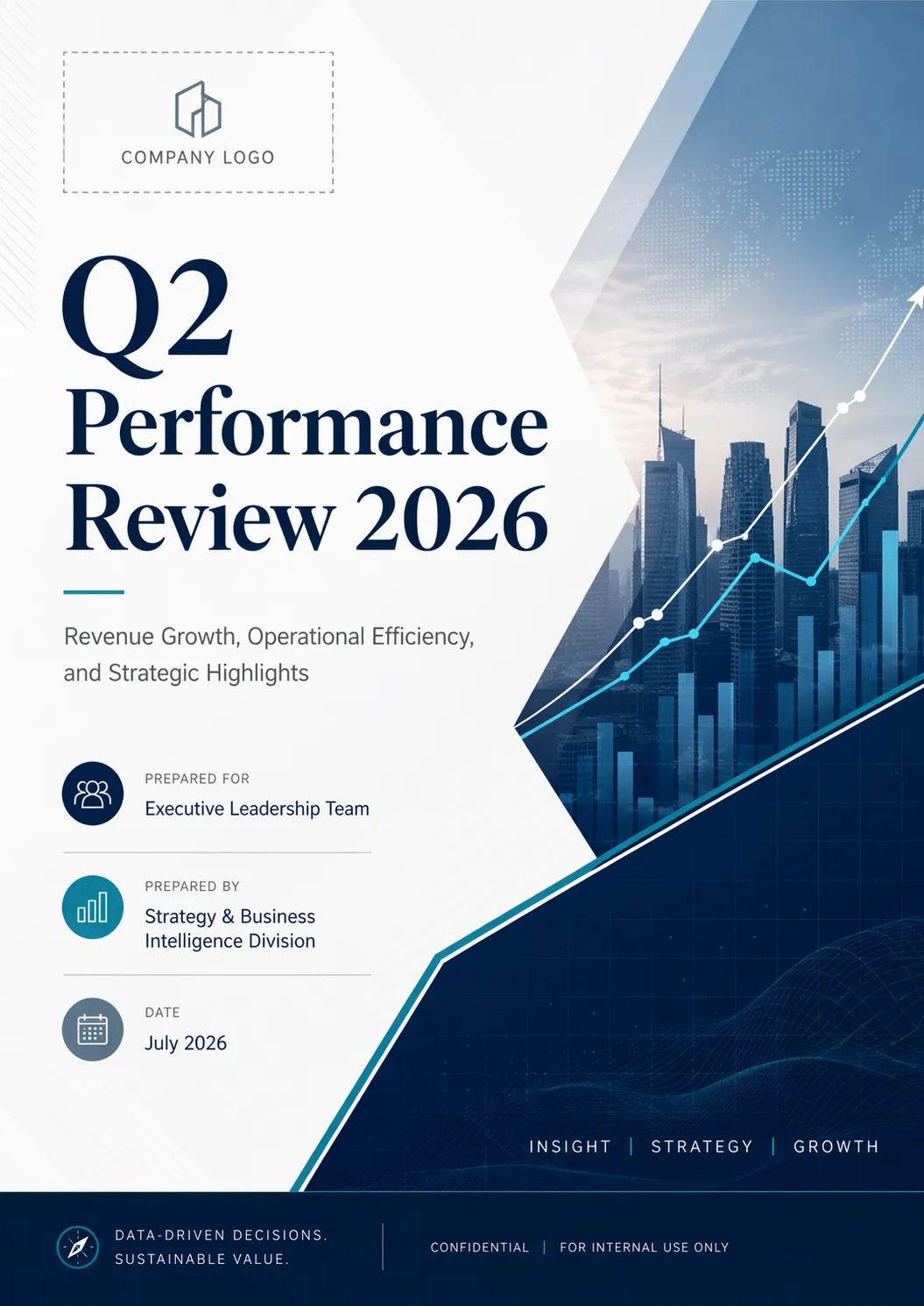
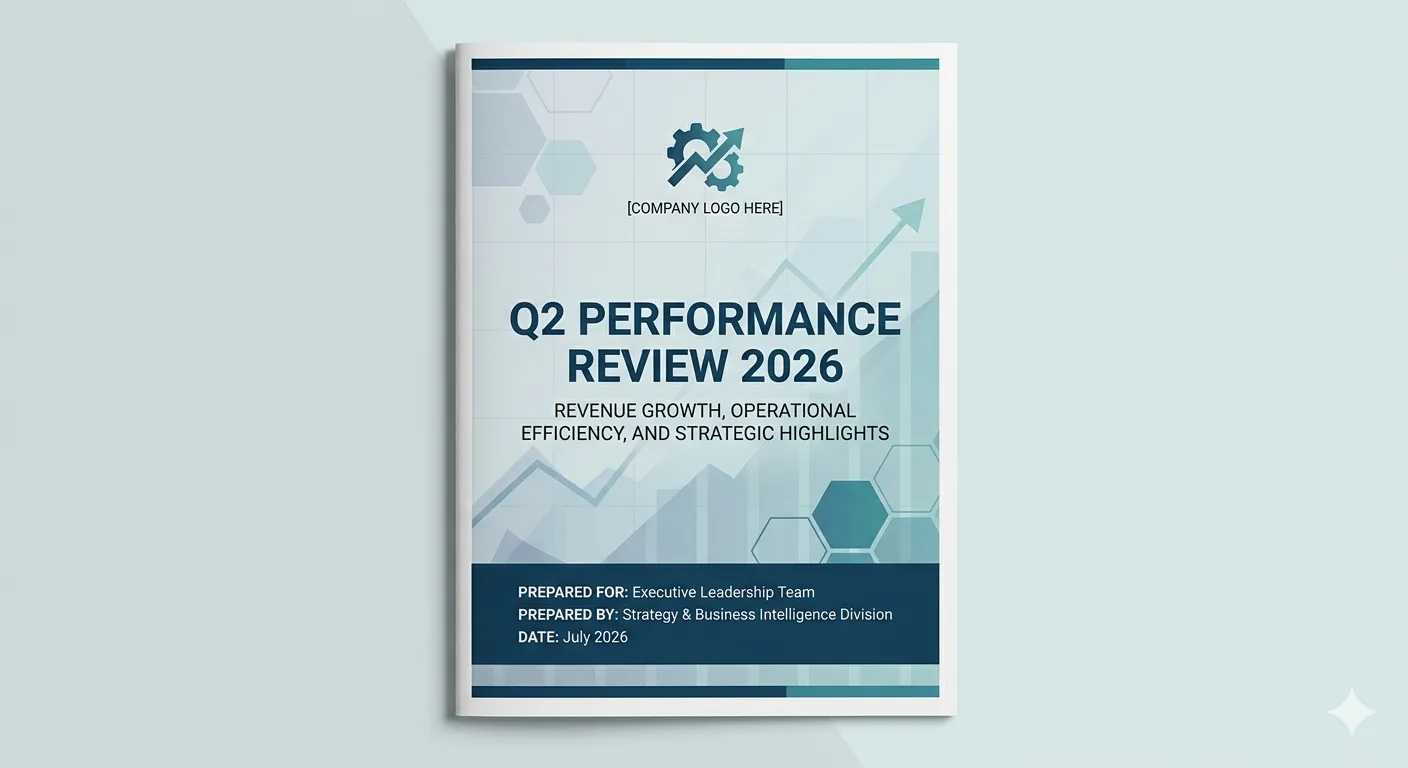
Design a professional cover page for a quarterly business report titled “Q2 Performance Review 2026.” Keep the style clean, modern, and corporate, suitable for senior leadership or investors.
Include:
Title: Q2 Performance Review 2026
Subtitle: Revenue Growth, Operational Efficiency, and Strategic Highlights
Prepared For: Executive Leadership Team
Prepared By: Strategy & Business Intelligence Division
Date: July 2026Use strong typography, a neat layout, and subtle business-themed visual elements like trend lines, grid patterns, or abstract data shapes. Leave space for a company logo. The final design should feel polished, executive-friendly, and presentation-ready.
ChatGPT Images 2.0 Output:
Nano Banana 2 Output:
Observations:
Only after looking at the outputs did I realise that this prompt can be a bit confusing for LLMs. To design a “cover page” for a report does not explicitly specify the format in which it is to be presented. A normal human would present it as a design file, to be able to be printed on the front of the report. Nano Banana 2 went a step further to show it on top of an actual report.
Nevertheless, both models executed the task easily and with complete accuracy, using the correct title, subtext, and details shared in the prompt. There is nothing much to compare here on, except for the personal preferences on design. For me, that leads to the result by ChatGPT Images 2.0.
Result:
ChatGPT Images 2.0 – 1
Nano Banana 2 – 1
Here is the final score of the 2 image generation models across the 10 tasks we tried them on:
| Model | Score |
|---|---|
| ChatGPT Images 2.0 | 10 |
| Nano Banana 2 | 5 |
So we have a clear winner here, and that is – ChatGPT Images 2.0!
A huge statement has been made here! Nano Banana has dominated the AI image generators list ever since the introduction of the series. No model even came close to the capabilities that Google’s powerhouse could boast of. And now, OpenAI has come back in the race and how!
Even benchmark scores indicate this supremacy of the new ChatGPT Images 2.0 over Nano Banana 2 and all other models by default. So, my recommendation here is – if you perform any image generation tasks using AI for work or even otherwise, it is time you give the new ChatGPT Images 2.0 a try right away.
Technical content strategist and communicator with a decade of experience in content creation and distribution across national media, Government of India, and private platforms
此内容由惯性聚合(RSS阅读器)自动聚合整理,仅供阅读参考。 原文来自 — 版权归原作者所有。