



惯性聚合 高效追踪和阅读你感兴趣的博客、新闻、科技资讯
阅读原文 在惯性聚合中打开

推荐订阅源

P
Privacy & Cybersecurity Law Blog
Engineering at Meta
Engineering at Meta
Forbes - Security
Forbes - Security
MongoDB | Blog
MongoDB | Blog
Threat Intelligence Blog | Flashpoint
A
About on SuperTechFans
量子位
Exploit-DB.com RSS Feed
雷峰网
雷峰网
腾讯CDC
P
Proofpoint News Feed
S
Schneier on Security
S
Secure Thoughts
V
Visual Studio Blog
Help Net Security
Help Net Security
The Hacker News
The Hacker News
C
Cyber Attacks, Cyber Crime and Cyber Security
P
Privacy International News Feed
SecWiki News
SecWiki News
S
SegmentFault 最新的问题
T
Threatpost
小众软件
小众软件
MyScale Blog
MyScale Blog
F
Fortinet All Blogs
cs.CL updates on arXiv.org
P
Proofpoint News Feed
T
Tailwind CSS Blog
I
Intezer
C
CERT Recently Published Vulnerability Notes
U
Unit 42
V
V2EX
Cyberwarzone
Cyberwarzone
Recorded Future
Recorded Future
O
OpenAI News
Project Zero
Project Zero
有赞技术团队
有赞技术团队
Google DeepMind News
Last Week in AI
Last Week in AI
Hugging Face - Blog
Hugging Face - Blog
Know Your Adversary
Know Your Adversary
C
Cybersecurity and Infrastructure Security Agency CISA
Scott Helme
Scott Helme
V2EX - 技术
V2EX - 技术
博客园 - 叶小钗
S
Securelist
A
Arctic Wolf
The Cloudflare Blog
W
WeLiveSecurity
T
Threat Research - Cisco Blogs
博客园 - Franky

ThinkAlone

JavaCard 上手 灵车!开创! Step-CA 日常使用教程 灵上加灵:使用 Pico HSM 和 step-ca 自建一个CA 友善 FriendlyELEC NanoPC-T4 CPU跑分测试 CPU Benchmark 常见物品尺寸记录 树莓派5 Raspberry Pi 5 CPU跑分测试 CPU Benchmark 鼎阳 SDS804X HD 示波器带宽与选件升级 OrangePi Zero3 CPU跑分测试 CPU Benchmark Canokey Canary上手 用 Orange Pi Zero 搭建一台 Stratum 1 的 NTP 服务器 难绷的Zip与中文密码 OrangePi Zero CPU跑分测试 CPU Benchmark 使用 Docker 部署 zhenxun_bot(绪山真寻Bot) 在Docker中运行Klipper 如何优雅的跳过/禁止Steam更新你的游戏 使用 GitHub Actions 自动部署Hexo 使用 Travis CI 自动构建 Hexo 博客 使DockerHub的Autobuild自动构建ARM/其他 架构的镜像 CoffeeMiner:劫持WiFi网络接入设备进行“挖矿”的框架
在2024年配置IPv6是什么怎样一种体验
Disappear9 · 2024-09-01 · via ThinkAlone

Do not 手欠

前段时间给宽带改了个套餐,公网IPv4没了,要也不给了,被迫开始转IPv6。


环境

主路由:
  ImmortalWrt 21.02
系统:
  Windows 10 LTSB 21H2
  Debian 12(bookworm)
  Ubuntu 22.04 LTS(jammy)
ISP:
  中国电信(DHCPv6-PD)

配置目标

让需要提供服务的设备获取到稳定的隐私地址,即:
1.不使用eui64(防止通过IPv6 SLAAC 地址反推客户端 MAC)。
2.地址要尽量固定,方便写防火墙规则。

路由配置

ImmortalWrt默认情况下直接拨号就会自动创建一个WAN6虚拟接口,可以说是十分的省心了。
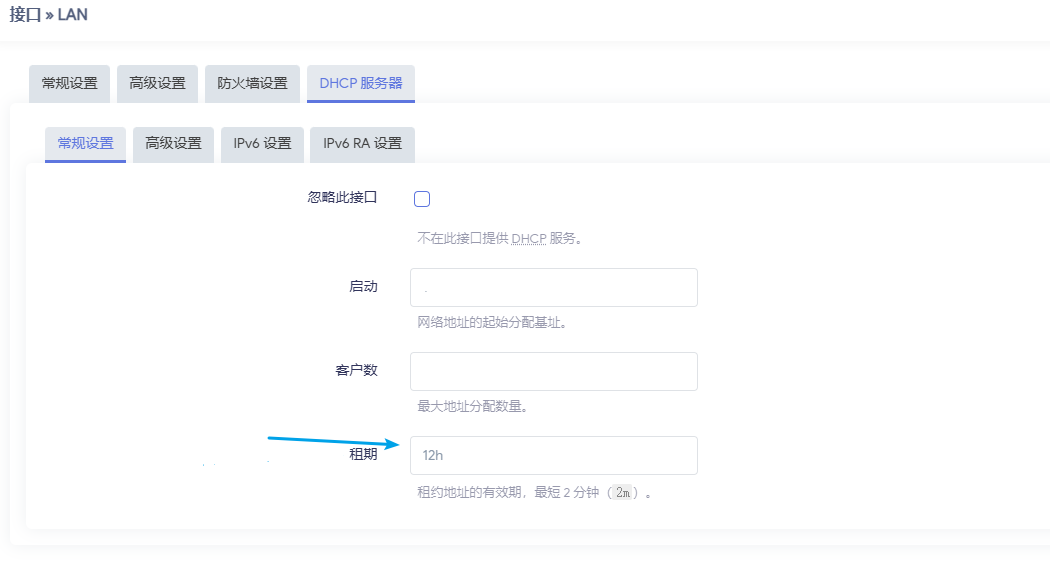
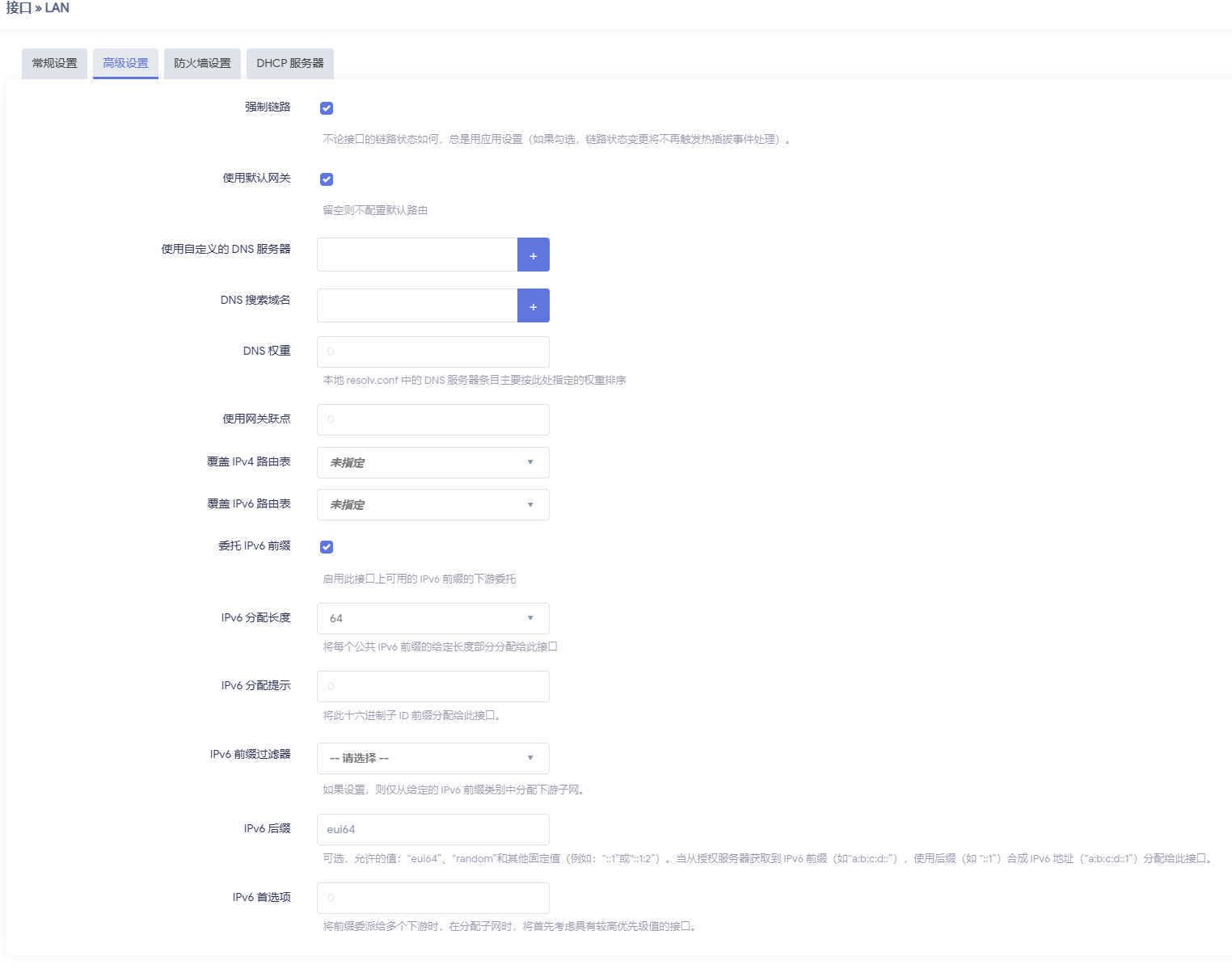
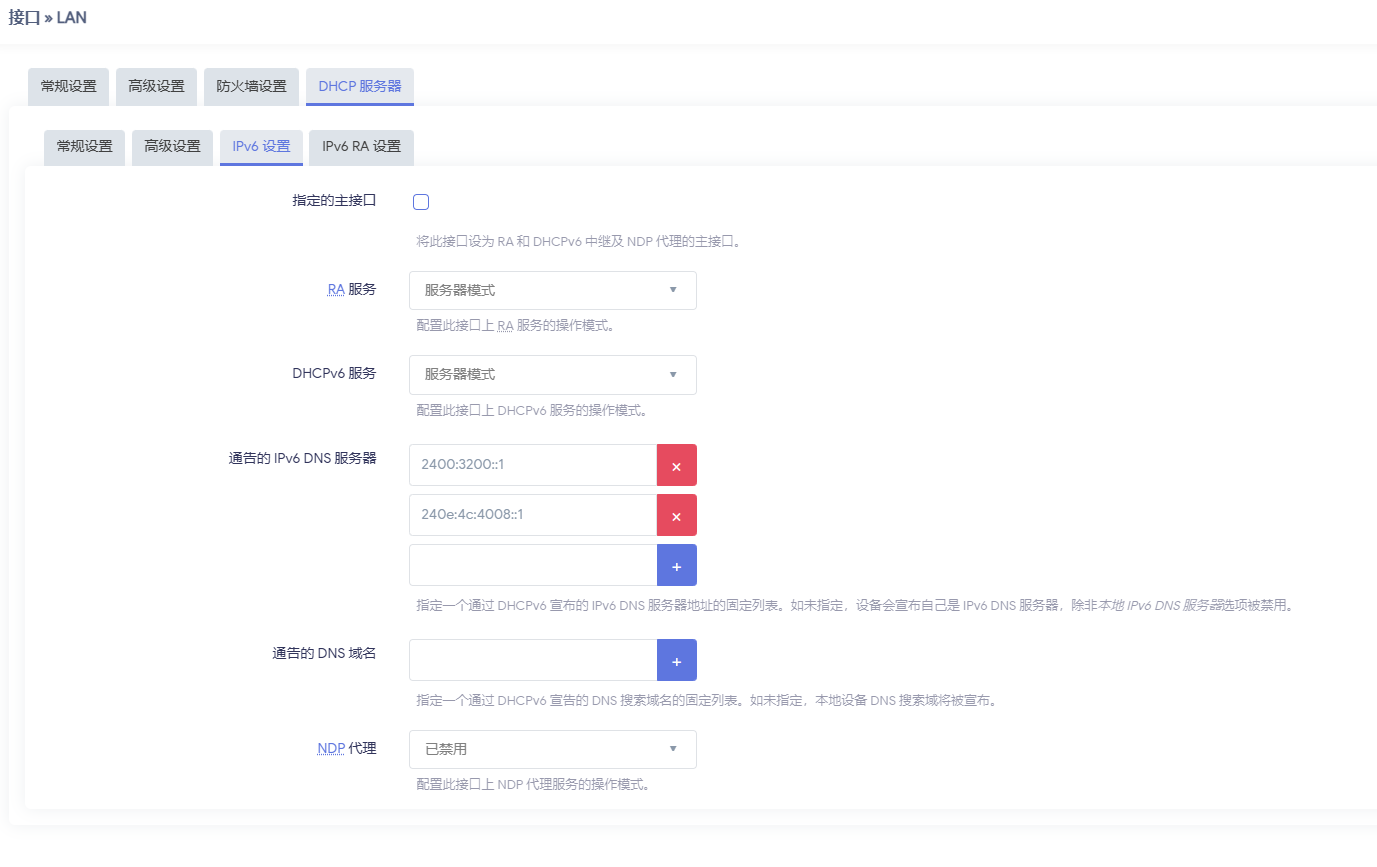
修改配置如图所示:
租期改为12小时
分配长度/64,eui64方式生成路由的地址
手动设置通告的DNS,不使用运营商的
开启SLAAC,配置M、O标签
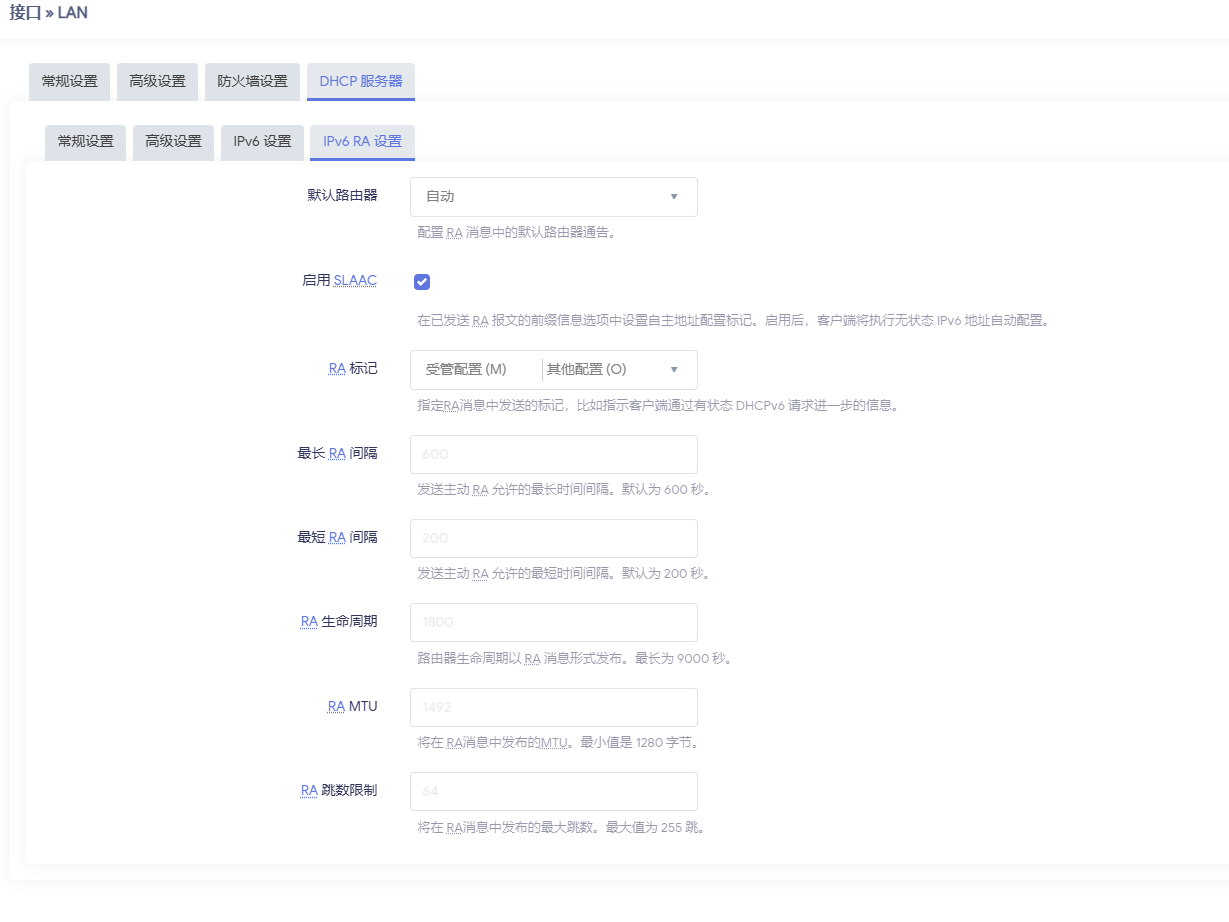
这里的配置同时开启了Stateless(SLAAC)和Stateful(DHCPv6)

目前:
  安卓设备只支持Stateless方式获取IPv6地址
  类Debian系统对Stateless和Stateful的支持都相对完善
  Windows系统(Window 10 21H2)对Stateless的支持相对完善,对Stateful的支持有问题

所以你完全可以按教程只使用Stateless,我同时开纯粹是没事找事。

Ubuntu

Ubuntu 20+版本默认使用Netplan管理网络

/etc/netplan/00-default-config.yaml
1
2
3
4
5
6
7
8
9
10
11
12
13
14
network:
version: 2
renderer: networkd
ethernets:
enp2s0:
dhcp4: true
dhcp6: true
ipv6-privacy: false
ipv6-address-token: ::dead:beef:114:514


Debian

首先配置让networkd来管理网络

Bash
1
2
3
4
5
mv /etc/network/interfaces /etc/network/interfaces.save  
mv /etc/network/interfaces.d /etc/network/interfaces.d.save

systemctl enable systemd-networkd.service
systemctl start systemd-networkd.service
/etc/systemd/network/default.network
1
2
3
4
5
6
7
8
9
10
11
[Match]
Name=eth0

[Network]
DHCP=yes
IPv6AcceptRA=yes
IPv6PrivacyExtensions=no

[IPv6AcceptRA]
Token=::dead:beef:114:514
# token部分解释同上

Windows

Update: Window在这里纯属特例,它既没有RFC 7217支持,也没有token支持(至少Window 10 21H2完全没有)
所以这里被迫使用eui64,同时为了隐私保护更改掉原始的MAC地址

以管理员启动Powershell:

Powershell
1
2
3
4
5
6
Set-NetIPv6Protocol -RandomizeIdentifiers Disabled


Set-NetIPv6Protocol -UseTemporaryAddresses Disabled

解释部分

这样配置下来以后,每个设备理论上能获得两组IPV6地址,一个SLAAC来的,一个DHCP V6分的,
中国电信每过几天就会把拨号断开重连导致PD前缀变化,由于SLAAC得到的地址会很快的更新,在所有系统上也都会很快的恢复连接。
DHCP V6就不一定了,我将租期设置为了12小时,类Debian系统每过12小时都会重新向DHCP服务器要地址,这很好。
但是Windows不会,无论我怎么更改设置,Windows总能给我整出来一个三天租期的花活,
然后因为前缀变化,原来的地址失效无法访问了,Windows就会自己整出来一个新的隐私地址用进而导致防火墙规则失效。
当然,本文中介绍的方法不是RFC 7217,需要RFC 7217请查看参考资料,反正我是感觉7217出来的地址太长还不好看。

参考资料

https://wiki.archlinuxcn.org/wiki/Systemd-networkd

https://wiki.archlinuxcn.org/wiki/IPv6#%E7%A8%B3%E5%AE%9A%E7%9A%84%E9%9A%90%E7%A7%81%E5%9C%B0%E5%9D%80

https://wiki.debian.org/SystemdNetworkd