惯性聚合 高效追踪和阅读你感兴趣的博客、新闻、科技资讯
阅读原文 在惯性聚合中打开

推荐订阅源

T
Tailwind CSS Blog
大猫的无限游戏
大猫的无限游戏
L
LINUX DO - 热门话题
让小产品的独立变现更简单 - ezindie.com
雷峰网
雷峰网
aimingoo的专栏
aimingoo的专栏
博客园_首页
MongoDB | Blog
MongoDB | Blog
V
V2EX
GbyAI
GbyAI
量子位
Microsoft Azure Blog
有赞技术团队
有赞技术团队
G
Google Developers Blog
云风的 BLOG
云风的 BLOG
B
Blog
Microsoft Security Blog
S
SegmentFault 最新的问题
O
OpenAI News
N
News and Events Feed by Topic
博客园 - Franky
爱范儿
爱范儿
Forbes - Security
Forbes - Security
freeCodeCamp Programming Tutorials: Python, JavaScript, Git & More
V2EX - 技术
V2EX - 技术
Application and Cybersecurity Blog
N
News and Events Feed by Topic
N
News | PayPal Newsroom
Schneier on Security
Cloudbric
Cloudbric
Security Archives - TechRepublic
cs.AI updates on arXiv.org
Recent Commits to openclaw:main
人人都是产品经理
人人都是产品经理
P
Privacy International News Feed
Cyber Security Advisories - MS-ISAC
B
Blog RSS Feed
阮一峰的网络日志
阮一峰的网络日志
D
DataBreaches.Net
Last Week in AI
Last Week in AI
罗磊的独立博客
Spread Privacy
Spread Privacy
Recent Announcements
The Cloudflare Blog
Google DeepMind News
AWS News Blog
AWS News Blog
The Register - Security
Y
Y Combinator Blog
J
Java Code Geeks
I
Intezer

ThinkAlone

JavaCard 上手 灵车!开创! Step-CA 日常使用教程 灵上加灵:使用 Pico HSM 和 step-ca 自建一个CA 友善 FriendlyELEC NanoPC-T4 CPU跑分测试 CPU Benchmark 常见物品尺寸记录 树莓派5 Raspberry Pi 5 CPU跑分测试 CPU Benchmark 鼎阳 SDS804X HD 示波器带宽与选件升级 OrangePi Zero3 CPU跑分测试 CPU Benchmark Canokey Canary上手 在2024年配置IPv6是什么怎样一种体验 用 Orange Pi Zero 搭建一台 Stratum 1 的 NTP 服务器 难绷的Zip与中文密码 OrangePi Zero CPU跑分测试 CPU Benchmark 使用 Docker 部署 zhenxun_bot(绪山真寻Bot) 在Docker中运行Klipper 使用 GitHub Actions 自动部署Hexo 使用 Travis CI 自动构建 Hexo 博客 使DockerHub的Autobuild自动构建ARM/其他 架构的镜像 CoffeeMiner:劫持WiFi网络接入设备进行“挖矿”的框架
如何优雅的跳过/禁止Steam更新你的游戏
Disappear9 · 2021-01-22 · via ThinkAlone

head

买了个Beatsaber, 每次Steam更新游戏都会让自己装的插件失效,而不更新又没法启动游戏……

1.关闭自动更新

这个应该不用说了,防止被Steam抢先更掉。

在Steam中 游戏 -》 右键属性 -》 更新 -》 自动更新 -》 只在我启动时更新此游戏

2.找到游戏对应的acf文件

在Steam商店找到你的游戏,复制URL/app/后的一串数字,这是游戏的appid

findfile

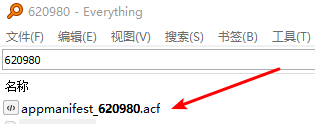
直接用文件管理器搜索appid,找到扩展名为acf的文件,以我要修改的Beatsaber为例:

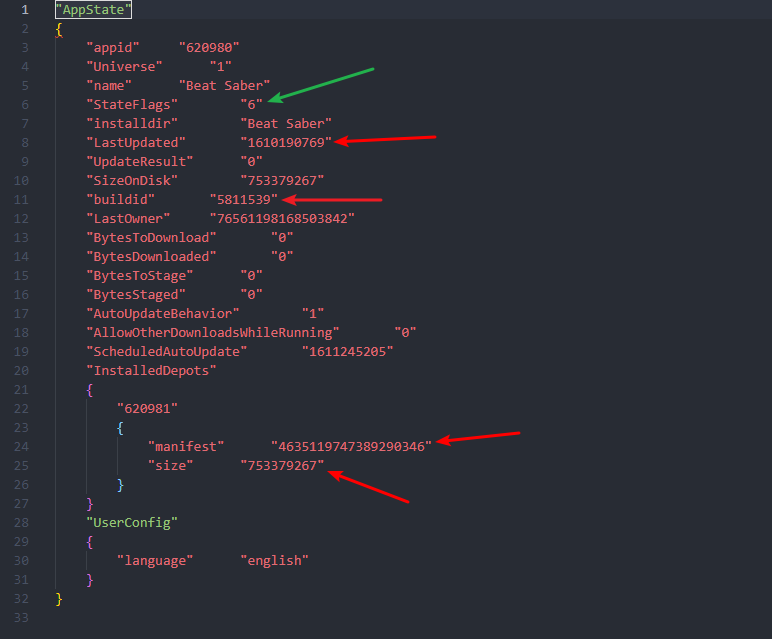
然后用你喜欢的文本编辑器打开acf文件

3.在Steamdb找数据

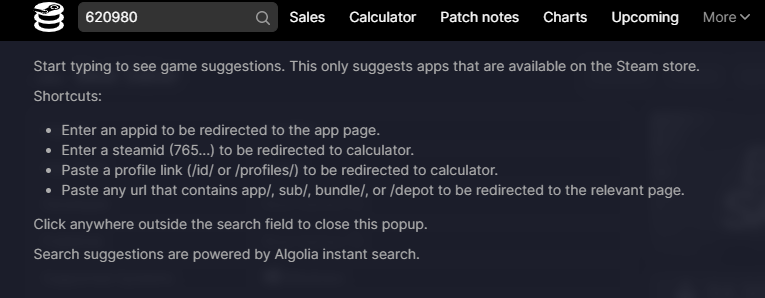
打开 Steamdb ,把appid粘贴进去。

search

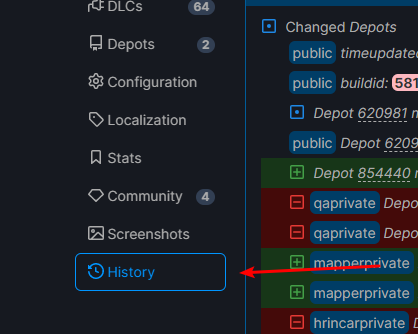
打开History标签

history

找到timeupdated buildid maxsize manifests,并记下绿色高亮的数值。
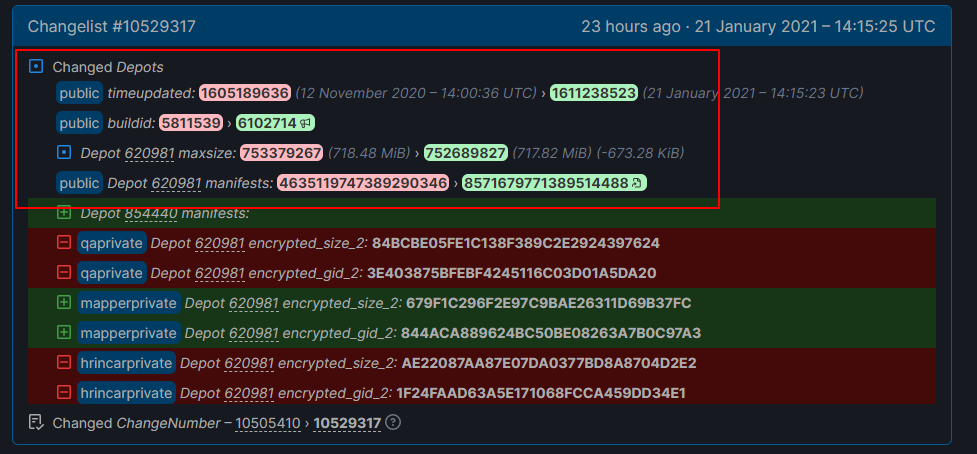
changelist

4.修改acf文件

修改前要先完全关闭steam

modify

StateFlags改为4,然后将上面复制的值一一对应覆盖原来的值。

timeupdated -> LastUpdated
buildid -> buildid
manifests -> manifest
maxsize -> size

保存后再启动steam,完成