

惯性聚合 高效追踪和阅读你感兴趣的博客、新闻、科技资讯
阅读原文 在惯性聚合中打开

推荐订阅源

V
V2EX
P
Proofpoint News Feed
D
DataBreaches.Net
C
Check Point Blog
L
LangChain Blog
量子位
美团技术团队
Vercel News
Vercel News
人人都是产品经理
人人都是产品经理
N
Netflix TechBlog - Medium
V
Visual Studio Blog
Microsoft Security Blog
博客园 - 【当耐特】
MongoDB | Blog
MongoDB | Blog
Cyber Security Advisories - MS-ISAC
freeCodeCamp Programming Tutorials: Python, JavaScript, Git & More
Last Week in AI
Last Week in AI
The GitHub Blog
The GitHub Blog
奇客Solidot–传递最新科技情报
奇客Solidot–传递最新科技情报
U
Unit 42
腾讯CDC
M
MIT News - Artificial intelligence
Microsoft Azure Blog
Blog — PlanetScale
Blog — PlanetScale

ABB00717

HTB - SpeedNet PHP Filter to RCE Redis HTB - Pollution HTB - Pollution 工具 常見服務 HTB - BroScience HTB - BroScience 如何把爛爛的 shell 升級成好用的 TTY 滲透筆記 HTB - Imagery HTB - Imagery HTB - Reset HTB - Reset HTB - Trick HTB - Trick HTB - Editorial HTB - Editorial 150. Evaluate Reverse Polish Notation droopescan 安裝找不到 module imp 解決「桌面背景被當成一個視窗不斷重新彈出並覆蓋其他視窗」的問題 桌面不斷彈出覆蓋其他視窗 medusa 找不到 ssh module 中文文案排版指北 BugBounty Playbook 小知識 透過 Ubuntu 26 設定 Windows 11 雙系統並使用 Image Recovery 之踩坑全紀錄 透過 Ubuntu 26 設定 Windows 11 雙系統並使用 Image Recovery 之踩坑全紀錄 清除 git history 中的機敏資料
將應用程式新增到 GNOME 的 Activities Overview
2026-01-11 · via ABB00717

思路

GNOME 屬於遵守 Desktop Entry 標準的桌面環境之一。而此標準可以利用 .desktop 建立應用程式列表,並把它們放進指定資料夾。因為是使用者層級,所以放在 ~/.local/share/applications/ 即可。

操作

其實很簡單,在 ~/.local/share/applications/ 建立對應的 .desktop 即可

[Desktop Entry]
Type=Application
Name=Vial
Exec=/home/abb00717/Apps/Vial-v0.7.5-x86_64.AppImage

TypeName 是一定要加上的,此外還有許多欄位可以設定。詳細可以 Ivon 的什麼是.desktop檔案?Linux桌面Desktop Entry用途解說
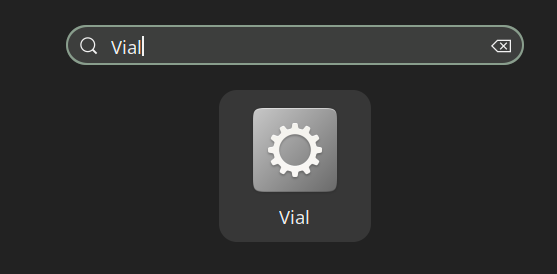
這樣在搜尋欄就可以找到 Vial 了。