
惯性聚合 高效追踪和阅读你感兴趣的博客、新闻、科技资讯
阅读原文 在惯性聚合中打开

推荐订阅源

Microsoft Azure Blog
宝玉的分享
宝玉的分享
博客园 - 【当耐特】
有赞技术团队
有赞技术团队
G
Google Developers Blog
Microsoft Security Blog
Apple Machine Learning Research
The Cloudflare Blog
Blog — PlanetScale
Blog — PlanetScale
博客园_首页
L
LangChain Blog
Stack Overflow Blog
Stack Overflow Blog
Last Week in AI
Last Week in AI
Y
Y Combinator Blog
罗磊的独立博客
T
Tailwind CSS Blog
博客园 - 叶小钗
T
The Blog of Author Tim Ferriss
Engineering at Meta
Engineering at Meta
博客园 - 聂微东
博客园 - Franky
B
Blog
freeCodeCamp Programming Tutorials: Python, JavaScript, Git & More
F
Fortinet All Blogs

TrueNAS – Open Enterprise Storage

What We Heard at NAB 2026 | TrueNAS - Open Enterprise Storage TrueNAS V160 Launched: High Performance, No All-Flash Tax TrueNAS 26 Is Here: What's New in This Major Release TrueNAS Connect: Enterprise Features on Your Own Hardware TrueNAS Immutability: Multi-Layered Data Protection & Ransomware Defense TrueNAS CEO Note to Community: We Are All TrueNAS TrueNAS 25.10.2 Goldeye: 100+ Fixes & What's New TrueNAS Names Brett Davis CEO for Enterprise Growth TrueNAS Plans for 2026: TrueNAS 26 & OpenZFS 2.4 Roadmap TrueNAS Connect Plus Now Available for All Community Users TrueNAS R60: High-Speed NVMe Storage for AI Workloads Introducing TrueNAS WebShare: Secure Web-Based File Sharing TrueNAS 25.10.1: Goldeye Matures, Performs, and Connects TrueNAS & Veeam v13: Turnkey Cyber‑Resilient Backups Customer Advantages of the TrueNAS Open Core Model TrueNAS Named Data Storage Company of the Year 2025 TrueNAS 25.10: Smarter, Streamlined Updates & Tools TrueNAS F-Series Shines at IBC with Two “Best of Show” Awards TrueNAS 25.10 “Goldeye”: NVMe‑oF, Unified, Simplified Storage Introducing TrueNAS Connect: Secure Monitoring & Alerts The ESG Advantage of Open Enterprise Architecture: Why TrueNAS Is the Sustainable Choice | TrueNAS - Open TrueNAS 25.10-RC1: New Features, Fixes & OpenZFS 2.3.4 Seamless Setup: Exploring TrueNAS Web-Driven Installation | TrueNAS - Open Enterprise Storage TrueNAS 25.10 “Goldeye” BETA is Available TrueNAS 25.10 “Goldeye” Highlights TrueNAS 25.04.2: Fangtooth restores Virtualization iXsystems Rebrands as TrueNAS to Reflect Market Momentum in Enterprise Storage | TrueNAS - Open Enterprise June 1 - Apps Migration Deadline for TrueNAS 24.04 and 23.10 TrueNAS 25.04.1: Fangtooth Unification Gains Momentum TrueNAS 24.10.2.2 Prepares for IP Addressing of Apps
Active Directory Security Updates for TrueNAS
iX Team · 2020-02-28 · via TrueNAS – Open Enterprise Storage

Critical Information for Current FreeNAS and TrueNAS Users

Microsoft is changing the security defaults for Active Directory to eliminate some security vulnerabilities in its protocols. Unfortunately, these new security defaults may disrupt existing FreeNAS/TrueNAS deployments once Windows systems are updated. The Windows updates may appear sometime in March 2020; no official date has been announced as of yet.
FreeNAS and TrueNAS users that utilize Active Directory should update to version 11.3 (or 11.2-U8) to avoid potential disruption of their networks when updating to the latest versions of Windows software after March 1, 2020. Version 11.3 has been released and version 11.2-U8 will be available in early March.
Full details are available in this iXsystems Technical Note about LDAP channel binding and LDAP signing.  
Users not using Active Directory are unaffected by these Microsoft updates and therefore can update their FreeNAS and TrueNAS systems at their leisure.
SMB Sharing on FreeNAS and TrueNAS
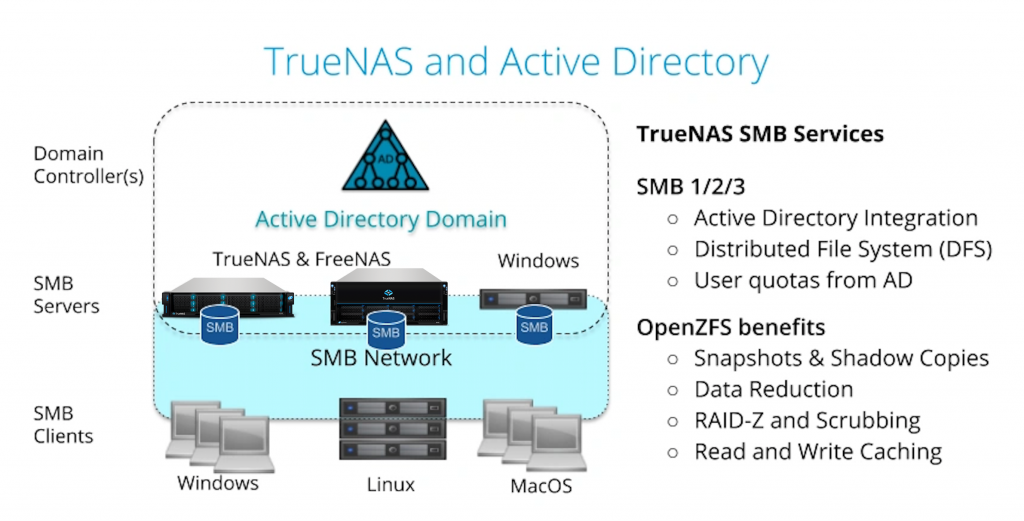
FreeNAS and TrueNAS are used to provide SMB shares in over 80% of deployments. Windows, Mac, and now Linux clients use SMB to share files. In many cases, SMB3 is preferred to NFSv3 and includes some file integrity advantages because the client behavior is well defined. SMB clients gain the advantages of the highly robust OpenZFS file system and all the replication and administration tools that FreeNAS and TrueNAS provide.
SMB3 is usually deployed in organizations with Active Directory to manage user authentication and permissions. All Windows Servers and FreeNAS/TrueNAS units can be configured to use the same security control.TrueNAS and Active Directory
FreeNAS and TrueNAS Release 11.3
The good news is that version 11.3 includes many improvements to SMB and Active Directory support beyond the compatibility with the new Microsoft security patches: 

  • The methods of communicating with the Active Directory Domain Controller now use strong authentication. The strong authentication methods are either SSL-encrypted transport or signed sasl_gssapi bind (Kerberos). This is the additional feature needed to avoid disruption with the change in security defaults.
  • Setup wizards for SMB and Active Directory have been added. The user feedback on ease of deployment has been excellent.
  • SMB and OpenZFS snapshots have been better integrated. Now ZFS snapshots are automatically visible to clients’ systems as Shadow Copies with all the previous versions of files. A file from an old snapshot can be copied and restored to a current share without any help from a storage administrator.  More impressively, only snapshots with file changes are visible to the client so it’s much easier to find the right snapshot.
  • Tools and best practices have been added to improve the ability to share the same files with NFS and SMB clients. NFSv3 has some weaknesses where clients can be configured to ignore network locking, but as long as best practices are followed, mixed protocol shares can be safely operated.
  • ACL manager has been added to provide an easy-to-use web UI to set permissions on an SMB share. This greatly simplifies SMB setup and reduces the setup time.
  • ZFS Replication between SMB datasets to a backup system has been greatly improved. The speed of replication on high bandwidth links has been increased by 8X to over 10Gbit/s (5 TB per hour). For large datasets, these replication tasks now support a suspend and resume model that can withstand a network outage. This is probably the most efficient SMB share replication available.
  • ZFS user quotas are now exposed as NT quotas to SMB clients. Windows users can manage these quotas using File Explorer, and Linux and FreeBSD users can use the smbcquotas utility for quota management.

Please contact us if we can help you with your next SMB server deployments.