




惯性聚合 高效追踪和阅读你感兴趣的博客、新闻、科技资讯
阅读原文 在惯性聚合中打开

推荐订阅源

H
Help Net Security
爱范儿
爱范儿
V
Visual Studio Blog
Last Week in AI
Last Week in AI
阮一峰的网络日志
阮一峰的网络日志
雷峰网
雷峰网
Hugging Face - Blog
Hugging Face - Blog
博客园 - 【当耐特】
freeCodeCamp Programming Tutorials: Python, JavaScript, Git & More
博客园 - 三生石上(FineUI控件)
博客园 - Franky
博客园 - 叶小钗
OSCHINA 社区最新新闻
OSCHINA 社区最新新闻
The Cloudflare Blog
大猫的无限游戏
大猫的无限游戏
人人都是产品经理
人人都是产品经理
M
MIT News - Artificial intelligence
罗磊的独立博客
L
LangChain Blog
Jina AI
Jina AI
IT之家
IT之家
J
Java Code Geeks
Microsoft Azure Blog
博客园_首页

TrueNAS – Open Enterprise Storage

What We Heard at NAB 2026 | TrueNAS - Open Enterprise Storage TrueNAS V160 Launched: High Performance, No All-Flash Tax TrueNAS 26 Is Here: What's New in This Major Release TrueNAS Connect: Enterprise Features on Your Own Hardware TrueNAS Immutability: Multi-Layered Data Protection & Ransomware Defense TrueNAS CEO Note to Community: We Are All TrueNAS TrueNAS 25.10.2 Goldeye: 100+ Fixes & What's New TrueNAS Names Brett Davis CEO for Enterprise Growth TrueNAS Plans for 2026: TrueNAS 26 & OpenZFS 2.4 Roadmap TrueNAS Connect Plus Now Available for All Community Users TrueNAS R60: High-Speed NVMe Storage for AI Workloads Introducing TrueNAS WebShare: Secure Web-Based File Sharing TrueNAS 25.10.1: Goldeye Matures, Performs, and Connects TrueNAS & Veeam v13: Turnkey Cyber‑Resilient Backups Customer Advantages of the TrueNAS Open Core Model TrueNAS Named Data Storage Company of the Year 2025 TrueNAS 25.10: Smarter, Streamlined Updates & Tools TrueNAS F-Series Shines at IBC with Two “Best of Show” Awards TrueNAS 25.10 “Goldeye”: NVMe‑oF, Unified, Simplified Storage Introducing TrueNAS Connect: Secure Monitoring & Alerts The ESG Advantage of Open Enterprise Architecture: Why TrueNAS Is the Sustainable Choice | TrueNAS - Open TrueNAS 25.10-RC1: New Features, Fixes & OpenZFS 2.3.4 Seamless Setup: Exploring TrueNAS Web-Driven Installation | TrueNAS - Open Enterprise Storage TrueNAS 25.10 “Goldeye” BETA is Available TrueNAS 25.10 “Goldeye” Highlights TrueNAS 25.04.2: Fangtooth restores Virtualization iXsystems Rebrands as TrueNAS to Reflect Market Momentum in Enterprise Storage | TrueNAS - Open Enterprise June 1 - Apps Migration Deadline for TrueNAS 24.04 and 23.10 TrueNAS 25.04.1: Fangtooth Unification Gains Momentum TrueNAS 24.10.2.2 Prepares for IP Addressing of Apps
Plex Permissions in FreeNAS 11.3 | TrueNAS - Open Enterpr...
iX Team · 2020-02-19 · via TrueNAS – Open Enterprise Storage

NOTE: This is historical content that may contain outdated information.


Plex Media Server is a popular Plugin available for FreeNAS, allowing the user to stream media directly from their FreeNAS system. Because Plugins reside inside a jail, Plex must have access to the media files to be shared which are generally stored in a separate dataset that is mounted inside the Plex Plugin jail. A media dataset can also be mounted in multiple jails to allow access to other Plugins like Radarr, Sonarr, or Sabnzbd to manage and share the centralized media.
Once Plex is installed, its permissions will be in a default state set during the initial creation of a dataset on FreeNAS. Unless otherwise modified, this means the dataset will be owned by the user “root” and group “wheel”. Because Plex Media Server runs as the user “plex” in the default configuration, Plex will not be able to read or write to the media dataset and thus not be able to access the media files stored there. To create an ACL for the media dataset with the correct Plex user ID, first verify that user ID by running id plex in the Plugin Jail’s shell. This should be 972; with that information, launch the FreeNAS 11.3 ACL manager:

      1. Click the three dots next to the media dataset; in this example, it is called “media”
      2. Select “Edit ACL”
      3. Click the “Add ACL Item” button. A new section will appear at the bottom of the list of existing ACL items.
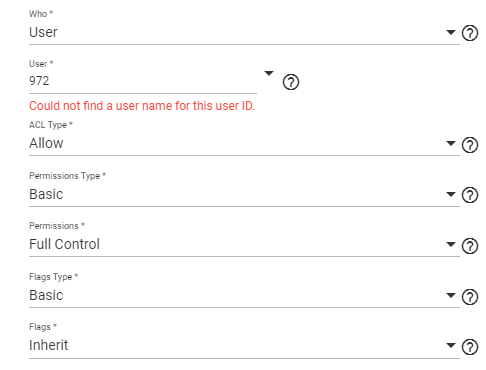
      4. Fill in the following:
        Who: User
        User: 972 (Don't worry if it says "Could not find a username for this ID")
        ACL Type: Allow
        Permissions Type:
        Basic Permissions: Full Control
        Flags Type: Basic
        Flags: Inherit
      5. If files already exist in the dataset, select the “Apply permissions recursively” checkbox.
      6. Click “Save”
      7. Add media in Plex Media Server through its web interface as normal

Other popular Plugin user ID’s include:

  • Radarr = 352
  • Sonarr = 351
  • Transmission = 921
  • Sabnzbd = 350

Visit the General Plugin Discussion in the FreeNAS Forums for more information and enjoy your media serving with FreeNAS!