
惯性聚合 高效追踪和阅读你感兴趣的博客、新闻、科技资讯
阅读原文 在惯性聚合中打开

推荐订阅源

爱范儿
爱范儿
博客园 - 叶小钗
OSCHINA 社区最新新闻
OSCHINA 社区最新新闻
腾讯CDC
S
SegmentFault 最新的问题
D
DataBreaches.Net
Hugging Face - Blog
Hugging Face - Blog
L
LangChain Blog
Recent Announcements
阮一峰的网络日志
阮一峰的网络日志
N
Netflix TechBlog - Medium
大猫的无限游戏
大猫的无限游戏
M
MIT News - Artificial intelligence
酷 壳 – CoolShell
酷 壳 – CoolShell
博客园 - 三生石上(FineUI控件)
F
Fortinet All Blogs
让小产品的独立变现更简单 - ezindie.com
Martin Fowler
Martin Fowler
雷峰网
雷峰网
J
Java Code Geeks
钛媒体:引领未来商业与生活新知
钛媒体:引领未来商业与生活新知
小众软件
小众软件
云风的 BLOG
云风的 BLOG
T
Tailwind CSS Blog

TrueNAS – Open Enterprise Storage

What We Heard at NAB 2026 | TrueNAS - Open Enterprise Storage TrueNAS V160 Launched: High Performance, No All-Flash Tax TrueNAS 26 Is Here: What's New in This Major Release TrueNAS Connect: Enterprise Features on Your Own Hardware TrueNAS Immutability: Multi-Layered Data Protection & Ransomware Defense TrueNAS CEO Note to Community: We Are All TrueNAS TrueNAS 25.10.2 Goldeye: 100+ Fixes & What's New TrueNAS Names Brett Davis CEO for Enterprise Growth TrueNAS Plans for 2026: TrueNAS 26 & OpenZFS 2.4 Roadmap TrueNAS Connect Plus Now Available for All Community Users TrueNAS R60: High-Speed NVMe Storage for AI Workloads Introducing TrueNAS WebShare: Secure Web-Based File Sharing TrueNAS 25.10.1: Goldeye Matures, Performs, and Connects TrueNAS & Veeam v13: Turnkey Cyber‑Resilient Backups Customer Advantages of the TrueNAS Open Core Model TrueNAS Named Data Storage Company of the Year 2025 TrueNAS 25.10: Smarter, Streamlined Updates & Tools TrueNAS F-Series Shines at IBC with Two “Best of Show” Awards TrueNAS 25.10 “Goldeye”: NVMe‑oF, Unified, Simplified Storage Introducing TrueNAS Connect: Secure Monitoring & Alerts The ESG Advantage of Open Enterprise Architecture: Why TrueNAS Is the Sustainable Choice | TrueNAS - Open TrueNAS 25.10-RC1: New Features, Fixes & OpenZFS 2.3.4 Seamless Setup: Exploring TrueNAS Web-Driven Installation | TrueNAS - Open Enterprise Storage TrueNAS 25.10 “Goldeye” BETA is Available TrueNAS 25.10 “Goldeye” Highlights TrueNAS 25.04.2: Fangtooth restores Virtualization iXsystems Rebrands as TrueNAS to Reflect Market Momentum in Enterprise Storage | TrueNAS - Open Enterprise June 1 - Apps Migration Deadline for TrueNAS 24.04 and 23.10 TrueNAS 25.04.1: Fangtooth Unification Gains Momentum TrueNAS 24.10.2.2 Prepares for IP Addressing of Apps
Back Up Plugins and Jails on FreeNAS | TrueNAS
iX Team · 2019-05-23 · via TrueNAS – Open Enterprise Storage

For years, FreeNAS has offered functionality expansion through premade plugins and jails. In Version 11.2, the management platform was updated to make it even easier to manage and create new plugins.
FreeNAS users can treat their NAS as a server. Advanced services running on top of the ultra-secure ZFS file system allow streaming and managing media, running a website,  and even handling surveillance. As usage becomes more versatile and valuable, protecting plugins and jails becomes even more important. Luckily, FreeNAS makes it easy with the ZFS file system.
Plugins and jails are stored in the iocage dataset, which is created automatically when the first plugin or jail is installed. Users can create snapshots of the entire dataset or sub-directories of individual plugins and jails. If an issue occurs, the user can roll back a jail to a previous state.

Going a step further, snapshots can also be replicated to other FreeNAS or TrueNAS systems to aid with disaster recovery and data protection. If there are replacements or upgrades to the hardware, these images and their data can be moved over to new systems with ease.

Creating Snapshots:
Go to Storage -> Pools in the FreeNAS web interface and locate the iocage dataset.
Open the options menu (three dots) and select Create Snapshot. Enter a name and click CREATE SNAPSHOT. Snapshots can be regularly taken after a defined amount of time by going to Tasks -> Periodic Snapshots and selecting the appropriate dataset.
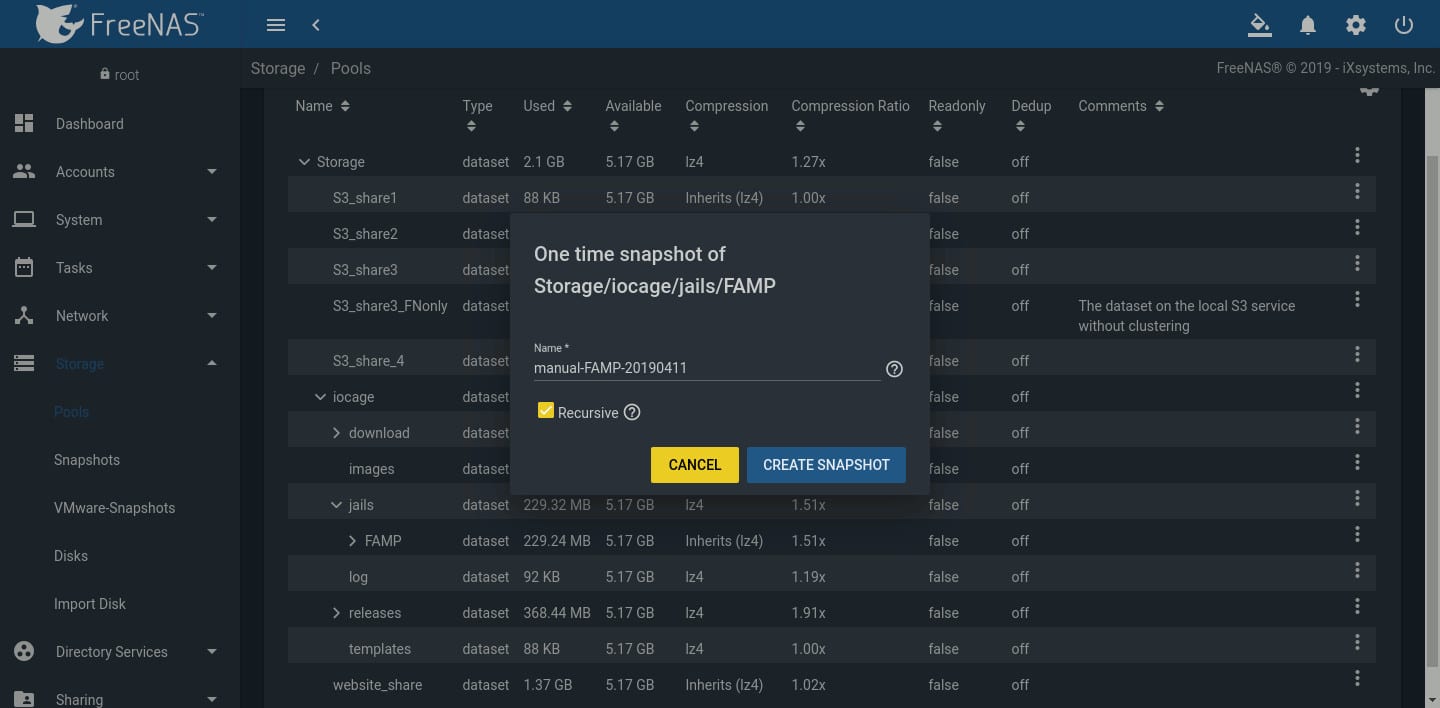
One time Snapshot of Storage

To test or rollback the iocage dataset, go to Storage -> Snapshots, find the snapshot to recover, and click Rollback.
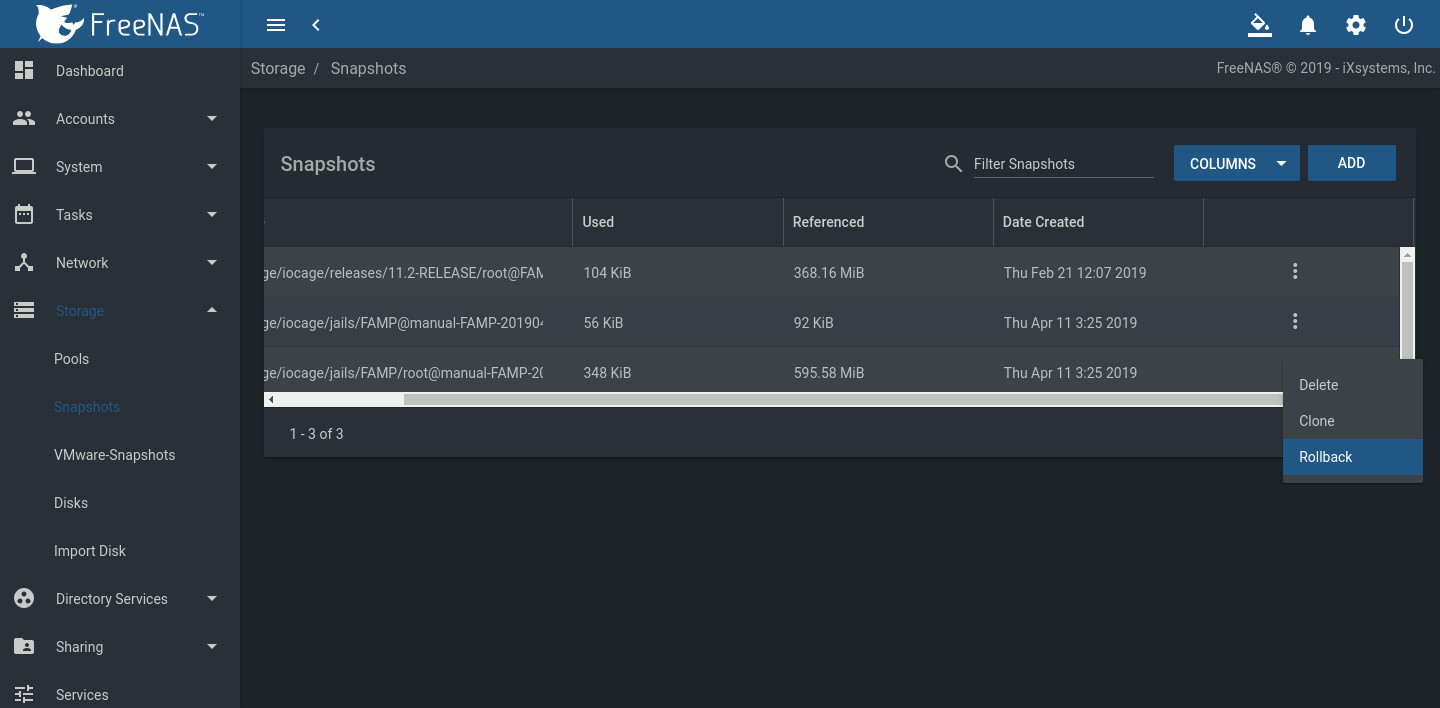
test or rollback the iocage dataset window

This graphic demonstrates the effectiveness of rolling back a dataset. A snapshot of Storage/iocage/jails/FAMP is created. Text file test.txt is then added to the jail. After rolling back the dataset to the snapshot image, test.txt is gone.
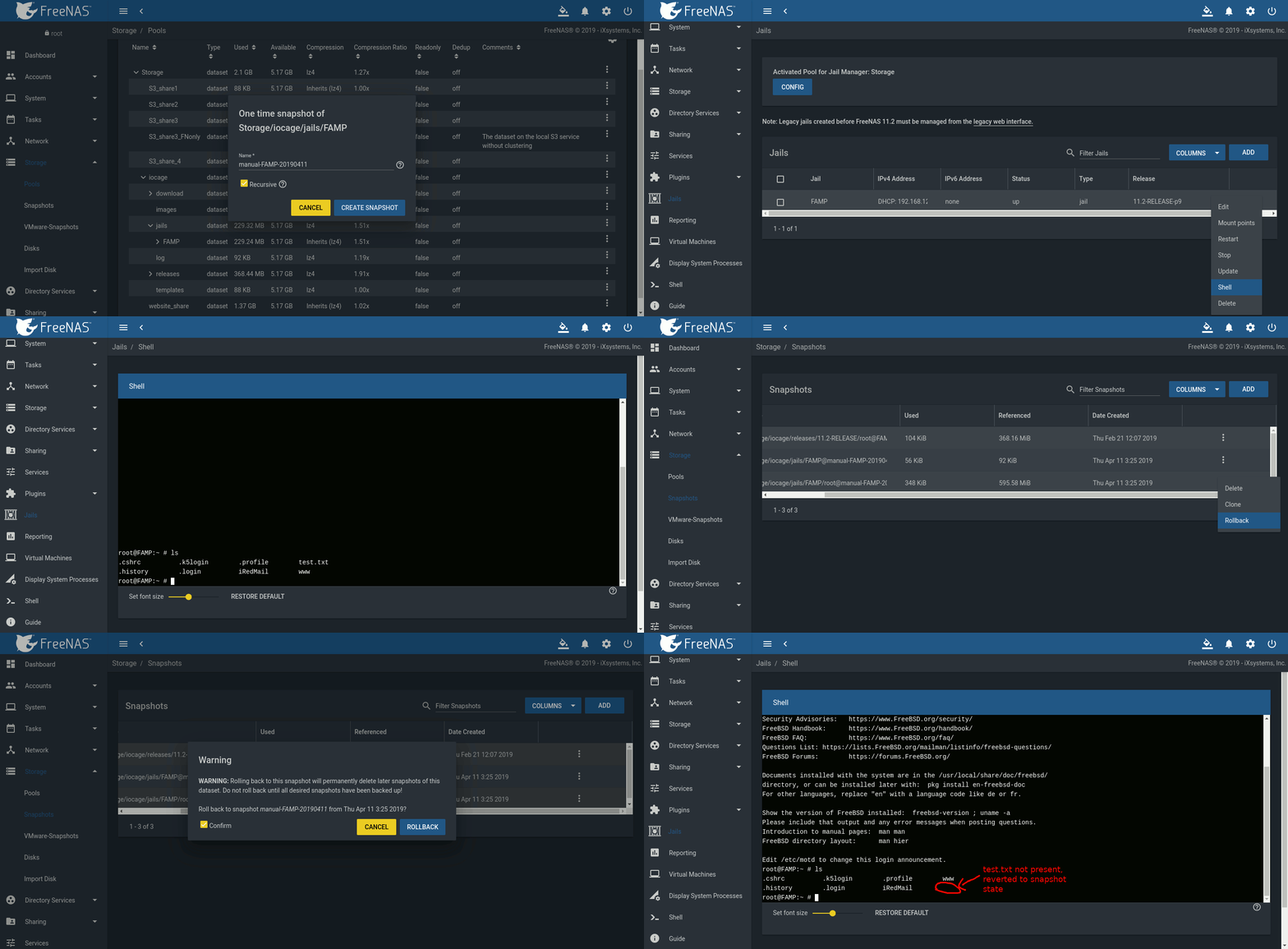
overview of FreeNAS protects jails and plugins with snapshots

This overview demonstrates how effectively FreeNAS protects jails and plugins with snapshots. Using snapshots and replication preserves your valuable data and can save you many hours of recovery time.
For more tips on using FreeNAS, go to our forums and iX University. Jails and Plugins are also coming to TrueNAS in version 11.3. If your organization is looking for a specific deployment with enterprise support, please contact us.