










FreeNAS is a NAS and/or IP-SAN (via iSCSI)…which means everything happens over the network. If you are after performance, you are going to want good switches and server grade network cards. If you are building a home media setup, everything might be happening over wireless, in which case network performance becomes far less critical (there really is a difference in performance between a Cisco 2960G or Juniper EX4200 and a Netgear or Dlink! This difference becomes more pronounced if you are doing vlans, spanning tree, jumbo frames, L3 routing, etc).
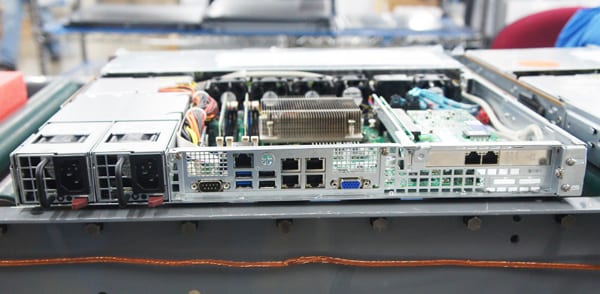
In the current landscape, gigE networking is nearly ubiquitous and 10Gbe networking is expensive enough to keep it out of the hands of many home and small business setups. If you have a number of users and appropriate switch gear, you can benefit from aggregating multiple gigE network connections to your FreeNAS box. Modern hard drives approach, and oftentimes exceed, the performance of gigE networking when doing sequential reads or writes. Modern SSDs exceed gigE networking for sequential or random read/write workloads. This means that — on the low end — a FreeNAS system with a 3 drive RAIDZ pool and a single gigE network connection can hit a bottleneck at the network for performance, since the volume will be able to read or write sequentially at 200+ MB/sec and the network will be limited to ~115MB/sec. If your application is IOPs bound instead of bandwidth bound (such as a database or virtualization platform), and your storage is comprised of spinning disks, you might find that a single gigE connection is sufficient for a dozen or more disks.
Intel NICs are the best game in town for Gigabit networking with FreeNAS. The desktop parts are fine for home or SOHO use. If your system is under-provisioned for CPU or sees heavy usage, the server parts will have better offload capabilities and correspondingly lower CPU utilization. Stay away from Broadcom and Realtek interfaces if and when possible.
In the Ten Gigabit arena, Chelsio NICs are hands down the best choice for FreeNAS. There’s a significant premium for these cards over some alternatives, so second and third choice would be Emulex and Intel (In that order). FreeNAS includes drivers for a number of other 10Gbe cards but these are largely untested by the FreeNAS developers.
Options here are very limited. Qlogic is pretty much the only game in town. The 16Gb parts do not have a driver yet and the 1Gb parts are no longer supported, so you’ll be limited to the 8Gb, 4Gb and 2Gb parts. Fiber initiator mode works out of the box, and the “easter egg” to enable Target mode is well documented and tested.
FreeNAS was originally designed to run as a read-only image on a small boot device. The latest versions now run read/write using ZFS. A SATA DOM or small SSD is a great boot device for the latest versions. Since ZFS is used, the boot device itself can be mirrored. As an alternative to a SATA DOM or SSD, one or more high quality USB sticks can be used. As an absolute minimum, the boot device must be 4GB, however 8GB is a more comfortable and recommended minimum. Beyond 16GB in size, the space will be mostly unused. Since the boot device can’t be used for sharing data, installing FreeNAS to a high capacity hard drive is not recommended.
Hardware configuration is one of the most prominent and active categories in the FreeNAS forum. I have attempted to share some best practices that we at iXsystems have seen over the years and I hope that I have not missed anything big. With so many options and use cases, it’s difficult to come up with a set of one-size-fits-all instructions. Some other tips if you get stuck:
As an open source community, FreeNAS relies on the input and expertise of its users to help improve it. Take some time to assist the community; your contributions benefit everyone who uses FreeNAS.
To sum up: FreeNAS is great—I’ve used it for many years and we have several instances running at iXsystems. I attempted to provide accurate and helpful advice in this post and as long as you follow my guidance, your system should work fine. If not, feel free to let me know. I’d love to hear from you.
Josh Paetzel
iXsystems Director of IT
<< Part 3/4 of A Complete Guide to FreeNAS Hardware Design, Pools, Performance, and Cache
此内容由惯性聚合(RSS阅读器)自动聚合整理,仅供阅读参考。 原文来自 — 版权归原作者所有。