


March 2022, sunny weather, spring returns to earth, green everywhere. Unfortunately, due to COVID-19 impact, I again couldn't return to school. Seizing the last opportunity in China, I decided to solve pain points, reorganize connections, and take the first step toward a smart home. Unexpectedly, network upgrade was full of challenges, twists and turns, ups and downs. A summary-style documentation couldn't handle so much content. Therefore, I recorded the troubleshooting process in diary(running account) format. Hope it can bring readers a few minutes of enjoyment.
COVID-19 Omicron variant broke out across China. Multiple areas in Shenzhen were classified as medium-risk zones. As a senior with graduation thesis tasks, I couldn't return to school for experiments. Fortunately, most experiments in computer science can be completed through remote connections. As long as devices are connected to the internet, we can use them.
Due to network security reasons, the school prohibits setting up reverse proxies privately. To access intranet addresses from off-campus, VPN qualification approval from the competent department is required. SUSTech uses a VPN system developed by Sangfor(this company is notorious for developing employee surveillance software). Its software lacks many functions: for example, when doing experiments, I often access Google while accessing campus networks simultaneously. After enabling VPN, my regular proxy becomes ineffective. Some students tried packaging Sangfor VPN into Docker containers, exposing SOCKS interfaces externally, using plugins like SwitchOmega for proxy traffic splitting. Very inconvenient.
My experimental equipment is placed in the Engineering College, connected to the lab's switch via ethernet, which connects to the wall ethernet port. Such wired connections can simultaneously obtain intranet IPv4 addresses and public IPv6 addresses. With public addresses, devices don't need to bother with campus VPN.
The problem is, I don't have IPv6 addresses at home, so I can't directly connect to school equipment via IPv6 protocol.
❯ curl 4.ipw.cn
223.68.97.161
❯ curl 6.ipw.cn
curl: (56) Recv failure: Connection reset by peer
In 2022, the three major operators had long provided IPv6 addresses, and devices had long supported IPv6 protocol. The problem of not getting addresses must be in home network configuration. I need to check from the source step by step, first the incoming fiber optical modem, then routers on various floors, finally terminal devices in my hands.
The incoming fiber optical modem (hereafter "optical modem") is a square box provided free by China Mobile when installing broadband, installed in the weak current box, serving as the gateway for the entire home by default, the unified entry and exit point for all network traffic. The optical modem has a web management interface at fixed IP address 192.168.1.1, with username and password stuck on the device bottom.

Entering the optical modem management interface for inspection, I found IPv6 functionality was indeed enabled and correctly obtained /64 IPv6 address range through PPPoE dial-up. Before investigation, I predicted the problem was most likely due to incorrect optical modem configuration. But current results show the problem is in the complex downstream.
"Downstream" includes routers on various floors and terminal devices. IPv6 addresses can be distributed from routers to terminal devices through protocols like SLAAC (StateLess Address Auto Configuration) or DHCPv6.

Back to the topic. I continued investigating downstream, checking routers on various floors. My router is TP-Link's TL-WDR5620. The product introduction webpage says "supports IPv6," and the manual has chapters on adjusting IPv6 settings. But in the router web management interface, I couldn't find IPv6 related settings no matter what.
Here I encountered the first outrageous thing: the router in the manual is called "TL-WDR5620 Gigabit Edition," while mine is called "TL-WDR5620," missing "Gigabit Edition." I thought Gigabit and regular editions only differed in maximum wireless speeds, not expecting the regular edition to have IPv6 functionality castrated.
Alright, no IPv6 support, no gigabit bandwidth - such routers indeed don't make sense in 2022. Now I have sufficient reason to replace new routers. Time to enter the next era.
When I say "my home network situation is very complex," I'm really not exaggerating. To explain more intuitively, I drew a simple map.
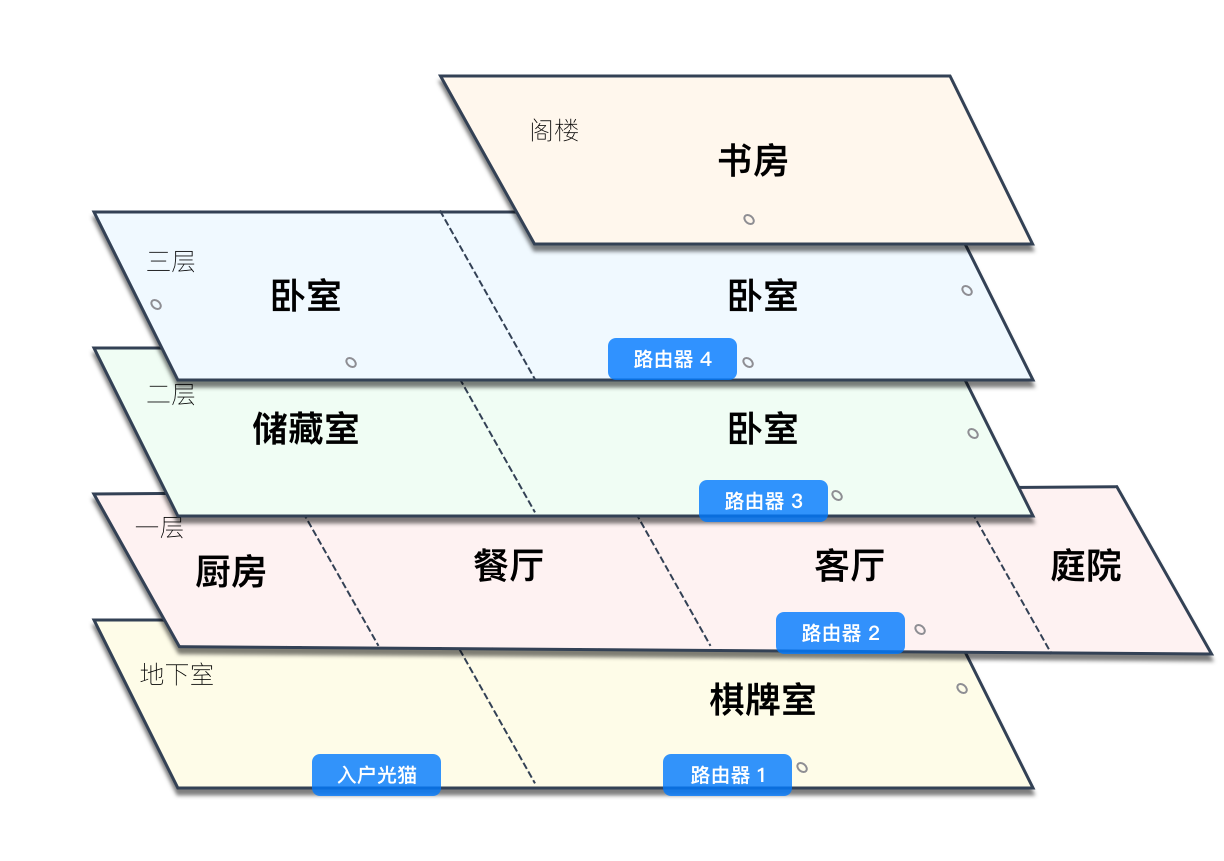
Home network layout
In 2017, the network assembly master went up and down for a whole day, finally creating this network:
- Basement: 108_underground
- First floor: 108_A (2.4GHz), 108_B (5GHz)
- Second floor: 108_2
- Third floor: 108_3A (2.4GHz), 108_3B (5GHz)
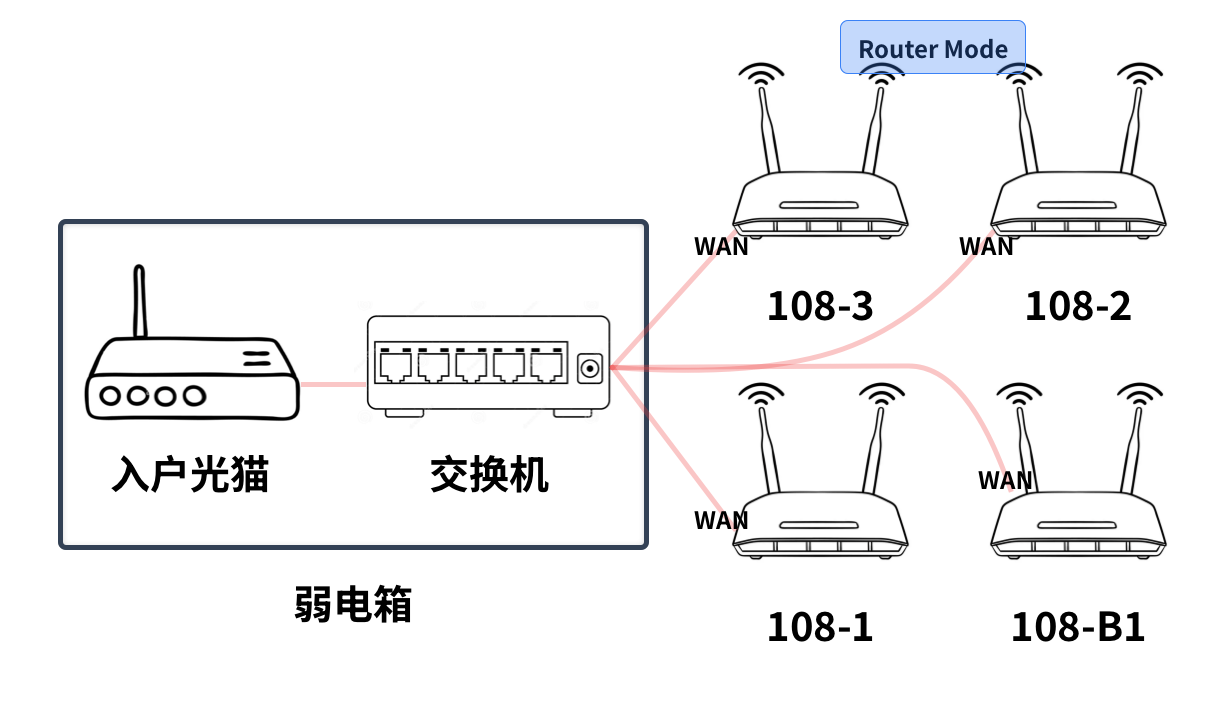
2017 solution
Various floors have new routers, some have old routers brought from moving; some support 5GHz bands, some only have 2.4GHz... In short, each floor's router performs its duties, not caring about others. In this network, the optical modem serves both dial-up and gateway functions. After routers connect to the optical modem through WAN ports, they become secondary gateways themselves. If this sounds too convoluted, here's an example.

The disadvantages of this networking approach:
- Independent SSIDs on each floor. Going up and down stairs requires manually switching WiFi connections. For example, when I go from the third floor to the first floor for meals, if I don't actively switch WiFi, my phone still connects to the third-floor router with unstable network.
- Network devices on different floors can't communicate. Since each router uses Router mode, all occupying 192.168.0.0/16 IP segments, different floors can't directly connect through LAN. For example, while connected to third-floor WiFi, I can't control first-floor smart devices.
- Double NAT. [Optical modem-router] is one NAT layer, [router-device] is the second NAT layer. This causes P2P penetration failures, with obvious delays in BT downloads and online gaming.
- Poor QoS (Quality of Service). Even enabling WMM protocol to ensure critical devices (like set-top boxes) have priority channel preemption within the same WiFi, all routers are equal from the optical modem's perspective, making cross-floor network preemption problems serious.
- Routers in /64 network segments get IPv6 addresses through SLAAC and can only distribute downstream via DHCPv6.
With so many disadvantages, home networks need major renovation.
Wait wait wait. Before jumping into over-engineering's abyss, let's clarify one point first: since the optical modem already serves as gateway, can't all the above problems be solved by simply adjusting routers to AP mode?

That's right in theory. If all routers work in AP mode:
- Network devices on different floors communicate with each other
- No Double NAT exists
- SLAAC IPv6 distribution problems are solved
- But going up and down stairs still requires manually switching WiFi connections
Smartphone WiFi switching logic is an [offline - search - auto-connect - internet] loop. If current networks are unavailable, it will search for WiFi and attempt auto-connection.
The example mentioned earlier: "going from third floor to first floor for meals, if not manually switching, phones still connect to third-floor routers with unstable networks." If all APs have the same name, the experience becomes even worse - due to unified SSIDs, you can't even actively choose which router to connect to (only one network in WiFi list, no choice). After going up and down floors, you must turn phone WiFi off and on again, forcing it to search for nearest AP signals.
So is there a way to seamlessly and imperceptibly switch between wireless access points?
Is there an elegant solution? That's 802.11k/v/r.
802.11k/v/r are device-oriented protocols. How different APs coordinate with each other and implement these protocols isn't specifically regulated. I searched for network devices on sale and found these protocols are usually implemented on same-brand AC+AP setups or devices capable of mesh networking.
Very reasonable - AC+AP uses hardware to manage hardware, same-brand devices can freely transmit private packets. Mesh networking currently has no large-scale universal industry standards; each manufacturer does their own thing (WiFi Alliance's EasyMesh is dead in the water).
Conclusion - to achieve automatic roaming, you must buy the same brand. Next step is choosing a brand of routers and bringing 4 home~
Good, to satisfy automatic roaming seamless switching, new hardware supporting 802.11k/v/r must be purchased. Previously using Xiaomi routers in labs, I thought their web management was well done. After comparison, I decided to purchase these two router types.
| Hardware Name | Quantity | Flagship Store Unit Price |
|---|---|---|
| Redmi Router AX3000 | 3 | 249 yuan |
| Xiaomi Router AX6000 | 1 | 599 yuan |
Reference price 249×3+599=1346249\times3 + 599 = 1346 yuan. During actual purchase, I caught the March 8th festival promotion, AX3000 dropped to 199 yuan, total cost 1196 yuan.
Xiaomi routers support Mesh networking. Mesh is largely still a marketing concept, usually including auto-networking (flexible use of wireless and wired links for mutual communication), configuration synchronization (routers synchronize SSIDs, passwords, AP links and other information), seamless roaming and other functions.

Each manufacturer speaks their own language ("one Mesh, each tells their own story"), full of promotion and marketing rhetoric. Here I'll share my own understanding of Mesh: before Mesh appeared, network engineers needed clear mental understanding of network topology and correctly configure each node so it could communicate properly in its position. Mesh networking gives network devices plug-and-play characteristics; devices can discover network topology structures themselves and automatically join networks with appropriate configurations.
So Mesh networking is particularly suitable for home networks: regardless of whether wires in walls are
-
Series:
Internet → [WAN - LAN] → [WAN - LAN]; -
Or parallel:
Internet → { [WAN - LAN], [WAN - LAN] }; -
Or not connected at all (bridging through wireless signals)
After routers are powered on, they automatically build the fastest topology, smoothly synchronize configurations, and expand network coverage.
Although Mesh networking is automatic, it can only adapt on existing structures and cannot transcend physical line limitations. Network topology construction (simply put: how to connect wires, which ports to plug network cables) still needs manual optimization and adjustment to build optimal network structures.
Mesh networking solutions have three types: wired backhaul, wireless backhaul, AP mode. Wireless backhaul means routers exchange data through wireless frequencies for network expansion, with large bandwidth loss and high latency, not recommended.
AP mode is similar to my existing network topology. The optical modem is still responsible for dial-up and gateway, but routers lose many functions. For example: data packets are forwarded after only going through layer 2, so routers can't perform ad blocking or transparent proxy through iptables lists.
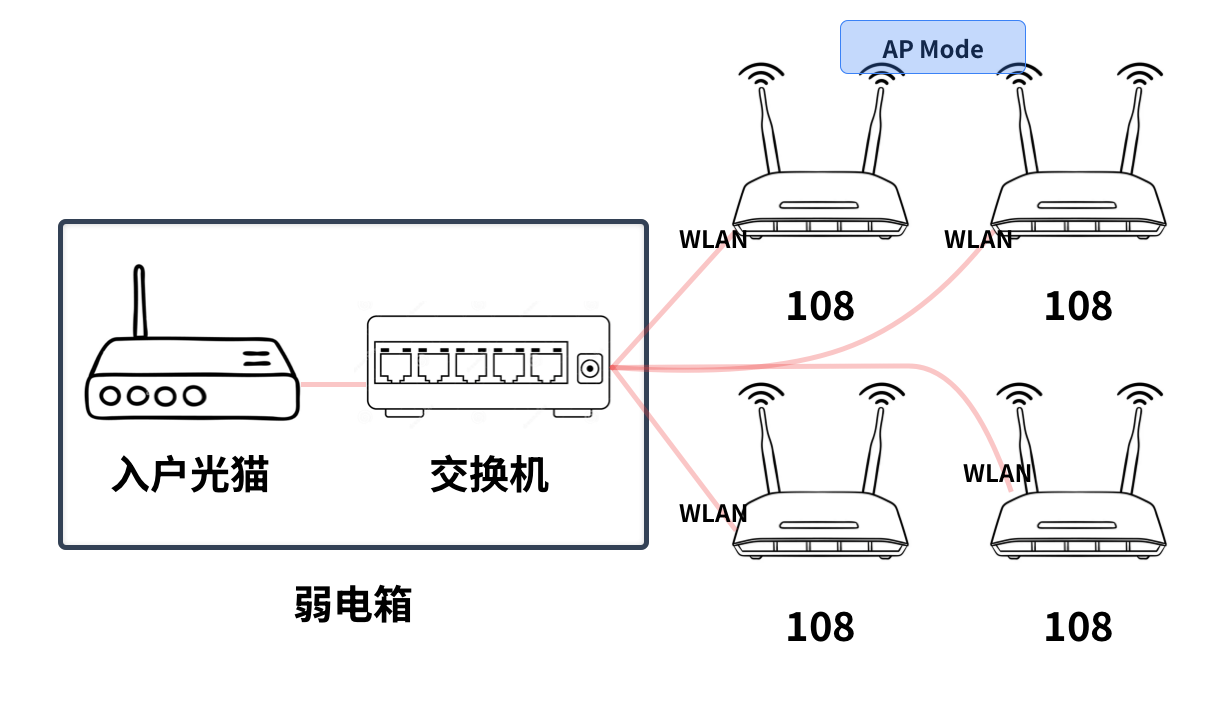
AP mode
Wired backhaul is the most suitable networking solution. The optical modem bridges to a main router, the main router handles dial-up and gateway, sub-routers connect to main router LAN ports as APs.
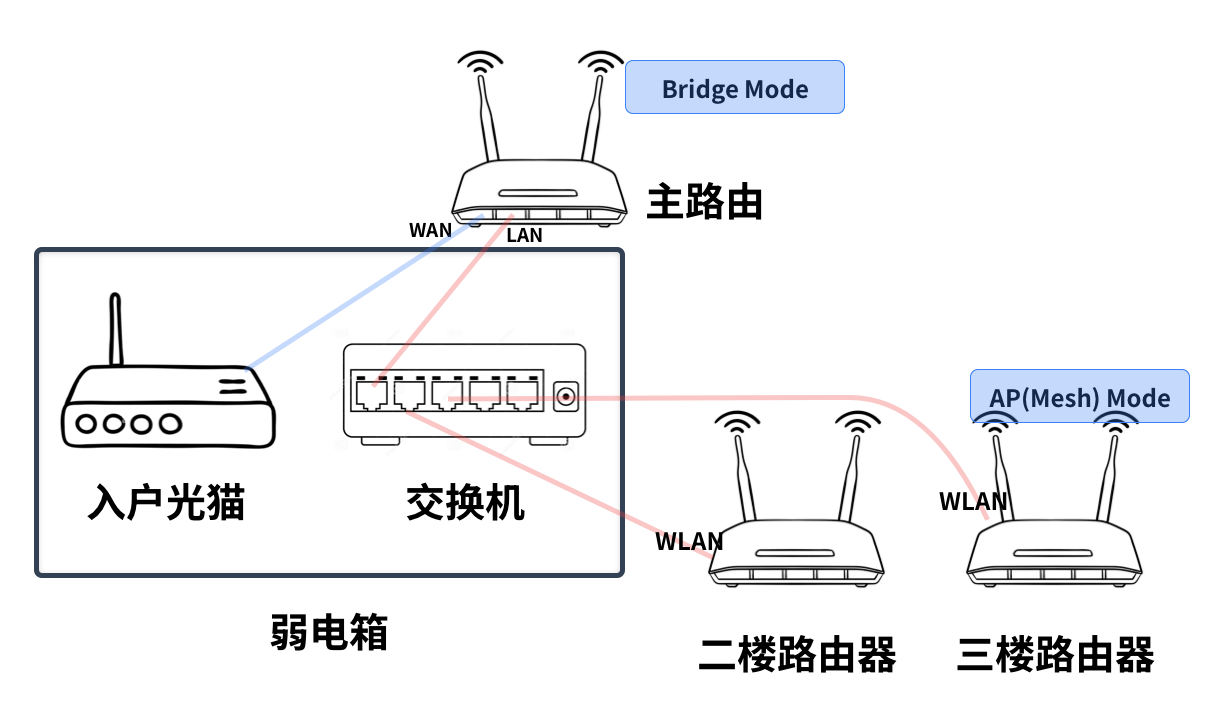
Wired backhaul
All additional functions like ad blocking, transparent proxy, port forwarding can be placed on the main router - configure once, all home devices benefit.
No, no, no. This solution has a fatal force majeure factor not considered. The main router dragging two network cables and one power cable out of the weak current box prevents the box door from closing. The weak current box is at the entrance; aesthetics cannot be guaranteed. Aesthetics over functionality - difficult clients indeed.
Let's refocus on the "wired backhaul" diagram above. The main router can't be dragged outside the weak current box, so maybe it can be placed on the first floor, using wires in walls as [optical modem - WAN] connection lines. But what about the [LAN - switch] line? There's only one wire in the wall!
Getting off track - I need to continue optimizing the "wired backhaul" solution design. Current dilemmas in order:
- Routers dragged outside weak current boxes look ugly
- Routers can connect to weak current boxes through wires in walls
- Routers need two network cables but walls only have one
Regardless, let's first assume there are two wires in the wall, converging at the switch. How to configure the switch to make this network work?
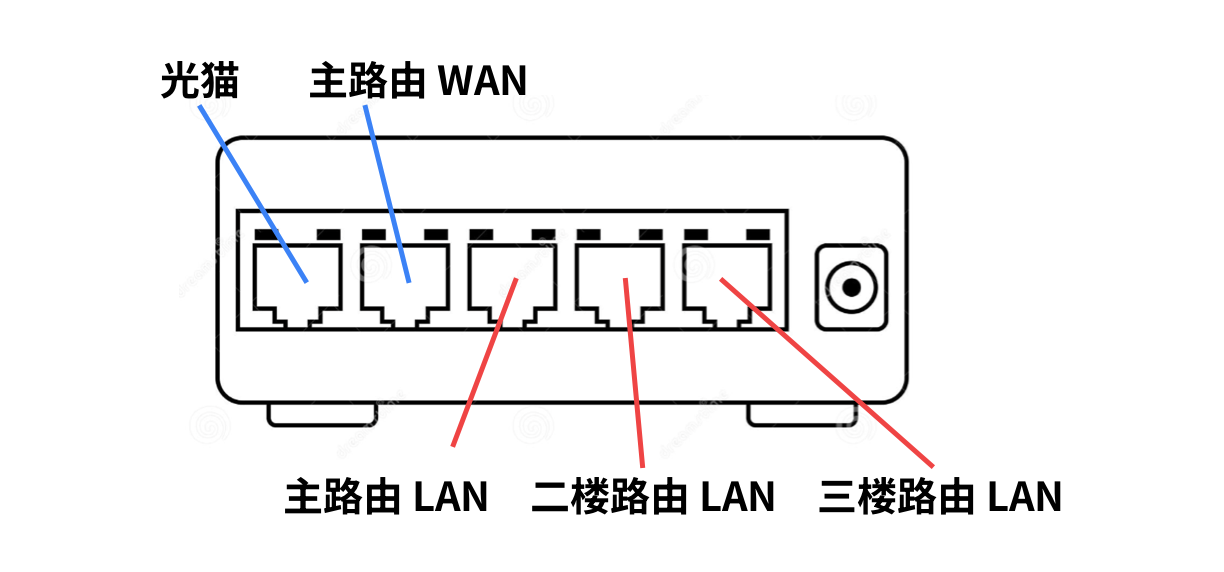
Recalling networking knowledge: switches can isolate two subnets by dividing VLANs. In the diagram below, the two blue wires belong to VLAN 1, the three red wires belong to VLAN 2.
Struggling to recall networking knowledge, I remembered something called 802.1q. 802.1q allows switches to support cross-switch VLANs through single network cables. I even dug out old course materials~
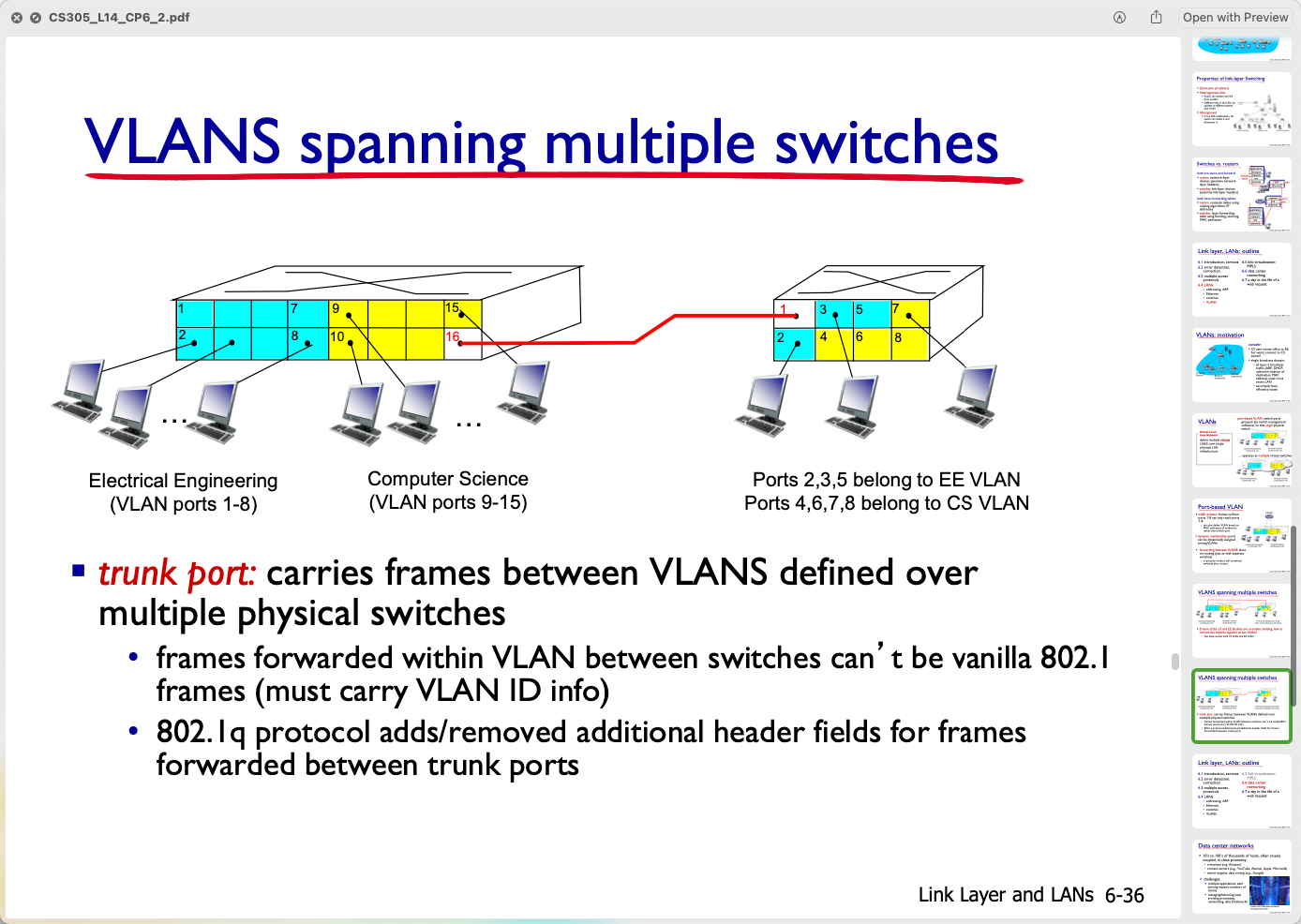
802.1Q
If I add a switch on the first floor, set up VLANs on the new switch, then connect first-floor and weak current box switches via trunk port, wouldn't this perfectly meet design requirements?
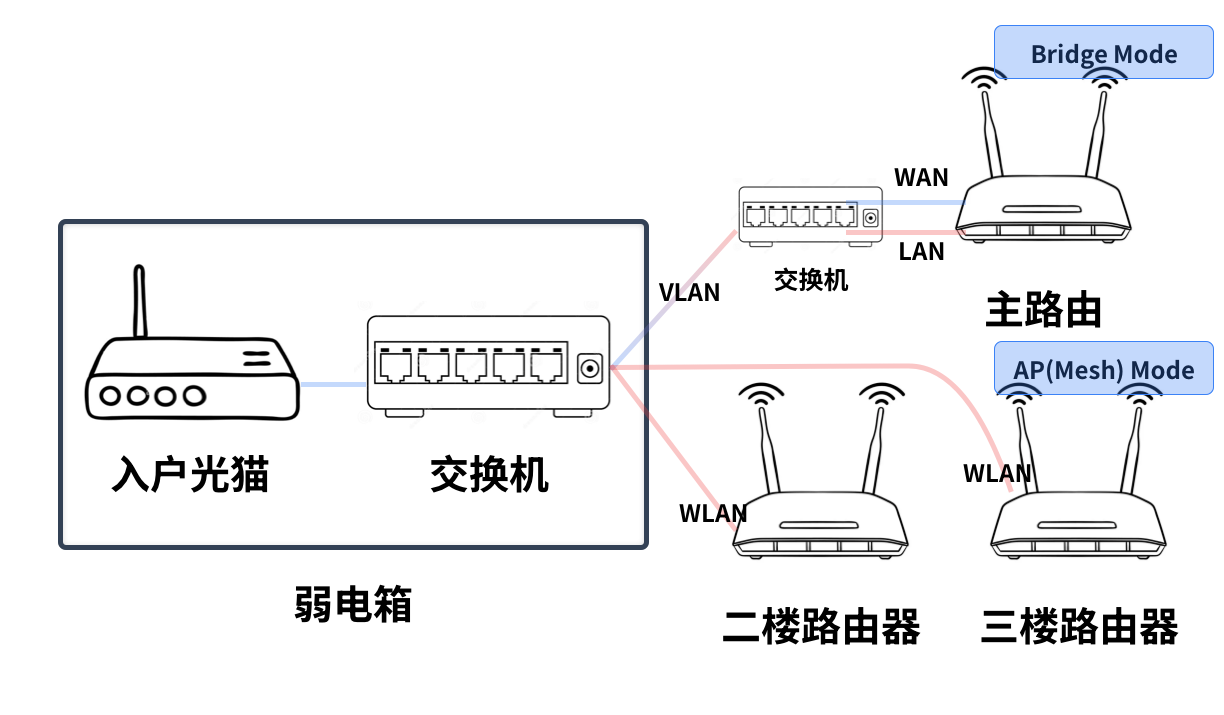
Advanced wired backhaul
Networking studies weren't wasted. We can all accept this solution - let's do it this way~
Today all hardware arrived. First debug various networks in front of the weak current box, then use wires in walls to build real networks. Otherwise, get ready for up-and-down climbing exercise~
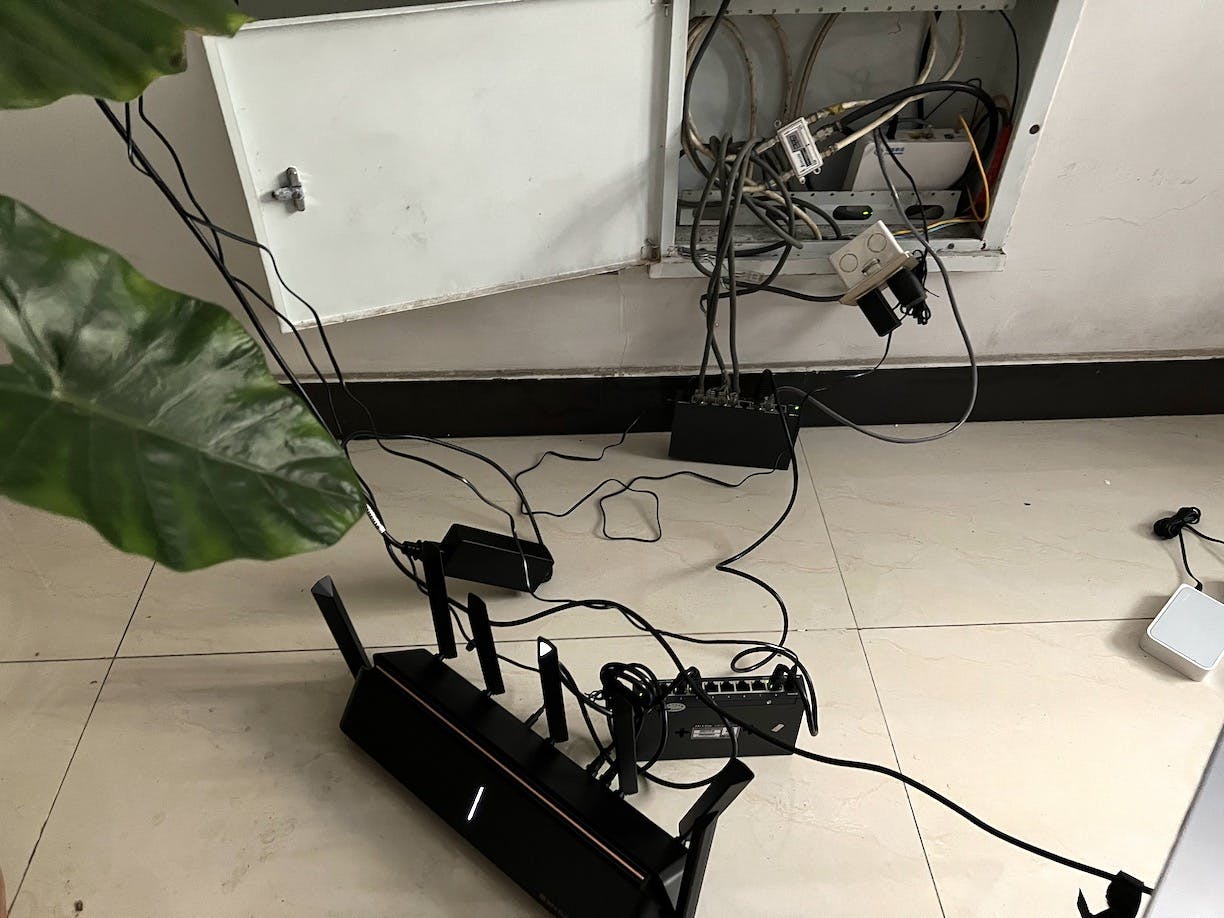
Debugging scene
The AX6000's seven antennas in the picture look scary, but signal strength is just average 😂
I originally thought home network renovation could declare victory after assembly completion. But today when I conducted speed tests on the third floor, I found network speed was only 40Mbps, far below what 300M broadband should achieve.
Before analyzing reasons, let's look at current network topology. Suppose we send a data packet from the third floor - this is the data packet flow path.
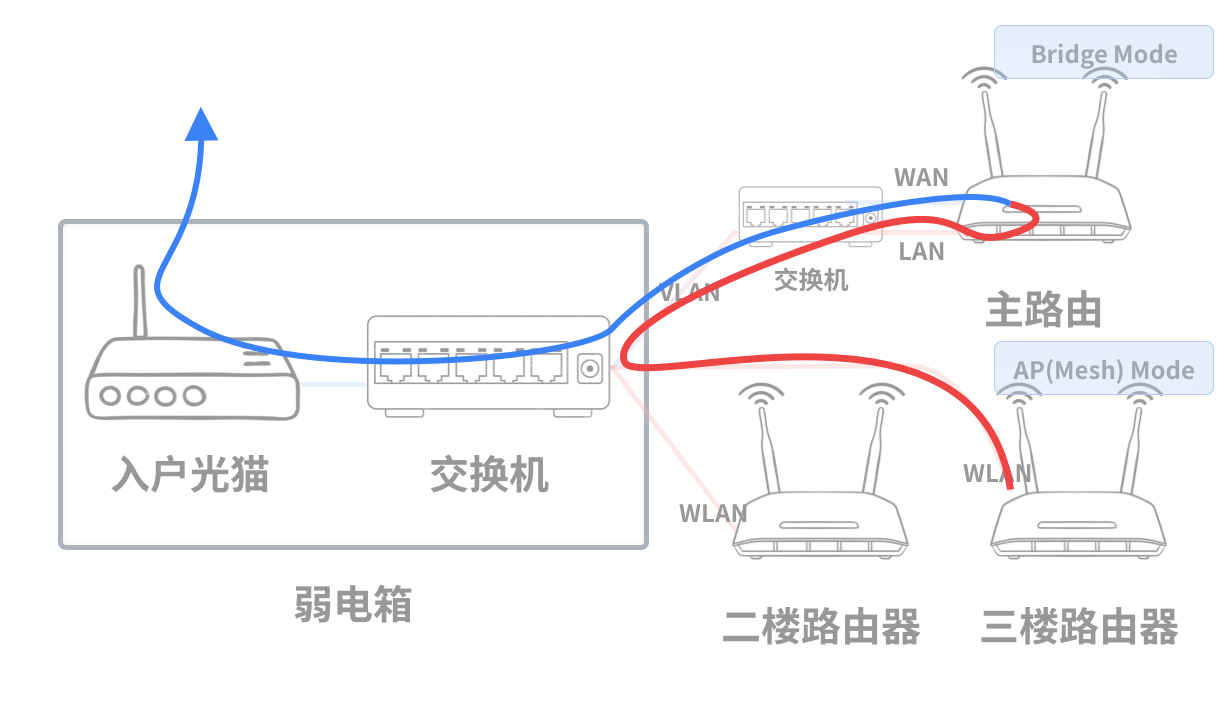
Sending data packets
- From third floor through wall cables to weak current box switch
- Then via trunk port through wall cables to first-floor switch
- Enter main router LAN port, get NAT header modification, exit from WAN port
- Once again via trunk port through wall cables to weak current box switch
- From weak current box switch into optical modem for external transmission
If any bottleneck occurs in this entire process, network speed drops - this is the barrel effect. Initially I thought the VLAN trunk line (connecting two switches) caused speed reduction due to single-line multiplexing. Checking switch management interfaces, I found that line negotiated 1Gbps speed, far higher than my bandwidth. So where exactly is the bottleneck?
I used a laptop to measure speed on each network cable individually. Finally discovered the network cable from third-floor router to switch had problems, negotiating only 100M speed. Seems wall pre-embedded cables are Category 5, limiting the entire network to around 100M. Besides replacing cables, there seems no other solution.
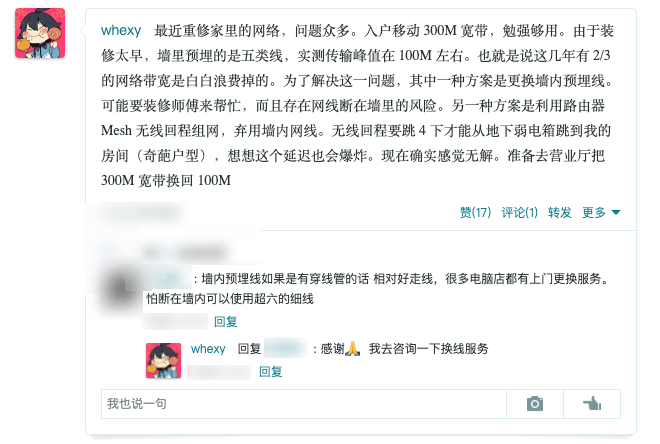
Waking up this morning, I had second thoughts - VLAN trunk lines can negotiate 1Gbps, why do third-floor to switch cables only have 100M? Did decoration workers use two different types of network cables during renovation? This doesn't make sense. So I studied communication-related knowledge.
100M Era
First, network cables transmit CLK clock signals and DATA data signals, requiring bidirectional transmission, so TX_CLK, TX_DATA, RX_CLK, RX_DATA signals are needed - at least four wires.
Network cables have 8 cores total. In the 100M network era, only 4 cores were used in cables, leaving 4 as spares. To reduce wiring, decoration workers split 8 cores into two groups of 4 cores each, pressing two crystal heads at each end. This way one network cable splits into two, laying in two network ports in one room.
Gigabit Era
Gigabit Ethernet copper cable standards include 1000BASE-TX and 1000BASE-T. 1000BASE-TX uses 2 pairs of twisted pairs - one for receiving, one for sending, basically the same principle as 100M networks. But cable requirements are high; my home's buried super Category 5 cables can't meet requirements.
1000BASE-T uses 4 pairs of twisted pairs (two wires twisted together) to simultaneously send and receive data, using algorithms at receiving ends to filter out self-transmitted signals, leaving only signals sent by the other party. This is now the most commonly used gigabit copper cable standard. Because it chooses differential transmission, 8 wires are needed.
My home third-floor network cables were already split into 4-core cables by decoration workers, so speed negotiation ceiling is 100M. This is why I only have 100M networks on the third floor.
As for cable replacement, because my home's duplex layout has all internal wiring with right-angle bends, it's easy to break original cables when rewiring. So I'm not considering it temporarily.
After twists and turns, I finally reached the networking endpoint. What have I gained these days?
- Upgraded incoming optical modem to gigabit optical modem
- Unified SSIDs and passwords using Mesh networking
- Eliminated Double NAT using AP mode networking
- Allocated IPv6 addresses using SLAAC
- Achieved seamless roaming using 802.11kvr protocol
- Tried wired backhaul
What regrets remain?
- Limited by network cable layout, second and third floor network negotiation speed ceiling is 100M
Although network renovation ended with regrets, I wrote this blog post, organizing the entire process and providing foundation for future network building. Maybe next time I build networks will be when I buy and renovate my own house - what new ideas and technologies will emerge then? Maybe universal 10-gigabit networks? Maybe complete abandonment of wiring? Maybe Nth generation mobile communication technology finally eliminates broadband? Progress never ends - see you later~
© LICENSED UNDER CC BY-NC-SA 4.0