



惯性聚合 高效追踪和阅读你感兴趣的博客、新闻、科技资讯
阅读原文 在惯性聚合中打开

推荐订阅源

The Last Watchdog
The Last Watchdog
K
Kaspersky official blog
cs.AI updates on arXiv.org
Spread Privacy
Spread Privacy
T
Threatpost
cs.CV updates on arXiv.org
cs.CL updates on arXiv.org
MongoDB | Blog
MongoDB | Blog
V
Vulnerabilities – Threatpost
Threat Intelligence Blog | Flashpoint
Help Net Security
Help Net Security
Microsoft Azure Blog
GbyAI
GbyAI
小众软件
小众软件
Cloudbric
Cloudbric
The Hacker News
The Hacker News
阮一峰的网络日志
阮一峰的网络日志
Vercel News
Vercel News
人人都是产品经理
人人都是产品经理
Forbes - Security
Forbes - Security
Martin Fowler
Martin Fowler
CTFtime.org: upcoming CTF events
AWS News Blog
AWS News Blog
Stack Overflow Blog
Stack Overflow Blog
N
News | PayPal Newsroom
P
Privacy & Cybersecurity Law Blog
TaoSecurity Blog
TaoSecurity Blog
H
Hackread – Cybersecurity News, Data Breaches, AI and More
博客园_首页
A
Arctic Wolf
www.infosecurity-magazine.com
让小产品的独立变现更简单 - ezindie.com
Scott Helme
Scott Helme
T
Tor Project blog
S
Secure Thoughts
Know Your Adversary
Know Your Adversary
P
Proofpoint News Feed
M
MIT News - Artificial intelligence
博客园 - 司徒正美
T
Threat Research - Cisco Blogs
C
Cyber Attacks, Cyber Crime and Cyber Security
Schneier on Security
B
Blog RSS Feed
AI
AI
Cyber Security Advisories - MS-ISAC
Attack and Defense Labs
Webroot Blog
Webroot Blog
Google DeepMind News
Project Zero
Project Zero
Hacker News: Ask HN
Hacker News: Ask HN

Replicate's blog

How to make remarkable videos with Seedance 2.0 – Replicate blog How to prompt Seedream 5.0 – Replicate blog Recraft V4: image generation with design taste – Replicate blog Run Isaac 0.1 on Replicate – Replicate blog Run FLUX.2 on Replicate – Replicate blog How to prompt Nano Banana Pro – Replicate blog Retro Diffusion's pixel art models are now on Replicate – Replicate blog Replicate is joining Cloudflare – Replicate blog Extract text from documents and images with Datalab Marker and OCR – Replicate blog How to prompt Veo 3.1 – Replicate blog IBM's Granite 4.0 is now on Replicate – Replicate blog Which image editing model should I use? – Replicate blog Introducing our new search API – Replicate blog Torch compile caching for inference speed – Replicate blog Announcing Replicate's remote MCP server – Replicate blog How to prompt Veo 3 with images – Replicate blog Open source video is back – Replicate blog Generate consistent characters – Replicate blog Bria is now on Replicate – Replicate blog How we optimized FLUX.1 Kontext [dev] – Replicate blog Compare AI video models – Replicate blog The FLUX.1 Kontext hackathon – Replicate blog How to prompt Veo 3 for the best results – Replicate blog Get the most from Google Veo 3 – Replicate blog FLUX.1 Kontext from the community – Replicate blog Use FLUX.1 Kontext to edit images with words – Replicate blog Generate incredible images with Google's Imagen 4 – Replicate blog Run OpenAI’s latest models on Replicate – Replicate blog NVIDIA H100 GPUs are here – Replicate blog Run 30,000+ LoRAs on Hugging Face with Replicate – Replicate blog Ideogram 3.0 on Replicate – Replicate blog Run MiniMax Speech-02 models with an API – Replicate blog Easel AI is now on Replicate – Replicate blog Stylized video with Wan2.1 – Replicate blog Creative roundup: avatars, lightsabers, and LoRA tricks – Replicate blog Wan2.1: generate videos with an API – Replicate blog Wan2.1 parameter sweep – Replicate blog You can now fine-tune open-source video models – Replicate blog Generate short videos with the Replicate playground – Replicate blog AI video is having its Stable Diffusion moment – Replicate blog FLUX fine-tunes are now fast – Replicate blog FLUX.1 Tools – Control and steerability for FLUX – Replicate blog NVIDIA L40S GPUs are here – Replicate blog Ideogram v2 is an outstanding new inpainting model – Replicate blog Stable Diffusion 3.5 is here – Replicate blog FLUX is fast and it's open source – Replicate blog FLUX1.1 [pro] is here – Replicate blog Using synthetic training data to improve Flux finetunes – Replicate blog Fine-tune FLUX.1 with an API – Replicate blog Fine-tune FLUX.1 to create images of yourself – Replicate blog Replicate Intelligence #12 – Replicate blog Replicate Intelligence #11 – Replicate blog Fine-tune FLUX.1 with your own images – Replicate blog Replicate Intelligence #10 – Replicate blog FLUX.1: First Impressions – Replicate blog Replicate Intelligence #9 – Replicate blog Run FLUX with an API – Replicate blog Replicate Intelligence #8 – Replicate blog Run Meta Llama 3.1 405B with an API – Replicate blog Replicate Intelligence #7 – Replicate blog Replicate Intelligence #6 – Replicate blog Replicate Intelligence #5 – Replicate blog How to get the best results from Stable Diffusion 3 – Replicate blog Run Stable Diffusion 3 on your Apple Silicon Mac – Replicate blog Push a custom version of Stable Diffusion 3 – Replicate blog Replicate Intelligence #4 – Replicate blog Run Stable Diffusion 3 on your own machine with ComfyUI – Replicate blog H100s are coming to Replicate – Replicate blog Run Stable Diffusion 3 with an API – Replicate blog Replicate Intelligence #3 – Replicate blog Replicate Intelligence #2 – Replicate blog Replicate Intelligence #1 – Replicate blog Shared network vulnerability disclosure – Replicate blog Run Snowflake Arctic with an API – Replicate blog Run Meta Llama 3 with an API – Replicate blog Run Code Llama 70B with an API – Replicate blog How to create an AI narrator for your life – Replicate blog Clone your voice using open-source models – Replicate blog Businesses are building on open-source AI – Replicate blog How to run Yi chat models with an API – Replicate blog Scaffold Replicate apps with one command – Replicate blog Using open-source models for faster and cheaper text embeddings – Replicate blog Generate music from chord progressions and text prompts with MusicGen-Chord – Replicate blog Generate images in one second on your Mac using a latent consistency model – Replicate blog How to use retrieval augmented generation with ChromaDB and Mistral – Replicate blog Fine-tune MusicGen to generate music in any style – Replicate blog Jet-setting with Llama 2 + Grammars – Replicate blog How to run Mistral 7B with an API – Replicate blog Make smooth AI generated videos with AnimateDiff and an interpolator – Replicate blog Fine-tuned models now boot in less than one second – Replicate blog Painting with words: a history of text-to-image AI – Replicate blog We're cutting our prices in half – Replicate blog A guide to prompting Llama 2 – Replicate blog Streaming output for language models – Replicate blog Fine-tune SDXL with your own images – Replicate blog Run Llama 2 with an API – Replicate blog Run SDXL with an API – Replicate blog A comprehensive guide to running Llama 2 locally – Replicate blog Fine-tune Llama 2 on Replicate – Replicate blog What happened with Llama 2 in the last 24 hours? 🦙 – Replicate blog
Run Stable Diffusion with an API – Replicate blog
2022-08-29 · via Replicate's blog

Posted August 29, 2022 by

The neat thing about Stable Diffusion being open source is that you can modify it and build things with it. Photoshop plugins, bots, animations, fixing human foibles, all sorts.

But, if you want to integrate it into an app or a project, you need to set it up with GPUs and put an API in front of it. And the GPUs are expensive so you don’t want to leave them switched on all the time.

Replicate lets you run machine learning models from your own code without having to set up any infrastructure. In this post, we’ll show you how to use it to run Stable Diffusion.
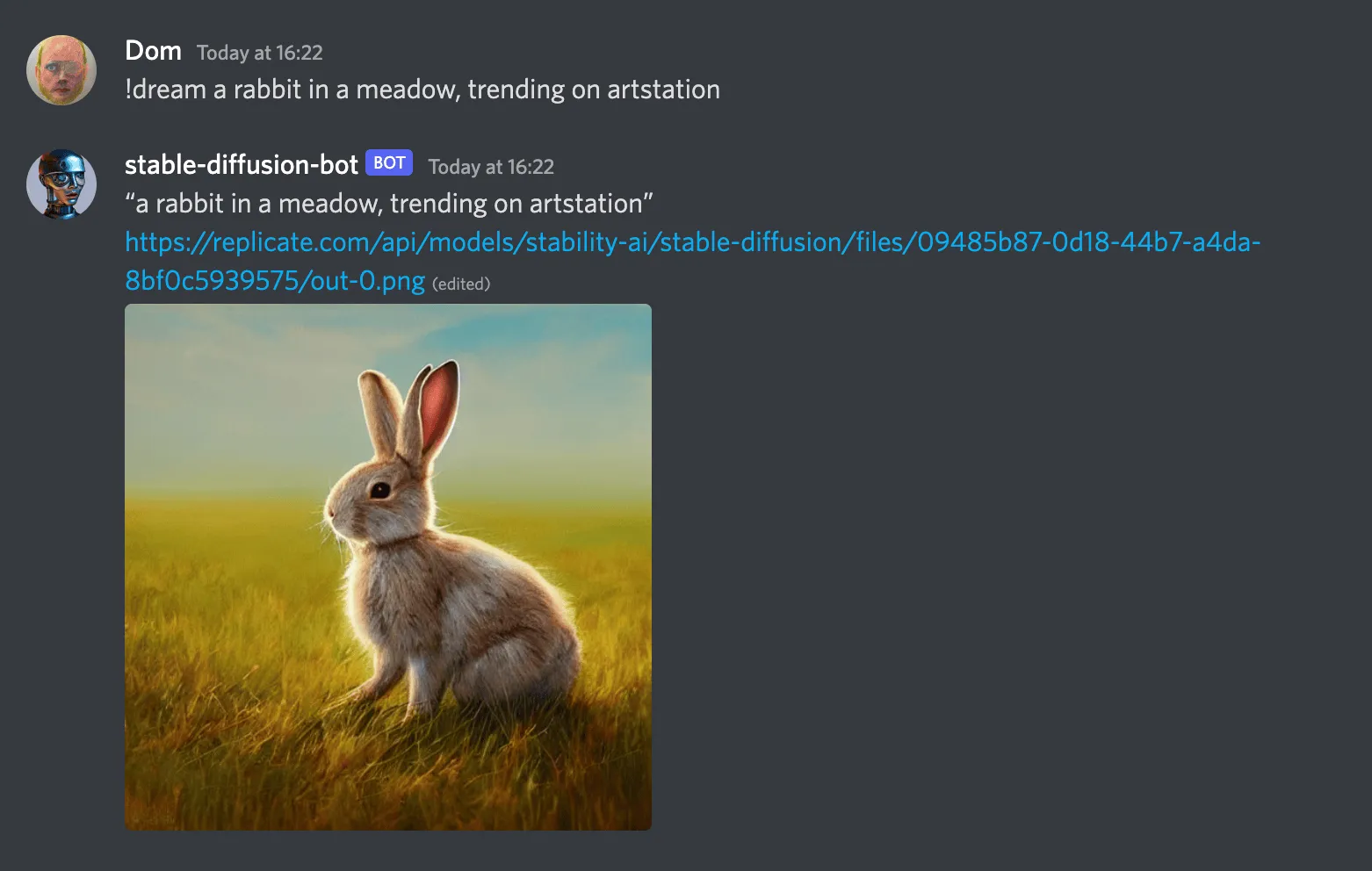
a screenshot of the stable-diffusion-bot generating a cute rabbit in Discord

Install the Python library

We maintain an open-source Python client for the API. Install it with pip:

There’s also a community-maintained Node.js/JavaScript library. See replicate-js on GitHub.

Authenticate

Sign up for Replicate, then you can find your API token on your account page. Set your token in an environment variable in your terminal shell:

You’ll be able to use the API for free for a bit, but eventually we’ll ask you to enter your credit card. We only charge you by the second for the amount of time your requests are running, so it usually works out much cheaper than running your own GPUs.

Run predictions

Create a file called dream.py and paste in the following content:

Then run the script from your terminal:

This will create a prediction using the API and open the generated image in your web browser. It might look something like this:

output

View your predictions

Whenever you run a model on Replicate, whether in the browser or with the API, the prediction is saved and associated with your user account. Visit your dashboard to view all your previous predictions.

Next steps

Join us in Discord to show us what you’ve made, or if you need any help. We’re looking forward to seeing your creations. ✨