惯性聚合 高效追踪和阅读你感兴趣的博客、新闻、科技资讯
阅读原文 在惯性聚合中打开

推荐订阅源

Security Archives - TechRepublic
T
The Exploit Database - CXSecurity.com
P
Proofpoint News Feed
Scott Helme
Scott Helme
NISL@THU
NISL@THU
Cisco Talos Blog
Cisco Talos Blog
C
Cybersecurity and Infrastructure Security Agency CISA
AWS News Blog
AWS News Blog
V
Vulnerabilities – Threatpost
J
Java Code Geeks
U
Unit 42
The GitHub Blog
The GitHub Blog
H
Help Net Security
T
Tenable Blog
aimingoo的专栏
aimingoo的专栏
Jina AI
Jina AI
Spread Privacy
Spread Privacy
Apple Machine Learning Research
人人都是产品经理
人人都是产品经理
L
Lohrmann on Cybersecurity
T
Threatpost
让小产品的独立变现更简单 - ezindie.com
Engineering at Meta
Engineering at Meta
A
About on SuperTechFans
I
InfoQ
Microsoft Azure Blog
B
Blog
L
LINUX DO - 最新话题
K
Kaspersky official blog
cs.CV updates on arXiv.org
T
Threat Research - Cisco Blogs
C
Check Point Blog
T
The Blog of Author Tim Ferriss
有赞技术团队
有赞技术团队
宝玉的分享
宝玉的分享
Help Net Security
Help Net Security
Google DeepMind News
A
Arctic Wolf
Y
Y Combinator Blog
N
News | PayPal Newsroom
M
MIT News - Artificial intelligence
Latest news
Latest news
H
Hacker News: Front Page
Blog — PlanetScale
Blog — PlanetScale
腾讯CDC
I
Intezer
爱范儿
爱范儿
F
Fortinet All Blogs
P
Palo Alto Networks Blog
C
CERT Recently Published Vulnerability Notes

Replicate's blog

How to make remarkable videos with Seedance 2.0 – Replicate blog How to prompt Seedream 5.0 – Replicate blog Recraft V4: image generation with design taste – Replicate blog Run Isaac 0.1 on Replicate – Replicate blog Run FLUX.2 on Replicate – Replicate blog How to prompt Nano Banana Pro – Replicate blog Retro Diffusion's pixel art models are now on Replicate – Replicate blog Replicate is joining Cloudflare – Replicate blog Extract text from documents and images with Datalab Marker and OCR – Replicate blog How to prompt Veo 3.1 – Replicate blog IBM's Granite 4.0 is now on Replicate – Replicate blog Which image editing model should I use? – Replicate blog Introducing our new search API – Replicate blog Torch compile caching for inference speed – Replicate blog Announcing Replicate's remote MCP server – Replicate blog How to prompt Veo 3 with images – Replicate blog Open source video is back – Replicate blog Generate consistent characters – Replicate blog Bria is now on Replicate – Replicate blog How we optimized FLUX.1 Kontext [dev] – Replicate blog Compare AI video models – Replicate blog The FLUX.1 Kontext hackathon – Replicate blog How to prompt Veo 3 for the best results – Replicate blog Get the most from Google Veo 3 – Replicate blog FLUX.1 Kontext from the community – Replicate blog Use FLUX.1 Kontext to edit images with words – Replicate blog Generate incredible images with Google's Imagen 4 – Replicate blog Run OpenAI’s latest models on Replicate – Replicate blog NVIDIA H100 GPUs are here – Replicate blog Run 30,000+ LoRAs on Hugging Face with Replicate – Replicate blog Ideogram 3.0 on Replicate – Replicate blog Run MiniMax Speech-02 models with an API – Replicate blog Easel AI is now on Replicate – Replicate blog Stylized video with Wan2.1 – Replicate blog Creative roundup: avatars, lightsabers, and LoRA tricks – Replicate blog Wan2.1: generate videos with an API – Replicate blog Wan2.1 parameter sweep – Replicate blog You can now fine-tune open-source video models – Replicate blog Generate short videos with the Replicate playground – Replicate blog AI video is having its Stable Diffusion moment – Replicate blog FLUX fine-tunes are now fast – Replicate blog FLUX.1 Tools – Control and steerability for FLUX – Replicate blog NVIDIA L40S GPUs are here – Replicate blog Ideogram v2 is an outstanding new inpainting model – Replicate blog Stable Diffusion 3.5 is here – Replicate blog FLUX is fast and it's open source – Replicate blog FLUX1.1 [pro] is here – Replicate blog Using synthetic training data to improve Flux finetunes – Replicate blog Fine-tune FLUX.1 with an API – Replicate blog Fine-tune FLUX.1 to create images of yourself – Replicate blog Replicate Intelligence #12 – Replicate blog Replicate Intelligence #11 – Replicate blog Fine-tune FLUX.1 with your own images – Replicate blog Replicate Intelligence #10 – Replicate blog FLUX.1: First Impressions – Replicate blog Replicate Intelligence #9 – Replicate blog Run FLUX with an API – Replicate blog Replicate Intelligence #8 – Replicate blog Run Meta Llama 3.1 405B with an API – Replicate blog Replicate Intelligence #7 – Replicate blog Replicate Intelligence #6 – Replicate blog Replicate Intelligence #5 – Replicate blog How to get the best results from Stable Diffusion 3 – Replicate blog Run Stable Diffusion 3 on your Apple Silicon Mac – Replicate blog Push a custom version of Stable Diffusion 3 – Replicate blog Replicate Intelligence #4 – Replicate blog Run Stable Diffusion 3 on your own machine with ComfyUI – Replicate blog H100s are coming to Replicate – Replicate blog Run Stable Diffusion 3 with an API – Replicate blog Replicate Intelligence #3 – Replicate blog Replicate Intelligence #2 – Replicate blog Replicate Intelligence #1 – Replicate blog Shared network vulnerability disclosure – Replicate blog Run Snowflake Arctic with an API – Replicate blog Run Meta Llama 3 with an API – Replicate blog Run Code Llama 70B with an API – Replicate blog How to create an AI narrator for your life – Replicate blog Clone your voice using open-source models – Replicate blog Businesses are building on open-source AI – Replicate blog How to run Yi chat models with an API – Replicate blog Scaffold Replicate apps with one command – Replicate blog Using open-source models for faster and cheaper text embeddings – Replicate blog Generate music from chord progressions and text prompts with MusicGen-Chord – Replicate blog Generate images in one second on your Mac using a latent consistency model – Replicate blog How to use retrieval augmented generation with ChromaDB and Mistral – Replicate blog Fine-tune MusicGen to generate music in any style – Replicate blog Jet-setting with Llama 2 + Grammars – Replicate blog How to run Mistral 7B with an API – Replicate blog Make smooth AI generated videos with AnimateDiff and an interpolator – Replicate blog Fine-tuned models now boot in less than one second – Replicate blog Painting with words: a history of text-to-image AI – Replicate blog We're cutting our prices in half – Replicate blog A guide to prompting Llama 2 – Replicate blog Streaming output for language models – Replicate blog Fine-tune SDXL with your own images – Replicate blog Run Llama 2 with an API – Replicate blog Run SDXL with an API – Replicate blog A comprehensive guide to running Llama 2 locally – Replicate blog Fine-tune Llama 2 on Replicate – Replicate blog What happened with Llama 2 in the last 24 hours? 🦙 – Replicate blog
Automating image collection – Replicate blog
2022-08-05 · via Replicate's blog

Collecting images enables us to customize powerful machine learning models in new and exciting ways. For example, some of text-to-image models on Replicate can be steered using an existing image. This capability is great for when we want to steer vision models toward a particular scene or aesthetic, but it requires that we have example images of our own.

I’m Clay, a member of LAION and of the team at Replicate. In this post, I’m going to show you how to use a pip package called clip-retrieval to collect hundreds of images (and captions) from the LAION-5B dataset. We’ll look at how to collect images that either match a text description or have a similar style to some existing images.

clip-retrieval was developed by a fellow member of LAION, Romain Beaumont. It works by embedding the billions of images and captions in the LAION dataset with CLIP. Using the magic of k-NN and autofaiss, we can create an in-memory index over these embeddings with fairly fast retrieval times. If you’re interested in how this works on a technical level, I recommend reading Romain’s article “Semantic search with embeddings: index anything”.

Getting started

Let’s get started by installing clip-retrieval:

lets us query pre-built CLIP faiss indexes using the class ClipRetrieval.ClipClient. By default, queries are sent to the free, hosted knn index over LAION-5B built by LAION-AI.

We can set a custom num_images to return. Let’s use 400 for now.

Query LAION-5B with text

After getting set up, we can query the backend:

The response will be a JSON array of results containing a caption, url, and similarity.
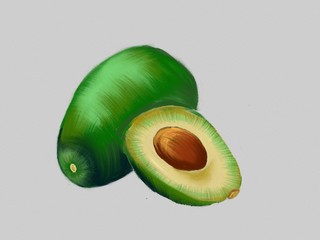
avocado

the second result for “fresh avocado, digital art”

Because the API de-duplicates results, we won’t get exactly 400 back.

But, hey - 321 isn’t half bad!

Get variations of your image with a text2image model

I love to use this as a way of finding good init images for various text-to-image models. Init images guide a text-to-image model to produce different variations of your image, with some influence from the specified prompt. In some cases, using an init image can even make the model run faster (I also mentioned init images in my previous blog post).

We can use Replicate to explore the effect of init images easily. First, we get set up on Replicate:

Grab your API token from here, then set your API token as an environment variable.

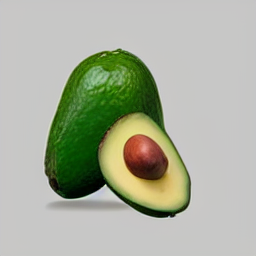
Now, we can run text-to-image models remotely! I use “afiaka87/glid-3-xl”, a photorealistic image model that takes a prompt and an init_image argument. The init_image argument conveniently accepts URL’s, so there’s no need to download clip-retrieval results in advance. Let’s use the first result from our search as an init image:
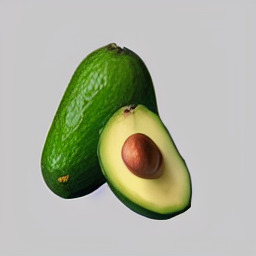
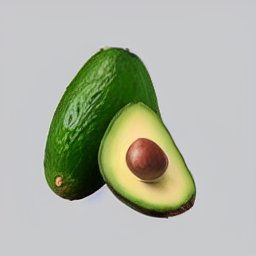
generation 1 generation 2 generation 3

Query Laion5B with images

Another cool thing we can do with clip-retrieval is take an existing image and try to find images similar to it.

For this, we will need CLIP. Let’s load CLIP with some helper methods for converting torch tensors to the numpy arrays that clip-retrieval expects.

You can find similar examples and usage in the official clip_retrieval.clip_client notebook.

Load CLIP

Convert your image to a CLIP embedding and pass the embedding to clip-retrieval

Instead of using text as an input and converting it into a text embedding, we now use images as an input and convert it to an image embedding.

Let’s take this image of a model wearing a blue dress and find some similar images.

input image: an image of a woman wearing a blue dress

The input image is an image of a woman wearing a blue dress.

Again, the response will be a JSON array of results containing a caption, url, and similarity.

first result 8c7889e0b92b Cinderella Divine 1295 Long Chiffon Grecian Royal Blue Dress Mid Length Sleeves V Neck

The first result is “Cinderella Divine 1295 Long Chiffon Grecian Royal Blue Dress Mid Length Sleeves V Neck.”

Final thoughts

Querying Laion5B with text and images are just a few things you can do with clip-retrieval.

One of the key benefits of deep learning is that, given enough data, we can scale or finetune models to improve general and/or task-specific (“downstream”) performance. With clip-retrieval, finetuning models with data that you curate is now possible. We’re writing a future blog post to show you how to finetune models of your own and run them on Replicate. Stay tuned!

There are absolutely other use cases, too. If you have any other cool ideas, reach out on the Replicate’s Discord. We’d love to hear them!