


惯性聚合 高效追踪和阅读你感兴趣的博客、新闻、科技资讯
阅读原文 在惯性聚合中打开

推荐订阅源

OSCHINA 社区最新新闻
OSCHINA 社区最新新闻
Exploit-DB.com RSS Feed
酷 壳 – CoolShell
酷 壳 – CoolShell
雷峰网
雷峰网
奇客Solidot–传递最新科技情报
奇客Solidot–传递最新科技情报
WordPress大学
WordPress大学
小众软件
小众软件
P
Proofpoint News Feed
IT之家
IT之家
Apple Machine Learning Research
T
The Exploit Database - CXSecurity.com
钛媒体:引领未来商业与生活新知
钛媒体:引领未来商业与生活新知
T
Threat Research - Cisco Blogs
K
Kaspersky official blog
V
V2EX
博客园 - Franky
Cisco Talos Blog
Cisco Talos Blog
Threat Intelligence Blog | Flashpoint
Scott Helme
Scott Helme
量子位
SecWiki News
SecWiki News
博客园 - 叶小钗
S
SegmentFault 最新的问题
L
LINUX DO - 最新话题
Attack and Defense Labs
T
Tailwind CSS Blog
Google DeepMind News
T
Tor Project blog
N
News and Events Feed by Topic
The Cloudflare Blog
Help Net Security
Help Net Security
Forbes - Security
Forbes - Security
罗磊的独立博客
Stack Overflow Blog
Stack Overflow Blog
P
Privacy & Cybersecurity Law Blog
freeCodeCamp Programming Tutorials: Python, JavaScript, Git & More
A
Arctic Wolf
L
LangChain Blog
Latest news
Latest news
S
Schneier on Security
C
CERT Recently Published Vulnerability Notes
D
Darknet – Hacking Tools, Hacker News & Cyber Security
博客园_首页
T
The Blog of Author Tim Ferriss
Schneier on Security
S
Security @ Cisco Blogs
Hugging Face - Blog
Hugging Face - Blog
MyScale Blog
MyScale Blog
Blog — PlanetScale
Blog — PlanetScale
O
OpenAI News

VMware Blogs

Diagnostics for VMware Cloud Foundation (VCF) 9.1 with Old Versions of VCF Components Mastering Infrastructure Policies in VMware Cloud Foundation Automation 9.1 Announcing the VMware Cloud Foundation 9.1 Upgrade Planning Tool VCF Breakroom Chats Episode 86 – Containers Made Easy: The New “Container-as-a-Service” in VCF 9.1 Securing Your VCF 9.1 Infrastructure with the Symantec Identity Security Platform Virtually Speaking: The AI Reality Check with Dave Linthicum Zero Touch Provisioning: Activating Edge Sites with VMware Cloud Foundation Edge 9.1 VCF Breakroom Chats Episode 85 – Cloning Success at Scale: Inside VCF 9.1’s App Stack Formation VMware Cloud on AWS の使用状況を確認できる API Unlocking the Full Potential of Programmable Infrastructure with VMware Cloud Foundation 9.1 – New Features and Capabilities Smarter Patching at Scale: Vulnerability Assessment and Remediation with VMware Tanzu Platform Encrypted vMotion Offload to Intel QAT in VMware Cloud Foundation 9.1 Deepen Your Expertise: Four Key Benefits of Attending Increase Deployment Flexibility with VCF Edge Automation 1.0.3 Avi Advantage: Automating Certificate Management of VCF Workloads More Memory, Less Effort: Configuring Memory Tiering in VCF 9.1 VCF 9.1 Licensing: Programmatic, Centralized, and Built to Scale Why APJ Networking Professionals Need Private Cloud Expertise VCF 9.1 Networking: Simpler VPC Connectivity Control VCF 9.1 Networking: Exploring Network Services for Virtual Private Clouds VCF Networking 9.1: Seamless DDI Integration with Infoblox The Open Source Advantage: Building from Source for Ultimate Security Expand Shared VMDKs with Clustered Applications in VMware vSAN for VCF 9.1 Monetizing Zero-Trust Security with VCF 9.1 and VMware vDefend VMware vSAN Protection and Recovery Enhancements for VCF 9.1 Deliver Production SQL Server DBaaS with VMware Data Services Manager 9.1 Maximizing Profitability: VCF 9.1 Cost-Focused Approach for VMware Cloud Service Providers Modernizing Your Infrastructure: Introducing VMware Cloud Foundation 9.1 to VCSPs VCF 9.1 is Available: Explore the New Features in Hands-on Labs What’s New with vSphere in VMware Cloud Foundation 9.1? Resizing VMware vCenter in VMware Cloud Foundation 9 Non-Disruptive VMware vCenter Patching in VMware Cloud Foundation 9.1 VMware vCenter Virtual Hardware Gets an Upgrade in vSphere with VCF 9.1 AI Has Changed the Threat Landscape. Is Your Infrastructure Ready? Simplifying Storage with the New Effective Capacity View in VMware vSAN for VCF 9.1 Auto-RAID in VMware vSAN for VCF 9.1 – Comprehensive System-Managed Data Resilience Introducing VMmark 4.1: Enhanced Power Efficiency Benchmarking for Private Cloud Infrastructure Advanced Memory Tiering Enhancements in VMware Cloud Foundation 9.1 VCF 9.1 Is Here. See It in Action. 博通發布 VMware Cloud Foundation 9.1 How Broadcom Is Helping Enterprises Win the AI Security Sprint How to Prepare for the World of AI Driven Exploits Avi Innovations for VCF 9.1: Powering Kubernetes, Agentic AI and VPC Workloads VCF 9.1: The Secure, Cost-Effective Private Cloud Platform for Production AI Announcing VCF 9.1: Modern Private Cloud Built for Efficiency and Resilience Announcing VMware Cloud Foundation Edge 9.1: A Scalable, Autonomous Edge Platform Accelerate, Streamline, and Control Your Self-Service Private Cloud with VMware Cloud Foundation 9.1 Deploy Modern Apps Faster, Scale Smarter, and Lower Your TCO with VMware vSphere Kubernetes Service in VCF 9.1 Scale Smarter, Save More: Redefining Infrastructure Economics with VMware vSphere in VCF 9.1 AI with VCF 9.1 on AMD GPUs: Build with open frameworks and simplify management, at a lower TCO Streamline, Simplify and Protect all your AI workloads with VCF 9.1 Simplify Workload Connectivity and Enhance Network Scale and Performance with VCF 9.1 VMware and CrowdStrike Deliver New Integration for Cyber Recovery Workflows How Many Users Can Your LLM Server Really Handle? From Infrastructure to Agents: A Hands-On Guide to Secure Private AI with Broadcom – Part 2 The New Frontier: Leading the Cloud-Native Evolution Replicating VMware vSphere Configuration Profile Desired State Webinar Recap: Design and Architecture Considerations for VMware vSphere Kubernetes Service on VMware Cloud Foundation Kubernetes 1.36: What Actually Changed for Enterprise Platforms Enhance Lateral Security and Ingress Load Balancing for Kubernetes Workloads Avi Load Balancer Analytics: Root Cause Application Performance Issues in Minutes Analyst Insight Series #3: Policy-Driven Governance and Multi-Tenant Control Post-Quantum Readiness on VMware Cloud Foundation Registration Is Live for Las Vegas | $ave with Early-Bird May 21, 2026: What’s New in VMware Tanzu Data Intelligence 10.4 From Infrastructure to Agents: A Hands-On Guide to Secure Private AI with Broadcom – Part 1 Stop Guessing: Advanced Monitoring and Troubleshooting for Data Services CPU, Disk, Network, and Memory Workload Profiles for DVD Store Database Testing How VMware Salt Automates Compliance Across Private Cloud Analyst Insight Series #2: Operational Scalability and Lifecycle Management MCP vs. APIs: Why You Need Both for AI Applications The Real Constraint on Enterprise AI isn’t GPUs; It’s Power Deploying Harbor Service in Air-Gapped VMware Cloud Foundation 9.0 Why Enhanced DirectPath Wins for High-Performance Apps Bridging the (.Local) Gap: A Split-Domain Design for VMware Cloud Foundation Deployment Observability on VMware vSphere Kubernetes Service VMware Cloud on AWS: Introducing the Usage Report APIs Converging VMware vSphere to VMware Cloud Foundation 9.0: The Top 10 Questions Answered May 6, 2026: What’s New in Tanzu Platform 10.4: Powering Agentic Apps at Scale VMware Tanzu RabbitMQ Powers the Modern Data Lakehouse with New Spark Integration and Enterprise Tooling Tanzu Data Intelligence 10.4 Delivers AI-Driven Analytics, Unified Real-Time Operations, and Sovereign Resilience Enterprise-Ready Agents Made Simple & Safe with VMware Tanzu Platform Agent Foundations Introducing Tanzu Platform 10.4: Extending Platform as a Service to Agentic Applications How AI-Assisted Analytics in Tanzu Data Intelligence Can Help Remove the SQL Bottleneck From Prototype to Production: Securing Database MCP at Enterprise Scale The Compelling Case for a Private Cloud Data Intelligence Platform The Unification Dividend: Consolidating Database Operations on VMware Cloud Foundation The Modern Spring Workflow Is Enterprise-Ready and AI-Boosted [TAM Blog] セキュアブート証明書の有効期限切れに関する注意点と対応について Accelerate Lateral Security and Ingress Load Balancing for Kubernetes Workloads From Platform to Data: Building a Cloud-Native Developer Experience On-Prem with VMware Cloud Foundation How VMware Cloud Foundation (VCF) Training Helps Keep Top Tech Talent in APJ Build Your Case for Attending VMware Explore 2026 Spring 開発元が提供する商用サポート「VMware Tanzu® Spring Essentials」とは VMware Cloud on AWS より i7i.metal-24xl インスタンスの提供開始 VMware Advanced Memory Tiering Tips for Success VMware Cloud Foundation Edge 9.0: Two-Host Edge Site Deployment with Brownfield Import Your Database Is About to Become an AI Tool. Is It Ready? Applying GitOps Principles to Maintain Desired State Configuration using VMware vSphere Configuration Profile – Part 3 Webinar Recap: Converging VMware vSphere to VMware Cloud Foundation 9.0
Modernizing the Private Cloud: Why VCF 9.1 Lifecycle Management is a Game Changer
Brandon Hahn · 2026-05-28 · via VMware Blogs

In my conversations with customers over the last year, one theme consistently rose to the top: the desire for simplicity without sacrificing scale. As we continue to evolve VMware Cloud Foundation (VCF) into the industry’s premier private cloud platform, our engineering focus continues toward making the Day 2 experience—the long-term maintenance and operation of your environment—as seamless as possible.

With the release of VCF 9.1, we are taking a massive leap forward. We aren’t just adding features; we are fundamentally changing the math of maintenance windows. 

Today, I want to dive into three specific lifecycle management capabilities that are quickly becoming customer favorites because they tackle one of the biggest pain points in the data center: downtime.

Eliminating the 2 AM Maintenance Window: VMware vCenter Reduced Downtime

For years, updating VMware vCenter Server was a Sunday at 2 AM kind of task. Because vCenter is the brains of your Software Defined Data Center, taking it offline meant losing management capabilities, API access, and third-party integrations for the duration of the update. Despite ever increasing CPU, memory, and networking speeds, the actual migration and data conversion could take significant time.

vCenter Reduced Downtime (introduced in VMware vSphere 8 U3 and fully integrated into VCF 9.1 workflows) changes that narrative. Instead of taking the old vCenter down and starting the clock, we use a migration-based approach behind the scenes.

The process works by deploying a new vCenter appliance in the background while the old one is still running. Data is synchronized between the two instances while your environment remains fully operational. The only actual downtime occurs during a brief switchover period—typically lasting only minutes—where the services are cut over to the new version. For our customers running global, 24/7 operations, this turns a high-risk event into a non-event.

vCenter Quick Patch: Speed is a Security Feature

While Reduced Downtime handles major updates, we realized that the frequency of security patches requires an even more surgical approach. This led to the development of vCenter Quick Patch.

In the past, even a small security patch required a full reboot of the vCenter appliance or a lengthy service restart. vCenter quick patch changes the game by allowing us to patch vCenter services in a more modular fashion with minimal, sometimes zero, downtime. While we can’t promise that every vCenter patch will be vCenter quick-patch-compatible, vCenter release notes and the patch information available in the product will confirm. For more details on vCenter quick patch, check out this blog.

The beauty of vCenter quick patch is that it integrates directly into existing VCF and vCenter workflows. It allows administrators to minimize the amount of time the management plane is unavailable (which is critical to fully automated cloud operations) while staying compliant with the latest security advisories. In a world where Zero Day vulnerabilities are a constant threat, the ability to patch quickly isn’t just a convenience; it’s a critical security requirement.

The 80% Goal: Revolutionizing VMware ESX Maintenance

It’s not just the management plane that’s getting a makeover. The biggest time-sink in any private cloud is host patching. We’ve all been there: putting a host into maintenance mode, waiting for vMotion to evacuate VMs, rebooting, waiting for hardware initialization, and then doing it all over again for every single host in the cluster.

In VCF 9.1, we are doubling down on VMware ESX Live Patch with a bold target: Up To 80% of all ESX patches will be Live Patch enabled.

What does this mean for you? It means that for the vast majority of security fixes and bug patches, the ESX hypervisor will no longer require a full hardware reboot. By patching the running memory of the hypervisor and only restarting the necessary sub-processes, we can apply updates while VMs remain running on the host.

When you combine this with VCF’s automated orchestration, the time required to patch a large cluster drops from days to hours, sometimes even minutes. It reduces vMotion churn and application impacts allowing your infrastructure and application teams to focus on adding value instead of fighting to stay current. VCF’s goal  is to make ESX patching as routine and boring as a software update on your phone.

The Race Against Time: Adapting to the Shrunken AI Exploit Window

Besides operational improvements, these new capabilities reflect a changing security environment. In the current threat landscape, the race to patch has shifted from a matter of days to a matter of minutes. Zero Day Clock, a cybersecurity research initiative and live dashboard that visualizes the shrinking time gap between a software vulnerability’s public disclosure (CVE) and when it is actively weaponized and exploited in the wild, illustrates this disturbing trend well.
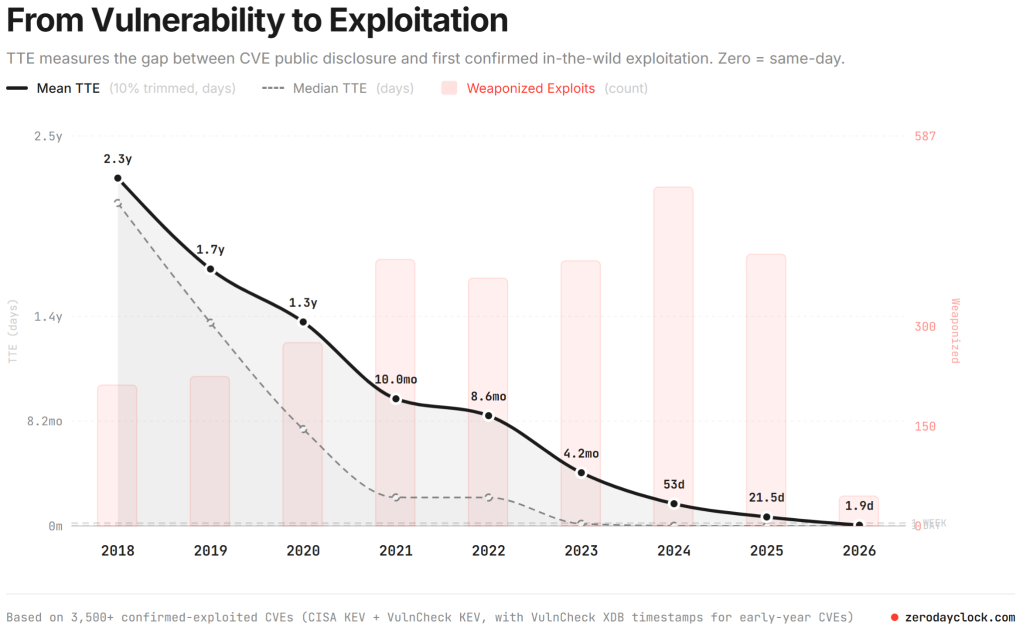
From Zero Day Clock

In 2020, the average time to exploit was over a year. In 2023 this fell to just over four months, and last year was down to 21.5 days. So far in 2026, this timeframe has collapsed to under two days. And this is even before the integration of frontier AI models like Claude Mythos, which will automate the process of discovering and weaponizing zero-day vulnerabilities. Attackers are no longer manually tinkering with code for weeks; instead, they are using AI-driven exploit factories to perform patch diffing and generate functional exploits nearly as soon as a vendor releases a fix.

This compression of the exploit cycle makes vCenter quick patch and ESX Live Patch essential rather than optional. When the window to compromise is measured in hours, the traditional requirement for lengthy maintenance windows or hardware reboots becomes a critical security liability. By reducing vCenter downtime to under a minute and enabling up to 80% of ESX patches without a reboot, VCF 9.1 allows organizations to apply defenses at machine speed. 

This zero-disruption approach ensures that security teams can remediate high-risk vulnerabilities the moment they are released, effectively closing the gap that AI-powered adversaries rely on for mass exploitation.

Plan your transition to a secure infrastructure at scale

The feedback we’ve received on these features has been incredible. Whether it’s the 90% reduction in vCenter switchover time or the elimination of host reboots, these aren’t just incremental improvements—they are the foundation of a modern, resilient private cloud.

If you’re ready to eliminate the maintenance window and secure your infrastructure at scale, now is the time to plan your transition. Reach out to your VCF Technical Adoption Manager (TAM) to map out your upgrade path, or talk to your Account Director on how you can engage our VCF Professional Services team to upgrade your existing vSphere and VCF environments to VCF 9.1.

Let’s get your environment modernized so you can stop managing downtime and start driving innovation.


Discover more from VMware Cloud Foundation (VCF) Blog

Subscribe to get the latest posts sent to your email.