

惯性聚合 高效追踪和阅读你感兴趣的博客、新闻、科技资讯
阅读原文 在惯性聚合中打开

推荐订阅源

OSCHINA 社区最新新闻
OSCHINA 社区最新新闻
雷峰网
雷峰网
Hugging Face - Blog
Hugging Face - Blog
IT之家
IT之家
H
Help Net Security
腾讯CDC
奇客Solidot–传递最新科技情报
奇客Solidot–传递最新科技情报
The GitHub Blog
The GitHub Blog
V
V2EX
M
MIT News - Artificial intelligence
Vercel News
Vercel News
WordPress大学
WordPress大学
博客园 - 三生石上(FineUI控件)
钛媒体:引领未来商业与生活新知
钛媒体:引领未来商业与生活新知
freeCodeCamp Programming Tutorials: Python, JavaScript, Git & More
Cyber Security Advisories - MS-ISAC
阮一峰的网络日志
阮一峰的网络日志
B
Blog RSS Feed
D
Docker
V
Visual Studio Blog
博客园 - 叶小钗
美团技术团队
S
SegmentFault 最新的问题
让小产品的独立变现更简单 - ezindie.com

VMware Blogs

Mastering Infrastructure Policies in VMware Cloud Foundation Automation 9.1 Modernizing the Private Cloud: Why VCF 9.1 Lifecycle Management is a Game Changer Announcing the VMware Cloud Foundation 9.1 Upgrade Planning Tool VCF Breakroom Chats Episode 86 – Containers Made Easy: The New “Container-as-a-Service” in VCF 9.1 Securing Your VCF 9.1 Infrastructure with the Symantec Identity Security Platform Virtually Speaking: The AI Reality Check with Dave Linthicum Zero Touch Provisioning: Activating Edge Sites with VMware Cloud Foundation Edge 9.1 VCF Breakroom Chats Episode 85 – Cloning Success at Scale: Inside VCF 9.1’s App Stack Formation VMware Cloud on AWS の使用状況を確認できる API Unlocking the Full Potential of Programmable Infrastructure with VMware Cloud Foundation 9.1 – New Features and Capabilities Smarter Patching at Scale: Vulnerability Assessment and Remediation with VMware Tanzu Platform Encrypted vMotion Offload to Intel QAT in VMware Cloud Foundation 9.1 Deepen Your Expertise: Four Key Benefits of Attending Increase Deployment Flexibility with VCF Edge Automation 1.0.3 Avi Advantage: Automating Certificate Management of VCF Workloads More Memory, Less Effort: Configuring Memory Tiering in VCF 9.1 VCF 9.1 Licensing: Programmatic, Centralized, and Built to Scale Why APJ Networking Professionals Need Private Cloud Expertise VCF 9.1 Networking: Simpler VPC Connectivity Control VCF 9.1 Networking: Exploring Network Services for Virtual Private Clouds VCF Networking 9.1: Seamless DDI Integration with Infoblox The Open Source Advantage: Building from Source for Ultimate Security Expand Shared VMDKs with Clustered Applications in VMware vSAN for VCF 9.1 Monetizing Zero-Trust Security with VCF 9.1 and VMware vDefend VMware vSAN Protection and Recovery Enhancements for VCF 9.1 Deliver Production SQL Server DBaaS with VMware Data Services Manager 9.1 Maximizing Profitability: VCF 9.1 Cost-Focused Approach for VMware Cloud Service Providers Modernizing Your Infrastructure: Introducing VMware Cloud Foundation 9.1 to VCSPs VCF 9.1 is Available: Explore the New Features in Hands-on Labs What’s New with vSphere in VMware Cloud Foundation 9.1?
Diagnostics Log Assist for Broadcom Cases
James Walker · 2026-06-25 · via VMware Blogs

In VMware Cloud Foundation Operations 9.1, the Log Assist feature supports all core and management layers of VMware Cloud Foundation (VCF). Diagnostics Log Assist streamlines support by automatically collecting, bundling, and transferring logs to Broadcom for troubleshooting. It significantly cuts down manual effort and speeds up log transfer (often 30-40% faster), while providing a secure, centralized library to track these transfers for better support management. 

Key Benefits:

  • Faster Troubleshooting: Reduces time spent manually gathering and uploading logs, allowing Broadcom engineers to diagnose issues faster.
  • Streamlined Process: Simplifies log collection and transfer directly from VCF Operations to an open Broadcom case.
  • Centralized Tracking: Provides a log library to view, manage, and track all log transfers and interactions with support.
  • Enhanced Security: Securely transfers sensitive log data to support for analysis.

Configuring Log Assist

In this video, we go over the configuration of Log Assist:
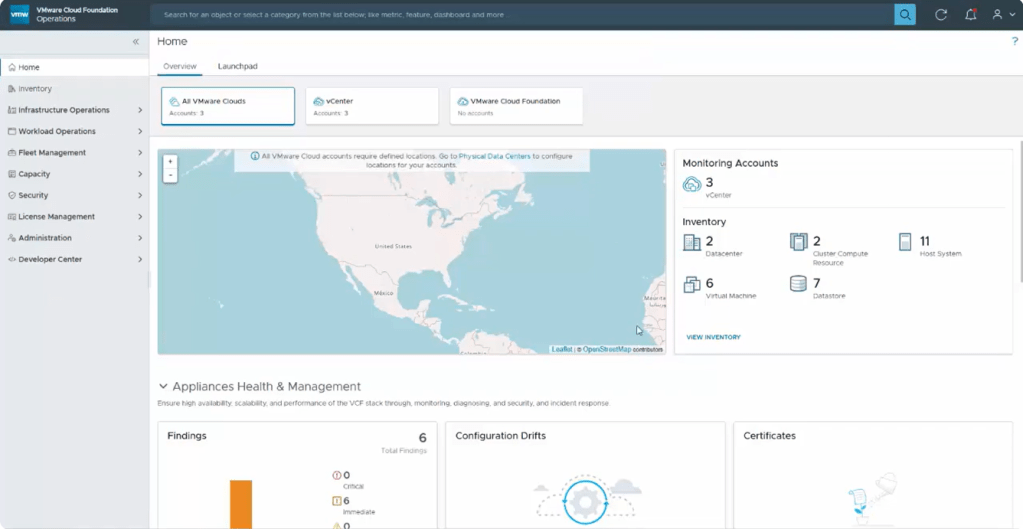
To begin your Log Assist setup, please go to Administration → Control Panel → Log Assist. 

The Log Assist configuration consists of three steps. 

Step 1 is under License Manager → Registration where you will set the reporting mode of Operations to Connected. 

Step 2 is under Administration → Cloud Proxies where you will select a cloud proxy and activate it for Log Assist. 

Step 3 is under Infrastructure Operations → Configurations → Log Assist. Select the objects you would like to assist to your cloud proxies for Log Assist. 

Using Log Assist

In this video we go over the usage of Log Assist:
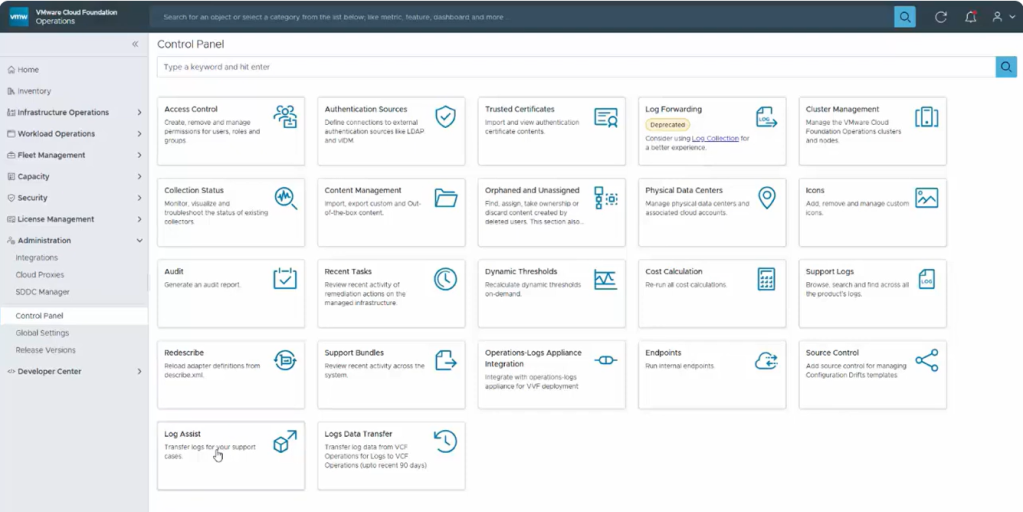
To use Log Assist, please go to Administration → Control Panel → Log Assist.

The first step is to select the object(s) that you would like to send logs to Broadcom Support for. 

Click Next and wait for the connectivity validation.

  • In case the check fails, click RE-VALIDATE to get the latest connectivity status for your environment. Validation checks the connectivity, authentication, and required privileges for the object. To fix privileges, see KB 375817.

Click Next to progress to the “Transfer to Support Portal” tab. From this tab enter your case number in the Support case ID field and choose transfer. 

Please note: To accelerate a case with Broadcom Support, you can add log-based diagnostic findings to identify known issues that might contribute to the troubleshooting. Make sure the findings cover the period for which the issue was observed. When you initiate a transfer, Log Assist uploads the diagnostic findings along with the support bundles. For more details, see How to collect a Diagnostics Log Bundle.

Additional Resources

Creating and managing Broadcom support request (SR) cases

Use Log Assist to Accelerate Your Support Cases

Questions and Answers for Diagnostics for VMware Cloud Foundation


Discover more from VMware Cloud Foundation (VCF) Blog

Subscribe to get the latest posts sent to your email.