


惯性聚合 高效追踪和阅读你感兴趣的博客、新闻、科技资讯
阅读原文 在惯性聚合中打开

推荐订阅源

L
LangChain Blog
博客园 - 司徒正美
美团技术团队
WordPress大学
WordPress大学
奇客Solidot–传递最新科技情报
奇客Solidot–传递最新科技情报
人人都是产品经理
人人都是产品经理
让小产品的独立变现更简单 - ezindie.com
T
Troy Hunt's Blog
S
Schneier on Security
T
The Exploit Database - CXSecurity.com
P
Proofpoint News Feed
云风的 BLOG
云风的 BLOG
Engineering at Meta
Engineering at Meta
Cisco Talos Blog
Cisco Talos Blog
T
Tor Project blog
B
Blog
NISL@THU
NISL@THU
月光博客
月光博客
博客园 - 【当耐特】
AWS News Blog
AWS News Blog
cs.CL updates on arXiv.org
腾讯CDC
L
Lohrmann on Cybersecurity
The Cloudflare Blog
L
LINUX DO - 最新话题
S
Security @ Cisco Blogs
S
Secure Thoughts
Spread Privacy
Spread Privacy
有赞技术团队
有赞技术团队
The Last Watchdog
The Last Watchdog
Project Zero
Project Zero
cs.AI updates on arXiv.org
Vercel News
Vercel News
H
Hacker News: Front Page
S
SegmentFault 最新的问题
Schneier on Security
aimingoo的专栏
aimingoo的专栏
P
Privacy & Cybersecurity Law Blog
博客园 - 三生石上(FineUI控件)
Forbes - Security
Forbes - Security
C
CXSECURITY Database RSS Feed - CXSecurity.com
I
InfoQ
T
Tailwind CSS Blog
Application and Cybersecurity Blog
G
GRAHAM CLULEY
W
WeLiveSecurity
小众软件
小众软件
Recorded Future
Recorded Future
Cyberwarzone
Cyberwarzone
cs.CV updates on arXiv.org

VMware Blogs

Mastering Infrastructure Policies in VMware Cloud Foundation Automation 9.1 Modernizing the Private Cloud: Why VCF 9.1 Lifecycle Management is a Game Changer Announcing the VMware Cloud Foundation 9.1 Upgrade Planning Tool VCF Breakroom Chats Episode 86 – Containers Made Easy: The New “Container-as-a-Service” in VCF 9.1 Securing Your VCF 9.1 Infrastructure with the Symantec Identity Security Platform Virtually Speaking: The AI Reality Check with Dave Linthicum Zero Touch Provisioning: Activating Edge Sites with VMware Cloud Foundation Edge 9.1 VCF Breakroom Chats Episode 85 – Cloning Success at Scale: Inside VCF 9.1’s App Stack Formation VMware Cloud on AWS の使用状況を確認できる API Unlocking the Full Potential of Programmable Infrastructure with VMware Cloud Foundation 9.1 – New Features and Capabilities Smarter Patching at Scale: Vulnerability Assessment and Remediation with VMware Tanzu Platform Encrypted vMotion Offload to Intel QAT in VMware Cloud Foundation 9.1 Deepen Your Expertise: Four Key Benefits of Attending Increase Deployment Flexibility with VCF Edge Automation 1.0.3 Avi Advantage: Automating Certificate Management of VCF Workloads More Memory, Less Effort: Configuring Memory Tiering in VCF 9.1 VCF 9.1 Licensing: Programmatic, Centralized, and Built to Scale Why APJ Networking Professionals Need Private Cloud Expertise VCF 9.1 Networking: Simpler VPC Connectivity Control VCF 9.1 Networking: Exploring Network Services for Virtual Private Clouds VCF Networking 9.1: Seamless DDI Integration with Infoblox The Open Source Advantage: Building from Source for Ultimate Security Expand Shared VMDKs with Clustered Applications in VMware vSAN for VCF 9.1 Monetizing Zero-Trust Security with VCF 9.1 and VMware vDefend VMware vSAN Protection and Recovery Enhancements for VCF 9.1 Deliver Production SQL Server DBaaS with VMware Data Services Manager 9.1 Maximizing Profitability: VCF 9.1 Cost-Focused Approach for VMware Cloud Service Providers Modernizing Your Infrastructure: Introducing VMware Cloud Foundation 9.1 to VCSPs VCF 9.1 is Available: Explore the New Features in Hands-on Labs What’s New with vSphere in VMware Cloud Foundation 9.1? Resizing VMware vCenter in VMware Cloud Foundation 9 Non-Disruptive VMware vCenter Patching in VMware Cloud Foundation 9.1 VMware vCenter Virtual Hardware Gets an Upgrade in vSphere with VCF 9.1 AI Has Changed the Threat Landscape. Is Your Infrastructure Ready? Simplifying Storage with the New Effective Capacity View in VMware vSAN for VCF 9.1 Auto-RAID in VMware vSAN for VCF 9.1 – Comprehensive System-Managed Data Resilience Introducing VMmark 4.1: Enhanced Power Efficiency Benchmarking for Private Cloud Infrastructure Advanced Memory Tiering Enhancements in VMware Cloud Foundation 9.1 VCF 9.1 Is Here. See It in Action. 博通發布 VMware Cloud Foundation 9.1 How Broadcom Is Helping Enterprises Win the AI Security Sprint How to Prepare for the World of AI Driven Exploits Avi Innovations for VCF 9.1: Powering Kubernetes, Agentic AI and VPC Workloads VCF 9.1: The Secure, Cost-Effective Private Cloud Platform for Production AI Announcing VCF 9.1: Modern Private Cloud Built for Efficiency and Resilience Announcing VMware Cloud Foundation Edge 9.1: A Scalable, Autonomous Edge Platform Accelerate, Streamline, and Control Your Self-Service Private Cloud with VMware Cloud Foundation 9.1 Deploy Modern Apps Faster, Scale Smarter, and Lower Your TCO with VMware vSphere Kubernetes Service in VCF 9.1 Scale Smarter, Save More: Redefining Infrastructure Economics with VMware vSphere in VCF 9.1 AI with VCF 9.1 on AMD GPUs: Build with open frameworks and simplify management, at a lower TCO Streamline, Simplify and Protect all your AI workloads with VCF 9.1 Simplify Workload Connectivity and Enhance Network Scale and Performance with VCF 9.1 VMware and CrowdStrike Deliver New Integration for Cyber Recovery Workflows How Many Users Can Your LLM Server Really Handle? From Infrastructure to Agents: A Hands-On Guide to Secure Private AI with Broadcom – Part 2 The New Frontier: Leading the Cloud-Native Evolution Replicating VMware vSphere Configuration Profile Desired State Webinar Recap: Design and Architecture Considerations for VMware vSphere Kubernetes Service on VMware Cloud Foundation Kubernetes 1.36: What Actually Changed for Enterprise Platforms Enhance Lateral Security and Ingress Load Balancing for Kubernetes Workloads Avi Load Balancer Analytics: Root Cause Application Performance Issues in Minutes Analyst Insight Series #3: Policy-Driven Governance and Multi-Tenant Control Post-Quantum Readiness on VMware Cloud Foundation Registration Is Live for Las Vegas | $ave with Early-Bird May 21, 2026: What’s New in VMware Tanzu Data Intelligence 10.4 From Infrastructure to Agents: A Hands-On Guide to Secure Private AI with Broadcom – Part 1 Stop Guessing: Advanced Monitoring and Troubleshooting for Data Services CPU, Disk, Network, and Memory Workload Profiles for DVD Store Database Testing How VMware Salt Automates Compliance Across Private Cloud Analyst Insight Series #2: Operational Scalability and Lifecycle Management MCP vs. APIs: Why You Need Both for AI Applications The Real Constraint on Enterprise AI isn’t GPUs; It’s Power Deploying Harbor Service in Air-Gapped VMware Cloud Foundation 9.0 Why Enhanced DirectPath Wins for High-Performance Apps Bridging the (.Local) Gap: A Split-Domain Design for VMware Cloud Foundation Deployment Observability on VMware vSphere Kubernetes Service VMware Cloud on AWS: Introducing the Usage Report APIs Converging VMware vSphere to VMware Cloud Foundation 9.0: The Top 10 Questions Answered May 6, 2026: What’s New in Tanzu Platform 10.4: Powering Agentic Apps at Scale VMware Tanzu RabbitMQ Powers the Modern Data Lakehouse with New Spark Integration and Enterprise Tooling Tanzu Data Intelligence 10.4 Delivers AI-Driven Analytics, Unified Real-Time Operations, and Sovereign Resilience Enterprise-Ready Agents Made Simple & Safe with VMware Tanzu Platform Agent Foundations Introducing Tanzu Platform 10.4: Extending Platform as a Service to Agentic Applications How AI-Assisted Analytics in Tanzu Data Intelligence Can Help Remove the SQL Bottleneck From Prototype to Production: Securing Database MCP at Enterprise Scale The Compelling Case for a Private Cloud Data Intelligence Platform The Unification Dividend: Consolidating Database Operations on VMware Cloud Foundation The Modern Spring Workflow Is Enterprise-Ready and AI-Boosted [TAM Blog] セキュアブート証明書の有効期限切れに関する注意点と対応について Accelerate Lateral Security and Ingress Load Balancing for Kubernetes Workloads From Platform to Data: Building a Cloud-Native Developer Experience On-Prem with VMware Cloud Foundation How VMware Cloud Foundation (VCF) Training Helps Keep Top Tech Talent in APJ Build Your Case for Attending VMware Explore 2026 Spring 開発元が提供する商用サポート「VMware Tanzu® Spring Essentials」とは VMware Cloud on AWS より i7i.metal-24xl インスタンスの提供開始 VMware Advanced Memory Tiering Tips for Success VMware Cloud Foundation Edge 9.0: Two-Host Edge Site Deployment with Brownfield Import Your Database Is About to Become an AI Tool. Is It Ready? Applying GitOps Principles to Maintain Desired State Configuration using VMware vSphere Configuration Profile – Part 3 Webinar Recap: Converging VMware vSphere to VMware Cloud Foundation 9.0
Modernize with Virtualized Storage
Jonathan McDonald · 2026-06-13 · via VMware Blogs

Editorial note: This blog was originally published on January 15, 2025 and has been updated to reflect VCF 9.1 updates.

Are you planning on deploying or have you already stood up your VMware Cloud Foundation (VCF) private cloud using VMware vSAN? If you have deployed or are thinking of deploying your VCF environment using vSAN, you will be able to leverage the power of software defined storage.  A default deployment of VCF using vSAN begins the journey, but doesn’t configure many of the features and capabilities offered by the platform.

There are substantial cost savings, when you take advantage of all vSAN has to offer. According to Signal65, they found that utilizing vSAN results in a 30% cost savings over five years. They go into a full analysis in the Economics of Disaggregated Private Cloud Storage report.

If you are an experienced operator of vSAN perhaps your environment has been optimized appropriately.  If not, you may not be maximizing the value of your VCF investment. Examples of vSAN features that can help you do this include:

  • Policy Based Storage
  • Stretch Clusters
  • Health, Capacity and Performance Monitoring

Policy Based Storage

Policy based storage is one of the most powerful features in the vSAN storage policy engine. vSAN uses these policies to define the storage characteristics that will be used for the virtual machine (VM). These policies are not static. They can be modified on the fly if VM requirements change. 

By default, when configuring vSAN, both in VCF and in VMware vSphere Foundation, the default vSAN storage policy is used. A screenshot of the default storage policy is shown below.

What does this mean? Well, it means that there will be only a basic level of protection configured.  In this default case the only setting configured is tolerance of a single failure. In the event of a single host failure, a secondary copy of the VM data is still available on the vSAN datastore and can be powered on. Typically, this is automatically performed using VMware High Availability (HA) when the failure is detected. This is a great policy for all workloads by default because it provides a good balance between space usage and protection.

Why is this important? This policy can be modified for all VMs, or you can create a new policy that specifies different settings such as, a higher level of availability, more disk stripes, or to limit IOPS, if appropriate. However, there is a trade-off between storage space utilization and the resultant costs, and the required level of protection from failures.

VCF Professional Services can analyze your environment and help to develop and configure a storage policy strategy that is tailored to meet the performance, protection, and security requirements of your workloads. 

vSAN Stretch Clusters with VMware Cloud Foundation

Another key topology choice when deploying vSAN is the use of stretch clusters for business continuity and disaster recovery. This feature is available as an option within vSAN but is not configured by default in VCF. Once a workload domain is deployed, there are workflows in VCF to add stretch clustering as a secondary availability zone. Logically, this looks like the following diagram.
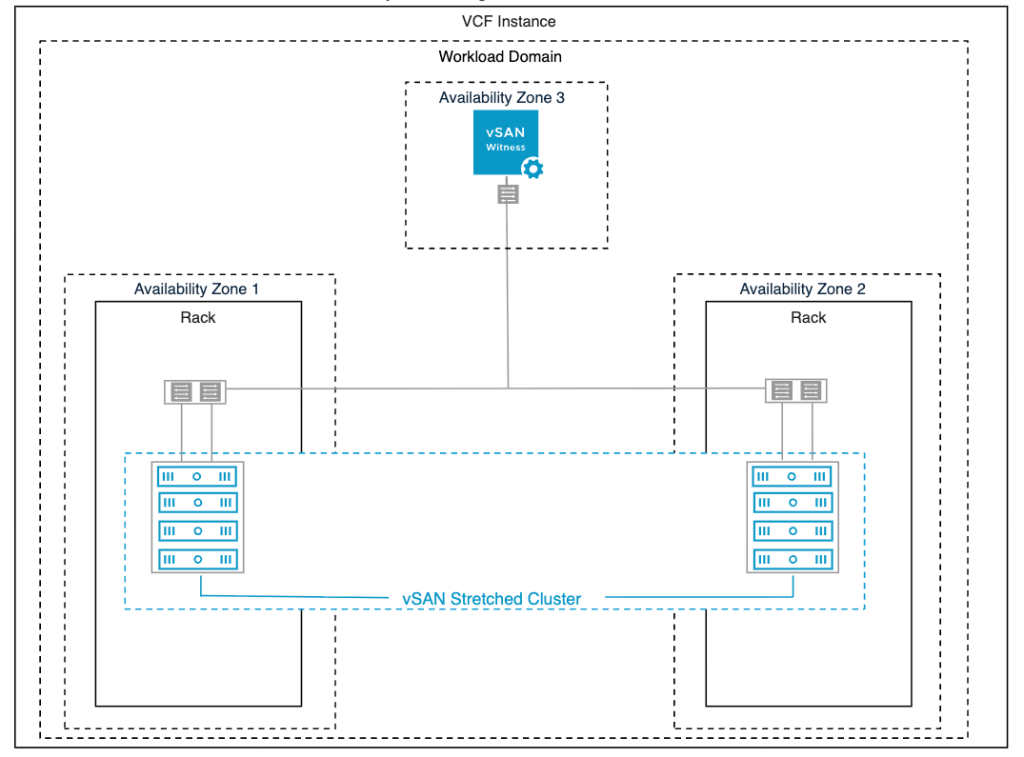
vSAN Stretched Clusters allow for an additional level of availability. By incorporating multiple availability zones in the environment, it can help reduce the radius of a failure and can increase application availability. Typically, multiple availability zones are deployed across two independent data centers, but they could be in other configurations as well.  

Although it does increase the hardware requirements, the cost for an entire site to be protected against a failure is very attractive compared to other more expensive methods of protection.

This is a good example of a vSAN feature that VCF Professional Services can help you set up.  Our Professional Services teams have a wealth of experience for assessing environment requirements, designing, and implementing vSAN Stretch Clusters to meet a variety of business objectives.

Health, Capacity and Performance Monitoring

If you are new to vSAN there is often a learning curve to know which resources to leverage and what to look for when diagnosing issues.  This is not specific to vSAN, there’s always a learning curve when adding new capabilities to any datacenter.  When it comes to the performance and capacity of vSAN we have a multitude of built in tools as well as dashboards from VMware Cloud Foundation Operations (formerly Aria Operations) that can provide a wealth of information.  This helps to reduce the learning curve to be able to better manage vSAN in an environment.

For example, just by clicking on the vSAN cluster, you can see the health and capacity details all in one overview screen.

If you drill down further and click into vSAN Health, the exact details of what has been tested and the health state is displayed allowing you to troubleshoot further.

By selecting Capacity from the cluster, you can view a breakdown of capacity usage for each storage policy configured.
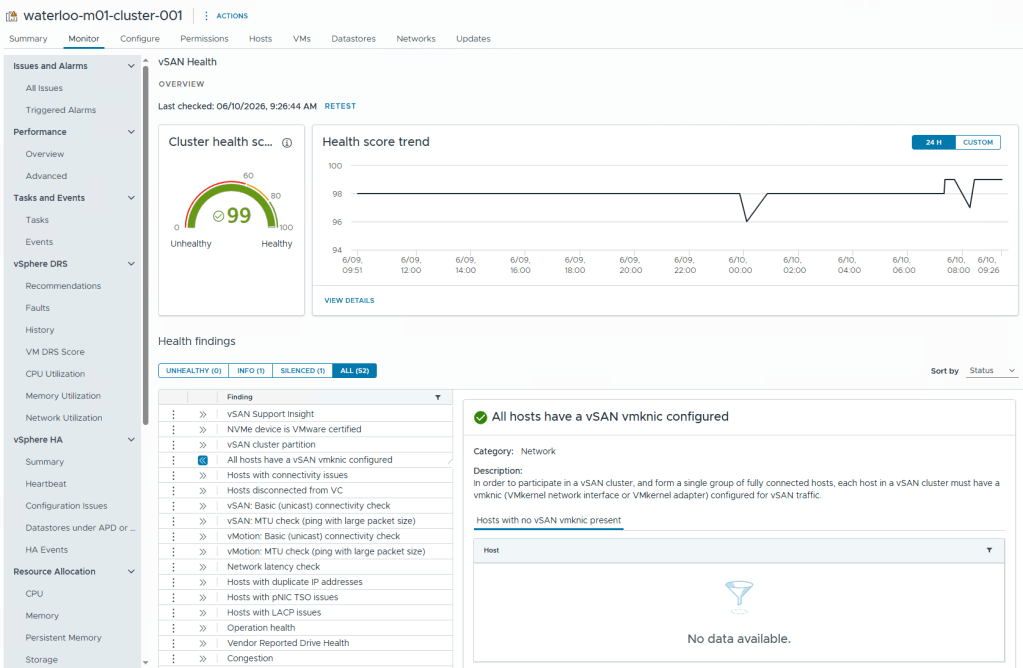
By selecting Capacity from the cluster, you can view a breakdown of capacity usage for each storage policy configured.

Similarly, by selecting Performance you are provided with a significant amount of information for the environment.  This will allow you to get a breakdown of statistics and metrics for diagnosing performance issues for VMs, Hosts and disks. A good example is a VM that is powering on slowly. By examining the performance metrics, you could determine if there was contention on the storage or network, a disk failure, or even if there was a limit set on the virtual machine limiting resources.

While vSAN includes a wealth of tools for monitoring and managing the environment, VMware Cloud Foundation Operations can take your monitoring and management capabilities to a whole new level. VCF Operations is configured by default when standing up VCF.  

With VCF Operations, a number of built in dashboards for both VCF and vSAN are available. If there are specific needs, custom dashboards can be built to showcase exactly the data which is required by the business. With deeper insights and tools your administrators can ensure your VMs are meeting SLAs with high throughput and low latency. You can even get predictive growth metrics to understand trends and plan for future needs.
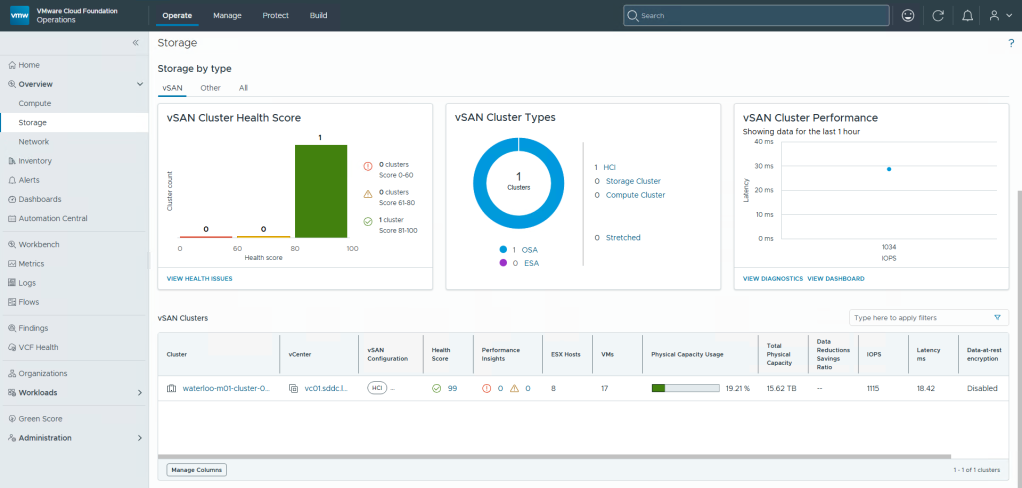
VCF Professional Services can help by assessing your environment requirements, deploying, and configuring VCF Operations dashboards to meet your business and technical needs.

Conclusion

vSAN is a powerful addition to any datacenter. This blog explored only a few vSAN features that happen to be my personal favorites and is not intended to be an exhaustive list of how it can benefit your organization. By modernizing your environment to take advantage of the beneficial features vSAN offers you can tune your virtual storage to provide consistent performance at scale, avoid downtime with high resilience, and adapt to changing requirements.  

vSAN is also not only for new hardware deployments, it can be added to existing ESX Clusters by adding disks to the hosts. This is an attractive option for customers who are looking to extend the lifecycle of hardware and reduce operational costs. For additional details and a repurposing checklist read TAM Brandon Hahn’s blog.

VCF Professional Services for vSAN can help you modernize your private cloud with vSAN virtualized storage and gain operational insights with dashboards powered by VCF Operations so that you can take advantage of these capabilities and more.


Discover more from VMware Cloud Foundation (VCF) Blog

Subscribe to get the latest posts sent to your email.