




惯性聚合 高效追踪和阅读你感兴趣的博客、新闻、科技资讯
阅读原文 在惯性聚合中打开

推荐订阅源

云风的 BLOG
云风的 BLOG
The GitHub Blog
The GitHub Blog
A
About on SuperTechFans
P
Proofpoint News Feed
G
Google Developers Blog
Stack Overflow Blog
Stack Overflow Blog
IT之家
IT之家
Microsoft Security Blog
F
Fortinet All Blogs
人人都是产品经理
人人都是产品经理
博客园 - 叶小钗
C
Check Point Blog
Microsoft Azure Blog
aimingoo的专栏
aimingoo的专栏
月光博客
月光博客
美团技术团队
D
Docker
博客园 - Franky
Y
Y Combinator Blog
大猫的无限游戏
大猫的无限游戏
Cyber Security Advisories - MS-ISAC
博客园 - 【当耐特】
罗磊的独立博客
奇客Solidot–传递最新科技情报
奇客Solidot–传递最新科技情报

博客园 - 漂泊雪狼

关于SeaTunnel 达梦数据迁移无法自动建表的问题 Kettel链接达梦数据 Elastic Job 入门笔记 记一次Spring boot集成mybatis错误修复过程 Failed to configure a DataSource: 'url' attribute is not specified and no embedded datasource could be configured. Spring Boot 框架下使用MyBatis访问数据库之基于XML配置的方式 CentOS7下载配置PostgreSQL的pgAgent运行代理作业 ElasticSearch 中文分词搜索环境搭建 学习笔记——Ubuntu下使用Docker包部署禅道任务管理系统 windows下的Redis主从集群搭建 asp.net mvc5中使用Swagger 自动生成WebApi文档笔记 Centos 7.5下搭建SVN源代码服务器 获取geometry边界范围的示例代码 使用pgrouting进行最短路径搜索 Nginx设置防止IP及非配置域名访问 java 调用c# web api 代码 一台机器部署多个tomcat服务 nginx反向代理多个服务 笔记 利用Kettle 从Excel中抽取数据写入SQLite sql server 统计信息 sql server 索引碎片相关问题
使用Fiddler 4 调用WebService
漂泊雪狼 · 2018-05-15 · via 博客园 - 漂泊雪狼

Fiddler让我们这些.neter感到非常欣慰, 是用C#写出来的,它包含一个简单却功能强大的基于JScript .NET 事件脚本子系统,它的灵活性非常棒,可以支持众多的http调试任务,并且能够使用.net框架语言进行扩展。

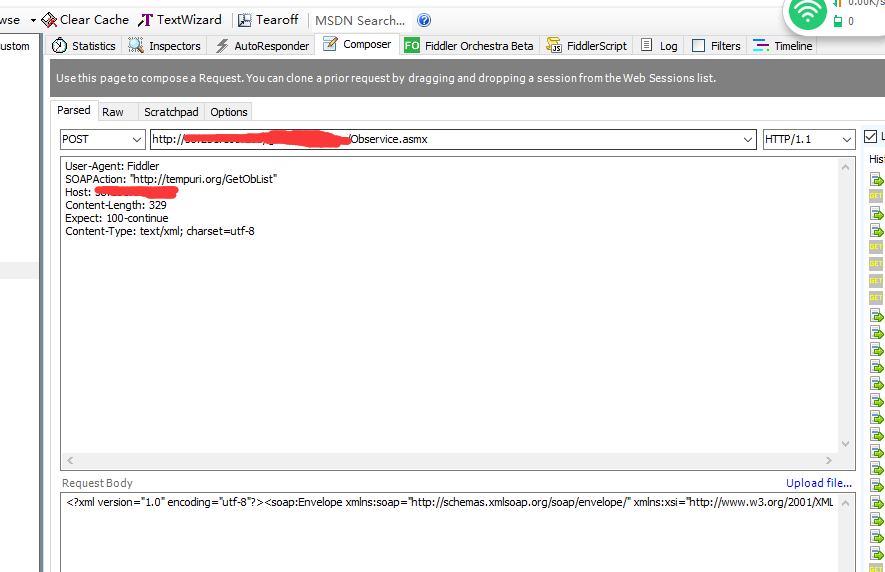
调用webservice需要设置正确的请求头,以下为例子,每个webserive的请求头可能不一样,具体根据ws提供方来确定

请求头:

User-Agent: Fiddler
SOAPAction: "http://tempuri.org/GetObList"
Host: **IP
Content-Length: 329
Expect: 100-continue
Content-Type: text/xml; charset=utf-8

传入值

<?xml version="1.0" encoding="utf-8"?><soap:Envelope xmlns:soap="http://schemas.xmlsoap.org/soap/envelope/" xmlns:xsi="http://www.w3.org/2001/XMLSchema-instance" xmlns:xsd="http://www.w3.org/2001/XMLSchema"><soap:Body><GetObList xmlns="http://tempuri.org/"><time>2018-01-01T00:00:00</time></GetObList></soap:Body></soap:Envelope>
 点击Execute显示调用结果

 Fiddler调试WebApi注意事项:

1、需指定请求上下文类型,否则有些api可能会调用报错,例如 Content-Type: application/json

2、