





Think about the last change you pushed across two hundred Macs. You knew what needed to happen in about thirty seconds. Then came the syntax you had to look up, the filter you built by hand, the script you wrote slowly because it was going to touch real machines, and the wait to find out whether any of it landed.
The thirty seconds was the job. The rest was tax.
Today we’re launching the Addigy Intelligence Suite: the intelligence layer inside Apple device management. You describe what you want in plain language. It proposes; you approve. And because the platform underneath has executed in real time since we built it, approving and executing are the same moment instead of a change with a waiting period attached.
The approval gate isn’t a safety feature bolted on at the end. It’s the reason the rest of this is allowed to be as capable as it is. The management layer sits above root, so restraint is what makes the horsepower usable.
Every admin, an Apple expert. Above root. Under your control.
The Problem Addigy Intelligence Suite Solves
Why does every Mac ticket end up on the same desk?
Because the knowledge is the bottleneck, not the judgment. Your tier-one tech usually knows what the Mac needs. What they don’t have is the Apple-specific syntax, the right native binary, or the filter logic to find the other forty machines with the same problem.
The Addigy Intelligence Suite supplies the Apple knowledge and the Addigy knowledge. You describe the outcome in plain language; the platform handles the part that used to require a decade of Apple experience. Judgment is the only thing you have to bring.
How do you know which AI is already running on your Macs?
You probably don’t, and that’s the uncomfortable part. The AI nobody approved is already running on machines you’re responsible for — and if you’re an MSP, that’s a client-contract question, not a preference.
We shipped the ability to block AI tool usage before we shipped AI enablement. The AI Compliance Benchmark gives you 30+ controls at the app and network level, so the first thing we hand you is a way to contain AI, not a reason to adopt more of it.
Why does knowing the fix on Apple take five minutes but shipping it takes much longer?
Because most platforms poll. An AI reasoning on fifteen-minute-old device state is automation with a blindfold on. We built the live architecture in 2013, and it’s the reason any of this works: when you approve an action, it executes in real time, not at the next check-in.
What’s New?*
1. Plain-English device search. Smart Filters lets you describe a condition — Macs on an outdated OS build in one department, machines missing a specific patch across a multi-client book — and get results against live device state. Read-only. Nothing about it can change a Mac.
2. Plain-English reporting. Ask the question the way you’d ask a colleague — patch status across a client’s Macs, OS build spread by department, which machines have drifted off the compliance baseline — and get a finished, ready-to-share report back instead of a CSV you still have to make presentable. It’s built against live device state, so what you hand your client or your auditor is true at the moment you send it, not as of the last check-in. The reports nobody had a spare afternoon to build stop being a scheduling problem.
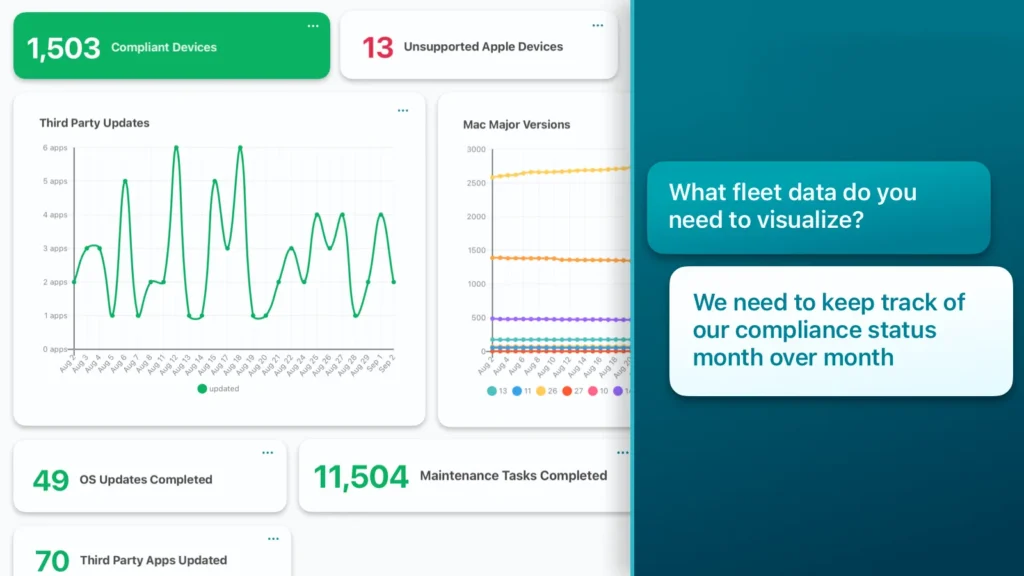
3. Block unapproved AI in your environment. The AI Compliance Benchmark monitors roughly thirty controls at the app and network level, covering the AI tools that drive most of the usage you’ll actually see. Report on it for yourself, your client, or your auditor.
4. Script Assist. Describe the remediation in a sentence and it drafts the script — calling Addigy’s native binaries where a general-purpose model would write an AppleScript workaround. It will also audit an existing script for security and performance issues, including ones that have been sitting in your library for years.
5. Addigy MCP. Roughly 240 tools spanning devices, policies, compliance benchmarks, MDM profiles, alerts, and more.
If you’re already running your own agents, connect them directly. Full read and write, scoped by your existing permissions. Most customers start read-only; that’s a choice you make, not a limit we impose.
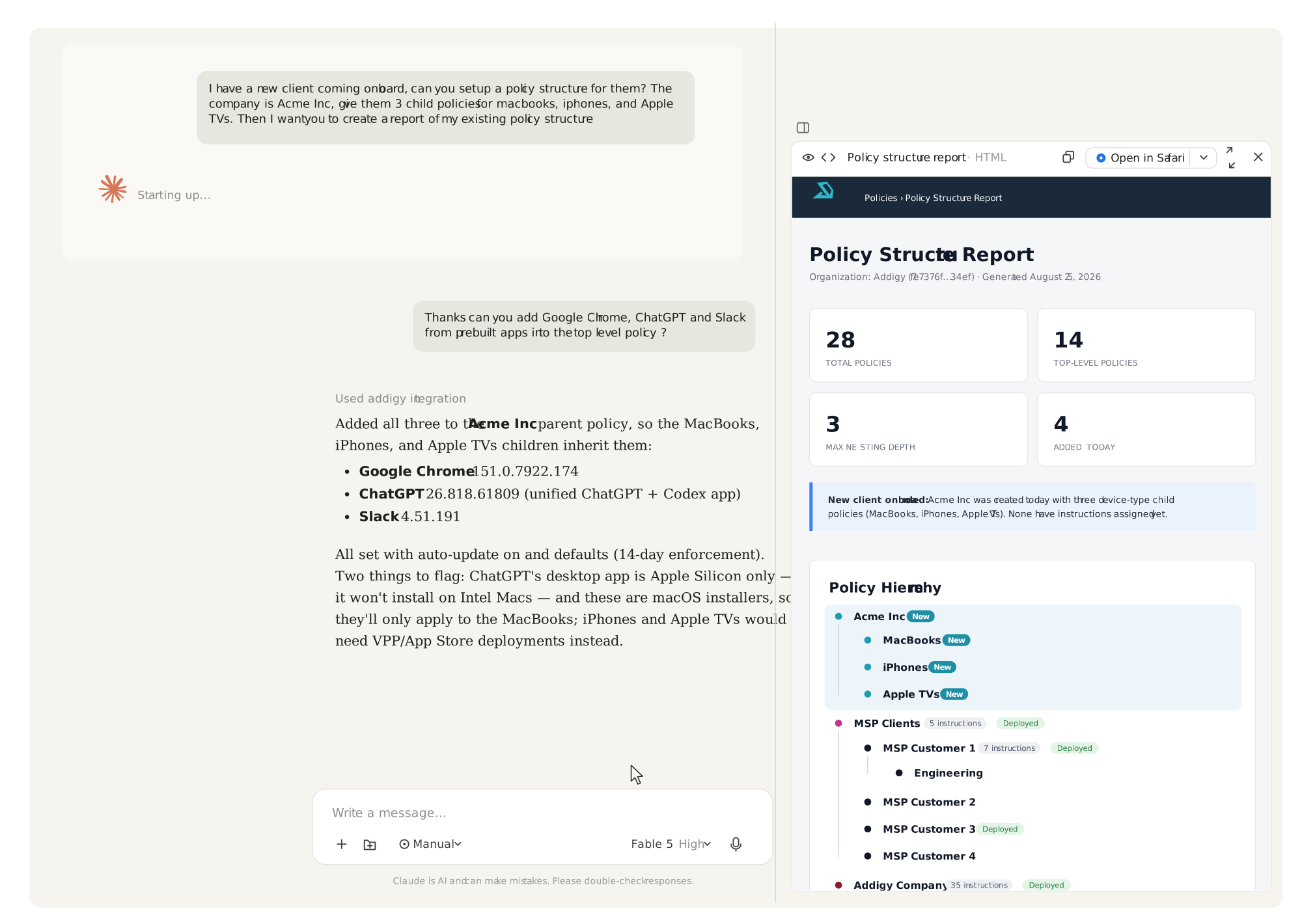
*An approval gate on every action. It proposes; you approve. No command executes on a Mac without a person saying yes, every script change arrives as a diff you review before it runs, and the agent inherits your existing RBAC — it can’t reach anything your permissions don’t already reach. The management layer sits above root, which is exactly why restraint is the feature.
Where does your data go?
Our AI runs on third-party models accessed through our own infrastructure. Your data isn’t used for training and isn’t shared with model providers. Nothing you do in Addigy trains a model.
That’s an architectural decision, not a policy page.
What Intelligence Suite doesn’t do yet
- The AI Compliance Benchmark monitors whether an AI tool is blocked. It doesn’t yet detect whether one is present. That’s a real distinction and we’d rather name it than have you find it.
- It targets the AI tools driving the most usage — not everything, and not AI embedded inside other software.
Who Is Intelligence Suite For?
MSPs
Every ticket that touches a Mac either gets solved fast by your one Apple person or it waits for them — and that’s a ceiling on how much Apple business you can take on. Client reporting is unbilled work. Ask in plain English for every Mac across the book missing a specific patch, and the filter returns results across tenants without a per-client sweep. Pick a client, describe the fix, review what Script Assist drafts, approve. Nothing runs on a client’s Mac unless one of your people says so.
What used to escalate now resolves at the bench.
IT admins
You already know what’s wrong. The time goes into turning that into a change across two hundred Macs. Describe the condition, get the machines. Describe the remediation, get a draft that uses the platform’s own native tools instead of a generic script bolted on top. Approve it and watch state update live. Then point the script audit at something already in your library and see what it finds.
The Apple-specific syntax is handled so your expertise transfers. You stay the expert.
IT directors and managers
Response time becomes a number you can defend, and the projects that never got started become things your existing team can actually take on. Audit posture improves without adding a console: the approval gate, the RBAC inheritance, and the review trail are the same mechanism that makes the AI useful. Hand your security lead the data-boundary details and let them verify it themselves — it takes about ten minutes.
How to Get Started
- Turn on the AI Compliance Benchmark and find out what AI is already running on your Macs. Read-only. Nothing changes.
- Ask a question in Smart Filters. Describe a condition in plain English instead of building the filter by hand.
- Point Script Assist at an existing script before you ask it to write a new one. Run the audit on something old and see what comes back.
- Review the approval gate yourself. Propose an action, look at the diff, decline it. Confirm the behavior rather than taking our word for it.
- Connect your own agents through Addigy MCP if you’re already running Claude or Cursor and want to scope it yourself.
Free for all customers until October 31st. We’re still finalizing how these capabilities will be packaged. Nothing converts automatically, nothing starts billing unless you choose it, and you’ll hear from us well before anything changes.
Our AI Philosophy: Built on Trust
You should be skeptical of AI on machines you’re responsible for. We are too. That’s why the first thing we shipped wasn’t AI enablement, it was the ability to block AI. Containment came before capability, on purpose.
Everything after that follows the same rule. The AI can propose, but a person approves. It inherits your permissions and can’t reach past them. Your data isn’t used for training, and that’s architecture, not a policy page. The capability is real; the restraint is what makes it usable.
A group of beta customers has been telling us where this breaks, which is why the limits are written down above instead of discovered later.
Now go check the one thing an announcement can’t manufacture: request a demo, read more about what’s included in the Intelligence Suite, or reach out to your Addigy rep and test it yourself.