惯性聚合 高效追踪和阅读你感兴趣的博客、新闻、科技资讯
阅读原文 在惯性聚合中打开

推荐订阅源

Application and Cybersecurity Blog
The Register - Security
V
Visual Studio Blog
aimingoo的专栏
aimingoo的专栏
Stack Overflow Blog
Stack Overflow Blog
IT之家
IT之家
量子位
C
Check Point Blog
博客园 - 【当耐特】
小众软件
小众软件
钛媒体:引领未来商业与生活新知
钛媒体:引领未来商业与生活新知
雷峰网
雷峰网
freeCodeCamp Programming Tutorials: Python, JavaScript, Git & More
Microsoft Azure Blog
CTFtime.org: upcoming CTF events
Engineering at Meta
Engineering at Meta
Recorded Future
Recorded Future
The Last Watchdog
The Last Watchdog
博客园 - Franky
N
Netflix TechBlog - Medium
Webroot Blog
Webroot Blog
A
About on SuperTechFans
cs.AI updates on arXiv.org
W
WeLiveSecurity
D
Docker
S
Security Affairs
T
The Blog of Author Tim Ferriss
F
Fortinet All Blogs
Blog — PlanetScale
Blog — PlanetScale
V2EX - 技术
V2EX - 技术
Jina AI
Jina AI
Help Net Security
Help Net Security
L
LangChain Blog
P
Proofpoint News Feed
The Cloudflare Blog
WordPress大学
WordPress大学
Google DeepMind News
Schneier on Security
Recent Announcements
Attack and Defense Labs
云风的 BLOG
云风的 BLOG
V
Vulnerabilities – Threatpost
Microsoft Security Blog
H
Heimdal Security Blog
P
Proofpoint News Feed
O
OpenAI News
H
Help Net Security
cs.CV updates on arXiv.org
爱范儿
爱范儿
Security Archives - TechRepublic

博客园 - 流逝的轻风

3D点云到2D点云投影图像具体方法 单目相机 MATLAB 参数标定详解 nmcli修改ip地址 nginx 交叉编译报错问题解决(转) 图片转视频并推流源码,已通过测试 Hadoop的安装,图文并茂的安装过程 线程占用等待释放解决方案 ffmpeg重新编码示例 编译ffmpeg以支持rtmp, librtmp not found问题 瑞芯微rk3399实现硬编硬解编译rkmpp到ffmpeg Openc4.8QT中编译异常处理 yolov8模型转onnx MIPS编译opencv-自用 docker启动ubuntu,并映射端口 mips交叉编译相关库文件,主要做以后参考 OPENSSL1.1交叉编译编译异常处理 mips交叉编译ffmpeg 关于/proc/id/status中内容的描述 Linux GPIO控制方法
A7-NXP-6G2C修改分驱大小
流逝的轻风 · 2022-10-27 · via 博客园 - 流逝的轻风
  1. 修改/A7-linux-src/arch/arm/boot/dts/imx6g2c-256m.dts,重新编译内核
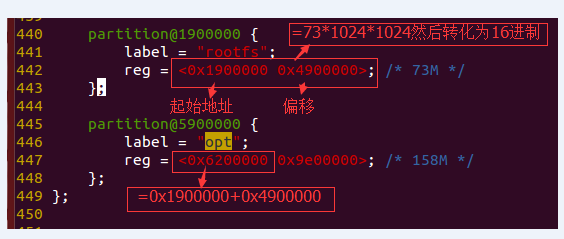
  2. 用生成的imx6g2c-256m.dtb替换TF卡烧写包内的以下文件(注意改同名)

    M6G2C-256LI-V1.04\firmware\imx6g2c-256m.dtb

    M6G2C-256LI-V1.04\manufacture\imx6g2c-manufacture.dtb

  3. 打包文件系统

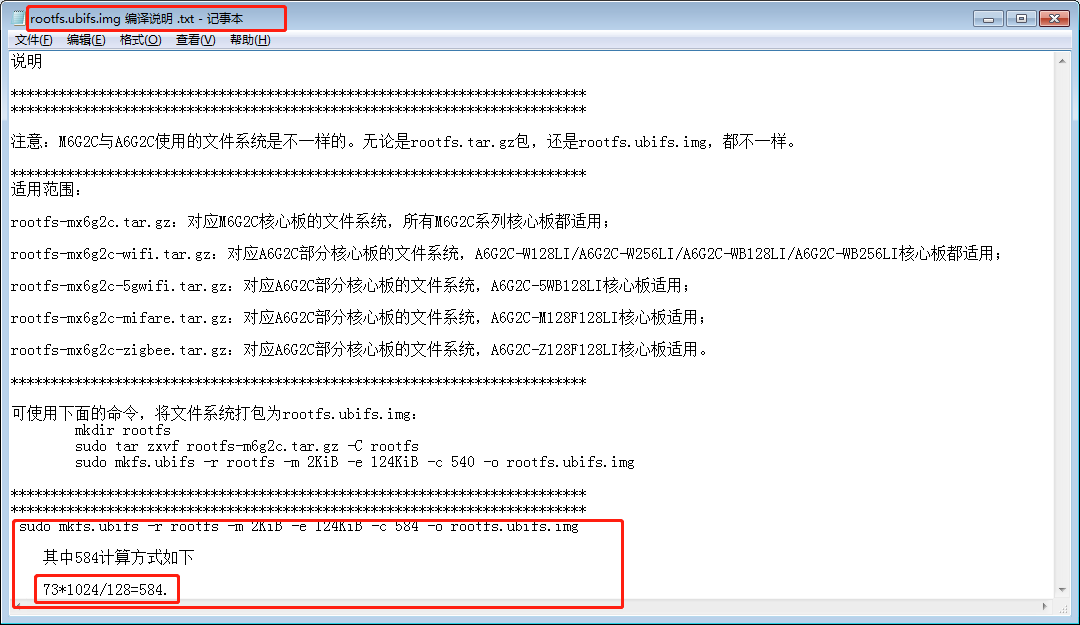
    我们使用的是100M,对应参数为,这是最容易忽略的地方,最开始我们就是搞忘记了
    sudo mkfs.ubifs -r rootfs -m 2KiB -e 124KiB -c 800 -o rootfs.ubifs.img
  4.   用生成的rootfs.ubifs.img替换TF卡烧写包内的:

    \M6G2C-256LI-V1.04\firmware\rootfs.ubifs.img

  5. 重新制作TF启动卡,烧写固件

posted @ 2022-10-27 10:31  流逝的轻风  阅读(158)  评论(0)    收藏  举报

刷新页面返回顶部