惯性聚合 高效追踪和阅读你感兴趣的博客、新闻、科技资讯
阅读原文 在惯性聚合中打开

推荐订阅源

H
Hackread – Cybersecurity News, Data Breaches, AI and More
W
WeLiveSecurity
C
Check Point Blog
OSCHINA 社区最新新闻
OSCHINA 社区最新新闻
V
Vulnerabilities – Threatpost
GbyAI
GbyAI
A
Arctic Wolf
NISL@THU
NISL@THU
N
Netflix TechBlog - Medium
The Register - Security
M
MIT News - Artificial intelligence
cs.CL updates on arXiv.org
Microsoft Security Blog
Cyberwarzone
Cyberwarzone
C
CERT Recently Published Vulnerability Notes
T
Tenable Blog
G
GRAHAM CLULEY
O
OpenAI News
S
Schneier on Security
Google Online Security Blog
Vercel News
Vercel News
宝玉的分享
宝玉的分享
Attack and Defense Labs
T
The Blog of Author Tim Ferriss
量子位
aimingoo的专栏
aimingoo的专栏
The Cloudflare Blog
P
Privacy & Cybersecurity Law Blog
S
SegmentFault 最新的问题
MongoDB | Blog
MongoDB | Blog
Apple Machine Learning Research
freeCodeCamp Programming Tutorials: Python, JavaScript, Git & More
L
LINUX DO - 热门话题
博客园_首页
F
Full Disclosure
Recent Commits to openclaw:main
D
Docker
U
Unit 42
A
About on SuperTechFans
博客园 - 司徒正美
Hacker News - Newest:
Hacker News - Newest: "LLM"
人人都是产品经理
人人都是产品经理
Application and Cybersecurity Blog
G
Google Developers Blog
Security Archives - TechRepublic
cs.AI updates on arXiv.org
J
Java Code Geeks
云风的 BLOG
云风的 BLOG
Scott Helme
Scott Helme
TaoSecurity Blog
TaoSecurity Blog

博客园 - kingBook

git patch git 修改最后一次提交的日期 TypeScript async、 await、Promise LayaAir3.x 侦听程序退出 旋转力学例子 旋转力学公式 凹多边形碰撞检测 LayaAir3.x 侦听键盘事件 URP 阴影 TypeScript 里的 override TypeScript 类的自身类型 Unity 二维数组序列化 C# 匿名对象、动态属性 Cocos Creator 安卓模拟器中无法运行 Unity Editor 保存图片、缩放纹理 LayaAir3.2.0-beta.2 设置2d刚体线性速度,在不同设备(分辨率)下,表现不一致的问题 LayaAir3.x 物理2D碰撞事件 TypeScirpt 声明Map类型变量 TypeScript 声明函数类型变量
Win10 修改特定格式文件的右键快捷菜单
kingBook · 2025-05-09 · via 博客园 - kingBook

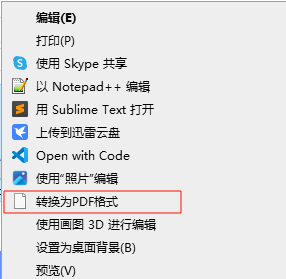
如:现在 .png 文件上,右键单击快捷菜单如下:
image
现在想把 "转换为PDF格式" 删除,操作如下:

  • Win+R 输入 regedit 打开注册表编辑器
  • 找到以下位置
计算机\HKEY_LOCAL_MACHINE\SOFTWARE\Classes\SystemFileAssociations\.png\Shell
  • 发现在 Shell 下,有一个 kother_to_pdf 文件夹,删除即可
    其他格式文件的右键菜单也是一样,在 SystemFileAssociations 下找到对应的格式修改即可.