







因为看到https://learn.microsoft.com/en-us/archive/msdn-magazine/2014/october/async-programming-introduction-to-async-await-on-asp-net,文章说异步IO,数据库不消耗线程,故做个测试,结果似乎没看出来异步是否比同步更少消耗线程。可能测试样例不对。但测试出大并发下改如何设置,也算有收获,在此记录。
现在新的.net webapi其实不用asp.net 4的应用程序池,都是“无托管代码”。故,设置IIS并没多大意义。
主要是程序设置:
首先,也是最重要的,ThreadPool.SetMinThreads(work, io);work设置1000,io没有影响设置原先值即可。默认work值是CPU逻辑核数,当请求的并发大时就报502错误,或者线程池开始排队(有Queen值)。
其次,若数据库处理速度很快,则设置.Net数据库连接池MaxSize。我这是SqlServer:Pooling=true;Min pool size=5;Max pool size=1024;Connect Timeout=100。Max pool size影响最大,默认是100。其中,平衡要掌握好。当线程池线程数大于数据库连接池最大数时,将报数据库连接池不足错误( Connection open error . Timeout expired. The timeout period elapsed prior to obtaining a connection from the pool. This may have occurred because all pooled connections were in use and max pool size was reached)。
开始测试
代码如下。一个同步,一个异步,两个方法。都执行数据库存储过程,数据库是SqlServer,存储过程等到10秒。

using Microsoft.AspNetCore.Http;
using Microsoft.AspNetCore.Mvc;
using Microsoft.Data.SqlClient;
using SqlSugar;
using System.Configuration;
using System.Data;

namespace WebApplication2
{
    [Route("api/[controller]")]
    [ApiController]
    public class ValuesController : ControllerBase
    {
        private readonly IConfiguration _configuration;
        public ValuesController(IConfiguration configuration)
        {
            _configuration = configuration;
        }

        [HttpGet]
        public IActionResult Get()
        {
            return new OkObjectResult(DateTime.Now.ToString());
        }

        [HttpGet("Sync")]
        public IActionResult GetSync()
        {
            string msg = "";
            string? connStr = _configuration.GetValue<string>("DbConfig:ConnectionString");
            using (SqlSugarClient client = new SqlSugarClient(new ConnectionConfig()
            {
                ConnectionString = connStr,
                DbType = SqlSugar.DbType.SqlServer,

            }))
            {
                msg = Thread.CurrentThread.ManagedThreadId.ToString();
                DataSet ds = client.Ado.UseStoredProcedure().GetDataSetAll("TestWait");
                msg += " " + Thread.CurrentThread.ManagedThreadId.ToString();
            }
            return new OkObjectResult(msg + " " + DateTime.Now.ToString());
        }

        [HttpGet("Async")]
        public async Task<IActionResult> GetAsync()
        {
            string msg = "";
            string? connStr = _configuration.GetValue<string>("DbConfig:ConnectionString");
            using (SqlSugarClient client = new SqlSugarClient(new ConnectionConfig()
            {
                ConnectionString = connStr,
                DbType = SqlSugar.DbType.SqlServer,
            }))
            {
                msg = Thread.CurrentThread.ManagedThreadId.ToString();
                DataSet ds = await client.Ado.UseStoredProcedure().GetDataSetAllAsync("TestWait");
                msg += " " + Thread.CurrentThread.ManagedThreadId.ToString();
            }
            return new OkObjectResult(msg + " " + DateTime.Now.ToString());
        }
    }
}
View Code
存储过程如下:TestWait
SET QUOTED_IDENTIFIER ON
SET ANSI_NULLS ON
GO

CREATE PROC TestWait
AS
BEGIN

SELECT GETDATE()
WAITFOR DELAY N'00:00:10'
SELECT GETDATE()

END
GO
View Code
JMeter压测,dotnet-counters监控(https://learn.microsoft.com/zh-cn/dotnet/core/diagnostics/dotnet-counters)
1、发出测试,1000个1秒内发送。
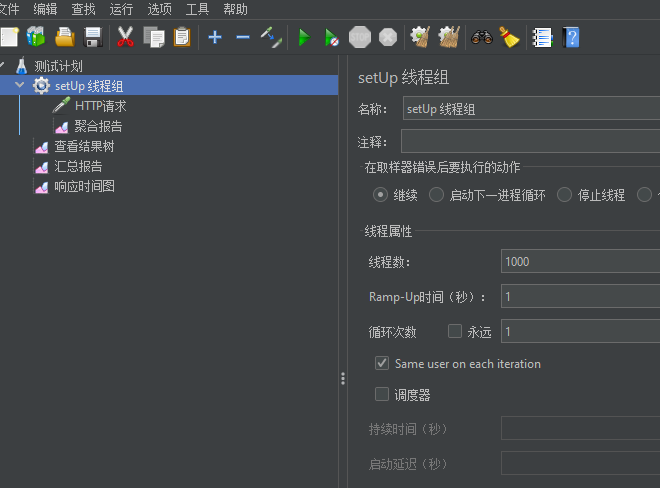
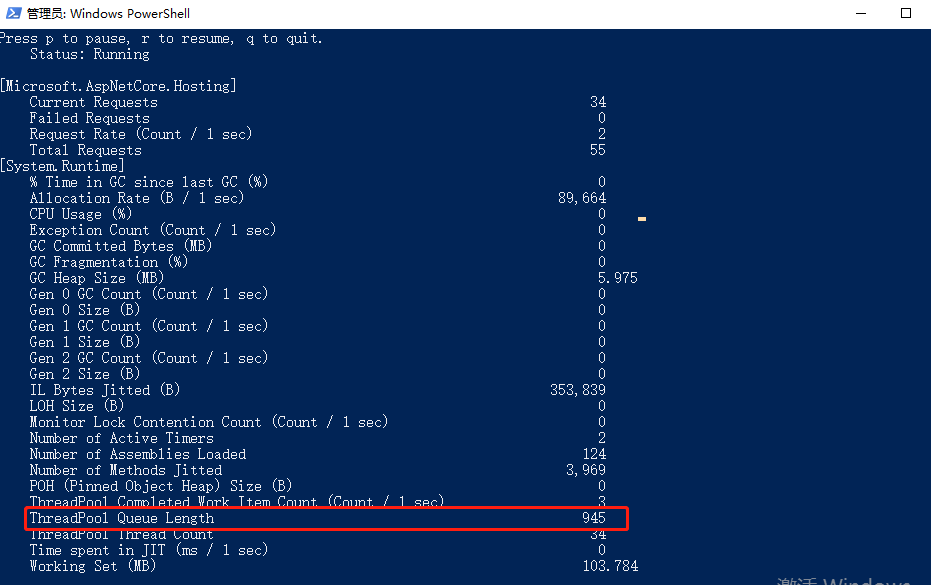
2、监控线程池。 .\dotnet-counters.exe monitor -p 10580 --counters Microsoft.AspNetCore.Hosting,System.Runtime
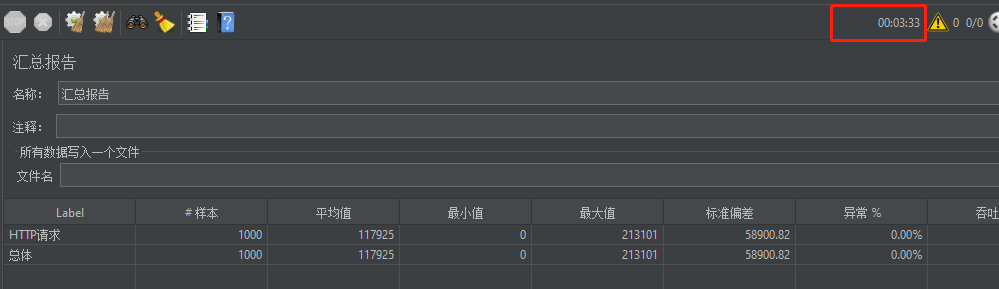
看到线程池排大队,但线程池由于爬坡算法,不会迅速增加线程,故导致很多http返回502。
而且实际非常长,将近4分钟。
修改程序参数,再测试:
1、Main内设置参数,ThreadPool.SetMinThreads(1000, 10);
2、 同时,连接字符串添加如下:Pooling=true;Min pool size=5;Max pool size=1024;Connect Timeout=100
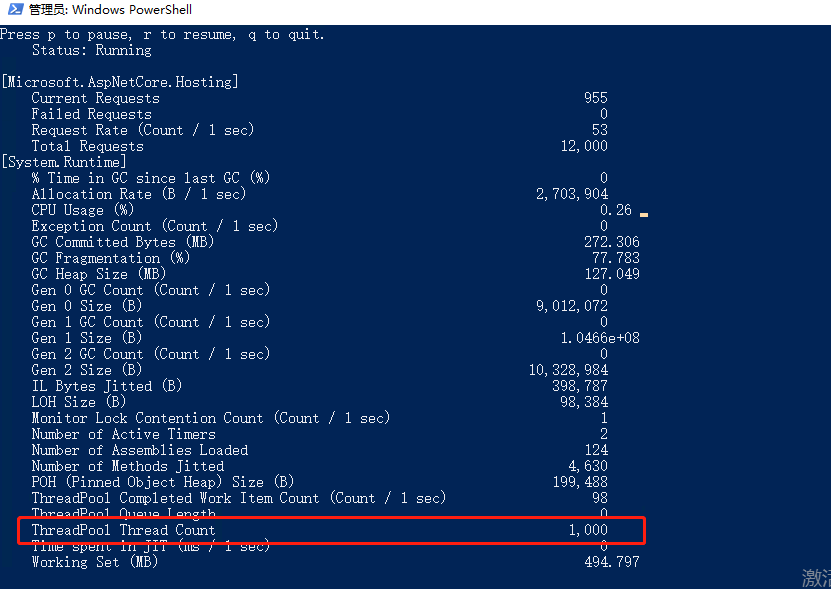
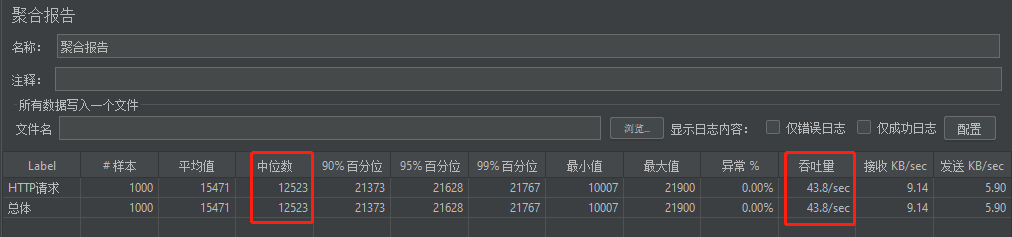
3,看结果。存储过程等待10秒,表现非常不错99%都在21秒内返回,web的紧箍咒解掉了,压力都传入后端数据库。
此内容由惯性聚合(RSS阅读器)自动聚合整理,仅供阅读参考。 原文来自 — 版权归原作者所有。