惯性聚合 高效追踪和阅读你感兴趣的博客、新闻、科技资讯
阅读原文 在惯性聚合中打开

推荐订阅源

N
News and Events Feed by Topic
WordPress大学
WordPress大学
Vercel News
Vercel News
CTFtime.org: upcoming CTF events
小众软件
小众软件
L
LangChain Blog
雷峰网
雷峰网
D
DataBreaches.Net
博客园 - 三生石上(FineUI控件)
Threat Intelligence Blog | Flashpoint
T
Tor Project blog
NISL@THU
NISL@THU
Scott Helme
Scott Helme
量子位
S
Security Affairs
T
Threat Research - Cisco Blogs
博客园_首页
云风的 BLOG
云风的 BLOG
D
Docker
AWS News Blog
AWS News Blog
腾讯CDC
博客园 - 聂微东
The GitHub Blog
The GitHub Blog
U
Unit 42
Recent Announcements
Apple Machine Learning Research
G
Google Developers Blog
T
The Exploit Database - CXSecurity.com
MongoDB | Blog
MongoDB | Blog
Stack Overflow Blog
Stack Overflow Blog
cs.AI updates on arXiv.org
L
LINUX DO - 热门话题
Cyber Security Advisories - MS-ISAC
The Last Watchdog
The Last Watchdog
C
Cybersecurity and Infrastructure Security Agency CISA
IT之家
IT之家
W
WeLiveSecurity
P
Privacy & Cybersecurity Law Blog
F
Full Disclosure
L
Lohrmann on Cybersecurity
The Hacker News
The Hacker News
Exploit-DB.com RSS Feed
Y
Y Combinator Blog
S
Security @ Cisco Blogs
C
Cyber Attacks, Cyber Crime and Cyber Security
C
Check Point Blog
C
CXSECURITY Database RSS Feed - CXSecurity.com
N
News and Events Feed by Topic
PCI Perspectives
PCI Perspectives
I
InfoQ

博客园 - 水手paul2008

MySQL 数据库归档日志相关 SQL Server 数据库给第三方用户开权限,限制可见内容。 visual svn server 迁移 windbg preview调试winform程序卡死 JavaScript的数字运算不准的问题 .net List.ForEach内部Async/Await 异步的问题 asp.net core 大并发设置 SQLServer数据库优化 windbg 调试 winform程序(二车间机台程序) IIS日志分析工具 .Net的三个Timer内Interval是不精确的 IE 碰到<不能执行已释放 Script 的代码> IIS应用程序池设置若干 关于thinkpad t440s的声卡失真问题,竟然带来对旧电脑的惊喜 给汽车换牌照灯的故事 .Net 混淆器ConfuserEx 车辆年检、强险、车船税的关系 .Net下几种ORM Windows 刷新图标命令
ArcMap10.4 遇到严重的应用程序错误,无法继续
水手paul2008 · 2020-07-28 · via 博客园 - 水手paul2008

故障

环境:Win2016 DataCenter,未激活。安装 ArcGIS 10.4的Licensen Manger,Desktop,Server,三个组件。

当前登录用户,已经是管理员Administrator

无缘无故,也不能说无缘无故,似乎是装了360杀毒和安全卫士导致的。然后就这样了。
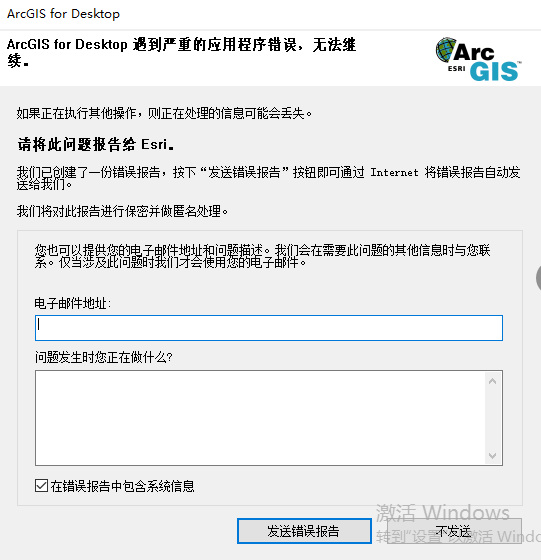
  • 修复(Repaire)Desktop,无效。
  • Remove后,重装Desktop,无效。
  • Remove LicesenManger和Desktop,后重装LicensenManager和Desktop,无效。

解决方案

网上很多解决方法,比如删除用户目录下模板,清除注册表,安装补丁,都是不行。

最后试出来一个万无一失的,大法。

这是谷歌,Bing,百度,都搜不到的大法。

360杀毒和360安全卫士,均已经卸载,并且重装过10.4Desktop,不知是否必须这样做,但已经做过了。很可能无需做这些。

360会误判ArcGIS文件是真的,需要添加白名单或信任此文件。

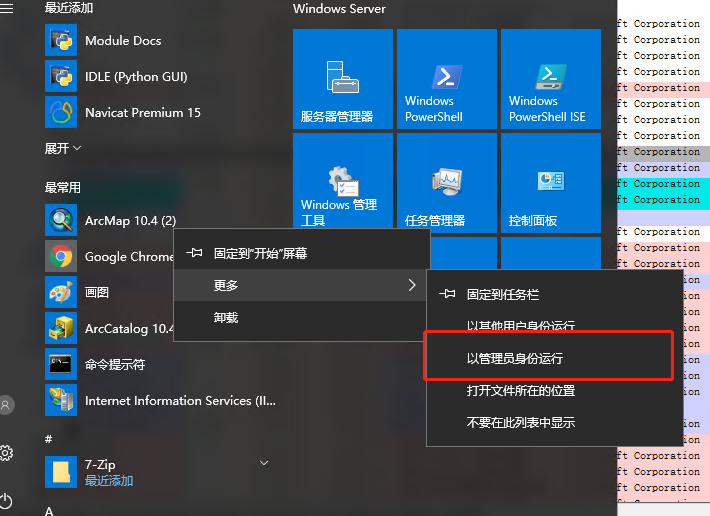
大法:Desktop安装并激活好后,在开始菜单,右键打开ArcMap,以管理员身份运行,一打便开,而且屡试不爽,次次成功。

切记,只能在开始菜单里右键管理员打开。在桌面快捷方式,程序目录exe文件,右键管理员和左键常规打开,均失败。
分析原因

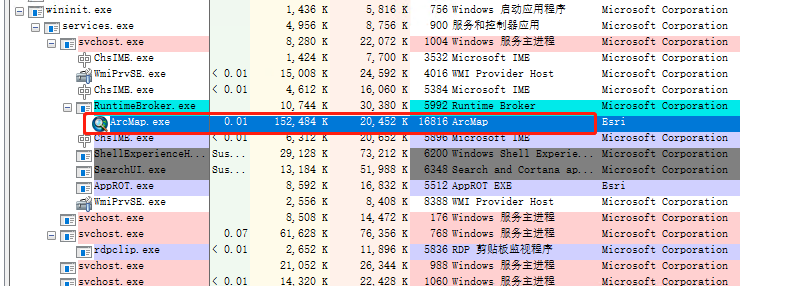
用进程管理器(Process Explorer)查看,发现如下现象,从开始右键打开的,是由RunTimerBroker.exe激发的ArcMap.exe进程,其他均是直接打开。具体原因还未知,但差别在这。