惯性聚合 高效追踪和阅读你感兴趣的博客、新闻、科技资讯
阅读原文 在惯性聚合中打开

推荐订阅源

Spread Privacy
Spread Privacy
S
Schneier on Security
博客园 - 【当耐特】
Cyber Security Advisories - MS-ISAC
美团技术团队
Application and Cybersecurity Blog
MongoDB | Blog
MongoDB | Blog
NISL@THU
NISL@THU
N
Netflix TechBlog - Medium
Exploit-DB.com RSS Feed
Webroot Blog
Webroot Blog
月光博客
月光博客
T
The Exploit Database - CXSecurity.com
Forbes - Security
Forbes - Security
freeCodeCamp Programming Tutorials: Python, JavaScript, Git & More
博客园 - 叶小钗
Recent Announcements
IT之家
IT之家
B
Blog
C
CERT Recently Published Vulnerability Notes
S
SegmentFault 最新的问题
Recent Commits to openclaw:main
F
Fortinet All Blogs
Martin Fowler
Martin Fowler
Know Your Adversary
Know Your Adversary
Security Latest
Security Latest
cs.CL updates on arXiv.org
T
Troy Hunt's Blog
O
OpenAI News
D
Darknet – Hacking Tools, Hacker News & Cyber Security
C
CXSECURITY Database RSS Feed - CXSecurity.com
V2EX - 技术
V2EX - 技术
L
Lohrmann on Cybersecurity
C
Cyber Attacks, Cyber Crime and Cyber Security
H
Help Net Security
让小产品的独立变现更简单 - ezindie.com
cs.AI updates on arXiv.org
Last Week in AI
Last Week in AI
Help Net Security
Help Net Security
Hacker News: Ask HN
Hacker News: Ask HN
A
About on SuperTechFans
Y
Y Combinator Blog
Hacker News - Newest:
Hacker News - Newest: "LLM"
Engineering at Meta
Engineering at Meta
T
Threat Research - Cisco Blogs
Vercel News
Vercel News
K
KPMG report finds enterprise disconnect between AI and its ROI | CIO
Recorded Future
Recorded Future
C
Cisco Blogs
Project Zero
Project Zero

The GitHub Blog

$100 million for open source: A milestone built by the community The cost of saying yes has changed GitHub for Beginners: Your roadmap to mastering the GitHub essentials Better tools made Copilot code review worse. Here's how we actually improved it. How GitHub gave every repository a durable owner GitHub availability report: June 2026 How GitHub Copilot enables zero DNS configuration for GitHub Pages Q1 2026 Innovation Graph update: Open source collaboration is accelerating worldwide How GitHub used secret scanning to reach inbox zero 6 security settings every GitHub maintainer should enable this week How GitHub maintains compliance for open source dependencies Highlights from Git 2.55 Inside the Advisory Database and what happens when vulnerability volume breaks records GitHub and UNDP team up to advance development priorities in Ghana with open source Transitioning as a Hubber Evaluating performance and efficiency of the GitHub Copilot agentic harness across models and tasks I automated my job (and it made me a better leader) GitHub joins coalition advocating for fixes to California AI Transparency Act to protect open source From pledge to practice: Building a more inclusive open source ecosystem How we built an internal data analytics agent How pull request limits are cutting down the noise Getting more from each token: How Copilot improves context handling and model routing What are git worktrees, and why should I use them? GitHub Copilot CLI for Beginners: Overview of common slash commands Accelerating researchers and developers building multilingual AI with a new open dataset How we made GitHub Copilot CLI more selective about delegation GitHub availability report: May 2026 Making secret scanning more trustworthy: Reducing false positives at scale Give GitHub Copilot CLI real code intelligence with language servers From one-off prompts to workflows: How to use custom agents in GitHub Copilot CLI GitHub for Beginners: Answers to some common questions GitHub Universe is back: All together now, in the agentic era GitHub Copilot app: The agent-native desktop experience Still a developer. Just outside. Our latest GitHub Shop collection is here. GitHub for Beginners: Getting started with Git and GitHub in VS Code GitHub recognized as a Leader in the Gartner® Magic Quadrant™ for Enterprise AI Coding Agents for the third year in a row Beyond the engine: 10 open source projects shaping how games actually get made Building GitHub’s next chapter in accessibility Investigation update: GitHub Enterprise Server signing key rotation Take your local GitHub sessions anywhere Building a general-purpose accessibility agent—and what we learned in the process Raising the bar: Quality, shared responsibility, and the future of GitHub’s bug bounty program GitHub availability report: April 2026 From latency to instant: Modernizing GitHub Issues navigation performance Dungeons & Desktops: 10 roguelikes that never die (because their communities won’t let them) GitHub Copilot individual plans: Introducing flex allotments in Pro and Pro+, and a new Max plan Dungeons & Desktops: Building a procedurally generated roguelike with GitHub Copilot CLI GitHub for Beginners: Getting started with OSS contributions Why age assurance laws matter for developers How researchers are using GitHub Innovation Graph data to reveal the “digital complexity” of nations Improving token efficiency in GitHub Agentic Workflows Agent pull requests are everywhere. Here’s how to review them. Validating agentic behavior when “correct” isn’t deterministic Welcome to Maintainer Month: Celebrating the people behind the code Register now for OpenClaw: After Hours @ GitHub GitHub Copilot CLI for Beginners: Interactive v. non-interactive mode GitHub for Beginners: Getting started with Markdown Securing the git push pipeline: Responding to a critical remote code execution vulnerability Highlights from Git 2.54 Building an emoji list generator with the GitHub Copilot CLI Bringing more transparency to GitHub’s status page How GitHub uses eBPF to improve deployment safety Build a personal organization command center with GitHub Copilot CLI Developer policy update: Intermediary liability, copyright, and transparency Hack the AI agent: Build agentic AI security skills with the GitHub Secure Code Game How exposed is your code? Find out in minutes—for free GitHub for Beginners: Getting started with GitHub Pages GitHub Copilot CLI for Beginners: Getting started with GitHub Copilot CLI GitHub availability report: March 2026 GitHub Universe is back: We want you to take the stage GitHub Copilot CLI combines model families for a second opinion The uphill climb of making diff lines performant Securing the open source supply chain across GitHub Run multiple agents at once with /fleet in Copilot CLI Agent-driven development in Copilot Applied Science GitHub for Beginners: Getting started with GitHub security What’s coming to our GitHub Actions 2026 security roadmap
Automating cross-repo documentation with GitHub Agentic Workflows
David Pine · 2026-07-09 · via The GitHub Blog

“Where are the docs?” It’s a question nobody on a product team enjoys answering. The honest reply is usually some variant of “behind.” A writer is staring at a closed pull request, trying to reverse-engineer what changed. The pull request’s author has already moved on. By the time the doc actually publishes, the feature has shipped, sometimes more than once.

That used to be us on the Aspire team (we’re a small team of 10 building dev tools for distributed apps). A few months back, we were trying to figure out how to safely bring AI into automations we already trusted. That’s when we discovered GitHub Agentic Workflows. I started bolting prototypes into microsoft/aspire.

Here’s what that bought us, in numbers pulled straight out of GitHub: for Aspire 13.3 and 13.4, 82 feature-docs pull requests merged at a median of 44.8 hours after the product pull request, every one of them reviewed by the engineer who shipped the feature. No new headcount. No process retraining. Just a different way of asking “who writes this?”

🔒 The constraint: cross-repo automation is the hard part

Our product lives in microsoft/aspire and our docs site lives in microsoft/aspire.dev—different repo, deploy target, and review chain. Most teams figure out same-repo automation pretty quickly; cross-repo automation is where things get sharp. Broad repo-scoped tokens belong in a museum, and any responsible security posture (ours included) restricts them accordingly. That’s a good thing. It’s also a real bottleneck if the place where you write the docs isn’t the place where you write the code.

The default workflow for years was:

  1. Engineer ships a feature in microsoft/aspire.
  2. Docs writer notices weeks later.
  3. Docs writer opens the pull request, reads the diff, and pings the engineer to clarify what changed.
  4. Engineer is on the next feature, vaguely remembers, replies with half the picture.
  5. Docs draft ships, sometimes against a release that’s already out.

This is the reverse-engineering tax. We needed automation that crossed repos without handing an agent a write-everywhere token. GitHub Agentic Workflows turned out to be the answer.

🤖 Why GitHub Agentic Workflows

GitHub Agentic Workflows is a project from the GitHub Next team that I keep describing to people as “GitHub Actions, but with a model as the work-item processor and guard rails that satisfy security review.” That’s reductive, but it’s close.

The shape of it:

  • You author a workflow as a single markdown file (.github/workflows/my-thing.md). YAML-style frontmatter on top, an English-language prompt underneath.
  • You run GitHub Agentic Workflows compile, and it generates a sibling .lock.yml (a normal GitHub Actions workflow) that you commit alongside.
  • At runtime, the workflow runs an agent against your prompt with a constrained toolset.
  • Critically, the agent doesn’t write to GitHub directly. It emits intent (a JSON blob describing the pull requests, issues, and comments it wants to create), and a separate, narrowly scoped job (the safe-outputs handler) materializes that intent against a per-workflow GitHub app.

That last bullet is the unlock. The agent gets read access and a prompt. Writes go through a tiny verifiable pipeline with explicit allow-lists. Security review nods. We ship.

💚 A small aside: kindred stacks

I love when the tools you’re using to build are built with the same tools you’re using to build with. The GitHub Agentic Workflows docs are built with Astro and Starlight. So is aspire.dev—Astro with Starlight, dressed up with the wider Starlight plugin ecosystem (astro-mermaid, starlight-llms-txt, starlight-sidebar-topics, starlight-image-zoom, the gorgeous @catppuccin/starlight theme, and more. Shout-out to Chris Swithinbank and the Starlight maintainers, the entire ecosystem feels designed by people who genuinely care).

There’s a real kinship there. The tool we use to automate docs and the docs site we automate into share the same foundation. Convenient, because the Mermaid sequence diagram in the next section renders the exact same way in both worlds.

The end-to-end pipeline

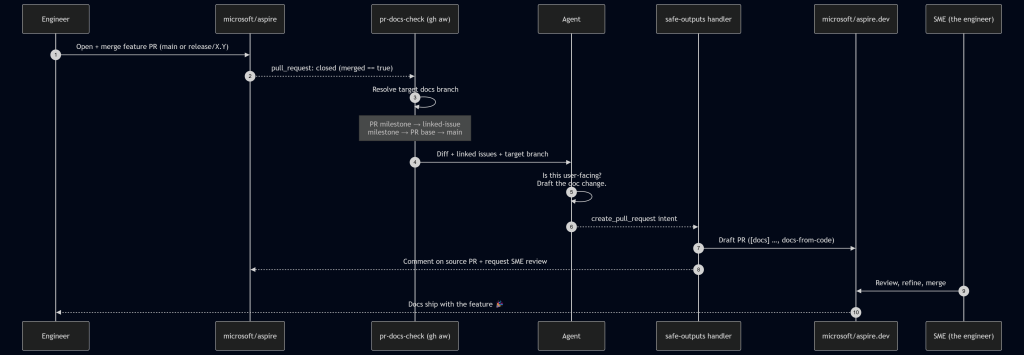
Here’s the flow we landed on. The protagonist is a workflow called pr-docs-check.md living in microsoft/aspire.

Sequence diagram showing an automated docs workflow: merging a feature pull request in microsoft/aspire triggers a GitHub Actions check that has an agent draft the documentation, open a draft pull request in microsoft/aspire.dev, and request SME review—so docs ship with the feature.

A run starts on pull_request: closed against main or release/*, gated by merged == true. From there, the workflow first runs a deterministic target branch resolver in plain bash before the agent ever wakes up:

  1. Pull request milestone title (e.g. 13.4 → release/13.4 on aspire.dev).
  2. Linked-issue milestone title (parse Fixes/Closes/Resolves #N from the body, fetch each issue, take the first non-empty milestone).
  3. Pull request base ref, if it matches release/X.Y[.Z].
  4. Fall back to main.

This is the linchpin. Milestones in the product repo map cleanly to release branches in the docs repo. When the agent finally runs, it knows exactly where the docs should land without any creative writing about target branches or guessing.

The agent reads the diff, scans linked issues, and decides: does this need docs? If yes, it drafts the actual content in a checked-out microsoft/aspire.dev workspace, following our existing doc-writer skill (voice, MDX conventions, Starlight components). It then emits a create_pull_request safe-output and hands off.

The safe-outputs handler takes over:

  • Title prefix: [docs]
  • Label: docs-from-code
  • draft: true (we never auto-merge)
  • Base branch: agent-supplied, restricted to main or release/*
  • Target repo: microsoft/aspire.dev
  • Reviewer: the SME identified from the source pull request’s reviews—i.e., whoever the product team trusted to approve the feature, now gets asked to approve the doc for that feature.

A companion job posts a marker comment back on the source pull request with the docs pull request link and minimizes any older pr-docs-check comments on re-run. The engineer who just hit Merge gets a notification within a few minutes: “Here’s the docs draft. Look it over?”

🔐 The safe-outputs contract

The whole security story comes down to a small, boring stretch of frontmatter:

tools: 
  github: 
    toolsets: [repos, issues, pull_requests] 
    min-integrity: approved          # only run pinned, integrity-checked actions 
    allowed-repos: 
      - microsoft/* 
    github-app: 
      app-id: ${{ secrets.ASPIRE_BOT_APP_ID }} 
      private-key: ${{ secrets.ASPIRE_BOT_PRIVATE_KEY }} 
      owner: "microsoft" 
      repositories: ["aspire.dev", "aspire"] 

safe-outputs: 
  create-pull-request: 
    title-prefix: "[docs] " 
    labels: [docs-from-code] 
    draft: true                      # human-in-the-loop, always 
    base-branch: main 
    allowed-base-branches: [main, release/*] 
    target-repo: "microsoft/aspire.dev" 
    protected-files: blocked         # AGENTS.md, manifests, security config: hands off 
    fallback-as-issue: true 

That’s the deal in plain text. The agent gets a GitHub App token whose installation is scoped to exactly two repositories—the product repo and the docs repo—and nothing else in the org is reachable. It can only land pull requests against main or release/*. AGENTS.md and dependency manifests are off-limits by policy. If the pull request creation fails (network blip, conflict, anything), the framework falls back to filing an issue, so nothing is silently dropped.

This is the part security review actually liked. The agent’s reasoning is fuzzy. The action surface is not.

📊 By the numbers

Here are the stats from a rolling 30-day window (May 3 – June 2, 2026) spanning the back end of the Aspire 13.3 release and the run-up to 13.4:

Metric Value 
Product pull requests merged in microsoft/aspire 396 (338 main / 50 release/13.3 / 8 release/13.2) 
pr-docs-check workflow runs 396 
Draft docs pull requests created on microsoft/aspire.dev 82 
  – Merged 82 (100%) 
  – Closed without merge 
  – Still open 
Docs pull requests target branches 52 → release/13.3, 27 → release/13.4, 3 → main 
Median time-to-merge (docs) 44.8 hours 
Merged within 24 h / 7 days 38% / 96% 

Note: Numbers captured at the time of writing; the workflows keep running, so the totals only go up. 

A few of those numbers deserve a second look:

  • 396 runs → 82 pull requests is not a defect. The workflow runs on every merged pull request; most of them are internal refactors, test fixes, or dependency bumps with no user-facing surface. The agent saying “no docs needed” 300+ times is a feature.
  • 100% merge rate says the agent’s docs picks are right. The tighter prompt we shipped after the v1 false-positive phase is paying off.

✅ What worked, what didnt

What worked

  • Milestone → release-branch mapping. This was the single highest-leverage choice we made. Engineers already set milestones on pull requests and issues; we got accurate target-branch routing for free.
  • Draft-only, SME-as-reviewer. The agent never merges. The engineer who shipped the feature is the one who confirms the docs are right. We’ve stopped reverse-engineering features at the doc layer. The engineer just tells the docs draft what to say, in the place where they already are.
  • Scoped GitHub app per workflow. Each workflow gets its own app token with explicit repo and permission scopes. Security review approved. We approved too; the first time we needed to rotate keys.
  • protected-files: blocked. The agent cannot touch AGENTS.md, package manifests, or repo security config. Period.

What didn’t (at first)

  • ❌ The agent’s “is this docs-worthy?” gate was too generous in the first version. It drafted pull requests for changes that were genuinely internal, such as a CI tweak or a logging refactor. The result: 9 closures of 69 pull requests (≈13%), so we tightened the prompt’s user-facing-change definition and added explicit negative examples (CI, internal helpers, tests-only). Now, the rate is trending down.
  • ❌ Cross-repo pull request creation needed a mirrored checkout pattern that wasn’t obvious from the docs. The agent works in one repo; safe-outputs needs to find the target repo to push a branch. We solved it by checking out microsoft/aspire.dev twice—once as the current workspace, once under _repos/aspire.dev—so the safe-outputs handler can rediscover it deterministically.
  • ❌ Big diffs blow prompt budgets. We pre-extract pull request metadata (linked issues, milestone, base ref) in pre-agent-steps bash, so the agent gets a small, structured summary instead of a giant payload. This is GitHub Agentic Workflow’s designed-in pattern, and it works.

Wrapping up

The changes we made shifted our thinking. A feature wasn’t considered done until the docs were. Docs no longer trail along behind it like a tin can on a string. The engineer’s review is the gate; the bot does the typing.

Critically, this doesn’t replace docs writers; it un-burdens them. Our writers used to spend most of their time reverse-engineering features. Now they spend their time on the things only a human can do well: narrative pages, sample programs, conceptual walkthroughs, the parts of the docs that don’t fall out of a diff. The bot handles the mechanical “this new option was added; here’s the reference page update” work that was never enjoyable for anyone.

Huge thanks to the GitHub Next team for GitHub Agentic Workflows (and for making the safe-outputs primitive a first-class part of the design), and to Chris Swithinbank and the Starlight maintainers for the docs platform we automate into. A genuine thank-you, too, to the security folks whose guardrails forced us to design this the right way the first time. The boring secret of good automation is that strong security constraints make the system more trustworthy and more correct.

If you build a product in one repo and ship docs in another—and especially if you have to do it inside any nontrivial security boundary—GitHub Agentic Workflows is worth a serious look. Start with one workflow, such as pr-docs-check, and watch what happens to your median time-to-docs.

🔗 The other workflows

pr-docs-check is the one I wrote this post about, but it’s not running alone. If you’re curious about the rest, the source is public:

  • milestone-changelog.md: runs every two hours, picks up newly merged pull requests in the active milestone, and maintains a 13.x-Change-log wiki page (new features, improvements, notable bug fixes) with a companion editorial-feedback issue. 346 runs.
  • release-update-support-mdx.md: on a stable Aspire release, drafts a [support] pull request on aspire.dev that updates the support policy page (promotes the new version, demotes the previous one, refreshes the “Last updated” badge).
  • update-integration-data.md: lives in the docs repo; runs pnpm update:all daily, refreshes NuGet metadata + GitHub stats + sample data, and opens a chore: Update integration data PR with supersede-and-close logic for stale runs. 27 runs, eight merged pull requests.
  • repo-pulse.md: a rolling three-day repo dashboard pinned to a single issue and updated in place: recent merges, pull requests awaiting review, new issues, discussion activity. One issue, always fresh.

Happy automating, friends! 🤖🚀


Written by

David Pine

Senior Software Engineer, Building aspire.dev at Microsoft

Peli de Halleux

Principal Research Software Design Engineer at Microsoft Research. Creator of MakeCode, GenAIScript and more.

Explore more from GitHub

Docs

Docs

Everything you need to master GitHub, all in one place.

Go to Docs

GitHub

GitHub

Build what’s next on GitHub, the place for anyone from anywhere to build anything.

Start building

Customer stories

Customer stories

Meet the companies and engineering teams that build with GitHub.

Learn more

GitHub Universe 2026

GitHub Universe 2026

Join us October 28-29 in San Francisco or online for GitHub Universe, our flagship developer event uniting people, agents, and the world’s code.

Register now