惯性聚合 高效追踪和阅读你感兴趣的博客、新闻、科技资讯
阅读原文 在惯性聚合中打开

推荐订阅源

aimingoo的专栏
aimingoo的专栏
Google DeepMind News
S
SegmentFault 最新的问题
Project Zero
Project Zero
D
DataBreaches.Net
I
InfoQ
L
Lohrmann on Cybersecurity
OSCHINA 社区最新新闻
OSCHINA 社区最新新闻
酷 壳 – CoolShell
酷 壳 – CoolShell
Stack Overflow Blog
Stack Overflow Blog
The Register - Security
Recorded Future
Recorded Future
Vercel News
Vercel News
博客园 - 司徒正美
freeCodeCamp Programming Tutorials: Python, JavaScript, Git & More
I
Intezer
The Hacker News
The Hacker News
F
Fortinet All Blogs
Microsoft Azure Blog
P
Proofpoint News Feed
Help Net Security
Help Net Security
cs.CV updates on arXiv.org
Application and Cybersecurity Blog
Scott Helme
Scott Helme
T
Threatpost
爱范儿
爱范儿
N
Netflix TechBlog - Medium
D
Docker
云风的 BLOG
云风的 BLOG
C
Cisco Blogs
K
Kaspersky official blog
H
Help Net Security
S
Secure Thoughts
T
Threat Research - Cisco Blogs
钛媒体:引领未来商业与生活新知
钛媒体:引领未来商业与生活新知
S
Security @ Cisco Blogs
Cyberwarzone
Cyberwarzone
N
News and Events Feed by Topic
G
Google Developers Blog
Forbes - Security
Forbes - Security
博客园 - 三生石上(FineUI控件)
博客园 - 叶小钗
B
Blog
Google DeepMind News
Recent Announcements
Simon Willison's Weblog
S
Securelist
P
Privacy International News Feed
Spread Privacy
Spread Privacy
The Last Watchdog
The Last Watchdog

The GitHub Blog

GitHub for Beginners: Your roadmap to mastering the GitHub essentials Better tools made Copilot code review worse. Here's how we actually improved it. How GitHub gave every repository a durable owner Automating cross-repo documentation with GitHub Agentic Workflows GitHub availability report: June 2026 Q1 2026 Innovation Graph update: Open source collaboration is accelerating worldwide How GitHub used secret scanning to reach inbox zero 6 security settings every GitHub maintainer should enable this week How GitHub maintains compliance for open source dependencies Highlights from Git 2.55 Inside the Advisory Database and what happens when vulnerability volume breaks records GitHub and UNDP team up to advance development priorities in Ghana with open source Transitioning as a Hubber Evaluating performance and efficiency of the GitHub Copilot agentic harness across models and tasks I automated my job (and it made me a better leader) GitHub joins coalition advocating for fixes to California AI Transparency Act to protect open source From pledge to practice: Building a more inclusive open source ecosystem How we built an internal data analytics agent How pull request limits are cutting down the noise Getting more from each token: How Copilot improves context handling and model routing What are git worktrees, and why should I use them? GitHub Copilot CLI for Beginners: Overview of common slash commands Accelerating researchers and developers building multilingual AI with a new open dataset How we made GitHub Copilot CLI more selective about delegation GitHub availability report: May 2026 Making secret scanning more trustworthy: Reducing false positives at scale Give GitHub Copilot CLI real code intelligence with language servers From one-off prompts to workflows: How to use custom agents in GitHub Copilot CLI GitHub for Beginners: Answers to some common questions GitHub Universe is back: All together now, in the agentic era GitHub Copilot app: The agent-native desktop experience Still a developer. Just outside. Our latest GitHub Shop collection is here. GitHub for Beginners: Getting started with Git and GitHub in VS Code GitHub recognized as a Leader in the Gartner® Magic Quadrant™ for Enterprise AI Coding Agents for the third year in a row Beyond the engine: 10 open source projects shaping how games actually get made Building GitHub’s next chapter in accessibility Investigation update: GitHub Enterprise Server signing key rotation Take your local GitHub sessions anywhere Building a general-purpose accessibility agent—and what we learned in the process Raising the bar: Quality, shared responsibility, and the future of GitHub’s bug bounty program GitHub availability report: April 2026 From latency to instant: Modernizing GitHub Issues navigation performance Dungeons & Desktops: 10 roguelikes that never die (because their communities won’t let them) GitHub Copilot individual plans: Introducing flex allotments in Pro and Pro+, and a new Max plan Dungeons & Desktops: Building a procedurally generated roguelike with GitHub Copilot CLI GitHub for Beginners: Getting started with OSS contributions Why age assurance laws matter for developers How researchers are using GitHub Innovation Graph data to reveal the “digital complexity” of nations Improving token efficiency in GitHub Agentic Workflows Agent pull requests are everywhere. Here’s how to review them. Validating agentic behavior when “correct” isn’t deterministic Welcome to Maintainer Month: Celebrating the people behind the code Register now for OpenClaw: After Hours @ GitHub GitHub Copilot CLI for Beginners: Interactive v. non-interactive mode GitHub for Beginners: Getting started with Markdown Securing the git push pipeline: Responding to a critical remote code execution vulnerability Highlights from Git 2.54 Building an emoji list generator with the GitHub Copilot CLI Bringing more transparency to GitHub’s status page How GitHub uses eBPF to improve deployment safety Build a personal organization command center with GitHub Copilot CLI Developer policy update: Intermediary liability, copyright, and transparency Hack the AI agent: Build agentic AI security skills with the GitHub Secure Code Game How exposed is your code? Find out in minutes—for free GitHub for Beginners: Getting started with GitHub Pages GitHub Copilot CLI for Beginners: Getting started with GitHub Copilot CLI GitHub availability report: March 2026 GitHub Universe is back: We want you to take the stage GitHub Copilot CLI combines model families for a second opinion The uphill climb of making diff lines performant Securing the open source supply chain across GitHub Run multiple agents at once with /fleet in Copilot CLI Agent-driven development in Copilot Applied Science GitHub for Beginners: Getting started with GitHub security What’s coming to our GitHub Actions 2026 security roadmap
How GitHub Copilot enables zero DNS configuration for GitHub Pages
Bruno Borges · 2026-07-09 · via The GitHub Blog

Custom domains make a project feel real. But for many developers, DNS, the last mile, is also the most frustrating: A records, CNAME entries, TTLs, and that long wait where you’re never quite sure if the internet is broken or you are.

In this post, I’ll walk through how I took a project from an empty repository to a live website on a custom domain, secured with HTTPS, in about 14 minutes without manually editing a single DNS record. The trick is to let GitHub Copilot CLI drive the work, with a community Namecheap skill handling the DNS automation through the registrar’s API.

Here’s what you’ll learn how to do:

  • Publish a site with GitHub Pages
  • Register an inexpensive domain
  • Enable your registrar’s API and connect it to Copilot CLI
  • Point the domain at GitHub Pages and verify it end to end

What you’ll need

  • A GitHub account (the free tier works)
  • GitHub Copilot CLI, installed and authenticated with GitHub Copilot
  • A Namecheap account, for buying the domain and using its API

No prior DNS expertise required. That’s the whole point. Let’s get started. ⤵

Step 1: Publish a site with GitHub Pages

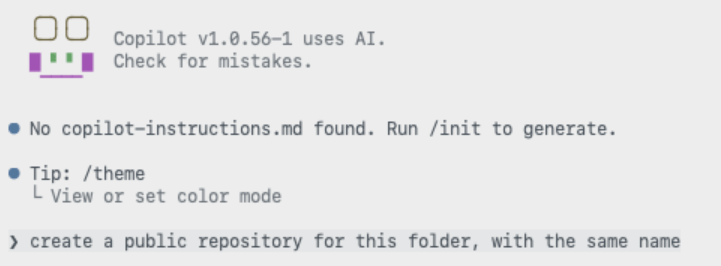
Every deployment needs something to deploy, so start with a home for the site: a new public repository.

Screenshot of Copilot CLI screen that says 'create a public repository for this folder with the same name'
Screenshot showing the public repository has been created.

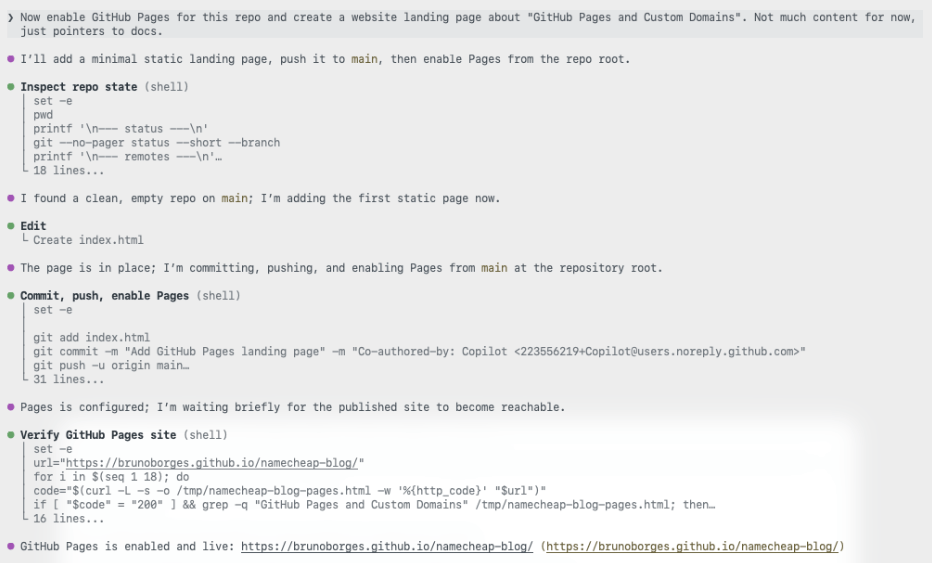
With the repository in place, you don’t have to hand-write an index.html, commit it, and then click through the pages settings yourself. Instead, describe the outcome you want to Copilot CLI and let it create the landing page and enable GitHub Pages for you.

Screenshot showing a prompt to enable GitHub Pages for this repo and create a website landing page about 'GitHub Pages and Custom Domains.'

The site is now live on a github.io URL. That’s a solid start. Now let’s give it a proper address.

Step 2: Register an inexpensive domain

You don’t need a premium .com to ship a side project. For this walkthrough I chose one of the cheapest top-level domains available, .click, and searched for an available name.

ghpagesblog.click was available, so I moved to checkout.

The total came to USD $2.00, or about CAD $2.46. That’s a low-risk price for trying a custom domain on a side project.

Step 3: Connect the domain to GitHub Pages

This is the step developers tend to dread. Here, an AI assistant does the repetitive work while you stay in control of the decisions.

Enable Namecheap API access

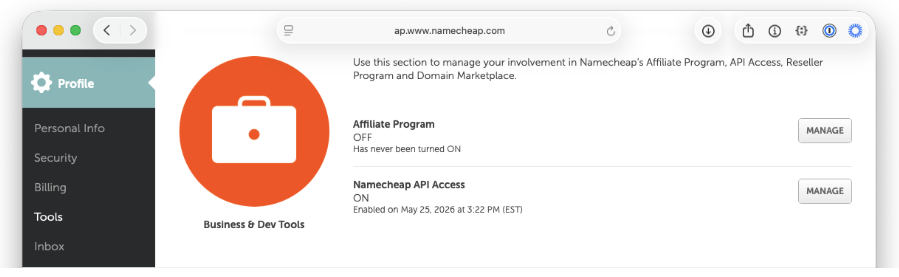
Before Copilot CLI can update your DNS, you need to turn on Namecheap’s API. In your Namecheap account, go to Profile → Tools, scroll to Business & Dev Tools, and select Manage under Namecheap API Access.

Screenshot showing Profile > Tools highlighted.

You can also navigate directly to the API access settings page (note that this URL may change over time).

On that page, complete three steps:

  1. Toggle the API to ON.
  2. Add the public IP of the machine that will call the API to the IP allowlist (Namecheap labels this field Whitelisted IPs).
  3. Copy the API Key and store it somewhere safe. You’ll need it shortly.

For more detail on what the API offers, see Namecheap’s API introduction.

Install the Namecheap skill

Next, give Copilot CLI the ability to talk to Namecheap by installing the Namecheap skill. It’s a single command:

gh skill install github/awesome-copilot namecheap --scope user

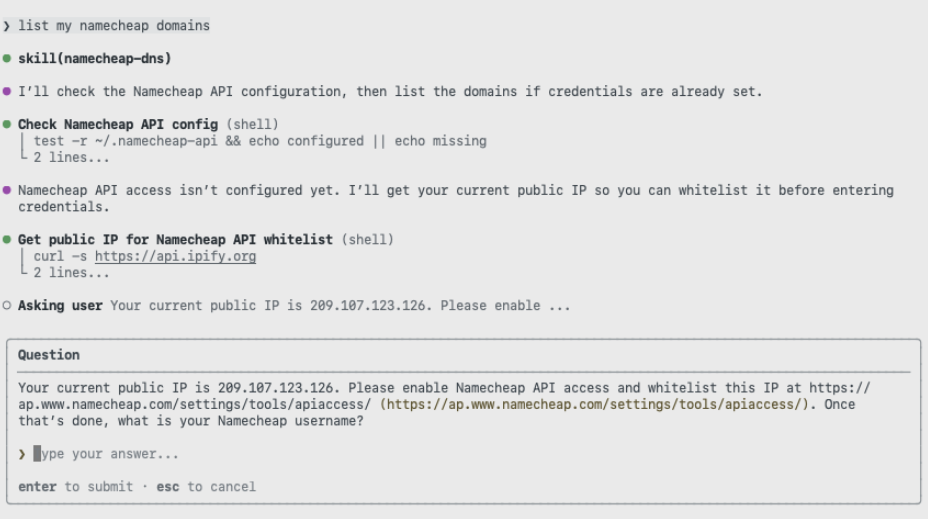
The first time you ask Copilot to do something like “list my Namecheap domains, it confirms the skill is configured and prompts you for your username.

Screenshot showing Copilot CLI prompt 'list my namecheap domains.'

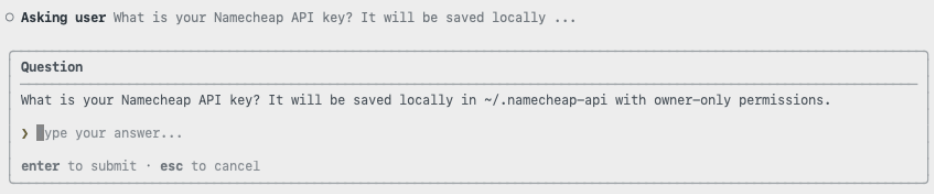
Then it asks for the API key you copied earlier.

Screenshot of Copilot asking the user 'What is your namecheap API key? It will be saved locally...'

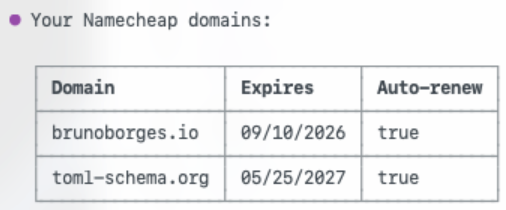
With credentials in place, Copilot returns the list of domains in your account. It’s a quick way to confirm everything is wired up correctly before making any changes.

Screenshot of domains: brunoborges.io and toml-schema.org.

Point the domain at GitHub Pages

Now connect the domain to the site. Ask Copilot to configure the custom domain using the skill.

Screenshot of a prompt asking Copilot to 'Enable this GitHub Pages site with the custom domain ghpagesblog.click registered with namecheap.'

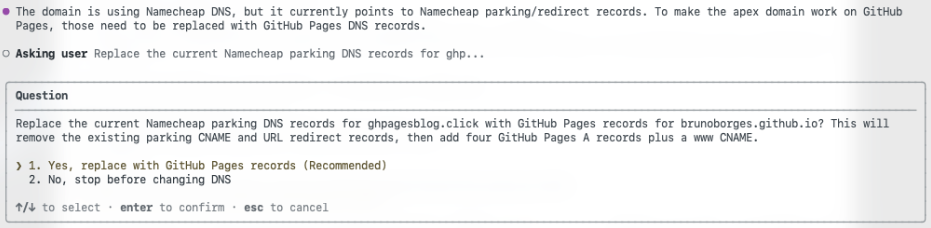
A good automation asks before it acts. The skill pauses to confirm the change before touching any records.

Screenshot of Copilot asking: 'The domain is using Namecheap DNS, but it currently points to Namecheap parking/redirect records. To make the apex domain work on GitHub Pages, those need to be replaced with GitHub Pages DNS records. Asking user: Replace the current Namecheap parking DNS records for ghp...'

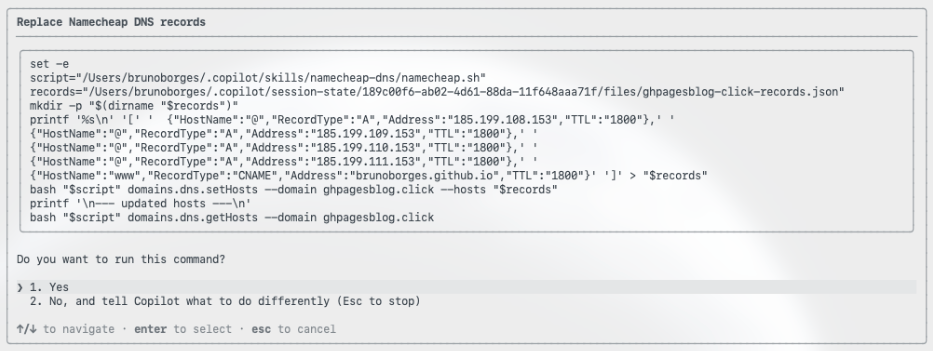
Once you approve, it replaces the existing parking records with the GitHub Pages A records and a CNAME for the WWW subdomain, which is the exact configuration GitHub Pages expects. This matches GitHub’s documented steps for configuring a custom domain for your GitHub Pages site.

Screenshot showing 'Replace Namecheap DNS records.'

It also handles the repository side, committing a CNAME file that tells GitHub Pages which custom domain the site should answer to.

Not using Namecheap? The same approach works with any registrar that offers an API. You don’t need a purpose-built skill: point Copilot CLI at your registrar’s API documentation and ask it to read, understand, and use that API to set the GitHub Pages records for your domain. The registrar changes; the workflow doesn’t.

Step 4: Verify the deployment

Rather than assuming success, Copilot CLI checks its own work. First, it confirms the domain resolves.

Screenshot showing 'Verify custom domain publication (shell).'

Then it confirms that the site returns a healthy HTTP 200 response.

If you’d like to review every prompt and response, the full Copilot CLI session is available as a gist.

Now for the timeline. The domain was purchased at 11:21:27 a.m. ET.

The site was live on the custom domain, served over HTTPS, at around 11:35 a.m. ET. That’s roughly 14 minutes from owning nothing to a fully deployed site, including API setup, skill installation, DNS configuration, propagation, and verification.

Wrapping up

DNS isn’t hard, exactly, but it’s fiddly, easy to get wrong, and slow to give feedback. By pairing GitHub Pages with GitHub Copilot CLI and the Namecheap skill, the repetitive parts of a custom-domain deployment fade into a short conversation: you make the decisions and approve the changes, and the tooling handles the plumbing.

If you’ve been putting off a custom domain because the DNS step feels like a chore, this workflow removes the friction. To go further, explore the GitHub Pages documentation and the guide to configuring a custom domain for your GitHub Pages site, then try it on your next project.

Written by

Bruno Borges

Principal Product Manager

Related posts

Explore more from GitHub

Docs

Docs

Everything you need to master GitHub, all in one place.

Go to Docs

GitHub

GitHub

Build what’s next on GitHub, the place for anyone from anywhere to build anything.

Start building

Customer stories

Customer stories

Meet the companies and engineering teams that build with GitHub.

Learn more

GitHub Universe 2026

GitHub Universe 2026

Join us October 28-29 in San Francisco or online for GitHub Universe, our flagship developer event uniting people, agents, and the world’s code.

Register now