








February 26, 2026 by Vikram Duvvur, Gaurav Mittal, Benjamin Simmonds
Last February, we released next edit suggestions (NES) in GitHub Copilot. NES extends ghost text by not just inserting code at your cursor, but suggesting edits nearby, anticipating what you'd change next. This was a powerful step forward, but it only worked within a small window around your cursor. In real editing workflows, the next change you need to make is often several screens away.
That's what we set out to solve with long-distance next edit suggestions: extending NES to predict and suggest edits anywhere in your file, not just near your current cursor position.
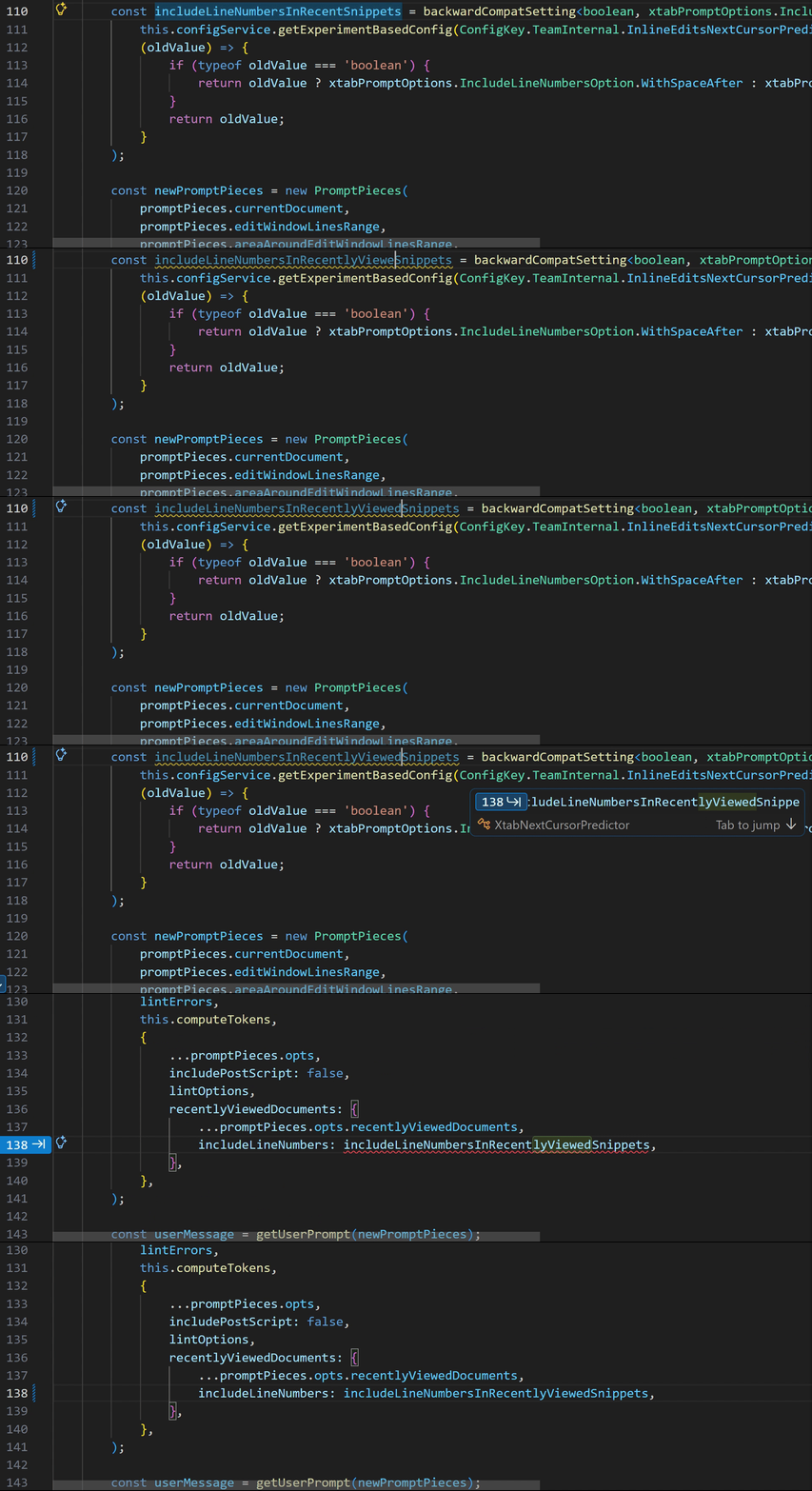
Think about a typical refactoring session. You rename a function and all function invocations elsewhere in the file also need updating. Or you change a parameter type, which now makes the validation logic 200 lines down incorrect. These are exactly the moments where you would expect NES to help you, but unfortunately, the next meaningful edit is far outside its effective window.
This creates a hard modeling problem. The search space explodes from a handful of nearby lines to every line in the file. And the cost of getting it wrong isn't evenly split: a correct jump saves you real effort, but an unnecessary one interrupts your flow and makes you less likely to trust the next suggestion. The system must learn not only where to move, but also when not to move.
Rather than modifying the existing edit-generation model, we decided to use a multi-model approach. We trained a dedicated location model whose sole responsibility is to predict where the next edit should happen. Once a valid location is selected, the original NES model then generates the edit suggestion.
This separation has two benefits. First, each model can specialize on one task: one model learns spatial intent (where to jump), the other model produces high-quality edits within a local window. In addition, it enables us to iterate independently on location prediction without disrupting ongoing improvements to the core NES model.
Before training the location model, we needed a way to measure whether it was actually working for real-world editing scenarios.
We designed a structured three-step evaluation process:

We started by analyzing how developers chain together edits in real-world scenarios - renaming, signature changes, documentation updates - rather than treating each edit as an isolated event. The common thread: edits ripple across multiple, non-adjacent locations in a file.
From these workflows, we built an evaluation dataset where each example includes the ground-truth next line to jump to, recent edit history, and cursor context.
Crucially, we measured both jump and no-jump accuracy. While many examples required predicting a new location, a meaningful subset required staying on the current line. A model that jumps too often can be just as disruptive as one that misses important transitions. Imagine getting a jump suggestion every time you're halfway through typing a variable name.
By grounding evaluation in realistic workflows and measuring both jump and no-jump cases, we ensured that offline metrics reflected how developers actually edit rather than artificial scenarios.
With evaluation in place, we turned to training data. While the evaluation dataset was small enough to construct by hand, training required data at a much larger scale. We started with the same dataset we curated for training the core NES model, which contains trajectories of how developers move through and edit a file.
By replaying these trajectories, we transformed every cursor movement into a training sample. After applying filters, such as ensuring the jump location appeared in the prompt, we had our training dataset.
To train the location model, we used Supervised Finetuning (SFT) with targeted hyperparameter search. Our strongest results came from a structured grid search centered around the hyperparameters of the existing NES model. By constraining the search space to values already known to perform well in a related setting, we were able to efficiently explore combinations and identify a high-performing configuration.
Before settling on this approach, we also experimented with Bayesian Optimization, a technique designed to optimize expensive black-box functions. In our case, each evaluation required training a model from scratch, making experimentation computationally costly. While theoretically appealing, this approach did not yield improvements over the more focused grid search.
Ultimately, the structured grid search produced our best-performing supervised model and provided a stable foundation for subsequent iterations.
A better model isn't enough if you never notice or trust the suggestions it produces. With standard NES, suggestions appear close to your cursor and within your immediate view, making them naturally discoverable. With long-distance NES, the most relevant edit may not be in your immediate vicinity. So, the UX has to solve a harder problem: surfacing distant edits without disrupting your flow.

This comes down to balancing three concerns: keeping suggestions compact, making them readable, and minimizing how much of your code they obscure.
This is more than a discoverability problem. It's a trust problem. When the system proposes moving your cursor elsewhere, you need to quickly assess whether that jump is relevant and worth your attention. The UI must communicate enough context to evaluate the suggestion without demanding a full context switch.
Rather than rendering large diffs inline or forcing attention shifts, we designed a compact widget that appears near your cursor and prefers empty space when available. The widget adapts to the surrounding editor layout, shrinking or expanding to fit naturally into whitespace such as at the end of a line or between blocks of code.
Because the full edit may be far away and potentially large, the widget does not attempt to render the entire suggestion. Instead, it provides a lightweight preview, an excerpt from one of the affected lines, rendered with diff-style highlighting. This gives you just enough context to judge relevance and decide whether to act.
If the preview looks useful, you can choose to jump to the suggested location and review or apply the full edit there. If not, you can continue editing uninterrupted.
We always dogfood internally before shipping new capabilities, and long-distance NES was no exception. Early feedback revealed a clear pattern: the model was too eager to jump. Even when its predictions were directionally correct, frequent suggestions became distracting. The root cause was a dataset imbalance: far fewer "no jump" examples than jump examples. The model had learned to jump confidently but hadn't learned when to stay put.
We rebalanced the dataset by expanding samples where the correct action was to remain on the current line, such as partially typed identifiers where jumping would not make sense. After retraining, both jump and no-jump accuracy improved, and suggestions felt noticeably more intentional.
To validate at scale, we ran A/B tests comparing long-distance NES against standard NES. The results were encouraging: a 23% increase in code written via NES, along with improvements across other engagement metrics. But the experiment also surfaced a tradeoff. Far-away suggestions were rejected more often than standard NES. Some of this was expected given a new interaction pattern, but it signaled that the model still needed to be more selective about when to suggest a jump.
This wasn't purely a modeling problem or purely a UX problem. It was both. Improving long-distance NES required tightening the model's jump predictions while also ensuring the interface made it easy to assess and accept relevant suggestions.
The validation results pointed to a clear conclusion: the supervised model needed more restraint.
To address this, we introduced a reinforcement learning stage using Reinforcement Learning with Verified Rewards (RLVR). Instead of relying solely on supervised labels, we added a grading signal based on how closely the model's predicted jump location matched the eventual cursor movement. Predictions that aligned closely with actual editing behavior were rewarded more strongly, while unnecessary or poorly timed jumps were penalized.
This allowed the model to optimize directly for real editing conditions, without requiring new manual annotations or UX instrumentation.
The result was a better balance between initiative and restraint. The updated model improved offline metrics and translated those gains into online performance, increasing code written via NES while reducing rejection rates. With those signals in place, we began shipping the improved version the following month.
Looking ahead, we plan to extend this work with cross-file suggestions, enabling the model to reason beyond the current file. We're also exploring a unified model that predicts both the location and the content of the next edit together, which could improve overall suggestion relevance.
Long-distance next edit suggestions are available now in VS Code for users with a GitHub Copilot subscription - just ensure you have next edit suggestions and extended NES range github.copilot.nextEditSuggestions.extendedRange enabled in VS Code. Give it a try the next time you're doing refactoring work—renaming variables, updating function signatures, or making changes that ripple through your file. We'd love to hear your feedback!
Happy coding! 💙
A big shoutout to our developer community for the ongoing feedback that pushes us to deliver the best possible experiences with VS Code and GitHub Copilot. And a huge thanks to the researchers, engineers, product managers, and designers across GitHub and Microsoft who curated the training data, built the training pipeline, evaluation suites, and serving stack, and to the VS Code and GitHub Copilot teams for smooth model releases.
此内容由惯性聚合(RSS阅读器)自动聚合整理,仅供阅读参考。 原文来自 — 版权归原作者所有。