








July 6, 2026 by VS Code Team, @code
In our previous post, we introduced the VS Code coding harness, the layer that connects the model to tools, context, instructions, and the agent loop, giving the model the ability to perform coding tasks.
Each model responds to tool calls and instructions differently, and the harness can adapt to improve results. This post walks through a two-week experiment we ran in partnership with OpenAI to tune the GPT-5.5 system prompt in VS Code. The question was simple: if we nudge the agent to explore less and validate sooner, can it get faster and cheaper without getting worse? With OpenAI's model expertise and our harness data, we tested two small prompt changes, measured them against a control on live traffic, and shipped the winner.
This matters more with usage-based billing in place. Token efficiency isn't only an infrastructure metric: every token the agent spends wandering is a token you pay for and wait on. An agent that reaches a grounded edit sooner is both a better experience and a smaller bill.
Following the launch of GPT-5.5, we looked at how the model spent tokens inside the VS Code agent harness, as part of the work described in Improving token efficiency in GitHub Copilot. Two patterns stood out: where the model spent tokens, and where it over-explored before acting. Agents can spend a lot of effort searching, rereading, and comparing nearby paths before making a useful edit.
That pointed to a single, testable idea: the agent should spend less effort wandering and more effort moving through a deliberate loop of evidence, action, and validation.
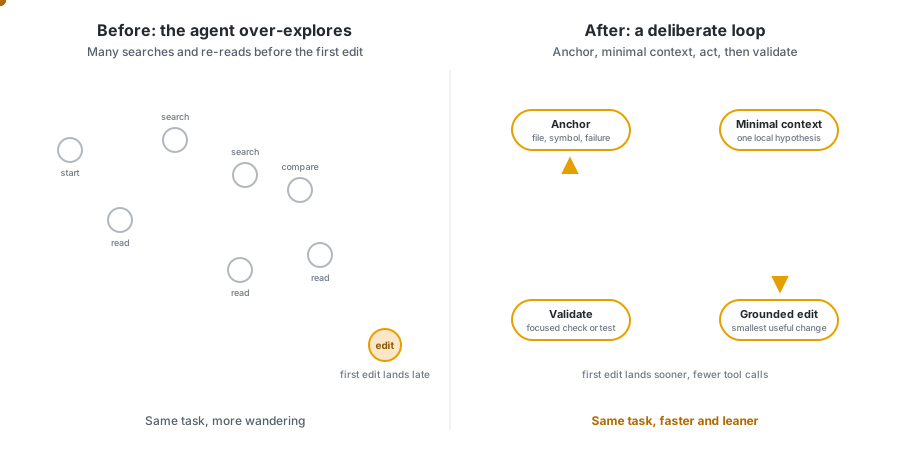
After testing different hypotheses and running offline evaluations, we turned that idea into two variants of the GPT-5.5 system prompt, both were promising in offline evals, and we tested them against the current default on live traffic.
We ran the experiment in VS Code over a two-week window, splitting GPT-5.5 agent traffic across two treatment groups and one control group with a 25/25/25 split. Both treatments test the same hypothesis but differ in how much structure they add to the prompt.
| Group | Variant name | Description | Traffic allocation |
|---|---|---|---|
| Control | PRPT_CTRL |
Current default prompt | 25% |
| Treatment A | PRPT_SRCH |
Economical search and edit: single, compact reminder to limit exploration before acting | 25% |
| Treatment B | PRPT_LRG |
Large prompt sections: broader restructure covering the full edit-and-validate loop | 25% |
Note: The allocations add up to 75% because the experiment scorecard compares evenly sized groups. The remaining
GPT-5.5traffic continued to use the default prompt outside this scorecard slice, so we could compare the treatments and control across the same kind of user traffic.
Treatment A makes a small, focused change: a single, compact reminder that nudges the model to reduce unnecessary exploration.
The <economical_search_and_edit> section in the prompt instructs the agent to start from a concrete anchor, gather only enough local context, avoid broad exploration, act once there is a cheap discriminating check, and avoid rereading unchanged context.
You can find the complete implementation details in gpt55BasePrompt.tsx:
{economicalSearchAndEditEnabled && <Tag name='economical_search_and_edit'>
    - Start from the most concrete available anchor: a file, symbol, failing behavior, failing command, or nearby implementation surface.<br />
    - Gather only enough nearby context to choose one plausible local hypothesis and one cheap check that could disconfirm it.<br />
    - Prefer one targeted search or nearby read over broad repo exploration.<br />
    - Once the cheapest discriminating check is known, act.<br />
    - Do not re-read unchanged context unless a new result makes it relevant.<br />
</Tag>}
Treatment B tested a broader version of the same idea of limiting exploration. Instead of adding a single, compact reminder about economical search, it reorganizes the agent workflow into explicit <Before_the_first_edit> and <After_the_first_edit> sections. Unlike Treatment A, these additions make the system prompt itself larger, so a key question was whether the added structure would still improve efficiency, not just agent behavior.
The goal was to solve the full loop and not only the search step: form a local hypothesis before editing, avoid broad exploration, make a grounded first edit, and validate immediately after the first substantive edit.
You can find the complete implementation details in gpt55BasePrompt.tsx:
{largePromptSectionsEnabled && <>
    <Tag name='Before_the_first_edit'>
        - Start from the most concrete anchor available: a file, symbol, failing behavior, failing command, test, or nearby implementation surface. If the request does not name one explicitly, use the first targeted search or nearby read to identify that anchor, then continue locally from there.<br />
        - Before the first edit, gather only enough nearby evidence to state one falsifiable local hypothesis about how the requested behavior should work or why it is failing, and one cheap check that could disconfirm it.<br />
        [...]
        - Once you can state one falsifiable local hypothesis, the nearby code path it depends on, one cheap check that could disconfirm it, and one small edit that would test it, the next action must be a grounded edit.<br />
        - If confidence is incomplete, the first edit may be a small reversible probe that exposes missing types, behavior mismatches, control-flow gaps, or validation failures.<br />
        - If you find yourself still searching after that local-routing budget, treat that as drift. Recover by choosing the best current hypothesis and the best available nearby check, then make the smallest plausible edit that will let that check discriminate.<br />
    </Tag>
    <Tag name='After_the_first_edit'>
        - Prefer this order for that first validation action:<br />
        - the cheapest behavior-scoped or failing check that can falsify the current hypothesis<br />
        - a narrow test for the touched slice<br />
        - a narrow compile, lint, or typecheck command for the touched slice<br />
        [...]
        - Finish with at least one post-edit executable validation step whenever the environment provides one. Only fall back to diff-only validation when no focused command exists or commands are unavailable.<br />
    </Tag>
</>}
We tracked the treatments across three dimensions: quality (does the code stick), latency (how fast the first edit lands), and efficiency (tokens and tool calls). Each treatment is compared with the control group in the table below.
Signal legend: ● favorable and highly significant (p < 0.001), ○ favorable and statistically significant (p < 0.05), ● unfavorable and highly significant, ○ unfavorable and statistically significant, - not statistically significant.
| Metric | Treatment A (PRPT_SRCH) impact |
P-value | Signal | Treatment B (PRPT_LRG) impact |
P-value | Signal |
|---|---|---|---|---|---|---|
| 10-minute survival rate (by user) | -0.40% (-0.37 pp) | 0.0707 | - | -0.44% (-0.41 pp) | 0.0493 | ○ |
| Commit survival rate (by user) | -0.48% (-0.41 pp) | 0.3200 | - | +0.68% (+0.57 pp) | 0.1533 | - |
| p50 Time to First Edit (by turn) | -2.88% (2.0s faster) | 0.0271 | ○ | -5.68% (3.9s faster) | 2e-5 | ● |
| p95 Time to First Edit (by turn) | -1.93% (8.0s faster) | 0.1928 | - | -9.30% (38.8s faster) | 1e-10 | ● |
| p50 total tokens (by user) | -2.54% (0.2M fewer tokens) | 0.3429 | - | -3.25% (0.3M fewer tokens) | 0.2094 | - |
| p95 total tokens (by turn) | -5.19% (0.3M fewer tokens) | 0.0157 | ○ | -7.64% (0.5M fewer tokens) | 0.0003 | ● |
| Average tool calls (by turn) | -3.19% (0.77 fewer tool calls) | 0.0091 | ○ | -8.54% (2.04 fewer tool calls) | 1e-12 | ● |
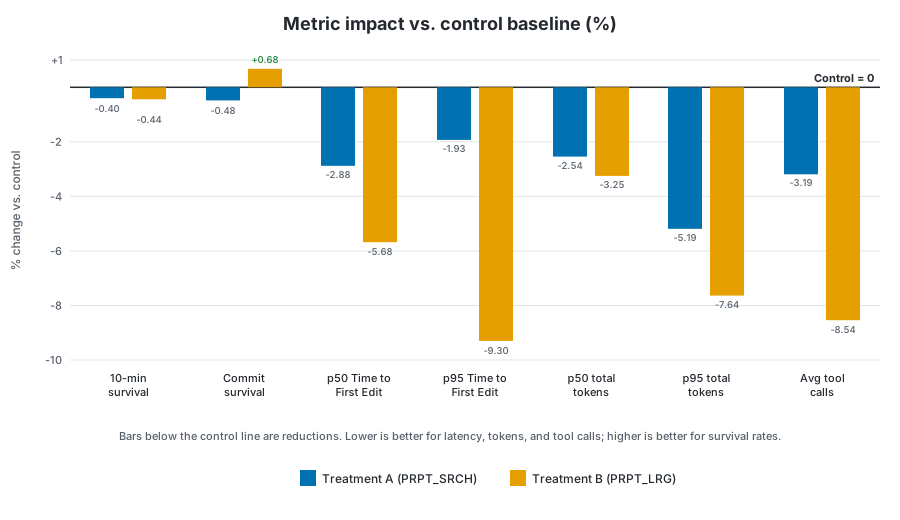
Quality: the guardrail metrics stayed mostly healthy. Commit survival rate moved slightly up for Treatment B (+0.68%) and slightly down for Treatment A (-0.48%), neither statistically significant. The 10-minute survival rate moved slightly down for both treatments: -0.44% for Treatment B and -0.40% for Treatment A. Only the Treatment B movement crossed the statistical significance threshold, and just barely (p=0.0493), unlike the highly significant efficiency wins. We treated that as a real tradeoff to weigh, but the movement was small and the other quality guardrail did not regress.
Latency: Treatment B delivered the strongest edit-latency wins, and both were highly statistically significant: p50 Time to First Edit improved -5.68% (3.9s faster, p=2e-5), and p95 Time to First Edit improved -9.30% (38.8s faster, p=1e-10). Treatment A moved in the right direction, but the edit-latency effects were weaker: p50 Time to First Edit -2.88% (2.0s faster, p=0.0271), and p95 Time to First Edit -1.93% (not significant).
Token efficiency: both treatments reduced median total tokens per user, but those p50 movements were not statistically significant: -3.25% for Treatment B and -2.54% for Treatment A. At the upper tail, Treatment B reduced p95 total tokens by -7.64%, highly statistically significant (p=0.0003). Treatment A also reduced p95 total tokens by -5.19%, statistically significant (p=0.0157). Both variants reduced average tool calls per turn: -8.54% (2.04 fewer tool calls) for Treatment B, highly statistically significant (p=1e-12), and -3.19% (0.77 fewer tool calls) for Treatment A, statistically significant (p=0.0091).
Treatment B had the strongest overall profile: clear latency wins, significant upper-tail token reductions, fewer tool calls, and mostly stable quality guardrails. The one movement worth watching, the small drop in 10-minute survival, was only lightly significant (p=0.0493), while the latency, token, and tool-call gains were larger and far more robust. Treatment A moved several metrics in the right direction, but Treatment B was more consistent across the measures that matter most for VS Code.
So we shipped it: Treatment B, LargePromptSections, is now the default GPT-5.5 system prompt.
The takeaway isn't only that the numbers moved. The movement was tied to a specific, testable harness hypothesis from provider feedback, validated offline first and then confirmed online over a two-week production window. That's the loop we want to keep running.
This experiment is one example of how we work with model providers beyond launch day. A model release is not the end of the tuning loop. It is another chance to look at real VS Code behavior, test focused improvements, and find new ways to make the experience faster, more reliable, and more efficient.
We'll keep looking for those improvements across models, prompts, tools, and the VS Code coding harness, so more of each agent's budget goes to the work that matters instead of unnecessary exploration.
Try agents in VS Code, switch between models, and compare how different models approach the same task. Share your feedback in our GitHub repo. It helps us keep improving the experience.
Happy coding! 💙
此内容由惯性聚合(RSS阅读器)自动聚合整理,仅供阅读参考。 原文来自 — 版权归原作者所有。