







August 26, 2026 by Rob Lourens, Connor Peet, and Brigit Murtaugh
When you assign work to an agent, it should just continue its work, even when you're not actively watching. Whether you switch to another agent session, move between the editor and the Agents window, or connect remotely from another machine or the browser, you should be able to monitor and interact with that session.
We're introducing the Agent Host, a self-contained process that owns agent sessions, and the open Agent Host Protocol (AHP) for connecting hosts and clients. Together, they enable sessions to continue after you close the folder or editor window where they started, stay synchronized across clients, run locally or remotely, and support multiple agent harnesses without losing their distinct capabilities.
In this post, we'll explain why we built the Agent Host, what it enables in VS Code (and how you can try it), how its architecture works, and how AHP opens that architecture to other clients.
In late 2025, we added support for closing a local agent chat and keeping it running in the background. That made it possible to run multiple sessions in parallel or focus on another task while you were in VS Code. The next step was enabling those sessions to continue after you closed the folder where they started and to move across VS Code surfaces.
Aside from supporting long-running sessions, we set out to adopt the GitHub Copilot SDK for the Copilot harness in VS Code. Using the SDK gives Copilot a more consistent harness behavior and functionality across Copilot CLI, the standalone GitHub Copilot app, and other Copilot products.
Bringing these efforts together gave us an opportunity to reevaluate how we run agent harnesses in VS Code. An agent harness assembles context, provides tools, runs the agent loop, and applies changes. Without the Agent Host, VS Code runs the local agent harness in each editor window's extension host, the process that VS Code uses to run extensions such as GitHub Copilot Chat. The extension host isolates extension code from the core editor, however it also ties the agent runtime to one VS Code window. Closing that window stops the runtime. As a result, each window loads its own agent infrastructure.
Moving session state, harness adapters, and baseline workspace capabilities into a dedicated process changes that boundary. The extension host is no longer in the critical path for baseline agent work, and multiple windows can connect to one host instead of each loading a separate runtime. VS Code still communicates with the host, and tools contributed by a client still route back to that client, but the session itself no longer depends on the specific folder or editor window where it started.
This separation also gives VS Code a common foundation for multiple agent harnesses while preserving what makes each one distinct. Earlier this year, we introduced the Claude Agent using Anthropic's official harness. Copilot and Claude can retain their own SDKs, agent loops, tools, and provider-specific capabilities, while the Agent Host and AHP give them a consistent session experience in VS Code.
The Agent Host is enabled in the latest VS Code Stable and Insiders. Because the Agent Host owns the session, you can start working with an agent in an editor window and continue with the same live session in the Agents window. Both surfaces stay synchronized, so you can monitor progress and interact with the session wherever you prefer without creating a copy.
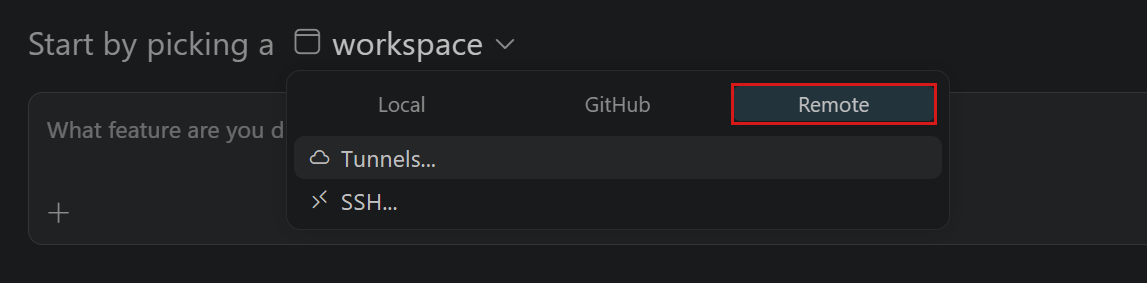
The separation between clients and hosts also enables remote sessions. The Agent Host can run with your workspace on another machine while you connect from the desktop or web to check progress, review changes, and manage sessions. Learn more about remote agent sessions, including setup instructions for SSH, dev tunnels, and the web.

Try this workflow to experience how a session continues after you close its folder and stays in sync across VS Code surfaces:
Open a folder in an editor window, select Copilot from the harness picker, and start an agent session as you normally would.
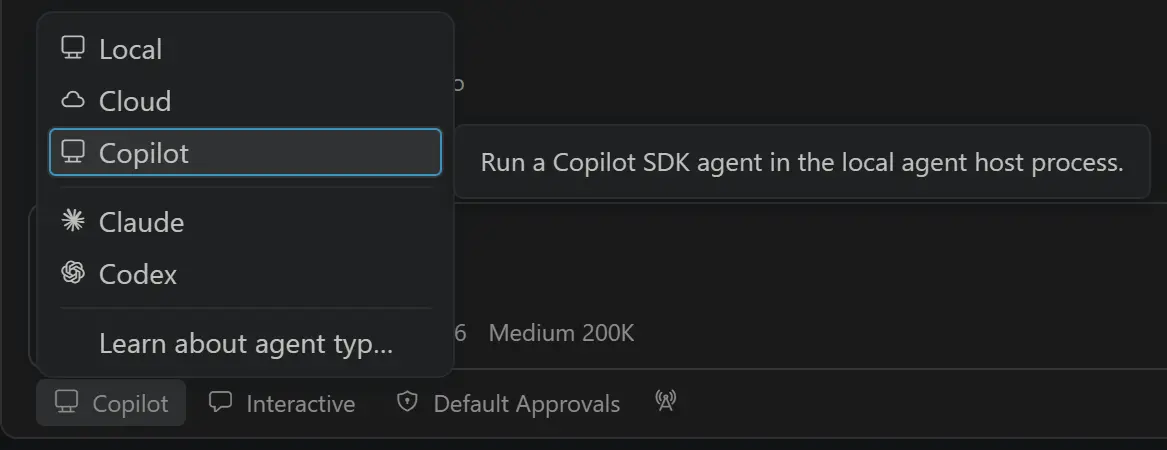
While the agent is working, close the folder but keep VS Code running. The active turn continues in the Agent Host even though that folder is no longer open.
Note: Closing a folder does not quit VS Code. For local sessions, VS Code must remain running because it manages the local Agent Host.
Reopen the folder and return to the session. Its state and progress are still there.
Open the Agents window to monitor the same live session. You can work with it from the editor and Agents window without creating a copy, and updates appear in both.
To try a remote connection, connect the Agents window to a remote Agent Host and start or open a session. Then open insiders.vscode.dev/agents, select the same host, and continue the session from your browser.
The Agent Host is a dedicated process that owns sessions. It can run locally as a VS Code utility process or remotely as a standalone server. In either case, it remains active across many editor sessions. Previously, we could rely on direct IPC between the extension host and editor window, but a persistent process that could communicate with multiple versions of VS Code necessitates a standardization in how we talk about agents. The Agent Host Protocol (AHP) is that standardization.

When the host runs on the same machine as VS Code, all editor windows and the Agents window connect to the single host process. In AHP terms, those windows are clients and the Agent Host plays the server role. VS Code bundles our own implementation of an Agent Host and our UI is a client, but other applications can implement either side of the same agnostic protocol. Clients can also contribute tools based on their own capabilities.
The Agent Host is designed to support different harnesses. Each harness retains its own agent loop and capabilities, while an adapter translates its events into the common AHP session model. Here are two examples of how this works:
AHP standardizes the client-facing session, not how an agent reasons, manages context, or calls tools. Learn more about choosing an agent harness in VS Code.
Most agent protocols describe a one-to-one conversation between a client and an agent. AHP solves a different problem: coordinating multiple independent clients around the same long-running agent session. The host owns the authoritative, agent-agnostic state, while connected clients can observe progress, contribute actions, approve tool calls, or cancel work.
AHP is deliberately state-first. Rather than expose harness-specific backend events, the host translates them into durable, display-ready state and ordered Redux-like actions. Clients can optimistically apply an action and reconcile it with the host's sequenced response, then replay missed actions gracefully on reconnection.
The state is opinionated to reflect which user experience clients should present, and it avoids going into implementation details. For example, while our Agent Host drives changes through local git and GitHub, this is modeled as the generic concept of changesets. Implementations can operate on other representations - for example, in-memory virtual file systems like those used on vscode.dev or by the GitHub Repositories extension.
All protocol functionality is exposed as URI-addressable channels, including sessions, chats, terminals, and changesets. When a client subscribes, it receives a snapshot of the current state followed by an ordered stream of actions. Shared reducers apply those actions consistently, so an editor, the Agents window, and a browser client converge on the same view without each client having to understand the harness's SDK or session model.

While AHP handles these coordination challenges, we also want it to be straightforward to implement. At the coarsest level, clients and hosts choose which channels they implement beyond the basic session and chat channels, and negotiate capabilities for finer-grained control. As we add functionality, it will continue to compose into the protocol - providing richer experiences for setups that expose it without adding burden for new clients and hosts.
Because AHP is open, you can build clients that connect to an Agent Host to monitor session progress, review changes, approve tool calls, and contribute tools based on the client's capabilities.
To get started, run code agent host (or code-insiders agent host for Insiders) to start a standalone Agent Host on your machine. Then connect to it with one of the AHP client libraries:
See the AHP client library table for current versions and additional clients.
VS Code's Agent Host implementation and the AHP specification are under active development, and new capabilities continue to roll out. Follow the Agent Host architecture documentation for current VS Code behavior. To follow AHP's design or share feedback on the protocol overall, explore the AHP documentation and source repository.
As you run agents through the Agent Host in VS Code, please share your feedback with us in the VS Code repository.
Happy coding! 💙
此内容由惯性聚合(RSS阅读器)自动聚合整理,仅供阅读参考。 原文来自 — 版权归原作者所有。