
惯性聚合 高效追踪和阅读你感兴趣的博客、新闻、科技资讯
阅读原文 在惯性聚合中打开

推荐订阅源

阮一峰的网络日志
阮一峰的网络日志
IT之家
IT之家
H
Heimdal Security Blog
Jina AI
Jina AI
宝玉的分享
宝玉的分享
博客园 - 【当耐特】
让小产品的独立变现更简单 - ezindie.com
爱范儿
爱范儿
T
Tailwind CSS Blog
OSCHINA 社区最新新闻
OSCHINA 社区最新新闻
Apple Machine Learning Research
有赞技术团队
有赞技术团队
酷 壳 – CoolShell
酷 壳 – CoolShell
WordPress大学
WordPress大学
AWS News Blog
AWS News Blog
C
Cisco Blogs
Cisco Talos Blog
Cisco Talos Blog
钛媒体:引领未来商业与生活新知
钛媒体:引领未来商业与生活新知
freeCodeCamp Programming Tutorials: Python, JavaScript, Git & More
D
Darknet – Hacking Tools, Hacker News & Cyber Security
The Hacker News
The Hacker News
The Cloudflare Blog
Hugging Face - Blog
Hugging Face - Blog
cs.CL updates on arXiv.org
T
Threatpost
S
Securelist
P
Privacy International News Feed
C
CXSECURITY Database RSS Feed - CXSecurity.com
博客园 - 聂微东
博客园 - 叶小钗
J
Java Code Geeks
V
V2EX
博客园 - Franky
Spread Privacy
Spread Privacy
K
Kaspersky official blog
C
Cyber Attacks, Cyber Crime and Cyber Security
Simon Willison's Weblog
Project Zero
Project Zero
大猫的无限游戏
大猫的无限游戏
S
SegmentFault 最新的问题
C
Cybersecurity and Infrastructure Security Agency CISA
C
CERT Recently Published Vulnerability Notes
Latest news
Latest news
NISL@THU
NISL@THU
罗磊的独立博客
W
WeLiveSecurity
Google DeepMind News
奇客Solidot–传递最新科技情报
奇客Solidot–传递最新科技情报
博客园_首页
V
Visual Studio Blog

Visual Studio Code - Code Editing. Redefined.

Visual Studio Code 1.130 (Insiders) Visual Studio Code 1.131 (Insiders) Visual Studio Code 1.129 (Insiders) How Prompt Tuning Improved GPT-5.5 in VS Code Visual Studio Code 1.127 Visual Studio Code 1.128 Iterating faster with TypeScript 7 Visual Studio Code 1.126 What 50,000 Runs of a 5-Line Eval Taught Us Use your own language model key in VS Code Improving token efficiency for GitHub Copilot in VS Code December 2025 (version 1.108) November 2025 (version 1.107) October 2025 (version 1.106) September 2025 (version 1.105) August 2025 (version 1.104) July 2025 (version 1.103) June 2025 (version 1.102) May 2025 (version 1.101) April 2025 (version 1.100) March 2025 (version 1.99) Visual Studio Code 1.114 Visual Studio Code 1.116 Making agents practical for real-world development Visual Studio Code 1.111 How VS Code Builds with AI January 2026 (version 1.109) Visual Studio Code 1.113 Visual Studio Code 1.112 Visual Studio Code 1.115 Your Home for Multi-Agent Development Giving Agents a Visual Voice: MCP Apps Support in VS Code Building docfind: Fast Client-Side Search with Rust and WebAssembly Introducing the VS Code Insiders Podcast Introducing the Visual Studio Code Private Marketplace: Your Team's Secure, Curated Extension Hub 🎉 Open Source AI Editor: Second Milestone A Unified Experience for all Coding Agents Expanding Model Choice in VS Code with Bring Your Own Key Command GitHub's Coding Agent from VS Code Open Source AI Editor: First Milestone The Complete MCP Experience: Full Specification Support in VS Code VS Code: Open Source AI Editor Beyond the tools, adding MCP in VS Code Context is all you need: Better AI results with custom instructions February 2026 (version 1.110) Enhance productivity with AI + Remote Dev Visual Studio Code 1.117 Visual Studio Code 1.118 Visual Studio Code 1.119 Visual Studio Code 1.120 The Coding Harness Behind GitHub Copilot in VS Code Visual Studio Code 1.122 Visual Studio Code 1.123 Building Long-Distance Next Edit Suggestions Visual Studio Code 1.125 Visual Studio Code 1.121 Visual Studio Code 1.124
Introducing auto model selection (preview)
Microsoft · 2021-11-03 · via Visual Studio Code - Code Editing. Redefined.

September 15th, 2025 by Isidor Nikolic, @isidorn

Faster responses, a lower chance of rate limiting, and 10% off premium requests for paid users - auto picks the best available model for each request based on current capacity and performance. With auto you can’t choose a specific model, auto handles that for you. Auto model selection in Chat is being rolled out in preview to all GitHub Copilot users in VS Code, starting with the individual plans.

How auto model selection works

Auto selects the best model to ensure that you get the optimal performance and reduce the likelihood of rate limits. Auto will choose between Claude Sonnet 4, GPT-5, GPT-5 mini and other models, unless your organization has disabled access to these models. As we introduce picking models based on task complexity, this behavior will change over the next iterations.

For paid users, we currently plan to primarily rely on Claude Sonnet 4 as the model powering auto.
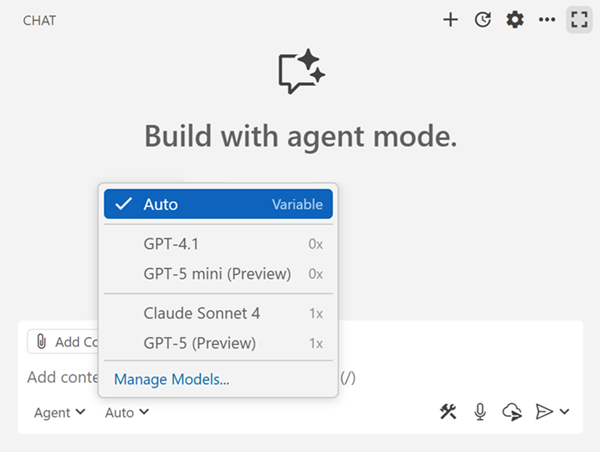
Screenshot that shows the model picker in the Chat view, showing the auto option.

When using auto model selection, VS Code uses a variable model multiplier based on the automatically selected model. If you are a paid user, auto applies a 10% request discount. For example, if auto selects Sonnet 4, it will be counted as 0.9x of a premium request; if auto selects GPT-5-mini, this counts as 0x because the model is included for paid users. You can see which model and model multiplier are used by hovering over the chat response.

If you are a paid user and run out of premium requests, auto will always choose a 0x model (for example, GPT-5 mini), so you can continue using auto without interruption.

What’s next

With VS Code's rapid usage growth, auto helps us manage capacity, so we can handle the millions of agentic requests coming in each day. That's our immediate goal, however this is not our long-term vision for auto. We aim to make auto the best model selection for most users and to achieve this, here's what we plan next:

  • Dynamically switch between small and large models based on the task - this flexibility ensures that you get the right balance of performance and efficiency, while saving on requests
  • Add more language models to auto
  • Let users on a free plan take advantage of the latest models through auto
  • Improve the model dropdown to make it more obvious which models and discounts are used

Using VS Code Insiders and providing feedback in our open source repository is the best way to help us improve auto. For the latest information, check out the auto model selection documentation.

Happy coding!