








Follow us on LinkedIn, X, Bluesky
Release date: April 1, 2026
Downloads: Windows: x64 Arm64 | Mac: Universal Intel silicon | Linux: deb rpm tarball Arm snap
Welcome to the 1.114 release of Visual Studio Code. This release focuses on streamlining your chat experience.
Preview videos: preview videos in the image carousel for chat attachments and the Explorer context menu.
Copy chat response: copy the final Markdown chat response for easy sharing.
Troubleshooting chat: use /troubleshoot to diagnose chat customization issues in previous sessions.
Simplified workspace search: get faster, more consistent semantic search results.
Happy Coding!
Settings: imageCarousel.chat.enabled , imageCarousel.explorerContextMenu.enabled
The image carousel, introduced in version 1.113, now also supports videos. You can play and navigate videos from chat attachments or the Explorer context menu.
The viewer includes:
The Chat view already has commands to copy the entire conversation or a specific response. However, that also includes the agent's thinking process and tool calls.
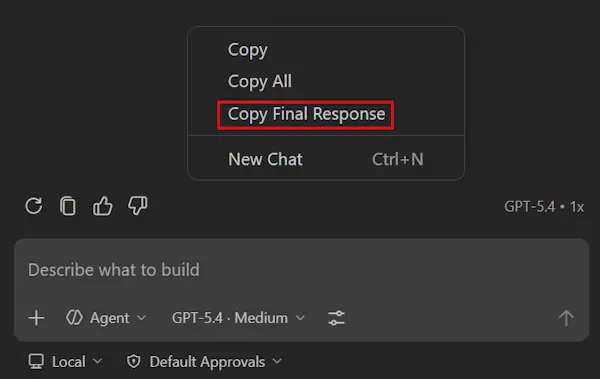
For those cases where you only want to copy the final response, there is now a Copy Final Response command in the chat context menu that copies the last Markdown section of the agent's response, after all tool calls have run.
The #codebase tool lets Copilot do a semantic search of your codebase. This can be especially useful for finding relevant code snippets in codebases with tens to hundreds of thousands of files.
When the #codebase tool was first introduced, it was designed for Copilot's ask flow: you ask a question or request an edit and Copilot produces a result directly in its response. Now that almost all Copilot interactions are agentic, with agents able to run multiple tools and iterate before producing an edit or response, much of the original #codebase design is no longer relevant.
The first important change is that #codebase is now purely used for semantic searches. Previously, it could fall back to less accurate (and less efficient) fuzzy text searches. The agent can still do text and fuzzy searches if it wants, but we want to keep #codebase purely focused on semantic searches.
We've also simplified how the codebase index is managed. This index is what enables the #codebase tool to provide semantic search results quickly. Previously, we had the concept of both a "local index" and a "remote index". The local indexes were limited to a few thousand files and weren't always semantic. The remote index was stored remotely for a given repo, could be shared across a team, and could support millions of files.
Now there's just a single state: is your codebase semantically indexed or not? No more local vs remote. Behind the scenes, some parts of the index might still be stored on your machine and some might come from remote sources, however you no longer have to manage these indexes yourself.
Here's what all of these changes mean for using Copilot:
The #codebase tool is now always semantic and provides consistent results.
Copilot automatically uses #codebase for semantic searches when it makes sense. We build indexes for you on demand and use them automatically. You do not have to manage the index yourself.
Workspaces that previously were shown as being indexed will need to be reindexed. This is typically because they were using a local, non-semantic index.
Especially large codebases without a GitHub repo might not currently be indexable. We are slowly rolling out support for indexing these as well.
Even if your workspace is not semantically indexed, we've found you can still get good results through Copilot's other search methods (text, grep, symbols).
All these changes should make working with agents faster and provide higher quality context to the models. We also believe they simplify using Copilot and understanding what tools are available to it.
For more details, see the workspace guide.
Settings: github.copilot.chat.agentDebugLog.enabled , github.copilot.chat.agentDebugLog.fileLogging.enabled
The troubleshoot skill (invoked via /troubleshoot) helps with diagnosing chat issues by analyzing agent debug logs and surfacing insights into the agent's behavior. For example, to investigate why custom instructions were ignored or responses are slow.
With this release, you can now reference any previous chat session when troubleshooting. This makes it easier to investigate issues after the fact, without needing to reproduce them.
To troubleshoot a previous session, use the /troubleshoot command and include #session in your prompt. This will trigger a session picker where you can select from a list of your previous chat sessions.
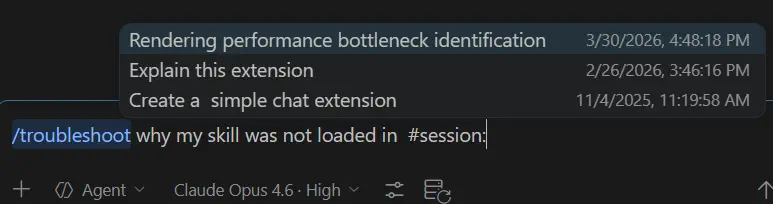
Tip: You can also attach a session by selecting
+(Add Context) > Sessions.
Our JavaScript and TypeScript support now uses TypeScript 6.0. This major update includes important fixes and improvements. Importantly, this TypeScript release also deprecates a number of older options in preparation for the TypeScript 7.0 rewrite.
You can read all about the TypeScript 6.0 release on the TypeScript blog.
Various bug fixes in the Python Environments extension for env file notifications and environment manager selection priority:
vscode-python#25867, vscode-python-environments#1347, vscode-python-environments#1393
The Python Environments extension now recommends the community Pixi extension when Pixi environments are detected, and includes Pixi in the environment manager priority order. vscode-python-environments#1291
Administrators can now use a group policy to disable the Claude agent integration in chat. When this policy is applied, the github.copilot.chat.claudeAgent.enabled This setting is managed at the organization level. Contact your administrator to change it. setting is managed by the organization and users cannot enable the Claude agent.
This policy is configured as a boolean with key Claude3PIntegration. Learn more about device management policies in the enterprise documentation.
There has been more progress on the GitHub Pull Requests extension, which enables you to work on, create, and manage pull requests and issues. New features include:
Review the changelog for the 0.134.0 release of the extension to learn about everything in the release.
Language model tools with an approval flow can now scope approval to a specific combination of arguments.
For example, the built-in "Run VS Code Command" tool can run any VS Code command. A user might feel comfortable always approving editor.action.formatDocument, but not other commands. With this API, the tool implementation can scope approval to the specific command, so users approve each command individually.
export interface LanguageModelToolConfirmationMessages {
  /**
   * When set, a button will be shown allowing the user to approve this particular
   * combination of tool and arguments. The value is shown as the label for the
   * approval option.
   *
   * For example, a tool that reads files could set this to `"Allow reading 'foo.txt'"`,
   * so that the user can approve that specific file without approving all invocations
   * of the tool.
   */
  approveCombination?: string | MarkdownString;
}
See the full API proposal for more details: Fine grain tool approval.
See an example of the API in use in the Copilot Chat extension.
None
Contributions to our issue tracking:
Contributions to vscode:
Contributions to vscode-pull-request-github:
Contributions to monaco-editor:
We really appreciate people trying our new features as soon as they are ready, so check back here often and learn what's new.
If you'd like to read release notes for previous VS Code versions, go to Updates on code.visualstudio.com.
此内容由惯性聚合(RSS阅读器)自动聚合整理,仅供阅读参考。 原文来自 — 版权归原作者所有。