


惯性聚合 高效追踪和阅读你感兴趣的博客、新闻、科技资讯
阅读原文 在惯性聚合中打开

推荐订阅源

cs.AI updates on arXiv.org
H
Hackread – Cybersecurity News, Data Breaches, AI and More
酷 壳 – CoolShell
酷 壳 – CoolShell
小众软件
小众软件
奇客Solidot–传递最新科技情报
奇客Solidot–传递最新科技情报
钛媒体:引领未来商业与生活新知
钛媒体:引领未来商业与生活新知
有赞技术团队
有赞技术团队
大猫的无限游戏
大猫的无限游戏
Security Latest
Security Latest
V
V2EX
Hugging Face - Blog
Hugging Face - Blog
IT之家
IT之家
让小产品的独立变现更简单 - ezindie.com
月光博客
月光博客
博客园 - Franky
Threat Intelligence Blog | Flashpoint
Simon Willison's Weblog
S
Securelist
T
Threatpost
Last Week in AI
Last Week in AI
P
Privacy International News Feed
S
SegmentFault 最新的问题
aimingoo的专栏
aimingoo的专栏
CTFtime.org: upcoming CTF events
MyScale Blog
MyScale Blog
P
Palo Alto Networks Blog
Cisco Talos Blog
Cisco Talos Blog
T
Tailwind CSS Blog
Blog — PlanetScale
Blog — PlanetScale
G
GRAHAM CLULEY
GbyAI
GbyAI
G
Google Developers Blog
cs.CL updates on arXiv.org
B
Blog RSS Feed
A
About on SuperTechFans
H
Help Net Security
T
Threat Research - Cisco Blogs
C
Check Point Blog
S
Schneier on Security
Google DeepMind News
T
The Exploit Database - CXSecurity.com
博客园 - 叶小钗
Scott Helme
Scott Helme
博客园 - 司徒正美
美团技术团队
W
WeLiveSecurity
O
OpenAI News
Exploit-DB.com RSS Feed
AWS News Blog
AWS News Blog
I
InfoQ

Visual Studio Code - Code Editing. Redefined.

Visual Studio Code 1.130 (Insiders) Visual Studio Code 1.131 (Insiders) Visual Studio Code 1.129 (Insiders) How Prompt Tuning Improved GPT-5.5 in VS Code Visual Studio Code 1.127 Visual Studio Code 1.128 Iterating faster with TypeScript 7 Visual Studio Code 1.126 What 50,000 Runs of a 5-Line Eval Taught Us Use your own language model key in VS Code Improving token efficiency for GitHub Copilot in VS Code December 2025 (version 1.108) November 2025 (version 1.107) October 2025 (version 1.106) September 2025 (version 1.105) August 2025 (version 1.104) July 2025 (version 1.103) June 2025 (version 1.102) May 2025 (version 1.101) April 2025 (version 1.100) March 2025 (version 1.99) Visual Studio Code 1.114 Visual Studio Code 1.116 Making agents practical for real-world development Visual Studio Code 1.111 How VS Code Builds with AI January 2026 (version 1.109) Visual Studio Code 1.113 Visual Studio Code 1.112 Visual Studio Code 1.115 Your Home for Multi-Agent Development Giving Agents a Visual Voice: MCP Apps Support in VS Code Building docfind: Fast Client-Side Search with Rust and WebAssembly Introducing the VS Code Insiders Podcast Introducing the Visual Studio Code Private Marketplace: Your Team's Secure, Curated Extension Hub 🎉 Open Source AI Editor: Second Milestone A Unified Experience for all Coding Agents Expanding Model Choice in VS Code with Bring Your Own Key Introducing auto model selection (preview) Command GitHub's Coding Agent from VS Code Open Source AI Editor: First Milestone VS Code: Open Source AI Editor Beyond the tools, adding MCP in VS Code Context is all you need: Better AI results with custom instructions February 2026 (version 1.110) Enhance productivity with AI + Remote Dev Visual Studio Code 1.117 Visual Studio Code 1.118 Visual Studio Code 1.119 Visual Studio Code 1.120 The Coding Harness Behind GitHub Copilot in VS Code Visual Studio Code 1.122 Visual Studio Code 1.123 Building Long-Distance Next Edit Suggestions Visual Studio Code 1.125 Visual Studio Code 1.121 Visual Studio Code 1.124
The Complete MCP Experience: Full Specification Support in VS Code
Security-First: The New Authorization Foundation · 2021-11-03 · via Visual Studio Code - Code Editing. Redefined.

June 12, 2025 by Harald Kirschner, Connor Peet, and Tyler Leonhardt

VS Code now supports the complete Model Context Protocol specification.

MCP co-creator David Soria Parra reflects on this milestone:

I'm excited to see what developers will build now that they have access to the full spectrum of MCP features within VS Code. The community continually impresses me with their creativity and drive to push the boundaries of what's possible.

Beyond the initial tools and workspace awareness we introduced in May, you can now use authorization, prompts, resources, and sampling. These additions transform MCP from a set of individual tools into a comprehensive standard for AI agent integrations.

The new authorization specification is the biggest leap forward. Microsoft, Anthropic, and the broader identity community—including Okta/Auth0, Stytch, and Descope—collaborated on this effort. The new specification cleanly separates MCP servers as Resource Providers from Authorization Servers, allowing developers to delegate authentication to existing identity providers rather than building their own OAuth implementations from scratch. For the technical details on how the new authorization flow works, check out Den Delimarsky's comprehensive overview.

Combined with streamable HTTP transport (which landed in our previous version), this enables remote MCP servers that can scale independently while maintaining enterprise-grade security. The GitHub MCP Server demonstrates this evolution perfectly—it's now available as a remote server with proper OAuth integration that uses VS Code's existing GitHub authentication and account management, so you can securely connect repositories and issue tracking.
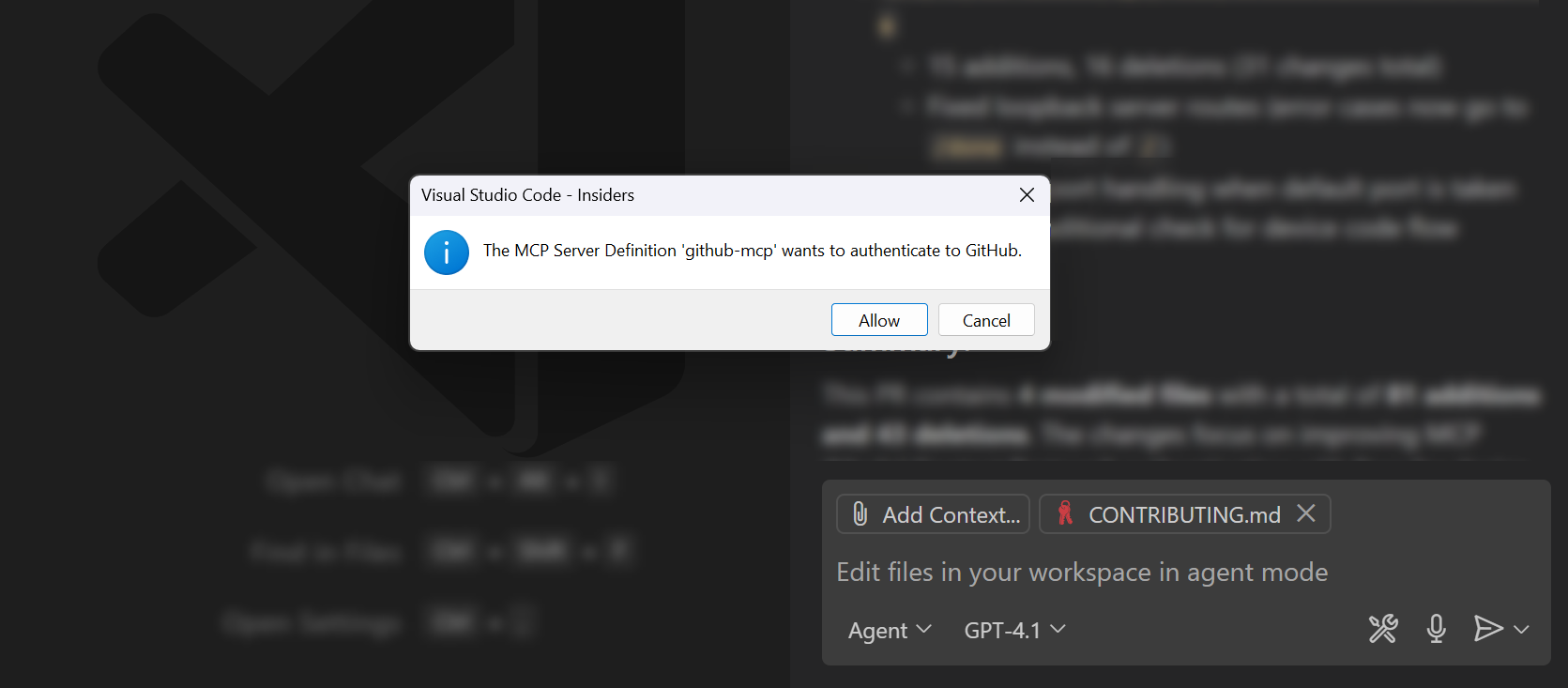
Screenshot showing the login dialog from the GitHub MCP server in VS Code.

While tools handle individual actions, Prompts deliver complete workflows. These aren't static templates—they're dynamic, context-aware starting points that servers can tailor to your current workspace and project state. When a server provides prompts, they appear directly in VS Code's slash commands next to your user-defined prompts, letting you invoke sophisticated workflows with a simple /mcp.servername.promptname command.

Screenshot of the Chat view, referencing a prompt from the Gistpad MCP server, which asks for additional input values.

Resources represent semantic information that you can interact with directly. For example, when the Playwright MCP server takes a screenshot of a web application, that image can become a resource that you can drag into your workspace, annotate, or share with teammates. When debugging tools return logs, those logs can stream live updates directly in VS Code.

Screenshot of the context picker, highlighting the option to select an MCP resource.

Perhaps the most upvoted MCP capability is Sampling, the ability for MCP servers to make their own language model requests. Instead of servers managing their own AI SDKs and API keys, they can use your existing model subscription. This enables complex reasoning and multi-agent coordination, while you maintain control over security, privacy, and costs.
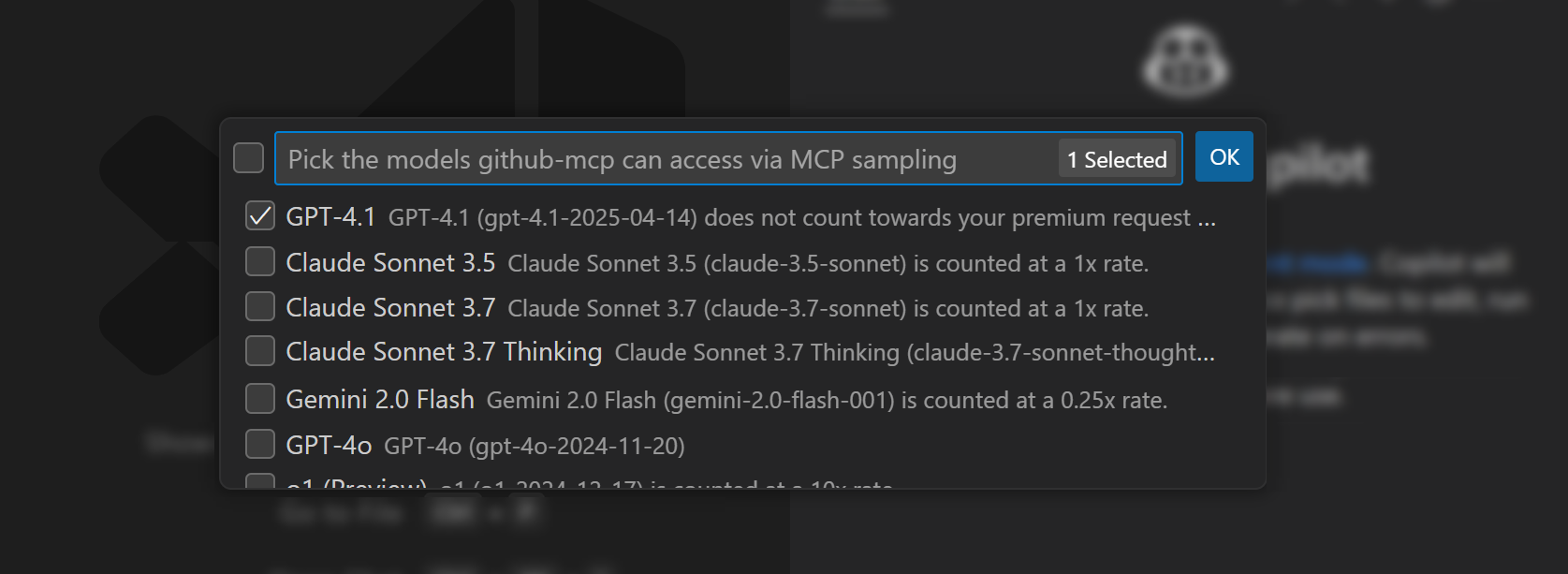
Screenshot of the model picker for indicating which models an MCP server can use for sampling.

Ready to Explore

The complete MCP experience is available now in VS Code. Try the GitHub MCP server with its new remote capabilities and VS Code authentication integration, explore servers that provide rich prompts and resources, or build your own server that takes advantage of the full specification.

To get started, check out the VS Code MCP documentation, browse the official server repository, or dive into the Model Context Protocol specification.

The MCP ecosystem now has a client that provides the complete foundation to build on.

Happy Coding!