



惯性聚合 高效追踪和阅读你感兴趣的博客、新闻、科技资讯
阅读原文 在惯性聚合中打开

推荐订阅源

Threat Intelligence Blog | Flashpoint
K
KPMG report finds enterprise disconnect between AI and its ROI | CIO
T
Threat Research - Cisco Blogs
C
CERT Recently Published Vulnerability Notes
cs.CL updates on arXiv.org
L
Lohrmann on Cybersecurity
D
Darknet – Hacking Tools, Hacker News & Cyber Security
K
Kaspersky official blog
C
Cybersecurity and Infrastructure Security Agency CISA
C
Cisco Blogs
V
Vulnerabilities – Threatpost
L
LINUX DO - 热门话题
G
GRAHAM CLULEY
The GitHub Blog
The GitHub Blog
NISL@THU
NISL@THU
AWS News Blog
AWS News Blog
博客园 - 【当耐特】
奇客Solidot–传递最新科技情报
奇客Solidot–传递最新科技情报
freeCodeCamp Programming Tutorials: Python, JavaScript, Git & More
阮一峰的网络日志
阮一峰的网络日志
Cyberwarzone
Cyberwarzone
V
V2EX
Know Your Adversary
Know Your Adversary
P
Palo Alto Networks Blog
月光博客
月光博客
MongoDB | Blog
MongoDB | Blog
Scott Helme
Scott Helme
A
Arctic Wolf
美团技术团队
S
Schneier on Security
P
Proofpoint News Feed
G
Google Developers Blog
The Hacker News
The Hacker News
S
Securelist
Microsoft Security Blog
Project Zero
Project Zero
T
The Exploit Database - CXSecurity.com
量子位
T
Threatpost
Spread Privacy
Spread Privacy
Help Net Security
Help Net Security
B
Blog
WordPress大学
WordPress大学
B
Blog RSS Feed
J
Java Code Geeks
cs.AI updates on arXiv.org
Blog — PlanetScale
Blog — PlanetScale
Simon Willison's Weblog
Y
Y Combinator Blog
Cloudbric
Cloudbric

Visual Studio Code - Code Editing. Redefined.

Visual Studio Code 1.130 (Insiders) Visual Studio Code 1.129 (Insiders) How Prompt Tuning Improved GPT-5.5 in VS Code Visual Studio Code 1.127 Visual Studio Code 1.128 Iterating faster with TypeScript 7 Visual Studio Code 1.126 What 50,000 Runs of a 5-Line Eval Taught Us Use your own language model key in VS Code Improving token efficiency for GitHub Copilot in VS Code December 2025 (version 1.108) November 2025 (version 1.107) October 2025 (version 1.106) September 2025 (version 1.105) August 2025 (version 1.104) July 2025 (version 1.103) June 2025 (version 1.102) May 2025 (version 1.101) April 2025 (version 1.100) March 2025 (version 1.99) Visual Studio Code 1.114 Visual Studio Code 1.116 Making agents practical for real-world development Visual Studio Code 1.111 How VS Code Builds with AI January 2026 (version 1.109) Visual Studio Code 1.113 Visual Studio Code 1.112 Visual Studio Code 1.115 Your Home for Multi-Agent Development Building docfind: Fast Client-Side Search with Rust and WebAssembly Introducing the VS Code Insiders Podcast Introducing the Visual Studio Code Private Marketplace: Your Team's Secure, Curated Extension Hub 🎉 Open Source AI Editor: Second Milestone A Unified Experience for all Coding Agents Expanding Model Choice in VS Code with Bring Your Own Key Introducing auto model selection (preview) Command GitHub's Coding Agent from VS Code Open Source AI Editor: First Milestone The Complete MCP Experience: Full Specification Support in VS Code VS Code: Open Source AI Editor Beyond the tools, adding MCP in VS Code Context is all you need: Better AI results with custom instructions February 2026 (version 1.110) Enhance productivity with AI + Remote Dev Visual Studio Code 1.117 Visual Studio Code 1.118 Visual Studio Code 1.119 Visual Studio Code 1.120 The Coding Harness Behind GitHub Copilot in VS Code Visual Studio Code 1.122 Visual Studio Code 1.123 Building Long-Distance Next Edit Suggestions Visual Studio Code 1.125 Visual Studio Code 1.121 Visual Studio Code 1.124
Giving Agents a Visual Voice: MCP Apps Support in VS Code
Microsoft · 2021-11-03 · via Visual Studio Code - Code Editing. Redefined.

January 26, 2026 by Harald Kirschner and Connor Peet

AI coding agents have become remarkably capable. Out of the box, they search your codebase, edit files, run terminal commands, and respond to compile errors. Add MCP servers, and they can query databases, browse the web with Playwright, summarize GitHub issues, and connect to your cloud platforms. Models can even process images—you can paste a screenshot to debug a layout issue, or have Playwright capture browser state for verification.

Agents format tables, structure data, and render ASCII diagrams. But none of this is interactive. When you need to reorder a list, confirm a destructive action with specifics, or explore a visualization, you're back to describing things in sentences.

Today, the MCP community is announcing MCP Apps, the first official MCP extension. Tool calls can now return interactive UI components that render directly in the conversation: dashboards, forms, visualizations, multi-step workflows. This creates opportunities for a richer and more effective human-agent collaboration.

VS Code is the first major AI code editor with full MCP Apps support. Available now in VS Code Insiders—our daily build where new features land first. Install Insiders to try MCP Apps today, and expect this to roll out to VS Code Stable in next week's release.

Demos: Where Interaction Beats Text

We've built a few demos to show where agents benefit from richer collaboration with developers. Since MCP Apps is new, we look forward to seeing more adoption across the ecosystem.

Interactive List Reordering

Today: Agent proposes a sorted order based on its analysis. You read the text output, request adjustments, and go back and forth until the order matches your preferences.

With MCP Apps: Agent displays a drag-and-drop interface alongside its suggested order. You reorder items visually, or select "Ask AI to Sort" to let the agent apply its reasoning.
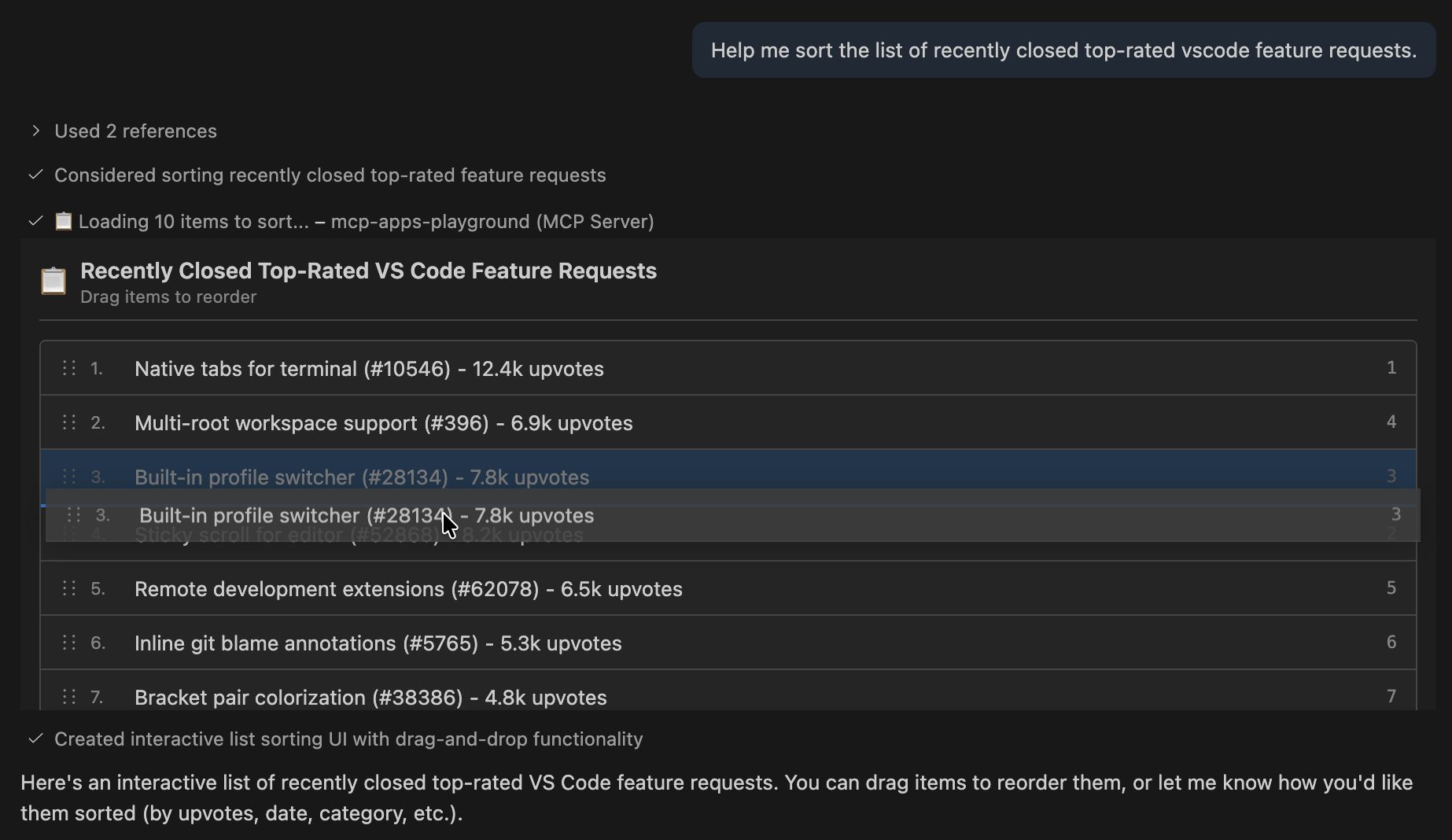
Screenshot showing an interactive task sorting UI with drag-and-drop in the VS Code agent panel.

Performance Profiler Visualization

Today: Agent analyzes CPU profile data and summarizes bottlenecks in text. You see the summary but have no way to validate the hypotheses or explore areas the agent might have overlooked.

With MCP Apps: Agent renders an interactive flame graph. You drill into call stacks, hover for timing details, and confirm or reject the agent's analysis with your own domain knowledge.
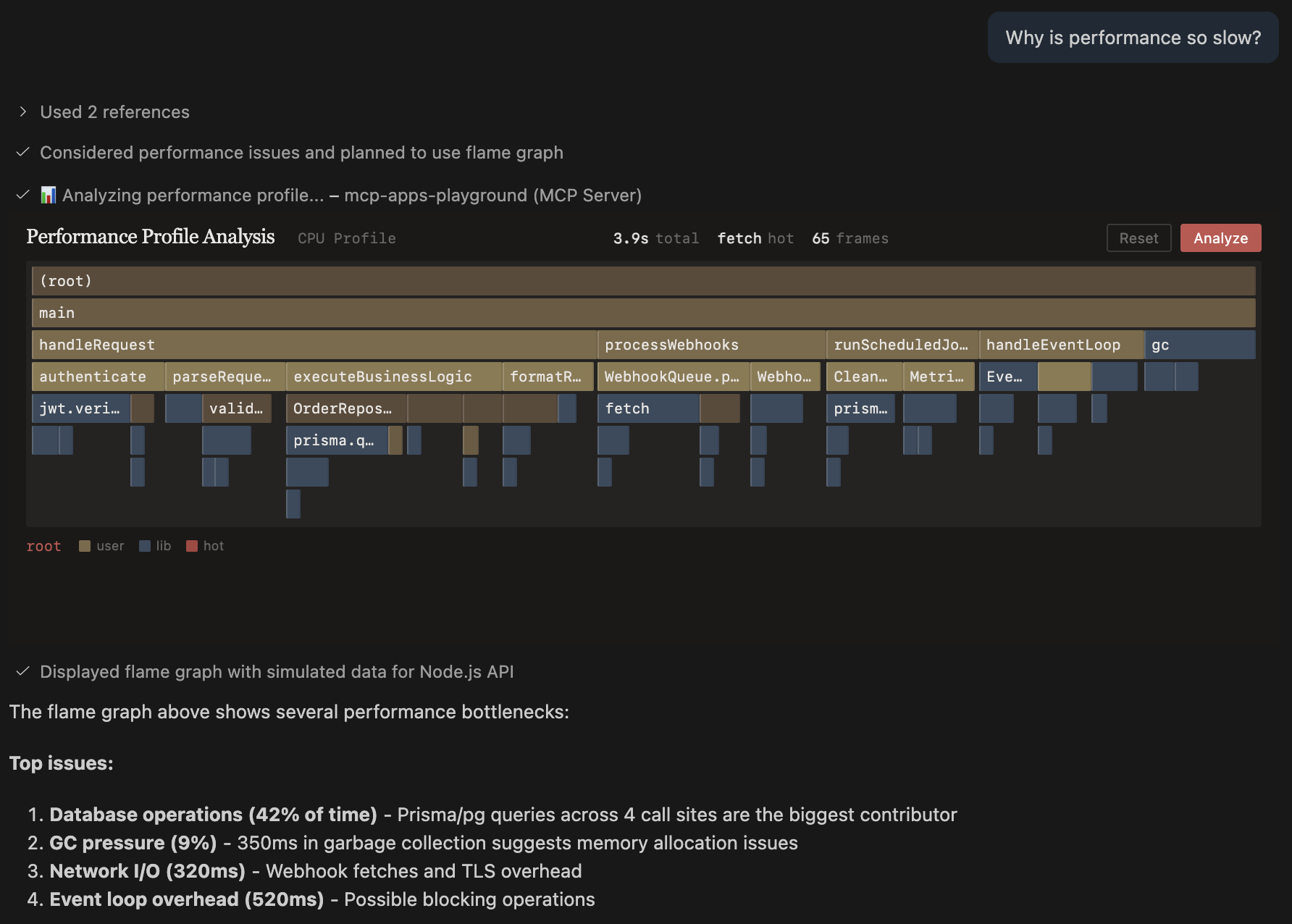
Screenshot showing an interactive flame graph visualization rendered by an MCP App.

Feature Flag Selector

Today: Agent fetches flag configuration and lists what exists. You cross-reference mentally with your deployment context and ask the agent to generate integration code in a separate step.

With MCP Apps: Agent displays a searchable flag picker with live environment status. You select flags, switch between prod/staging/dev views, and generate SDK code—all in one interaction.
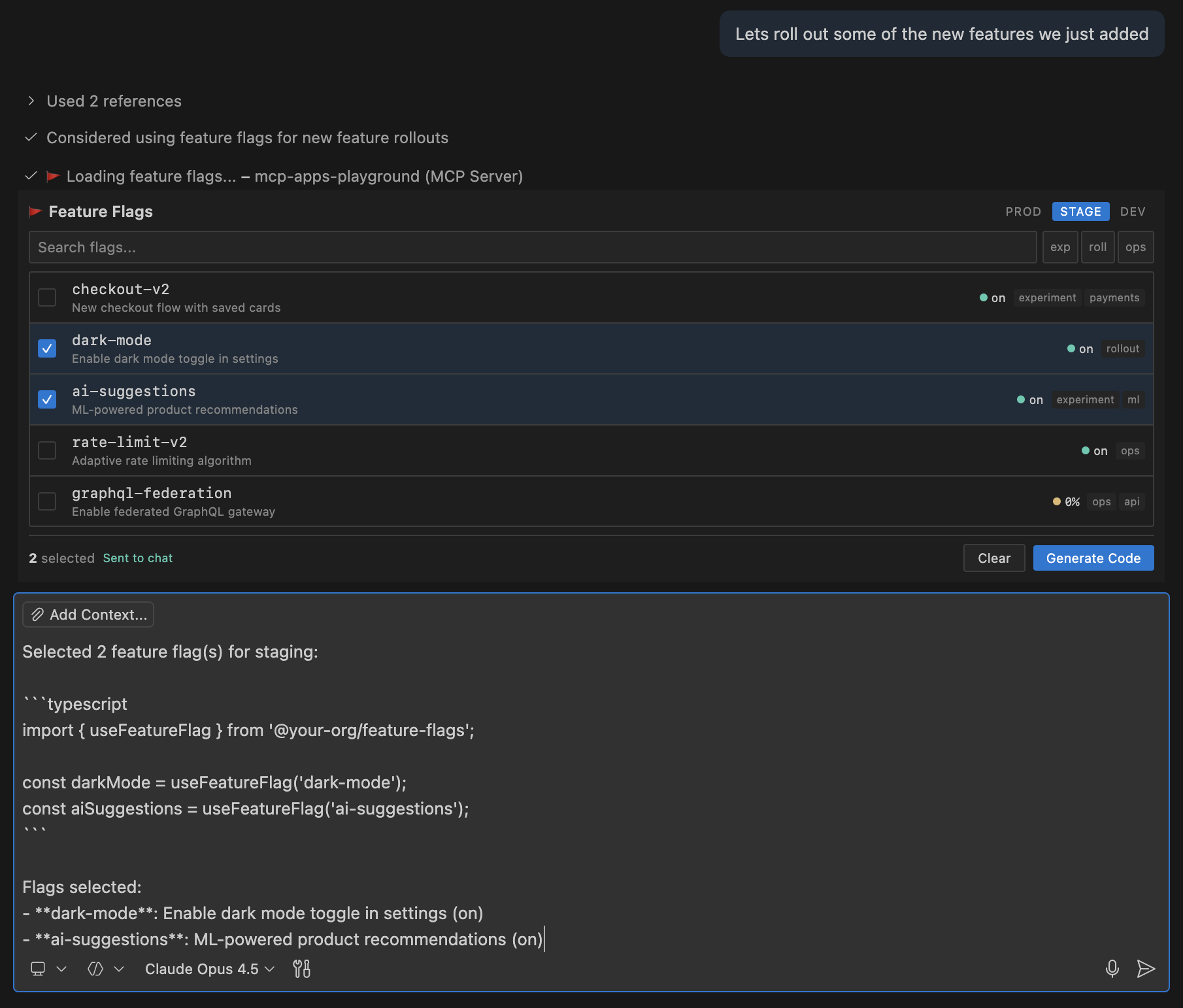
Screenshot showing a feature flag selector with environment tabs in the agent panel.

Partner Spotlight: Storybook

Storybook has added MCP Apps support to their open source MCP server. Simply ask an agent to "build a login form using our design system" instead of describing the desired result in extensive detail, and the agent renders an interactive component preview directly in VS Code.

"We've been working with the VS Code team on MCP Apps and we're excited about the results. Users can now preview Storybook stories directly in the agent chat, eliminating the need to navigate between the chat and their Storybook to review changes." – Jeppe Reinhold (Storybook core contributor, Chromatic)

A Natural Fit for VS Code

VS Code has always been more than a text editor. Extensions bring UI and interaction into the editor through webview panels, custom editors, and sidebar views. Jupyter notebooks showed that mixing code with rich output transforms workflows. GitHub Copilot agents gave AI the ability to work autonomously in your workspace.

MCP Apps is the next layer: giving agents a visual voice to communicate back. You see what's happening, make choices with confidence, and stay in control.

Get Started

If you're building MCP servers, add MCP Apps to make them more interactive. VS Code is where you can develop and debug them with full MCP support. Join today's VS Code livestream with Den Delimarsky, MCP core maintainer, for live demos and Q&A.

Try building your first MCP App and share what you create with the community. Sometimes showing is better than telling—now your agents can do both.

Happy Coding! 💙