





Follow us on LinkedIn, X, Bluesky
Release date: May 13, 2026
Downloads: Windows: x64 Arm64 | Mac: Universal Intel silicon | Linux: deb rpm tarball Arm snap
Welcome to the 1.120 release of Visual Studio Code. This release brings the Agents window to Stable, improves BYOK model visibility and control, and adds Markdown quality-of-life improvements and agent safety features. Here are the highlights for this release:
Agents window in Stable: Work in an agents-first way across all your projects with the new Agents window.
BYOK improvements: Track and optimize token usage and configure thinking effort for your BYOK models.
Markdown improvements: Review Markdown content instead of syntax with Markdown preview for diffs.
Command risk assessment: Assess the risk of terminal commands before they run.
Token optimization: Reduce context window usage by compressing large terminal output.
Happy Coding!
While VS Code is already used by millions of developers for agentic coding, its editor layout is primarily optimized for single-task, single-workspace workflows. To enable our users (and ourselves!) to work with multiple agents across multiple projects, we created a new type of window: Agents.
The new Agents window is a companion to the editor you already know: purpose-built for agent-driven development, with a dedicated space to explore, iterate on, and review tasks across multiple projects, and seamlessly switch between them. And because VS Code is built for developer choice and flexibility, the Agents window lets you pick your agent harness, run agents on remote machines, and configure the environment the way you want it - color themes, keybindings, and extensions included.
The Agents window has been available as part of VS Code Insiders in our past few releases, and with this release, it's now available as a preview in VS Code Stable.
You can open the Agents window in several ways, including the "Open in Agents" button in the VS Code title bar. To learn more about how it works and what you can do with it, visit the Agents window documentation.
If you've already been using the Agents window in Insiders, thank you! We've continued to act on your feedback, with the following improvements landing this week:
Your feedback continues to be a great help in shaping Agents. Please file issues on GitHub or browse existing issues.
Extensions that contribute only static content, such as themes, grammars, languages, and keybindings, activate in the Agents window automatically. We also tested the top 100 Marketplace extensions, and some of those activate as well when installed in your default VS Code profile.
For other extensions, you can opt them in by ID with the extensions.supportAgentsWindow setting. Any extension you enable this way needs to be installed in your default VS Code profile.
"extensions.supportAgentsWindow": {
    "myextension.id": true
}
While we're still working on the broader extension story, we're looking to collaborate with extension authors on what extension enablement in the Agents window unlocks and how various extensions should behave in this environment. Whether you'd like to ideate on new scenarios that take advantage of running agents across projects, or share feedback on how your existing extension behaves in the Agents window, we'd love to collaborate with you through GitHub issues.
Agent plugins installed with the GitHub Copilot CLI are picked up automatically by VS Code, so a single copilot plugin install covers both surfaces. Previously, you had to install the same plugin separately in VS Code or add its path to
chat.plugins.paths
.
With Bring Your Own Key (BYOK), you can use your own API keys from providers like Anthropic, OpenAI, and others to take advantage of your own billing or model hosting options. To learn more, see the BYOK documentation.
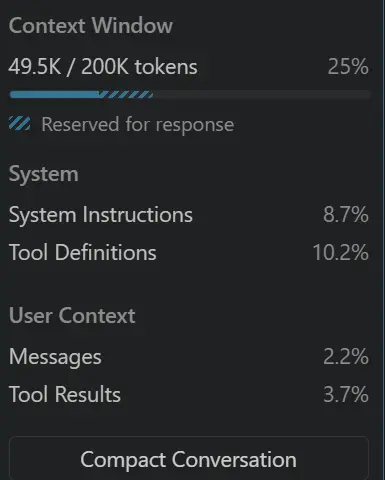
Managing a model's context window is key to getting good results and controlling costs. The model can lose track of important details from the conversation, and token usage can increase costs. This release brings better visibility into token usage for BYOK models, so you can keep an eye on the context window.
Previously, when chatting with a model you brought via your own API key (Anthropic, OpenAI, or other), the control always displayed 0% and a zero-token count because token accounting was only working for built-in models.
The context window control in the Chat view now shows accurate token usage and percent-full for BYOK models.
Reasoning-capable language models allow you to configure their "thinking effort", which is a way to trade off between response quality and speed/cost. You can learn more in the thinking effort documentation.
In this release, you can now configure the thinking effort for BYOK reasoning models directly from the model picker in the Chat view. The selected effort is forwarded to the model on every request, letting you trade off latency and cost against answer quality.
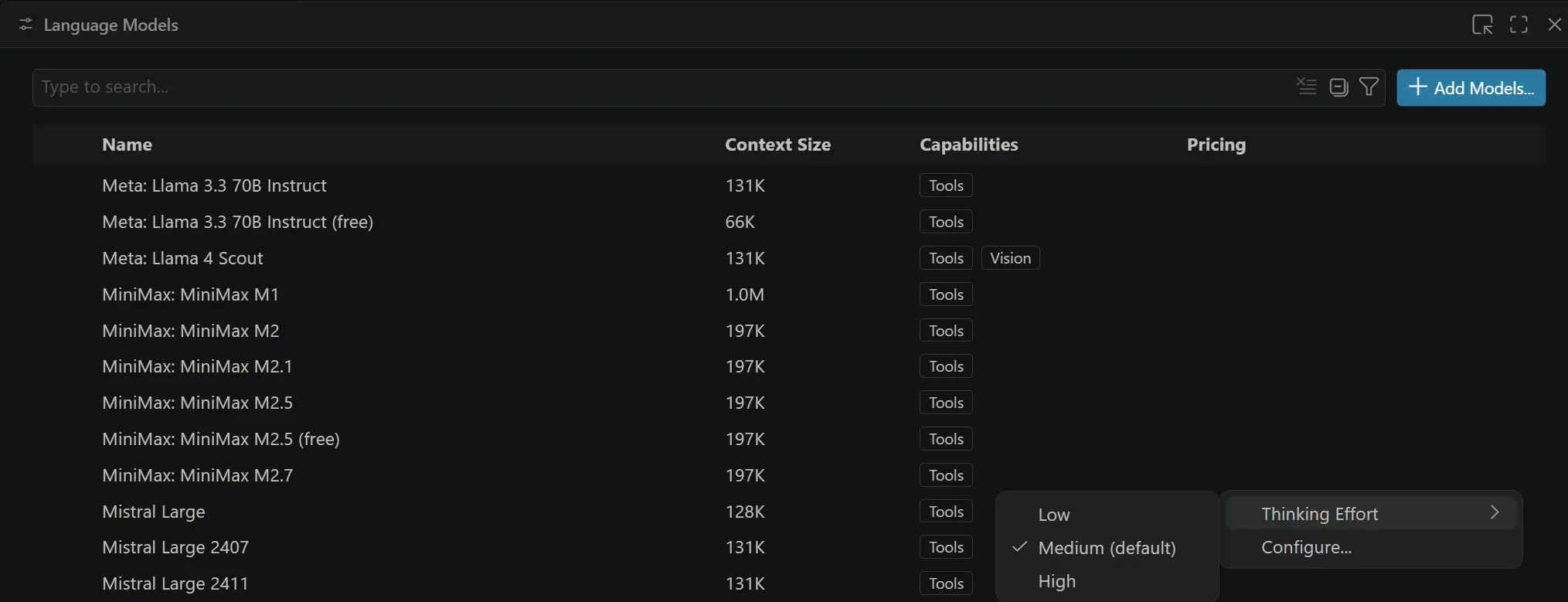
Applies to: Bring-Your-Own-Key (BYOK) reasoning models served via OpenAI-compatible endpoints (OpenAI, xAI (Grok), OpenRouter, and custom OpenAI / Azure OpenAI deployments). Anthropic models already supported this; the control is now consistent across providers.
The model picker in the Chat view now groups models by their provider, making it easier to find the model you want when you have access to models from multiple sources. You can also search for models by name.
Recently used models now display the provider name in grey text alongside the model name, so you can quickly distinguish between similarly named models from different providers.
Tip
You can quickly access the models by typing /models in the chat input.
Setting: chat.tools.compressOutput.enabled
Long terminal output from commands like git diff, ls -l, and npm install can consume a large share of the model's context window, which leaves less room for your code and the agent's reasoning.
When you enable the
chat.tools.compressOutput.enabled
setting, VS Code post-processes the output of these commands before sending it to the model. Large unchanged hunks in diffs are collapsed, lockfile and snapshot diffs are dropped, ls -l is reduced to entry names, and npm install progress bars, deprecation warnings, and audit summaries are stripped.
A short banner is prepended to any compressed output, so the model can see which filters fired and how to disable compression if it needs the raw text.
Setting: chat.tools.riskAssessment.enabled
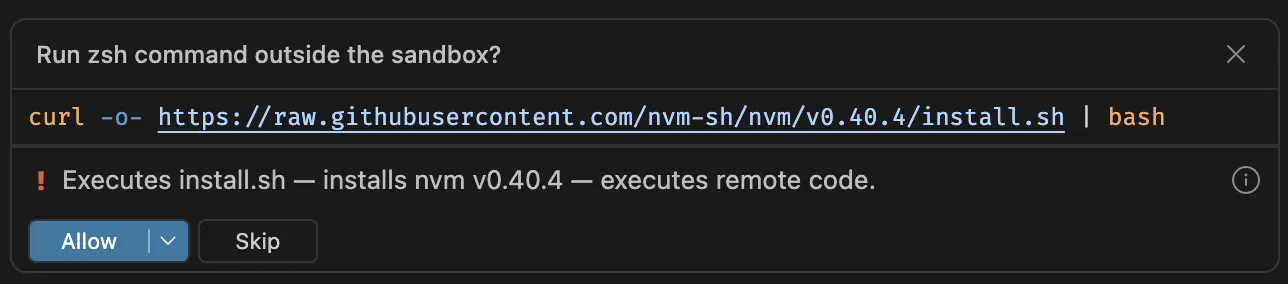
To help you decide quickly whether a command is worth a closer look, terminal command confirmations now include a risk badge with an AI-generated explanation of what the command does.
Each badge shows one of three levels along with a one-sentence summary tailored to the specific command:
Setting: chat.planWidget.inlineEditor.enabled
When you use plan mode with the Claude agent or the Copilot CLI, VS Code shows an inline plan control that lets you review and shape the plan before the agent starts executing. This release brings several improvements to that flow:
When you open a Markdown file from the Source Control view, you can view the diff using VS Code's rendered Markdown preview instead of the raw source.
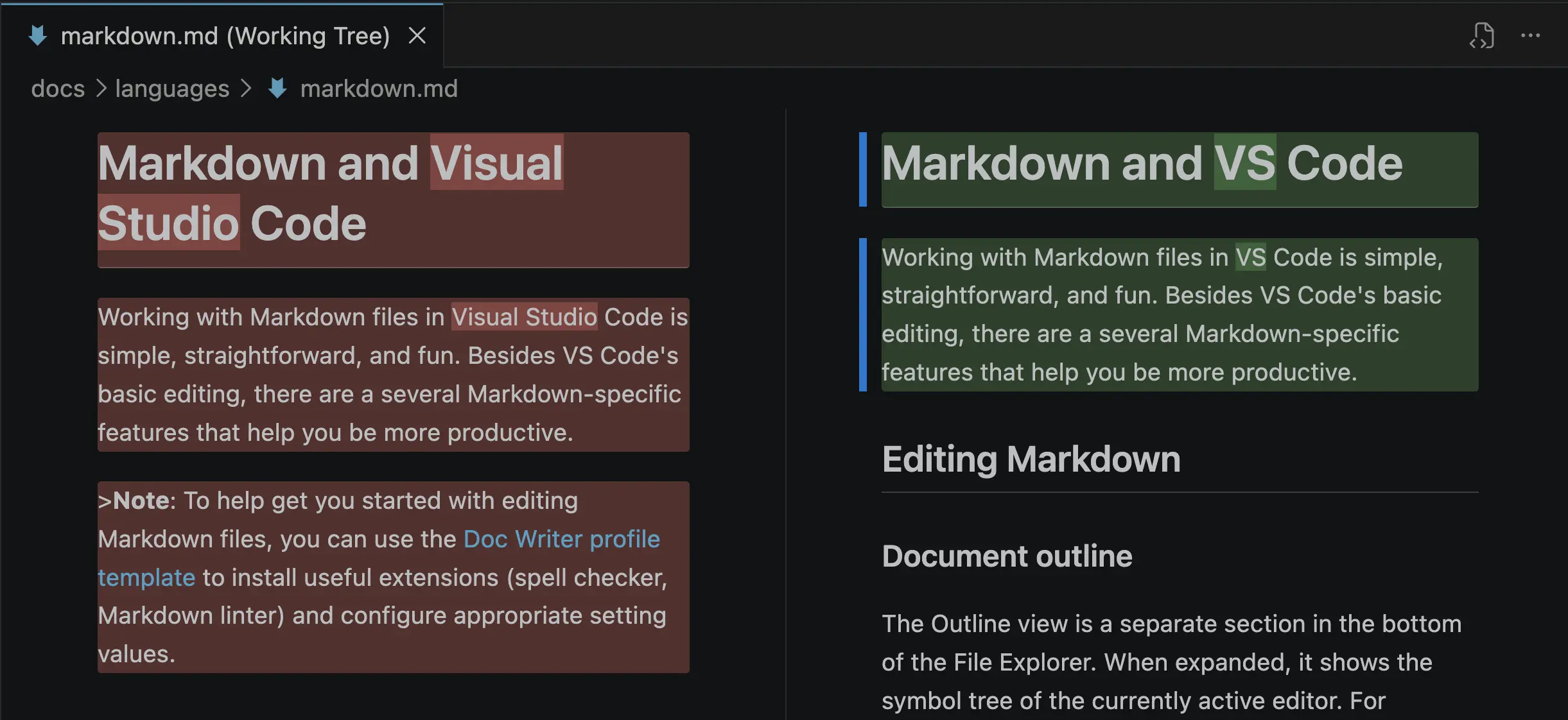
This makes it much easier to spot meaningful changes, such as updated headings, new sections, modified images, or restructured lists, without having to mentally parse Markdown syntax line by line.
The diff Markdown preview supports both a side-by-side diff view and an inline view.
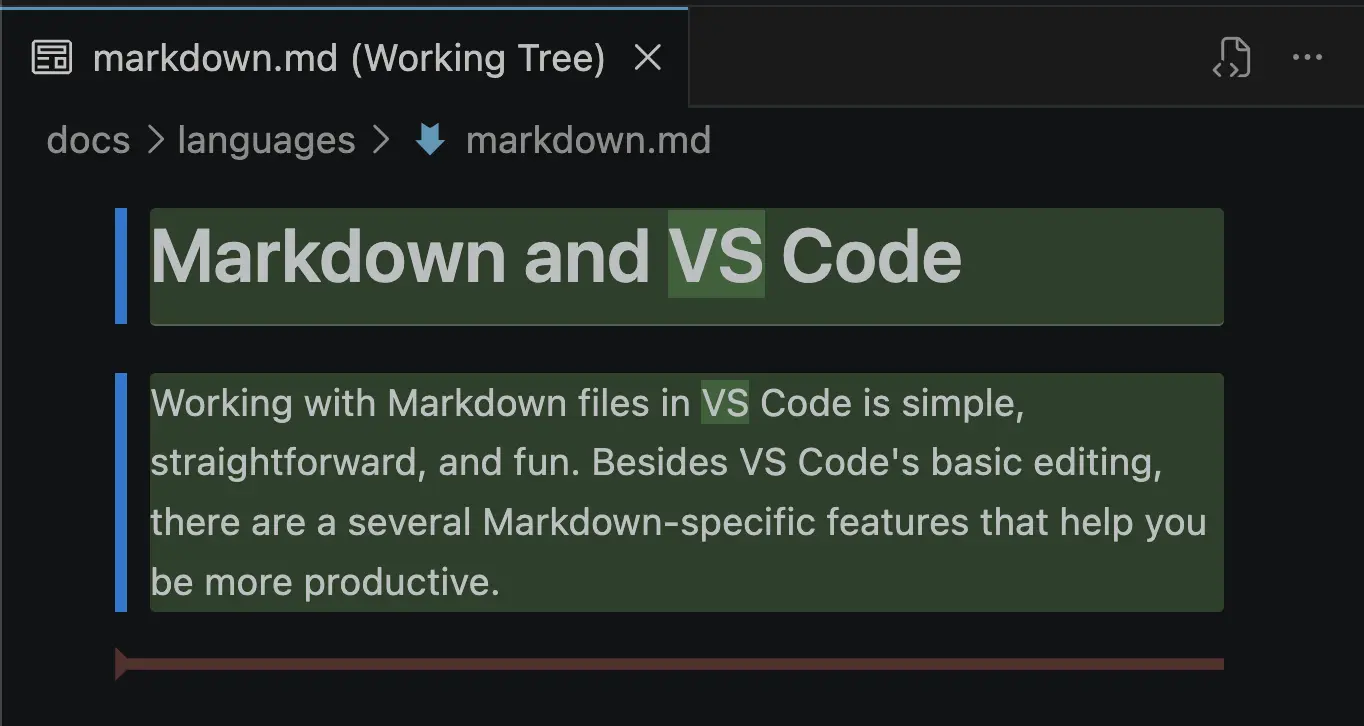
To try it, open a Markdown diff from Source Control (or any other diff editor) and use Reopen Editor With... to switch to the Markdown preview diff view. You can also open diffs in the Markdown preview by default with the workbench.diffEditorAssociations setting:
"workbench.diffEditorAssociations": {
  "*.md": "vscode.markdown.preview.editor"
}
This feature is still a preview, so you might run into issues. We think it will be especially useful for reviewing documentation changes from agents or pull requests.
VS Code's built-in Markdown preview has been around for a while and a few of the original features aren't as necessary as they once were. This iteration we decided to disable two of these features by default:
markdown.preview.doubleClickToSwitchToEditor
: Double-clicking in the preview switches back to the source editor. Users often found it confusing as they wanted to use double click to make selections. We now have features like Reopen With that largely replace this functionality
markdown.preview.markEditorSelection : Marks the currently selected line in the editor. We think it's less useful for modern workflows.
You can re-enable these settings if you prefer the previous behavior.
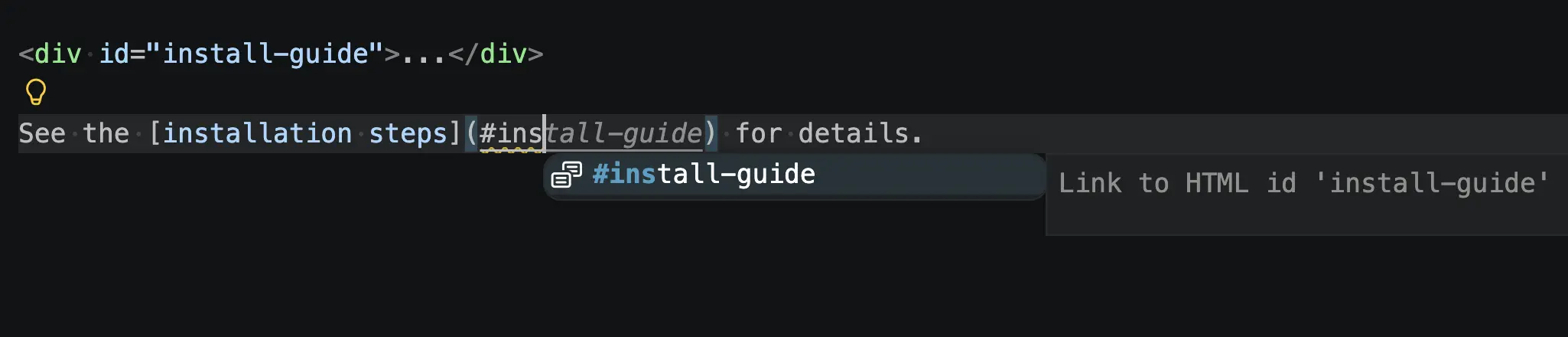
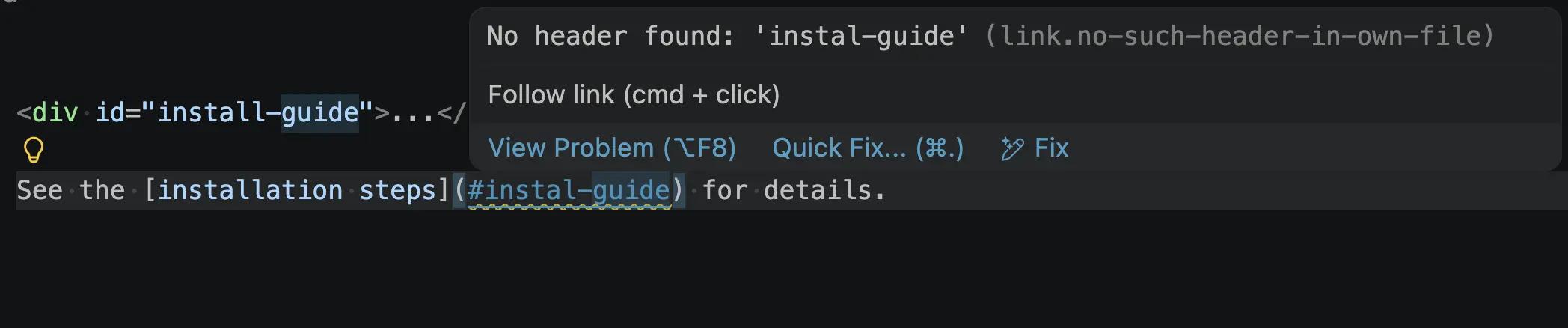
Our built-in Markdown path completions and link validation now recognize id attributes from HTML elements in Markdown files.
<div id="install-guide">...</div>

See the [installation steps](#_install-guide) for details.
Links for these IDs are now suggested in completions:
They are also used for link validation:
Markdown tables now support basic smart selection. Use Expand Selection (⌃⇧⌘→ (Windows, Linux Shift+Alt+Right)) to grow the selection from a cell to its row and then to the full table, and Shrink Selection (⌃⇧⌘← (Windows, Linux Shift+Alt+Left)) to step back down.
The new customEditorDiffs proposed API lets custom editors render diffs with a dedicated diff UI. This is what powers the new Markdown preview in the diff view, and it opens up a much nicer compare experience where a textual diff of the underlying source isn't useful.
A custom editor provider can opt in by implementing one or both of the following on CustomReadonlyEditorProvider or CustomTextEditorProvider:
resolveCustomEditorInlineDiff(documents, webviewPanel, token): render the diff in a single webview, with both the original and modified documents available to the extension.
resolveCustomEditorSideBySideDiff(documents, webviewPanels, token): render the diff using two webviews, one for each side, with VS Code coordinating layout and scroll sync.
Combined with diffEditorPriority, extensions now have full control over whether their custom editor handles diffs and how those diffs are presented. See issue #138525 to follow along and provide feedback.
Custom editor extensions can now set different default priorities for editing, diffing, and merging a file type. The customEditors contribution accepts two new optional fields, diffEditorPriority and mergeEditorPriority, alongside the existing priority.
"contributes": {
  "customEditors": [
    {
      "viewType": "myExtension.editor",
      "displayName": "My Custom Editor",
      "selector": [
        { "filenamePattern": "*.custom" }
      ],
      "priority": "default",
      "diffEditorPriority": "option",
      "mergeEditorPriority": "option"
    }
  ]
}
The above contribution makes it so that opening a *.custom file uses the custom editor, but opening a diff from source control uses the normal text diff view.
This API is still proposed. Try it out and share feedback in issue #292379.
The new documentDiff proposed API exposes VS Code's built-in diff algorithm to extensions via workspace.getTextDiff(original, modified, options?). It returns a streaming async iterable of line-level changes plus a complete promise with summary information (identical, may-be-incomplete, and optional move detection). Inner character-level ranges are included on each change.
This is especially useful for custom diff editors (see Custom editor diffs) so they can render exactly the same diffs as the built-in editor instead of shipping their own algorithm.
const diff = vscode.workspace.getTextDiff(originalDoc, modifiedDoc, {
  ignoreTrimWhitespace: true,
  computeMoves: false
});

for await (const change of diff.changes) {
  // change.originalRange, change.modifiedRange, change.innerChanges
}

const { identical, mayBeIncomplete, moves } = await diff.complete;
Track progress and provide feedback in issue #315174.
There has been more progress on the GitHub Pull Requests extension, which enables you to work on, create, and manage pull requests and issues. New features include:
"githubIssues.issueBranchTitle" now supports the ${issueType} template variable.Review the changelog for the 0.144.0 release of the extension to learn about everything in the release.
Contributions to our issue tracking:
Contributions to vscode:
Contributions to vscode-pull-request-github:
We really appreciate people trying our new features as soon as they are ready, so check back here often and learn what's new.
If you'd like to read release notes for previous VS Code versions, go to Updates on code.visualstudio.com.
此内容由惯性聚合(RSS阅读器)自动聚合整理,仅供阅读参考。 原文来自 — 版权归原作者所有。