惯性聚合 高效追踪和阅读你感兴趣的博客、新闻、科技资讯
阅读原文 在惯性聚合中打开

推荐订阅源

Forbes - Security
Forbes - Security
OSCHINA 社区最新新闻
OSCHINA 社区最新新闻
L
LangChain Blog
量子位
GbyAI
GbyAI
B
Blog RSS Feed
月光博客
月光博客
人人都是产品经理
人人都是产品经理
腾讯CDC
Recent Announcements
Microsoft Azure Blog
I
InfoQ
The Cloudflare Blog
D
Docker
Cyberwarzone
Cyberwarzone
U
Unit 42
NISL@THU
NISL@THU
C
Check Point Blog
B
Blog
大猫的无限游戏
大猫的无限游戏
Cisco Talos Blog
Cisco Talos Blog
Recorded Future
Recorded Future
H
Hackread – Cybersecurity News, Data Breaches, AI and More
J
Java Code Geeks
G
GRAHAM CLULEY
Engineering at Meta
Engineering at Meta
酷 壳 – CoolShell
酷 壳 – CoolShell
博客园 - 叶小钗
P
Proofpoint News Feed
F
Fortinet All Blogs
V
V2EX
T
Threat Research - Cisco Blogs
T
Threatpost
S
SegmentFault 最新的问题
Know Your Adversary
Know Your Adversary
雷峰网
雷峰网
CTFtime.org: upcoming CTF events
博客园 - 司徒正美
P
Privacy & Cybersecurity Law Blog
Cyber Security Advisories - MS-ISAC
TaoSecurity Blog
TaoSecurity Blog
Latest news
Latest news
Apple Machine Learning Research
cs.AI updates on arXiv.org
Y
Y Combinator Blog
P
Privacy International News Feed
L
Lohrmann on Cybersecurity
AWS News Blog
AWS News Blog
G
Google Developers Blog
美团技术团队

Mapping the <mark>Internet</mark> on Netlas: Comprehensive Internet-Wide Scanning & OSINT Platform

Weaponized RMM: Hunting the Adversary Abuse of Remote Monitoring Tools Device Code Phishing: Technical Analysis and Proactive Hunting via Netlas Discovering Data Exposure with Netlas Telegram Bot API Abuse - Netlas Blog Using OWASP Amass with Netlas Module - Netlas Blog How we hunt C2 infrastructure at RST Cloud using Netlas - Netlas Blog Netlas Updates Terms and API & Data License Agreement - Netlas Blog Top 10 Hacking Devices for Ethical Hackers in 2026 - Netlas Blog Inside ClickFix: How Fake Prompts Took Over the Web Top 10 Critical Threat Actors to Watch in 2026: Ransomware, APTs & Defensive Strategies - Netlas Blog Bug Bounty 101 - A Complete Bug Bounty Roadmap for Beginners (2026) - Netlas Blog Supply Chain Attack - How Attackers Weaponize Software Supply Chains - Netlas Blog The Evolution of C2: Centralized to On-Chain - Netlas Blog From Starlink to Star Wars - The Real Cyber Threats in Space - Netlas Blog LLM Vulnerabilities: Why AI Models Are the Next Big Attack Surface - Netlas Blog When AI Turns Criminal: Deepfakes, Voice-Cloning & LLM Malware - Netlas Blog Zero-Click Exploits - Netlas Blog When Patches Fail: An Analysis of Patch Bypass and Incomplete Security - Netlas Blog I Analysed Over 3 Million Exposed Databases Using Netlas - Netlas Blog Post-Quantum Now: From AES & RSA to ML-KEM Hybrids - Netlas Blog Bug Bounty 101: Top 10 Reconnaissance Tools - Netlas Blog Mapping Dark Web Infrastructure - Netlas Blog Top Vibe-Coding Security Risks - Netlas Blog From Chaos to Control: Kanvas Incident Management Tool - Netlas Blog Bug Bounty 101: The Best Courses to Get Started in 2025 - Netlas Blog I, Robot + NIST AI RMF = Complete Guide on Preventing Robot Rebellion - Netlas Blog The $1.5B Bybit Hack & How OSINT Led to Its Attribution - Netlas Blog Hannibal Stealer: A Deep Technical Analysis - Netlas Blog Proactive Threat Hunting: Techniques to Identify Malicious Infrastructure - Netlas Blog The Pyramid of Pain: Beyond the Basics - Netlas Blog SOCMINT: Intelligence in the Social Media Era - Netlas Blog Hannibal Stealer vs. Browser Security - Netlas Blog The Largest Data Breach Ever? How Hackers Stole 16 Billion Credentials - Netlas Blog DNS Cache Poisoning – Is It Still Relevant? - Netlas Blog Modern Cybercrime: Who’s Behind It and Who’s Stopping It - Netlas Blog AI-Driven Attack Surface Discovery - Netlas Blog Netlas vs Urlscan: Tools Comparison - Netlas Blog Track Adversary Infrastructure Challenge 2025 Recap - Netlas Blog What is Threat Intelligence - Netlas Blog Netlas vs IPinfo: Tools Comparison - Netlas Blog Best Nmap Alternatives - Netlas Blog Whois History: How to Check the Domain Owner History - Netlas Blog Top WHOIS & RDAP Tools for Fast IP Address Lookup - Netlas Blog ASN Lookup Explained: Tools, Methods & Insights - Netlas Blog How to Detect CVEs Using Nmap Vulnerability Scan Scripts - Netlas Blog Nmap Cheat Sheet: Top 10 Scan Techiques - Netlas Blog Netlas vs ZoomEye: Platforms Comparison - Netlas Blog Top 6 Most Widely Used Port Scanners in Cybersecurity - Netlas Blog FAQ: Understanding Root DNS Servers and the Root Zone - Netlas Blog Domain Recon: Must-Know Tools for Security Professionals - Netlas Blog DNS History: Exploring Domains Past by Inspecting DNS Trails - Netlas Blog DNSSEC: Should You Use It? An Expert’s View on the Pros, Cons, and When to Implement - Netlas Blog Which DNS Servers Offer the Best Balance of Speed, Security, and Privacy? - Netlas Blog theHarvester: a Classic Open Source Intelligence Tool - Netlas Blog - Netlas Blog Top 15 OSINT Tools for Expert Intelligence Gathering - Netlas Blog A Deep Dive into the Open Web Application Security Project Top 10 Vulnerabilities - Netlas Blog Using Subfinder with Netlas Module - Netlas Blog Netlas Chrome and Firefox Extensions - Netlas Blog Netlas vs Censys: Platforms Comparison - Netlas Blog OSINT in Cybersecurity: Exploring Its Spectrum and Tech - Netlas Blog Best Honeypots for Detecting Network Threats - Netlas Blog Using Maltego with Netlas Module - Netlas Blog Using theHarvester with Netlas - Netlas Blog Using TLDFinder with Netlas - Netlas Blog Netlas vs Fofa: Platforms Comparison - Netlas Blog Netlas vs Shodan: Platforms Comparison - Netlas Blog Google Dorking in Cybersecurity - Netlas Blog 7 Tools for Web Penetration Testing - Netlas Blog Using DNS History in Cybersecurity - Netlas Blog Mastering Online Camera Searches - Netlas Blog Best Attack Surface Visualization Tools - Netlas Blog Complete Guide on Attack Surface Discovery - Netlas Blog How to find unprotected databases with Netlas.io: Chapter 2 - Netlas Blog
Using Uncover with Netlas.io module - Netlas Blog
Vyacheslav Makhrov · 2026-03-13 · via Mapping the <mark>Internet</mark> on Netlas: Comprehensive Internet-Wide Scanning & OSINT Platform

In this short article, I will show you how to use the product search in Uncover by ProjectDiscovery with the connection of the Netlas integrated module and explain how to install and configure the utility.

Uncover is developed by ProjectDiscovery, and its source code is available in the official Uncover repository.

Uncover is a utility for finding exposed hosts. It can be used to build an attack perimeter at the foreign reconnaissance stage during a pen test. In addition, it supports automation and can be easily added to your pipeline. Netlas is built into it at the level of the tag system. These tags cover a wide range of hosts: IoT, security systems, business monitoring, and live webcams. This way, you will be able to reach all of this using Uncover. Next, I will show how this can be done.

Installing

Installing Uncover is divided into two stages: downloading go modules and directly downloading the utility.

Go modules install

If the go language is already installed on your device, you can skip this step and proceed directly to installing Uncover. I only recommend that you check the product version by entering the go version command in the terminal. The official Uncover GitHub repository says that the utility requires a version >= 1.17, but I was only able to install starting from 1.19. I recommend keeping this in mind.

I also recommend using Ubuntu OS due to the fairly easy installation process for it.

Follow these steps to install:

  1. Install Ubuntu upgrades by commands
    sudo apt update
    sudo apt install
  2. Next, you need to download Go from the official repository. Create a directory for this and enter the following command:
wget https://dl.google.com/go/go1.20.linux-amd64.tar.gz
  1. Then carry out the installation. To do this, in the directory where the files were downloaded, write two commands:
    sudo tar -xvf go1.20.linux-amd64.tar.gz
    sudo mv go /usr/local
  2. The next step is to set the paths. It is produced by three commands:
    export GOROOT=/usr/local/go
    export GOPATH=\$HOME/go
    export PATH=\$GOPATH/bin:\$GOROOT/bin:\$PATH
  3. Renew the shell sessions:

After all five points have been completed, enter go version in the console and make sure you have installed Go 1.20. If everything is fine, you can proceed with the installation of Uncover.

Uncover install

Installing the utility itself is much easier. To do this, you just need to download the repository from GitHub with the following command:

go install -v github.com/projectdiscovery/uncover/cmd/uncover@latest

After that, you will be able to run Uncover.

To check the utility’s performance, you can enter the uncover -h command.
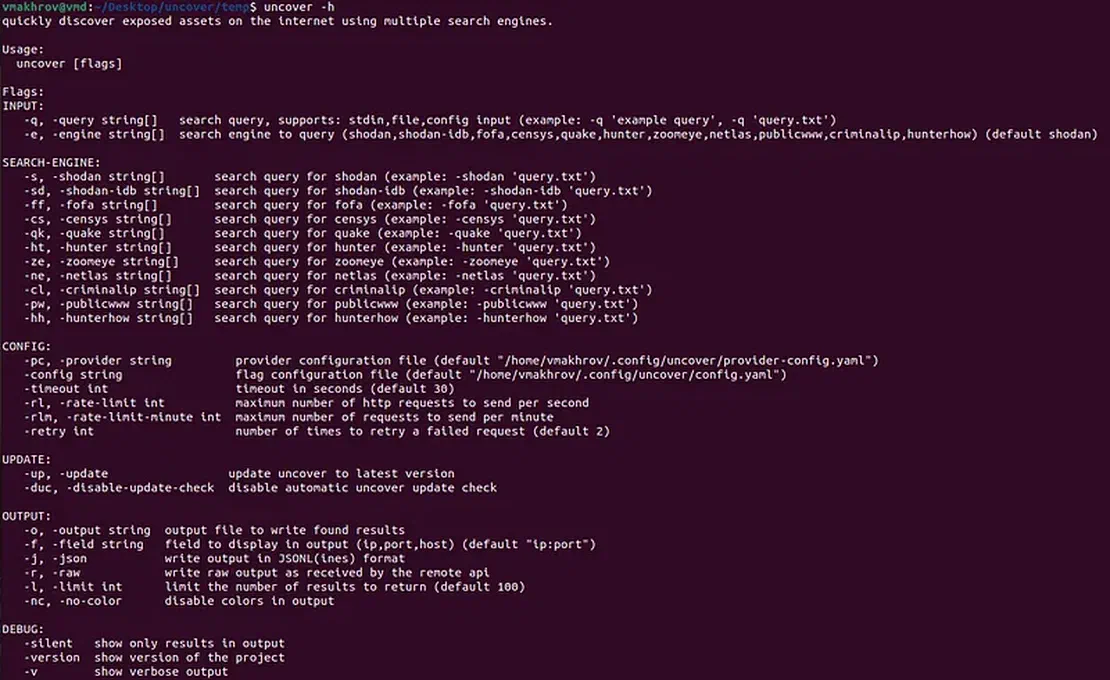
Uncovers’ help Uncovers’ help

Using Uncover with Netlas

First, you need to check your Netlas.io subscription plan. The use of tags is available starting from the business plan, this should be kept in mind.

Next, to get Netlas’ results in Uncover, you need to enter your Netlas API key. This can be done in two ways:

  1. Place the key in the provider configuration file (provider-config.yaml). The default path depends on your OS:
    • Linux: ~/.config/uncover/provider-config.yaml
    • macOS: ~/Library/Application Support/uncover/provider-config.yaml
    • Add your key like this: netlas: [YOUR_NETLAS_API_KEY]
  2. Set the key as an environment variable in the bash profile using the export NETLAS_API_KEY=xxx command.

If you do not know where to find your key, see the Netlas docs: How to find Netlas API key.

Once the key has been installed, you can start getting results from Netlas through Uncover. To do this, when starting the utility, use the -ne key before entering the request.

Let’s try to find the addresses of TP-Link routers. Uncover only supports working with Netlas tags, so you need to know how these devices are marked. However, in a particular situation, there is nothing complicated, TP-Link routers have the tplink tag.

To search for them, enter the following query:

The program will start its work and return Netlas results (default setting is 100 in Uncover).
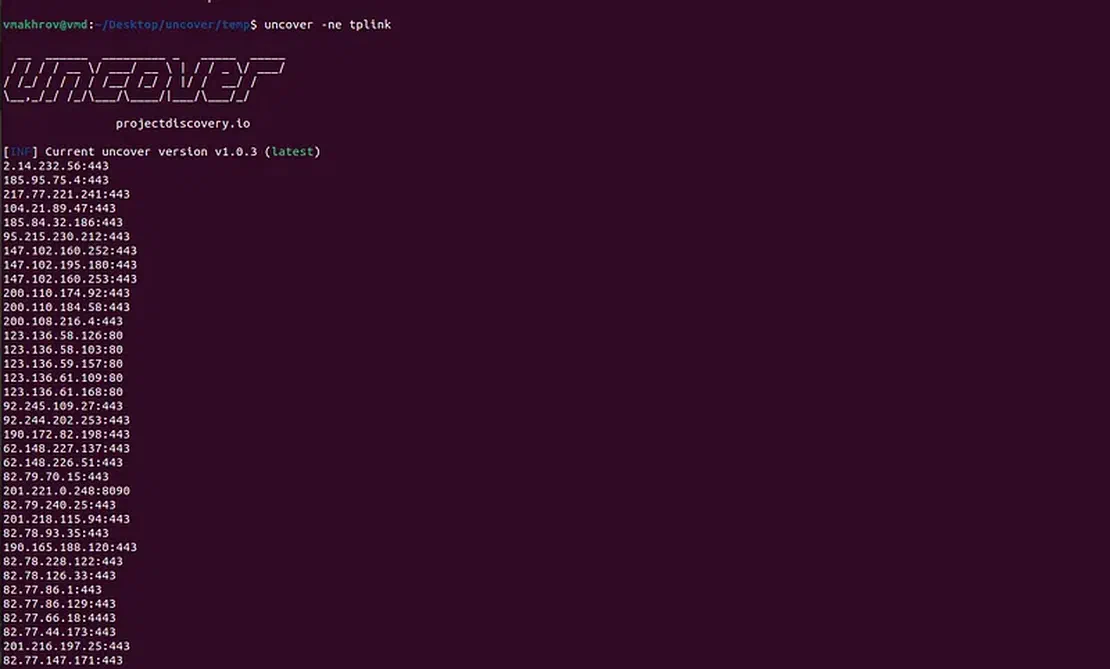
First search results First search results

You can read more about the Uncover settings and the flags used in the official utility repository.

Where you can find tags

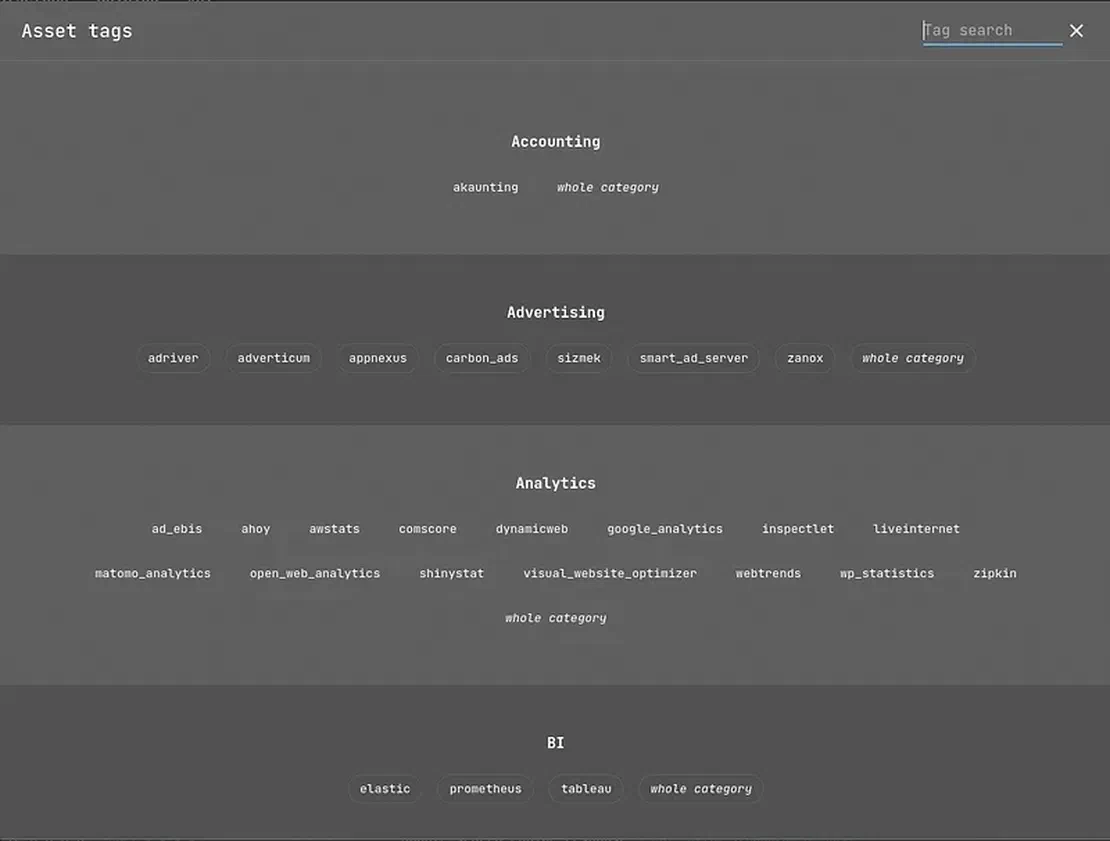
But how to get the list of tags? You can go to the site and see them there.

Tag button on the site Tag button on the site

List of tags on the site List of tags on the site

However, searching on the site isn’t the most rational solution. It will be much faster to get tags directly from the Netlas API.

This can be done with the following command:

curl -s https://app.netlas.io/api/tags/ | jq -r '.[].tags[].name' | sort -u

The command will give you a list sorted alphabetically.
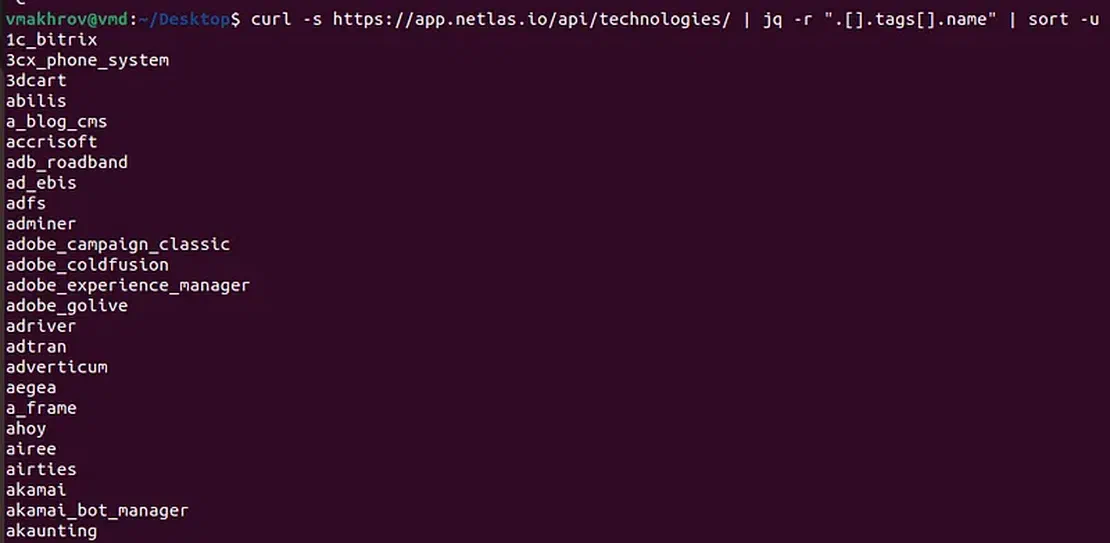
Command usage example Command usage example

Count of results

An equally important point is the number of results returned. You can set it up in Uncover, but who knows how many objects are stored in the Netlas databases? Of course, you can try to enter a very large number, but this is not the best option.

Through Uncover, it is impossible to find out the number of objects returned on request to Netlas. However, you can do this with our CLI. To do this, you need the command netlas count -d response tag.name:[tagName].

It will return you the number of objects that can be obtained by request.

If you run uncover -ne ... and get empty output, verify the key and plan first. In some cases, invalid credentials may fail quietly. A quick check is:

netlas count -d response 'tag.name:tplink' -a "$NETLAS_API_KEY" -f json

Count of results for “tplink” tag Count of results for “tplink” tag

Conclusion

In conclusion, I would like to thank ProjectDiscovery for the integration. Perhaps one day the interaction will be deepened.

Good reconnaissances to you, readers!