






惯性聚合 高效追踪和阅读你感兴趣的博客、新闻、科技资讯
阅读原文 在惯性聚合中打开

推荐订阅源

B
Blog RSS Feed
Google DeepMind News
罗磊的独立博客
Martin Fowler
Martin Fowler
博客园_首页
Stack Overflow Blog
Stack Overflow Blog
Last Week in AI
Last Week in AI
The GitHub Blog
The GitHub Blog
B
Blog
C
Check Point Blog
WordPress大学
WordPress大学
G
Google Developers Blog
CTFtime.org: upcoming CTF events
量子位
月光博客
月光博客
U
Unit 42
Engineering at Meta
Engineering at Meta
有赞技术团队
有赞技术团队
钛媒体:引领未来商业与生活新知
钛媒体:引领未来商业与生活新知
奇客Solidot–传递最新科技情报
奇客Solidot–传递最新科技情报
大猫的无限游戏
大猫的无限游戏
博客园 - 聂微东
让小产品的独立变现更简单 - ezindie.com
OSCHINA 社区最新新闻
OSCHINA 社区最新新闻
Y
Y Combinator Blog
freeCodeCamp Programming Tutorials: Python, JavaScript, Git & More
Cyber Security Advisories - MS-ISAC
Vercel News
Vercel News
Application and Cybersecurity Blog
博客园 - 【当耐特】
cs.CV updates on arXiv.org
cs.AI updates on arXiv.org
Jina AI
Jina AI
S
Secure Thoughts
aimingoo的专栏
aimingoo的专栏
D
Darknet – Hacking Tools, Hacker News & Cyber Security
I
Intezer
Latest news
Latest news
V
Vulnerabilities – Threatpost
D
Docker
Attack and Defense Labs
Help Net Security
Help Net Security
S
Security @ Cisco Blogs
Forbes - Security
Forbes - Security
MongoDB | Blog
MongoDB | Blog
云风的 BLOG
云风的 BLOG
L
LINUX DO - 热门话题
P
Palo Alto Networks Blog
Cloudbric
Cloudbric
Spread Privacy
Spread Privacy

C++ Team Blog

Faster C++ iterative builds with GitHub Copilot - C++ Team Blog Pure Virtual C++ 2026 [Meet the Speakers, Part 3]: Modernizing C++ - C++ Team Blog MSVC Build Tools Preview updates - July 2026 - C++ Team Blog Rethinking C++ Performance: Faster Code Navigation and GitHub Copilot Tools with Whole Codebase Indexing - C++ Team Blog Pure Virtual C++ 2026 [Meet the Speakers, Part 2]: The AI-Native C++ Developer Workflow - C++ Team Blog Pure Virtual C++ 2026 [Meet the Speakers, Part 1]: Build Faster, Run Faster - C++ Team Blog What's New in vcpkg (June 2026) - C++ Team Blog Pure Virtual C++ 2026 Talks Announced - C++ Team Blog Save the Date: Pure Virtual C++ 2026 - C++ Team Blog Streamline C++ Code Intelligence Setup in Copilot CLI - C++ Team Blog Boosting Adobe Photoshop’s Performance with MSVC and SPGO - C++ Team Blog GitHub Copilot modernization for C++ is out of preview MSVC Build Tools Preview updates – June 2026 What’s New in vcpkg (May 2026) What’s New for C++ Developers in Visual Studio 2026 (18.1 – 18.6) Introducing Sample Profile Guided Optimization in MSVC NuGet PackageReference for C++ Projects in Visual Studio Segment Heap support for C++ projects in Visual Studio MSVC Build Tools Preview updates – May 2026 MSVC Build Tools version 14.51 (GA) now available Project-Specific Build Optimizations with GitHub Copilot What's New in vcpkg (Apr 2026) - C++ Team Blog Giving Copilot more C++ context using custom instructions in VS Code Take the 2026 ISO C++ Developer Survey! - C++ Team Blog MSVC Build Tools Version 14.51 Release Candidate Now Available C++23 Support in MSVC Build Tools 14.51 What’s New in vcpkg (Feb 2026 – Mar 2026): Parallel file installation and more! Visual Studio at GDC Festival of Gaming 2026 C++ Performance Improvements in MSVC Build Tools v14.51 C++ symbol context and CMake build configuration awareness for GitHub Copilot in VS Code Microsoft C++ (MSVC) Build Tools v14.51 Preview Released: How to Opt In What’s New in vcpkg (Nov 2025 – Jan 2026) MSVC Build Tools Versions 14.30 – 14.43 Now Available in Visual Studio 2026 GitHub Copilot app modernization for C++ is now in Public Preview Visual Studio Code CMake Tools 1.22: Target bookmarks and better CTest output
C++ Code Intelligence for GitHub Copilot CLI (Preview) - C++ Team Blog
Erika Sweet · 2026-04-23 · via C++ Team Blog

April 22nd, 2026

like2 reactions

Principal Product Manager

We recently brought C++ code understanding tools to GitHub Copilot in Visual Studio and VS Code. These tools provide precise, semantic understanding of your C++ code to GitHub Copilot using the same IntelliSense engine that powers code navigation in the IDE. Until now, these capabilities have been tied to GitHub Copilot in Visual Studio and VS Code. Today, we’re bringing this same intelligence to the CLI with the release of the Microsoft C++ Language Server for GitHub Copilot CLI, now available in Preview.

Why this matters

C++ is difficult for tools to reason about: complex include hierarchies, macros, templates, overloads, and build-system-dependent configurations mean that text search alone can give incomplete or misleading results. The Microsoft C++ Language Server provides the GitHub Copilot CLI with precise semantic data – including symbol definitions, references, call hierarchies, and type information – to complement grep-style search. Let’s look at an example using {fmt}, an open-source formatting library.

Example scenario

I want to create a custom fmt formatter for the following internal type:

enum class LogLevel {info, warning, error};

One way to define a custom formatter is to inherit from an existing formatter. I want Copilot to provide a summary of all base formatters that are available to inherit from and a recommendation for which one I should use.

With the Microsoft C++ Language Server enabled, Copilot:

1. Uses workspace symbol search to find existing formatters in the fmt library
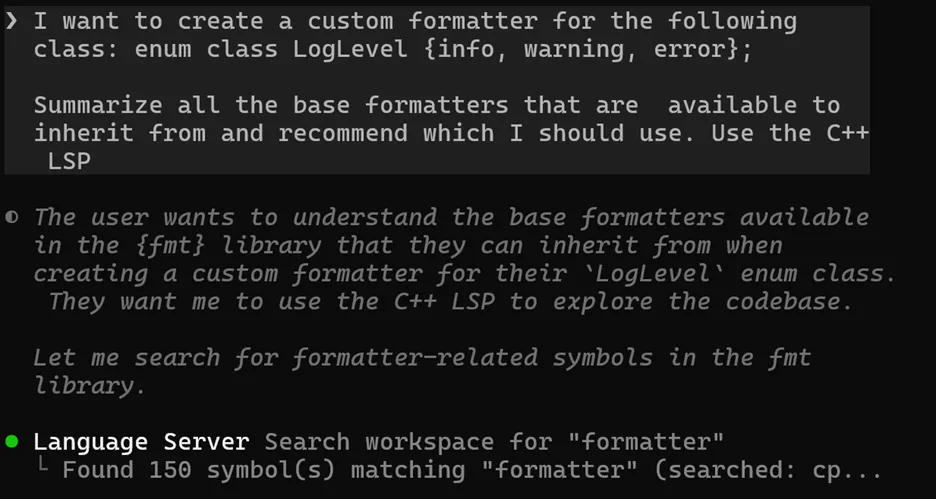
A screenshot of the Copilot CLI using the Microsoft C++ Language Server to search the workspace for a symbol.

2. Uses go to definition on key base classes
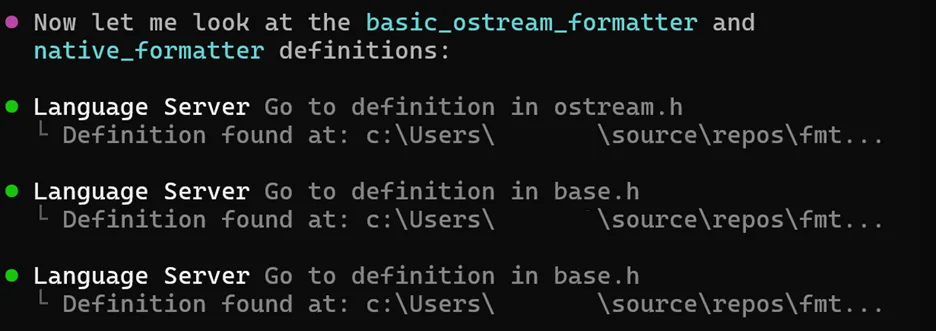
A screenshot of the Copilot CLI using the Microsoft C++ Language Server to go to definition.

3. Summarizes all existing formatters, their purpose, and a recommendation

In contrast, without the Microsoft C++ Language Server enabled, Copilot uses iterative grep searches to build its understanding of potentially relevant code.
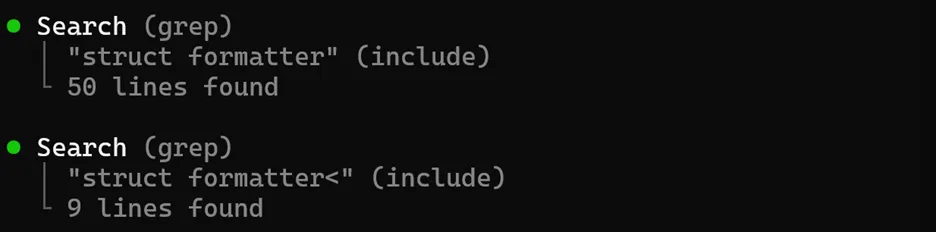
A screenshot of the Copilot CLI calling grep twice in a row.

Then, instead of jumping to the definition of key base classes, it uses grep on the class name, which returns all instances of those types across the codebase to filter through.

A screenshot of the Copilot CLI calling grep on basic_ostream_formatter.

In this example, the precision of LSP protects against the retrieval of irrelevant results.

Getting started with the Microsoft C++ Language Server

The Microsoft C++ Language Server is available in Preview as a npm package. It runs on Windows, Linux, and macOS. Check out the quick start guide in the README of our corresponding issue-only GitHub repository to get started. An active GitHub Copilot subscription is required.

The Microsoft C++ Language Server requires:

  • Authenticating with the GitHub Copilot CLI
  • Creating a compile_commands.json file for your project
  • Configuring your project for use with the GitHub Copilot CLI

Our issue-only GitHub repository contains a skill to automate steps #2-3 for CMake projects and instructions to walk through the process yourself. For MSBuild (vcxproj) users, we’ve created a sample application to help extract compile_commands.json from C++ MSBuild projects. Integrated support for C++ MSBuild projects is planned for a future release.

Different models are more or less likely to call the C++ LSP. For best results, we recommend appending something like “Use the C++ LSP” to the end of your queries or creating a custom instructions file to prefer the C++ LSP.

Share your feedback

The Microsoft C++ Language Server is available in Preview for early feedback. To report a problem or suggest an improvement, follow these instructions to open an issue.

Category

Author

Erika Sweet

Principal Product Manager

Erika is a Product Manager on the C++ team. She likes math and mystery novels.