






In large C++ codebases, your code understanding and navigation depend on quickly determining how symbols, declarations, definitions, and references are connected across your project.
In Visual Studio Insiders 18.9, the new whole codebase indexing (WCI) enhances the existing browse database via a deeper, more comprehensive indexing approach. This preview feature allows Visual Studio to access richer symbol information more efficiently in your C++ project, with faster lookups for core IntelliSense scenarios like Find All References and semantic file colorization. It also enables new experiences like CodeLens references for C++ , a highly requested productivity feature. The same symbol index supports the find_symbol tool, which gives Copilot faster access to symbol context, providing more responsive agentic suggestions.
In this blog, we discuss:
- Faster file colorization and code navigation with WCI
- Faster access to symbol-level context for GitHub Copilot tools
- CodeLens for C++
- Technical implementation details
Faster File Colorization and Code Navigation
Building code understanding features for C++ is uniquely challenging due to the language’s complexity, especially at scale in modern codebases. Whole codebase indexing (WCI) adds a deeper indexing approach designed for faster, more accurate C++ code navigation. For a deeper technical explanation, see the Technical Details section.
Prior to WCI, many code navigation features relied on a combination of information from the browse database and on-demand analysis of translation units to resolve C++ symbols. Because this information often had to be computed at request time, navigation operations could take longer to complete and require additional time and resources. This was especially noticeable for repeated operations, as the same symbol information had to be recomputed every time. Now, deeper symbol information is stored in the database and continuously updated as you code, leading to faster, more efficient lookups.
While results vary between codebases and operations, we consistently found 2x or greater improvements for many code navigation and semantic colorization scenarios with WCI enabled. These accumulate as repeated operations can continue using the same database, with the largest speedups often occurring in larger projects. In some scenarios, operations that used to take seconds to wait for, like file colorization, are now nearly instantaneous, creating a significantly more responsive editing experience.
With WCI enabled, Visual Studio enhances the C++ browse database in the background with richer symbol information. This information is indexed on demand on file open and persists between Visual Studio sessions, with the database expanding as you open new files and work across your codebase. If the required data is not yet (or only partially) available, Visual Studio automatically falls back to the existing implementation. When this happens, all code navigation features continue to work, but without the performance gains from WCI.
The examples below show these improvements on two open-source codebases of different sizes: the smaller Bullet3 repository and the larger LLVM project. All testing was done with Visual Studio 2026 version 18.9.
In the two examples below, building the initial on-demand index required for these scenarios took approximately 22 seconds for Bullet3 (91 translation units indexed across 2 files) and approximately took 3.5 minutes for LLVM (136 translation units indexed across 5 files in the LLVM core project). These measurements are examples, actual indexing time and resources depends on the size and complexity of your codebase as well as the number of files opened at once.
The charts below show the average completion time for semantic file colorization and Find All References calls across both codebases with and without WCI enabled.
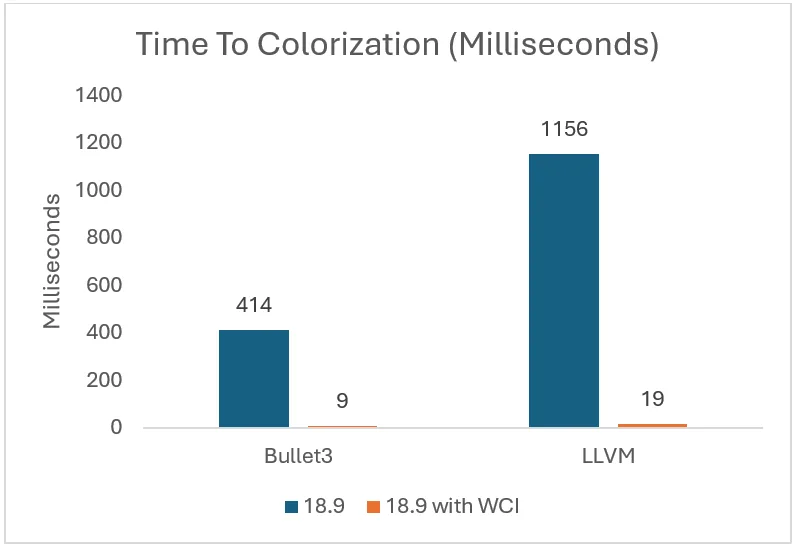
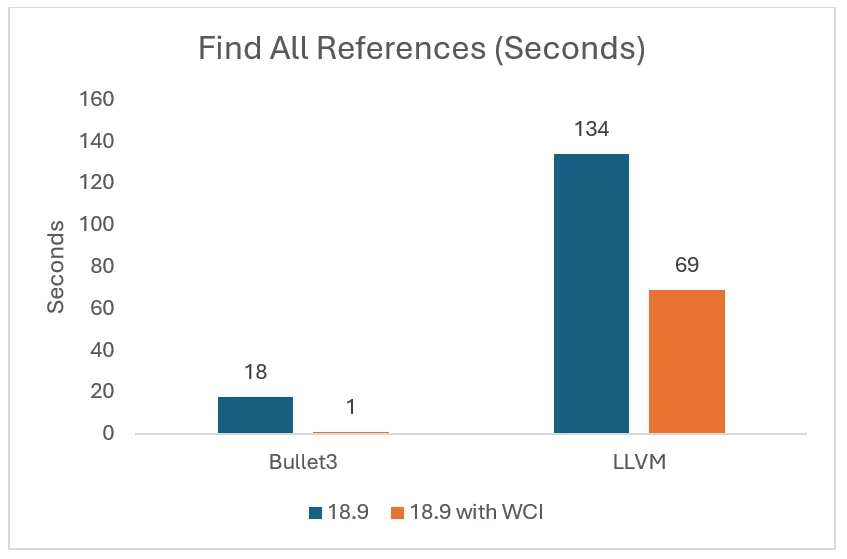
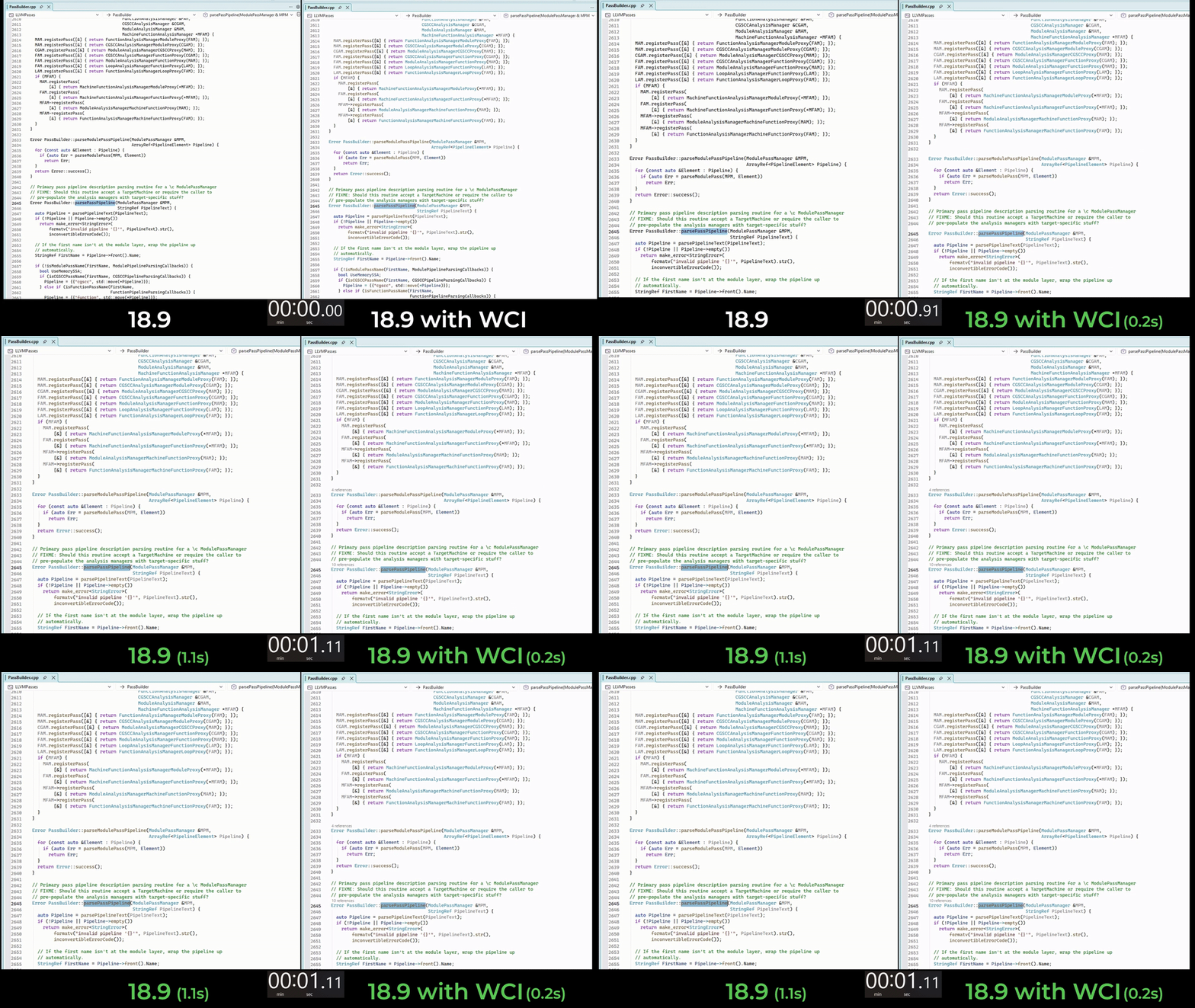
In many cases, like in LLVM above, the improvements are large enough that colorization no longer feels like a background operation. Instead, once the deeper semantic index has been created, the semantic colorization feels nearly instantaneous. For example, it only takes 0.2 seconds to colorize the PassBuilder.cpp file from Bullet3:
Faster access to symbol-level context for agentic suggestions
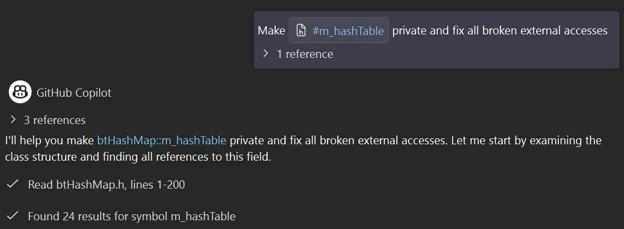
WCI also improves C++ agentic suggestions by giving Copilot faster access to rich, symbol-level context from your C++ codebase through the find_symbol tool. This tool is backed by language service protocol (LSP) symbol operations, and WCI’s expanded symbol index helps these operations locate relevant types, functions, declarations, and definitions across the codebase more quickly and directly.
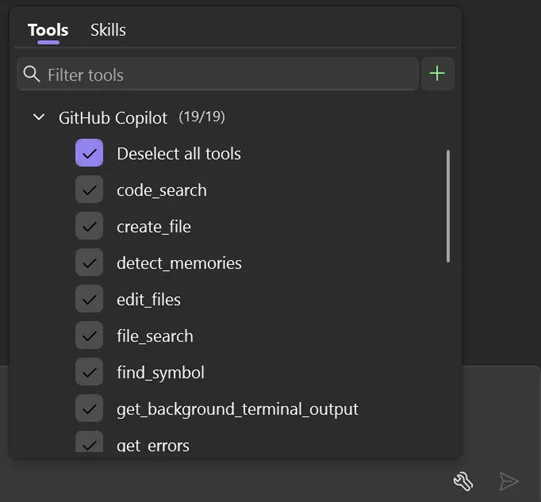
This deeper integration with Visual Studio’s C++ code intelligence helps Copilot spend less time searching for symbol information, making the full agentic loop quicker and more responsive. In larger codebases, especially when symbols have many reference locations, this helps C++ agentic suggestions execute faster and be more relevant than workflows that depend only on file search or language-agnostic code context.
Faster Navigation via CodeLens for C++
WCI’s richer symbol information also enables new experiences in the editor. For example, enabling the “Enable CodeLens for References” sub-setting for WCI enables a highly requested capability: reference support for CodeLens in C++. Since this feature is currently in preview, it is off by default.
With WCI powering CodeLens, you can now see reference counts directly inline above your functions or symbols. These are available for any symbol indexed by WCI, with the full list of references accessible via a single click. Now, there’s no need to manually run “Find All References” or switch to a separate results window. Symbol usage, definitions, and declarations are also shown inline.
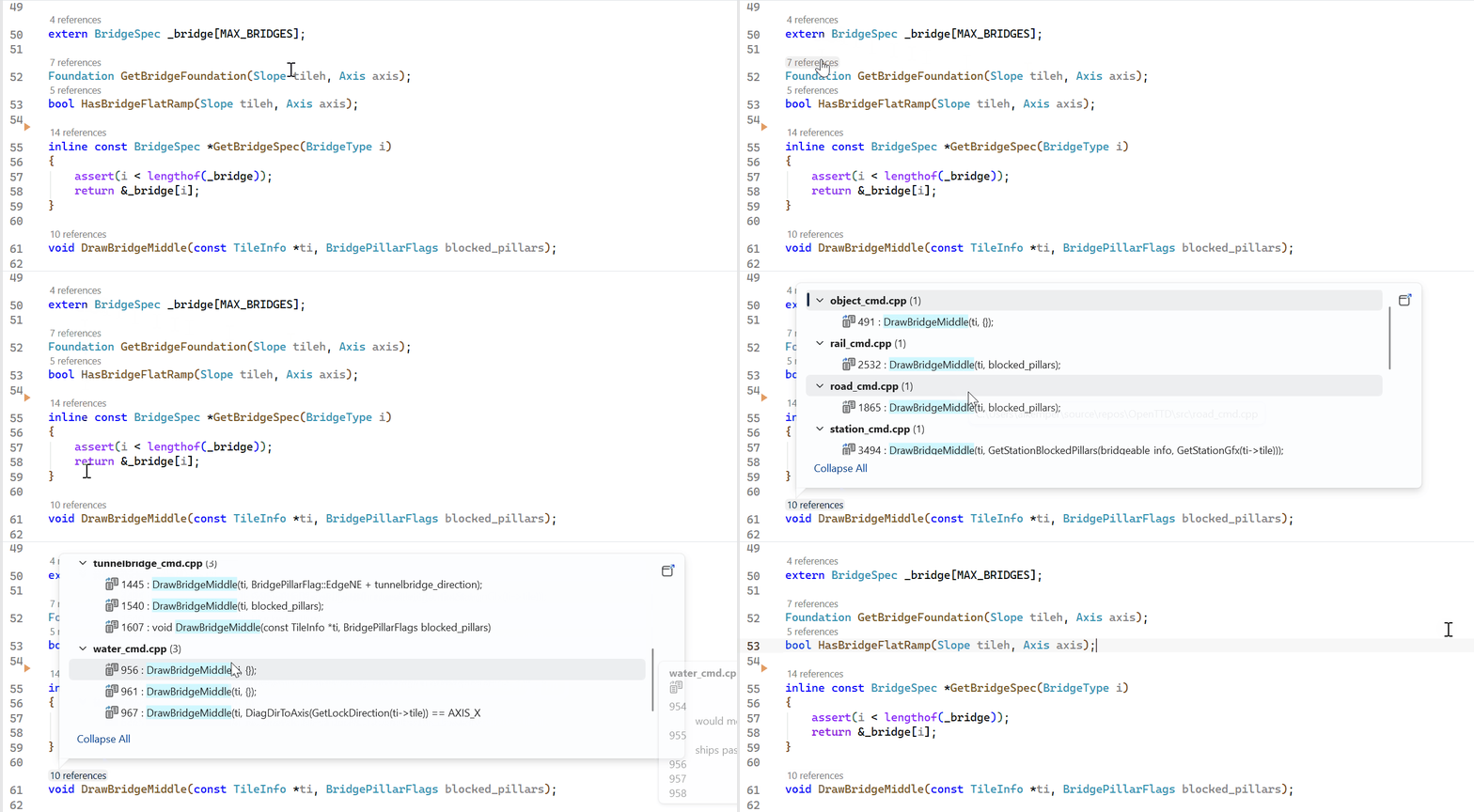
Note, to use CodeLens for C++, your project also needs to have the CodeLens setting (Tools > Options > Text Editor > CodeLens) enabled.
Technical details
Traditionally, the browsing database tracks only declarations and definitions of symbols in a codebase, and is populated by the TagParser. The TagParser is optimized for speed, and does not expand includes or perform full name resolution. It is a different C++ parser than the one used in the IntelliSense engine, and that tradeoff for speed versus accuracy can result in ambiguities that need to be resolved during the operation by the IntelliSense engine.
In WCI, the database is expanded to track symbol usages as well, using the full capabilities of the IntelliSense engine. The result is more precise semantic information in the database, and the ability to use that data directly to serve the operations for semantic colorization and navigation across files, instead of having to wait for the IntelliSense engine to be initialized, which can have a higher latency cost.
The database now acts as a caching layer for the IntelliSense operations: it uses the database if a given file has been indexed, and if not, it falls back to the IntelliSense engine as before. Because that precise information might take more time and resources to compute, by default the files are progressively indexed on demand based on their usage. This allows the cost to be amortized over time, especially for large codebases. With a smaller codebase, consider enabling the sub setting “Parse all files in the solution ahead of time” to index all project files once on project open.
This model produces more predictable latency curve, with a lower average overall, but also fewer operations experiencing long tail latency, in cases where complex code constructs would take more time to process and delay the results, since that processing can now be non-blocking and reused more often.
A Few Things to Keep in Mind
- Machines need to have a minimum of 4+ cores to use this process, which is the recommended minimum hardware requirement for Visual Studio 2026.
- Building a symbol index with WCI for your project may take up additional processing and memory resources on your machine compared to using the previously. To check the current status while indexing is in progress, look for a task notification in Visual Studio’s task manager called “Running deep C++ analysis for richer navigation”.
- This is a preview feature that is gradually being rolled out to specific groups, so the setting might be already enabled on your machine. If you want to enable it yourself, you can always navigate to the setting in the preview feature (Tools > Options > Whole codebase semantic index for C++)
Try it today & tell us what you think
Try out this feature today in your own codebase by enabling the setting in the preview feature (Tools > Options > Whole codebase semantic index for C++).
To check whether the setting has been enabled, navigate to Tools > Options > Languages > C/C++ > IntelliSense > Browsing & navigation > whole codebase semantic index > enable faster code navigation and colorization features (experimental).
This feature exists because of your feedback, and we will continue to improve. We would love to hear how this deeper indexing is working for you. Please share your thoughts by filling out this survey , commenting below, through Help > Send Feedback in Visual Studio, on Bluesky (@msftcpp.bsky.social) or on X (@VisualC). Thank you for your continued support!
To learn more: Configure IntelliSense Options for C and C++ – Visual Studio (Windows) | Microsoft Learn


