



惯性聚合 高效追踪和阅读你感兴趣的博客、新闻、科技资讯
阅读原文 在惯性聚合中打开

推荐订阅源

Jina AI
Jina AI
V
Visual Studio Blog
博客园 - 司徒正美
TaoSecurity Blog
TaoSecurity Blog
博客园 - 聂微东
IT之家
IT之家
博客园_首页
Threat Intelligence Blog | Flashpoint
C
Cyber Attacks, Cyber Crime and Cyber Security
博客园 - Franky
雷峰网
雷峰网
罗磊的独立博客
S
Schneier on Security
C
Cybersecurity and Infrastructure Security Agency CISA
The Cloudflare Blog
T
Tailwind CSS Blog
B
Blog RSS Feed
H
Help Net Security
T
The Blog of Author Tim Ferriss
C
CXSECURITY Database RSS Feed - CXSecurity.com
T
Threatpost
C
CERT Recently Published Vulnerability Notes
博客园 - 三生石上(FineUI控件)
P
Palo Alto Networks Blog
I
Intezer
G
GRAHAM CLULEY
Engineering at Meta
Engineering at Meta
S
Securelist
J
Java Code Geeks
V
V2EX
Y
Y Combinator Blog
Simon Willison's Weblog
L
LINUX DO - 热门话题
云风的 BLOG
云风的 BLOG
Spread Privacy
Spread Privacy
MongoDB | Blog
MongoDB | Blog
P
Privacy International News Feed
cs.CL updates on arXiv.org
B
Blog
Forbes - Security
Forbes - Security
Google Online Security Blog
Help Net Security
Help Net Security
S
SegmentFault 最新的问题
N
Netflix TechBlog - Medium
Webroot Blog
Webroot Blog
Microsoft Security Blog
SecWiki News
SecWiki News
Scott Helme
Scott Helme
aimingoo的专栏
aimingoo的专栏
N
News and Events Feed by Topic

C++ Team Blog

Pure Virtual C++ 2026 Is a Wrap - C++ Team Blog Pure Virtual C++ 2026 Is Now Live! - C++ Team Blog C++ Dependencies Without the Headache: vcpkg + Copilot CLI - C++ Team Blog Pure Virtual C++ 2026 Is Tomorrow and On-Demand Sessions Are Now Available - C++ Team Blog Faster C++ iterative builds with GitHub Copilot - C++ Team Blog Pure Virtual C++ 2026 [Meet the Speakers, Part 3]: Modernizing C++ - C++ Team Blog MSVC Build Tools Preview updates - July 2026 - C++ Team Blog Rethinking C++ Performance: Faster Code Navigation and GitHub Copilot Tools with Whole Codebase Indexing - C++ Team Blog Pure Virtual C++ 2026 [Meet the Speakers, Part 2]: The AI-Native C++ Developer Workflow - C++ Team Blog Pure Virtual C++ 2026 [Meet the Speakers, Part 1]: Build Faster, Run Faster - C++ Team Blog What's New in vcpkg (June 2026) - C++ Team Blog Pure Virtual C++ 2026 Talks Announced - C++ Team Blog Save the Date: Pure Virtual C++ 2026 - C++ Team Blog Streamline C++ Code Intelligence Setup in Copilot CLI - C++ Team Blog Boosting Adobe Photoshop’s Performance with MSVC and SPGO - C++ Team Blog GitHub Copilot modernization for C++ is out of preview MSVC Build Tools Preview updates – June 2026 What’s New in vcpkg (May 2026) What’s New for C++ Developers in Visual Studio 2026 (18.1 – 18.6) Introducing Sample Profile Guided Optimization in MSVC NuGet PackageReference for C++ Projects in Visual Studio MSVC Build Tools Preview updates – May 2026 MSVC Build Tools version 14.51 (GA) now available Project-Specific Build Optimizations with GitHub Copilot What's New in vcpkg (Apr 2026) - C++ Team Blog Giving Copilot more C++ context using custom instructions in VS Code Take the 2026 ISO C++ Developer Survey! - C++ Team Blog C++ Code Intelligence for GitHub Copilot CLI (Preview) - C++ Team Blog MSVC Build Tools Version 14.51 Release Candidate Now Available C++23 Support in MSVC Build Tools 14.51 What’s New in vcpkg (Feb 2026 – Mar 2026): Parallel file installation and more! Visual Studio at GDC Festival of Gaming 2026 C++ Performance Improvements in MSVC Build Tools v14.51 C++ symbol context and CMake build configuration awareness for GitHub Copilot in VS Code Microsoft C++ (MSVC) Build Tools v14.51 Preview Released: How to Opt In What’s New in vcpkg (Nov 2025 – Jan 2026) MSVC Build Tools Versions 14.30 – 14.43 Now Available in Visual Studio 2026 GitHub Copilot app modernization for C++ is now in Public Preview Visual Studio Code CMake Tools 1.22: Target bookmarks and better CTest output
Segment Heap support for C++ projects in Visual Studio
MacGyver Codilla · 2026-05-15 · via C++ Team Blog

Visual Studio 2026 version 18.6 makes it easier to take advantage of modern Windows memory management improvements. Segment Heap is a modern heap implementation in Windows that delivers stronger protection against common memory vulnerabilities, higher allocation throughput, lower memory fragmentation, better scalability across cores, and more predictable performance under load. Starting with this release, new C++ projects are now configured to use Segment Heap by default.

Onboarding your project to use the Segment Heap

New C++ projects come with Segment Heap enabled by default. For existing projects, follow the steps below to enable it.

For MSBuild solution-based C++ projects, the project property is located at Project -> Properties -> Manifest Tool -> Input and Output -> Enable Segment Heap. You can opt into the segment heap on a per-project basis, allowing you to onboard at your own pace.
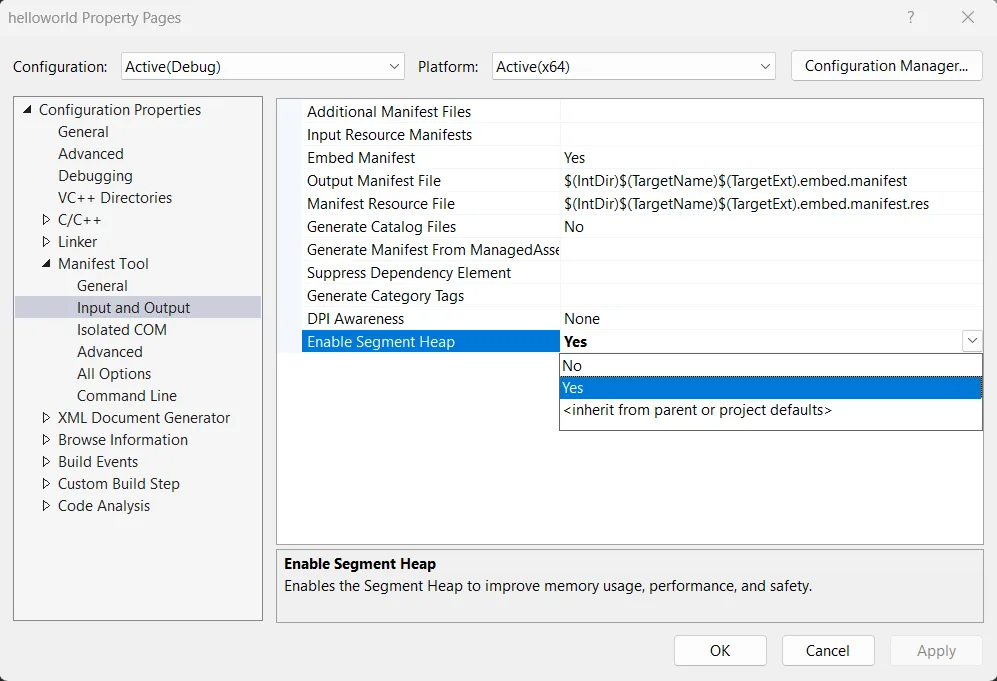
Property Pages

For CMake users, Visual Studio provides a helper script, SegmentHeap.cmake, that integrates Segment Heap into your build automatically. If you manage your configuration through CMakePresets, you can enable Segment Heap by setting CMAKE_PROJECT_TOP_LEVEL_INCLUDES. Optionally, you can use the VS_SEGMENT_HEAP_ALLOWLIST and VS_SEGMENT_HEAP_EXCLUDE environment variables in the same preset to control which targets opt in:

{
    "name": "foo",
    "displayName": "Foo",
    "inherits": "",
    "environment": {
        "VS_SEGMENT_HEAP_ALLOWLIST": "target1;target2;",
        "VS_SEGMENT_HEAP_EXCLUDE": "target3;"
    },
    "cacheVariables": {
        "CMAKE_PROJECT_TOP_LEVEL_INCLUDES": "$env{VSINSTALLDIR}Common7/IDE/CommonExtensions/Microsoft/CMake/cmake/Microsoft/SegmentHeap.cmake"
    }
}

In this example, the optional VS_SEGMENT_HEAP_ALLOWLIST variable limits Segment Heap to target1 and target2, while the optional VS_SEGMENT_HEAP_EXCLUDE variable keeps it disabled for target3. This gives you fine-grained control over which targets in the project use Segment Heap when you need it.

Segment Heap integration is designed to coexist cleanly with existing toolchains and build configurations. It integrates into the standard linker + manifest tool flow, and it avoids introducing custom build steps or requiring changes to your toolchain configuration. This design ensures that Segment Heap adoption is low-risk and does not interfere with existing build logic.

How to check if Segment Heap is enabled

You can verify whether Segment Heap is enabled by checking the final application manifest embedded in your executable. Open the executable directly in Visual Studio, inspect the RT_MANIFEST resource for the following entry:

<heapType>SegmentHeap</heapType>

This indicates that the Segment Heap is active for your application.

Alternatively, you can open a Developer Command Prompt for Visual Studio, extract the embedded manifest with mt, and then open the generated manifest file in Visual Studio, and locate the same entry there.

For example:

mt.exe -inputresource:YourApp.exe;#1 -out:YourApp.manifest

Because Segment Heap is enabled via manifest embedding, the presence of this declaration in the final binary confirms that the feature is in effect.

Get started and share your feedback

We encourage you to download Visual Studio 2026 version 18.6 Stable to start using Segment Heap in your C++ projects. Whether you’re creating a new project or onboarding an existing one, we’d love to hear how it goes. You can reach us through Help > Send Feedback in the Visual Studio IDE or by posting on Developer Community.